ECO mode NISSAN LEAF 2016 1.G Workshop Manual
[x] Cancel search | Manufacturer: NISSAN, Model Year: 2016, Model line: LEAF, Model: NISSAN LEAF 2016 1.GPages: 437, PDF Size: 4.56 MB
Page 287 of 437
Registering with NissanConnectsm
Mobile Apps
To use the Smartphone Integration feature, it is
necessary for the user to register. In order to
register, visit the NissanConnect
smMobile Apps
website, www.nissanusa.com/connect/ or
https://canada.nissanconnect.com and sign up
or create an account through the prompts on the
NissanConnect Mobile Apps. Once registered,
download the NissanConnect Mobile Apps from
your compatible phone’s application download
source and then log into the application. If you
already have an account created through the
App, please log in.
Connect phone
To use this feature, a compatible smartphone
must be connected via Bluetooth® to the vehicle.
For additional information, refer to “Bluetooth®
Hands-Free Phone System without Navigation
System” in this section.
Note
Apple iPhones® and Android phones
must be paired via Bluetooth® for Nis-
sanConnect Mobile Apps to function.
Application download
Once connected, the NissanConnect Mobile
App will search your phone to determine which
compatible applications are currently installed.
The user will then choose which apps they want
to bring into their vehicle from the list of apps
within the “Manage My Apps” section of the
NissanConnect Mobile App on their smartphone.
The vehicle will then download the in-vehicle
interface for each of these compatible
applications. Once downloaded, the user can
access their selected smartphone applications
through the vehicle display. For additional
information on application availability visit
www.nissanusa.com/connect/ or
www.ca/nissanconnect or
www.nissan.ca/nissanconnect/fr.
CAR PHONE OR CB RADIO
When installing a CB, ham radio or car phone in
your vehicle, be sure to observe the following
precautions; otherwise, the new equipment may
adversely affect the engine control system and
other electronic parts.
WARNING
• A cellular phone should not be used for any purpose while driving so full
attention may be given to vehicle op-
eration. Some jurisdictions prohibit
the use of cellular phones while driv-
ing.
• If you must make a call while your vehicle is in motion, the hands free
cellular phone operational mode is
highly recommended. Exercise ex-
treme caution at all times so full atten-
tion may be given to vehicle operation.
• If you are unable to devote full atten- tion to vehicle operation while talking
on the phone, pull off the road to a safe
location and stop your vehicle.
4-58Display screen, heater, air conditioner, audio and phone systems
Page 298 of 437
• Select to delete a phone from the displayedlist. The system will ask to confirm before
deleting the phone.
• Replace Phone
• Select to replace a phone from the displayed list. When a selection is made, the system
will ask to confirm before proceeding. The
recorded phonebook for the phone being
deleted will be saved as long as the new
phone’s phonebook is the same as the old
phone’s phonebook.
• Select Phone or Device
• Select to connect to a previously connected phone from the displayed list.
• Phonebook Download
• Select to turn on or off the automatic down- load of a connected phone’s phonebook.
• Show Incoming Calls
• Select “Driver Only” to have incoming call information displayed only in the vehicle in-
formation display. Select “Both” to have in-
coming call information displayed in both the
vehicle information display and the center
display screen.
• Text Message
• Select to adjust the volume of the sound that plays when a new text is received by a phone connected to the Bluetooth® Hands-Free
Phone System. The setting all the way to the
left indicates that the new text sound will be
muted.
• Show Incoming Text
• Select “Driver Only” to have incoming text messages displayed only in the vehicle infor-
mation display. Select “Both” to have incom-
ing text messages displayed in both the ve-
hicle information display and the center
display screen. Select “None” to have no
display of incoming text messages.
• Edit Custom Messages
• Select to set a custom message that will be available with the standard options when
sending a text message. To set a custom
message, send a text message to your own
phone number while the phone is connected
to the system. Three custom messages can
be set. Custom messages can only be set
while the vehicle is stationary.
• Auto Reply
• Select to turn on or off the Auto Reply func- tion. When enabled, the vehicle will auto-
matically send a predefined text message to
the sender when a text message is received
while driving. • Auto Reply Message
• Select to choose the message that is sent
when the Auto Reply function is enabled.
Choose from “I’m Driving” or one of the three
custom messages stored in the system.
• Vehicle Signature On/Off
• Select to choose whether or not the vehicle signature is added to outgoing text mes-
sages from the vehicle. This message cannot
be changed or customized.
MANUAL CONTROLS
While using the Voice Recognition system, it is
possible to select menu options by using the
steering wheel controls instead of speaking voice
commands. This can be especially helpful if the
noise of driving makes it difficult for Voice Rec-
ognition system to accurately interpret com-
mands. The manual control mode does not allow
dialing a phone number by digits. The user may
select an entry from the Phonebook or Recent
Calls lists. To re-activate Voice Recognition, exit
the manual control mode by pressing and holding
the PHONE/END (
) button. At the time,
pressing the PHONE/SEND (
) button will
start the Hands Free Phone System.
Display screen, heater, air conditioner, audio and phone systems4-69
Page 299 of 437
Operating tips
• To enter manual control mode, start the VoiceRecognition system and tilt the tuning (
)
switch up or down. The system will speak
“Showing Manual Options” when manual con-
trols are initially activated.
• To browse the menu options, tilt the tuning (
) switch up or down. The system will al-
ways speak the current menu option. Depend- ing on the audio display, it will also show the
current menu option.
• To select the current menu option, press the PHONE/SEND (
) button.
• To go back to the previous menu, press the PHOEN/END (
) button. If the current
menu is the Main Menu, pressing the PHONE/
END (
) button will exit the Phone system.
• To exit the manual control mode, press and hold the PHONE/END (
) button for 5 seconds.
TROUBLESHOOTING GUIDE
The system should respond correctly to all voice
commands without difficulty. If problems are en-
countered, try the following solutions.
Where the solutions are listed by number, try
each solution in turn, starting with number 1, until
the problem is resolved.
Symptom Solution
System fails to interrupt the command correctly. 1. Ensure that the command is valid. For additional information, refer to “Voice commands”
in this section.
2. Ensure that the command is spoken after the tone.
3. Speak clearly without pausing between words and at a level appropriate to the ambient
noise level in the vehicle.
4. Ensure that the ambient noise level is not excessive (for example, windows open or de-
froster on) . NOTE: if it is too noisy to use the phone, it is likely that the voice commands
will not be recognized.
5. If more than one command was said at a time, try saying the commands separately.
6. If the system consistently fails to recognize commands, the voice training procedure
should be carried out to improve the recognition response for the speaker.
The system consistently selects the wrong entry from the phone book. 1. Ensure that the phone book entry name requested matches what was originally stored.
This can be confirmed by using the “List Names” command. For additional information,
refer to “Phonebook” in this section.
2. Replace one of the names being confused with a new name.
3. Say First Name and Last Name of the desired contact to improve recognition.
4-70Display screen, heater, air conditioner, audio and phone systems
Page 305 of 437
• Replacing tires with those not origi-nally specified by NISSAN could affect
the proper operation of the TPMS.
• Do not inject any tire liquid or aerosol tire sealant into the tires, as this may
cause a malfunction of the tire pres-
sure sensors.
CAUTION
• The TPMS may not function properly when the wheels are equipped with
tire chains or the wheels are buried in
snow.
• Do not place metalized film or any metal parts (antenna, etc.) on the win-
dows. This may cause poor reception
of the signals from the tire pressure
sensors, and the TPMS will not func-
tion properly.
Some devices and transmitters may temporarily
interfere with the operation of the TPMS and
cause the low tire pressure warning light to illu-
minate. Some examples are:
• Facilities or electric devices using similar radio frequencies that are near the vehicle.
• If a transmitter set to similar frequencies is being used in or near the vehicle. • If a computer (or similar equipment) or a DC/AC
converter is being used in or near the vehicle.
Low tire pressure warning light may illuminate
in the following cases.
– If the vehicle equipped with a wheel and tire without TPMS.
– If the TPMS has been replaced and the ID has not been registered.
– If the wheel is not originally specified by NISSAN.
FCC Notice:
For USA:
This device complies with Part 15 of the
FCC Rules. Operation is subject to the fol-
lowing two conditions: (1) This device may
not cause harmful interference, and (2) this
device must accept any interference re-
ceived, including interference that may
cause undesired operation.
NOTE:
Changes or modifications not expressly ap-
proved by the party responsible for compli-
ance could void the user’s authority to op-
erate the equipment. For Canada:
This device complies with Industry Canada
licence-exempt RSS standard(s) . Operation
is subject to the following two conditions: (1)
this device may not cause interference, and
(2) this device must accept any interference,
including interference that may cause unde-
sired operation of the device.
TPMS with Easy Fill Tire Alert
When tire pressure is low, the low tire pressure
warning light illuminates.
This vehicle provides visual and audible signals to
help you inflate the tires to the recommended
COLD tire pressure.
Vehicle set-up:
1. Park the vehicle in a safe and level place.
2. Apply the parking brake and push the P (Park)
position switch on the shift lever.
3. Place the power switch in the ON position. Do not place in the READY to drive mode.
5-4Starting and driving
Page 311 of 437
POWER SWITCH POSITIONS
LOCK (Normal parking position)
The power switch can only be locked in this
position.
The power switch will be unlocked when it is
pushed to the ACC position while the driver is
carrying the Intelligent Key.
ACC (Accessories)
This position activates electrical accessories,
such as the radio, when the EV system is off.
ON
This position turns on the EV system and electri-
cal accessories.
READY (Normal operating position)
This position turns on the EV system and electri-
cal accessories and the vehicle can be driven.
OFF
The EV system can be turned off.
The power switch cannot be placed in the LOCK
position until the vehicle is in the P (Park) posi-
tion.
CAUTION
Do not leave the vehicle with the power
switch in the ACC position for an ex-
tended period of time. This can discharge
the 12-volt battery.
NOTE:
If the power switch is pushed quickly or is
pushed twice quickly, the switch may not
function even if a chime sound is heard.
Push the switch again more slowly.
EMERGENCY EV SHUT OFF
To shut off the EV system in an emergency situ-
ation while driving, perform the following proce-
dure.
• Rapidly push the power switch three consecu- tive times in less than 1.5 seconds, or
• Push and hold the power switch for more than 2 seconds.NISSAN INTELLIGENT KEY®
BATTERY DISCHARGE
If the Intelligent Key battery is discharged, or
environmental conditions interfere with the Intel-
ligent Key operation, start the EV system in the
READY to drive mode according to the following
procedure:
1. Push the P (Park) position switch on the shift lever.
2. Firmly apply the foot brake.
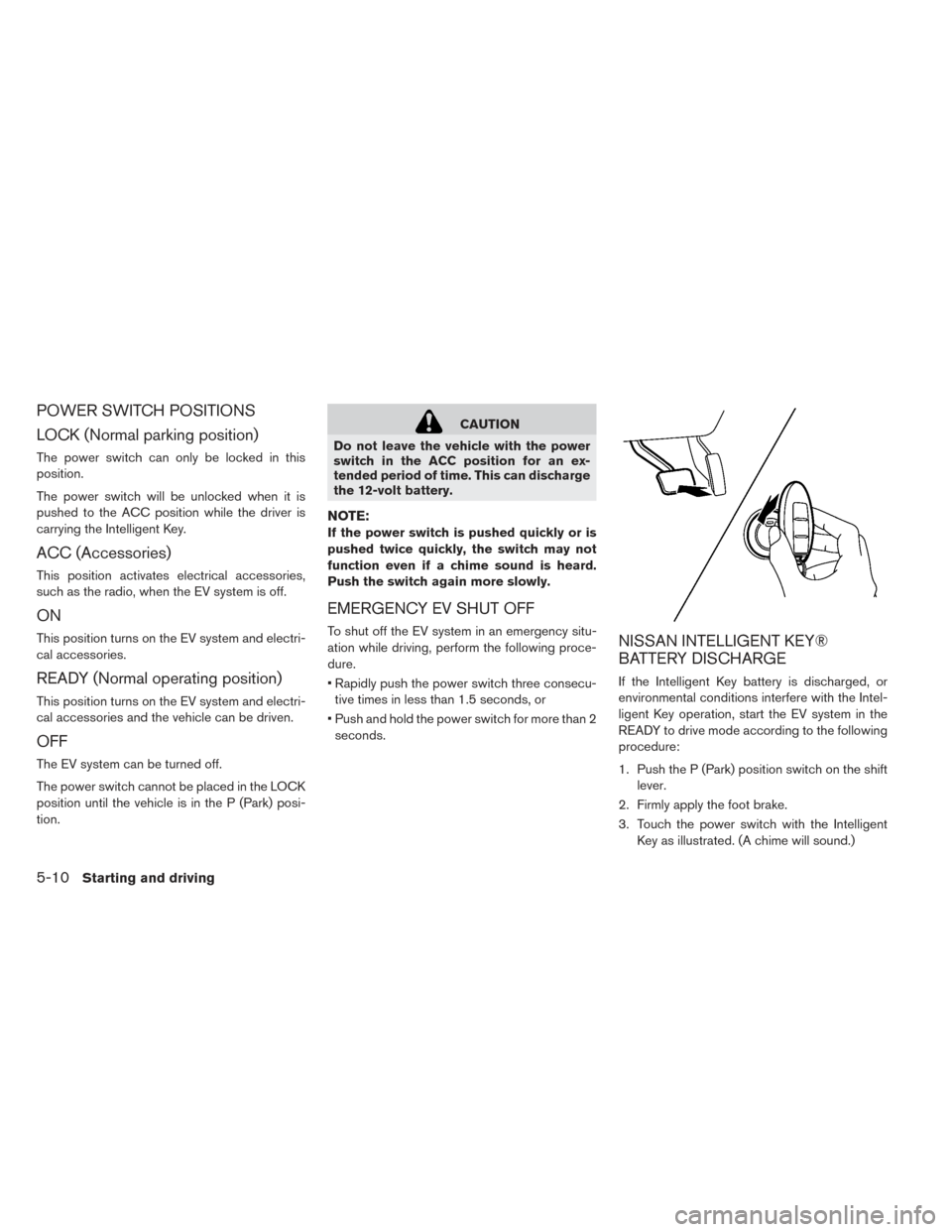
3. Touch the power switch with the Intelligent Key as illustrated. (A chime will sound.)
5-10Starting and driving
Page 312 of 437
4. Push the power switch while depressing thebrake pedal within 10 seconds after the
chime sounds. The power switch position
changes to the READY to drive mode.
After step 3 is performed, if the power switch is
pushed without depressing the brake pedal, the
power switch position will change to ACC.
NOTE:
• When the power switch is pushed to the
ACC or ON position or READY to drive
mode by the above procedure, the Intelli-
gent Key battery discharge indicator ap-
pears on the vehicle information display
even if the Intelligent Key is inside the
vehicle. This is not a malfunction. To stop
the warning indicator from blinking, touch
the power switch with the Intelligent Key
again.
• If the Intelligent Key system battery dis-
charge indicator appears on the vehicle
information display, replace the battery as
soon as possible. For additional informa-
tion, refer to “NISSAN Intelligent Key®
battery replacement” in the “Maintenance
and do-it-yourself” section of this manual. • Make sure that the area around the vehicle is
clear.
• Check fluid levels such as coolant, brake fluid, and windshield-washer fluid as frequently as
possible.
• Check that all windows and lights are clean.
• Visually inspect tires for their appearance and condition. Also check tires for proper inflation.
• Check that all doors are closed.
• Adjust the inside and outside mirrors.
• Fasten seat belts and ask all passengers to do likewise.
• Check the operation of the warning lights when the power switch is pushed to the ON position.
For additional information, refer to “Warning
lights, indicator lights and audible reminders” in
the “Instruments and controls” section of this
manual. 1. Confirm the parking brake is applied.
2. Confirm that the vehicle is in the P (Park)
position.
When the power switch is placed in the ON
position, the EV is designed not to operate
unless the shift lever is in the P (Park) or N
(Neutral) positions.
The Intelligent Key must be carried with
you when operating the power switch.
3. Depress the brake pedal and push the power switch to place the EV system in the READY
to drive position.
To place the vehicle in the READY to drive
position immediately, push and release the
power switch while depressing the brake
pedal with the power switch in any position.
The READY to drive indicator light
in the
meter illuminates.
4. To stop the EV system, push the P (Park) position switch on the shift lever, and push the
power switch to the OFF position.
BEFORE STARTING THE EV SYSTEM STARTING THE EV SYSTEM
Starting and driving5-11
Page 316 of 437
B-mode:
The B-mode engages the regenerative braking
system more aggressively on downhill slopes,
and helps reduce brake use. It is activated by
moving the shift lever left and down. The shift
lever will then return to the center position.ECO mode:
Use ECO in order to help extend the driving
range.
In comparison to the D (Drive) position, ECO
consumes less power for the traction motor and
enables the range of the vehicle to be extended.
For additional information, refer to “ECO switch”
in the “Instruments and controls” section of this
manual.
WARNING
• Be sure the parking brake is released before driving. Failure to do so could
cause brake failure and lead to an ac-
cident.
• Do not release the parking brake from outside the vehicle.
• To help avoid risk of injury or death through unintended operation of the
vehicle and/or its systems, do not
leave children, people who require the
assistance of others or pets unat-
tended in your vehicle. Additionally,
the temperature inside a closed ve-
hicle on a warm day can quickly be-
come high enough to cause a signifi-
cant risk of injury or death to people
and pets.
• When leaving the vehicle, apply the parking brake and push the P (Park)
position switch on the shift lever.
PARKING BRAKE
Starting and driving5-15
Page 319 of 437
Vehicle range depends on a number of factors.
Actual vehicle range will vary depending upon:
• speed
• vehicle load
• electrical load from vehicle accessories
• traffic and road conditions
NISSAN recommends the following driving
habits to help maximize vehicle range:
Before driving:
• Follow recommended periodic maintenance.
• Keep tires inflated to correct pressure.
• Keep wheels in correct alignment.
• Pre-heat or pre-cool the interior cabin while thevehicle is charging.
• Remove unnecessary cargo from the vehicle.
While driving:
• Drive in ECO mode – The ECO mode helps reduce power con-sumption by reducing acceleration when
compared to the same accelerator pedal
position in the D (Drive) position.
• Drive at a constant speed. Maintain cruising speeds with a constant accelerator position or
by using cruise control when appropriate. • Accelerate slowly and smoothly. Gently press
and release the accelerator pedal for accelera-
tion and deceleration.
• Drive at moderate speeds on the highway.
• Avoid frequent stopping and braking. Maintain a safe distance behind other vehicles.
• Turn off the air conditioner/heater when it is not necessary.
•
Select a moderate temperature setting for heat-
ing or cooling to help reduce power consumption.
• Use the air conditioner/heater and close win- dows to reduce drag when cruising at highway
speed.
• Release the accelerator pedal to slow down and do not apply the brakes when traffic and
road conditions allow. – This vehicle is equipped with a regenerative brake system. The primary purpose of the
regenerative brake system is to provide
some power to recharge the Li-ion battery
and extend driving range. A secondary ben-
efit is “engine braking” that operates based
on Li-ion battery conditions. In the D (Drive)
position, when the accelerator pedal is re-
leased, the regenerative brake system pro-
vides some deceleration and some power to
the Li-ion battery.
WARNING
• Do not stop or park the vehicle over flammable materials such as dry grass,
waste paper or rags. They may ignite
and cause a fire.
• Never leave the vehicle in the READY to drive mode while the vehicle is un-
attended.
• Do not leave children unattended in- side the vehicle. They could unknow-
ingly activate switches or controls. Un-
attended children could become
involved in serious accidents.
• Safe parking procedures require that both the parking brake be applied and
the vehicle placed in the park position.
Failure to do so could cause the ve-
hicle to move unexpectedly or roll
away and result in an accident.
•
To help avoid risk of injury or death
through unintended operation of the ve-
hicle and/or its systems, do not leave
children, people who require the assis-
tance of others or pets unattended in
your vehicle. Additionally, the tempera-
ture inside a closed vehicle on a warm
day can quickly become high enough to
cause a significant risk of injury or death
to people and pets.
INCREASING POWER ECONOMY PARKING/PARKING ON HILLS
5-18Starting and driving
Page 333 of 437
• Replacing tires with those not origi-nally specified by NISSAN could affect
the proper operation of the TPMS.
• The Genuine NISSAN Emergency Tire Repair Sealant or equivalent can be
used for temporarily repairing a tire.
Do not inject any other tire liquid or
aerosol tire sealant into the tires, as
this may cause a malfunction of tire
pressure sensors.
• NISSAN recommends using only NISSAN Genuine Emergency Tire Seal-
ant provided with your vehicle. Other
tire sealants may damage the valve
stem seal which can cause the tire to
lose air pressure. Contact a NISSAN
certified LEAF dealer as soon as pos-
sible after using tire repair sealant (for
models equipped with the emergency
tire puncture repair kit) .
REPAIRING FLAT TIRE
WARNING
• After using Emergency Tire Sealant to
repair a minor tire puncture, do not
drive the vehicle at speeds faster than
50 mph (80 km/h) . •
Immediately after using the Emer-
gency Tire Sealant to repair a minor
tire puncture, take your vehicle to a
NISSAN certified LEAF dealer to in-
spect, and repair or replace the tire.
The Emergency Tire Sealant cannot
permanently seal a punctured tire.
Continuing operation of the vehicle
without a permanent tire repair can
lead to a crash.
• If you used the Emergency Tire Sealant
to repair a minor tire puncture, a
NISSAN certified LEAF dealer will also
need to replace the TPMS sensor in
addition to repairing or replacing the
tire.
• NISSAN recommends using only
NISSAN Genuine Emergency Tire Seal-
ant provided with your vehicle. Other
tire sealants may damage the valve
stem seal which can cause the tire to
lose air pressure.
This vehicle does not have a spare tire. The
emergency tire puncture repair kit (Emergency
Tire Sealant) is supplied with the vehicle instead of a spare tire. It can be used to temporarily repair
minor tire punctures.
If possible, have the vehicle towed to a facility that
can repair or replace the flat tire. Using the emer-
gency tire puncture repair kit may cause a mal-
function of the tire pressure sensor and cause the
low tire pressure warning light to illuminate.
CAUTION
• To avoid the emergency tire puncture
kit being damaged during storage or
use:
–Only use the emergency tire punc-
ture repair kit on your vehicle. Do
not use it on other vehicles.
– Only use the kit to inflate the tires of
your vehicle and to check the vehi-
cle’s tire pressure.
– Only plug the compressor into a 12-
volt DC car power point.
– Keep the kit free of water and dirt.
– Do not disassemble or modify the
kit.
– Do not drop the kit or allow hard
impacts to the kit.
6-4In case of emergency
Page 350 of 437
CAUTION
• Never use benzine, thinner, or any similar material.
•
Small dirt particles can be abrasive and
damaging to the leather surfaces and
should be removed promptly. Do not use
saddle soap, car waxes, polishes, oils,
cleaning fluids, solvents, detergents or
ammonia-based cleaners as they may
damage the leather’s natural finish.
• Never use fabric protectors unless rec- ommended by the manufacturer.
• Do not use glass or plastic cleaner on meter or gauge lens covers. It may
damage the lens cover.
AIR FRESHENERS
Most air fresheners use a solvent that could affect
the vehicle interior. If you use an air freshener,
take the following precautions:
• Hanging-type air fresheners can cause perma-
nent discoloration when they contact vehicle
interior surfaces. Place the air freshener in a
location that allows it to hang free and not
contact an interior surface.
• Liquid-type air fresheners typically clip on the vents. These products can cause immediate damage and discoloration when spilled on inte-
rior surfaces.
Carefully read and follow the manufacturer’s in-
structions before using air fresheners.
FLOOR MATS
WARNING
To avoid potential pedal interference that
may result in a collision, injury or death:
• NEVER place a floor mat on top of another floor mat in the driver front
position.
• Use only Genuine NISSAN floor mats specifically designed for use in your
vehicle model. For additional informa-
tion, see a NISSAN certified LEAF
dealer.
• Properly position the mats in the floor- well using the floor mat positioning
aid. For additional information, refer to
“Floor mat positioning aid (driver’s
side only)” in this section.
The use of Genuine NISSAN floor mats can
extend the life of your vehicle carpet and make it
easier to clean the interior. Mats should be main-
tained with regular cleaning and replaced if they
become excessively worn.
Floor mat positioning aid (driver’s side
only)
This vehicle includes front floor mat brackets to
act as a floor mat positioning aid. NISSAN floor
mats have been specially designed for your ve-
hicle model. The driver’s side floor mat has grom-
met holes incorporated in it. Position the mat by
placing the floor mat bracket hook through the
floor mat grommet hole while centering the mat in
the floorwell.
Periodically check to make certain the mats are
properly positioned.
Appearance and care7-5