AUX NISSAN LEAF 2017 1.G Navigation Manual
[x] Cancel search | Manufacturer: NISSAN, Model Year: 2017, Model line: LEAF, Model: NISSAN LEAF 2017 1.GPages: 268, PDF Size: 1.41 MB
Page 13 of 268
extremities: hands, wrists, feet and ankles) .
Co-location:This transmitter must not be co-
located or operated in conjunction with any other
antenna or transmitter.
IC Regulatory information (for Canada)
The antenna cannot be removed (and changed)
by user.
This device complies with Industry Canada
license-exempt RSS standard(s) . Operation is
subject to the following two conditions: (1) This
device may not cause interference, and (2) this
device must accept any interference, including
interference that may cause undesired operation
of the device.
CAUTION: Radio Frequency Radiation Expo-
sure
This equipment complies with IC radiation
exposure limits set forth for uncontrolled envir-
onment and meets RSS-102 of the IC radio
frequency (RF) Exposure rules. This equipment
has very low levels of RF energy that it deemed to
comply without maximum permissive exposure
evaluation (MPE) . But it is desirable that it should
be installed and operated with at least 20 cm and
more between the radiator and person’s body
(excluding extremities: hands, wrists, feet and
ankles.) Co-location:
This transmitter must not be co-
located or operated in conjunction with any other
antenna or transmitter.
This Class B digital apparatus meets all require-
ments of the Canadian Interference-Causing
Equipment Regulations.
For Quebec :
L’antenne ne peut e ˆ
tre enleve ´
e (et modifie ´
) par
l’utilisateur.
NOTE
Le pre ´
sent appareil est conforme aux CNR
d’Industrie Canada applicables aux appareils
radio exempts de licence. L’exploitation est
autorise ´
e aux deux conditions suivantes : (1)
l’appareil ne doit pas produire de brouillage, et
(2) l’utilisateur de l’appareil doit accepter tout
brouillage radioe ´
lectrique subi, me ˆ
me si le
brouillage est susceptible d’en compromettre le
fonctionnement.
ATTENTION : l‘exposition aux rayonnements
radiofre ´
quence
Cet e ´
quipement est conforme aux limites d’ex-
position aux radiations IC de ´
finies pour un
environnement non contro ˆ
le´
et satisfait RSS-
102 de la fre ´
quence radio (RF) IC re `
gles
d‘exposition. Cet e ´
quipement pre ´
sente des niveaux tre
`
s faibles d’e ´
nergie RF re ´
pute ´
con-
forme sans e ´
valuation de l‘exposition maximale
permissive (MPE). Mais il est souhaitable qu’il
devrait e ˆ
tre installe ´
et fonctionner avec au moins
20 cm entre le radiateur et le corps de la
personne (a `
l‘exception des membres:. Mains,
poignets, pieds et chevilles) .
Co-localisation : Cet e ´
metteur ne doit pas e ˆ
tre
co-implante ´
s ou exploite ´
s
en conjonction avec
une autre antenne ou un autre e ´
metteur.
0-7
0. Introduction
Page 21 of 268

1 Getting started
Control buttons and touch screen display .......................... 1-2Control panel ........................................................................\
1-2
Steering wheel switches ................................................... 1-5
USB (Universal Serial Bus) Connection Port and
AUX (auxiliary) input jack ................................................... 1-5
Starting system ........................................................................\
.. 1-6 Start-up screen .................................................................... 1-6
Basic operation ........................................................................\
.. 1-7 Selecting menu from Launch Bar .................................... 1-7
Displaying Zero Emission menu screen ......................... 1-8
Displaying status screen .................................................... 1-9
Touch panel operation ........................................................ 1-9
Main screen operations .................................................. 1-10 Adjusting settings .......................................................... 1-11
How to input letters and numbers ............................. 1-11
How to view and operate HOME MENU screen ..... 1-11
Functions disabled while driving ................................ 1-14
System settings ..................................................................... 1-15 Setting menu ................................................................... 1-15
Display settings .............................................................. 1-16
Volume and Beeps settings ......................................... 1-16
Language and unit settings ......................................... 1-17
Clock settings ................................................................. 1-17
Comfort & Convenience settings ............................... 1-17
Connecting Bluetooth
Šdevice ................................... 1-19
Page 22 of 268
CONTROL BUTTONS AND
TOUCH SCREEN DISPLAY
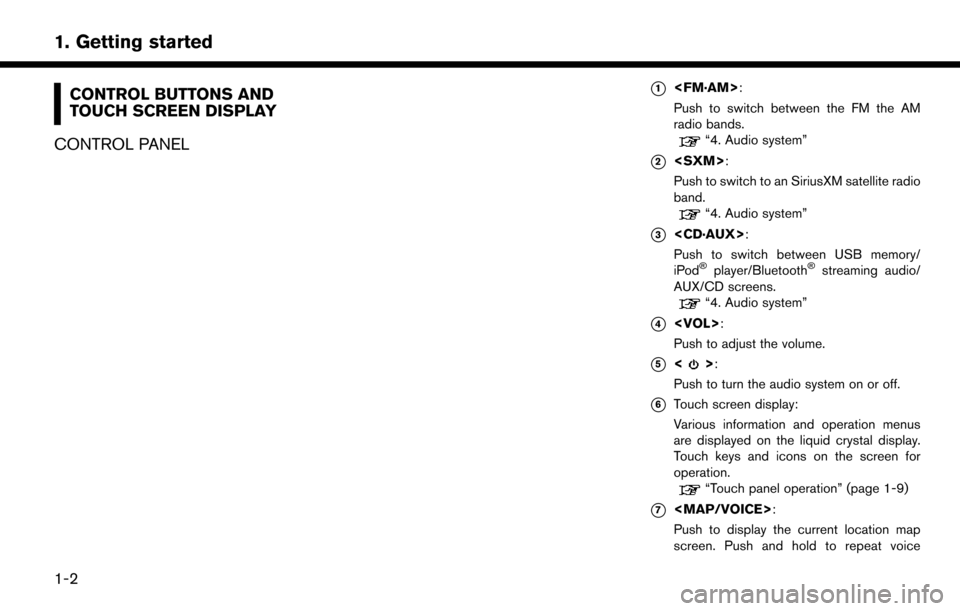
CONTROL PANEL*1
Push to switch between the FM the AM
radio bands.
“4. Audio system”
*2
Push to switch to an SiriusXM satellite radio
band.
“4. Audio system”
*3
Push to switch between USB memory/
iPod
Šplayer/BluetoothŠstreaming audio/
AUX/CD screens.
“4. Audio system”
*4
Push to adjust the volume.
*5<>:
Push to turn the audio system on or off.
*6Touch screen display:
Various information and operation menus
are displayed on the liquid crystal display.
Touch keys and icons on the screen for
operation.
“Touch panel operation” (page 1-9)
*7
Page 25 of 268
STEERING WHEEL SWITCHES
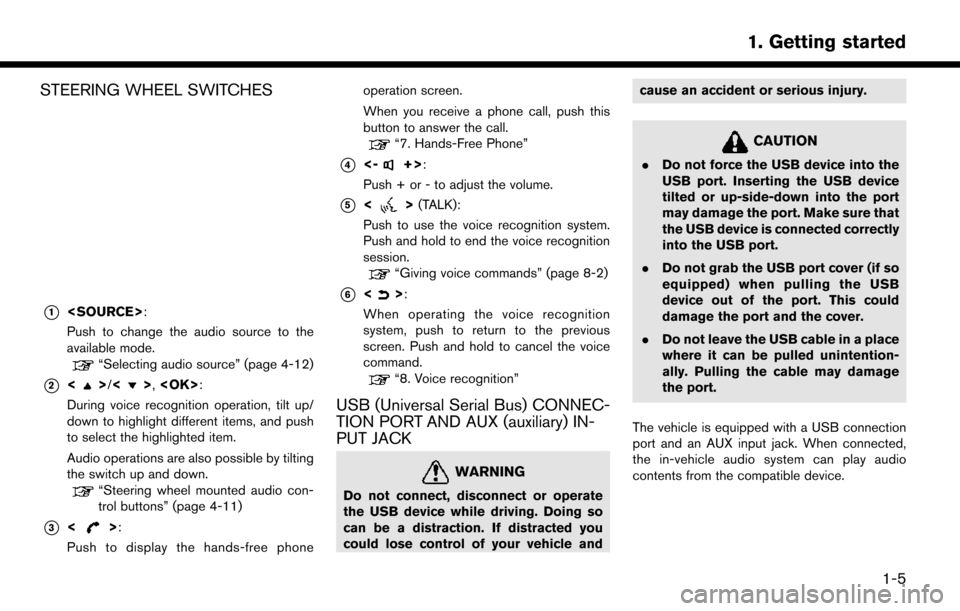
*1
Push to change the audio source to the
available mode.
“Selecting audio source” (page 4-12)
*2<>/<>,
During voice recognition operation, tilt up/
down to highlight different items, and push
to select the highlighted item.
Audio operations are also possible by tilting
the switch up and down.
“Steering wheel mounted audio con-
trol buttons” (page 4-11)
*3<>:
Push to display the hands-free phone operation screen.
When you receive a phone call, push this
button to answer the call.
“7. Hands-Free Phone”
*4<-+>:
Push + or - to adjust the volume.
*5<> (TALK):
Push to use the voice recognition system.
Push and hold to end the voice recognition
session.
“Giving voice commands” (page 8-2)
*6<>:
When operating the voice recognition
system, push to return to the previous
screen. Push and hold to cancel the voice
command.
“8. Voice recognition”
USB (Universal Serial Bus) CONNEC-
TION PORT AND AUX (auxiliary) IN-
PUT JACK
WARNING
Do not connect, disconnect or operate
the USB device while driving. Doing so
can be a distraction. If distracted you
could lose control of your vehicle and cause an accident or serious injury.
CAUTION
.
Do not force the USB device into the
USB port. Inserting the USB device
tilted or up-side-down into the port
may damage the port. Make sure that
the USB device is connected correctly
into the USB port.
. Do not grab the USB port cover (if so
equipped) when pulling the USB
device out of the port. This could
damage the port and the cover.
. Do not leave the USB cable in a place
where it can be pulled unintention-
ally. Pulling the cable may damage
the port.
The vehicle is equipped with a USB connection
port and an AUX input jack. When connected,
the in-vehicle audio system can play audio
contents from the compatible device.
1-5
1. Getting started
Page 26 of 268
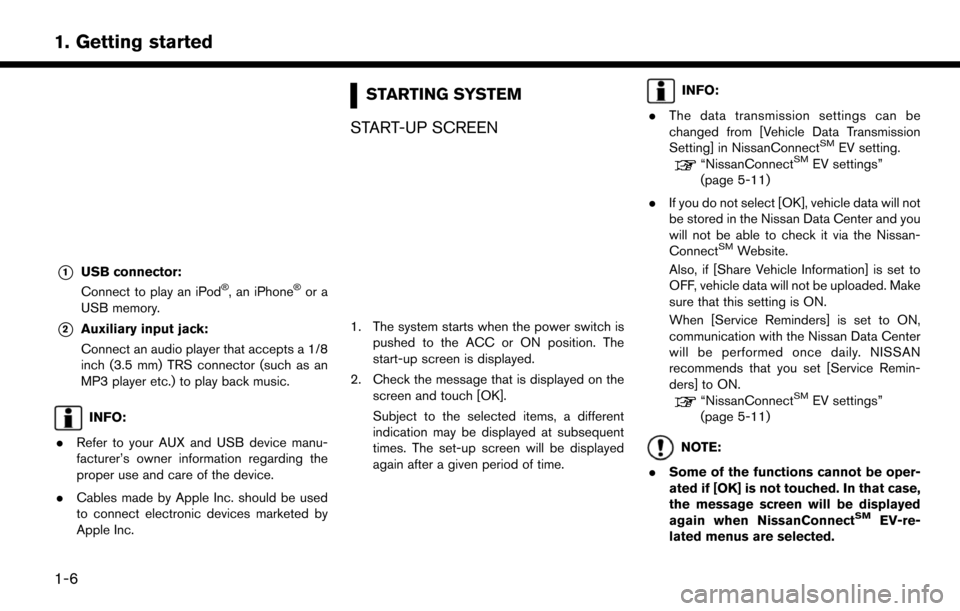
*1USB connector:
Connect to play an iPodŠ, an iPhoneŠor a
USB memory.
*2Auxiliary input jack:
Connect an audio player that accepts a 1/8
inch (3.5 mm) TRS connector (such as an
MP3 player etc.) to play back music.
INFO:
. Refer to your AUX and USB device manu-
facturer’s owner information regarding the
proper use and care of the device.
. Cables made by Apple Inc. should be used
to connect electronic devices marketed by
Apple Inc.
STARTING SYSTEM
START-UP SCREEN
1. The system starts when the power switch is pushed to the ACC or ON position. The
start-up screen is displayed.
2. Check the message that is displayed on the screen and touch [OK].
Subject to the selected items, a different
indication may be displayed at subsequent
times. The set-up screen will be displayed
again after a given period of time.
INFO:
. The data transmission settings can be
changed from [Vehicle Data Transmission
Setting] in NissanConnect
SMEV setting.“NissanConnectSMEV settings”
(page 5-11)
. If you do not select [OK], vehicle data will not
be stored in the Nissan Data Center and you
will not be able to check it via the Nissan-
Connect
SMWebsite.
Also, if [Share Vehicle Information] is set to
OFF, vehicle data will not be uploaded. Make
sure that this setting is ON.
When [Service Reminders] is set to ON,
communication with the Nissan Data Center
will be performed once daily. NISSAN
recommends that you set [Service Remin-
ders] to ON.
“NissanConnectSMEV settings”
(page 5-11)
NOTE:
. Some of the functions cannot be oper-
ated if [OK] is not touched. In that case,
the message screen will be displayed
again when NissanConnect
SMEV-re-
lated menus are selected.
1-6
1. Getting started
Page 117 of 268
![NISSAN LEAF 2017 1.G Navigation Manual Deleting stored item individually
1. Touch [Settings] on the Launch Bar.
2. Touch [Navigation] and touch [Address Book].
3. Touch [Delete Stored Items].Select the preferred item and touch [Yes] to com](/img/5/531/w960_531-116.png "NISSAN LEAF 2017 1.G Navigation Manual Deleting stored item individually
1. Touch [Settings] on the Launch Bar.
2. Touch [Navigation] and touch [Address Book].
3. Touch [Delete Stored Items].Select the preferred item and touch [Yes] to com")
Deleting stored item individually
1. Touch [Settings] on the Launch Bar.
2. Touch [Navigation] and touch [Address Book].
3. Touch [Delete Stored Items].Select the preferred item and touch [Yes] to complete the deleting operation.
Step 1 Step2 Action
[Delete Home Location] Deletes home location.
[Delete Address
Book] [Delete All]
Deletes all stored locations.
[Delete One] Deletes a selected stored location.
[Delete Stored
Routes] [Delete All]
Deletes all stored routes.
[Delete One] Deletes selected stored routes.
[Delete Avoid
Areas] [Delete All]
Deletes all Avoid Areas.
[Delete One] Deletes a selected Avoid Area.
[Delete Pre-
vious Destina-
tions] [Delete All Previous Destinations] Deletes all of the previous destinations.
[Delete Previous Destination] Deletes a selected previous destination.
[Delete Previous Start Point] Deletes a previous start point.
[Delete Learned Routes] Deletes all system learned routes.
Deleting individual item on map
1. Align the cross pointer over the preferred
stored location for deletion by moving on the
map, and then touch [
].
2. Touch [Delete].
3. A confirmation message is displayed. Con-
firm the contents of the message and touch
[Yes].
The stored item is deleted from the Address
Book.
TRANSFERRING INFORMATION TO/
FROM ADDRESS BOOK
The information of the stored home and ad-
dresses can be exported and imported using a
USB memory device.
“USB (Universal Serial Bus) Connection
Port and AUX (auxiliary) input jack”
(page 1-5)
3-57
3. Navigation
Page 123 of 268

4 Audio system
Audio operation precautions .................................................. 4-2Radio ........................................................................\
.............. 4-2
Compact Disc (CD) player ............................................... 4-4
USB (Universal Serial Bus) connection port ................ 4-5
Compressed Audio Files (MP3/WMA/AAC) ............... 4-7
Bluetooth
Šstreaming audio .............................................. 4-9
Names and functions of audio control buttons ............... 4-10
Audio main buttons .......................................................... 4-10
Steering wheel mounted audio control buttons ........ 4-11 Audio operations ................................................................... 4-11
Audio main operation .................................................... 4-11
Radio ........................................................................\
......... 4-12
Compact Disc (CD) player .......................................... 4-18
USB memory device player ......................................... 4-21
iPodŠplayer ..................................................................... 4-24
BluetoothŠaudio ............................................................ 4-28
Auxiliary (AUX) devices ................................................. 4-31
Audio settings ........................................................................\
4-32
Page 132 of 268

NAMES AND FUNCTIONS OF
AUDIO CONTROL BUTTONS
AUDIO MAIN BUTTONS*1
Push to toggle between FM and AM radio
screen.
*2
Push to display the SXM radio screen.
*3
Push to display the screen for CD, USB/
iPod
Š, BluetoothŠstreaming audio and
AUX.
The audio source will switch each time the
button is pushed.
*4
Push to adjust the volume.
*5<>:
Push to turn on/off the audio system.
*6Touch screen display:
Various information and operation menus
are displayed on the liquid crystal display.
Touch keys and icons on the screen for
operation.
“Touch panel operation” (page 1-9)
*7
Push to tune the radio and to select/restart
the tracks. Push and hold to seek the AM/
FM stations and to fast-forward/rewind the
tracks.
4-10
4. Audio system
Page 143 of 268
USB MEMORY DEVICE PLAYER
Connecting USB memory device
WARNING
Do not connect, disconnect or operate
the USB device while driving. Doing so
can be a distraction. If distracted you
could lose control of your vehicle and
cause an accident or serious injury.
CAUTION
.Do not force the USB device into the
USB port. Inserting the USB device
tilted or up-side-down into the port
may damage the port. Make sure that
the USB device is connected correctly
into the USB port.
. Do not grab the USB port cover (if so
equipped) when pulling the USB
device out of the port. This could
damage the port and the cover.
. Do not leave the USB cable in a place
where it can be pulled unintention-
ally. Pulling the cable may damage
the port. Refer to your device manufacturer’s owner
information regarding the proper use and care
of the device.
When compatible storage devices are plugged
into the port, compatible audio files on the
storage devices can be played through the
vehicle’s audio system.
For the location of the USB port:
“USB (Universal Serial Bus) Connection
Port and AUX (auxiliary) input jack”
(page 1-5)
4-21
4. Audio system
Page 146 of 268
![NISSAN LEAF 2017 1.G Navigation Manual [Now Playing] Touch to display the USB screen.
[SCAN] Touch to scan the tracks in theUSB memory device. During
scanning, the first several sec-
onds of all the tracks will be
played. Touching [Scan] a](/img/5/531/w960_531-145.png "NISSAN LEAF 2017 1.G Navigation Manual [Now Playing] Touch to display the USB screen.
[SCAN] Touch to scan the tracks in theUSB memory device. During
scanning, the first several sec-
onds of all the tracks will be
played. Touching [Scan] a")
[Now Playing] Touch to display the USB screen.
[SCAN] Touch to scan the tracks in theUSB memory device. During
scanning, the first several sec-
onds of all the tracks will be
played. Touching [Scan] again will
cancel the scanning mode and
the USB memory device will
return to play normally from the
track which is playing.
[Folder List]* Touch to display the folder list. Touch an item on the list to select
the folder.
Touch [
] and go back to the
previous screen to select tracks in
the folder.
[Album Art-
work] Touch to turn on/off the album
artwork display on the USB
screen.
Track List A list of the tracks in the USB is displayed. Touch an item on the
list to select the track.
*: Displayed only when available.
iPodŠPLAYER
Connecting iPod
Š
WARNING
Do not connect, disconnect or operate
the USB device while driving. Doing so
can be a distraction. If distracted you
could lose control of your vehicle and
cause an accident or serious injury.
CAUTION
. Do not force the USB device into the
USB port. Inserting the USB device
tilted or up-side-down into the port
may damage the port. Make sure that
the USB device is connected correctly
into the USB port.
. Do not grab the USB port cover (if so
equipped) when pulling the USB
device out of the port. This could
damage the port and the cover.
. Do not leave the USB cable in a place
where it can be pulled unintention-
ally. Pulling the cable may damage
the port. Connect the iPod
Što the USB port.“USB (Universal Serial Bus) Connection
Port and AUX (auxiliary) input jack”
(page 1-5)
The battery of the iPod
Šwill be charged while the
device is connected to the vehicle if the iPodŠ
supports charging via a USB connection.
Depending on the device and firmware version of
the iPod
Š, the display on the iPodŠshows a
NISSAN or Accessory Attached screen when
the connection is completed. When the iPod
Šis
connected to the vehicle, the iPodŠmusic library
can only be operated by the vehicle audio
controls.
Compatibility:
Made for
. iPod
Š(5th generation)
. iPod touch
Š(4th generation)
. iPod touch
Š(3rd generation)
. iPod touch
Š(2nd generation)
. iPod touch
Š(1st generation)
. iPod touch
Š
.iPod classicŠ(80G/160GB)
4-24
4. Audio system