ad blue NISSAN LEAF 2017 1.G Owner's Guide
[x] Cancel search | Manufacturer: NISSAN, Model Year: 2017, Model line: LEAF, Model: NISSAN LEAF 2017 1.GPages: 424, PDF Size: 4.51 MB
Page 302 of 424
•Add Phone or Device
For additional information, refer to “Con-
necting procedure” in this section.
•Delete Phone or Device
Select to delete a phone from the displayed
list. The system will ask to confirm before
deleting the phone.
•Replace Phone
Select to replace a phone from the dis-
played list. When a selection is made, the
system will ask to confirm before proceed-
ing. The recorded phonebook for the phone
being deleted will be saved as long as the
new phone’s phonebook is the same as the
old phone’s phonebook.
•Select Phone or Device
Select to connect to a previously connected
phone from the displayed list.
•Phonebook Download
Select to turn on or off the automatic down-
load of a connected phone’s phonebook.
•Show Incoming Calls
Select “Driver Only” to have incoming call
information displayed only in the vehicle in-
formation display. Select “Both” to have in- coming call information displayed in both
the vehicle information display and the cen-
ter display screen.
•Text Message (if so equipped)
Select to adjust the volume of the sound that
plays when a new text is received by a
phone connected to the Bluetooth®
Hands-Free Phone System. The setting all
the way to the left indicates that the new text
sound will be muted.
•Show Incoming Text
Select “Driver Only” to have incoming text
messages displayed only in the vehicle in-
formation display. Select “Both” to have in-
coming text messages displayed in both the
vehicle information display and the center
display screen. Select “None” to have no
display of incoming text messages.
•Edit Custom Messages
Select to set a custom message that will be
available with the standard options when
sending a text message. To set a custom
message, send a text message to your own
phone number while the phone is con-
nected to the system. Three custom mes- sages can be set. Custom messages can
only be set while the vehicle is stationary.
•Auto Reply
Select to turn on or off the Auto Reply func-
tion. When enabled, the vehicle will auto-
matically send a predefined text message to
the sender when a text message is received
while driving.
•Auto Reply Message
Select to choose the message that is sent
when the Auto Reply function is enabled.
Choose from “I’m Driving” or one of the
three custom messages stored in the sys-
tem.
•Vehicle Signature On/Off
Select to choose whether or not the vehicle
signature is added to outgoing text mes-
sages from the vehicle. This message can-
not be changed or customized.
MANUAL CONTROLS
While using the Voice Recognition system, it is
possible to select menu options by using the
steering wheel controls instead of speaking voice
commands. This can be especially helpful if the
Display screen, heater, air conditioner, audio and phone systems4-73
Page 305 of 424
For additional information, refer to the separate
LEAF Navigation System Owner’s Manual.For additional information, refer to the separate
LEAF Navigation System Owner’s Manual.
BLUETOOTH® HANDS-FREE PHONE
SYSTEM WITH NAVIGATION SYSTEM
(IF SO EQUIPPED)
NISSAN VOICE RECOGNITION
SYSTEM (IF SO EQUIPPED)
4-76Display screen, heater, air conditioner, audio and phone systems
Page 326 of 424
that could cause the power steering system to
overheat.
You may hear a noise when the steering wheel is
operated quickly. However, this is not a malfunc-
tion.
If the power steering warning light
illumi-
nates while the READY to drive indicator light is
ON, it may indicate the power steering system is
not functioning properly and may need servicing.
Have the power steering system checked. It is
recommended that you visit a NISSAN certified
LEAF dealer for this service. For additional infor-
mation, refer to “Power steering warning light” in
the “Instruments and controls” section of this
manual.
The power assist for steering stops operating
when both the power steering warning light and
READY to drive indicator light are illuminated.
You will still have control of the vehicle. However,
greater steering effort is needed, especially in
sharp turns and at low speeds.
BRAKE PRECAUTIONS
This vehicle is equipped with two braking sys-
tems:
1. Hydraulic brake system
2. Regenerative brake system
Hydraulic brake system
The hydraulic brake system is similar to the
brakes used on conventional vehicles.
The brake system has two separate hydraulic
circuits. If one circuit malfunctions, you will still
have braking at two wheels.
Regenerative brake system
The primary purpose of the regenerative brake
system is to provide some power to help re-
charge the Li-ion battery and extend driving
range. A secondary benefit is “engine braking”
that operates based on battery conditions.
In the D (Drive) range, when the accelerator is
released, the regenerative brake system provides
some deceleration and generates power for the
Li-ion battery. Power is also generated when the
brake pedal is applied. When you put the shift lever in the B position and
take your foot off the accelerator pedal, more
regenerative brake is applied than in the D (Drive)
position. However, during high-speed driving you
may feel that regenerative brake provides less
deceleration than the engine braking in an ordi-
nary vehicle. This is normal.
Less deceleration is provided by the regenerative
brake system when the Li-ion battery is fully
charged. Regenerative brake is automatically re-
duced when the Li-ion battery is fully charged to
prevent the Li-ion battery from becoming over-
charged. Regenerative brake is also automati-
cally reduced when the battery temperature is
high/low (indicated by the red/blue zones on the
battery temperature gauge) to prevent Li-ion bat-
tery damage.
The brake pedal should be used to slow or stop
the vehicle depending on traffic or road condi-
tions. The vehicle brakes are not affected by
regenerative brake system operation.
NOTE:
•
When applying the regenerative brakes,
you may hear a sound coming from the
regenerative brake system. This is a nor-
mal operating characteristic of an EV.
BRAKE SYSTEM
Starting and driving5-21
Page 365 of 424
The cooling system is filled at the factory with a
pre-diluted mixture of 50% Genuine NISSAN
Long Life Antifreeze/Coolant (blue) and 50% wa-
ter to provide year-round antifreeze and coolant
protection. The antifreeze solution contains rust
and corrosion inhibitors. Additional cooling sys-
tem additives are not necessary.
WARNING
• Never remove the coolant tank cap when the motor compartment is hot.
Wait until the motor compartment cool
down.
• The coolant tank is equipped with a special type coolant tank cap. To pre-
vent damage to the motor compart-
ment, use only a Genuine NISSAN
coolant tank cap.
CAUTION
• Never use any additives in the coolant such as radiator sealer in the cooling
system. This may cause damage to
electrical equipment such as the motor
and inverter. • When adding or replacing coolant, be
sure to use only a Genuine NISSAN
Long Life Antifreeze/Coolant (blue) or
equivalent. Genuine NISSAN Long Life
Antifreeze/Coolant (blue) is pre-
diluted to provide antifreeze protec-
tion to −34°F (−37°C) . If additional
freeze protection is needed due to the
weather conditions where you operate
your vehicle, add Genuine NISSAN
Long Life Antifreeze/Coolant (blue)
concentrate following the directions
on the container. If and equivalent
coolant other than Genuine NISSAN
Long Life Antifreeze/Coolant (blue) is
used, follow the coolant manufacture’s
instructions to maintain minimum an-
tifreeze protection to −34°F (−37°C) .
The use of other types of coolant solu-
tions other than Genuine NISSAN
Long Life Antifreeze/Coolant (blue) or
equivalent may damage the cooling
system. • The life expectancy of the factory-fill
coolant is 125,000 miles (200,000 km)
or 15 years. Mixing any other type of
coolant other than Genuine NISSAN
Long Life Antifreeze/Coolant (blue) ,
including Genuine NISSAN Long Life
Antifreeze/Coolant (green) , or the use
of non-distilled water will reduce the
life expectancy of the factory-filled
coolant. For additional information, re-
fer to the NISSAN Service and Mainte-
nance Guide.
COOLING SYSTEM
8-8Maintenance and do-it yourself
Page 395 of 424
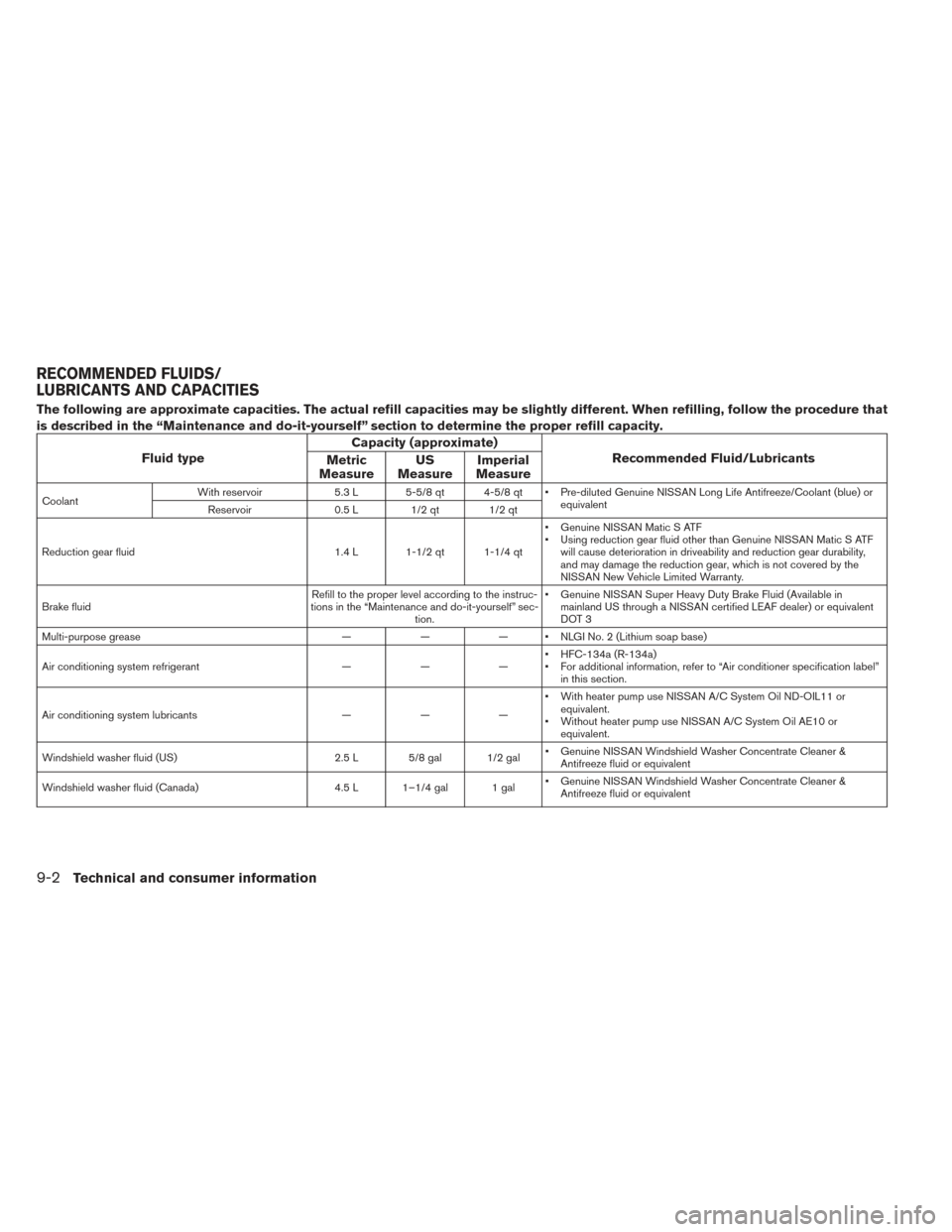
The following are approximate capacities. The actual refill capacities may be slightly different. When refilling, follow the procedure that
is described in the “Maintenance and do-it-yourself” section to determine the proper refill capacity.
Fluid typeCapacity (approximate)
Recommended Fluid/Lubricants
Metric
Measure US
Measure Imperial
Measure
Coolant With reservoir
5.3 L 5-5/8 qt 4-5/8 qt • Pre-diluted Genuine NISSAN Long Life Antifreeze/Coolant (blue) or
equivalent
Reservoir 0.5 L 1/2 qt 1/2 qt
Reduction gear fluid 1.4 L 1-1/2 qt 1-1/4 qt• Genuine NISSAN Matic S ATF
• Using reduction gear fluid other than Genuine NISSAN Matic S ATF
will cause deterioration in driveability and reduction gear durability,
and may damage the reduction gear, which is not covered by the
NISSAN New Vehicle Limited Warranty.
Brake fluid Refill to the proper level according to the instruc-
tions in the “Maintenance and do-it-yourself” sec- tion. • Genuine NISSAN Super Heavy Duty Brake Fluid (Available in
mainland US through a NISSAN certified LEAF dealer) or equivalent
DOT 3
Multi-purpose grease ——— • NLGI No. 2 (Lithium soap base)
Air conditioning system refrigerant ———• HFC-134a (R-134a)
• For additional information, refer to “Air conditioner specification label”
in this section.
Air conditioning system lubricants ———• With heater pump use NISSAN A/C System Oil ND-OIL11 or
equivalent.
• Without heater pump use NISSAN A/C System Oil AE10 or equivalent.
Windshield washer fluid (US) 2.5 L 5/8 gal 1/2 gal• Genuine NISSAN Windshield Washer Concentrate Cleaner &
Antifreeze fluid or equivalent
Windshield washer fluid (Canada) 4.5 L 1–1/4 gal 1 gal• Genuine NISSAN Windshield Washer Concentrate Cleaner &
Antifreeze fluid or equivalent
RECOMMENDED FLUIDS/
LUBRICANTS AND CAPACITIES
9-2Technical and consumer information
Page 416 of 424
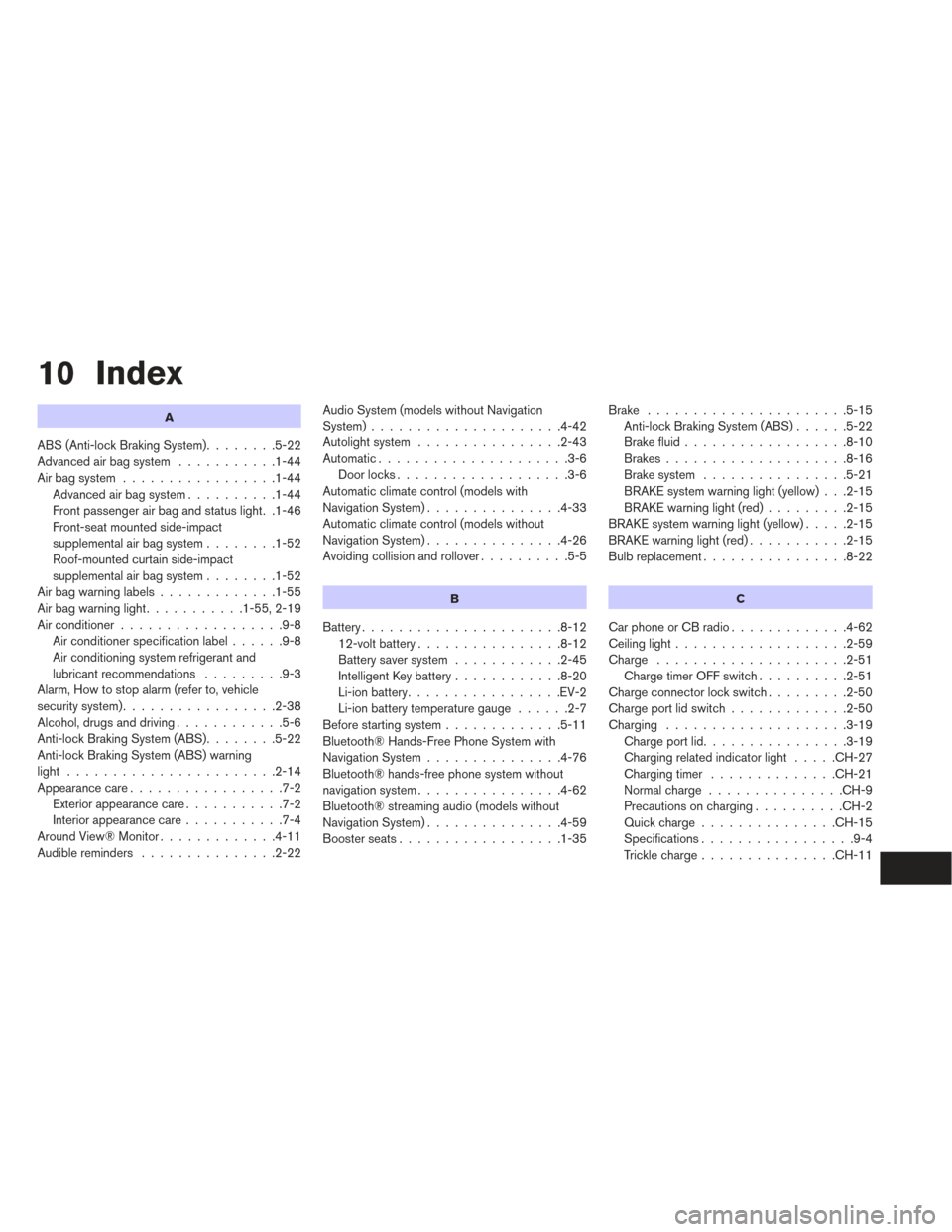
10 Index
A
ABS (Anti-lock Braking System)........5-22
Advanced air bag system ...........1-44
Air bag system .................1-44
Advanced air bag system ..........1-44
Front passenger air bag and status light. .1-46
Front-seat mounted side-impact
supplemental air bag system ........1-52
Roof-mounted curtain side-impact
supplemental air bag system ........1-52
Airbagwarninglabels.............1-55
Airbagwarninglight...........1-55,2-19
Air conditioner ..................9-8
Air conditioner specification label ......9-8
Air conditioning system refrigerant and
lubricant recommendations .........9-3
Alarm, How to stop alarm (refer to, vehicle
security system) .................2-38
Alcohol, drugs and driving ............5-6
Anti-lock Braking System (ABS) ........5-22
Anti-lock Braking System (ABS) warning
light .......................2-14
Appearance care .................7-2
Exterior appearance care ...........7-2
Interior appearance care ...........7-4
AroundView®Monitor.............4-11
Audible reminders ...............2-22 Audio System (models without Navigation
System).....................4-42
Autolight system
................2-43
Automatic.....................3-6 Door locks ...................3-6
Automatic climate control (models with
Navigation System) ...............4-33
Automatic climate control (models without
Navigation System) ...............4-26
Avoiding collision and rollover ..........5-5
B
Battery......................8-12
12-volt battery ................8-12
Battery saver system ............2-45
Intelligent Key battery ............8-20
Li-ion battery .................EV-2
Li-ion battery temperature gauge ......2-7
Before starting system .............5-11
Bluetooth® Hands-Free Phone System with
Navigation System ...............4-76
Bluetooth® hands-free phone system without
navigation system ................4-62
Bluetooth® streaming audio (models without
Navigation System) ...............4-59
Boosterseats..................1-35 Brake
......................5-15
Anti-lock Braking System (ABS) ......5-22
Brake fluid ..................8-10
Brakes ....................8-16
Brake system ................5-21
BRAKE system warning light (yellow) . . .2-15
BRAKE warning light (red) .........2-15
BRAKE system warning light (yellow) .....2-15
BRAKE warning light (red) ...........2-15
Bulbreplacement................8-22
C
CarphoneorCBradio.............4-62
Ceiling light ...................2-59
Charge .....................2-51
Charge timer OFF switch ..........2-51
Charge connector lock switch .........2-50
Charge port lid switch .............2-50
Charging ....................3-19
Chargeportlid................3-19
Charging related indicator light .....CH-27
Chargingtimer ..............CH-21
Normalcharge ...............CH-9
Precautions on charging ..........CH-2
Quickcharge...............CH-15
Specifications .................9-4
Trickle charge ...............CH-11