Type 1 NISSAN LEAF 2018 Owner´s Manual
[x] Cancel search | Manufacturer: NISSAN, Model Year: 2018, Model line: LEAF, Model: NISSAN LEAF 2018Pages: 435, PDF Size: 5.48 MB
Page 256 of 435
∙ Call HistoryDisplays the Call History screen. For ad-
ditional information, refer to “Making a
call” in this section.
∙ Dial Number Displays the Dial Number screen. For
additional information, refer to “Making
a call” in this section.
∙ Text Message Displays the received message screen.
For additional information, refer to “Text
messaging” in this section.
∙ Connections Displays the Connections screen. For
additional information, refer to
“Bluetooth® connections screen” in this
section.
∙ Volume Displays the volume adjustment
screen. For additional information, refer
to “Volume & beeps” in this section.MAKING A CALL
To make a call press thebutton on
the control panel. Touch an option from
menu screen:
∙ Phonebook Select a person and the phone number
you wish to call from the phonebook.
Depending on the device, the phone-
book will be downloaded from the cel-
lular phone automatically when it is
connected. If the automatic download
does not take place, the phone number
must be transferred to the hands-free
phone system from the cellular phone
prior to using this method. For addi-
tional information, refer to “Phone and
text message settings” in this section.
∙ Call History Select a phonebook name or phone
number from the recent incoming, out-
going or missed calls tabs. Touch a
phonebook name or phone number
listed to initiate the call.
∙ Dial Number Enter the phone number manually us-
ing the keypad displayed on the screen.
Press the “OK” key on the screen to initi-
ate the call. For additional options to make a call, refer
to “Voice commands” in this section.Quick Dial
Quick Dial entries can be used to quickly
make a call. The system allows up to 20
entries to be stored. To set up a quick dial
press the
button on the control
panel. Touch the “Quick Dial” key to display a
list of quick dial entries. Touch the “Edit” key
to edit current entries or touch the “Add
New” key to make a new entry. Two meth-
ods are given to create a quick dial entry:
∙ Touch the “Copy from Call History” key to save a phone number from the In-
coming, Outgoing or Missed call history
lists. Select the person or phone num-
ber from the menu to be added. A reg-
istration menu will display the Entry #,
phone number, phone number type
stored in the cellular phone and Voice
Tag. Select the “OK” key.
4-78Monitor, climate, audio, phone and voice recognition systems
Page 257 of 435
∙ Touch the “Copy from Phonebook” keyto save a number from the phonebook.
Use the scroll keys on the side to move
up and down through the menu. Select
a person to be added. A menu will dis-
play the Entry #, phone number, phone
number type stored in the cellular
phone and Voice Tag. Select the “OK”
key.
Voice tag
A voice tag can be recorded for each of the
registered Quick Dial numbers and can be
used to dial the number by speaking it. On
the Quick Dial registration screen, touch
the “Voice Tag” key. Select a relationship
from the list or create a new voice tag. To
record a new voice tag touch the “Custom-
ize” key on the screen then touch the “Store”
key. Speak a name af ter the prompt, the
new tag will be stored. To edit or create a
new voice tag select the “Customize” key
again. Touch the “Play” key to play the re-
corded voice tag, touch the “Restore” key to
edit the voice tag or “Delete” to delete the
current voice tag.RECEIVING A CALL
When a call is received by the phone con-
nected to the vehicle’s Bluetooth® Hands-
Free Phone System, the call information is
displayed on the control panel display.
Press the
button on the steering
wheel or touch the “
Answer” key on
the screen to accept the call. To reject the
call touch the “
Decline” key on the
screen.
If the user is not able to answer the call
right away, touch the “Hold Call” key dis-
played on the screen. A message will be
played for the caller: “I’m not able to take a
call right now.” The user may then accept
the call when available or reject the call.
To reject a call, press and hold the
button on the steering wheel.
DURING A CALL
While a call is active the following options
will appear on the control panel display:
∙ Mute Touch this key to mute or unmute the
system.
∙ Dial Number Touch this key to dial digits during the
phone call. ∙ Use Handset
Touch this key to transfer the call to the
handset. To transfer the call back from
the handset to the Bluetooth® Hands-
Free Phone System, press the
button on the control panel then select
the “Transfer Hands-free” key on the
screen.
∙ Switch Call This option will only be available when a
second call is active.
If supported by the phone, the
Bluetooth® Hands-Free Phone System
allows for call waiting functionality. If a
call is received while another call is al-
ready active, a message will be dis-
played on the screen. Press the
button on the steering wheel or touch
the “
Answer” key on screen to ac-
cept the incoming call. Touch the
“
Decline” key on the screen to re-
ject the second call.
Monitor, climate, audio, phone and voice recognition systems4-79
Page 273 of 435
∙ If the Easy-Fill Tire Alert does not op-erate due to TPMS interference, move
the vehicle about 3 f t (1 m) backward
or forward and try again.
If the Easy-Fill Tire Alert is not working, use a
tire pressure gauge.
ON-PAVEMENT AND OFF-ROAD
DRIVING PRECAUTIONS
Utility vehicles have a significantly
higher rollover rate than other types of
vehicles.
They have higher ground clearance than
passenger cars to make them capable of
performing in a variety of on-pavement
and off-road applications. This gives them
a higher center of gravity than ordinary ve-
hicles. An advantage of higher ground
clearance is a better view of the road, allow-
ing you to anticipate problems. However,
they are not designed for cornering at the
same speeds as conventional 2-wheel
drive vehicles any more than low-slung
sports cars are designed to perform satis-
factorily under off-road conditions. If at all
possible, avoid sharp turns at high speeds.
As with other vehicles of this type, failure to
operate this vehicle correctly may result in
loss of control or vehicle rollover. In a roll- over crash, an unbelted person is signifi-
cantly more likely to die than a person
wearing a seat belt.
AVOIDING COLLISION AND
ROLLOVER
WARNING
Failure to operate this vehicle in a safe
and prudent manner may result in loss
of control or an accident.
Be alert and drive defensively at all times.
Obey all traffic regulations. Avoid excessive
speed, high speed cornering, or sudden
steering maneuvers, because these driving
practices could cause you to lose control of
your vehicle.
As with any vehicle, loss of control could
result in a collision with other vehicles or
objects or cause the vehicle to roll over,
particularly if the loss of control causes
the vehicle to slide sideways.
Be attentive at all times, and avoid driving
when tired. Never drive when under the in-
fluence of alcohol or drugs (including pre-
scription or over-the-counter drugs which
may cause drowsiness). Always wear your
seat belt as outlined in the “Safety – Seats,
seat belts and supplemental restraint sys- tem” section of this manual, and also in-
struct your passengers to do so.
Seat belts help reduce the risk of injury in
collisions and rollovers.
In a rollover crash,
an unbelted or improperly belted person
is significantly more likely to be injured
or killed than a person properly wearing
a seat belt.OFF-ROAD RECOVERY
While driving, the right side or lef t side
wheels may unintentionally leave the road
surface. If this occurs, maintain control of
the vehicle by following the procedure be-
low. Please note that this procedure is only
a general guide. The vehicle must be driven
as appropriate based on the conditions of
the vehicle, road and traffic.
1. Remain calm and do not overreact.
2. Do not apply the brakes.
3. Maintain a firm grip on the steering wheel with both hands and try to hold a
straight course.
4. When appropriate, slowly release the accelerator pedal to gradually slow the
vehicle.
Starting and driving5-7
Page 320 of 435
The brake system has two separate hy-
draulic circuits. If one circuit malfunctions,
you will still have braking at two wheels.
BRAKE PRECAUTIONS
Vacuum assisted brakes
The brake booster aids braking by using
engine vacuum. If the engine stops, you
can stop the vehicle by depressing the
brake pedal. However, greater foot pres-
sure on the brake pedal will be required to
stop the vehicle and stopping distance will
be longer.
Using the brakes
Avoid resting your foot on the brake pedal
while driving. This will overheat the brakes,
wear out the brake pads faster, and reduce
gas mileage.
To help reduce brake wear and to prevent
the brakes from overheating, reduce speed
and downshif t to a lower gear before going
down a slope or long grade. Overheated
brakes may reduce braking performance
and could result in loss of vehicle control.
WARNING
∙ While driving on a slippery surface, becareful when braking, accelerating or
downshif ting. Abrupt braking or ac-
celerating could cause the wheels to
skid and result in an accident.
∙ If the engine is not running or is turned off while driving, the power as-
sist for the brakes will not work. Brak-
ing will be harder.
Wet brakes
When the vehicle is washed or driven
through water, the brakes may get wet. As
a result, your braking distance will be lon-
ger and the vehicle may pull to one side
during braking.
To dry the brakes, drive the vehicle at a safe
speed while lightly pressing the brake
pedal to heat up the brakes. Do this until
the brakes return to normal. Avoid driving
the vehicle at high speeds until the brakes
function correctly.
Parking brake break-in
Break in the parking brake shoes whenever
the stopping effect of the parking brake is
weakened or whenever the parking brake shoes and/or drums/rotors are replaced,
in order to assure the best braking perfor-
mance.
This procedure is described in the vehicle
service manual. It is recommended that
you visit a NISSAN dealer for this service.
ANTI-LOCK BRAKING SYSTEM (ABS)
WARNING
∙ The ABS is a sophisticated device, but
it cannot prevent accidents resulting
from careless or dangerous driving
techniques. It can help maintain ve-
hicle control during braking on slip-
pery surfaces. Remember that stop-
ping distances on slippery surfaces
will be longer than on normal sur-
faces even with ABS. Stopping dis-
tances may also be longer on rough,
gravel or snow covered roads, or if you
are using tire chains. Always maintain
a safe distance from the vehicle in
front of you. Ultimately, the driver is
responsible for safety.
∙ Tire type and condition may also af- fect braking effectiveness.
BRAKE SYSTEM
5-54Starting and driving
Page 321 of 435
– When replacing tires, install thespecified size of tires on all four
wheels.
– When installing a spare tire, make sure that it is the proper size and
type as specified on the Tire and
Loading Information label. For ad-
ditional information, refer to “Tire
and Loading Information label” in
the “Technical and consumer infor-
mation” section of this manual.
– For additional information, refer to “Wheels and tires” in the “Do-it-
yourself ” section of this manual.
The ABS controls the brakes so the wheels
do not lock during hard braking or when
braking on slippery surfaces. The system
detects the rotation speed at each wheel
and varies the brake fluid pressure to pre-
vent each wheel from locking and sliding.
By preventing each wheel from locking, the
system helps the driver maintain steering
control and helps to minimize swerving
and spinning on slippery surfaces.
Using the system
Depress the brake pedal and hold it down.
Depress the brake pedal with firm steady
pressure, but do not pump the brakes. The Anti-lock Braking System will operate to
prevent the wheels from locking up. Steer
the vehicle to avoid obstacles.
WARNING
Do not pump the brake pedal. Doing so
may result in increased stopping
distances.
Self-test feature
The Anti-lock Braking System (ABS) in-
cludes electronic sensors, electric pumps,
hydraulic solenoids and a computer. The
computer has a built-in diagnostic feature
that tests the system each time you start
the engine and move the vehicle at a low
speed in forward or reverse. When the self-
test occurs, you may hear a “clunk” noise
and/or feel a pulsation in the brake pedal.
This is normal and does not indicate a mal-
function. If the computer senses a mal-
function, it switches the ABS off and illumi-
nates the ABS warning light on the
instrument panel. The brake system then
operates normally but without anti-lock
assistance.
If the ABS warning light illuminates during
the self-test or while driving, have the ve-
hicle checked. It is recommended that you
visit a NISSAN dealer for this service.
Normal operation
The Anti-lock Braking System (ABS) oper-
ates at speeds abov
e3-6mph(5-
10 km/h). The speed varies according to
road conditions.
When the ABS senses that one or more
wheels are close to locking up, the actuator
rapidly applies and releases hydraulic pres-
sure. This action is similar to pumping the
brakes very quickly. You may feel a pulsa-
tion in the brake pedal and hear a noise
from under the hood or feel a vibration
from the actuator when it is operating. This
is normal and indicates that the ABS is op-
erating properly. However, the pulsation
may indicate that road conditions are haz-
ardous and extra care is required while
driving.
BRAKE ASSIST
When the force applied to the brake pedal
exceeds a certain level, the Brake Assist is
activated generating greater braking force
than a conventional brake booster even
with light pedal force.
Starting and driving5-55
Page 323 of 435
When the VDC switch is used to turn off the
system, the VDC system still operates to
prevent one drive wheel from slipping by
transferring power to a non-slipping drive
wheel. The
indicator flashes if this oc-
curs. All other VDC functions are off and
the
indicator will not flash.
The VDC system is automatically reset to
on when the ignition switch is placed in the
OFF position then back to the ON position.
The computer has a built-in diagnostic fea-
ture that tests the system each time you
start the engine and move the vehicle for-
ward or in reverse at a slow speed. When
the self-test occurs, you may hear a clunk
noise and/or feel a pulsation in the brake
pedal. This is normal and is not an indica-
tion of a malfunction.
WARNING
∙ The VDC system is designed to help the driver maintain stability but does
not prevent accidents due to abrupt
steering operation at high speeds or
by careless or dangerous driving
techniques. Reduce vehicle speed and
be especially careful when driving and
cornering on slippery surfaces and al-
ways drive carefully. ∙ Do not modif y the vehicle’s suspen-
sion. If suspension parts such as
shock absorbers, struts, springs, sta-
bilizer bars, bushings and wheels are
not NISSAN recommended for your
vehicle or are extremely deteriorated,
the VDC system may not operate
properly. This could adversely affect
vehicle handling performance, and
the
indicator light may flash or
illuminate.
∙ If brake related parts such as brake pads, rotors and calipers are not
NISSAN recommended or are ex-
tremely deteriorated, the VDC system
may not operate properly and
the
indicator light may
illuminate.
∙ If engine control related parts are not NISSAN recommended or are ex-
tremely deteriorated, the
indi-
cator light may illuminate.
∙ When driving on extremely inclined surfaces such as higher banked cor-
ners, the VDC system may not operate
properly and the
indicator light
may flash or illuminate. Do not drive
on these types of roads. ∙ When driving on an unstable surface
such as a turntable, ferry, elevator or
ramp, the
indicator light may
flash or illuminate. This is not a mal-
function. Restart the engine af ter
driving onto a stable surface.
∙ If wheels or tires other than the NISSAN recommended ones are used,
the VDC system may not operate
properly and the
indicator light
may flash or illuminate.
∙ The VDC system is not a substitute for winter tires or tire chains on a snow
covered road.
BRAKE FORCE DISTRIBUTION
During braking while driving through turns,
the system optimizes the distribution of
force to each of the front and rear wheels
depending on the radius of the turn.
Starting and driving5-57
Page 324 of 435
WARNING
∙ The VDC system is designed to helpthe driver maintain stability but does
not prevent accidents due to abrupt
steering operation at high speeds or
by careless or dangerous driving
techniques. Reduce vehicle speed and
be especially careful when driving and
cornering on slippery surfaces and al-
ways drive carefully.
∙ Do not modif y the vehicle’s suspen- sion. If suspension parts such as
shock absorbers, struts, springs, sta-
bilizer bars, bushings and wheels are
not NISSAN recommended for your
vehicle or are extremely deteriorated,
the VDC system may not operate
properly. This could adversely affect
vehicle handling performance, and
the
indicator light may flash or
illuminate.
∙ If brake related parts such as brake pads, rotors and calipers are not
NISSAN recommended or are ex-
tremely deteriorated, the VDC system
may not operate properly and
the
indicator light may
illuminate. ∙ If engine control related parts are not
NISSAN recommended or are ex-
tremely deteriorated, the
indi-
cator light may illuminate.
∙ When driving on extremely inclined surfaces such as higher banked cor-
ners, the VDC system may not operate
properly and the
indicator light
may flash or illuminate. Do not drive
on these types of roads.
∙ When driving on an unstable surface such as a turntable, ferry, elevator or
ramp, the
indicator light may
flash or illuminate. This is not a mal-
function. Restart the engine af ter
driving onto a stable surface.
∙ If wheels or tires other than the NISSAN recommended ones are used,
the VDC system may not operate
properly and the
indicator light
may flash or illuminate.
∙ The VDC system is not a substitute for winter tires or tire chains on a snow
covered road.
5-58Starting and driving
Page 327 of 435
The hill start assist system automatically
keeps the brakes applied to help prevent
the vehicle from rolling backwards in the
time it takes the driver to release the brake
pedal and apply the accelerator when the
vehicle is stopped on a hill.
The hill start assist system will operate au-
tomatically under the following conditions:∙ The transmission is shif ted to a forward or reverse gear.
∙ The vehicle is stopped completely on a hill by applying the brake.
The maximum holding time is 2 seconds.
Af ter 2 seconds the vehicle will begin to roll
back and the hill start assist system will
stop operating completely.
The hill start assist system will not operate
when the transmission is shif ted to the N
(Neutral) or P (Park) position or on a flat and
level road.
When the Vehicle Dynamic Control (VDC)
indicator light illuminates in the meter, the
hill start assist system will not operate. For
additional information, refer to “Vehicle Dy-
namic Control (VDC) indicator light” in the
“Instruments and controls” section of this
manual.FREEING A FROZEN DOOR LOCK
To prevent a door lock from freezing, apply
de-icer through the key hole. If the lock
becomes frozen, heat the key before in-
serting it into the key hole or use the re-
mote keyless entry function on the Intelli-
gent Key.
ANTIFREEZE
In the winter when it is anticipated that the
temperature will drop below 32°F (0°C),
check the antifreeze to assure proper win-
ter protection. For additional information,
refer to “Engine cooling system” in the “Do-
it-yourself ” section of this manual.
BATTERY
If the battery is not fully charged during
extremely cold weather conditions, the
battery fluid may freeze and damage the
battery. To maintain maximum efficiency,
the battery should be checked regularly.
For additional information, refer to “Battery”
in the “Do-it-yourself ” section of this
manual.
DRAINING OF COOLANT WATER
If the vehicle is to be lef t outside without
anti-freeze, drain the cooling system, in-
cluding the engine block. Refill before oper-
ating the vehicle. For additional informa-
tion, refer to “Changing engine coolant” in
the “Do-it-yourself ” section of this manual.
TIRE EQUIPMENT
1. SUMMER tires have a tread designed to provide superior performance on dry
pavement. However, the performance
of these tires will be substantially re-
duced in snowy and icy conditions. If
you operate your vehicle on snowy or
icy roads, NISSAN recommends the use
of MUD & SNOW or ALL SEASON TIRES
on all four wheels. It is recommended
that you visit a NISSAN dealer for the tire
type, size, speed rating and availability
information.
2. For additional traction on icy roads, studded tires may be used. However,
some states, provinces and territories
prohibit their use. Check local laws be-
fore installing studded tires.
COLD WEATHER DRIVING
Starting and driving5-61
Page 335 of 435
∙ Use the correct jack-up points. Neveruse any other part of the vehicle for
jack support.
∙ Never jack up the vehicle more than necessary.
∙ Never use blocks on or under the jack.
∙ Do not start or run the engine while vehicle is on the jack. It may cause the
vehicle to move. This is especially true
for vehicles with limited slip
differentials.
∙ Do not allow passengers to stay in the vehicle while it is on the jack.
∙ Never run the engine with a wheel(s) off the ground. It may cause the ve-
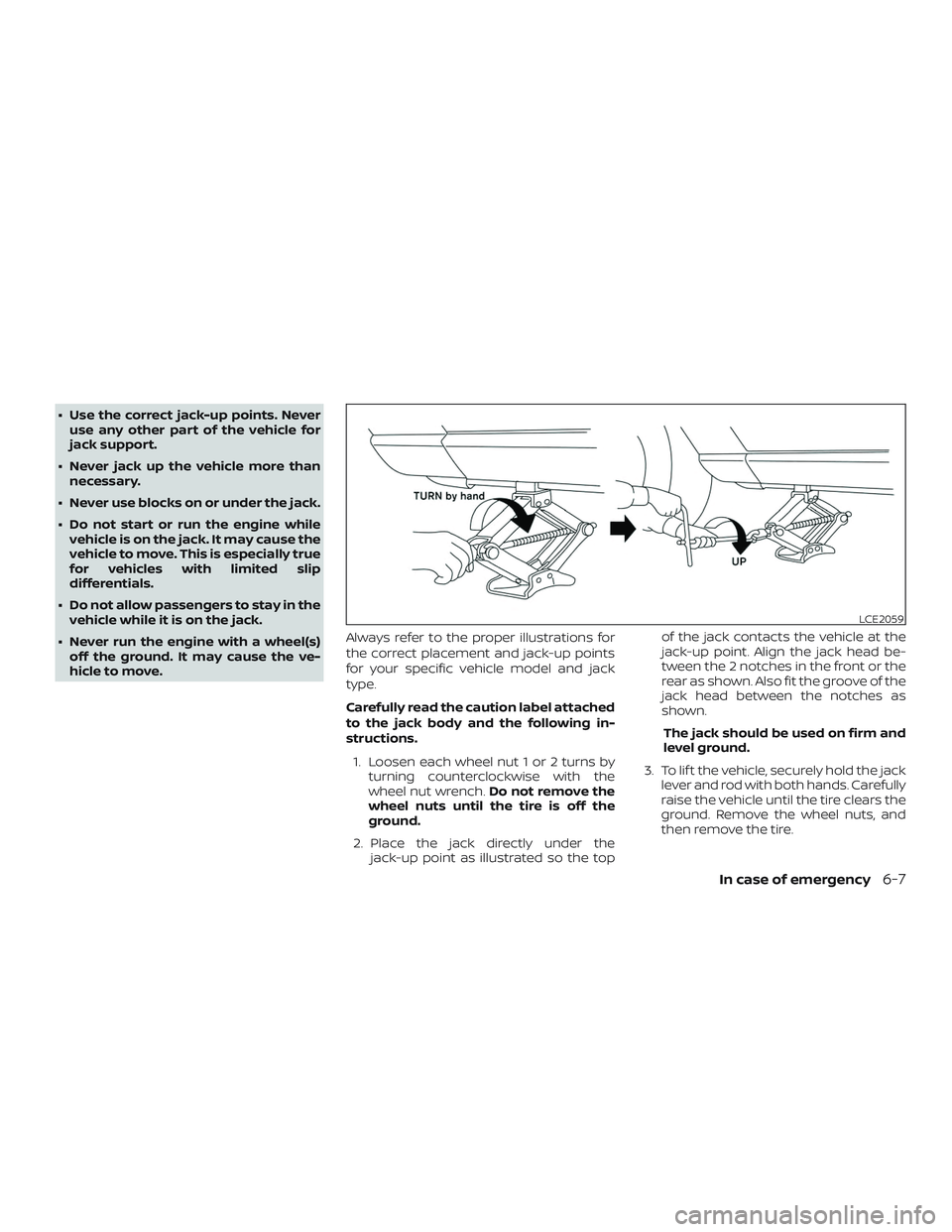
hicle to move. Always refer to the proper illustrations for
the correct placement and jack-up points
for your specific vehicle model and jack
type.
Carefully read the caution label attached
to the jack body and the following in-
structions.
1. Loosen each wheel nut 1 or 2 turns by turning counterclockwise with the
wheel nut wrench. Do not remove the
wheel nuts until the tire is off the
ground.
2. Place the jack directly under the jack-up point as illustrated so the top of the jack contacts the vehicle at the
jack-up point. Align the jack head be-
tween the 2 notches in the front or the
rear as shown. Also fit the groove of the
jack head between the notches as
shown.
The jack should be used on firm and
level ground.
3. To lif t the vehicle, securely hold the jack lever and rod with both hands. Carefully
raise the vehicle until the tire clears the
ground. Remove the wheel nuts, and
then remove the tire.
LCE2059
In case of emergency6-7
Page 340 of 435
6. Af ter the engine cools down, check thecoolant level in the engine coolant res-
ervoir with the engine running. Add
coolant to the engine coolant reservoir,
if necessary. Have your vehicle re-
paired. It is recommended that you visit
a NISSAN dealer for this service. When towing your vehicle, all State (Provin-
cial in Canada) and local regulations for
towing must be followed. Incorrect towing
equipment could damage your vehicle.
Towing instructions are available from a
NISSAN dealer. Local service operators are
generally familiar with the applicable laws
and procedures for towing. To assure
proper towing and to prevent accidental
damage to your vehicle, NISSAN recom-
mends having a service operator tow your
vehicle. It is advisable to have the service
operator carefully read the following pre-
cautions:
WARNING
∙ Never ride in a vehicle that is being
towed.
∙ Never get under your vehicle af ter it has been lif ted by a tow truck.
CAUTION
∙ When towing, make sure that thetransmission, axles, steering system
and powertrain are in working condi-
tion. If any of these conditions apply,
dollies or a flatbed tow truck must be
used.
∙ Always attach safety chains before towing.
For additional information, refer to “Flat
towing” in the “Technical and consumer in-
formation” section of this manual.
TOWING RECOMMENDED BY
NISSAN
NISSAN recommends towing your vehicle
based upon the type of drivetrain. For addi-
tional information, refer to the diagrams in
this section to ensure that your vehicle is
properly towed.
TOWING YOUR VEHICLE
6-12In case of emergency