propilot NISSAN LEAF 2019 Owner´s Manual
[x] Cancel search | Manufacturer: NISSAN, Model Year: 2019, Model line: LEAF, Model: NISSAN LEAF 2019Pages: 610, PDF Size: 7.11 MB
Page 14 of 610
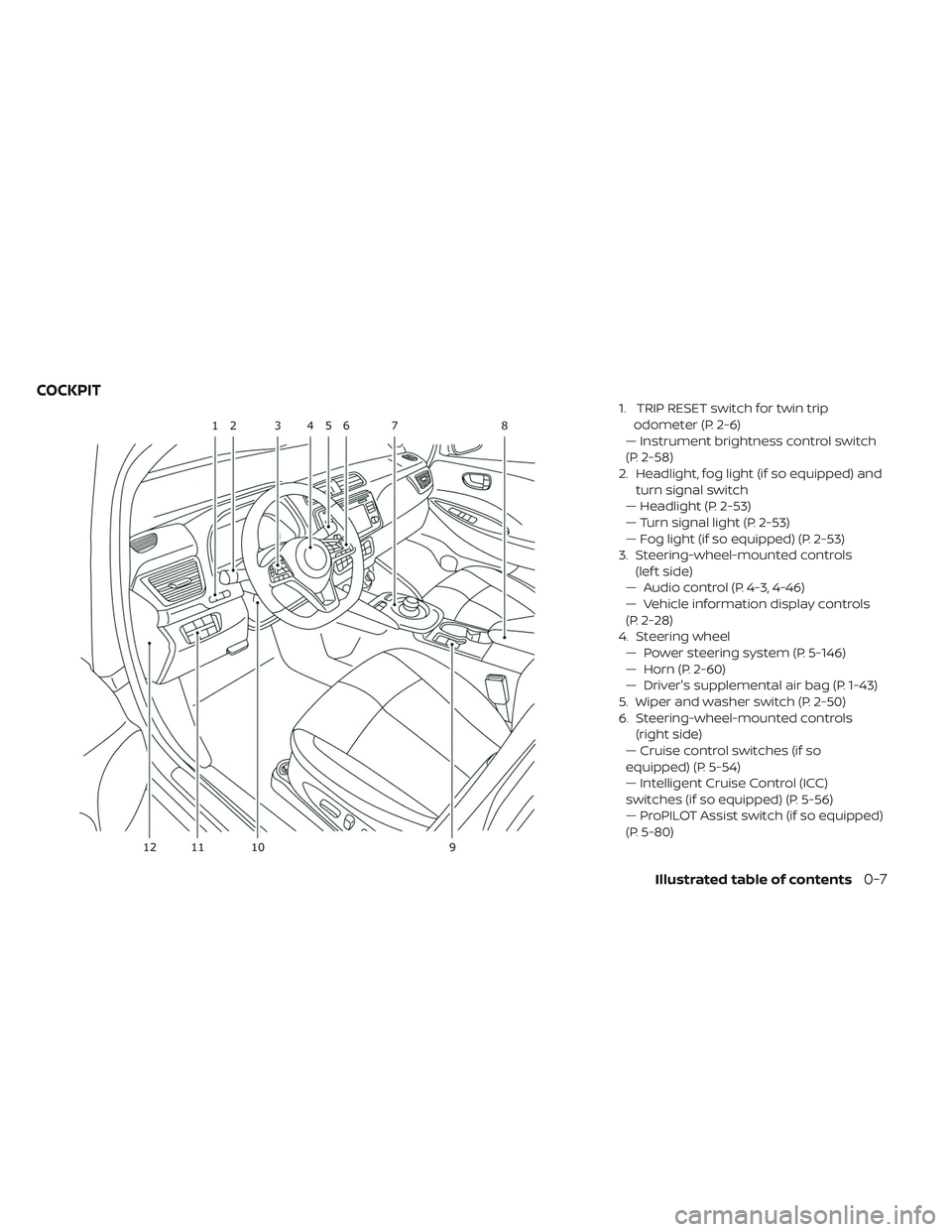
1. TRIP RESET switch for twin tripodometer (P. 2-6)
— Instrument brightness control switch
(P. 2-58)
2. Headlight, fog light (if so equipped) and turn signal switch
— Headlight (P. 2-53)
— Turn signal light (P. 2-53)
— Fog light (if so equipped) (P. 2-53)
3. Steering-wheel-mounted controls (lef t side)
— Audio control (P. 4-3, 4-46)
— Vehicle information display controls
(P. 2-28)
4. Steering wheel — Power steering system (P. 5-146)
— Horn (P. 2-60)
— Driver's supplemental air bag (P. 1-43)
5. Wiper and washer switch (P. 2-50)
6. Steering-wheel-mounted controls (right side)
— Cruise control switches (if so
equipped) (P. 5-54)
— Intelligent Cruise Control (ICC)
switches (if so equipped) (P. 5-56)
— ProPILOT Assist switch (if so equipped)
(P. 5-80)
COCKPIT
Illustrated table of contents0-7
Page 176 of 610
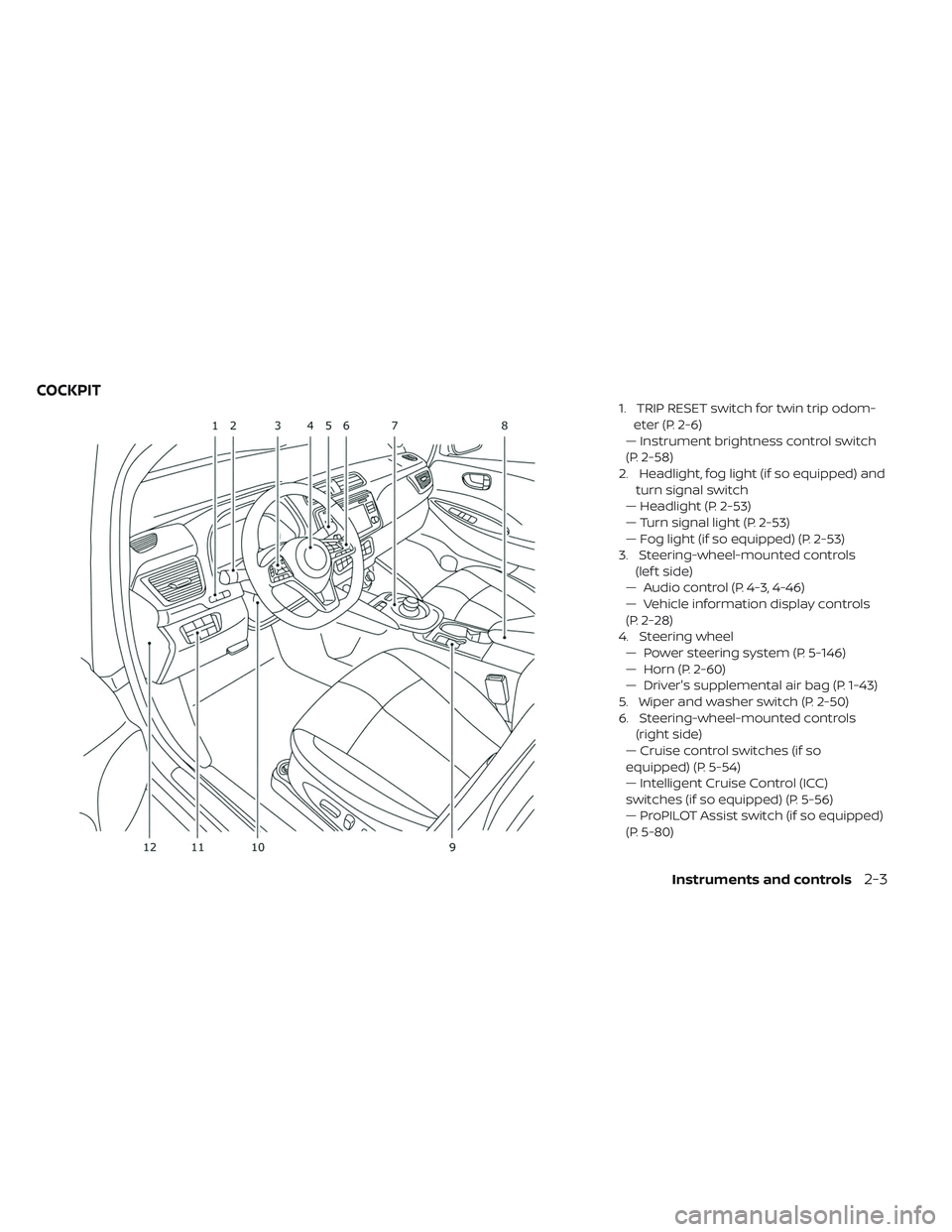
1. TRIP RESET switch for twin trip odom-eter (P. 2-6)
— Instrument brightness control switch
(P. 2-58)
2. Headlight, fog light (if so equipped) and turn signal switch
— Headlight (P. 2-53)
— Turn signal light (P. 2-53)
— Fog light (if so equipped) (P. 2-53)
3. Steering-wheel-mounted controls (lef t side)
— Audio control (P. 4-3, 4-46)
— Vehicle information display controls
(P. 2-28)
4. Steering wheel — Power steering system (P. 5-146)
— Horn (P. 2-60)
— Driver's supplemental air bag (P. 1-43)
5. Wiper and washer switch (P. 2-50)
6. Steering-wheel-mounted controls (right side)
— Cruise control switches (if so
equipped) (P. 5-54)
— Intelligent Cruise Control (ICC)
switches (if so equipped) (P. 5-56)
— ProPILOT Assist switch (if so equipped)
(P. 5-80)
COCKPIT
Instruments and controls2-3
Page 203 of 610
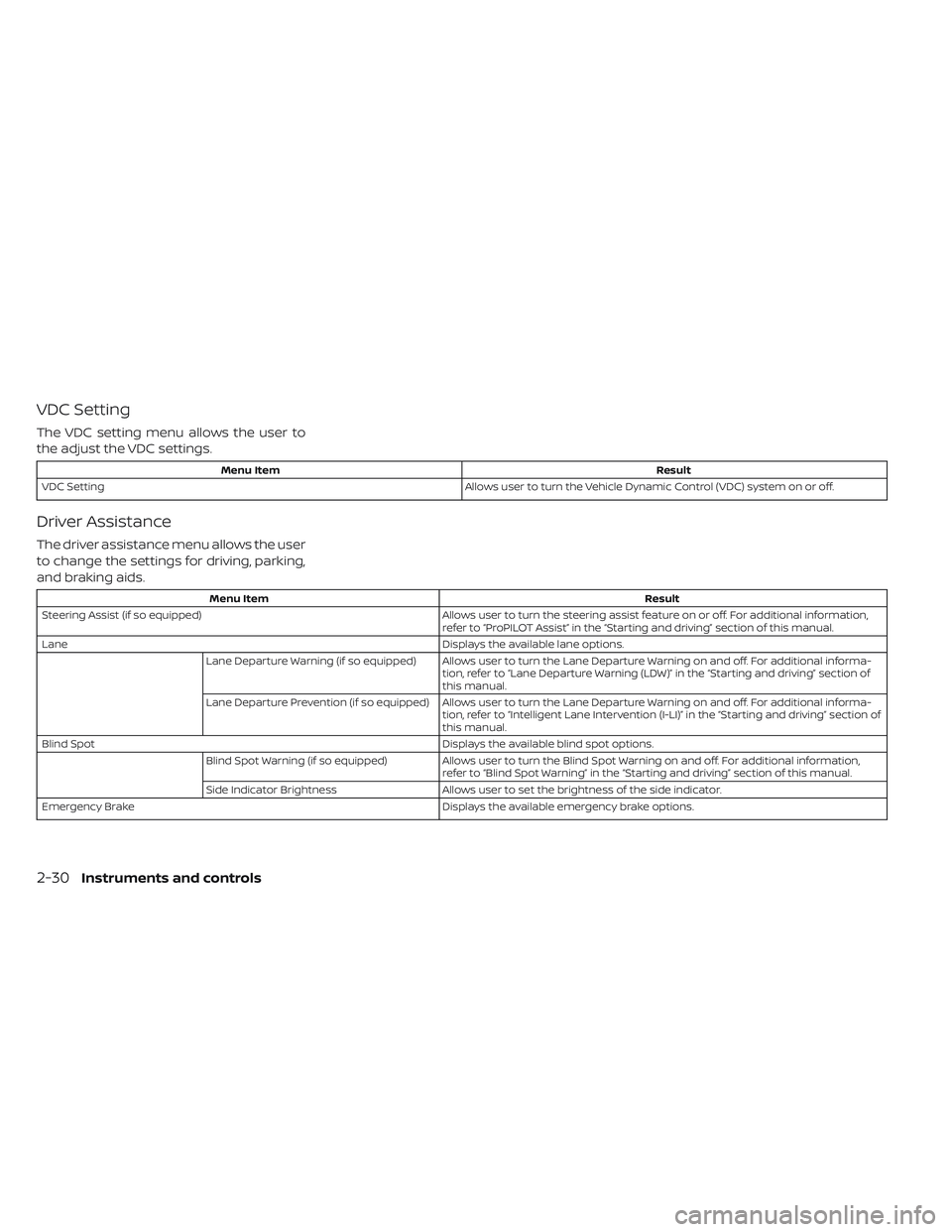
VDC Setting
The VDC setting menu allows the user to
the adjust the VDC settings.
Menu ItemResult
VDC Setting Allows user to turn the Vehicle Dynamic Control (VDC) system on or off.
Driver Assistance
The driver assistance menu allows the user
to change the settings for driving, parking,
and braking aids.
Menu Item Result
Steering Assist (if so equipped) Allows user to turn the steering assist feature on or off. For additional information,
refer to “ProPILOT Assist” in the “Starting and driving” section of this manual.
Lane Displays the available lane options.
Lane Departure Warning (if so equipped) Allows user to turn the Lane Departure Warning on and off. For additional informa- tion, refer to “Lane Departure Warning (LDW)” in the “Starting and driving” section of
this manual.
Lane Departure Prevention (if so equipped) Allows user to turn the Lane Departure Warning on and off. For additional informa- tion, refer to “Intelligent Lane Intervention (I-LI)” in the “Starting and driving” section of
this manual.
Blind Spot Displays the available blind spot options.
Blind Spot Warning (if so equipped) Allows user to turn the Blind Spot Warning on and off. For additional information,
refer to “Blind Spot Warning” in the “Starting and driving” section of this manual.
Side Indicator Brightness Allows user to set the brightness of the side indicator.
Emergency Brake Displays the available emergency brake options.
2-30Instruments and controls
Page 211 of 610
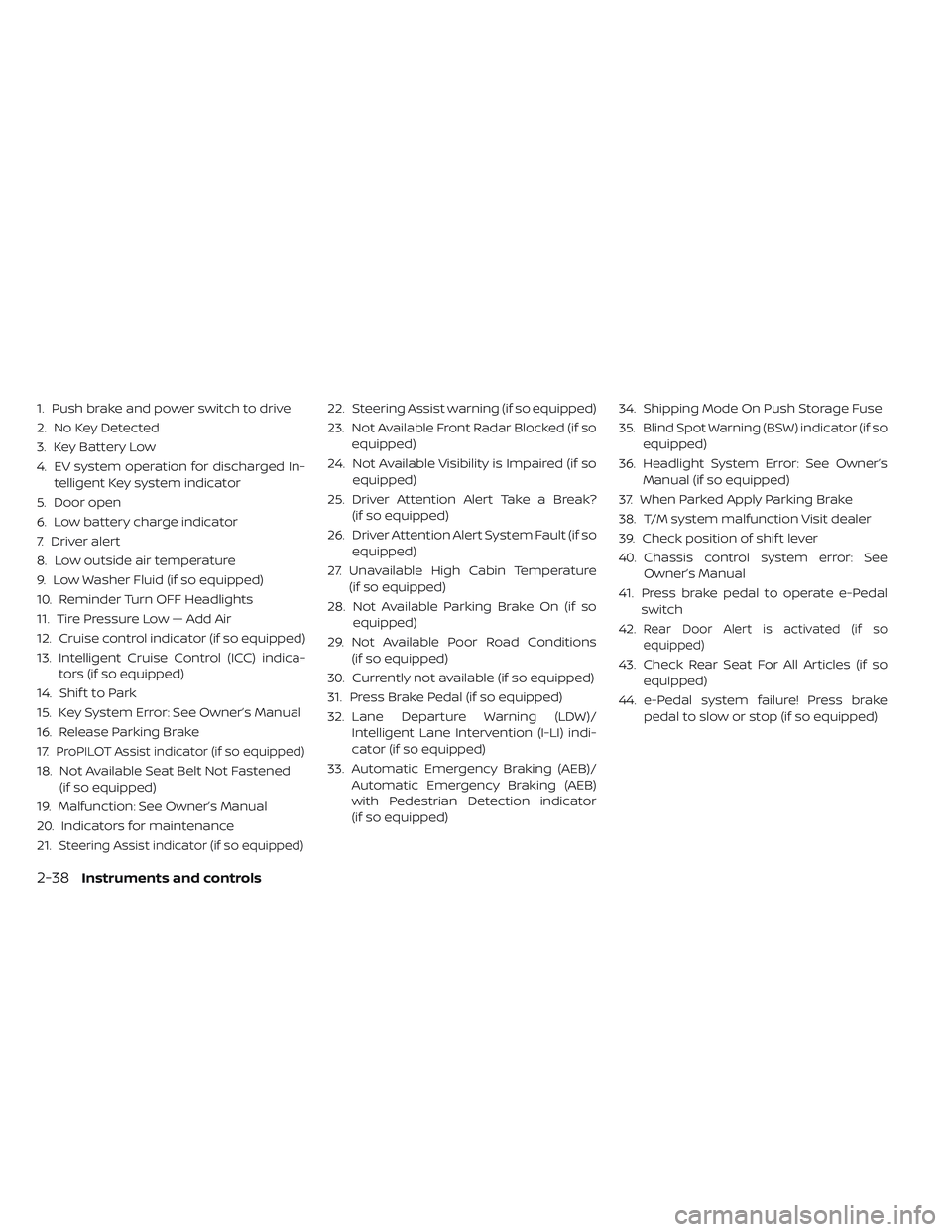
1. Push brake and power switch to drive
2. No Key Detected
3. Key Battery Low
4. EV system operation for discharged In-telligent Key system indicator
5. Door open
6. Low battery charge indicator
7. Driver alert
8. Low outside air temperature
9. Low Washer Fluid (if so equipped)
10. Reminder Turn OFF Headlights
11. Tire Pressure Low — Add Air
12. Cruise control indicator (if so equipped)
13. Intelligent Cruise Control (ICC) indica- tors (if so equipped)
14. Shif t to Park
15. Key System Error: See Owner’s Manual
16. Release Parking Brake
17.
ProPILOT Assist indicator (if so equipped)
18. Not Available Seat Belt Not Fastened (if so equipped)
19. Malfunction: See Owner’s Manual
20. Indicators for maintenance
21.
Steering Assist indicator (if so equipped)
22. Steering Assist warning (if so equipped)
23. Not Available Front Radar Blocked (if so equipped)
24. Not Available Visibility is Impaired (if so equipped)
25. Driver Attention Alert Take a Break? (if so equipped)
26. Driver Attention Alert System Fault (if so equipped)
27. Unavailable High Cabin Temperature (if so equipped)
28. Not Available Parking Brake On (if so equipped)
29. Not Available Poor Road Conditions (if so equipped)
30. Currently not available (if so equipped)
31. Press Brake Pedal (if so equipped)
32. Lane Departure Warning (LDW)/ Intelligent Lane Intervention (I-LI) indi-
cator (if so equipped)
33. Automatic Emergency Braking (AEB)/ Automatic Emergency Braking (AEB)
with Pedestrian Detection indicator
(if so equipped) 34. Shipping Mode On Push Storage Fuse
35. Blind Spot Warning (BSW) indicator (if so
equipped)
36. Headlight System Error: See Owner’s Manual (if so equipped)
37. When Parked Apply Parking Brake
38. T/M system malfunction Visit dealer
39. Check position of shif t lever
40. Chassis control system error: See Owner’s Manual
41. Press brake pedal to operate e-Pedal switch
42.
Rear Door Alert is activated (if so
equipped)
43. Check Rear Seat For All Articles (if so equipped)
44. e-Pedal system failure! Press brake pedal to slow or stop (if so equipped)
2-38Instruments and controls
Page 214 of 610
Intelligent Cruise Control (ICC)
indicators (if so equipped)
This indicator shows the Intelligent Cruise
Control (ICC) system status. The status is
shown by the color. For additional informa-
tion, refer to “Intelligent Cruise Control (ICC)”
in the “Starting and driving” section of this
manual.
Shif t to Park
This warning appears alternately with
door/rear hatch open warning when the
driver's door is opened with the shif t posi-
tion in any position other than the P (Park)
position. If this warning appears, push the P
(Park) position switch and place in the P
(Park) position.
For additional information, refer to “Door
open” in this section.
Key System Error: See Owner’s
Manual
Af ter the power switch is pushed to the ON
position, this light comes on for about
2 seconds and then turns off.The Key System Error message warns of a
malfunction with the Intelligent Key sys-
tem. If the light comes on while the motor is
stopped, it may be impossible to start the
motor.
If the light comes on while the motor is
running, you can drive the vehicle. However,
have it repaired as soon as possible. It is
recommended that you visit a NISSAN cer-
tified LEAF dealer for this service.
Release Parking Brake
This warning appears when the vehicle
speed is above 4 mph (7 km/h) (models not
equipped with electronic parking brake) or
2 mph (4 km/h) (models equipped with
electronic parking brake) and the parking
brake is applied. Stop the vehicle and re-
lease the parking brake.
ProPILOT Assist indicator (if so
equipped)
This indicator appears when the ProPILOT
Assist system is engaged. For additional in-
formation, refer to “ProPILOT Assist” in the
“Starting and driving” section of this manual.
Not Available Seat Belt Not
Fastened (if so equipped)
This indicator appears when the ProPILOT
Assist system will not engage because the
driver’s seat belt is not fastened. For addi-
tional information, refer to “ProPILOT Assist”
in the “Starting and driving” section of this
manual.
Malfunction: See Owner’s Manual
This warning appears when one or more of
the following systems (if so equipped) is
not functioning properly:
• Lane Departure Warning (LDW)
• Intelligent Lane Intervention (I-LI)
• Blind Spot Warning (BSW)
• Rear Cross Traffic Alert (RCTA)
• ProPILOT Assist
If one or more of these warning appears,
have the system checked. It is recom-
mended that you visit a NISSAN certified
LEAF dealer for this service.
Instruments and controls2-41
Page 215 of 610
Indicators for maintenance
These indicators appear when the cus-
tomer set distance comes for replacing
tires or other maintenance items. You can
set or reset the distance for replacing tires
and other maintenance items.
WARNING
The tire replacement indicator is not a
substitute for regular tire checks, in-
cluding tire pressure checks. For addi-
tional information, refer to “Changing
wheels and tires” in the “Maintenance
and do-it-yourself ” section of this
manual. Many factors including tire in-
flation, alignment, driving habits and
road conditions affect tire wear and
when tires should be replaced. Setting
the tire replacement indicator for a
certain driving distance does not
mean your tires will last that long. Use
the tire replacement indicator as a
guide only and always perform regular
tire checks. Failure to perform regular
tire checks, including tire pressure
checks could result in tire failure. Seri-
ous vehicle damage could occur and
may lead to a collision, which could re-
sult in serious personal injury or death. For scheduled maintenance items and in-
tervals, refer to the NISSAN Service and
Maintenance Guide.
Steering Assist indicator (if so
equipped)
This indicator appears when the Steering
Assist system is engaged. For additional
information, refer to “ProPilot Assist” in the
“Starting and driving” section of this
manual.
Steering Assist warning (if so
equipped)
This message may appear when the Steer-
ing Assist system is engaged.
It will be displayed under the following con-
dition:
•
When not holding the steering wheel or
when there is no steering wheel operation.
Please hold the steering wheel immediately.
When the steering operation is detected, the
warning turns off and the steering assist
function is automatically restored.
Not Available Front Radar Blocked
(if so equipped)
This message appears when one or more
of the following systems become unavail-
able due to an obstruction of the front ra-
dar.
• Intelligent Cruise Control (ICC)
• Intelligent Forward Collision Warning (I-FCW)
• Automatic Emergency Braking (AEB)
• Automatic Emergency Braking (AEB) with Pedestrian Detection
For additional information, refer to “Intelli-
gent Cruise Control (ICC)” , “Intelligent For-
ward Collision Warning (I-FCW)” , “Automatic
Emergency Braking (AEB)” , or “Automatic
Emergency Braking (AEB) with Pedestrian
Detection” in the “Starting and driving” sec-
tion of this manual.
2-42Instruments and controls
Page 216 of 610
Not Available Visibility is Impaired
(if so equipped)
This message may appear when the Intel-
ligent Cruise Control (ICC) (with ProPILOT
Assist) system is engaged.
Under the following conditions, the ICC
(with ProPILOT Assist) system is automati-
cally canceled:
• The camera area of the windshield isfogged up or covered with dirt, water, ice,
snow, etc.
• Strong light, such as sunlight or high beams from oncoming vehicles, enters
the front camera
• When the wiper (HI) operates
The system will be available when the
above conditions no longer exist.
If the warning message continues to ap-
pear, stop the vehicle in a safe location, turn
the EV system off and clean the windshield.
Driver Attention Alert Take a
Break? (if so equipped)
This alert appears when the system has
detected the driver may be displaying fa-
tigue or a lack of attention.
Driver Attention Alert System
Fault (if so equipped)
This warning appears when the Intelligent
Driver Alertness (I-DA) system is not func-
tioning properly.
For additional information, refer to “Intelli-
gent Driver Alertness (I-DA)” in the “Starting
and driving” section of this manual.
Unavailable High Cabin
Temperature (if so equipped)
This message appears when the camera
detects an interior temperature of more
than approximately 104°F (40°C).
For additional information, refer to “Lane
Departure Warning (LDW)” in the “Starting
and driving” section of this manual.
Not Available Parking Brake On (if
so equipped)
This message may appear when the Intel-
ligent Cruise Control (ICC) (with ProPILOT
Assist) system is engaged.
Under the following conditions, the ICC
(with ProPILOT Assist) system is automati-
cally canceled:
• The electronic parking brake is applied. The above system cannot be used when
the electronic parking brake is activated.
Not Available Poor Road
Conditions (if so equipped)
This message may appear when the Intel-
ligent Cruise Control (ICC) (with ProPILOT
Assist) system or the ICC is engaged.
Under the following conditions, the ICC
(with ProPILOT Assist) system or the ICC
system is automatically canceled:
• When the VDC operates.
• When a wheel slips.
The above system cannot be used in some
situations (VDC operates and wheel slip.)
Currently not available (if so
equipped)
This message may appear when the Intel-
ligent Cruise Control (ICC) (with ProPILOT
Assist) system or the ICC is engaged.
Under the following conditions, the ICC
(with ProPILOT Assist) system or the ICC
system is automatically canceled:
• When the VDC operates.
• When a wheel slips.
Instruments and controls2-43
Page 236 of 610
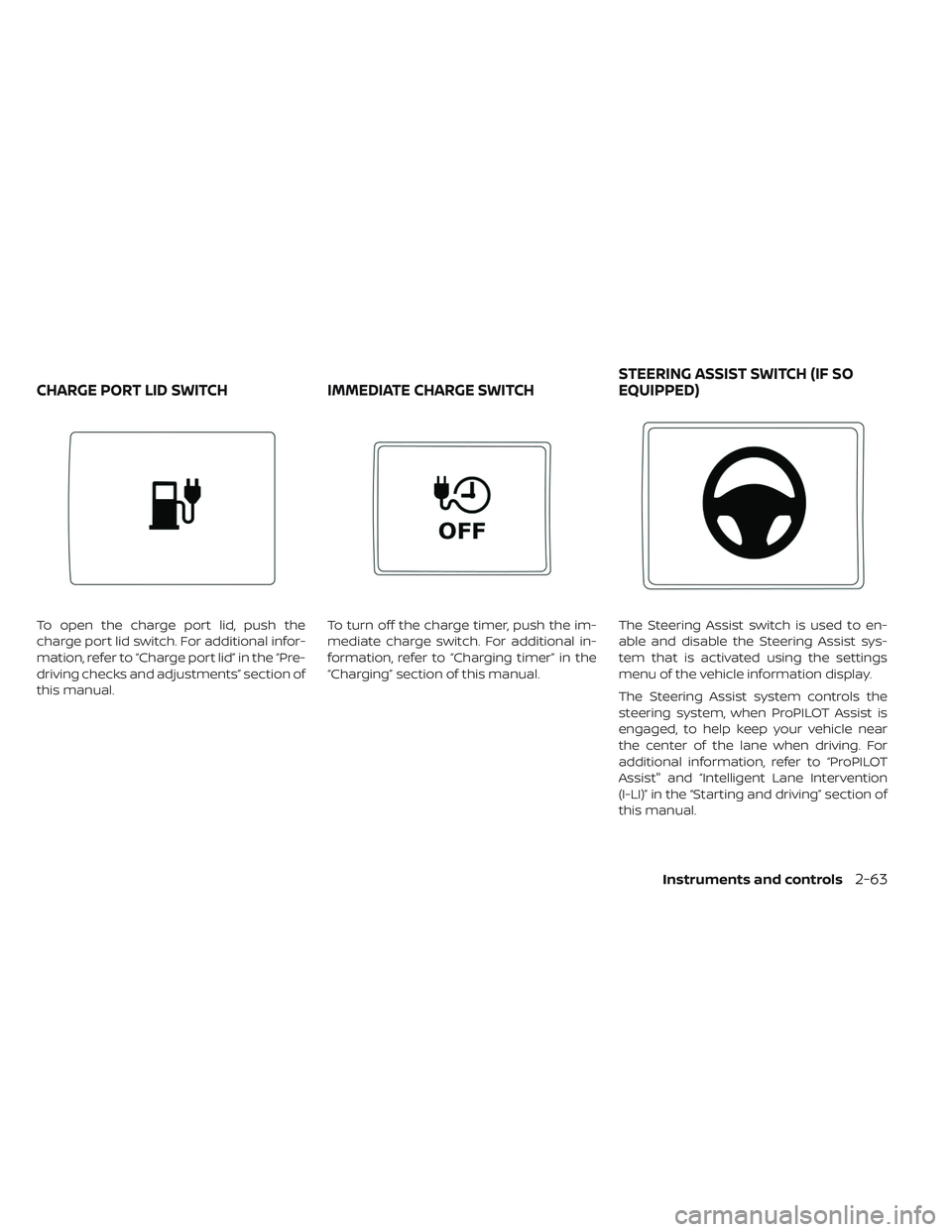
To open the charge port lid, push the
charge port lid switch. For additional infor-
mation, refer to “Charge port lid” in the “Pre-
driving checks and adjustments” section of
this manual.To turn off the charge timer, push the im-
mediate charge switch. For additional in-
formation, refer to “Charging timer” in the
“Charging” section of this manual.
The Steering Assist switch is used to en-
able and disable the Steering Assist sys-
tem that is activated using the settings
menu of the vehicle information display.
The Steering Assist system controls the
steering system, when ProPILOT Assist is
engaged, to help keep your vehicle near
the center of the lane when driving. For
additional information, refer to “ProPILOT
Assist" and “Intelligent Lane Intervention
(I-LI)” in the “Starting and driving” section of
this manual.
CHARGE PORT LID SWITCH
IMMEDIATE CHARGE SWITCHSTEERING ASSIST SWITCH (IF SO
EQUIPPED)
Instruments and controls2-63
Page 361 of 610
System maintenance................5-45
Rear Cross Traffic Alert (RCTA) (if so equipped) . . .5-46RCTA system operation ...............5-47
How to enable/disable the RCTA system . . .5-49
RCTA system limitations ..............5-50
System temporarily unavailable .........5-52
System maintenance ................5-52
Cruise control (if so equipped) ............5-54
Precautions on cruise control ...........5-54
Cruise control operations .............5-54
Intelligent Cruise Control (ICC) (for vehicles
without ProPILOT Assist) (if so equipped) .....5-56
How to select the cruise control mode .....5-58
Vehicle-to-vehicle distance control mode . . .5-58
Vehicle-to-vehicle distance control mode
operation ........................5-59
Vehicle-to-vehicle distance control mode
switches .........................5-61
Vehicle-to-vehicle distance control mode
limitations .......................5-68
System temporarily unavailable .........5-72
System maintenance ................5-74
Conventional (fixed speed) cruise control
mode .......................... .5-75ProPILOT Assist (if so equipped)
...........5-80
ProPILOT Assist system operation ........5-82
Turning the conventional (fixed speed)
cruise control mode on ...............5-85
Operating ProPILOT Assist .............5-86
How to enable/disable the Steering Assist . . .5-90
Intelligent Cruise Control (ICC)
(for vehicles with ProPILOT Assist) ........5-91
Steering Assist ................... .5-102
Conventional (fixed speed) cruise control
mode ......................... .5-108
Automatic Emergency Braking (AEB)
(if so equipped) ......................5-112
AEB system operation ...............5-113
Turning the AEB system on/off ..........5-114
AEB system limitations ...............5-115
System temporarily unavailable .........5-116
System malfunction ................ .5-117
System maintenance ................5-117
Automatic Emergency Braking (AEB) with
Pedestrian Detection (if so equipped) .......5-119
AEB with Pedestrian Detection system
operation .......................5-120
Page 383 of 610
When restarting the vehicle:
• Af ter the vehicle comes to a stop by thee-Pedal system function, the vehicle re-
mains at a stop as long as the accelerator
pedal is released.
• The vehicle’s brake lights remain illumi- nated when the vehicle is stopped by the
e-Pedal system.
• Depress the accelerator pedal to start the vehicle again from a stop.
When the vehicle needs to be stopped for a
certain period of time, place the vehicle in
the P (Park) position and apply the parking
brake.
CAUTION
When the e-Pedal system is turned off,
remember to depress the brake pedal
firmly to prevent the vehicle from mov-
ing with the shif t lever in any position
other than P (Park). When backing up the vehicle:
• With the shif t lever in the R (Reverse)
position, operating the accelerator pedal
adjusts the vehicle speed (acceleration,
deceleration, or stopping) in the same way
as the D (Drive) position.
Other driving tips for the e-Pedal
system:
• For smooth deceleration when the e-Pedal system is activated, it is recom-
mended that you adjust the accelerator
pedal by either depressing or returning,
not releasing, the pedal.
• Moving the shif t lever from D (Drive) to B mode or from B mode to D (Drive) does
not affect the e-Pedal system feature.
• The e-Pedal system does not function un- der the following conditions: – When the vehicle is placed in the P(Park) or N (Neutral) position
– When cruise control (if so equipped), ProPILOT Assist (if so equipped), or
Automatic Emergency Braking (if so
equipped) operates
E-PEDAL SYSTEM LIMITATIONS
WARNING
Listed below are the system limita-
tions for the e-Pedal system. Failure to
operate the vehicle in accordance with
these system limitations could result
in serious injury or death.
• If the “Press brake pedal to prevent rolling” warning message appears in
the vehicle information display, de-
press the brake pedal. The vehicle
may start moving.
• If the deceleration force provided by the e-Pedal system is not sufficient,
depress the brake pedal.
• If the vehicle starts to move while it is stopped by the e-Pedal system,
depress the brake pedal immedi-
ately.
• Under the following conditions, place the vehicle in the P (Park) posi-
tion and make sure the parking
brake is securely applied. The ve-
hicle may start moving suddenly.
– When getting in and out of the ve-hicle
– When loading and unloading the vehicle
5-24Starting and driving