parking brake NISSAN LEAF 2019 Owner´s Manual
[x] Cancel search | Manufacturer: NISSAN, Model Year: 2019, Model line: LEAF, Model: NISSAN LEAF 2019Pages: 610, PDF Size: 7.11 MB
Page 82 of 610
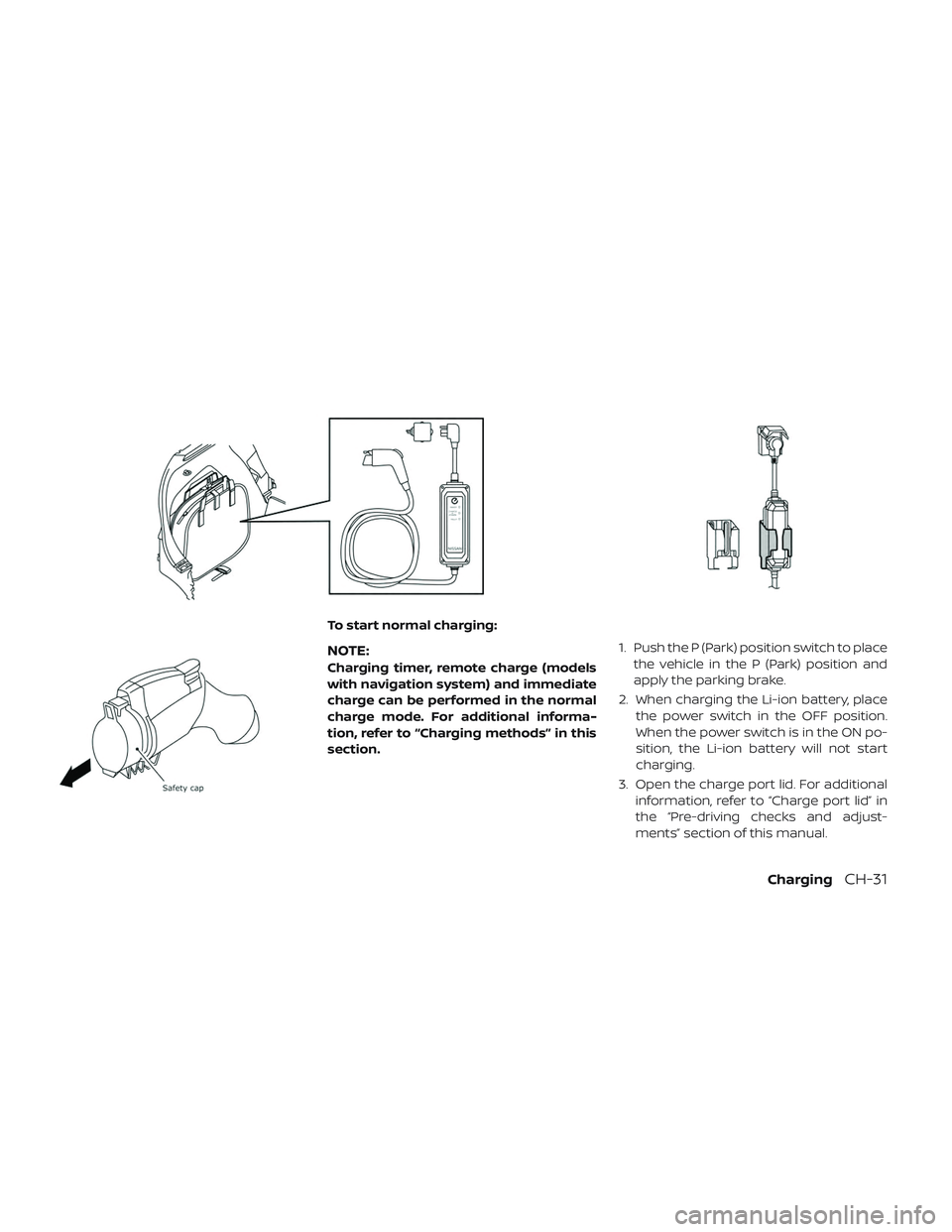
To start normal charging:
NOTE:
Charging timer, remote charge (models
with navigation system) and immediate
charge can be performed in the normal
charge mode. For additional informa-
tion, refer to “Charging methods” in this
section.1. Push the P (Park) position switch to place
the vehicle in the P (Park) position and
apply the parking brake.
2. When charging the Li-ion battery, place the power switch in the OFF position.
When the power switch is in the ON po-
sition, the Li-ion battery will not start
charging.
3. Open the charge port lid. For additional information, refer to “Charge port lid” in
the “Pre-driving checks and adjust-
ments” section of this manual.
ChargingCH-31
Page 87 of 610
WARNING
• Always use a quick charger that is compatible with the LEAF. Using an
incompatible quick charger may
cause a fire or malfunction resulting
in serious personal injury or death.
• Before starting the quick charge, carefully read the instructions pro-
vided on the quick charger and
make sure the quick charge connec-
tor is properly connected and
locked. Failure to connect or operate
the quick charger correctly could
cause damage to the vehicle or the
charging equipment.
NOTE:
•Quick charging is possible (even several
times a day) if the battery temperature
is not near the red zone. If the battery
temperature reaches the red zone, in
order to protect the battery, quick
charging is not allowed and the power
limitation mode will be triggered. For
additional information, refer to “Li-ion
battery temperature gauge” in the “EV
Overview” and “Instruments and con-
trols” section of this manual. •
When the Li-ion battery available
charge and the Li-ion battery capacity
are shown on the quick charger unit, the
readings may differ from the Li-ion bat-
tery available charge/capacity reading
shown on the vehicle’s display.
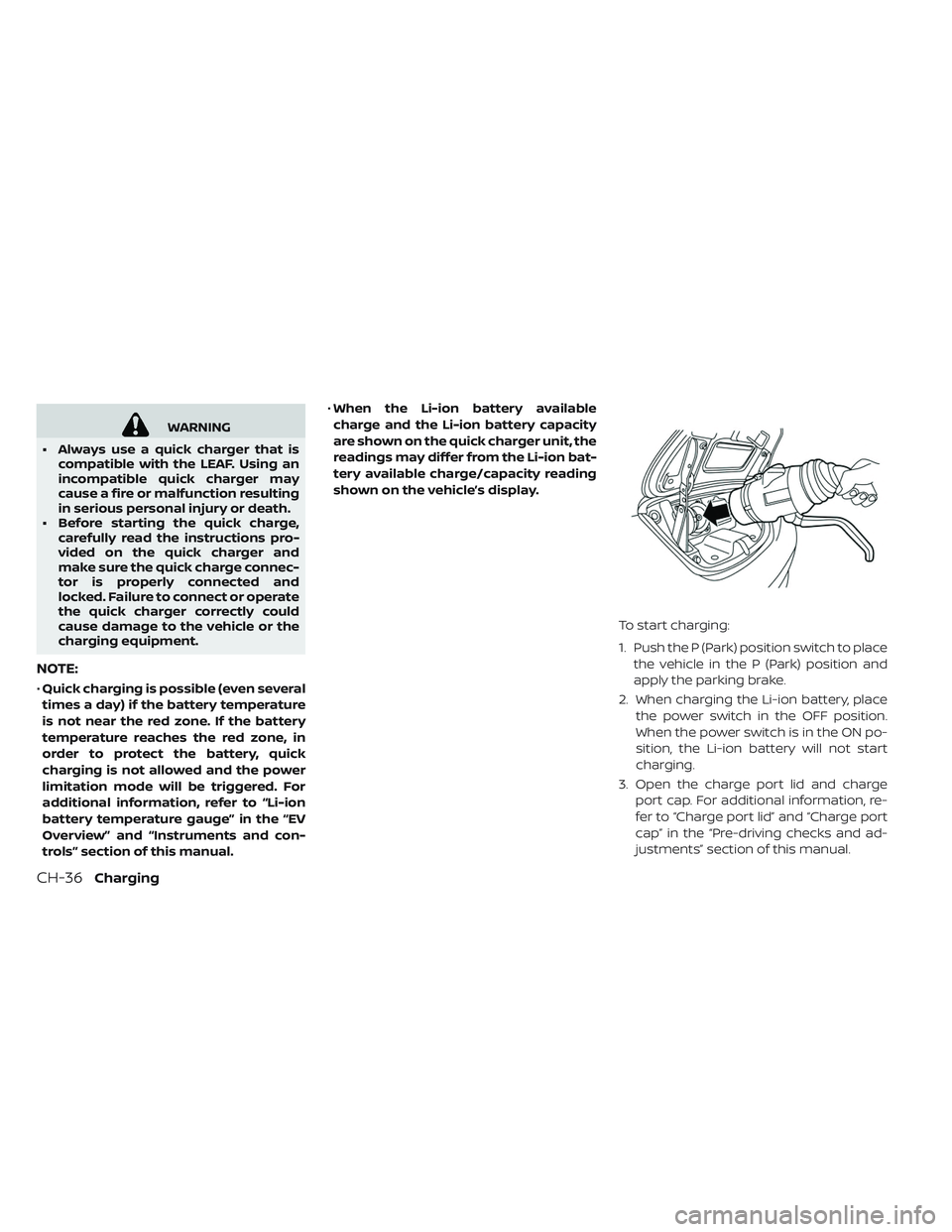
To start charging:
1. Push the P (Park) position switch to placethe vehicle in the P (Park) position and
apply the parking brake.
2. When charging the Li-ion battery, place the power switch in the OFF position.
When the power switch is in the ON po-
sition, the Li-ion battery will not start
charging.
3. Open the charge port lid and charge port cap. For additional information, re-
fer to “Charge port lid” and “Charge port
cap” in the “Pre-driving checks and ad-
justments” section of this manual.
CH-36Charging
Page 90 of 610
WARNING
• Always use a quick charger/V2X de- vice that is compatible with the LEAF.
Using an incompatible quick
charger/V2X device may cause a fire
or malfunction resulting in serious
personal injury or death.
• Before starting the quick charge/ V2X charge, carefully read the in-
structions provided on the quick
charger/V2X device and make sure
the quick charge connector is prop-
erly connected and locked. Failure to
connect or operate the quick char-
ger correctly could cause damage to
the vehicle or the charging equip-
ment.
NOTE:
•Charging/discharging using quick
charge port is possible (even several
times a day) if the battery temperature
is not near the red zone. If the battery
temperature reaches the red zone, in
order to protect the battery, charging/
discharging is not allowed and the
power limitation mode will be triggered.
For additional information, refer to “Li-
ion battery temperature gauge” in the
“EV Overview” and “Instruments and
controls” section of this manual.
• When the Li-ion battery available
charge/discharge and the Li-ion bat-
tery capacity are shown on the quick
charger unit or V2X device, the readings
may differ from the Li-ion battery avail-
able charge/discharge/capacity read-
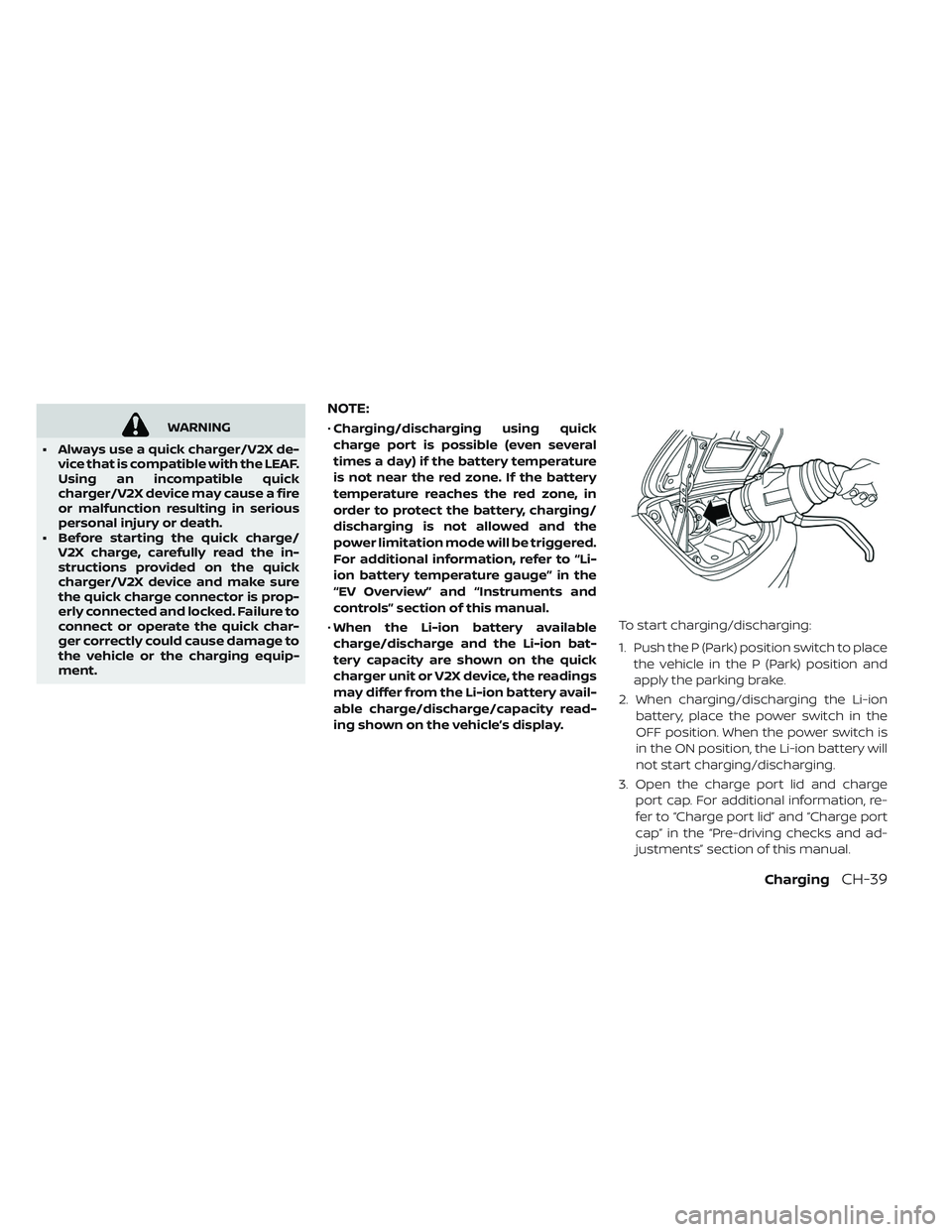
ing shown on the vehicle’s display. To start charging/discharging:
1. Push the P (Park) position switch to place
the vehicle in the P (Park) position and
apply the parking brake.
2. When charging/discharging the Li-ion battery, place the power switch in the
OFF position. When the power switch is
in the ON position, the Li-ion battery will
not start charging/discharging.
3. Open the charge port lid and charge port cap. For additional information, re-
fer to “Charge port lid” and “Charge port
cap” in the “Pre-driving checks and ad-
justments” section of this manual.
ChargingCH-39
Page 177 of 610
— Bluetooth® Hands-Free Phone System
control (P. 4-3, 4-68)
7. Shif t lever (P. 5-15) — ECO switch (P. 2-60)
— e-Pedal switch (P. 5-22)
8. Console box (P. 2-66)
9. Parking brake (switch type) (if so equipped) (P. 5-19)
10. Tilting steering wheel lever (P. 3-23)
11. Charge port lid switch (P. 3-20) — Immediate charge switch (P. 2-63)
— Heated steering wheel switch (if so
equipped) (P. 2-62)
— Steering Assist switch (if so equipped)
(P. 5-80)
12. Fuse box cover (P. 8-18)
2-4Instruments and controls
Page 189 of 610
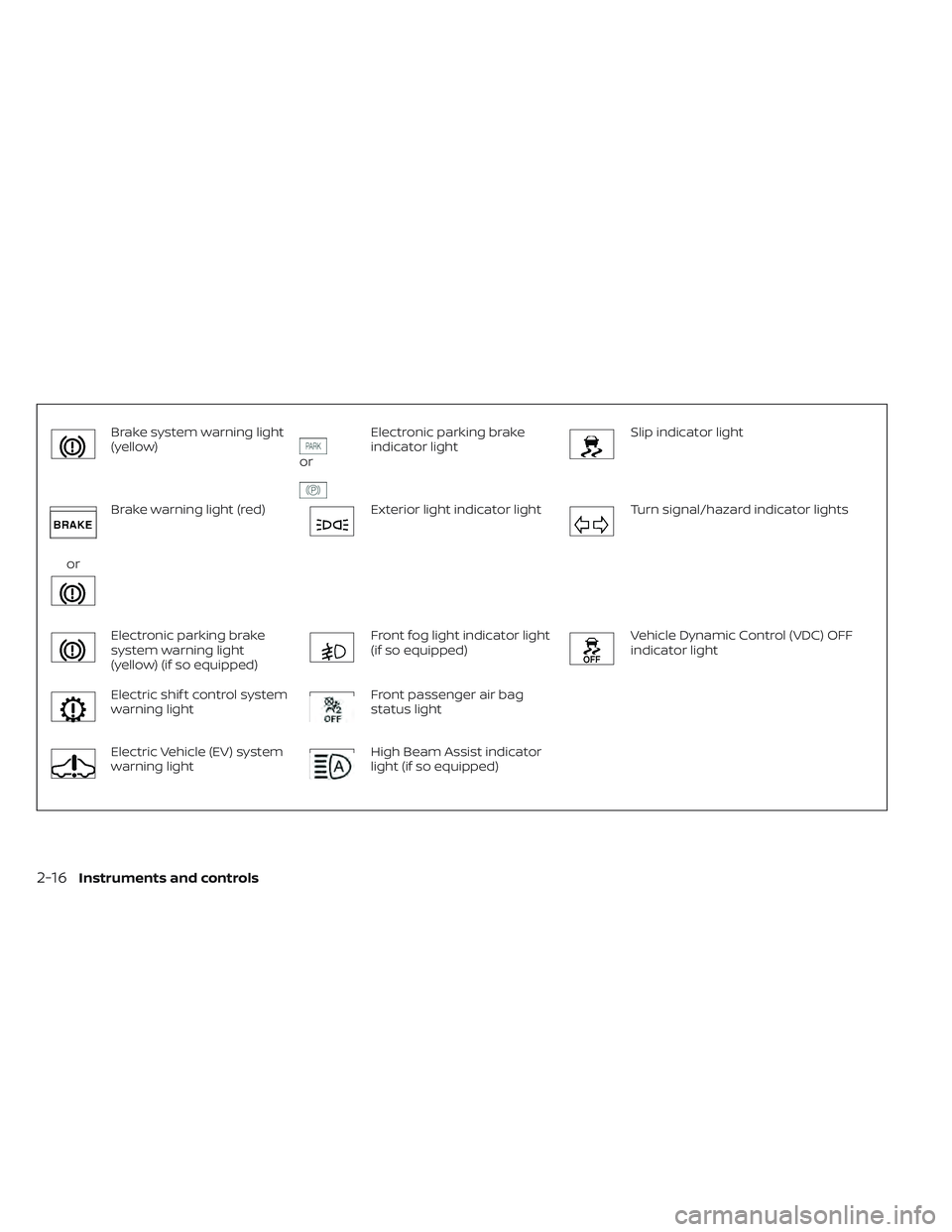
Brake system warning light
(yellow)
or
Electronic parking brake
indicator lightSlip indicator light
or
Brake warning light (red)Exterior light indicator lightTurn signal/hazard indicator lights
Electronic parking brake
system warning light
(yellow) (if so equipped)Front fog light indicator light
(if so equipped)Vehicle Dynamic Control (VDC) OFF
indicator light
Electric shif t control system
warning lightFront passenger air bag
status light
Electric Vehicle (EV) system
warning lightHigh Beam Assist indicator
light (if so equipped)
2-16Instruments and controls
Page 190 of 610
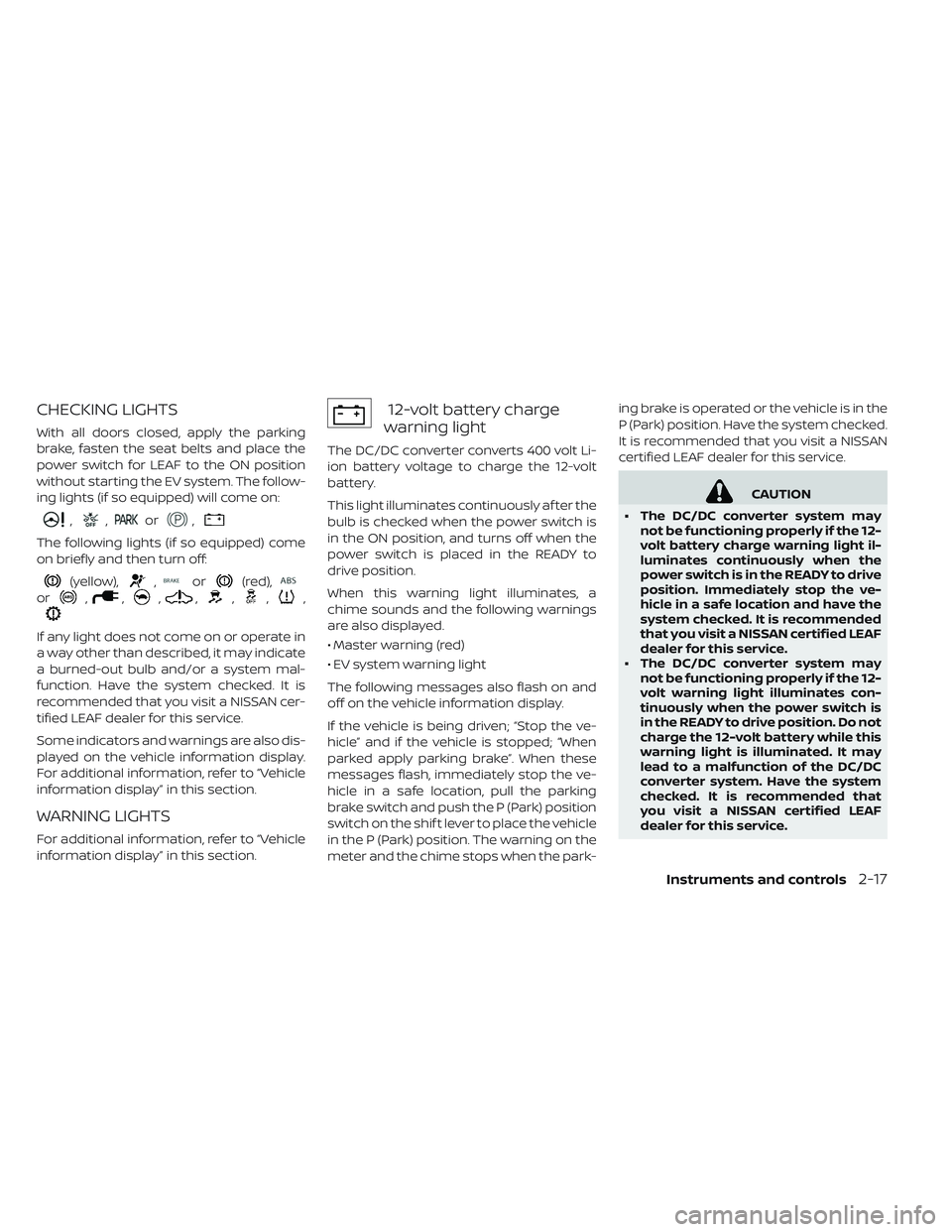
CHECKING LIGHTS
With all doors closed, apply the parking
brake, fasten the seat belts and place the
power switch for LEAF to the ON position
without starting the EV system. The follow-
ing lights (if so equipped) will come on:
,,or,
The following lights (if so equipped) come
on briefly and then turn off:
(yellow),,or(red),
or,,,,,,,
If any light does not come on or operate in
a way other than described, it may indicate
a burned-out bulb and/or a system mal-
function. Have the system checked. It is
recommended that you visit a NISSAN cer-
tified LEAF dealer for this service.
Some indicators and warnings are also dis-
played on the vehicle information display.
For additional information, refer to “Vehicle
information display” in this section.
WARNING LIGHTS
For additional information, refer to “Vehicle
information display” in this section.
12-volt battery charge
warning light
The DC/DC converter converts 400 volt Li-
ion battery voltage to charge the 12-volt
battery.
This light illuminates continuously af ter the
bulb is checked when the power switch is
in the ON position, and turns off when the
power switch is placed in the READY to
drive position.
When this warning light illuminates, a
chime sounds and the following warnings
are also displayed.
• Master warning (red)
• EV system warning light
The following messages also flash on and
off on the vehicle information display.
If the vehicle is being driven; “Stop the ve-
hicle” and if the vehicle is stopped; “When
parked apply parking brake”. When these
messages flash, immediately stop the ve-
hicle in a safe location, pull the parking
brake switch and push the P (Park) position
switch on the shif t lever to place the vehicle
in the P (Park) position. The warning on the
meter and the chime stops when the park- ing brake is operated or the vehicle is in the
P (Park) position. Have the system checked.
It is recommended that you visit a NISSAN
certified LEAF dealer for this service.
CAUTION
• The DC/DC converter system may not be functioning properly if the 12-
volt battery charge warning light il-
luminates continuously when the
power switch is in the READY to drive
position. Immediately stop the ve-
hicle in a safe location and have the
system checked. It is recommended
that you visit a NISSAN certified LEAF
dealer for this service.
• The DC/DC converter system may not be functioning properly if the 12-
volt warning light illuminates con-
tinuously when the power switch is
in the READY to drive position. Do not
charge the 12-volt battery while this
warning light is illuminated. It may
lead to a malfunction of the DC/DC
converter system. Have the system
checked. It is recommended that
you visit a NISSAN certified LEAF
dealer for this service.
Instruments and controls2-17
Page 193 of 610
• The cooperative regenerative brakesystem may not be working prop-
erly if the brake system warning
light illuminates when the READY to
drive indicator light is ON. If you
judge it to be safe, drive carefully to
the nearest service station for re-
pairs. Otherwise, have your vehicle
towed because driving could be
dangerous.
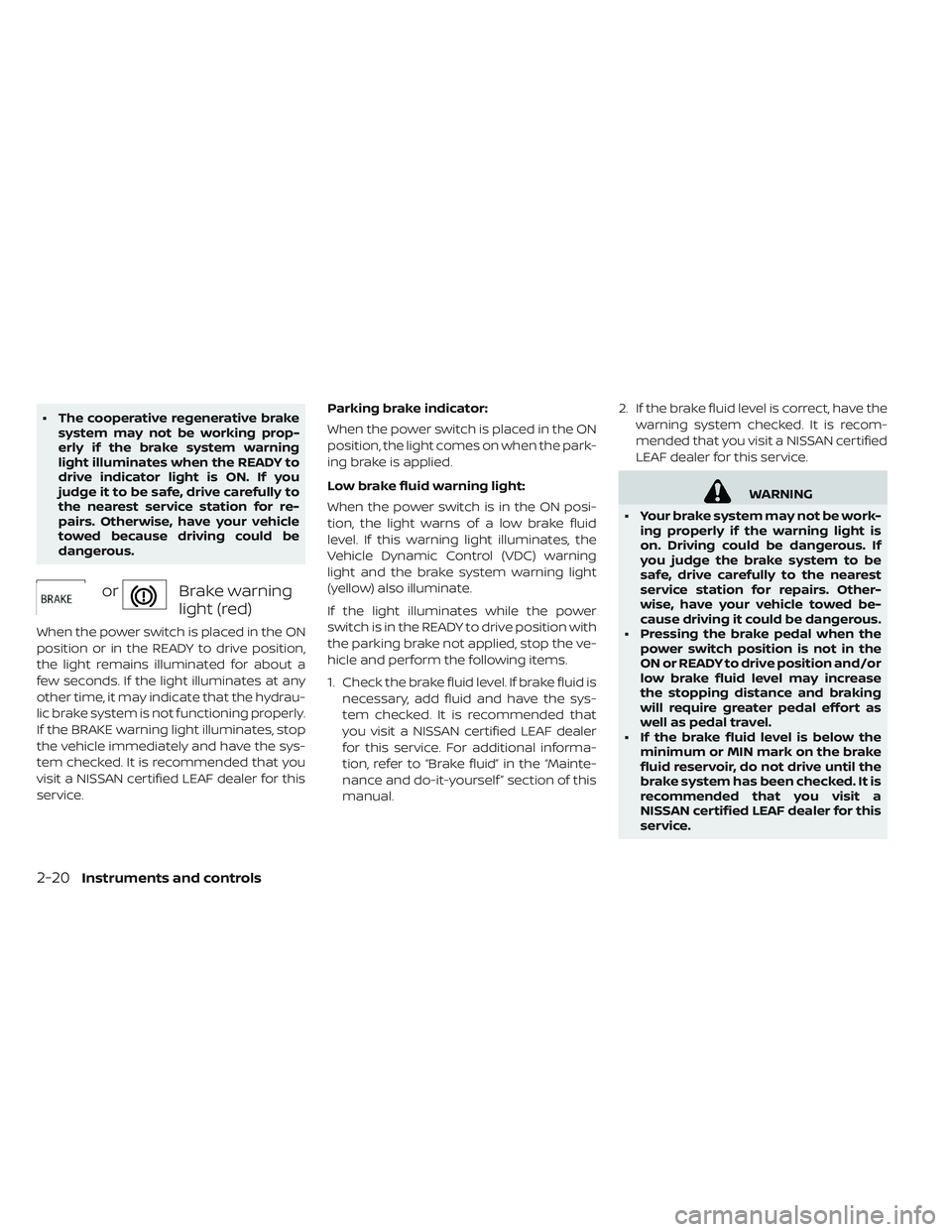
orBrake warning
light (red)
When the power switch is placed in the ON
position or in the READY to drive position,
the light remains illuminated for about a
few seconds. If the light illuminates at any
other time, it may indicate that the hydrau-
lic brake system is not functioning properly.
If the BRAKE warning light illuminates, stop
the vehicle immediately and have the sys-
tem checked. It is recommended that you
visit a NISSAN certified LEAF dealer for this
service. Parking brake indicator:
When the power switch is placed in the ON
position, the light comes on when the park-
ing brake is applied.
Low brake fluid warning light:
When the power switch is in the ON posi-
tion, the light warns of a low brake fluid
level. If this warning light illuminates, the
Vehicle Dynamic Control (VDC) warning
light and the brake system warning light
(yellow) also illuminate.
If the light illuminates while the power
switch is in the READY to drive position with
the parking brake not applied, stop the ve-
hicle and perform the following items.
1. Check the brake fluid level. If brake fluid is
necessary, add fluid and have the sys-
tem checked. It is recommended that
you visit a NISSAN certified LEAF dealer
for this service. For additional informa-
tion, refer to “Brake fluid” in the “Mainte-
nance and do-it-yourself ” section of this
manual. 2. If the brake fluid level is correct, have the
warning system checked. It is recom-
mended that you visit a NISSAN certified
LEAF dealer for this service.
WARNING
• Your brake system may not be work- ing properly if the warning light is
on. Driving could be dangerous. If
you judge the brake system to be
safe, drive carefully to the nearest
service station for repairs. Other-
wise, have your vehicle towed be-
cause driving it could be dangerous.
• Pressing the brake pedal when the power switch position is not in the
ON or READY to drive position and/or
low brake fluid level may increase
the stopping distance and braking
will require greater pedal effort as
well as pedal travel.
• If the brake fluid level is below the minimum or MIN mark on the brake
fluid reservoir, do not drive until the
brake system has been checked. It is
recommended that you visit a
NISSAN certified LEAF dealer for this
service.
2-20Instruments and controls
Page 194 of 610
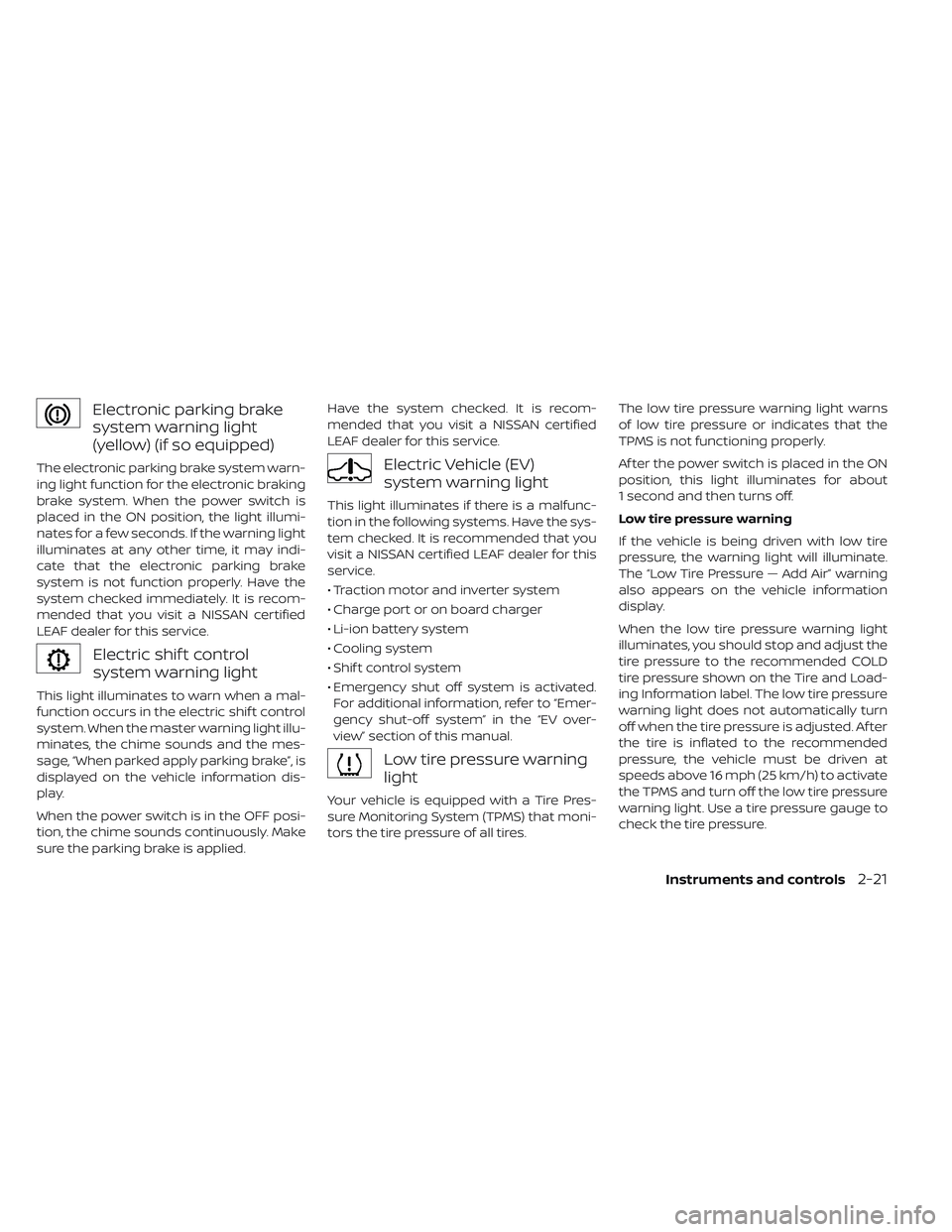
Electronic parking brake
system warning light
(yellow) (if so equipped)
The electronic parking brake system warn-
ing light function for the electronic braking
brake system. When the power switch is
placed in the ON position, the light illumi-
nates for a few seconds. If the warning light
illuminates at any other time, it may indi-
cate that the electronic parking brake
system is not function properly. Have the
system checked immediately. It is recom-
mended that you visit a NISSAN certified
LEAF dealer for this service.
Electric shif t control
system warning light
This light illuminates to warn when a mal-
function occurs in the electric shif t control
system. When the master warning light illu-
minates, the chime sounds and the mes-
sage, “When parked apply parking brake”, is
displayed on the vehicle information dis-
play.
When the power switch is in the OFF posi-
tion, the chime sounds continuously. Make
sure the parking brake is applied.Have the system checked. It is recom-
mended that you visit a NISSAN certified
LEAF dealer for this service.
Electric Vehicle (EV)
system warning light
This light illuminates if there is a malfunc-
tion in the following systems. Have the sys-
tem checked. It is recommended that you
visit a NISSAN certified LEAF dealer for this
service.
• Traction motor and inverter system
• Charge port or on board charger
• Li-ion battery system
• Cooling system
• Shif t control system
• Emergency shut off system is activated.
For additional information, refer to “Emer-
gency shut-off system” in the “EV over-
view” section of this manual.
Low tire pressure warning
light
Your vehicle is equipped with a Tire Pres-
sure Monitoring System (TPMS) that moni-
tors the tire pressure of all tires. The low tire pressure warning light warns
of low tire pressure or indicates that the
TPMS is not functioning properly.
Af ter the power switch is placed in the ON
position, this light illuminates for about
1 second and then turns off.
Low tire pressure warning
If the vehicle is being driven with low tire
pressure, the warning light will illuminate.
The “Low Tire Pressure — Add Air” warning
also appears on the vehicle information
display.
When the low tire pressure warning light
illuminates, you should stop and adjust the
tire pressure to the recommended COLD
tire pressure shown on the Tire and Load-
ing Information label. The low tire pressure
warning light does not automatically turn
off when the tire pressure is adjusted. Af ter
the tire is inflated to the recommended
pressure, the vehicle must be driven at
speeds above 16 mph (25 km/h) to activate
the TPMS and turn off the low tire pressure
warning light. Use a tire pressure gauge to
check the tire pressure.
Instruments and controls2-21
Page 197 of 610
Supplemental air bag
warning light
Af ter turning the power switch to the ON
position, the supplemental air bag warning
light will illuminate. The supplemental air
bag warning light will turn off af ter about
7 seconds if the supplemental front air bag
and supplemental side air bag, curtain
side-impact air bag systems and/or pre-
tensioner seat belt are operational.
If any of the following conditions occur, the
front air bag, side air bag, curtain air bag
and pretensioner systems need servicing
and your vehicle must be taken to your
nearest NISSAN certified LEAF dealer.
•
The supplemental air bag warning light re-
mains on af ter approximately 7 seconds.
• The supplemental air bag warning lightflashes intermittently.
• The supplemental air bag warning light does not illuminate at all.
Unless checked and repaired, the Supple-
mental Restraint Systems and/or the pre-
tensioners may not function properly. For additional information, refer to “Supple-
mental restraint system (SRS)” in the “Safety
— Seats, seat belts and supplemental re-
straint system” section of this manual.
WARNING
If the supplemental air bag warning
light is on, it could mean that the front
air bag, side air bag, curtain air bag
and/or pretensioner systems will not
operate in an accident. To help avoid
injury to yourself or others, have your
vehicle checked. It is recommended
that you visit a NISSAN certified LEAF
dealer as soon as possible for this ser-
vice.
INDICATOR LIGHTS
For additional information, refer to “Vehicle
information display” in this section.
orElectronic parking
brake indicator light
When the power switch is placed in the ON
position, the light comes on when the park-
ing brake is applied.
Exterior light indicator light
This indicator illuminates when the head-
light switch is turned to the AUTO,
or
position and the front parking lights,
side marker lights, tail and license plate
lights are on. The indicator turns off when
these lights are turned off.
Front fog light indicator light
(if so equipped)
The front fog indicator light illuminates
when the front fog lights are on. For addi-
tional information, refer to “Fog light switch”
in this section.
Front passenger air bag
status light
The front passenger air bag status light
(located on the center of the instrument
panel) will be lit and the passenger front air
bag will be turned off depending on how
the front passenger seat is being used.
For front passenger air bag status light op-
eration, refer to “NISSAN Advanced Air Bag
System (front seats)” in the “Safety — Seats,
seat belts and supplemental restraint sys-
tem” section of this manual.
2-24Instruments and controls
Page 200 of 610
Vehicle Dynamic Control
(VDC) OFF indicator light
This light illuminates when the Vehicle Dy-
namic Control (VDC) is turned off in the
vehicle information display. This indicates
that the VDC system is not operating. For
additional information, refer to “Vehicle Dy-
namic Control (VDC) system” in the “Start-
ing and driving” section of this manual.
AUDIBLE REMINDERS
Brake pad wear warning
The disc brake pads have audible wear
warnings. When a brake pad requires re-
placement, it will make a high pitched
scraping sound when the vehicle is in mo-
tion. This scraping sound will first occur
only when the brake pedal is depressed.
Af ter more wear of the brake pad, the
sound will always be heard even if the
brake pedal is not depressed. Have the
brakes checked as soon as possible if the
warning sound is heard.
Electric shif t control system
reminder chime
If an improper shif t operation is performed,
for safety reasons a chime will sound and
at the same time, depending on the condi-
tions, the operation will be canceled or the
shif t position will switch to the N (Neutral)
position.
For additional information, refer to “Driving
the vehicle” in the “Starting and driving” sec-
tion of this manual.
Key reminder chime
A chime will sound if the driver's side door is
opened while the power switch is pushed
to the ON or ACC position.
Make sure that the power switch is pushed
to the OFF position, and take the Intelligent
Key with you when leaving the vehicle.
Light reminder chime
The light reminder chime will sound when
the driver side door is opened with the light
switch in the
orposition, and
the power switch is in the ACC, OFF or LOCK
position. Turn the light switch off when you leave the
vehicle.
Parking brake reminder chime
(if so equipped)
A chime sounds if the parking brake is set
and the vehicle is driven. The chime will
stop if the parking brake is released or the
vehicle speed returns to zero.
Power switch reminder chime
The power switch reminder chime will
sound when the driver's door is opened
while the power switch is in the ON or
READY to drive position. Push the power
switch to the OFF position.
Seat belt warning chime
The seat belt warning chime will sound for
about 6 seconds unless the driver’s seat
belt is securely fastened.
12-volt battery charge warning
chime
If the 12-volt battery charge warning light
illuminates, the chime will sound when a
warning message is displayed in the ve-
hicle information display.
Instruments and controls2-27