clock reset NISSAN LEAF 2019 Owner´s Manual
[x] Cancel search | Manufacturer: NISSAN, Model Year: 2019, Model line: LEAF, Model: NISSAN LEAF 2019Pages: 610, PDF Size: 7.11 MB
Page 95 of 610
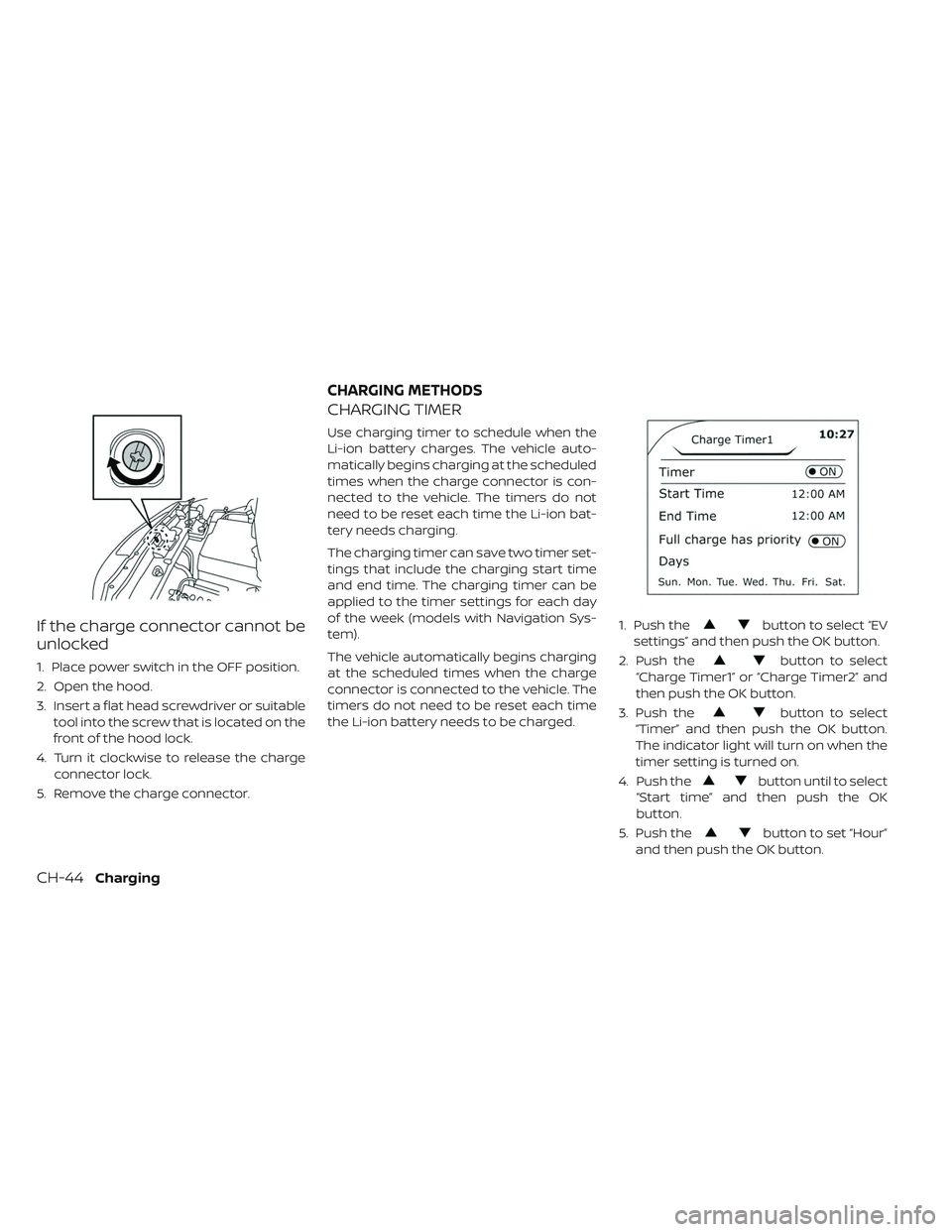
If the charge connector cannot be
unlocked
1. Place power switch in the OFF position.
2. Open the hood.
3. Insert a flat head screwdriver or suitabletool into the screw that is located on the
front of the hood lock.
4. Turn it clockwise to release the charge connector lock.
5. Remove the charge connector.
CHARGING TIMER
Use charging timer to schedule when the
Li-ion battery charges. The vehicle auto-
matically begins charging at the scheduled
times when the charge connector is con-
nected to the vehicle. The timers do not
need to be reset each time the Li-ion bat-
tery needs charging.
The charging timer can save two timer set-
tings that include the charging start time
and end time. The charging timer can be
applied to the timer settings for each day
of the week (models with Navigation Sys-
tem).
The vehicle automatically begins charging
at the scheduled times when the charge
connector is connected to the vehicle. The
timers do not need to be reset each time
the Li-ion battery needs to be charged. 1. Push the
button to select “EV
settings” and then push the OK button.
2. Push the
button to select
“Charge Timer1” or “Charge Timer2” and
then push the OK button.
3. Push the
button to select
“Timer” and then push the OK button.
The indicator light will turn on when the
timer setting is turned on.
4. Push the
button until to select
“Start time” and then push the OK
button.
5. Push the
button to set “Hour”
and then push the OK button.
CHARGING METHODS
CH-44Charging
Page 202 of 610
TheOK,buttons
also control audio and control panel func-
tions in some conditions. Most screens and
menus offer instruction prompts of the
steering switches to indicate how to con-
trol the vehicle information display. White
dots appear on the lef t side of the vehicle
information display when there is more
than one page of menu items. The OK,
andchange the audio source and the
buttons also control voice recognition
manual mode. For additional information,
refer to the separate NissanConnect®
Manual (for Leaf ).
STARTUP DISPLAY
With the vehicle in the ON position, the ve-
hicle information display may display the
following screens:
• Battery information
• Audio
• Navigation
• Energy Economy
• Safety Shield
• Warnings
• Settings
Warnings will only display if there are any
present. For additional information, refer to
“Vehicle information display warnings and
indicators” in this section.
To control which items display in the ve-
hicle information display, refer to “Meter
settings” in this section.
SETTINGS
The settings mode allows you to change
the information displayed in the vehicle in-
formation display as well as enable and
disable various vehicle features and sys-
tems. The settings include:
• VDC Setting
• Driver Assistance
• Customize Display
• Vehicle Settings
• EV Settings
• TPMS Settings
• Maintenance
• Clock
• Unit/Language
• Factory Reset
Instruments and controls2-29
Page 208 of 610
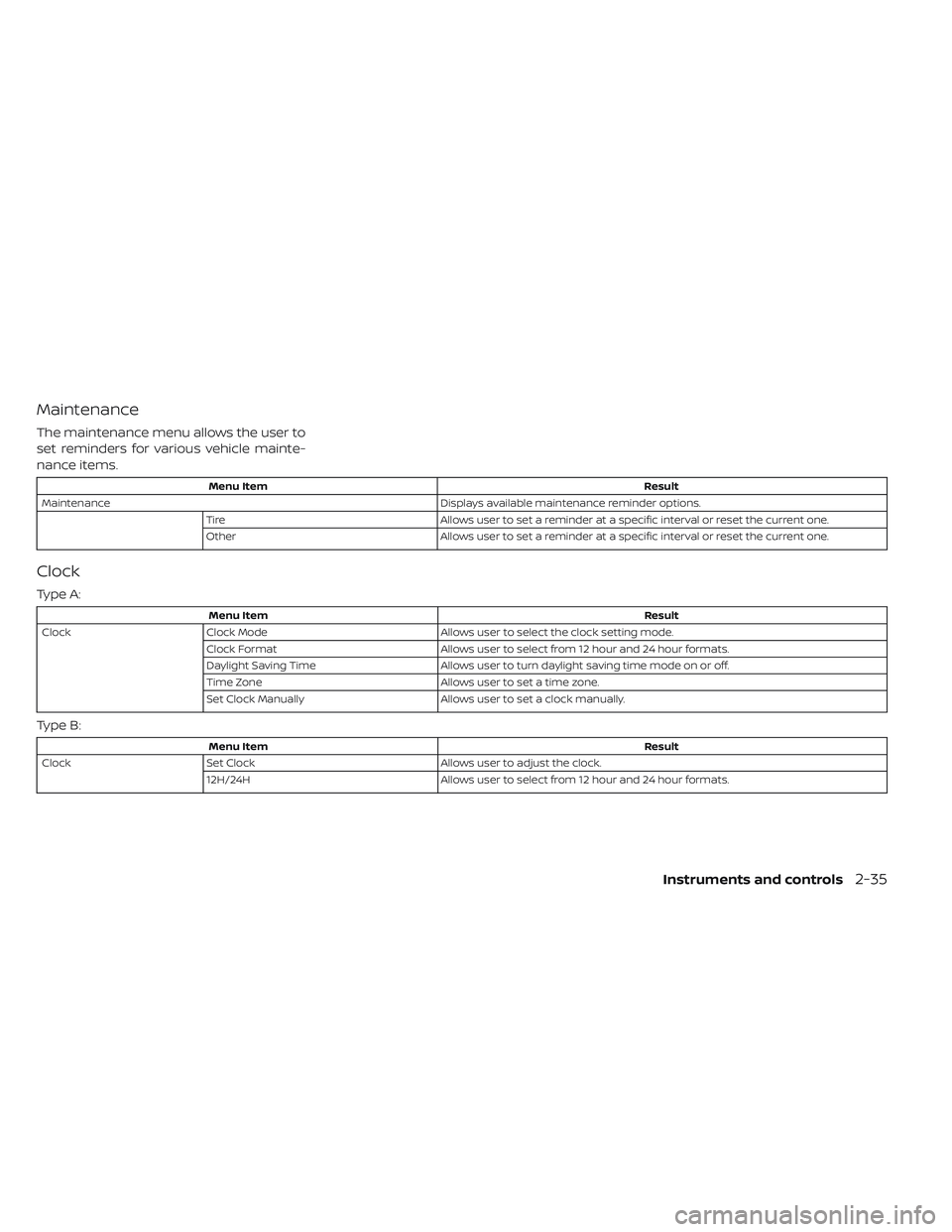
Maintenance
The maintenance menu allows the user to
set reminders for various vehicle mainte-
nance items.
Menu ItemResult
Maintenance Displays available maintenance reminder options.
Tire Allows user to set a reminder at a specific interval or reset the current one.
Other Allows user to set a reminder at a specific interval or reset the current one.
Clock
Type A:
Menu Item Result
Clock Clock Mode Allows user to select the clock setting mode.
Clock Format Allows user to select from 12 hour and 24 hour formats.
Daylight Saving Time Allows user to turn daylight saving time mode on or off.
Time Zone Allows user to set a time zone.
Set Clock Manually Allows user to set a clock manually.
Type B:
Menu Item Result
Clock Set Clock Allows user to adjust the clock.
12H/24H Allows user to select from 12 hour and 24 hour formats.
Instruments and controls2-35
Page 209 of 610
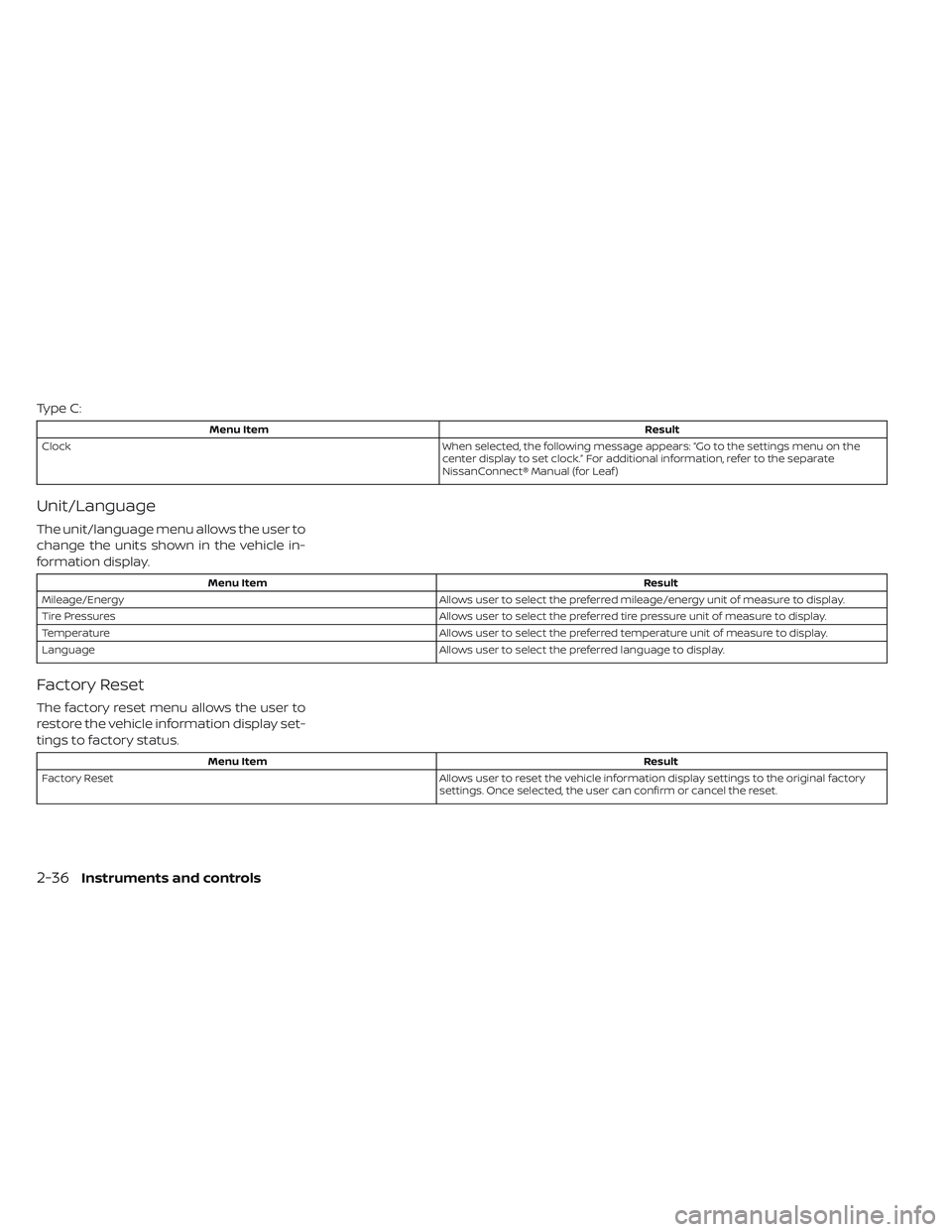
Type C:
Menu ItemResult
Clock When selected, the following message appears: “Go to the settings menu on the
center display to set clock.” For additional information, refer to the separate
NissanConnect® Manual (for Leaf )
Unit/Language
The unit/language menu allows the user to
change the units shown in the vehicle in-
formation display.
Menu Item Result
Mileage/Energy Allows user to select the preferred mileage/energy unit of measure to display.
Tire Pressures Allows user to select the preferred tire pressure unit of measure to display.
Temperature Allows user to select the preferred temperature unit of measure to display.
Language Allows user to select the preferred language to display.
Factory Reset
The factory reset menu allows the user to
restore the vehicle information display set-
tings to factory status.
Menu Item Result
Factory Reset Allows user to reset the vehicle information display settings to the original factory
settings. Once selected, the user can confirm or cancel the reset.
2-36Instruments and controls