light NISSAN LEAF 2020 Owner´s Manual
[x] Cancel search | Manufacturer: NISSAN, Model Year: 2020, Model line: LEAF, Model: NISSAN LEAF 2020Pages: 596, PDF Size: 4.33 MB
Page 347 of 596
The e-Pedal system provides the following
driving features:
When driving and stopping the vehicle:
• Depressing or returning the acceleratorpedal changes the degree of accelera-
tion and deceleration accordingly.
• Returning the accelerator pedal gener- ates more deceleration than normal. (The
maximum deceleration changes accord-
ing to the vehicle speed.)
• Releasing (taking your foot off ) the accel- erator pedal reduces the vehicle speed
until the vehicle comes to a stop.
• The vehicle’s brake lights illuminate when the deceleration level reaches an ordi-
nary braking operation.
If the deceleration is not sufficient when the
accelerator pedal is returned or released,
depress the brake pedal. The brake pedal
can be operated to reduce the vehicle
speed in the same way as normal even
when the e-Pedal system is activated.
When restarting the vehicle:
• Af ter the vehicle comes to a stop by the e-Pedal system function, the vehicle re-
mains at a stop as long as the accelerator
pedal is released. • The vehicle’s brake lights remain illumi-
nated when the vehicle is stopped by the
e-Pedal system.
• Depress the accelerator pedal to start the vehicle again from a stop.
When the vehicle needs to be stopped for a
certain period of time, place the vehicle in
the P (Park) position and apply the parking
brake.
CAUTION
When the e-Pedal system is turned off,
remember to depress the brake pedal
firmly to prevent the vehicle from mov-
ing with the shif t lever in any position
other than P (Park).
When backing up the vehicle:
• With the shif t lever in the R (Reverse) po- sition, operating the accelerator pedal
adjusts the vehicle speed (acceleration,
deceleration, or stopping) in the same
way as the D (Drive) position. Other driving tips for the e-Pedal sys-
tem:
• For smooth deceleration when the
e-Pedal system is activated, it is recom-
mended that you adjust the accelerator
pedal by either depressing or returning,
not releasing, the pedal.
• Moving the shif t lever from D (Drive) to B mode or from B mode to D (Drive) does
not affect the e-Pedal system feature.
• The e-Pedal system does not function under the following conditions:– When the vehicle is placed in the P (Park) or N (Neutral) position
– When cruise control (if so equipped), ProPILOT Assist (if so equipped), or Au-
tomatic Emergency Braking with Pe-
destrian Detection operates
E-PEDAL SYSTEM LIMITATIONS
WARNING
Listed below are the system limitations
for the e-Pedal system. Failure to oper-
ate the vehicle in accordance with
these system limitations could result in
serious injury or death.
5-24Starting and driving
Page 352 of 596
•Do not use the LDW system under the
following conditions as it may not
function properly:
– During bad weather (rain, fog,
snow, etc.).
– When driving on slippery roads,
such as on ice or snow.
– When driving on winding or un-
even roads.
– When there is a lane closure due to
road repairs.
– When driving in a makeshif t or
temporary lane.
– When driving on roads where the
lane width is too narrow.
– When driving without normal tire
conditions (for example, tire wear,
low tire pressure, installation of
spare tire, tire chains, nonstan-
dard wheels).
– When the vehicle is equipped with
non-original brake parts or sus-
pension parts.
– When you are towing a trailer or
other vehicle. •
The system may not function prop-
erly under the following conditions:
– On roads where there are multiple
parallel lane markers; lane mark-
ers that are faded or not painted
clearly; yellow painted lane mark-
ers; non-standard lane markers;
or lane markers covered with wa-
ter, dirt, snow, etc.
– On roads where the discontinued
lane markers are still detectable.
– On roads where there are sharp
curves.
– On roads where there are sharply
contrasting objects, such as shad-
ows, snow, water, wheel ruts,
seams or lines remaining af ter
road repairs. (The LDW system
could detect these items as lane
markers.)
– On roads where the traveling lane
merges or separates.
– When the vehicle’s traveling direc-
tion does not align with the lane
marker.
– When traveling close to the ve-
hicle in front of you, which ob-
structs the lane camera unit de-
tection range. –
When rain, snow, dirt or an object
adheres to the windshield in front
of the lane camera unit.
– When the headlights are not
bright due to dirt on the lens or if
the aiming is not adjusted
properly.
– When strong light enters the lane
camera unit (for example, the light
directly shines on the front of the
vehicle at sunrise or sunset).
– When a sudden change in bright-
ness occurs (for example, when
the vehicle enters or exits a tunnel
or under a bridge).
SYSTEM TEMPORARILY
UNAVAILABLE
If the vehicle is parked in direct sunlight
under high temperature conditions (over
approximately 104°F [40°C]) and then
started, the LDW system may be deacti-
vated automatically and the following
message will appear in the vehicle infor-
mation display: “Unavailable: High Cabin
Temperature.”
When the interior temperature is reduced,
the LDW system will resume operating au-
tomatically
Starting and driving5-29
Page 353 of 596
The LDW system is not designed to warn
under the following conditions:
• When you operate the lane change signaland change traveling lanes in the direc-
tion of the signal. (The LDW system will
become operable again approximately 2
seconds af ter the lane change signal is
turned off.)
• When the vehicle speed lowers to less than approximately 37 mph (60 km/h).
Af ter the above conditions have finished
and the necessary operating conditions
are satisfied, the LDW functions will resume.
SYSTEM MALFUNCTION
If the LDW system malfunctions, it will can-
cel automatically and “Malfunction: See
Owner’s Manual” will appear in the vehicle
information display. If “Malfunction: See
Owner’s Manual” appears in the vehicle in-
formation display, pull off the road to a safe
location and stop the vehicle. Place the
shif t lever in the P (Park) position and the
power switch in the OFF position and re-
start the EV system. If “Malfunction: See
Owner’s Manual” continues to appear in
the vehicle information display, have the
system checked. It is recommended that
you visit a NISSAN certified LEAF dealer for
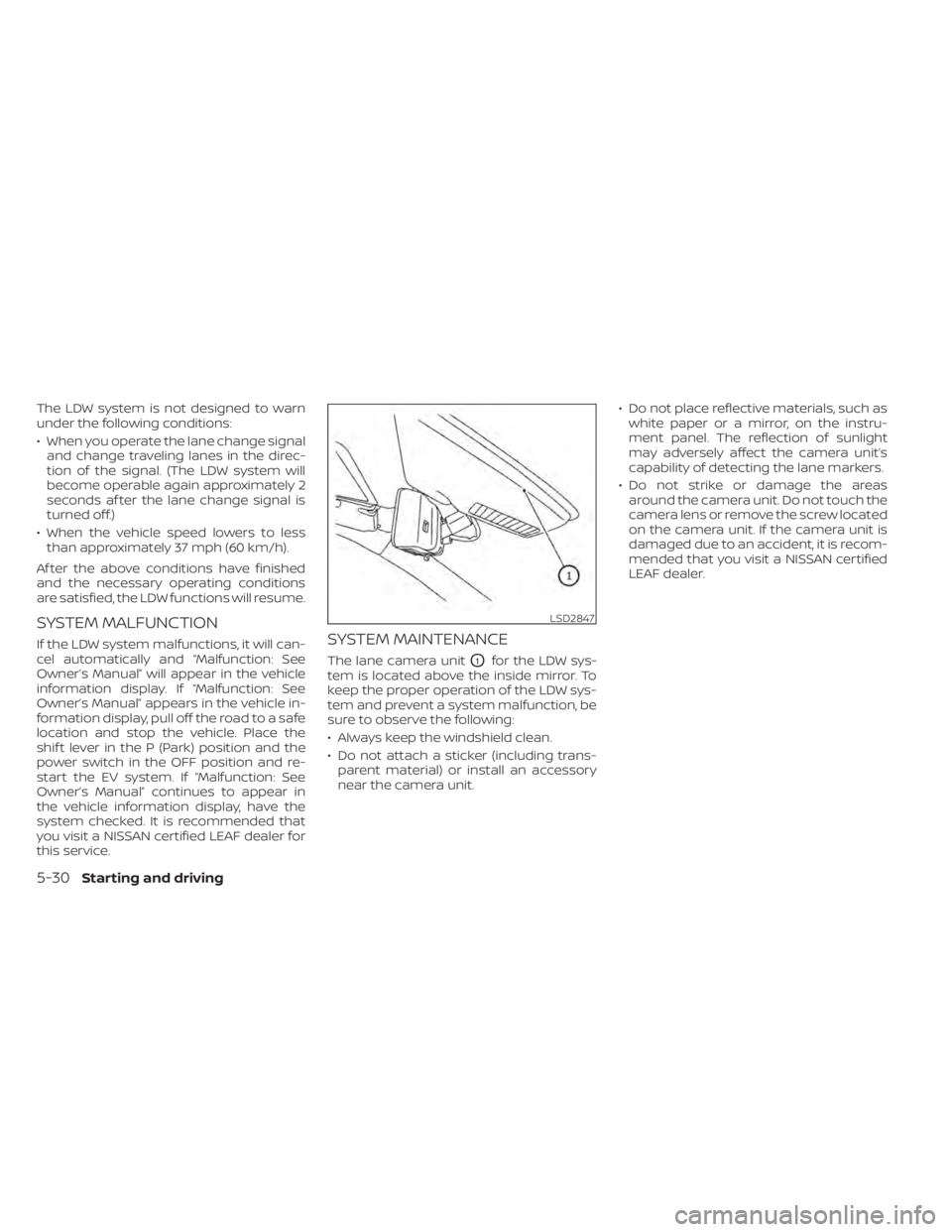
this service.SYSTEM MAINTENANCE
The lane camera unitO1for the LDW sys-
tem is located above the inside mirror. To
keep the proper operation of the LDW sys-
tem and prevent a system malfunction, be
sure to observe the following:
• Always keep the windshield clean.
• Do not attach a sticker (including trans- parent material) or install an accessory
near the camera unit. • Do not place reflective materials, such as
white paper or a mirror, on the instru-
ment panel. The reflection of sunlight
may adversely affect the camera unit’s
capability of detecting the lane markers.
• Do not strike or damage the areas around the camera unit. Do not touch the
camera lens or remove the screw located
on the camera unit. If the camera unit is
damaged due to an accident, it is recom-
mended that you visit a NISSAN certified
LEAF dealer.
LSD2847
5-30Starting and driving
Page 358 of 596
–On roads where there are sharply
contrasting objects, such as shad-
ows, snow, water, wheel ruts,
seams or lines remaining af ter
road repairs. (The I-LI system
could detect these items as lane
markers.)
– On roads where the traveling lane
merges or separates.
– When the vehicle’s traveling direc-
tion does not align with the lane
marker.
– When traveling close to the ve-
hicle in front of you, which ob-
structs the lane camera unit de-
tection range.
– When rain, snow or dirt adheres to
the windshield in front of the lane
camera unit.
– When the headlights are not
bright due to dirt on the lens or if
the aiming is not adjusted
properly.
– When strong light enters the lane
camera unit (for example, the light
directly shines on the front of the
vehicle at sunrise or sunset). –
When a sudden change in bright-
ness occurs (for example, when
the vehicle enters or exits a tunnel
or under a bridge).
While the I-LI system is operating, you may
hear a sound of brake operation. This is
normal and indicates that the I-LI system is
operating properly.
SYSTEM TEMPORARILY
UNAVAILABLE
Condition A:
The warning and assist functions of the I-LI
system are not designed to work under the
following conditions:
• When you operate the lane change signal and change the traveling lanes in the di-
rection of the signal. (The I-LI system will
be deactivated for approximately 2 sec-
onds af ter the lane change signal is
turned off.)
• When the vehicle speed lowers to less than approximately 37 mph (60 km/h).
Af ter the above conditions have finished
and the necessary operating conditions
are satisfied, the warning and assist func-
tions will resume. Condition B:
The assist function of the I-LI system is not
designed to work under the following con-
ditions (warning is still functional):
• When the brake pedal is depressed.
• When the steering wheel is turned as far
as necessary for the vehicle to change
lanes.
• When the vehicle is accelerated during I-LI system operation.
• When the Intelligent Cruise Control (ICC) approach warning occurs.
• When the hazard warning flashers are operated.
• When driving on a curve at high speed.
Af ter the above conditions have finished
and the necessary operating conditions
are satisfied, the I-LI system application of
the brakes will resume.
Condition C:
If the following messages appear in the
vehicle information display, a chime will
sound and the I-LI system will be turned off
automatically.
• “Not Available - Poor Road Conditions”: When the Vehicle Dynamic Control (VDC)
system (except Traction Control System
[TCS] function) or ABS operates.
Starting and driving5-35
Page 359 of 596
• “Currently not available”: When the VDCsystem is turned off.
Action to take:
When the above conditions no longer exist,
turn off the I-LI system. Push the ProPILOT
Assist switch (models with ProPILOT Assist)
or dynamic driver assistance switch (mod-
els without ProPILOT Assist) to turn the I-LI
system back on.
Temporary disabled status at high tem-
perature:
If the vehicle is parked in direct sunlight
under high temperature conditions (over
approximately 104°F [40°C]) and then the
I-LI system is turned on, the I-LI system
may be deactivated automatically and the
following message will appear on the ve-
hicle information display: “Unavailable: High
Cabin Temperature.” When the interior
temperature is reduced, the system will re-
sume operating automatically.
SYSTEM MALFUNCTION
If the I-LI system malfunctions, it will cancel
automatically. The I-LI system warning light
(orange) will illuminate and “Malfunction:
See Owner’s Manual” warning message will
appear in the display. If the I-LI system warning light (orange) illu-
minates in the display, pull off the road to a
safe location and stop the vehicle. Turn the
EV system off and restart the EV system. If
the I-LI system warning light (orange) con-
tinues to illuminate, have the I-LI system
checked. It is recommended that you visit a
NISSAN certified LEAF dealer for this ser-
vice.
SYSTEM MAINTENANCE
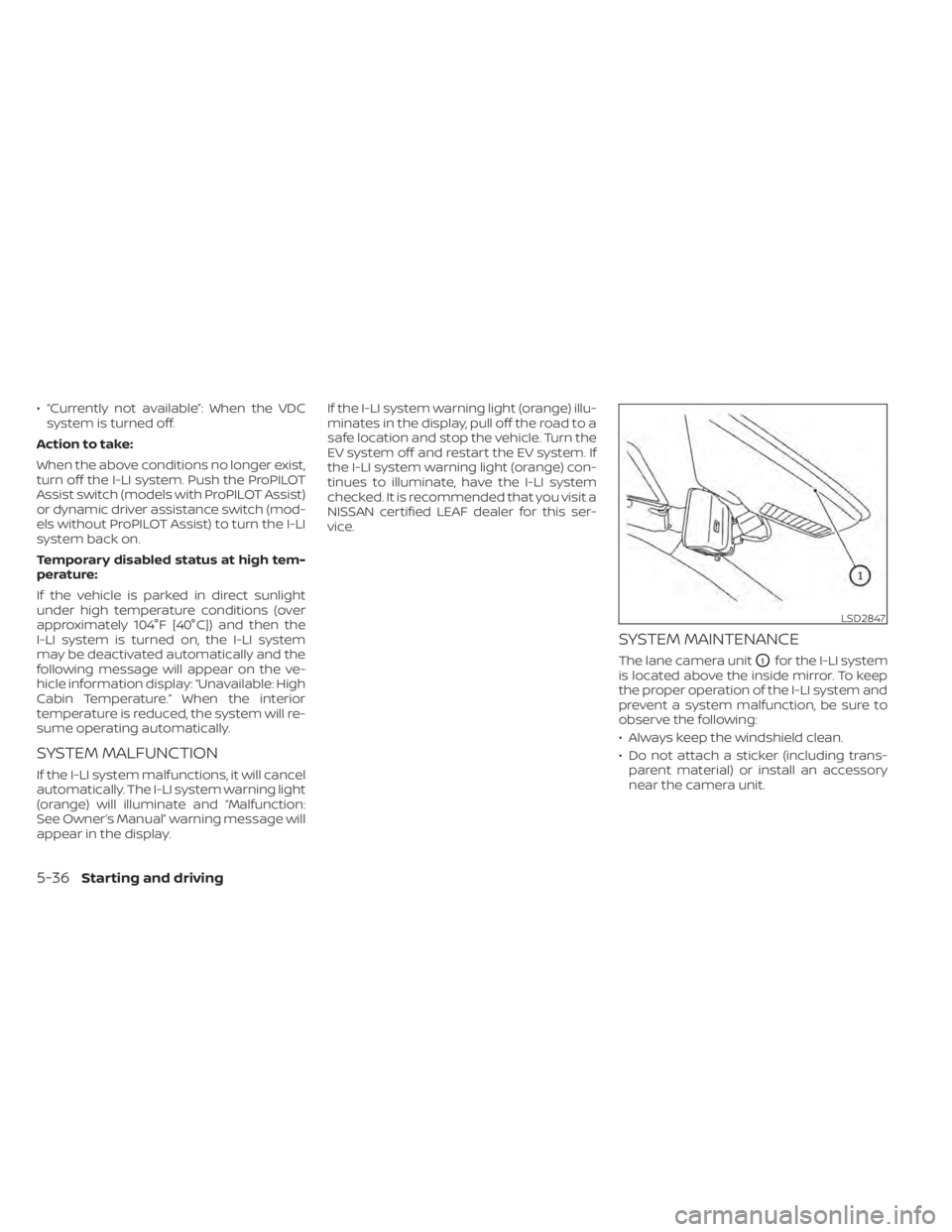
The lane camera unitO1for the I-LI system
is located above the inside mirror. To keep
the proper operation of the I-LI system and
prevent a system malfunction, be sure to
observe the following:
• Always keep the windshield clean.
• Do not attach a sticker (including trans- parent material) or install an accessory
near the camera unit.
LSD2847
5-36Starting and driving
Page 360 of 596
• Do not place reflective materials, such aswhite paper or a mirror, on the instru-
ment panel. The reflection of sunlight
may adversely affect the camera unit’s
capability of detecting the lane markers.
• Do not strike or damage the areas around the camera unit. Do not touch the
camera lens or remove the screw located
on the camera unit. If the camera unit is
damaged due to an accident, it is recom-
mended that you visit a NISSAN certified
LEAF dealer.WARNING
Failure to follow the warnings and in-
structions for proper use of the BSW
system could result in serious injury or
death.
• The BSW system is not a replacement
for proper driving procedures and is
not designed to prevent contact with
vehicles or objects. When changing
lanes, always use the side and rear
mirrors and turn and look in the di-
rection your vehicle will move to en-
sure it is safe to change lanes. Never
rely solely on the BSW system.
The BSW system helps alert the driver of
other vehicles in adjacent lanes when
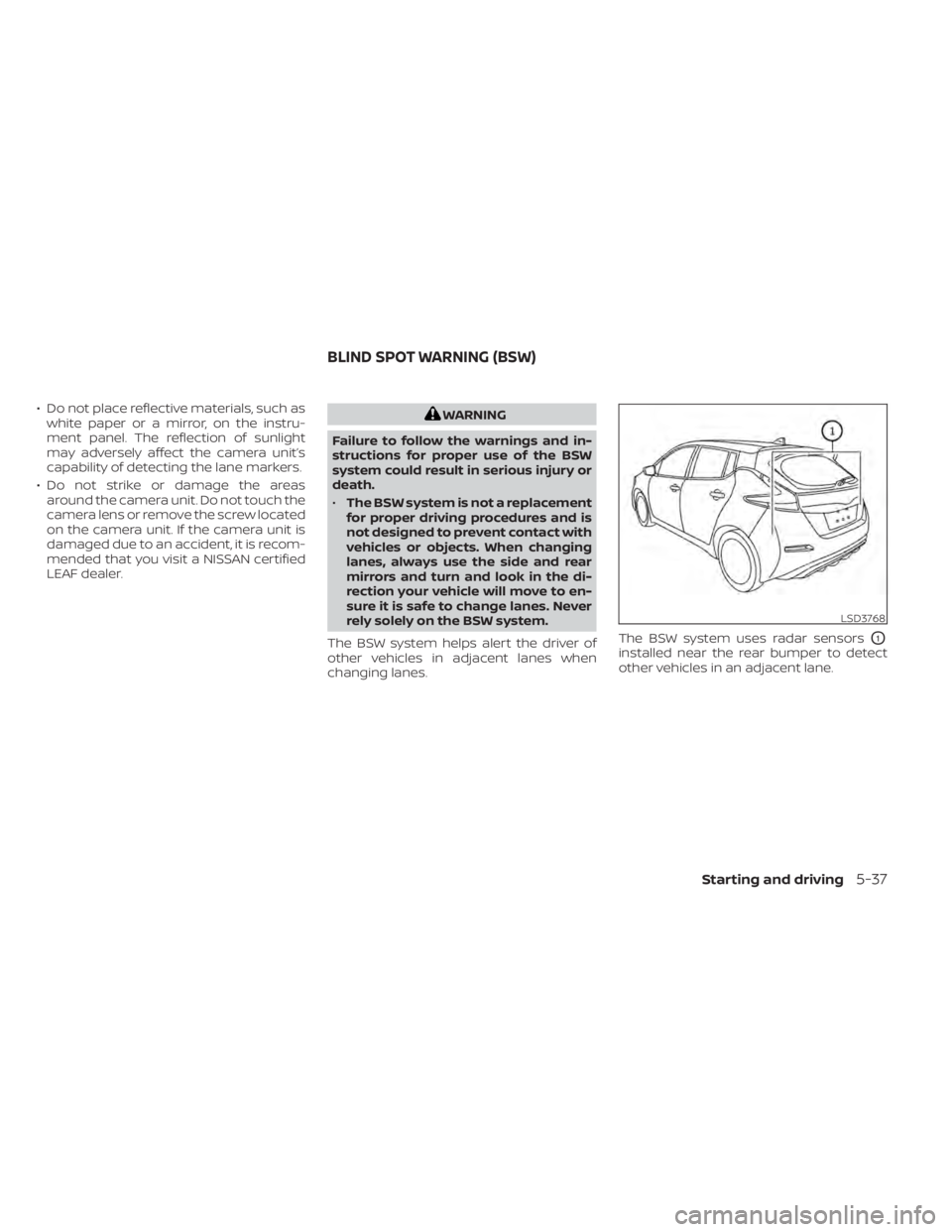
changing lanes. The BSW system uses radar sensors
O1
installed near the rear bumper to detect
other vehicles in an adjacent lane.
LSD3768
BLIND SPOT WARNING (BSW)
Starting and driving5-37
Page 362 of 596
BSW SYSTEM OPERATION
1. Side Indicator Light
2. BSW Indicator
The BSW system operates above approxi-
mately 20 mph (32 km/h).
If the radar sensors detect a vehicle in the
detection zone, the side indicator light (1)
illuminates. If the turn signal is then acti-
vated, the system chimes (twice), the side
indicator light flashes, and the BSW indica-
tor (2) illuminates (yellow) in the vehicle in-
formation display. The side indicator light
continues to flash until the detected ve-
hicle leaves the detection zone.
The side indicator light illuminates for a few
seconds when the power switch is placed
in the ON position.
The brightness of the side indicator light is
adjusted automatically depending on the
brightness of the ambient light.
If a vehicle comes into the detection zone
af ter the driver activates the turn signal,
then only the side indicator light flashes
and no chime sounds. For additional infor-
mation, refer to “BSW driving situations” in
this sectionThe BSW system automatically turns on
every time the EV system is started, as long
as it is activated using the settings menu
on the vehicle information display.
Starting and driving5-39
Page 365 of 596
BSW DRIVING SITUATIONS
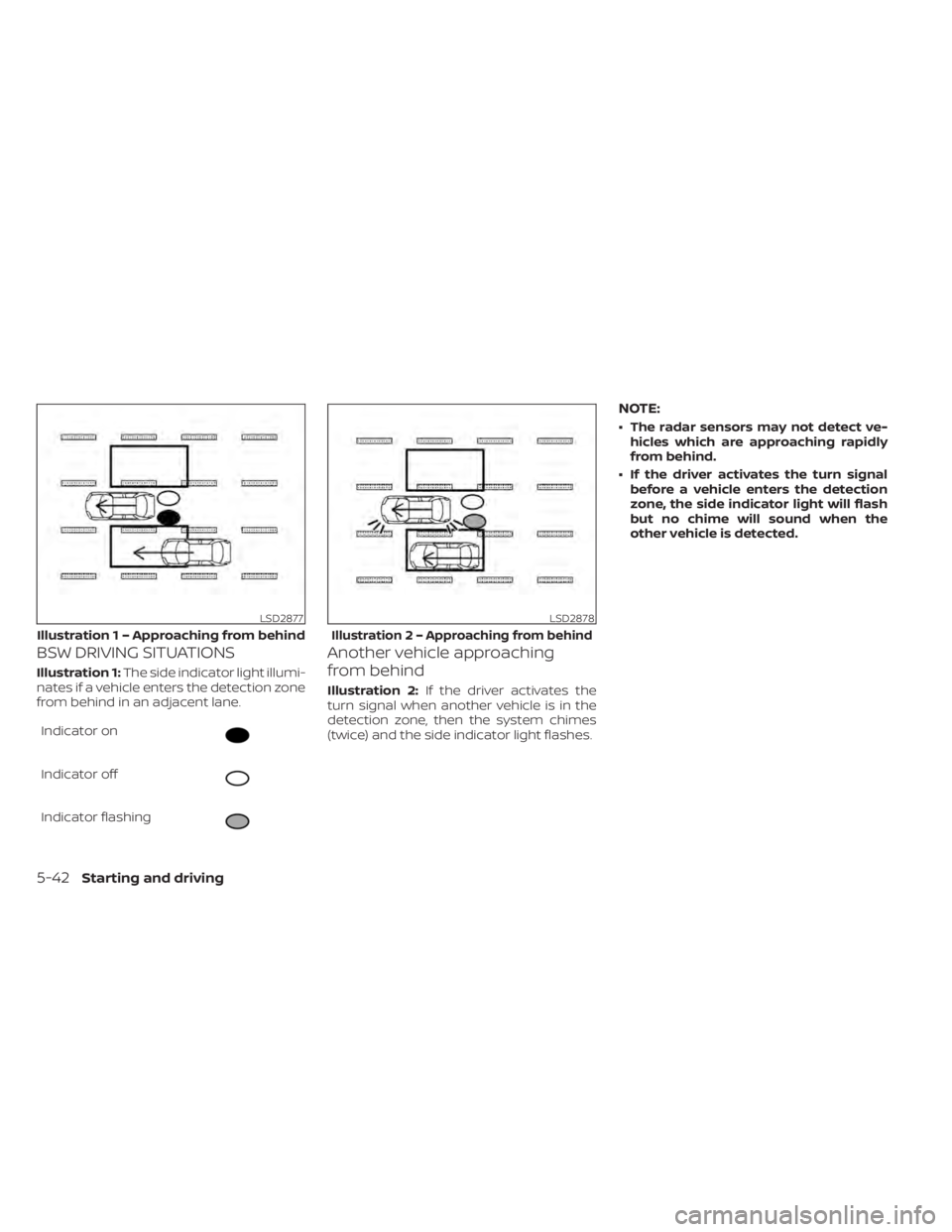
Illustration 1:The side indicator light illumi-
nates if a vehicle enters the detection zone
from behind in an adjacent lane.
Indicator on
Indicator off
Indicator flashing
Another vehicle approaching
from behind
Illustration 2: If the driver activates the
turn signal when another vehicle is in the
detection zone, then the system chimes
(twice) and the side indicator light flashes.
NOTE:
• The radar sensors may not detect ve- hicles which are approaching rapidly
from behind.
• If the driver activates the turn signal before a vehicle enters the detection
zone, the side indicator light will flash
but no chime will sound when the
other vehicle is detected.
LSD2877
Illustratio n 1 – Approaching from behind
LSD2878
Illustration2–Appro aching from behind
5-42Starting and driving
Page 366 of 596
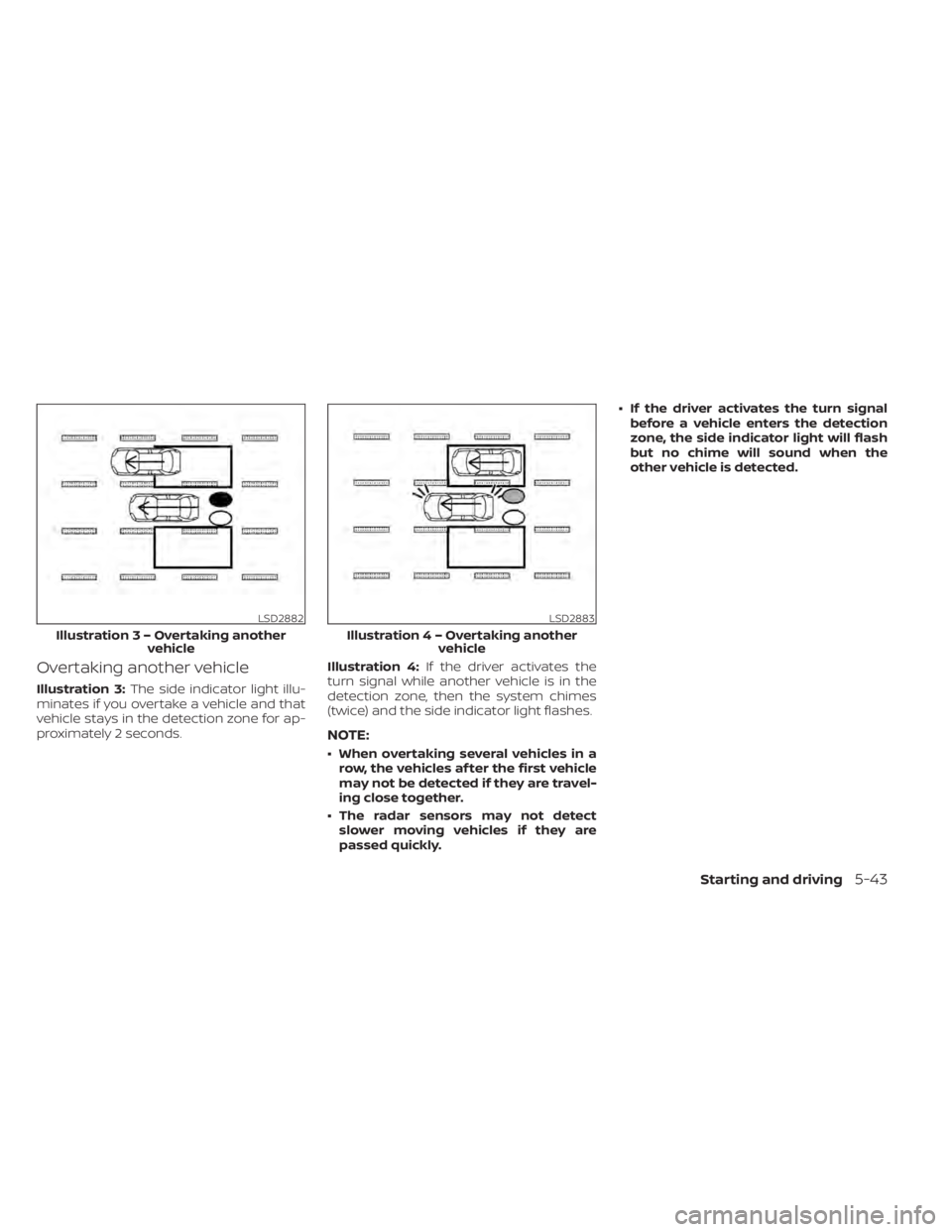
Overtaking another vehicle
Illustration 3:The side indicator light illu-
minates if you overtake a vehicle and that
vehicle stays in the detection zone for ap-
proximately 2 seconds. Illustration 4:
If the driver activates the
turn signal while another vehicle is in the
detection zone, then the system chimes
(twice) and the side indicator light flashes.
NOTE:
• When overtaking several vehicles in a row, the vehicles af ter the first vehicle
may not be detected if they are travel-
ing close together.
• The radar sensors may not detect slower moving vehicles if they are
passed quickly. • If the driver activates the turn signal
before a vehicle enters the detection
zone, the side indicator light will flash
but no chime will sound when the
other vehicle is detected.
LSD2882
Illustratio n3–Over taking another
vehicle
LSD2883
Illustratio n4–Over taking another
vehicle
Starting and driving5-43
Page 367 of 596
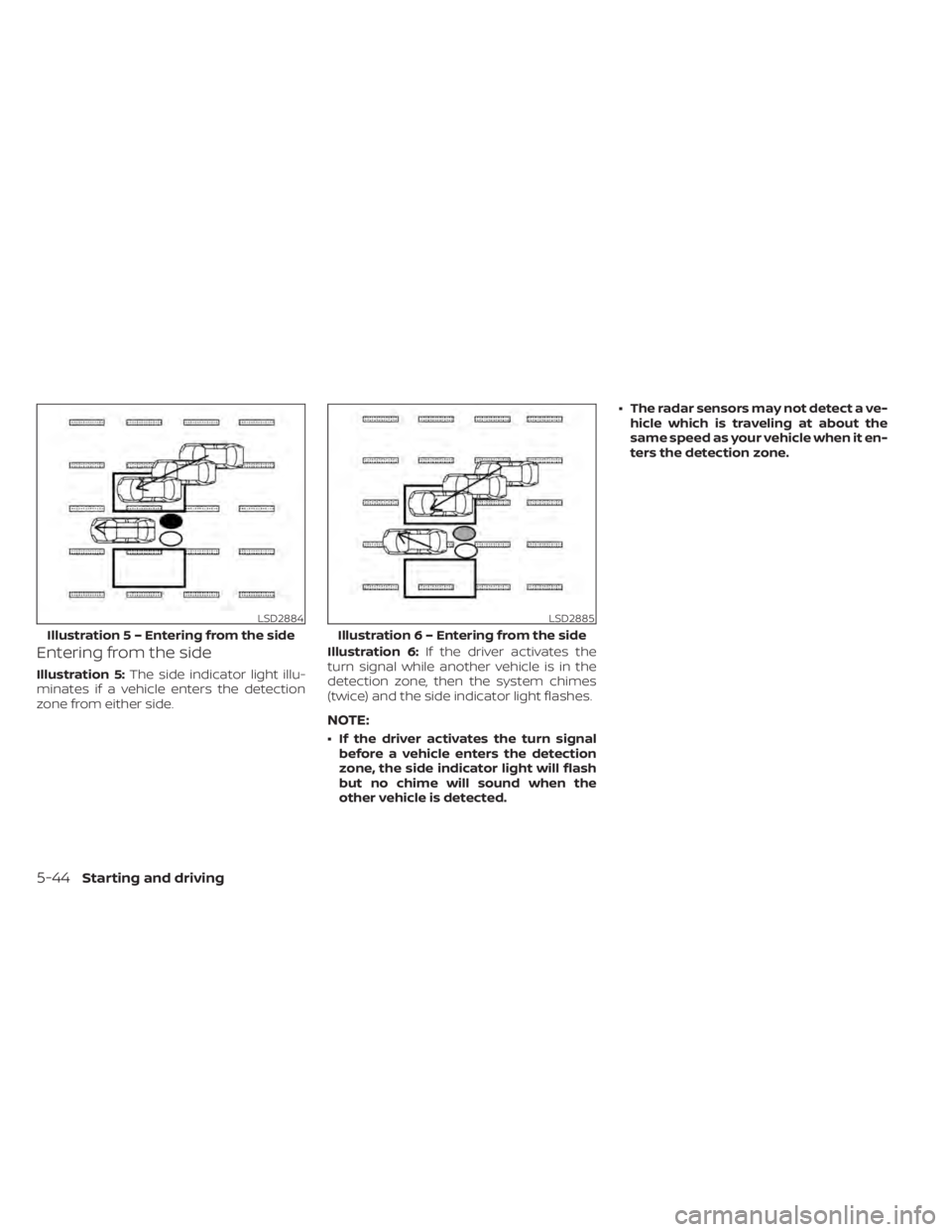
Entering from the side
Illustration 5:The side indicator light illu-
minates if a vehicle enters the detection
zone from either side. Illustration 6:
If the driver activates the
turn signal while another vehicle is in the
detection zone, then the system chimes
(twice) and the side indicator light flashes.
NOTE:
• If the driver activates the turn signal before a vehicle enters the detection
zone, the side indicator light will flash
but no chime will sound when the
other vehicle is detected. • The radar sensors may not detect a ve-
hicle which is traveling at about the
same speed as your vehicle when it en-
ters the detection zone.
LSD2884
Illustratio n 5 – Entering from the side
LSD2885
Illustration 6 – Entering from the side
5-44Starting and driving