park assist NISSAN LEAF 2020 Owner´s Manual
[x] Cancel search | Manufacturer: NISSAN, Model Year: 2020, Model line: LEAF, Model: NISSAN LEAF 2020Pages: 596, PDF Size: 4.33 MB
Page 436 of 596
• When the radar signal is temporarily in-terrupted.
Action to take:
When the conditions listed above are no
longer present, turn the system off using
the ProPILOT Assist switch. Turn the ProPI-
LOT Assist system back on to use the sys-
tem.
NOTE:
When the ICC system is canceled under
the following conditions at a standstill,
the electronic parking brake is auto-
matically activated:
• Any door is open.
• The driver’s seat belt is not fastened.
• Your vehicle has been stopped by the ICC system for approximately 3 min-
utes or longer.
• The shif t lever is not in the D (Drive) position or B mode.
• The VDC system is turned off.
• When distance measurement be- comes impaired due to adhesion of dirt
or obstruction to the sensor.
• When the radar signal is temporarily interrupted. Condition B
When the radar sensor of the front bumper
is covered with dirt or is obstructed, the ICC
system will automatically be canceled.
The chime will sound and the “Not Avail-
able: Front Radar Blocked” warning mes-
sage will appear in the vehicle information
display.
Action to take:
If the warning message appears, stop the
vehicle in a safe place, place the shif t lever
in the P (Park) position, and turn the EV
system off. When the radar signal is tempo-
rarily interrupted, clean the sensor area of
the front bumper and restart the EV sys-
tem. If the “Not Available: Front Radar
Blocked” warning message continues to
be displayed, have the system checked. It is
recommended that you visit a NISSAN cer-
tified LEAF dealer for this service.
Condition C
When driving on roads with limited road
structures or buildings (for example, long
bridges, deserts, snowfields, driving next to
long walls), the system may illuminate the
system warning light and display the “Not
Available: Front Radar Blocked” message.
Action to take:
When the above driving conditions no lon-
ger exist, turn the system back on.
Starting and driving5-113
Page 443 of 596
Steering Assist cancel
Under the following conditions, the Steer-
ing Assist cancels, and the Steering Assist
status indicator and the Steering Assist in-
dicator turn off, and the “Not Available Bad
Weather” warning message will appear:
• When unusual lane markers appear inthe traveling lane or when the lane
marker cannot be correctly detected for
some time due to certain conditions (for
example, a snow rut, the reflection of light
on a rainy day, the presence of several
unclear lane markers)
• When the windshield wiper operates in the high (HI) speed operation (the Steer-
ing Assist is disabled when the wiper op-
erates for more than approximately 10
seconds)
Action to take:
Turn the ICC system off using the CANCEL
switch. When the conditions listed above
are no longer present, turn the ICC system
on again.
Steering Assist malfunction
When the system malfunctions, it turns off
automatically. The Steering Assist status
warning illuminates (orange). A chime may
sound depending on the situation.
Action to take:
Stop the vehicle in a safe location, place the
vehicle in the P (Park) position, turn the EV
system off, restart the EV system, resume
driving, and set the Intelligent Cruise Con-
trol system again. If the warning (orange)
continues to illuminate, the Steering Assist
is malfunctioning. Although the vehicle is
still drivable under normal conditions, have
the system checked. It is recommended
that you visit a NISSAN certified LEAF dealer
for this service.
Steering Assist maintenance
The camera sensor is located above the
inside mirror.
To keep the proper operation of the system
and prevent a system malfunction, be sure
to observe the following:
• Always keep the windshield clean.
• Do not attach a sticker (including trans- parent material) or install an accessory
near the camera unit. • Do not place reflective materials, such as
white paper or a mirror, on the instru-
ment panel. The reflection of sunlight
may adversely affect the camera unit’s
capability of detecting the lane markers.
• Do not strike or damage the areas around the camera unit. Do not touch the
camera lens or remove the screw located
on the camera unit.
If the camera unit is damaged due to an
accident, it is recommended that you visit a
NISSAN certified LEAF dealer.
Radio frequency statement
For USA
FCC ID OAYARS4B
This device complies with Part 15 of the FCC
Rules. Operation is subject to the following
two conditions:
1. This device may not cause harmful inter- ference, and
2. This device must accept any interfer- ence received, including interference
that may cause undesired operation.
5-120Starting and driving
Page 457 of 596
2.L’utilisateur de l’appareil doit accepter
tout brouillage radioélectrique subi,
même si le brouillage est susceptible
d’en compromettre le fonctionnement.
Radio frequency radiation exposure in-
formation:
This equipment complies with FCC and IC
radiation exposure limits set forth for an
uncontrolled environment.
This equipment should be installed and
operated with minimum distance of 30
cm between the radiator and your body.
This transmitter must not be co-located
or operating in conjunction with any
other antenna or transmitter.
Cet équipement est conforme aux lim-
ites d’exposition aux rayonnements IC
établies pour un environnement non
contrôlé.
Cet équipement doit être installé et
utilisé avec un minimum de 30 cm de
distance entre la source de rayonnement
et votre corps.
FCC Notice
Changes or modifications not expressly
approved by the party responsible for
compliance could void the user’s author-
ity to operate the equipment.
WARNING
Failure to follow the warnings and in-
structions for proper use of the RAB
system could result in serious injury or
death.
• The RAB system is a supplemental
aid to the driver. It is not a replace-
ment for proper driving procedures.
Always use the side and rear mirrors
and turn and look in the direction you
will move before and while backing
up. Never rely solely on the RAB sys-
tem. It is the driver’s responsibility to
stay alert, drive safely, and be in con-
trol of the vehicle at all times.
• There is a limitation to the RAB sys-
tem capability. The RAB system is not
effective in all situations.
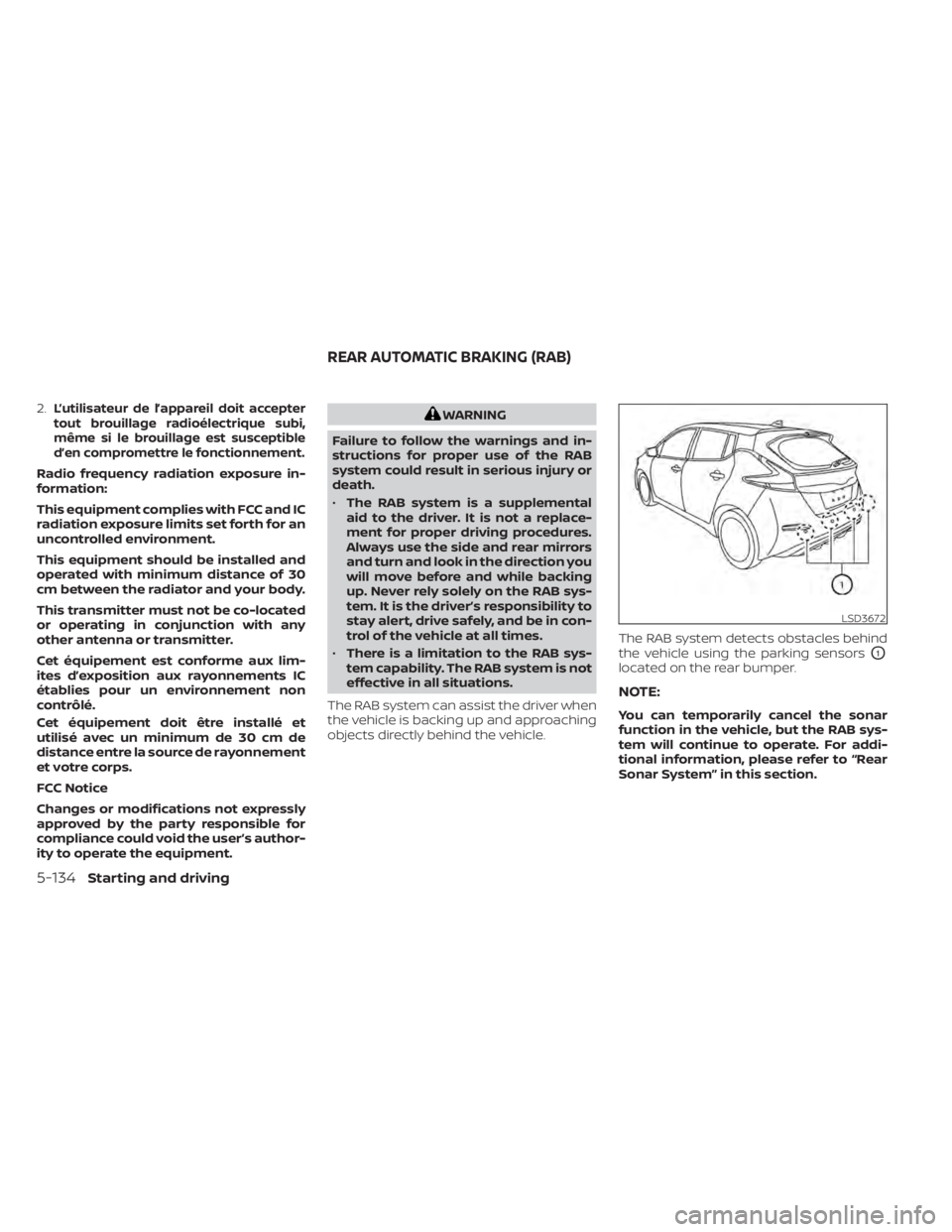
The RAB system can assist the driver when
the vehicle is backing up and approaching
objects directly behind the vehicle. The RAB system detects obstacles behind
the vehicle using the parking sensors
O1
located on the rear bumper.
NOTE:
You can temporarily cancel the sonar
function in the vehicle, but the RAB sys-
tem will continue to operate. For addi-
tional information, please refer to “Rear
Sonar System” in this section.
LSD3672
REAR AUTOMATIC BRAKING (RAB)
5-134Starting and driving
Page 478 of 596
4. Regenerated energy (mileage)Displays the amount of regenerated en-
ergy stored in the Li-ion battery in one
trip in terms of distance
If the vehicle has been driven mostly on
downhill roads, more energy is regener-
ated. This may cause the regenerated en-
ergy (mileage) (4) to show a longer distance
than the vehicle was driven or the current
energy economy (2) to show “99.9 miles/
kWh.”
When the
button is pressed while the
ECO Drive Report is shown, the display
switches to the timer display. Either display
will continue to show for another 30 sec-
onds af ter the button is pressed. If the
doors are locked af ter placing the power
switch in the OFF position, the display turns
off before the preset time.
In the “Settings” menu, you can program
the ECO Drive Report to not appear when
the power switch is placed in the OFF posi-
tion. For additional information, refer to “Ve-
hicle information display” in the “Instru-
ments and controls” section of this manual.
WARNING
• Do not stop or park the vehicle over
flammable materials such as dry
grass, waste paper or rags. They may
ignite and cause a fire.
• Never leave the vehicle in the READY
to drive mode while the vehicle is
unattended.
• Safe parking procedures require that
both the parking brake be applied
and the vehicle placed in the park po-
sition. Failure to do so could cause
the vehicle to move unexpectedly or
roll away and result in an accident.
• Do not leave children unattended in-
side the vehicle. They could unknow-
ingly activate switches or controls or
make the vehicle move. Unattended
children could become involved in
serious accidents. •
To help avoid risk of injury or death
through unintended operation of the
vehicle and/or its systems, do not
leave children, people who require
the assistance of others or pets unat-
tended in your vehicle. Additionally,
the temperature inside a closed ve-
hicle on a warm day can quickly be-
come high enough to cause a signifi-
cant risk of injury or death to people
and pets.
PARKING/PARKING ON HILLS
Starting and driving5-155
Page 479 of 596
1. Firmly apply the parking brake.
2. Push the P (Park) position switch on theshif t lever.
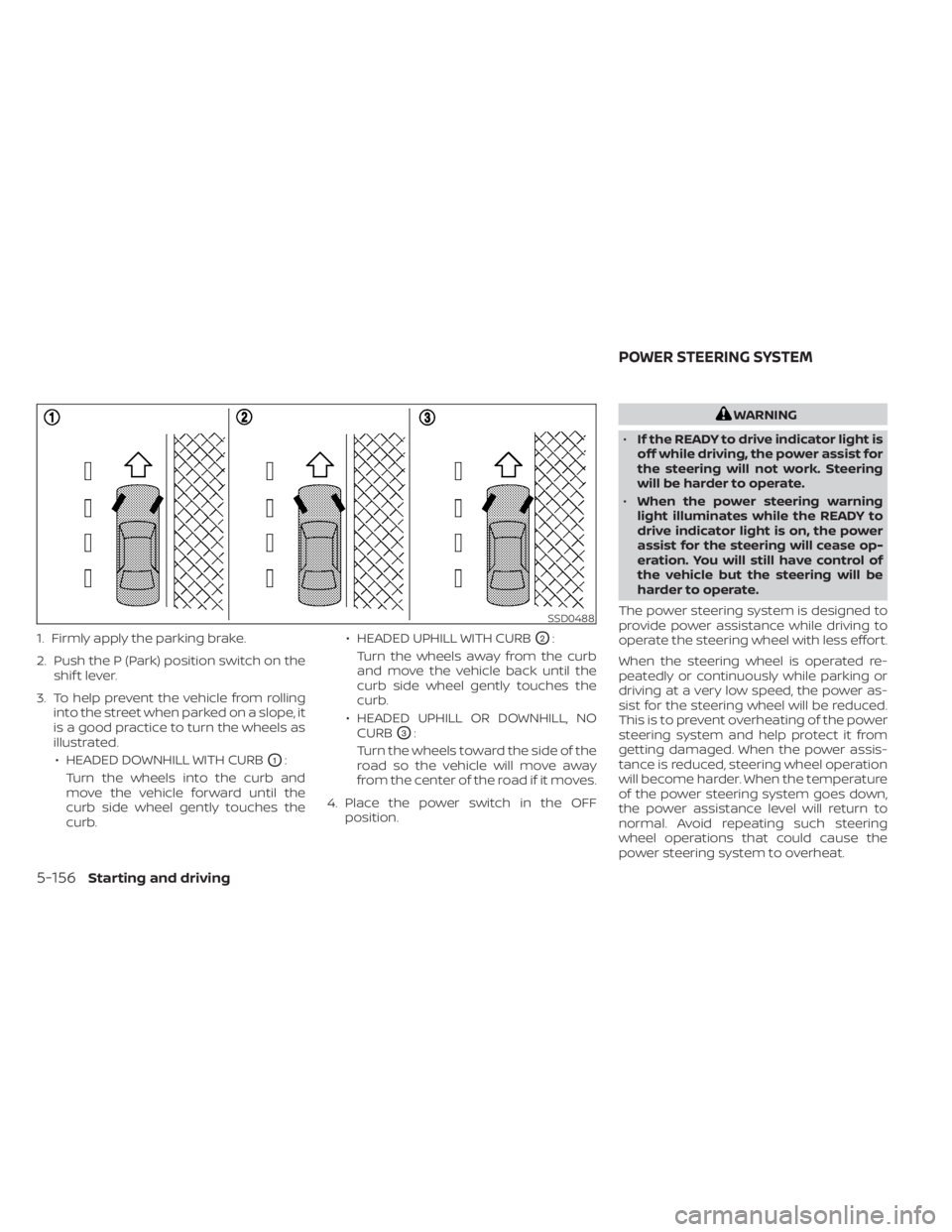
3. To help prevent the vehicle from rolling into the street when parked on a slope, it
is a good practice to turn the wheels as
illustrated.
• HEADED DOWNHILL WITH CURB
O1:
Turn the wheels into the curb and
move the vehicle forward until the
curb side wheel gently touches the
curb. • HEADED UPHILL WITH CURB
O2:
Turn the wheels away from the curb
and move the vehicle back until the
curb side wheel gently touches the
curb.
• HEADED UPHILL OR DOWNHILL, NO CURB
O3:
Turn the wheels toward the side of the
road so the vehicle will move away
from the center of the road if it moves.
4. Place the power switch in the OFF position.
WARNING
• If the READY to drive indicator light is
off while driving, the power assist for
the steering will not work. Steering
will be harder to operate.
• When the power steering warning
light illuminates while the READY to
drive indicator light is on, the power
assist for the steering will cease op-
eration. You will still have control of
the vehicle but the steering will be
harder to operate.
The power steering system is designed to
provide power assistance while driving to
operate the steering wheel with less effort.
When the steering wheel is operated re-
peatedly or continuously while parking or
driving at a very low speed, the power as-
sist for the steering wheel will be reduced.
This is to prevent overheating of the power
steering system and help protect it from
getting damaged. When the power assis-
tance is reduced, steering wheel operation
will become harder. When the temperature
of the power steering system goes down,
the power assistance level will return to
normal. Avoid repeating such steering
wheel operations that could cause the
power steering system to overheat.
SSD0488
POWER STEERING SYSTEM
5-156Starting and driving
Page 486 of 596
may indicate that the Intelligent Trace Con-
trol is not functioning properly. Have the
system checked as soon as possible. It is
recommended that you visit a NISSAN cer-
tified LEAF dealer for this service.
WARNING
The Intelligent Trace Control may not
be effective depending on the driving
condition. Always drive carefully and
attentively.
When the Intelligent Trace Control is oper-
ating, you may feel a pulsation in the brake
pedal, hear a noise and sense slight decel-
eration. This is normal and indicates that
the Intelligent Trace Control is operating
properly.
Even if the Intelligent Trace Control is
turned off, some functions will remain on to
assist the driver (for example, avoidance
scenes).
INTELLIGENT RIDE CONTROL
This system senses upper body motion
(based on wheel speed information) and
controls motor torque. This will enhance
ride comfort in effort to restrain uncom-
fortable upper body movement when passing over undulated road surfaces. This
system comes into effect above 25 mph
(40 km/h).
When the VDC system is turned off in the
vehicle information display, the Intelligent
Ride Control is also turned off.
WARNING
The Intelligent Ride Control may not be
effective depending on the driving con-
dition. Always drive carefully and at-
tentively.
When the Intelligent Ride Control is operat-
ing, you may hear a noise and sense slight
deceleration. This is normal and indicates
that the Intelligent Ride Control is operat-
ing properly.
If the “Chassis Control System Error: See
Owner’s Manual” warning message ap-
pears in the vehicle information display, it
may indicate that the Intelligent Ride Con-
trol is not functioning properly. Have the
system checked as soon as possible. It is
recommended that you visit a NISSAN cer-
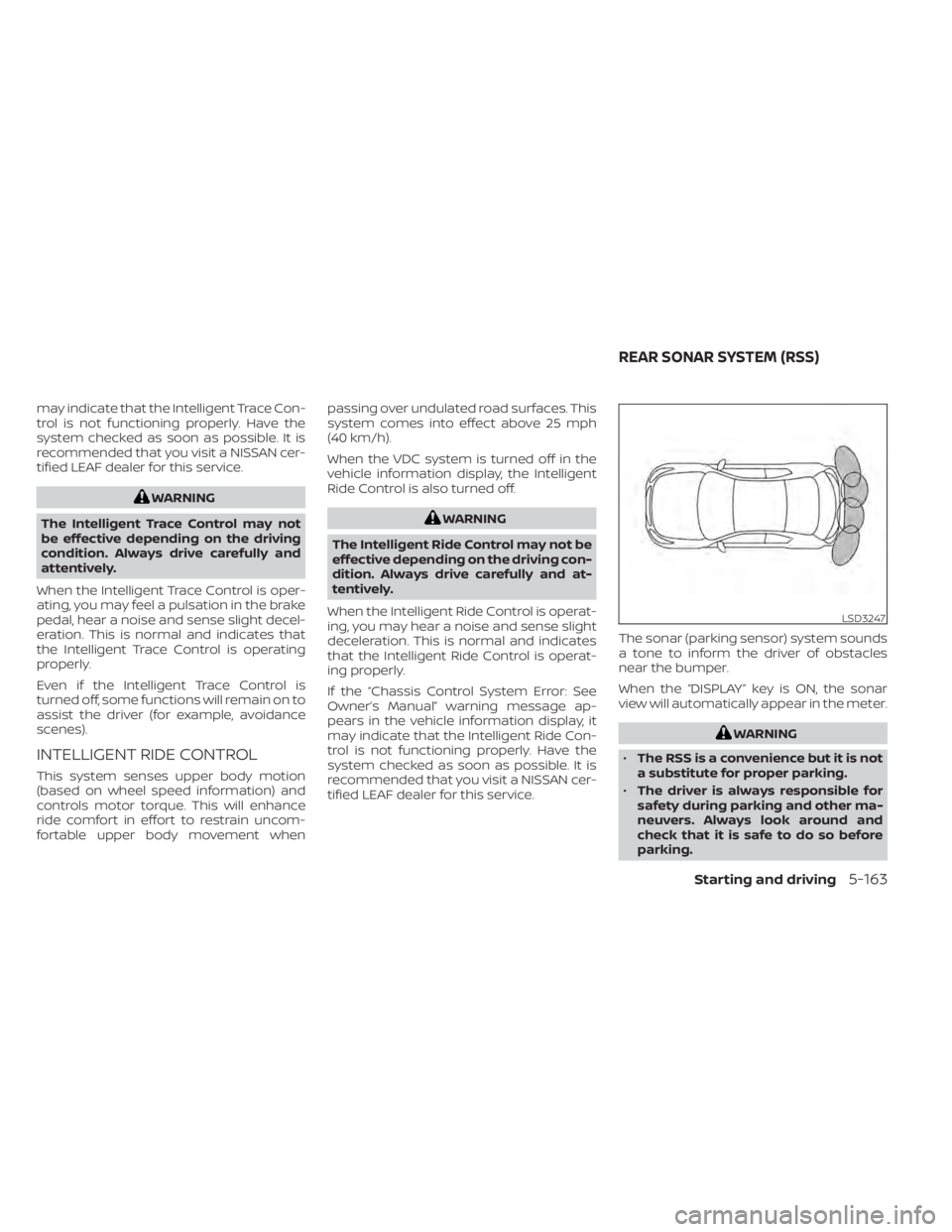
tified LEAF dealer for this service. The sonar (parking sensor) system sounds
a tone to inform the driver of obstacles
near the bumper.
When the “DISPLAY” key is ON, the sonar
view will automatically appear in the meter.
WARNING
• The RSS is a convenience but it is not
a substitute for proper parking.
• The driver is always responsible for
safety during parking and other ma-
neuvers. Always look around and
check that it is safe to do so before
parking.
LSD3247
REAR SONAR SYSTEM (RSS)
Starting and driving5-163
Page 489 of 596
HOW TO ENABLE/DISABLE THE
REAR SONAR SYSTEM
The system is automatically activated
when the power switch is placed in the ON
position and the shif t lever is in the R (Re-
verse) position.
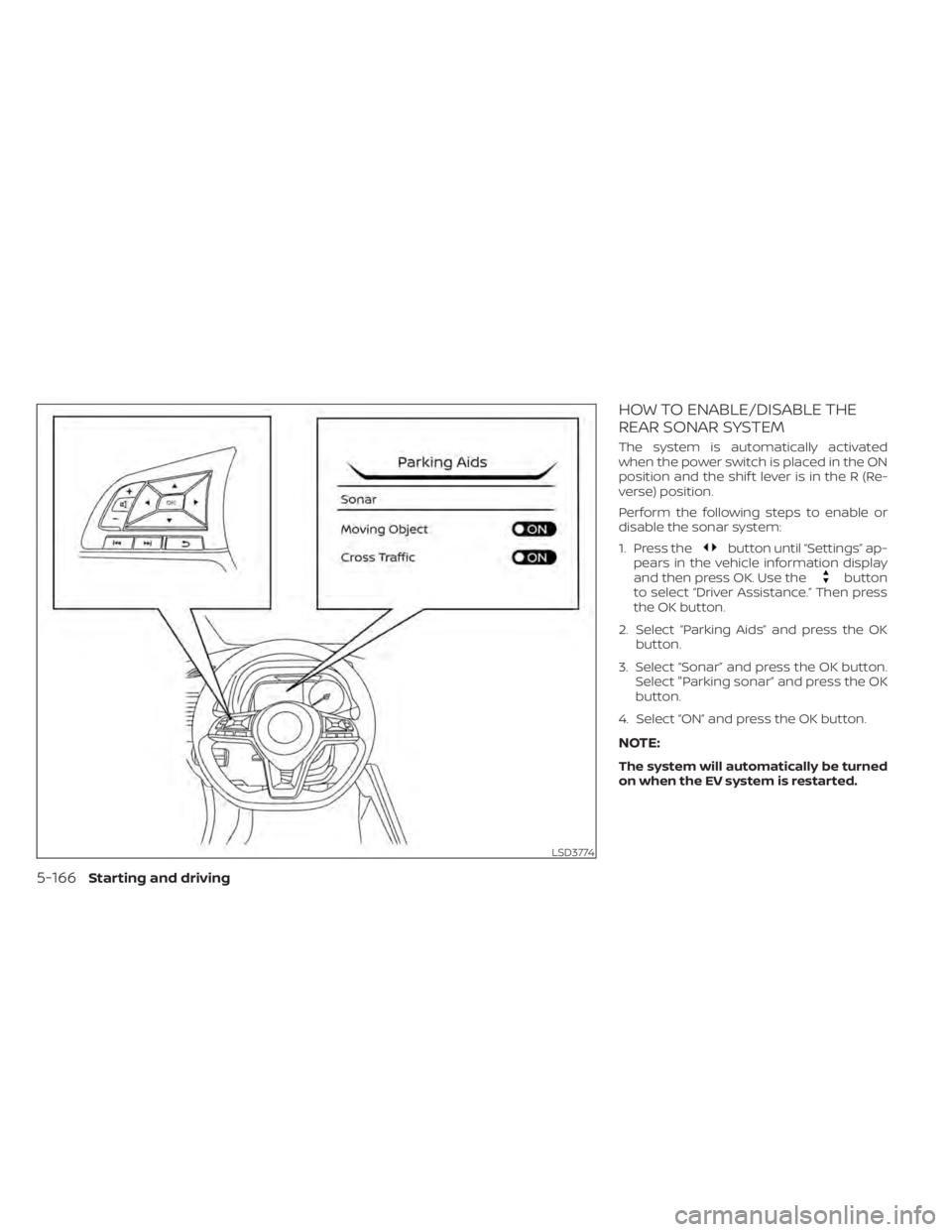
Perform the following steps to enable or
disable the sonar system:
1. Press the
button until “Settings” ap-
pears in the vehicle information display
and then press OK. Use the
button
to select “Driver Assistance.” Then press
the OK button.
2. Select “Parking Aids” and press the OK button.
3. Select “Sonar” and press the OK button. Select "Parking sonar” and press the OK
button.
4. Select “ON” and press the OK button.
NOTE:
The system will automatically be turned
on when the EV system is restarted.
LSD3774
5-166Starting and driving
Page 491 of 596
Do not attach stickers (including transpar-
ent material), install accessories or apply
additional paint near the sonar sensors.
Do not strike or damage the area around
the sonar sensors. It is recommended that
you visit a NISSAN dealer if the area around
the sonar sensors is damaged due to a
collision.WARNING
• Never rely solely on the hill start as-
sist system to prevent the vehicle
from moving backward on a hill. Al-
ways drive carefully and attentively.
Depress the brake pedal when the
vehicle is stopped on a steep hill. Be
especially careful when stopped on a
hill on frozen or muddy roads. Failure
to prevent the vehicle from rolling
backwards may result in a loss of
control of the vehicle and possible
serious injury or death.
• The hill start assist system is not de-
signed to hold the vehicle at a stand-
still on a hill. Depress the brake pedal
when the vehicle is stopped on a
steep hill. Failure to do so may cause
the vehicle to roll backwards and
may result in a collision or serious
personal injury.
• The hill start assist may not prevent
the vehicle from rolling backwards
on a hill under all load or road condi-
tions. Always be prepared to depress
the brake pedal to prevent the ve-
hicle from rolling backwards. Failure
to do so may result in a collision or
serious personal injury. The hill start assist system automatically
keeps the brakes applied to help prevent
the vehicle from rolling backwards in the
time it takes the driver to release the brake
pedal and apply the accelerator when the
vehicle is stopped on a hill.
Hill start assist will operate automatically
under the following conditions:
• The shif t lever is placed in the D (Drive), B
mode, or R (Reverse) position.
• The vehicle is stopped completely on a hill by applying the brake.
The maximum holding time is 2 seconds.
Af ter 2 seconds the vehicle will begin to roll
back and hill start assist will stop operating
completely.
Hill start assist will not operate when the
shif t lever is placed in the N (Neutral) or P
(Park) position or on a flat and level road.
HILL START ASSIST SYSTEM
5-168Starting and driving
Page 497 of 596
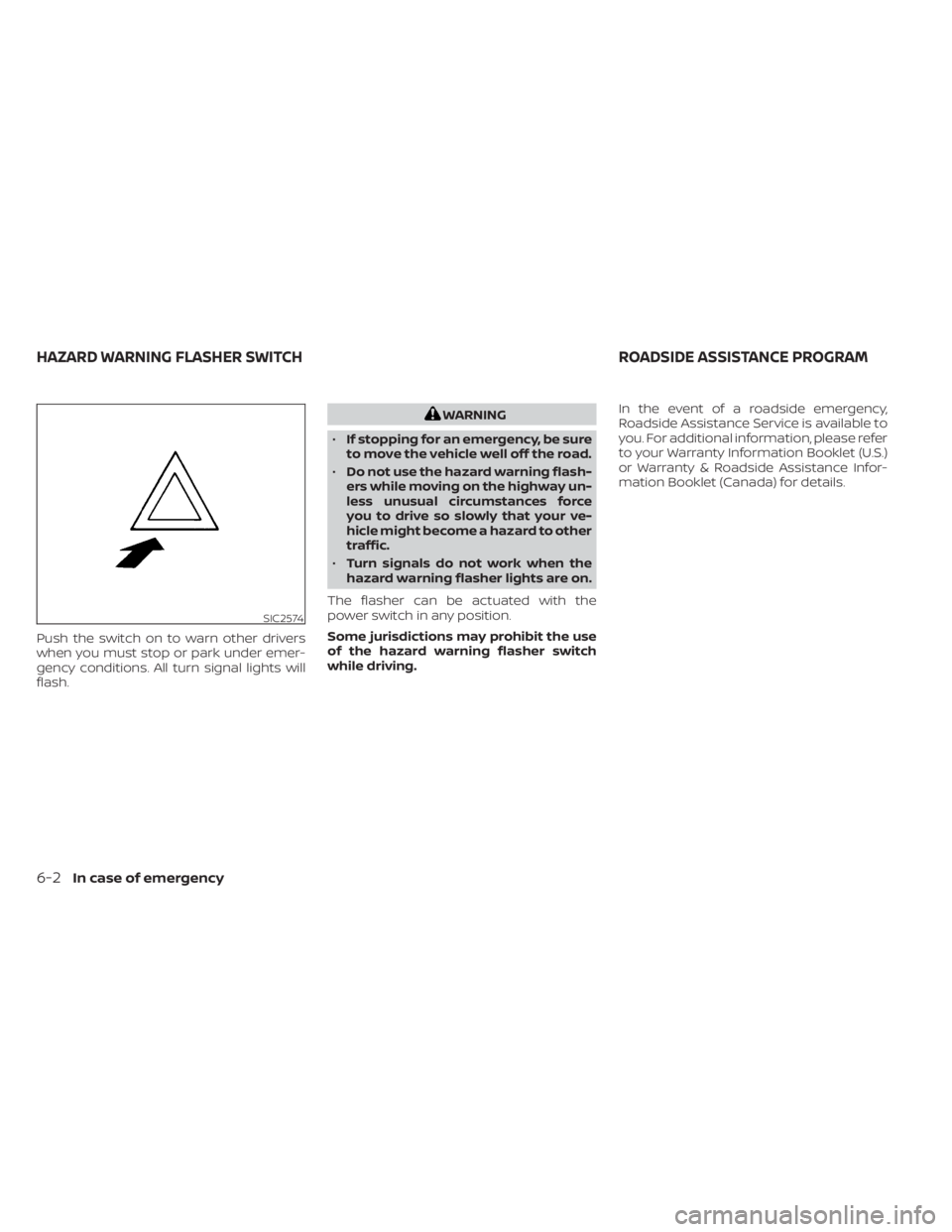
Push the switch on to warn other drivers
when you must stop or park under emer-
gency conditions. All turn signal lights will
flash.
WARNING
• If stopping for an emergency, be sure
to move the vehicle well off the road.
• Do not use the hazard warning flash-
ers while moving on the highway un-
less unusual circumstances force
you to drive so slowly that your ve-
hicle might become a hazard to other
traffic.
• Turn signals do not work when the
hazard warning flasher lights are on.
The flasher can be actuated with the
power switch in any position.
Some jurisdictions may prohibit the use
of the hazard warning flasher switch
while driving. In the event of a roadside emergency,
Roadside Assistance Service is available to
you. For additional information, please refer
to your Warranty Information Booklet (U.S.)
or Warranty & Roadside Assistance Infor-
mation Booklet (Canada) for details.
SIC2574
HAZARD WARNING FLASHER SWITCH
ROADSIDE ASSISTANCE PROGRAM
6-2In case of emergency
Page 500 of 596
CAUTION
• To avoid the emergency tire puncture
kit being damaged during storage or
use:
– Only use the emergency tire punc-
ture repair kit on your vehicle. Do
not use it on other vehicles.
– Only use the kit to inflate the tires
of your vehicle and to check the
vehicle’s tire pressure.
– Only plug the compressor into a
12-volt DC car power point.
– Keep the kit free of water and dirt.
– Do not disassemble or modif y the
kit.
– Do not drop the kit or allow hard
impacts to the kit.
• Do not use the emergency tire punc-
ture repair kit under the following
conditions. It is recommended that
you visit a NISSAN certified LEAF
dealer or professional road
assistance.
– when the sealant has passed its
expiration date (shown on the la-
bel attached to the bottle) –
when the cut or the puncture is
approximately 0.25 in (6 mm) or
longer
– when the tire sidewall is damaged
– when the vehicle has been driven
with extremely low tire pressure
– when the tire has come off the in-
side or the outside of the wheel
– when the tire wheel is damaged
– when two or more tires are flat
If you have a flat tire, follow the instructions
below.
Stopping the vehicle
1. Safely move the vehicle off the road and away from traffic.
2. Turn on the hazard warning flashers.
3. Park on a level surface and apply the parking brake.
4. Push the P (Park) position switch on the shif t lever to the P (Park) position.
5. Turn off the EV system.
6. Raise the hood to warn other traffic and to signal professional road assistance
personnel that you need assistance. 7. Have all passengers get out of the ve-
hicle and stand in a safe place, away
from traffic and clear of the vehicle.
WARNING
• Make sure the parking brake is se-
curely applied and the vehicle is
placed into the P (Park) position.
• Never repair tires when the vehicle is
on a slope, ice or slippery areas. This
is hazardous.
• Never repair tires if oncoming traffic
is close to your vehicle. Wait for pro-
fessional road assistance.
In case of emergency6-5