Dome NISSAN LEAF 2020 Owner´s Manual
[x] Cancel search | Manufacturer: NISSAN, Model Year: 2020, Model line: LEAF, Model: NISSAN LEAF 2020Pages: 596, PDF Size: 4.33 MB
Page 7 of 596

NISSAN CARES ...
Both NISSAN and your NISSAN certified LEAF dealer are dedicated to serving all your automotive needs. Your satisfaction with your vehicle
and your NISSAN certified LEAF dealer are our primary concerns. YourNISSAN certified LEAF dealer is always available to assist you with
all your automobile sales and service needs.
However, if there is something that your
NISSAN certified LEAF dealer cannot assist
you with or you would like to provide
NISSAN directly with comments or ques-
tions, please contact the NISSAN Con-
sumer Affairs Department using our toll-
free number:
For U.S. customers 1-877-NOGASEV
(1-877-664-2738)
For Canadian customers 1-800-387-0122
The Consumer Affairs Department will ask
for the following information:
– Your name, address, and telephone number – Vehicle identification number (attached
to the top of the instrument panel on the
driver's side)
– Date of purchase
– Current odometer reading
– Your NISSAN certified LEAF dealer’s name
– Your comments or questions
OR
You can write to NISSAN with the informa-
tion at:
For U.S. customers Nissan North America, Inc.
Consumer Affairs Department P.O. Box 685003
Franklin, TN 37068-5003
or via e-mail at:
[email protected]
For Canadian customers Nissan Canada Inc.
5290 Orbitor Drive
Mississauga, Ontario L4W 4Z5
or via e-mail at:
[email protected]
If you prefer, visit us at:
www.nissanusa.com (for U.S. customers)
or
www.nissan.ca (for Canadian customers)
We appreciate your interest in NISSAN and thank you for buying a quality NISSAN vehicle.
NISSAN CUSTOMER CARE PROGRAM
Page 15 of 596
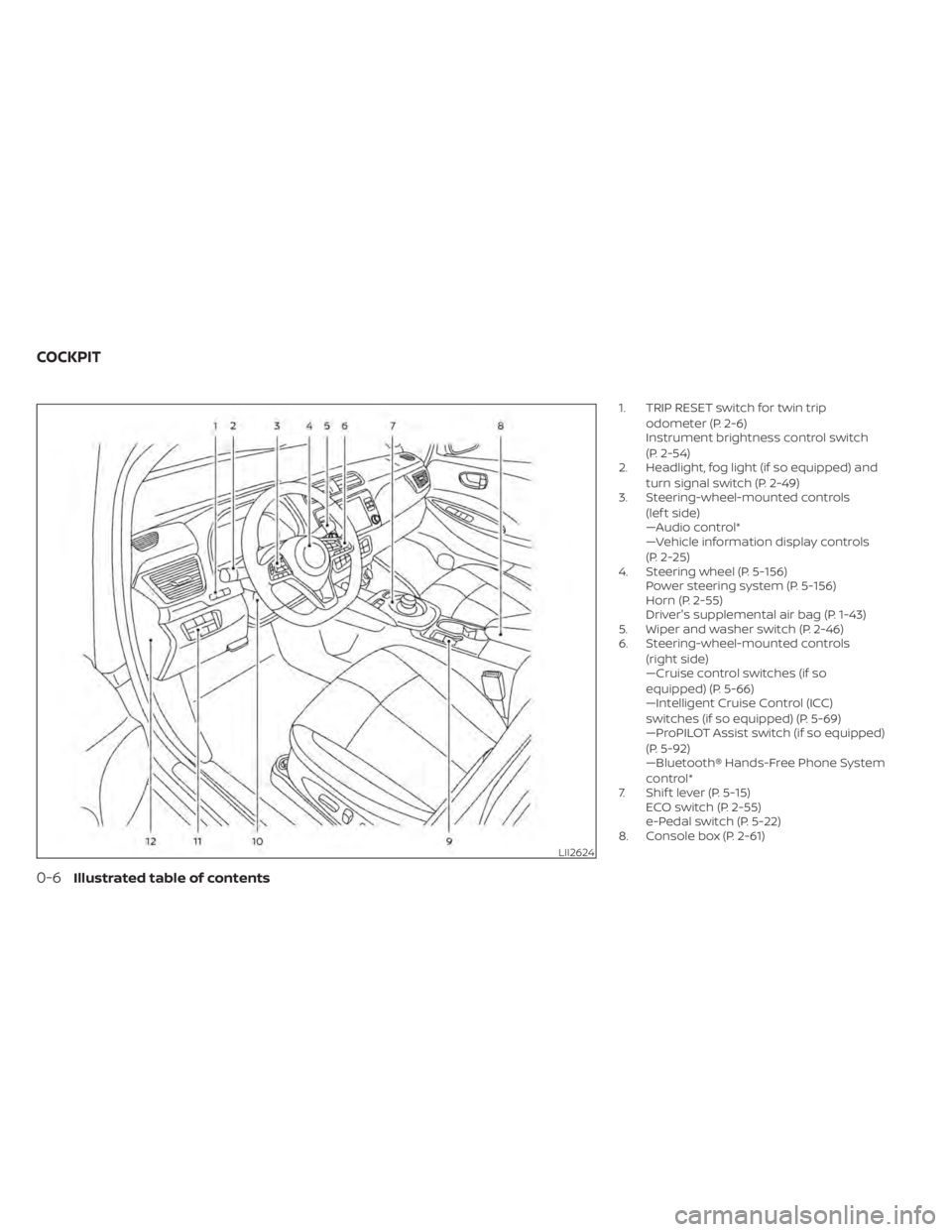
1. TRIP RESET switch for twin tripodometer (P. 2-6)
Instrument brightness control switch
(P. 2-54)
2. Headlight, fog light (if so equipped) and
turn signal switch (P. 2-49)
3. Steering-wheel-mounted controls
(lef t side)
—Audio control*
—Vehicle information display controls
(P. 2-25)
4. Steering wheel (P. 5-156) Power steering system (P. 5-156)
Horn (P. 2-55)
Driver's supplemental air bag (P. 1-43)
5. Wiper and washer switch (P. 2-46)
6. Steering-wheel-mounted controls
(right side)
—Cruise control switches (if so
equipped) (P. 5-66)
—Intelligent Cruise Control (ICC)
switches (if so equipped) (P. 5-69)
—ProPILOT Assist switch (if so equipped)
(P. 5-92)
—Bluetooth® Hands-Free Phone System
control*
7. Shif t lever (P. 5-15) ECO switch (P. 2-55)
e-Pedal switch (P. 5-22)
8. Console box (P. 2-61)
LII2624
COCKPIT
0-6Illustrated table of contents
Page 18 of 596
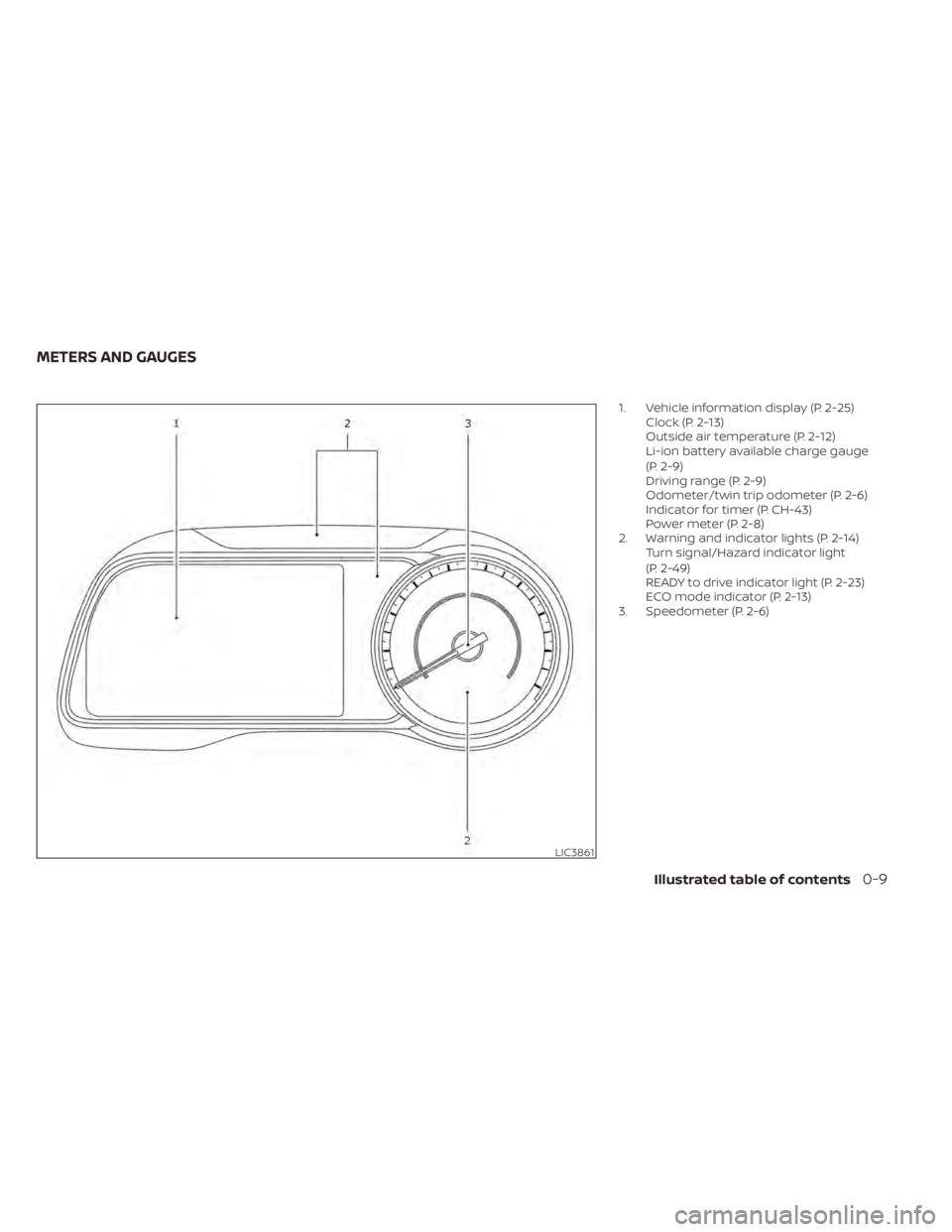
1. Vehicle information display (P. 2-25)Clock (P. 2-13)
Outside air temperature (P. 2-12)
Li-ion battery available charge gauge
(P. 2-9)
Driving range (P. 2-9)
Odometer/twin trip odometer (P. 2-6)
Indicator for timer (P. CH-43)
Power meter (P. 2-8)
2. Warning and indicator lights (P. 2-14) Turn signal/Hazard indicator light
(P. 2-49)
READY to drive indicator light (P. 2-23)
ECO mode indicator (P. 2-13)
3. Speedometer (P. 2-6)
LIC3861
METERS AND GAUGES
Illustrated table of contents0-9
Page 126 of 596
INFANTS
Infants up to at least 1 year old should be
placed in a rear-facing child restraint. NISSAN
recommends that infants be placed in child
restraints that comply with Federal Motor
Vehicle Safety Standards or Canadian Motor
Vehicle Safety Standards. You should choose
a child restraint that fits your vehicle and
always follow the manufacturer’s instruc-
tions for installation and use.
SMALL CHILDREN
Children that are over 1 year old and weigh
at least 20 lbs. (9 kg) should remain in a
rear-facing child restraint as long as pos-
sible up to the height or weight limit of the
child restraint. Children who outgrow the
height or weight limit of the rear-facing
child restraint and are at least 1 year old
should be secured in a forward-facing child
restraint with a harness. Refer to the manu-
facturer’s instructions for minimum and
maximum weight and height recommen-
dations. NISSAN recommends that small
children be placed in child restraints that
comply with Federal Motor Vehicle Safety
Standards or Canadian Motor Vehicle
Safety Standards. You should choose a
child restraint that fits your vehicle and al-
ways follow the manufacturer’s instruc-
tions for installation and use.
LARGER CHILDREN
Children should remain in a forward-facing
child restraint with a harness until they
reach the maximum height or weight limit
allowed by the child restraint manufac-
turer.Once a child outgrows the height or weight
limit of the harness-equipped forward-
facing child restraint, NISSAN recommends
that the child be placed in a commercially
available booster seat to obtain proper
seat belt fit. For a seat belt to fit properly, the
booster seat should raise the child so that
the shoulder belt is properly positioned
across the chest and the top, middle por-
tion of the shoulder. The shoulder belt
should not cross the neck or face and
should not fall off the shoulder. The lap belt
should lie snugly across the lower hips or
upper thighs, not the abdomen. A booster
seat can only be used in seating positions
that have a three-point type seat belt. The
booster seat should fit the vehicle seat and
have a label certif ying that it complies with
Federal Motor Vehicle Safety Standards or
Canadian Motor Vehicle Safety Standards.
Safety–Seats, seat belts and supplemental restraint system1-19
Page 173 of 596
2 Instruments and controls
Cockpit.........................................2-2
Instrument Panel ................................2-4
Meters and Gauges .............................2-5
Speedometer and odometer .................2-6
Li-ion battery temperature gauge ............ 2-7
Power meter .................................2-8
Driving range .................................2-9
Li-ion battery available charge gauge ........2-9
Li-ion battery capacity level gauge ..........2-12
Outside air temperature .....................2-12
Clock ........................................ 2-13
ECO mode indicator ......................... 2-13
e-Pedal system indicator ....................2-13
Warning lights, indicator lights and audible
reminders ...................................... 2-14
Checking lights .............................. 2-15
Warning lights ............................... 2-15
Indicator lights .............................. 2-22
Audible reminders ........................... 2-24
Vehicle information display .....................2-25
How to use the vehicle information
display ...................................... 2-26
Startup display .............................. 2-26
Settings ..................................... 2-26
Vehicle information display warnings
and indicators ............................... 2-33Warning information displays (MODELS
WITH A NAVIGATION SYSTEM)
................2-42
Security systems ............................... 2-43
Vehicle security system .....................2-43
NISSAN Vehicle Immobilizer System .........2-44
Wiper and washer switch .......................2-46
Washer operation ...........................2-47
Rear wiper operation ........................2-47
Rear window and outside mirror
(if so equipped) defroster switch ...............2-48
Headlight and turn signal switch ...............2-49
Headlight switch ............................ 2-49
LED Daytime Running Lights (DRL)
system (if so equipped) ......................2-53
Instrument brightness control ..............2-54
Turn signal switch ........................... 2-54
Fog light switch (if so equipped) ................2-55
Horn ........................................... 2-55
EC
O switch ..................................... 2-55
Heated seat switches (if so equipped) ..........2-56
Heated steering wheel switch (if so equipped) . . 2-57
E-call (SOS) button (if so equipped) .............2-58
Charge port lid switch .......................... 2-58
Immediate Charge switch ......................2-58
Page 175 of 596
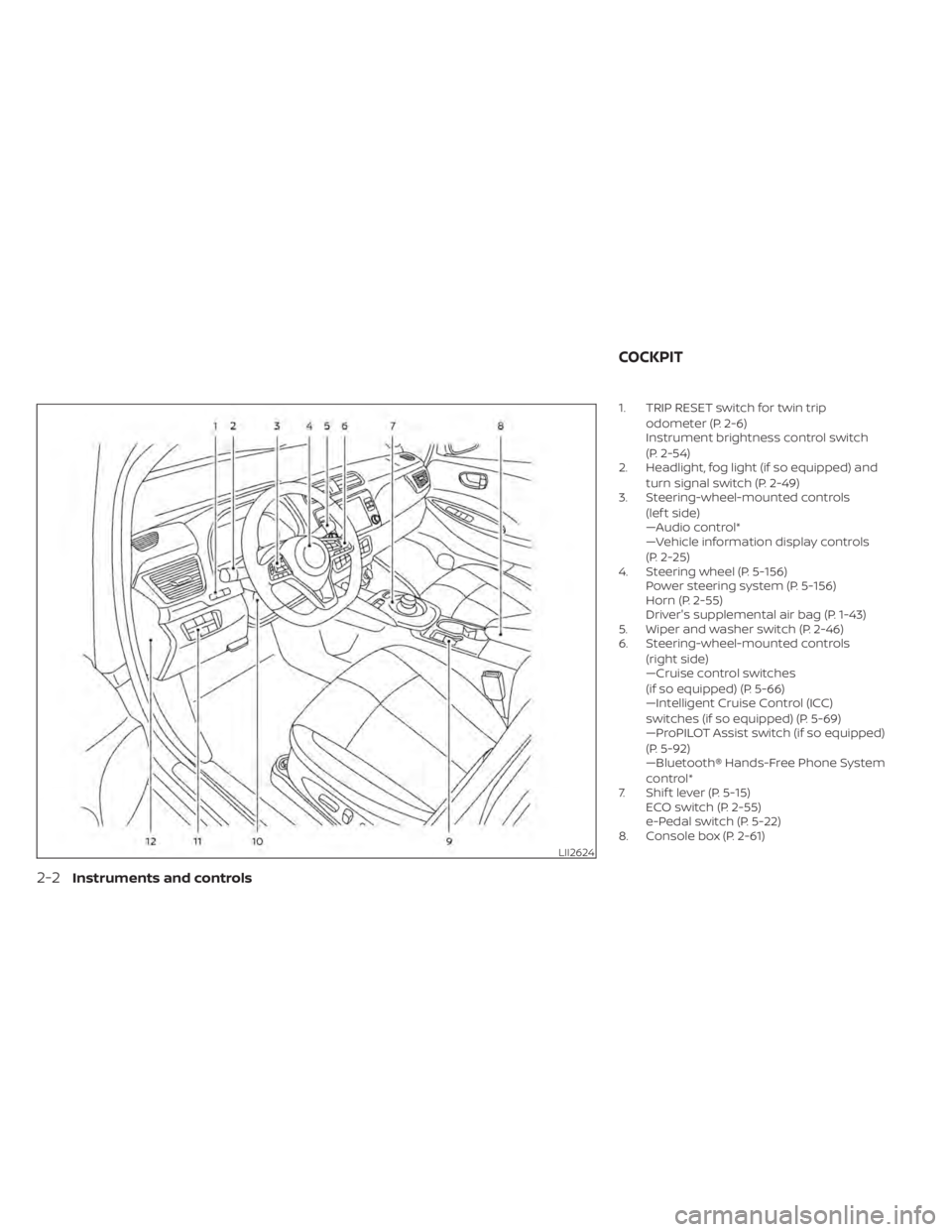
1. TRIP RESET switch for twin tripodometer (P. 2-6)
Instrument brightness control switch
(P. 2-54)
2. Headlight, fog light (if so equipped) and
turn signal switch (P. 2-49)
3. Steering-wheel-mounted controls
(lef t side)
—Audio control*
—Vehicle information display controls
(P. 2-25)
4. Steering wheel (P. 5-156) Power steering system (P. 5-156)
Horn (P. 2-55)
Driver's supplemental air bag (P. 1-43)
5. Wiper and washer switch (P. 2-46)
6. Steering-wheel-mounted controls
(right side)
—Cruise control switches
(if so equipped) (P. 5-66)
—Intelligent Cruise Control (ICC)
switches (if so equipped) (P. 5-69)
—ProPILOT Assist switch (if so equipped)
(P. 5-92)
—Bluetooth® Hands-Free Phone System
control*
7. Shif t lever (P. 5-15) ECO switch (P. 2-55)
e-Pedal switch (P. 5-22)
8. Console box (P. 2-61)
LII2624
COCKPIT
2-2Instruments and controls
Page 178 of 596
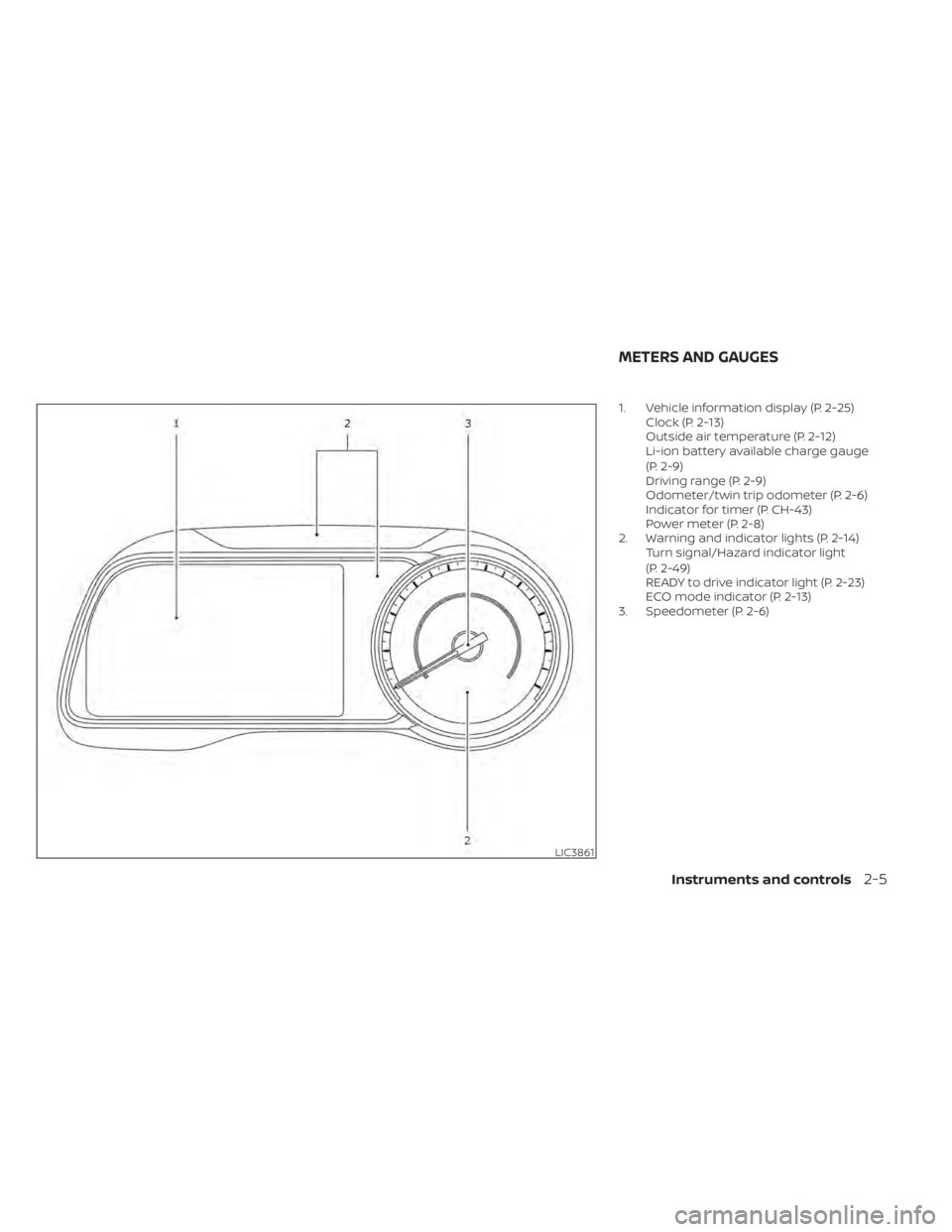
1. Vehicle information display (P. 2-25)Clock (P. 2-13)
Outside air temperature (P. 2-12)
Li-ion battery available charge gauge
(P. 2-9)
Driving range (P. 2-9)
Odometer/twin trip odometer (P. 2-6)
Indicator for timer (P. CH-43)
Power meter (P. 2-8)
2. Warning and indicator lights (P. 2-14) Turn signal/Hazard indicator light
(P. 2-49)
READY to drive indicator light (P. 2-23)
ECO mode indicator (P. 2-13)
3. Speedometer (P. 2-6)
LIC3861
METERS AND GAUGES
Instruments and controls2-5
Page 179 of 596
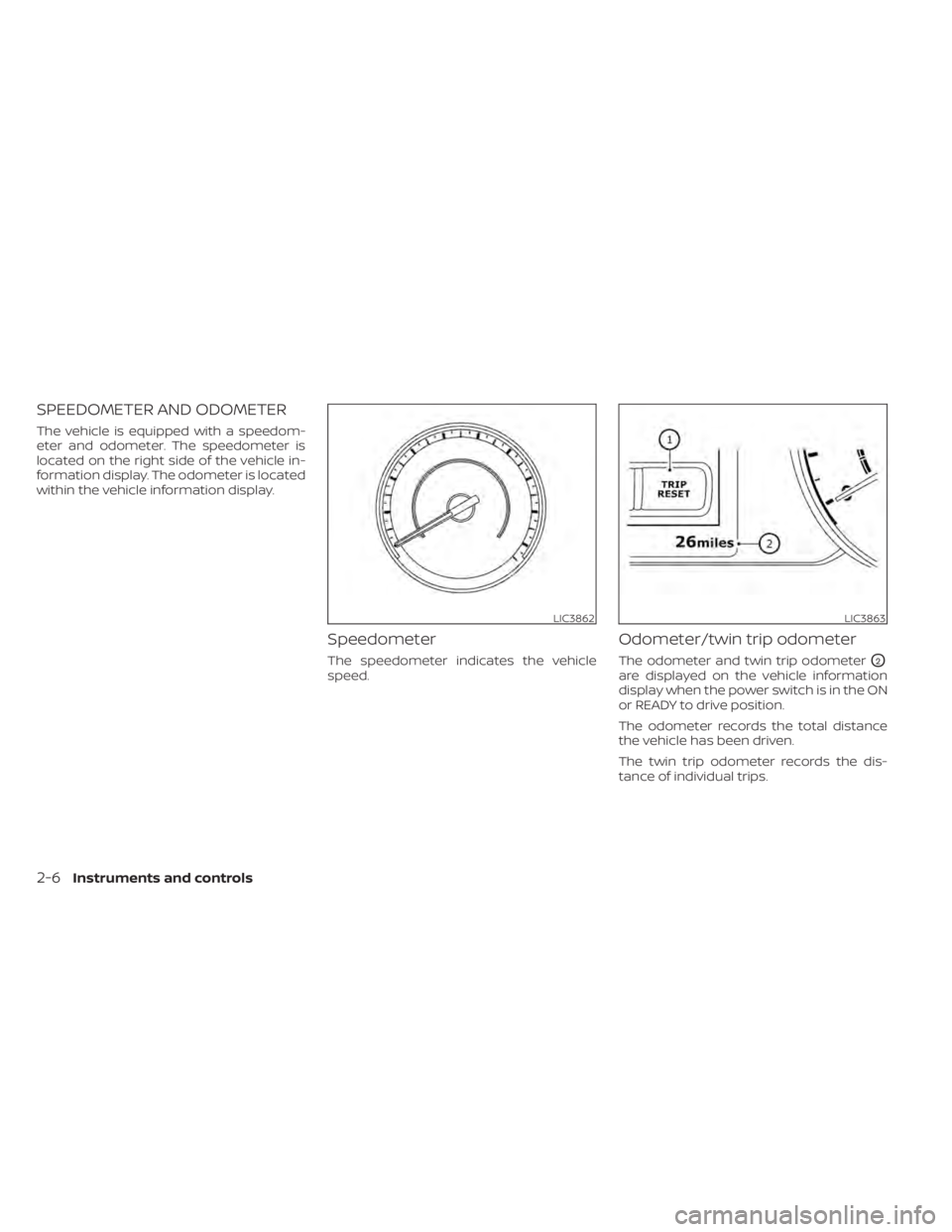
SPEEDOMETER AND ODOMETER
The vehicle is equipped with a speedom-
eter and odometer. The speedometer is
located on the right side of the vehicle in-
formation display. The odometer is located
within the vehicle information display.
Speedometer
The speedometer indicates the vehicle
speed.
Odometer/twin trip odometer
The odometer and twin trip odometerO2
are displayed on the vehicle information
display when the power switch is in the ON
or READY to drive position.
The odometer records the total distance
the vehicle has been driven.
The twin trip odometer records the dis-
tance of individual trips.
LIC3862LIC3863
2-6Instruments and controls
Page 180 of 596
Changing the display:
Pushing the TRIP RESET switch
O1located
on the lef t side of the instrument panel
changes the display as follows:
Odometer →TRIP A →TRIP B →Odometer
For additional information about the ve-
hicle information display, refer to “Vehicle
information display” in this section.
Resetting the trip odometer:
Pushing the TRIP RESET switch
O1for ap-
proximately 1 second resets the currently
displayed trip odometer to zero.
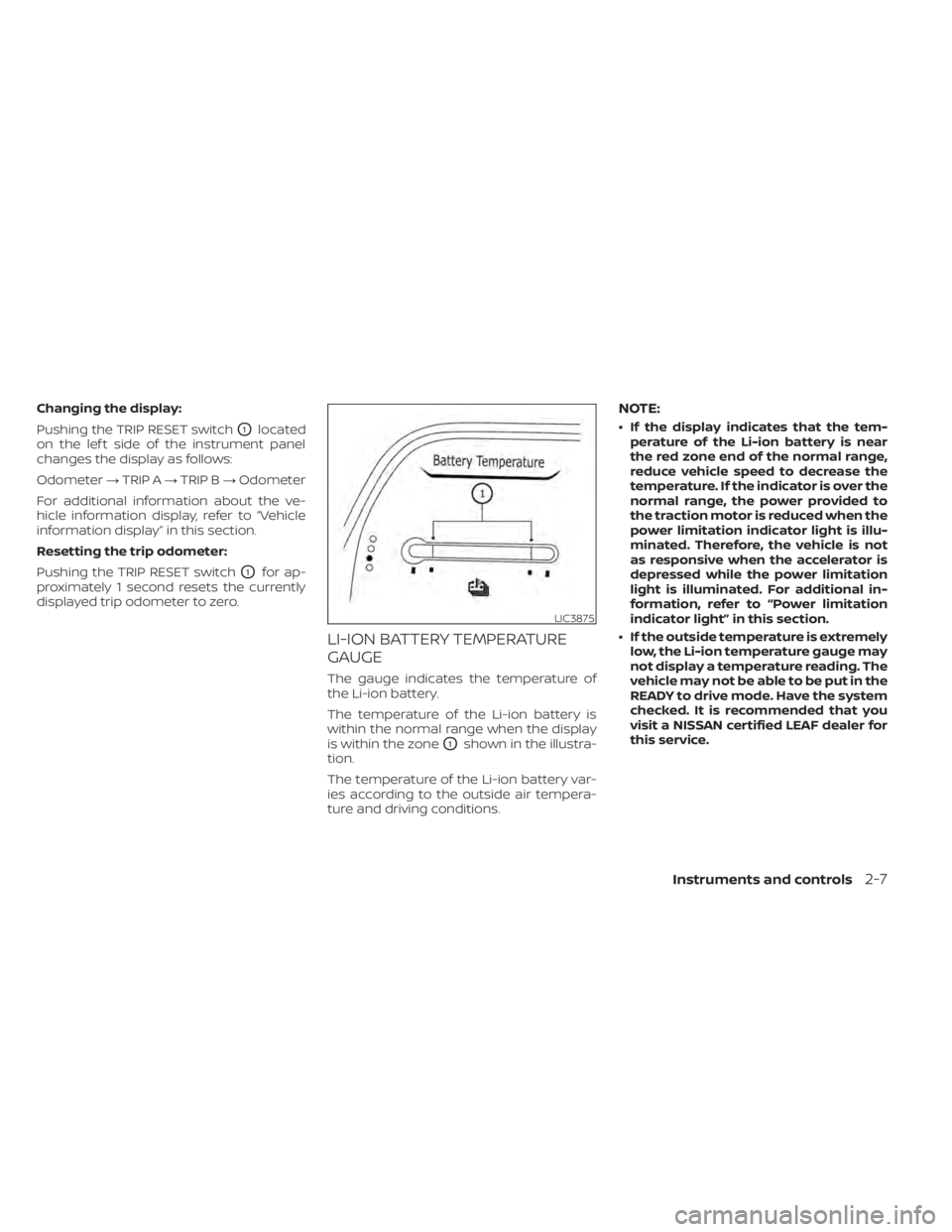
LI-ION BATTERY TEMPERATURE
GAUGE
The gauge indicates the temperature of
the Li-ion battery.
The temperature of the Li-ion battery is
within the normal range when the display
is within the zone
O1shown in the illustra-
tion.
The temperature of the Li-ion battery var-
ies according to the outside air tempera-
ture and driving conditions.
NOTE:
• If the display indicates that the tem- perature of the Li-ion battery is near
the red zone end of the normal range,
reduce vehicle speed to decrease the
temperature. If the indicator is over the
normal range, the power provided to
the traction motor is reduced when the
power limitation indicator light is illu-
minated. Therefore, the vehicle is not
as responsive when the accelerator is
depressed while the power limitation
light is illuminated. For additional in-
formation, refer to “Power limitation
indicator light” in this section.
• If the outside temperature is extremely low, the Li-ion temperature gauge may
not display a temperature reading. The
vehicle may not be able to be put in the
READY to drive mode. Have the system
checked. It is recommended that you
visit a NISSAN certified LEAF dealer for
this service.
LIC3875
Instruments and controls2-7
Page 198 of 596
Key reminder chime
A chime will sound if the driver's side door is
opened while the power switch is pushed
to the ON or ACC position.
Make sure that the power switch is pushed
to the OFF position, and take the Intelligent
Key with you when leaving the vehicle.
Light reminder chime
The light reminder chime will sound when
the driver side door is opened with the light
switch in the
orposition, and
the power switch is in the ACC, OFF or LOCK
position.
Turn the light switch off when you leave the
vehicle.
Parking brake reminder chime
A chime sounds if the parking brake is set
and the vehicle is driven. The chime will
stop if the parking brake is released or the
vehicle speed returns to zero.
Power switch reminder chime
The power switch reminder chime will
sound when the driver's door is opened
while the power switch is in the ON or READY to drive position. Push the power
switch to the OFF position.
Seat belt warning chime
The seat belt warning chime will sound for
about 6 seconds unless the driver’s seat
belt is securely fastened.
12-volt battery charge
warning chime
If the 12-volt battery charge warning light
illuminates, the chime will sound when a
warning message is displayed in the ve-
hicle information display.
When the chime sounds, immediately stop
the vehicle in a safe location and push the P
(Park) position switch on the shif t lever and
apply the parking brake. The 12-volt battery
charge warning light turns off and the
chime will stop when the parking brake is
applied or the vehicle is placed in the P
(Park) position. Have the system checked. It
is recommended that you visit a NISSAN
certified LEAF dealer for this service. For
additional information, refer to “12-volt bat-
tery charge warning light” in this section.
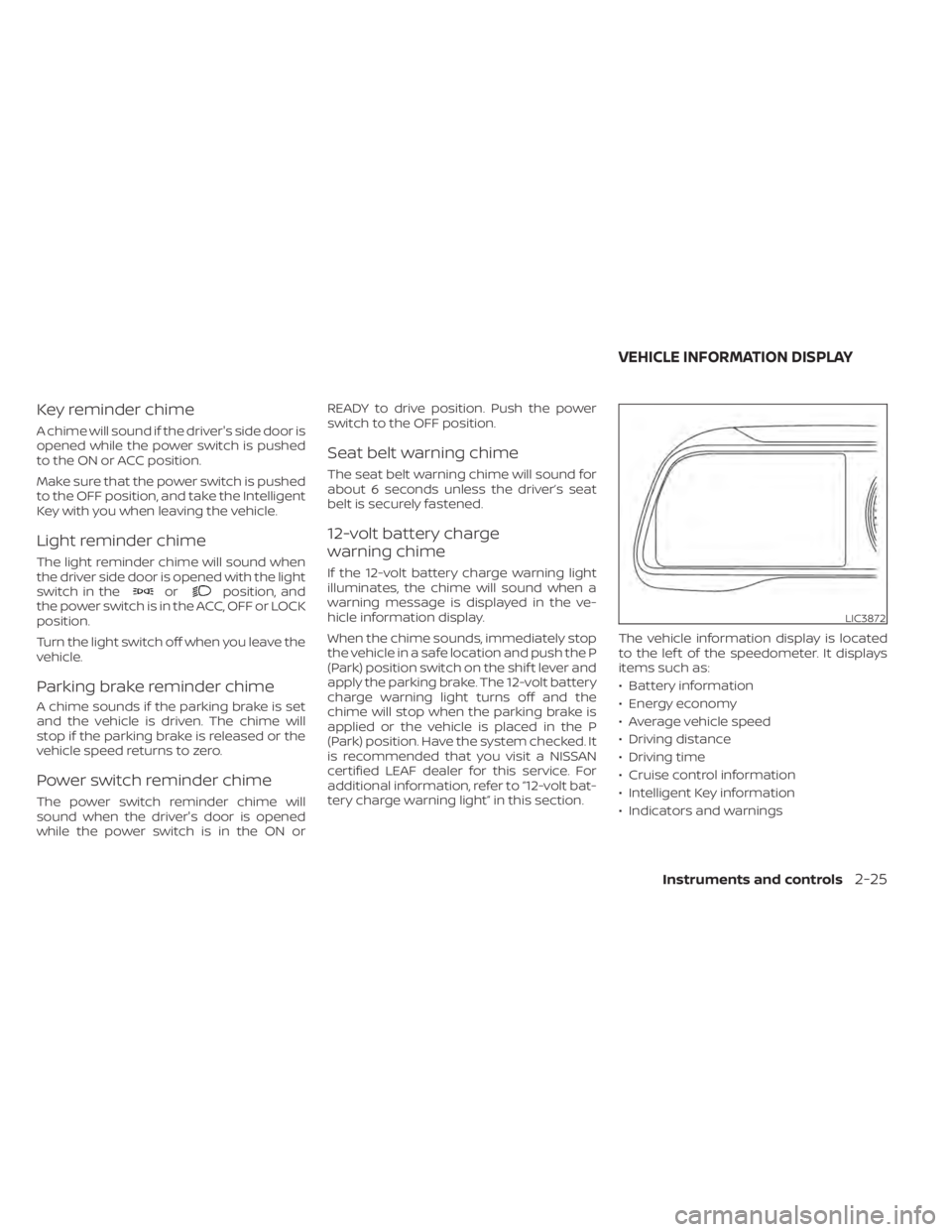
The vehicle information display is located
to the lef t of the speedometer. It displays
items such as:
• Battery information
• Energy economy
• Average vehicle speed
• Driving distance
• Driving time
• Cruise control information
• Intelligent Key information
• Indicators and warnings
LIC3872
VEHICLE INFORMATION DISPLAY
Instruments and controls2-25