horn NISSAN LEAF 2020 Owner´s Manual
[x] Cancel search | Manufacturer: NISSAN, Model Year: 2020, Model line: LEAF, Model: NISSAN LEAF 2020Pages: 596, PDF Size: 4.33 MB
Page 15 of 596
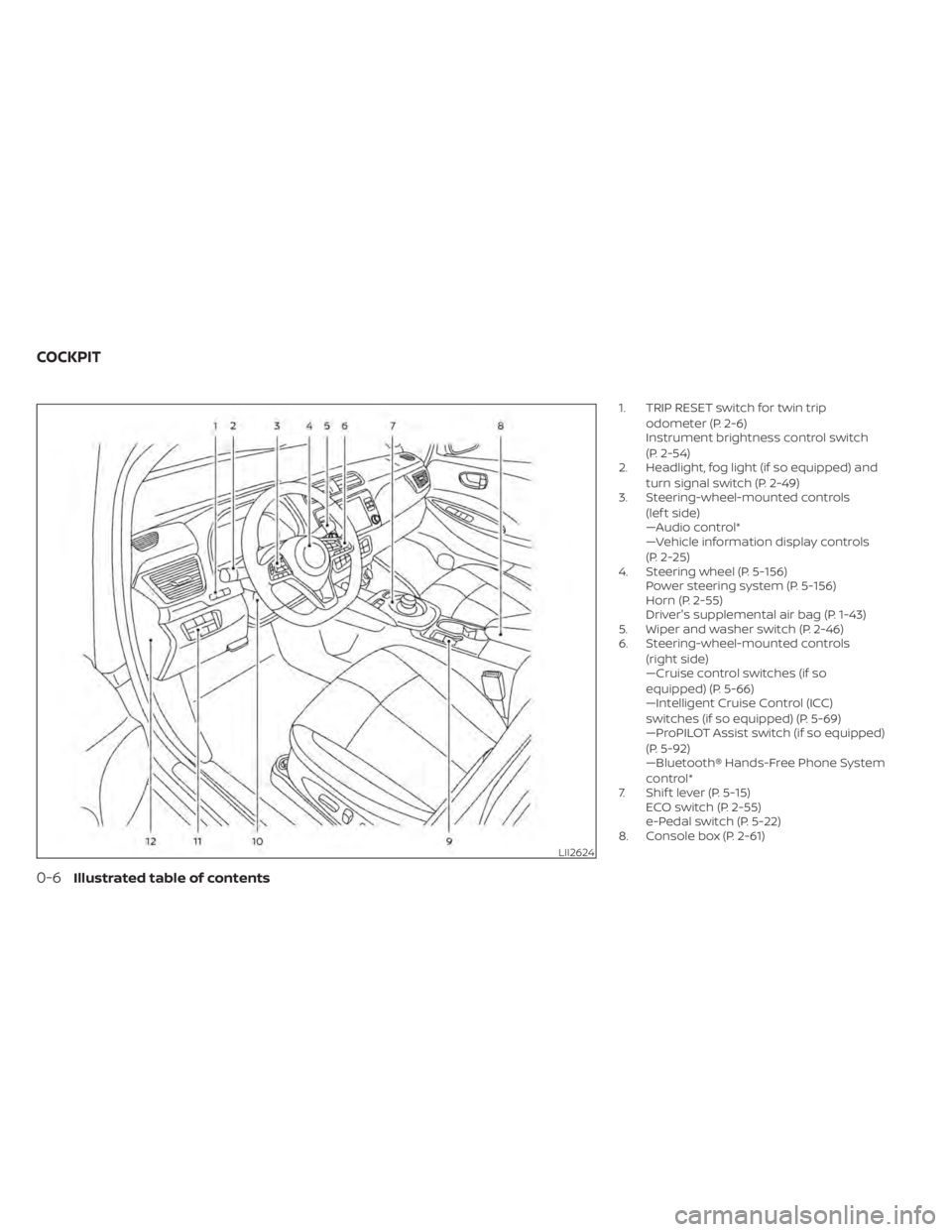
1. TRIP RESET switch for twin tripodometer (P. 2-6)
Instrument brightness control switch
(P. 2-54)
2. Headlight, fog light (if so equipped) and
turn signal switch (P. 2-49)
3. Steering-wheel-mounted controls
(lef t side)
—Audio control*
—Vehicle information display controls
(P. 2-25)
4. Steering wheel (P. 5-156) Power steering system (P. 5-156)
Horn (P. 2-55)
Driver's supplemental air bag (P. 1-43)
5. Wiper and washer switch (P. 2-46)
6. Steering-wheel-mounted controls
(right side)
—Cruise control switches (if so
equipped) (P. 5-66)
—Intelligent Cruise Control (ICC)
switches (if so equipped) (P. 5-69)
—ProPILOT Assist switch (if so equipped)
(P. 5-92)
—Bluetooth® Hands-Free Phone System
control*
7. Shif t lever (P. 5-15) ECO switch (P. 2-55)
e-Pedal switch (P. 5-22)
8. Console box (P. 2-61)
LII2624
COCKPIT
0-6Illustrated table of contents
Page 173 of 596
2 Instruments and controls
Cockpit.........................................2-2
Instrument Panel ................................2-4
Meters and Gauges .............................2-5
Speedometer and odometer .................2-6
Li-ion battery temperature gauge ............ 2-7
Power meter .................................2-8
Driving range .................................2-9
Li-ion battery available charge gauge ........2-9
Li-ion battery capacity level gauge ..........2-12
Outside air temperature .....................2-12
Clock ........................................ 2-13
ECO mode indicator ......................... 2-13
e-Pedal system indicator ....................2-13
Warning lights, indicator lights and audible
reminders ...................................... 2-14
Checking lights .............................. 2-15
Warning lights ............................... 2-15
Indicator lights .............................. 2-22
Audible reminders ........................... 2-24
Vehicle information display .....................2-25
How to use the vehicle information
display ...................................... 2-26
Startup display .............................. 2-26
Settings ..................................... 2-26
Vehicle information display warnings
and indicators ............................... 2-33Warning information displays (MODELS
WITH A NAVIGATION SYSTEM)
................2-42
Security systems ............................... 2-43
Vehicle security system .....................2-43
NISSAN Vehicle Immobilizer System .........2-44
Wiper and washer switch .......................2-46
Washer operation ...........................2-47
Rear wiper operation ........................2-47
Rear window and outside mirror
(if so equipped) defroster switch ...............2-48
Headlight and turn signal switch ...............2-49
Headlight switch ............................ 2-49
LED Daytime Running Lights (DRL)
system (if so equipped) ......................2-53
Instrument brightness control ..............2-54
Turn signal switch ........................... 2-54
Fog light switch (if so equipped) ................2-55
Horn ........................................... 2-55
EC
O switch ..................................... 2-55
Heated seat switches (if so equipped) ..........2-56
Heated steering wheel switch (if so equipped) . . 2-57
E-call (SOS) button (if so equipped) .............2-58
Charge port lid switch .......................... 2-58
Immediate Charge switch ......................2-58
Page 175 of 596
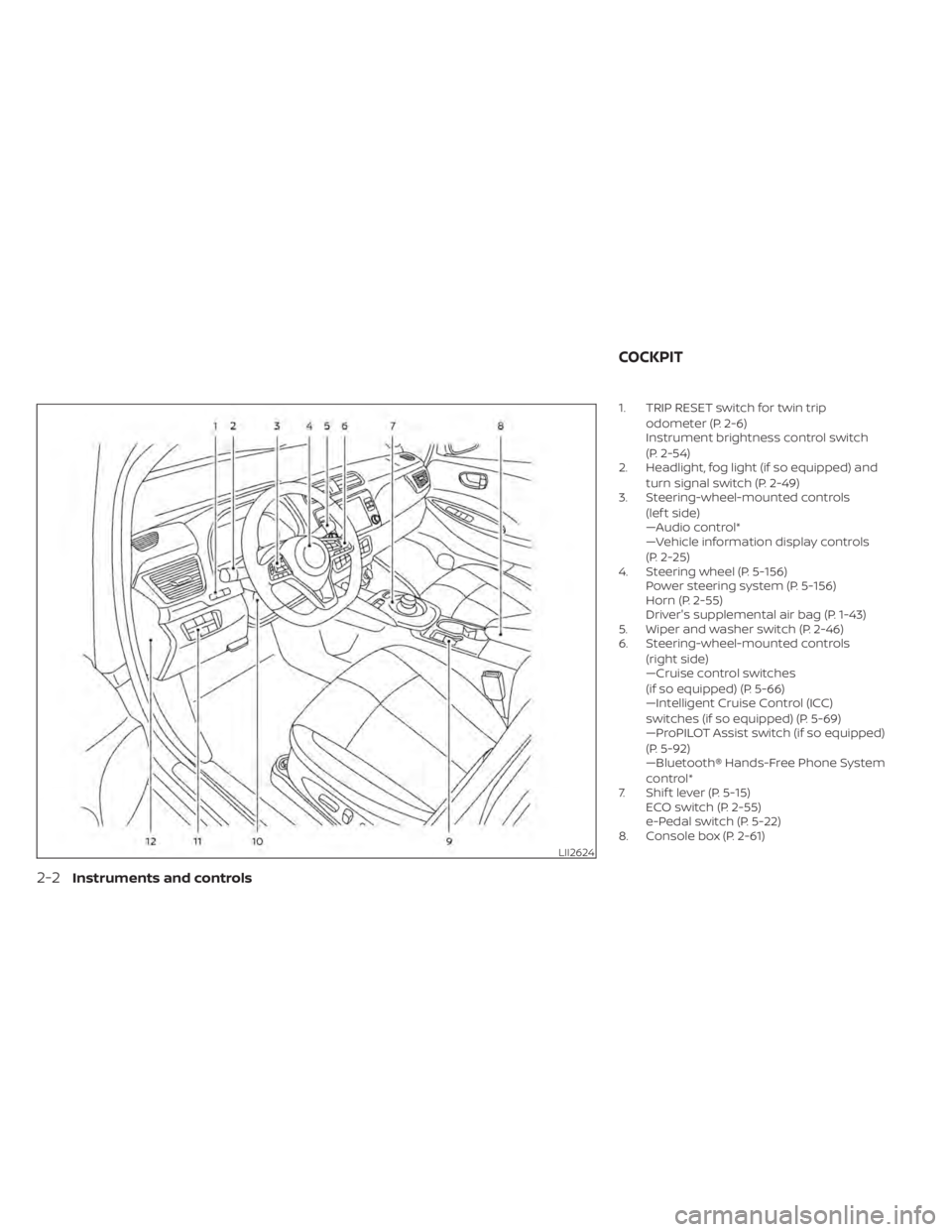
1. TRIP RESET switch for twin tripodometer (P. 2-6)
Instrument brightness control switch
(P. 2-54)
2. Headlight, fog light (if so equipped) and
turn signal switch (P. 2-49)
3. Steering-wheel-mounted controls
(lef t side)
—Audio control*
—Vehicle information display controls
(P. 2-25)
4. Steering wheel (P. 5-156) Power steering system (P. 5-156)
Horn (P. 2-55)
Driver's supplemental air bag (P. 1-43)
5. Wiper and washer switch (P. 2-46)
6. Steering-wheel-mounted controls
(right side)
—Cruise control switches
(if so equipped) (P. 5-66)
—Intelligent Cruise Control (ICC)
switches (if so equipped) (P. 5-69)
—ProPILOT Assist switch (if so equipped)
(P. 5-92)
—Bluetooth® Hands-Free Phone System
control*
7. Shif t lever (P. 5-15) ECO switch (P. 2-55)
e-Pedal switch (P. 5-22)
8. Console box (P. 2-61)
LII2624
COCKPIT
2-2Instruments and controls
Page 203 of 596
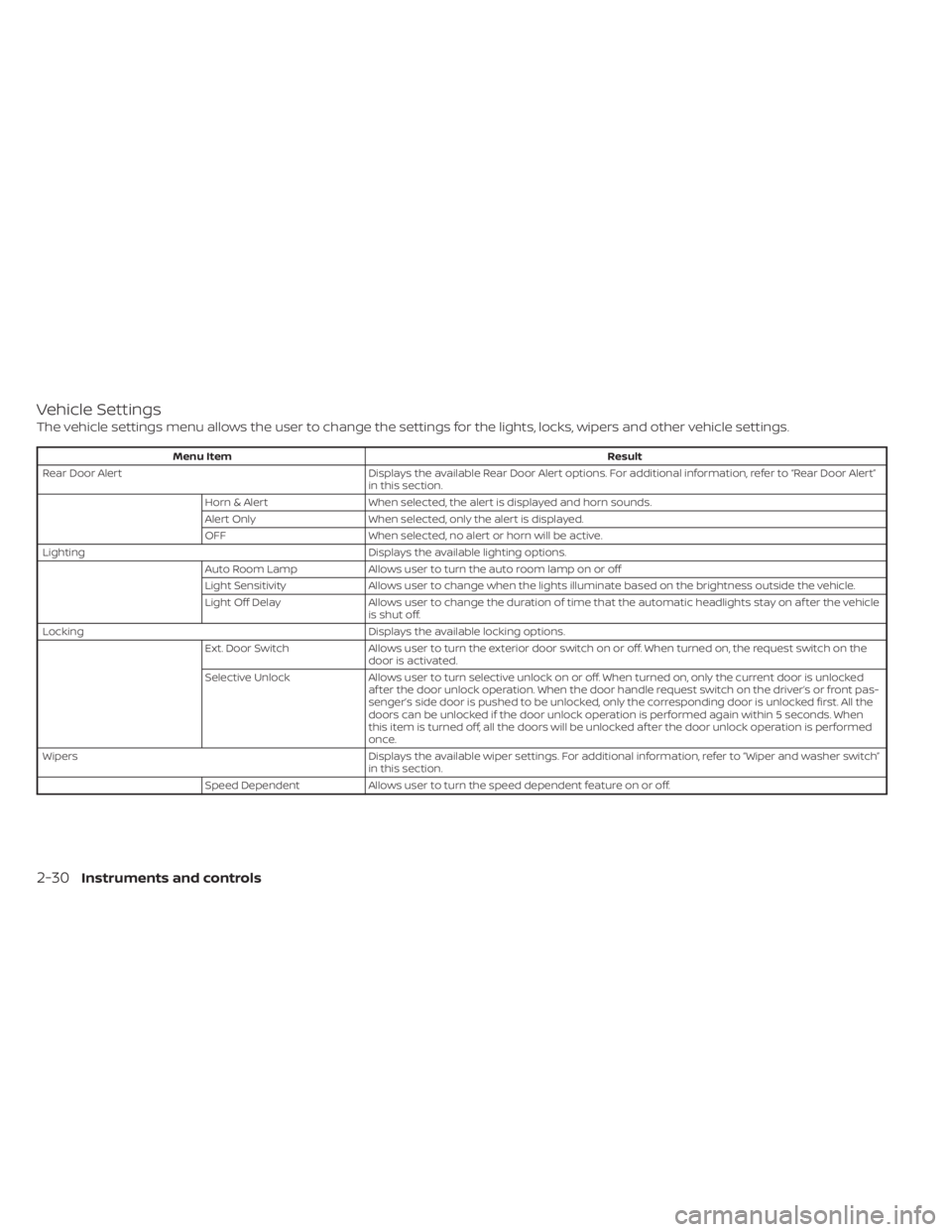
Vehicle Settings
The vehicle settings menu allows the user to change the settings for the lights, locks, wipers and other vehicle settings.
Menu ItemResult
Rear Door Alert Displays the available Rear Door Alert options. For additional information, refer to “Rear Door Alert”
in this section.
Horn & Alert When selected, the alert is displayed and horn sounds.
Alert Only When selected, only the alert is displayed.
OFF When selected, no alert or horn will be active.
Lighting Displays the available lighting options.
Auto Room Lamp Allows user to turn the auto room lamp on or off
Light Sensitivity Allows user to change when the lights illuminate based on the brightness outside the vehicle.
Light Off Delay Allows user to change the duration of time t hat the automatic headlights stay on af ter the vehicle
is shut off.
Locking Displays the available locking options.
Ext. Door Switch Allows user to turn the exterior door switch on or off. When turned on, the request switch on the
door is activated.
Selective Unlock Allows user to turn selective unlock on or off. When turned on, only the current door is unlocked
af ter the door unlock operation. When the door handle request switch on the driver’s or front pas-
senger’s side door is pushed to be unlocked, only the corresponding door is unlocked first. All the
doors can be unlocked if the door unlock operation is performed again within 5 seconds. When
this item is turned off, all the doors will be unlocked af ter the door unlock operation is performed
once.
Wipers Displays the available wiper settings. For additional information, refer to “Wiper and washer switch”
in this section.
Speed Dependent Allows user to turn the speed dependent feature on or off.
2-30Instruments and controls
Page 215 of 596
• Using the steering wheel switch, a drivercan select “Disable Alert” to disable the
horn alert for the remainder of the cur-
rent trip.
WARNING
Selecting “Dismiss Message” during a
stop within a trip temporarily dis-
misses the message for that stop with-
out turning the system off. Alerts can
be provided for other stops during the
trip. Selecting “Disable Alert” turns off
the Rear Door Alert system for the re-
mainder of a trip and no audible alert
will be provided.
NOTE:
This system is disabled until a driver en-
ables it using the vehicle information
display. For additional information, refer
to “How to use the vehicle information
display ” in this section.
For additional information, refer to “Rear
Door Alert” in this section.
Check Rear Seat For All Articles
When the system is enabled, this message
appears when the vehicle comes to a com-
plete stop, the vehicle is transitioned from
the D (Drive) position to P (Park) position,
and the driver exits the vehicle. This mes-
sage alerts the driver, af ter a period of time,
to check for items in the rear seat af ter the
audible alert has been provided.
NOTE:
This system is disabled until a driver en-
ables it using the vehicle information
display. For additional information, refer
to “How to use the vehicle information
display ” in this section.
For additional information, refer to “Rear
Door Alert” in this section.
e—Pedal system failure! Press
brake pedal to slow or stop (if so
equipped)
This warning is display when the e-Pedal
system is malfunctioning. Have the system
checked. It is recommended that you visit a
NISSAN certified LEAF dealer for this ser-
vice.
Parking Sensor
This indicator illuminates when the sensor
is activated. Pressing the OK button while
the sonar screen is displayed will dismiss
this message until the next time the sen-
sors are activated. The Parking Sensor sys-
tem will remain on, unless it is disabled in
the vehicle information display. For addi-
tional information, refer to “Rear Sonar Sys-
tem (RSS)” in the “Starting and driving” sec-
tion of this manual.
Parking Sensor Error: See Owner’s
Manual
This warning illuminates when there is an
error with the system. For additional infor-
mation, refer to “Rear Sonar System (RSS)”
in the “Starting and driving” section of this
manual.
WARNING INFORMATION DISPLAYS
(MODELS WITH A NAVIGATION
SYSTEM)
Low battery warning
When the low battery charge indicatorand the master warning light (yellow)illuminate, the system displays a
message on the navigation system screen
2-42Instruments and controls
Page 217 of 596
3. Close all doors. Lock all doors. The doorscan be locked with:
• the LOCK
button on the Intelli-
gent Key
• any request switch
• the power door lock switch
4. Confirm that the security indicator light illuminates. The security indicator light
stays on for about 30 seconds. The ve-
hicle security system is now pre-armed.
Af ter about 30 seconds the vehicle se-
curity system automatically shif ts into
the armed phase. The security light be-
gins to flash once every approximately 3
seconds. If, during this 30-second pre-
arm time period, the door is unlocked, or
the power switch is placed in the ACC or
ON position, the system will not arm.
Even when the driver and/or passengers
are in the vehicle, the system will acti-
vate with all doors locked and the power
switch in the OFF position. When placing
the power switch to the ACC or ON posi-
tion, the system will be released.
Vehicle security system activation
The vehicle security system will give the
following alarm:
• The headlights blink and the horn sounds intermittently.
• The alarm automatically turns off af ter approximately 50 seconds. However, the
alarm reactivates if the vehicle is tam-
pered with again.
The alarm is activated by:
• Unlocking the door without using the In- telligent Key, the request switch or the
key. (Even if the door is opened by releas-
ing the door inside lock knob, the alarm
will activate.)
• Opening the hood.
How to stop an activated alarm
The alarm will stop when a door is un-
locked by pushing the UNLOCKbut-
ton on the Intelligent Key, door handle re-
quest switch, or when the power switch is
pushed in the ACC or ON position.
If the system does not operate as de-
scribed above, have it checked. It is rec-
ommended that you visit a NISSAN certi-
fied LEAF dealer for this service.
NISSAN VEHICLE IMMOBILIZER
SYSTEM
The NISSAN Vehicle Immobilizer System
will not allow the power switch to be placed
in the READY to drive position without the
use of the registered key.
If the power switch fails to place the vehicle
into the READY to drive position using the
registered key, it may be due to interfer-
ence caused by another registered key, an
automated toll road device or automated
payment device on the key ring. Restart the
EV system using the following procedure:
1. Leave the power switch in the ON posi- tion for approximately 5 seconds.
2. Place the power switch in the OFF posi- tion and wait approximately 10 seconds.
3. Repeat step 1 and 2 again.
4. Place the power switch in the READY to drive position while holding the device
(which may have caused the interfer-
ence) separate from the registered key.
If this procedure allows the power
switch to be placed in the READY to drive
mode, NISSAN recommends placing the
registered key on a separate key ring to
avoid interference from other devices.
2-44Instruments and controls
Page 228 of 596
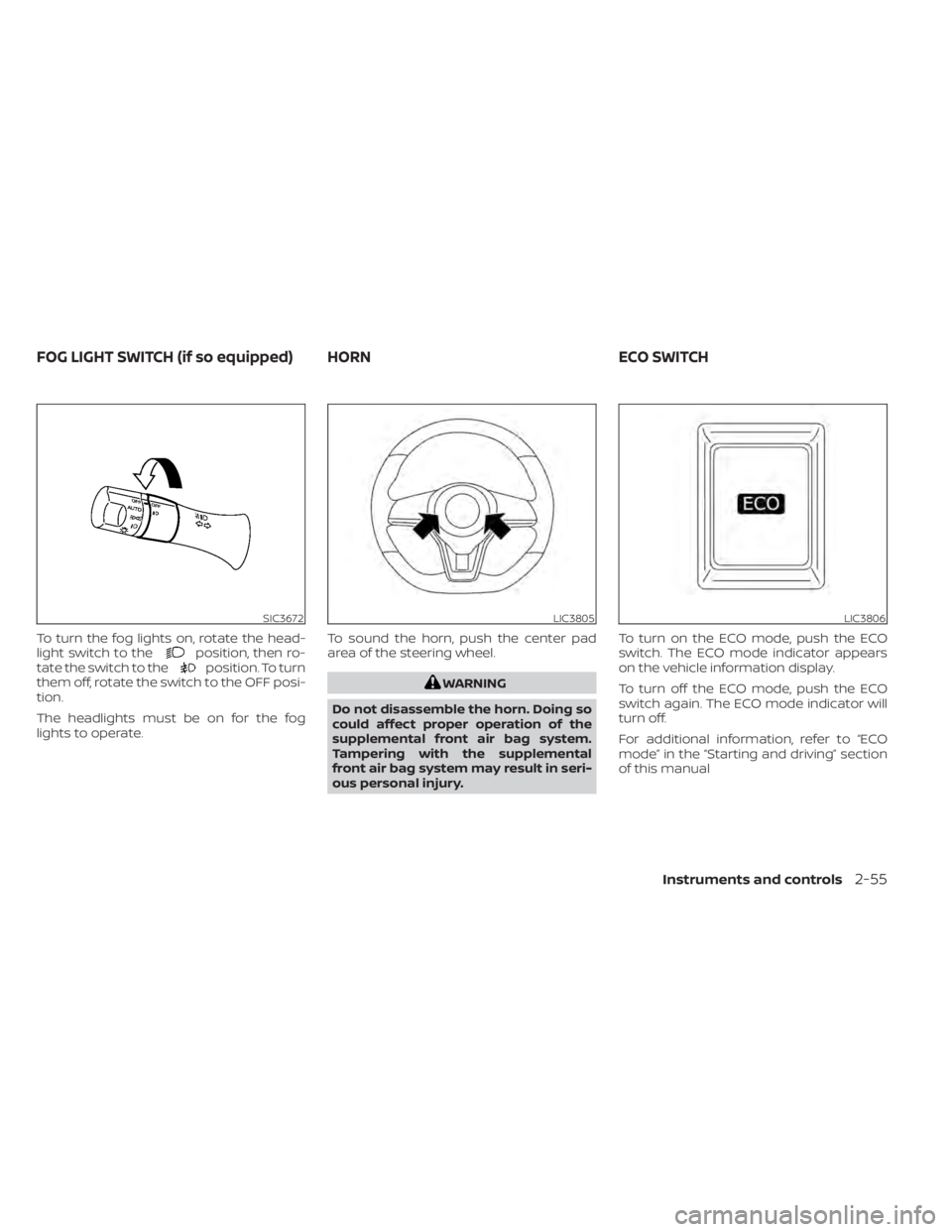
To turn the fog lights on, rotate the head-
light switch to theposition, then ro-
tate the switch to theposition. To turn
them off, rotate the switch to the OFF posi-
tion.
The headlights must be on for the fog
lights to operate. To sound the horn, push the center pad
area of the steering wheel.
WARNING
Do not disassemble the horn. Doing so
could affect proper operation of the
supplemental front air bag system.
Tampering with the supplemental
front air bag system may result in seri-
ous personal injury. To turn on the ECO mode, push the ECO
switch. The ECO mode indicator appears
on the vehicle information display.
To turn off the ECO mode, push the ECO
switch again. The ECO mode indicator will
turn off.
For additional information, refer to “ECO
mode” in the “Starting and driving” section
of this manual
SIC3672LIC3805LIC3806
FOG LIGHT SWITCH (if so equipped) HORN
ECO SWITCH
Instruments and controls2-55
Page 233 of 596
The Rear Door Alert system functions un-
der certain conditions to indicate there
may be an object or passenger in the rear
seat(s). Check the seat(s) before exiting the
vehicle.
The Rear Door Alert system is initially dis-
abled. The driver can enable the system
using the vehicle information display. For
additional information, refer to “Vehicle in-
formation display warnings and indicators”
in this section.
When the system is enabled:
• The system is activated when a rear dooris opened and closed within 10 minutes of
the vehicle being driven. When the driver
door is closed and the system is acti-
vated, a visual message appears in the
vehicle information display. For additional
information, refer to “Rear Door Alert is
activated” in this section.
• If a rear door is opened and closed but the vehicle is not driven within approxi-
mately 10 minutes, the system will not be
activated. A rear door must be opened
and closed and the car driven within 10
minutes for the system to activate.When the Rear Door Alert system is activated:
• When the driver puts the vehicle in the P(Park) position, a notification message
appears in the vehicle information dis-
play with the options to “Dismiss Mes-
sage” or “Disable Alert” if desired.– Select “Disable Alert” to temporarily disable for that stop.
– No selection or ‘Dismiss Message” will keep the alert enabled for that stop.
• If the alert is enabled when a driver exits the vehicle, a message will appear in the
vehicle information display that states
“Check Rear Seat for All Articles.”
If “Horn & Alert” setting is selected:
– – An audible horn sound will occur af ter
a short time unless a rear door is
opened and closed within a short time
to deactivate the alert.
–– If the doors are locked before the alert is deactivated by opening a rear door,
the horn will sound.
–– If the rear hatch is opened before a rear door is opened, the horn will be delayed
until af ter the hatch is closed.
NOTE:
If “Alert Only ” setting is selected, the
message alert will still be shown in the
vehicle information display but the horn
will not sound.
WARNING
• If the driver selects “Disable Alert”, no
audible alert will be provided regard-
less of rear door open/close status.
• There may be times when there is an
object or passenger in the rear
seat(s) but the audible alert does not
sound. For example, this may occur if
rear seat passengers enter or exit the
vehicle during a trip.
• The system does not directly detect
objects or passengers in the rear
seat(s). Instead, it can detect when a
rear door is opened and closed, indi-
cating that there may be something
in the rear seat(s).
NOTE:
There may be times when the horn
sounds but there are no objects or pas-
sengers in the rear seat(s).
For additional information, refer to “Rear
Door Alert is activated” in this section.
REAR DOOR ALERT
2-60Instruments and controls
Page 259 of 596
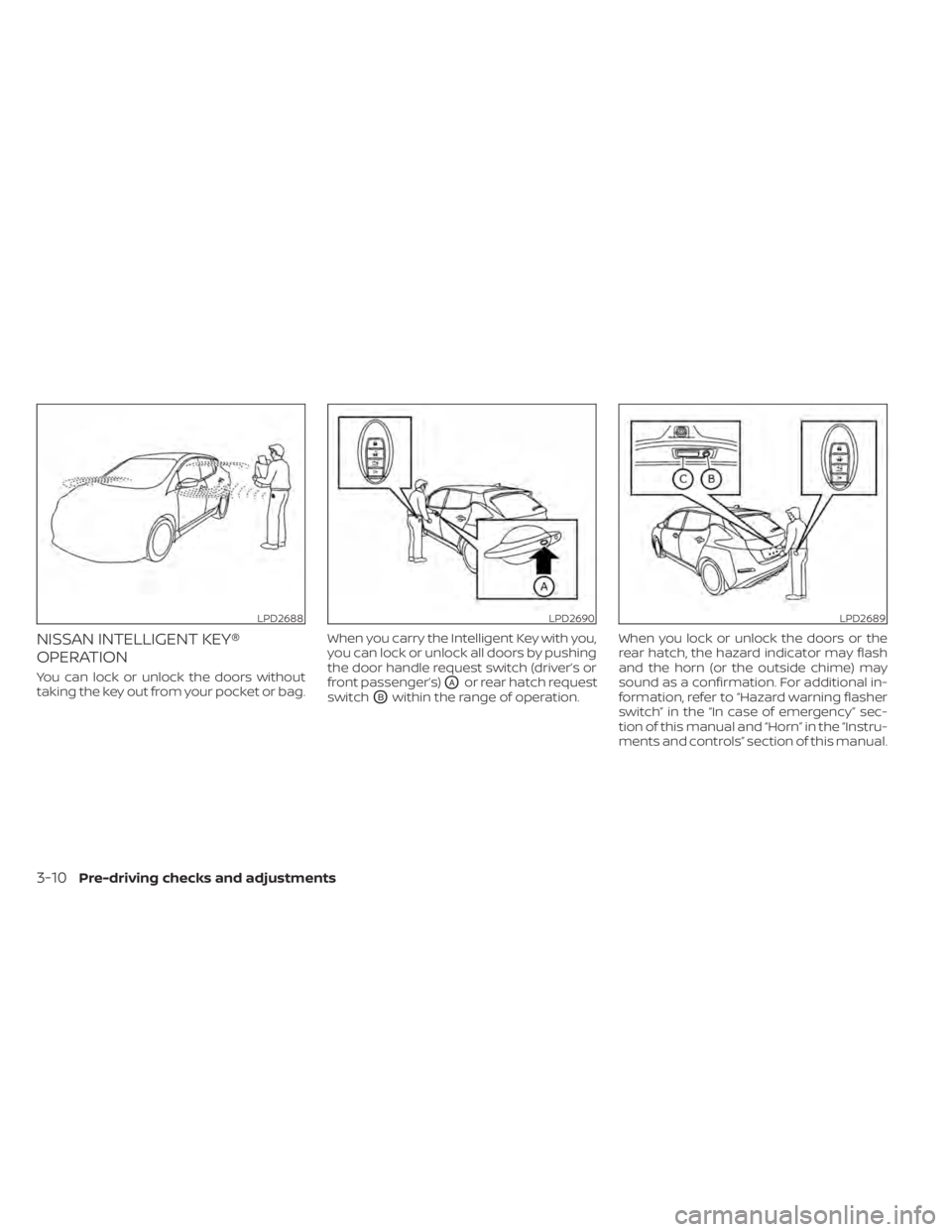
NISSAN INTELLIGENT KEY®
OPERATION
You can lock or unlock the doors without
taking the key out from your pocket or bag.When you carry the Intelligent Key with you,
you can lock or unlock all doors by pushing
the door handle request switch (driver’s or
front passenger’s)OAor rear hatch request
switch
OBwithin the range of operation. When you lock or unlock the doors or the
rear hatch, the hazard indicator may flash
and the horn (or the outside chime) may
sound as a confirmation. For additional in-
formation, refer to “Hazard warning flasher
switch” in the “In case of emergency” sec-
tion of this manual and “Horn” in the “Instru-
ments and controls” section of this manual.
LPD2688LPD2690LPD2689
3-10Pre-driving checks and adjustments
Page 261 of 596
12-VOLT BATTERY SAVER SYSTEM
When all the following conditions are met
for a period of time, the battery saver sys-
tem will cut off the power supply to prevent
12-volt battery discharge.
• The power switch is in the ACC or ONposition,
• All doors are closed, and
• The vehicle is in the P (Park) position.
WARNING SIGNALS
To help prevent the vehicle from moving
unexpectedly by erroneous operation of
the Intelligent Key listed on the following
chart or to help prevent the vehicle from
being stolen, chime or beep sounds inside
and outside the vehicle and a warning dis-
plays in the vehicle information display.
When a chime or beep sounds or the warn-
ing displays, be sure to check the vehicle
and Intelligent Key. For additional information, refer to the
”Troubleshooting guide” in this section and
“Vehicle information display” in the “Instru-
ments and controls” section of this manual.
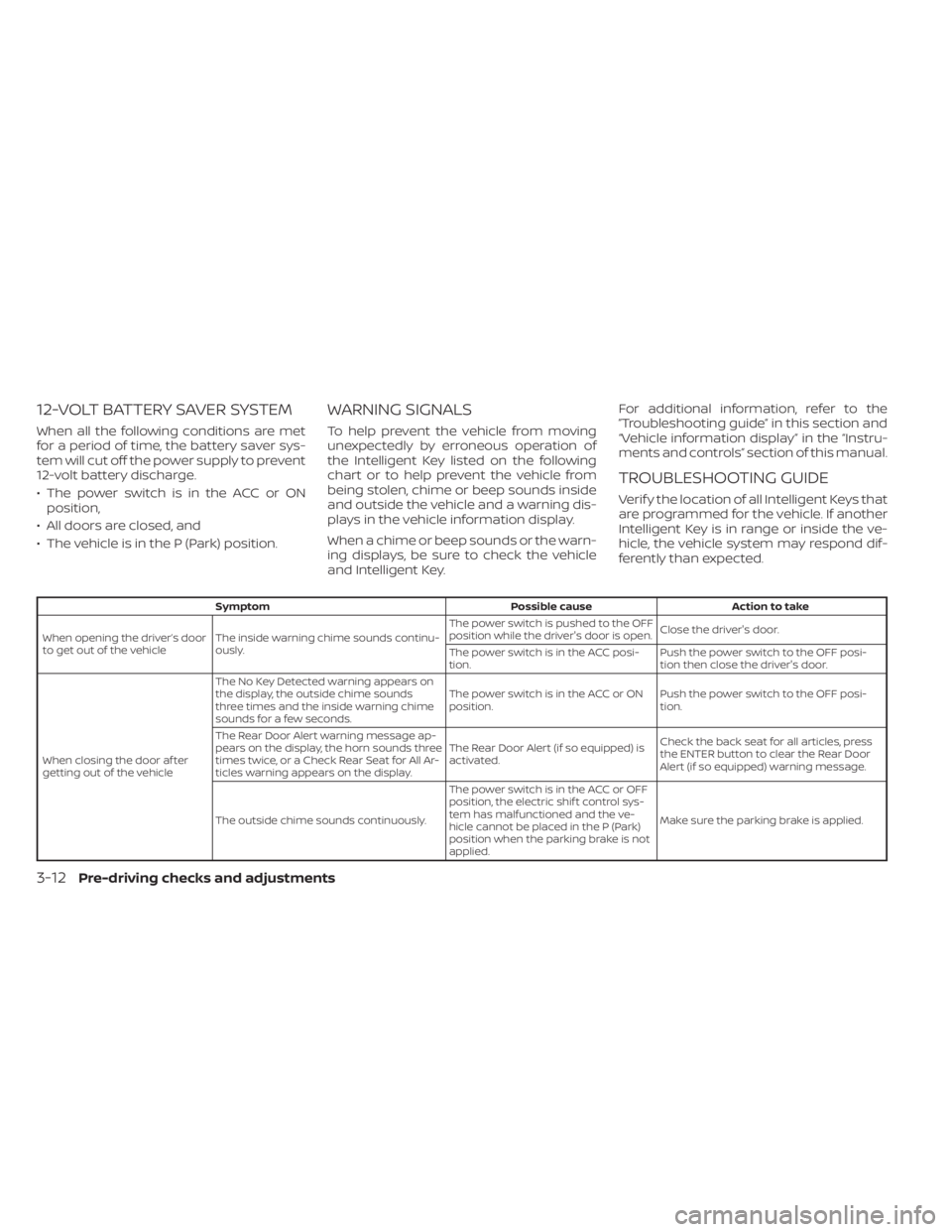
TROUBLESHOOTING GUIDE
Verif y the location of all Intelligent Keys that
are programmed for the vehicle. If another
Intelligent Key is in range or inside the ve-
hicle, the vehicle system may respond dif-
ferently than expected.
Symptom
Possible causeAction to take
When opening the driver’s door
to get out of the vehicle The inside warning chime sounds continu-
ously. The power switch is pushed to the OFF
position while the driver's door is open.
Close the driver's door.
The power switch is in the ACC posi-
tion. Push the power switch to the OFF posi-
tion then close the driver's door.
When closing the door af ter
getting out of the vehicle The No Key Detected warning appears on
the display, the outside chime sounds
three times and the inside warning chime
sounds for a few seconds.
The power switch is in the ACC or ON
position.
Push the power switch to the OFF posi-
tion.
The Rear Door Alert warning message ap-
pears on the display, the horn sounds three
times twice, or a Check Rear Seat for All Ar-
ticles warning appears on the display. The Rear Door Alert (if so equipped) is
activated.
Check the back seat for all articles, press
the ENTER button to clear the Rear Door
Alert (if so equipped) warning message.
The outside chime sounds continuously. The power switch is in the ACC or OFF
position, the electric shif t control sys-
tem has malfunctioned and the ve-
hicle cannot be placed in the P (Park)
position when the parking brake is not
applied.Make sure the parking brake is applied.
3-12Pre-driving checks and adjustments