lock NISSAN LEAF 2021 Owner´s Manual
[x] Cancel search | Manufacturer: NISSAN, Model Year: 2021, Model line: LEAF, Model: NISSAN LEAF 2021Pages: 602, PDF Size: 4.22 MB
Page 375 of 602
Action to take:
Stop the vehicle in a safe location, place the
vehicle in the P (Park) position, turn the EV
system off and restart the EV system. If the
“Not available System Malfunction” warning
message with the BSW indicator (orange)
continues to be displayed, have the I-BSI
system checked. It is recommended you
visit a NISSAN certified LEAF dealer for this
service.
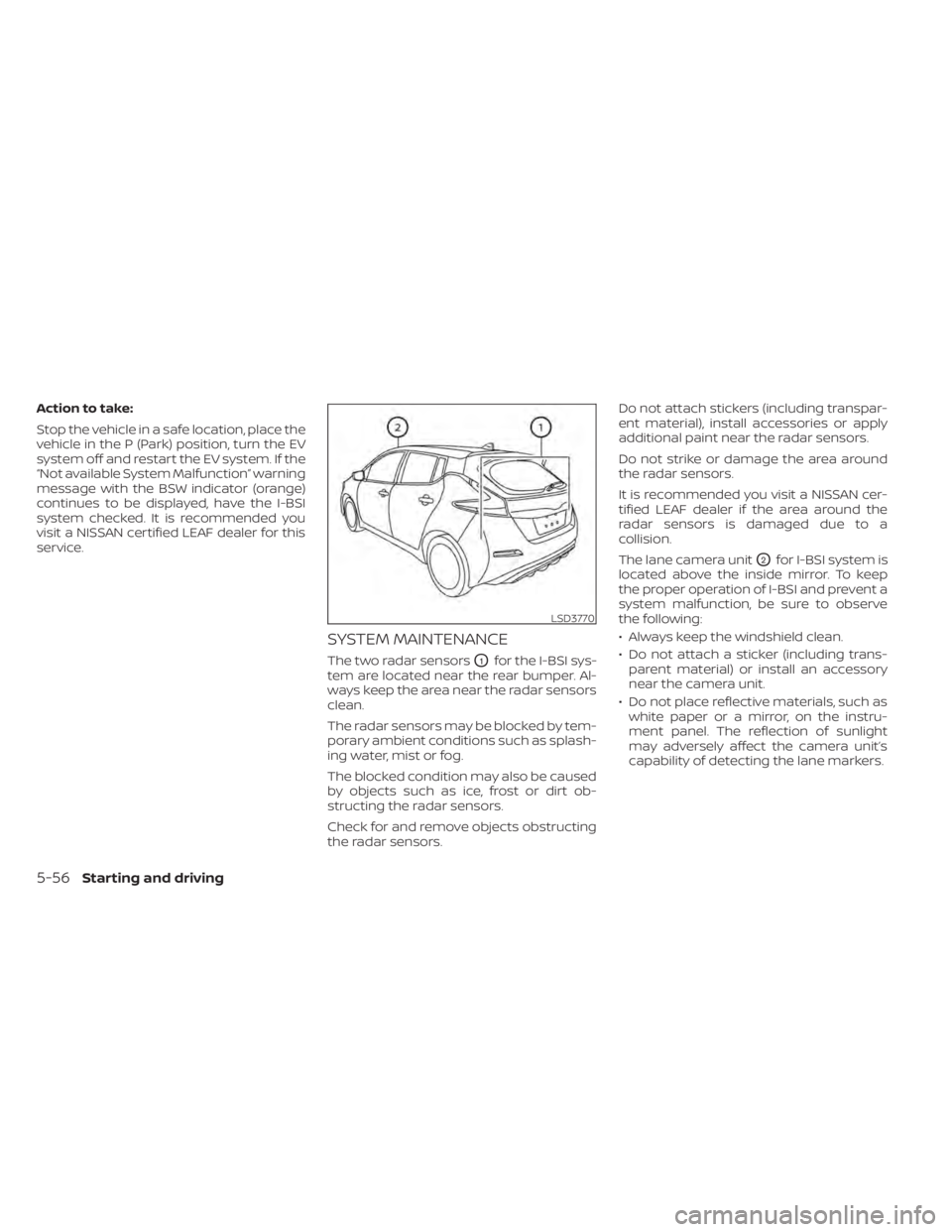
SYSTEM MAINTENANCE
The two radar sensorsO1for the I-BSI sys-
tem are located near the rear bumper. Al-
ways keep the area near the radar sensors
clean.
The radar sensors may be blocked by tem-
porary ambient conditions such as splash-
ing water, mist or fog.
The blocked condition may also be caused
by objects such as ice, frost or dirt ob-
structing the radar sensors.
Check for and remove objects obstructing
the radar sensors. Do not attach stickers (including transpar-
ent material), install accessories or apply
additional paint near the radar sensors.
Do not strike or damage the area around
the radar sensors.
It is recommended you visit a NISSAN cer-
tified LEAF dealer if the area around the
radar sensors is damaged due to a
collision.
The lane camera unit
O2for I-BSI system is
located above the inside mirror. To keep
the proper operation of I-BSI and prevent a
system malfunction, be sure to observe
the following:
• Always keep the windshield clean.
• Do not attach a sticker (including trans- parent material) or install an accessory
near the camera unit.
• Do not place reflective materials, such as white paper or a mirror, on the instru-
ment panel. The reflection of sunlight
may adversely affect the camera unit’s
capability of detecting the lane markers.
LSD3770
5-56Starting and driving
Page 381 of 602
–Illustration e: When the angle
formed by your vehicle and ap-
proaching vehicle is small.
• The following conditions may reduce
the ability of the radar to detect other
vehicles:
– Severe weather
– Road spray
– Ice/frost/dirt/snow build-up on
the vehicle
• Do not attach stickers (including
transparent material), install acces-
sories or apply additional paint near
the radar sensors. These conditions
may reduce the ability of the radar to
detect other vehicles.
• Excessive noise (e.g., audio system
volume, open vehicle window) will in-
terfere with the chime sound, and it
may not be heard.
NOTE:
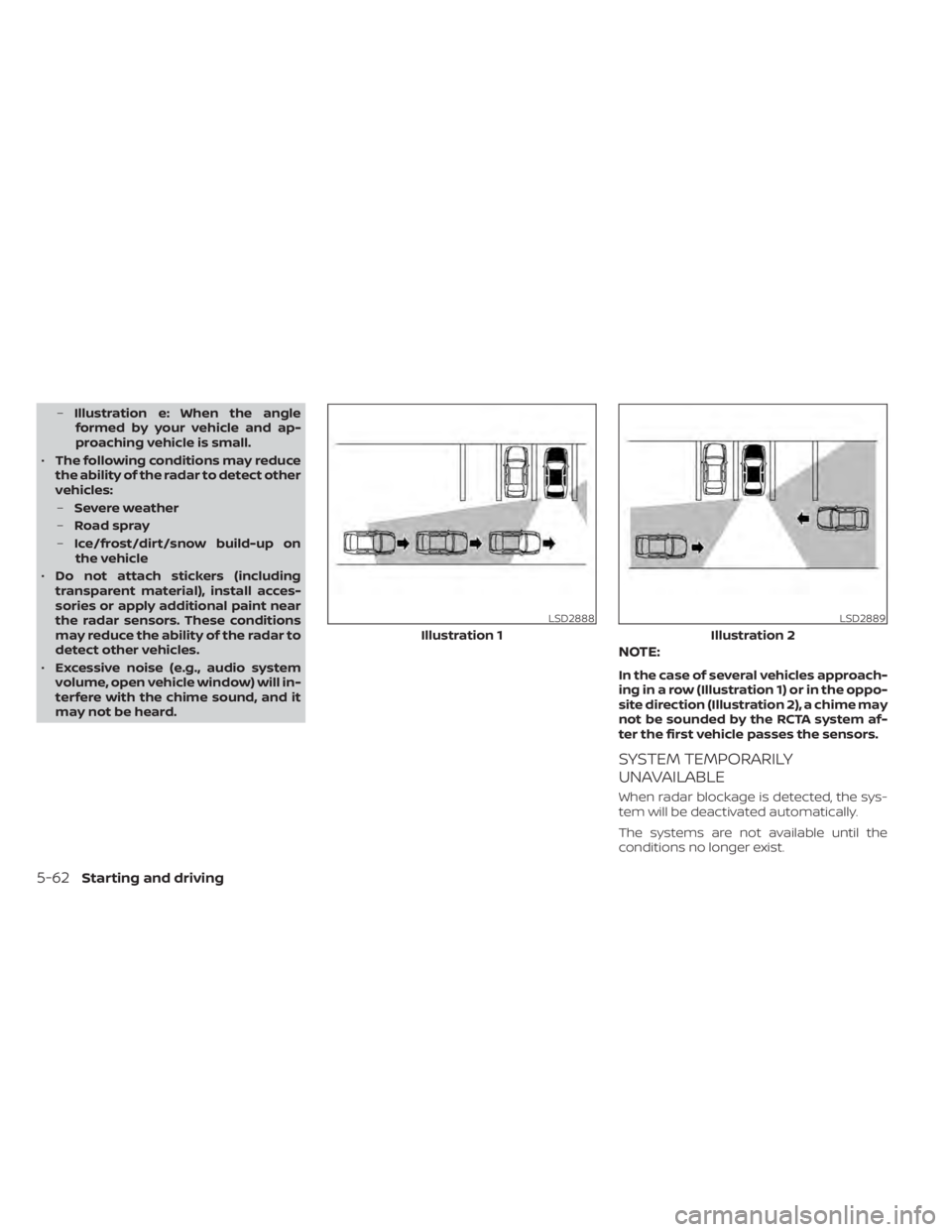
In the case of several vehicles approach-
ing in a row (Illustration 1) or in the oppo-
site direction (Illustration 2), a chime may
not be sounded by the RCTA system af-
ter the first vehicle passes the sensors.
SYSTEM TEMPORARILY
UNAVAILABLE
When radar blockage is detected, the sys-
tem will be deactivated automatically.
The systems are not available until the
conditions no longer exist.
LSD2888
Illustration 1
LSD2889
Illustration 2
5-62Starting and driving
Page 382 of 602
The radar sensors may be blocked by tem-
porary ambient conditions such as splash-
ing water, mist or fog.
The blocked condition may also be caused
by objects such as ice, frost or dirt ob-
structing the radar sensors.
NOTE:
If the BSW system stops working, the
RCTA system will also stop working.
Action to take
When the above conditions no longer exist,
the system will resume automatically.
Malfunction
When the RCTA system malfunctions, it will
turn off automatically. The “Malfunction:
See Owner’s Manual” warning message will
appear.
NOTE:
If the BSW system stops working, the
RCTA system will also stop working.Action to take
Stop the vehicle in a safe location, place the
vehicle in the P (Park) position, turn the EV
system off and restart the EV system. If the
system does not resume automatically,
have the system checked. It is recom-
mended that you visit a NISSAN certified
LEAF dealer for this service.
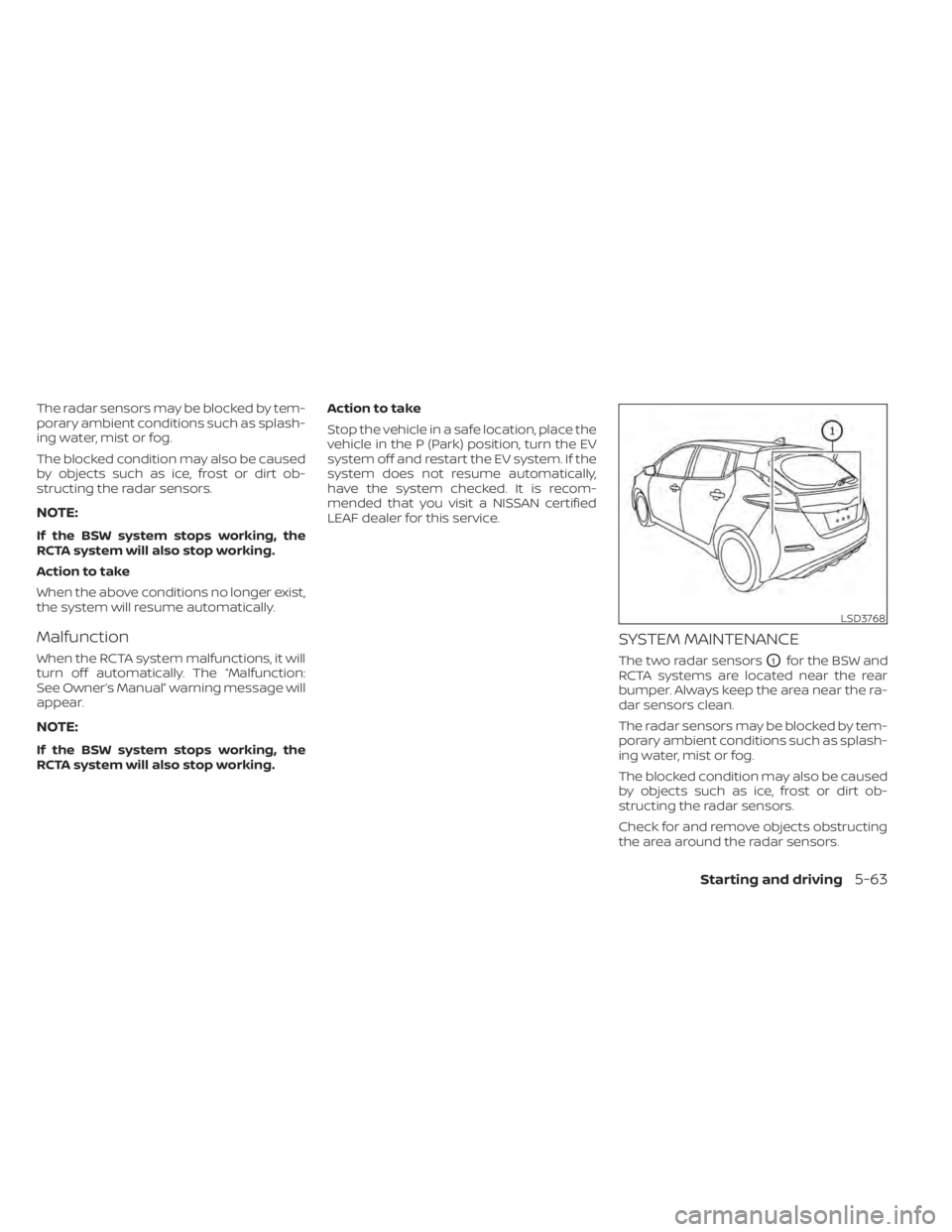
SYSTEM MAINTENANCE
The two radar sensorsO1for the BSW and
RCTA systems are located near the rear
bumper. Always keep the area near the ra-
dar sensors clean.
The radar sensors may be blocked by tem-
porary ambient conditions such as splash-
ing water, mist or fog.
The blocked condition may also be caused
by objects such as ice, frost or dirt ob-
structing the radar sensors.
Check for and remove objects obstructing
the area around the radar sensors.
LSD3768
Starting and driving5-63
Page 403 of 602
Condition B
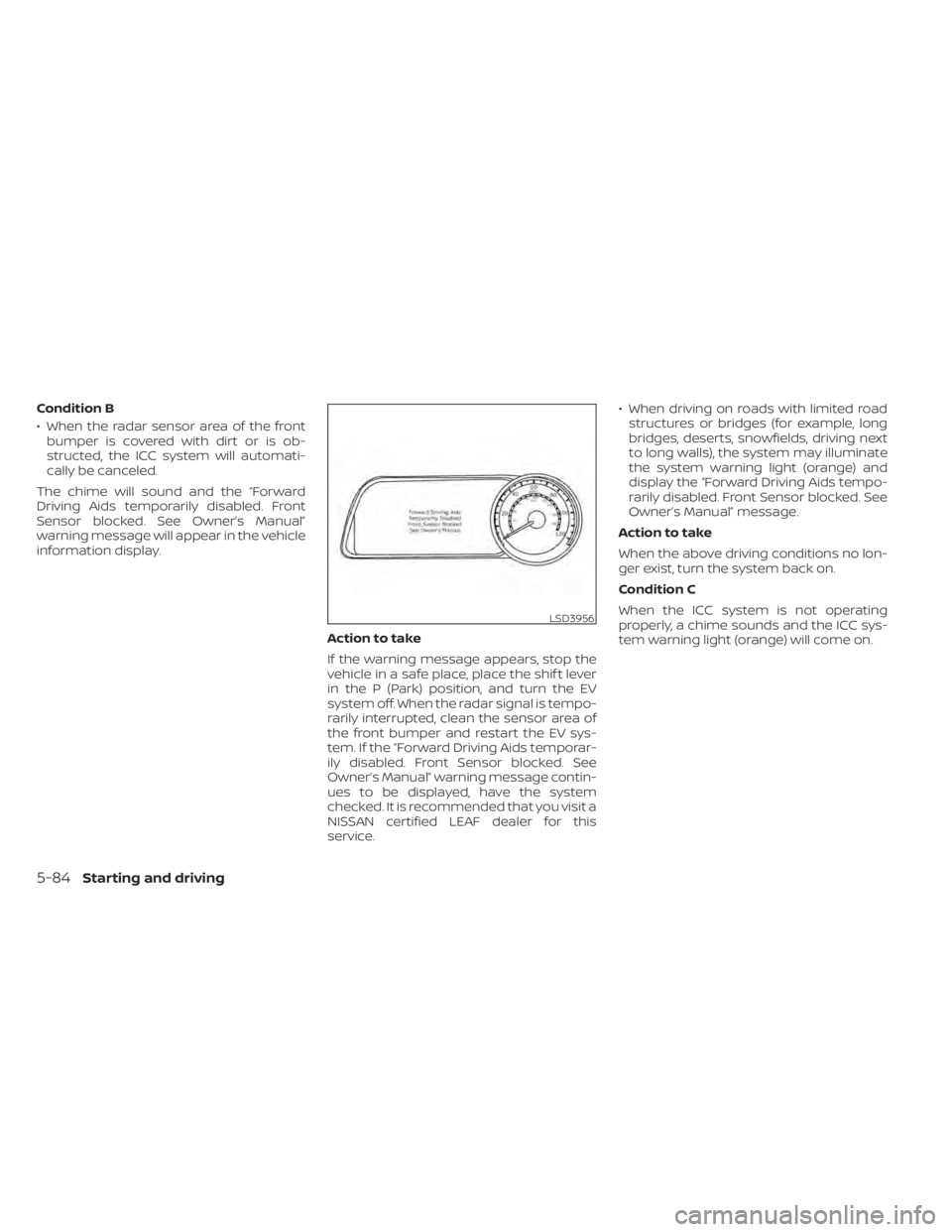
• When the radar sensor area of the frontbumper is covered with dirt or is ob-
structed, the ICC system will automati-
cally be canceled.
The chime will sound and the “Forward
Driving Aids temporarily disabled. Front
Sensor blocked. See Owner’s Manual”
warning message will appear in the vehicle
information display.
Action to take
If the warning message appears, stop the
vehicle in a safe place, place the shif t lever
in the P (Park) position, and turn the EV
system off. When the radar signal is tempo-
rarily interrupted, clean the sensor area of
the front bumper and restart the EV sys-
tem. If the “Forward Driving Aids temporar-
ily disabled. Front Sensor blocked. See
Owner’s Manual” warning message contin-
ues to be displayed, have the system
checked. It is recommended that you visit a
NISSAN certified LEAF dealer for this
service.• When driving on roads with limited road
structures or bridges (for example, long
bridges, deserts, snowfields, driving next
to long walls), the system may illuminate
the system warning light (orange) and
display the “Forward Driving Aids tempo-
rarily disabled. Front Sensor blocked. See
Owner’s Manual” message.
Action to take
When the above driving conditions no lon-
ger exist, turn the system back on.
Condition C
When the ICC system is not operating
properly, a chime sounds and the ICC sys-
tem warning light (orange) will come on.
LSD3956
5-84Starting and driving
Page 430 of 602
• When the radar signal is temporarilyinterrupted.
Action to take:
When the conditions listed above are no
longer present, turn the system off using
the ProPILOT Assist switch. Turn the ProPI-
LOT Assist system back on to use the
system.
NOTE:
When the ICC system is canceled under
the following conditions at a standstill,
the electronic parking brake is auto-
matically activated:
• Any door is open.
• The driver’s seat belt is not fastened.
• Your vehicle has been stopped by the ICC system for approximately 3 min-
utes or longer.
• The shif t lever is not in the D (Drive) position or B mode.
• The VDC system is turned off.
• When distance measurement be- comes impaired due to adhesion of dirt
or obstruction to the sensor.
• When the radar signal is temporarily interrupted. Condition B
When the radar sensor of the front bumper
is covered with dirt or is obstructed, the ICC
system will automatically be canceled.
The chime will sound and the "Forward
Driving Aids temporarily disabled. Front
Sensor blocked. See Owner’s Manual"
warning message will appear in the vehicle
information display.
Action to take:
If the warning message appears, stop the
vehicle in a safe place, place the shif t lever
in the P (Park) position, and turn the EV
system off. When the radar signal is tempo-
rarily interrupted, clean the sensor area of
the front bumper and restart the EV sys-
tem. If the "Forward Driving Aids temporar-
ily disabled. Front Sensor blocked. See
Owner’s Manual" warning message con-
tinues to be displayed, have the system
checked. It is recommended that you visit a
NISSAN certified LEAF dealer for this
service.
Condition C
When driving on roads with limited road
structures or buildings (for example, long
bridges, deserts, snowfields, driving next to
long walls), the system may illuminate the system warning light and display the "For-
ward Driving Aids temporarily disabled.
Front Sensor blocked. See Owner’s Manual"
message.
Action to take:
When the above driving conditions no lon-
ger exist, turn the system back on.
ICC system malfunction
If the ICC system malfunctions, it will be
turned off automatically, a chime will
sound, and the speed control status warn-
ing (orange) will illuminate.
Action to take:
If the warning light comes on, stop the ve-
hicle in a safe place. Turn the EV system off,
restart the EV system and set the ICC sys-
tem again. If it is not possible to set the ICC
system or the indicator stays on, it may be
a malfunction. Although the normal driving
can be continued, the ICC system should
be inspected. It is recommended that you
visit a NISSAN certified LEAF dealer for this
service.
Starting and driving5-111
Page 447 of 602
–A sudden change in brightness
occurs (for example, when the ve-
hicle enters or exits a tunnel or a
shaded area or lightning flashes).
– The poor contrast of a person to
the background, such as having
clothing color or pattern which is
similar to the background.
– The pedestrian’s profile is partially
obscured or unidentifiable due to
the pedestrian transporting lug-
gage, wearing bulky or very loose
fitting clothing or accessories.
• The system performance may de-
grade in the following conditions:
– The vehicle is driven on a slippery
road.
– The vehicle is driven on a slope.
– Excessively heavy baggage is
loaded in the rear seat or the
cargo area of your vehicle. •
The system is designed to automati-
cally check the sensor’s (radar and
camera) functionality, within certain
limitations. The system may not de-
tect blockage of sensor areas cov-
ered by ice, snow or stickers, for ex-
ample. In these cases, the system
may not be able to warn the driver
properly. Be sure that you check,
clean and clear sensor areas
regularly.
• In some road and traffic conditions,
the AEB with Pedestrian Detection
system may unexpectedly apply par-
tial braking. When acceleration is
necessary, depress the accelerator
pedal to override the system.
• Excessive noise will interfere with the
warning chime sound, and the chime
may not be heard. •
The AEB with Pedestrian Detection
system may react to a person on a
bicycle, detecting as a pedestrian.
• The AEB with Pedestrian Detection
system may operate under the fol-
lowing conditions, detecting the
possibility of a forward collision:
– A vehicle or a person is on the
roadside at the beginning of a
curve.
– A pedestrian approaches the driv-
ing lane in front of the vehicle.
5-128Starting and driving
Page 449 of 602
Condition B
In the following conditions, the AEB with
Pedestrian Detection system warning light
will illuminate and the "Forward Driving
Aids temporarily disabled. Front Sensor
blocked. See Owner’s Manual" warning
message will appear in the vehicle infor-
mation display:
• The sensor area of the front of the vehicleis covered with dirt or is obstructed.
Action to take
If the warning light (orange) comes on, stop
the vehicle in a safe place, and turn the EV
system off. Clean the radar cover on the
front of the vehicle with a sof t cloth, and
restart the EV system. If the warning light
continues to illuminate, have the AEB with
Pedestrian Detection system checked. It is
recommended that you visit a NISSAN cer-
tified LEAF dealer for this service.
When driving on roads with limited road
structures or buildings (for example, long
bridges, deserts, snow fields, driving next to
long walls).
Action to take
When the above conditions no longer exist,
the AEB with Pedestrian Detection system
will resume automatically.NOTE:
If the AEB with Pedestrian Detection sys-
tem stops working, the I-FCW system will
also stop working.
SYSTEM MALFUNCTION
If the AEB with Pedestrian Detection sys-
tem malfunctions, it will be turned off auto-
matically, a chime will sound, the AEB with
Pedestrian Detection system warning light
(orange) will illuminate and the warning
message “Malfunction: See Owner’s
Manual” will appear in the vehicle informa-
tion display.
Action to take
If the warning light (orange) comes on, stop
the vehicle in a safe location, turn the EV
system off and restart the EV system. If the
warning light continues to illuminate, have
the AEB with Pedestrian Detection system
checked. It is recommended that you visit a
NISSAN certified LEAF dealer for this
service.
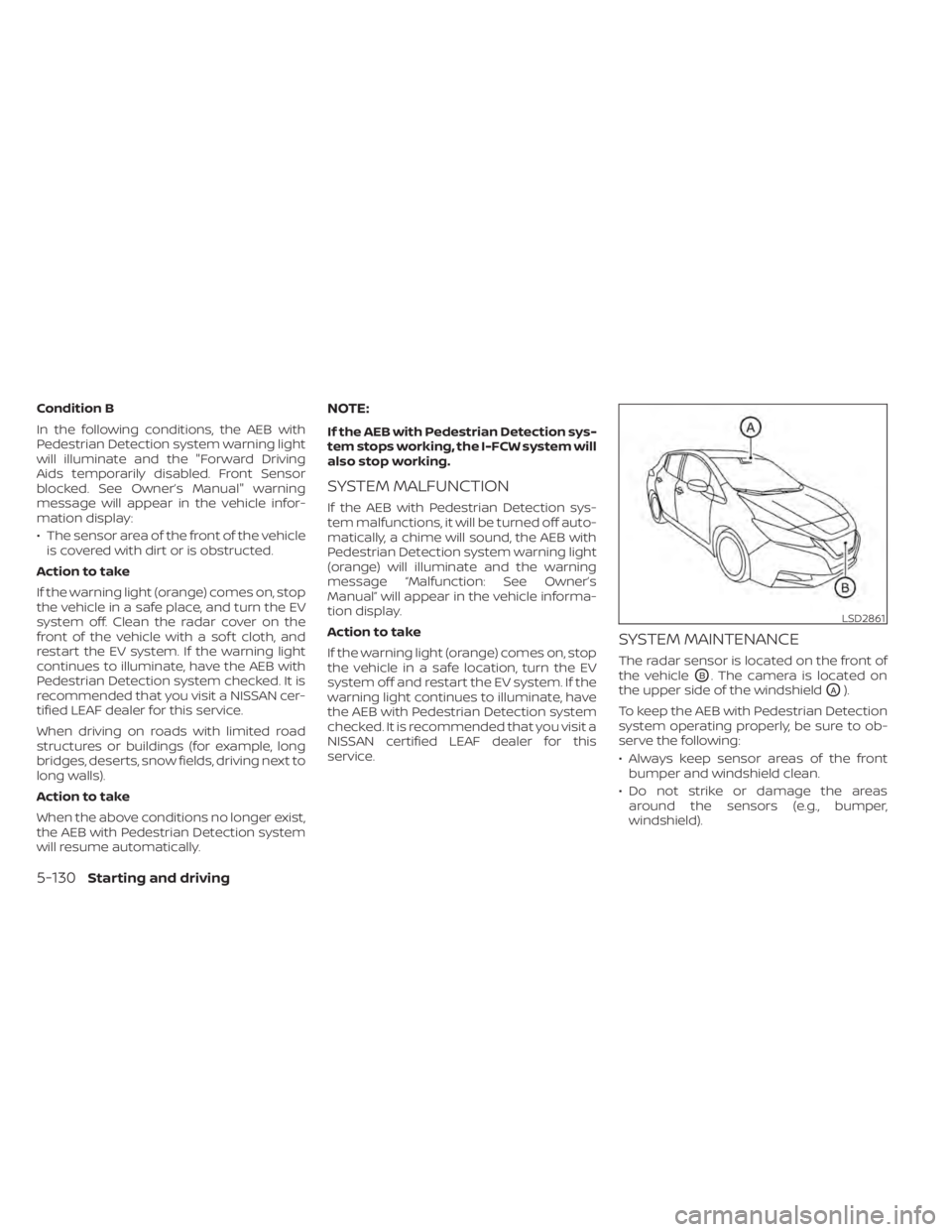
SYSTEM MAINTENANCE
The radar sensor is located on the front of
the vehicle
OB. The camera is located on
the upper side of the windshield
OA).
To keep the AEB with Pedestrian Detection
system operating properly, be sure to ob-
serve the following:
• Always keep sensor areas of the front bumper and windshield clean.
• Do not strike or damage the areas around the sensors (e.g., bumper,
windshield).
LSD2861
5-130Starting and driving
Page 450 of 602
• Do not cover or attach stickers, or installany accessory near the sensors. This
could block sensor signals, and/or cause
failure or malfunction.
• Do not attach metallic objects near the radar sensor (brush guard, etc.). This
could cause failure or malfunction.
• Do not place reflective materials, such as white paper or a mirror, on the instru-
ment panel. The reflection of sunlight
may adversely affect the camera unit’s
detection capability.
• Do not alter, remove or paint the front bumper. Before customizing or restoring
the front bumper, it is recommended that
you visit a NISSAN certified LEAF dealer.
Radio frequency statement
For USA
FCC ID OAYARS4B
This device complies with Part 15 of the
FCC Rules. Operation is subject to the fol-
lowing two conditions:
1. This device may not cause harmful in-
terference, and
2. This device must accept any interfer-
ence received, including interference
that may cause undesired operation. FCC Warning
Changes or modifications not expressly
approved by the party responsible for
compliance could void the user’s author-
ity to operate the equipment.
For Canada
Model: ARS4–B
IC: 4135A-ARS4B
FCC ID: OAYARS4B
This device complies with Part 15 of the
FCC Rules and with Industry Canada
licence-exempt RSS standard(s). Opera-
tion is subject to the following two
conditions:
1.
This device may not cause interfer-
ence, and
2. This device must accept any interfer-
ence received, including interference
that may cause undesired operation
of the device.
Le présent appareil est conforme aux
CNR d’Industrie Canada applicables aux
appareils radio exempts de licence.
L’exploitation est autorisée aux deux
conditions suivantes:
1. L’appareil ne doit pas produire de
brouillage, et 2.
L’utilisateur de l’appareil doit accepter
tout brouillage radioélectrique subi,
même si le brouillage est susceptible
d’en compromettre le
fonctionnement.
Radio frequency radiation exposure
information:
This equipment complies with FCC and IC
radiation exposure limits set forth for an
uncontrolled environment.
This equipment should be installed and
operated with minimum distance of 30
cm between the radiator and your body.
This transmitter must not be co-located
or operating in conjunction with any
other antenna or transmitter.
Cet équipement est conforme aux lim-
ites d’exposition aux rayonnements IC
établies pour un environnement non
contrôlé.
Cet équipement doit être installé et
utilisé avec un minimum de 30 cm de
distance entre la source de rayonnement
et votre corps.
Starting and driving5-131
Page 465 of 602
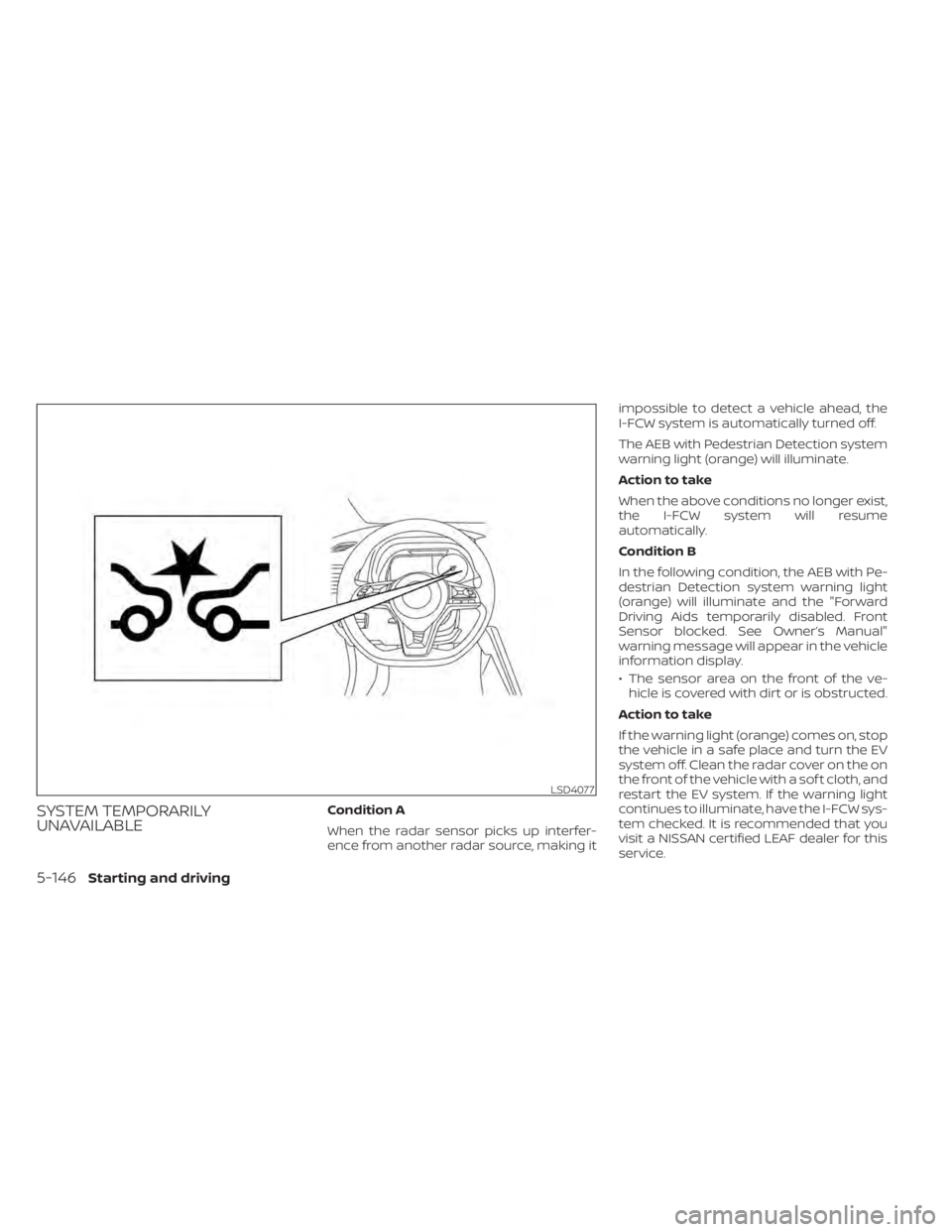
SYSTEM TEMPORARILY
UNAVAILABLECondition A
When the radar sensor picks up interfer-
ence from another radar source, making itimpossible to detect a vehicle ahead, the
I-FCW system is automatically turned off.
The AEB with Pedestrian Detection system
warning light (orange) will illuminate.
Action to take
When the above conditions no longer exist,
the I-FCW system will resume
automatically.
Condition B
In the following condition, the AEB with Pe-
destrian Detection system warning light
(orange) will illuminate and the "Forward
Driving Aids temporarily disabled. Front
Sensor blocked. See Owner’s Manual"
warning message will appear in the vehicle
information display.
• The sensor area on the front of the ve-
hicle is covered with dirt or is obstructed.
Action to take
If the warning light (orange) comes on, stop
the vehicle in a safe place and turn the EV
system off. Clean the radar cover on the on
the front of the vehicle with a sof t cloth, and
restart the EV system. If the warning light
continues to illuminate, have the I-FCW sys-
tem checked. It is recommended that you
visit a NISSAN certified LEAF dealer for this
service.
LSD4077
5-146Starting and driving
Page 473 of 602
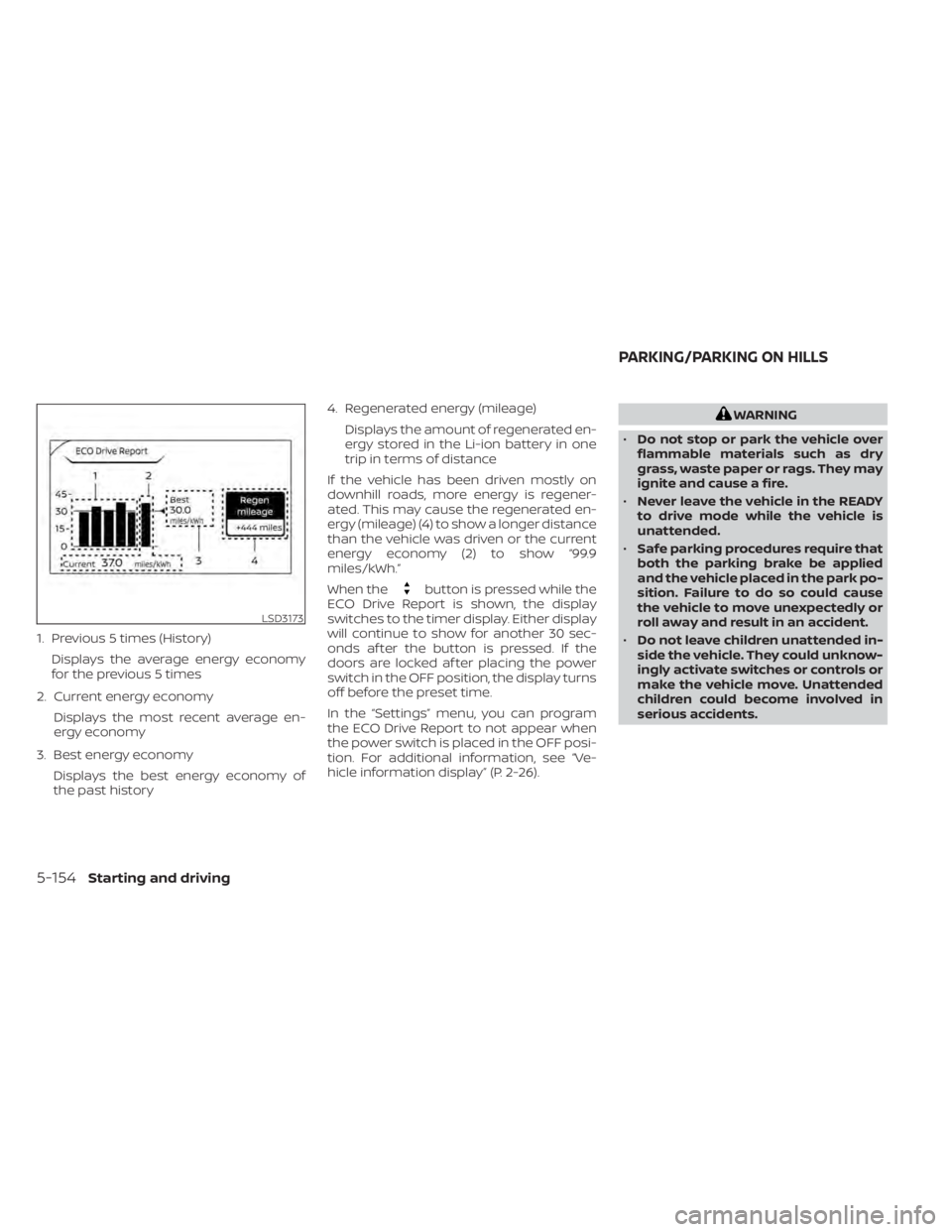
1. Previous 5 times (History)Displays the average energy economy
for the previous 5 times
2. Current energy economy Displays the most recent average en-
ergy economy
3. Best energy economy Displays the best energy economy of
the past history 4. Regenerated energy (mileage)
Displays the amount of regenerated en-
ergy stored in the Li-ion battery in one
trip in terms of distance
If the vehicle has been driven mostly on
downhill roads, more energy is regener-
ated. This may cause the regenerated en-
ergy (mileage) (4) to show a longer distance
than the vehicle was driven or the current
energy economy (2) to show “99.9
miles/kWh.”
When the
button is pressed while the
ECO Drive Report is shown, the display
switches to the timer display. Either display
will continue to show for another 30 sec-
onds af ter the button is pressed. If the
doors are locked af ter placing the power
switch in the OFF position, the display turns
off before the preset time.
In the “Settings” menu, you can program
the ECO Drive Report to not appear when
the power switch is placed in the OFF posi-
tion. For additional information, see “Ve-
hicle information display” (P. 2-26).
WARNING
• Do not stop or park the vehicle over
flammable materials such as dry
grass, waste paper or rags. They may
ignite and cause a fire.
• Never leave the vehicle in the READY
to drive mode while the vehicle is
unattended.
• Safe parking procedures require that
both the parking brake be applied
and the vehicle placed in the park po-
sition. Failure to do so could cause
the vehicle to move unexpectedly or
roll away and result in an accident.
• Do not leave children unattended in-
side the vehicle. They could unknow-
ingly activate switches or controls or
make the vehicle move. Unattended
children could become involved in
serious accidents.
LSD3173
PARKING/PARKING ON HILLS
5-154Starting and driving