battery location NISSAN LEAF 2021 Owner´s Manual
[x] Cancel search | Manufacturer: NISSAN, Model Year: 2021, Model line: LEAF, Model: NISSAN LEAF 2021Pages: 602, PDF Size: 4.22 MB
Page 218 of 602
For additional information, see "Rear Auto-
matic Braking (RAB) (P. 5-132).
Steering Assist warning
indicator
This message may appear when the Steer-
ing Assist system is engaged.
It will be displayed under the following
conditions:
• Gray — When in standby mode.
• Yellow — When there is a failure.
When the steering operation is detected,
the warning turns off and the steering as-
sist function is automatically restored.
Steering Assist warning
indicator
This message may appear when the Steer-
ing Assist system is engaged.
It will be displayed under the following
conditions:
• Red — When not holding the steeringwheel or when there is no steering wheel
operation.
• Green — When in active mode.
• Black — When the system is off.
When the steering assist warning indicator
appears red, please hold the steering
wheel immediately. When the steering op- eration is detected, the warning turns off
and the steering assist function is auto-
matically restored.
Unavailable High Cabin Temperature
This message appears when the camera
detects an interior temperature of more
than approximately 104°F (40°C).
For additional information, see “Lane De-
parture Warning (LDW)” (P. 5-25), “Intelligent
Lane Intervention (I-LI) (P. 5-30) or “Intelli-
gent Blind Spot Intervention (I-BSI) (P. 5-46).
Unavailable Side Radar Obstruction
This warning appears when there is radar
blockage detected. For additional informa-
tion, see “Blind Spot Warning (BSW)” (P. 5-36)
or “Intelligent Blind Spot Intervention (I-BSI)”
(P. 5-46).
Vehicle ahead detection
indicator
This indicator shows when the Automatic
Emergency Braking with Pedestrian Detec-
tion system is engaged and has detected a
vehicle.
For additional information, see “Automatic
Emergency Braking (AEB) with Pedestrian
Detection” (P. 5-123).
WARNING INFORMATION DISPLAYS
(MODELS WITH A NAVIGATION
SYSTEM)
Low battery warning
When the low battery charge indicatorand the master warning light (yellow)illuminate, the system displays a
message on the navigation system screen
that warns the driver that the Li-ion battery
power level is low.
1. The notification is displayed on the up- per lef t side of the STATUS screen. Touch
[Show] to display the screen showing
detailed information.
2. The system displays a message screen and announces the contents of the
message to warn that the Li-ion battery
power level is low. Check the message
displayed on the screen.
Touch [YES] to search for charging sta-
tions within the estimated driving range.
3. Touch
or press the MAPbutton to
return to the vehicle location screen.
Instruments and controls2-41
Page 258 of 602
WARNING
• Radio waves could adversely affect
electric medical equipment. Those
who use a pacemaker should contact
the electric medical equipment
manufacturer for the possible influ-
ences before use.
• The Intelligent Key transmits radio
waves when the buttons are pressed.
The FAA advises the radio waves may
affect aircraf t navigation and com-
munication systems. Do not operate
the Intelligent Key while on an air-
plane. Make sure the buttons are not
operated unintentionally when the
unit is stored for a flight.
• Never leave the Intelligent Key in the
vehicle when you leave the vehicle.
The Intelligent Key system can operate all
the door locks using the remote control
function or pushing the request switch on
the vehicle without taking the key out from
a pocket or purse. The operating environ-
ment and/or conditions may affect the In-
telligent Key system operation.
Be sure to read the following before using
the Intelligent Key system.CAUTION
Be sure to carry the Intelligent Key with
you when operating the vehicle.
The Intelligent Key is capable of receiving
and transmitting radio waves. The Intelli-
gent Key system transmits weak radio
waves from various distances. Environ-
mental conditions may interfere with the
operation of the Intelligent Key system un-
der the following operating conditions:
• When operating near a location where strong radio waves are transmitted, such
as a TV tower, power station and broad-
casting station.
• When in possession of wireless equip- ment, such as a cellular telephone, trans-
ceiver or a CB radio.
• When the Intelligent Key is in contact with or covered by metallic materials.
• When any type of radio wave remote con- trol is used nearby.
• When the Intelligent Key is placed near an electric appliance such as a personal
computer.
• When the vehicle is parked near a parking meter. In such cases, correct the operating condi-
tions before using the Intelligent Key func-
tion or use the mechanical key.
Although the life of the battery varies de-
pending on the operating conditions, the
battery’s life is approximately two years. If
the battery is discharged, replace it with a
new one.
When the Intelligent Key battery is low, the
“Key Battery Low” indicator illuminates in
the vehicle information display. For addi-
tional information, see “Key Battery Low”
(P. 2-34).
Since the Intelligent Key is capable of re-
ceiving radio waves, if the key is lef t near
equipment which transmits strong radio
waves, such as signals from a TV and per-
sonal computer, the battery life may be-
come shorter.
For additional information, see “NISSAN In-
telligent Key® battery replacement” (P. 8-19).
Pay special attention that the vehicle bat-
tery is not completely discharged.
NISSAN INTELLIGENT KEY® SYSTEM
Pre-driving checks and adjustments3-7
Page 259 of 602
As many as four Intelligent Keys can be
registered and used with one vehicle. For
information about the purchase and use of
additional Intelligent Keys, it is recom-
mended that you visit a NISSAN certified
LEAF dealer.
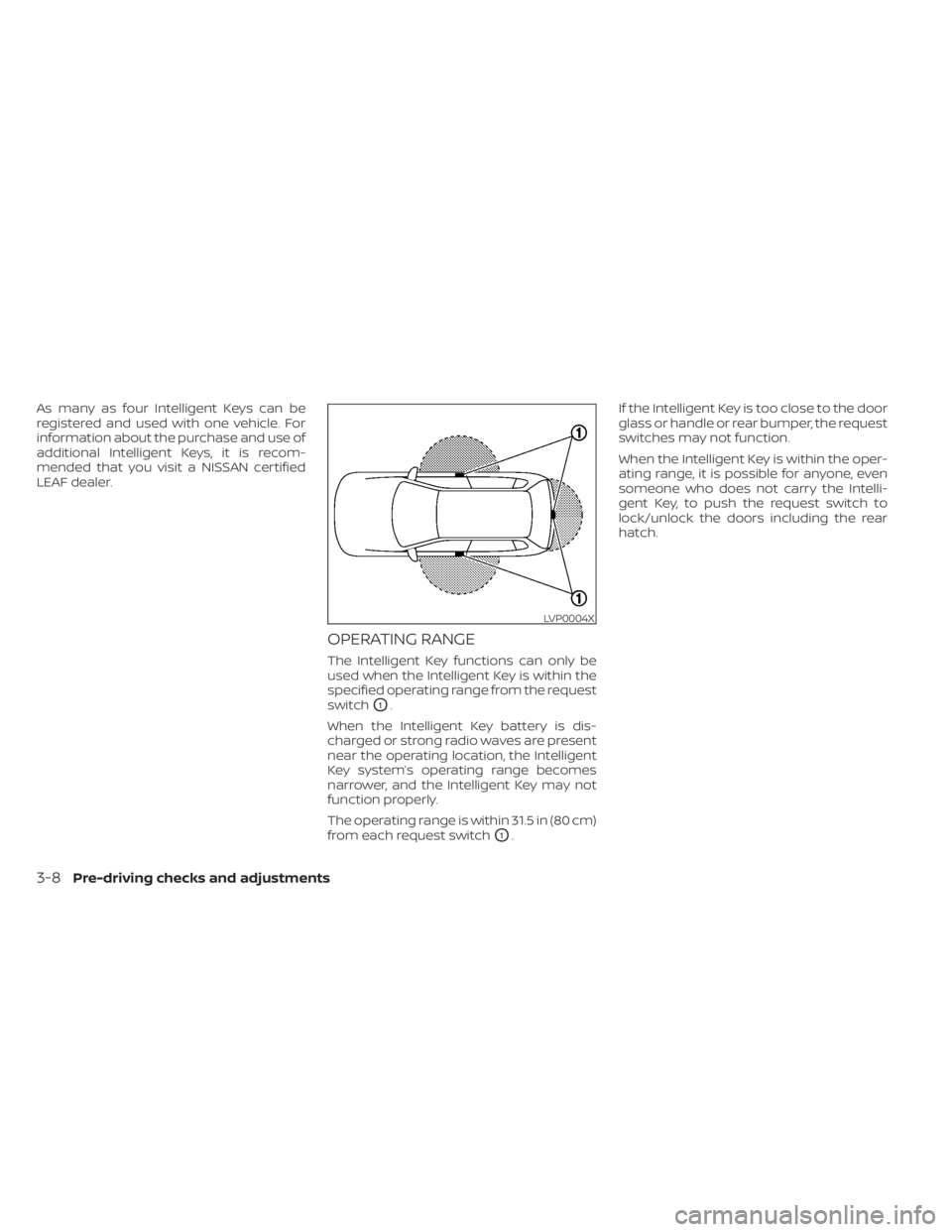
OPERATING RANGE
The Intelligent Key functions can only be
used when the Intelligent Key is within the
specified operating range from the request
switch
O1.
When the Intelligent Key battery is dis-
charged or strong radio waves are present
near the operating location, the Intelligent
Key system’s operating range becomes
narrower, and the Intelligent Key may not
function properly.
The operating range is within 31.5 in (80 cm)
from each request switch
O1. If the Intelligent Key is too close to the door
glass or handle or rear bumper, the request
switches may not function.
When the Intelligent Key is within the oper-
ating range, it is possible for anyone, even
someone who does not carry the Intelli-
gent Key, to push the request switch to
lock/unlock the doors including the rear
hatch.
LVP0004X
3-8Pre-driving checks and adjustments
Page 267 of 602
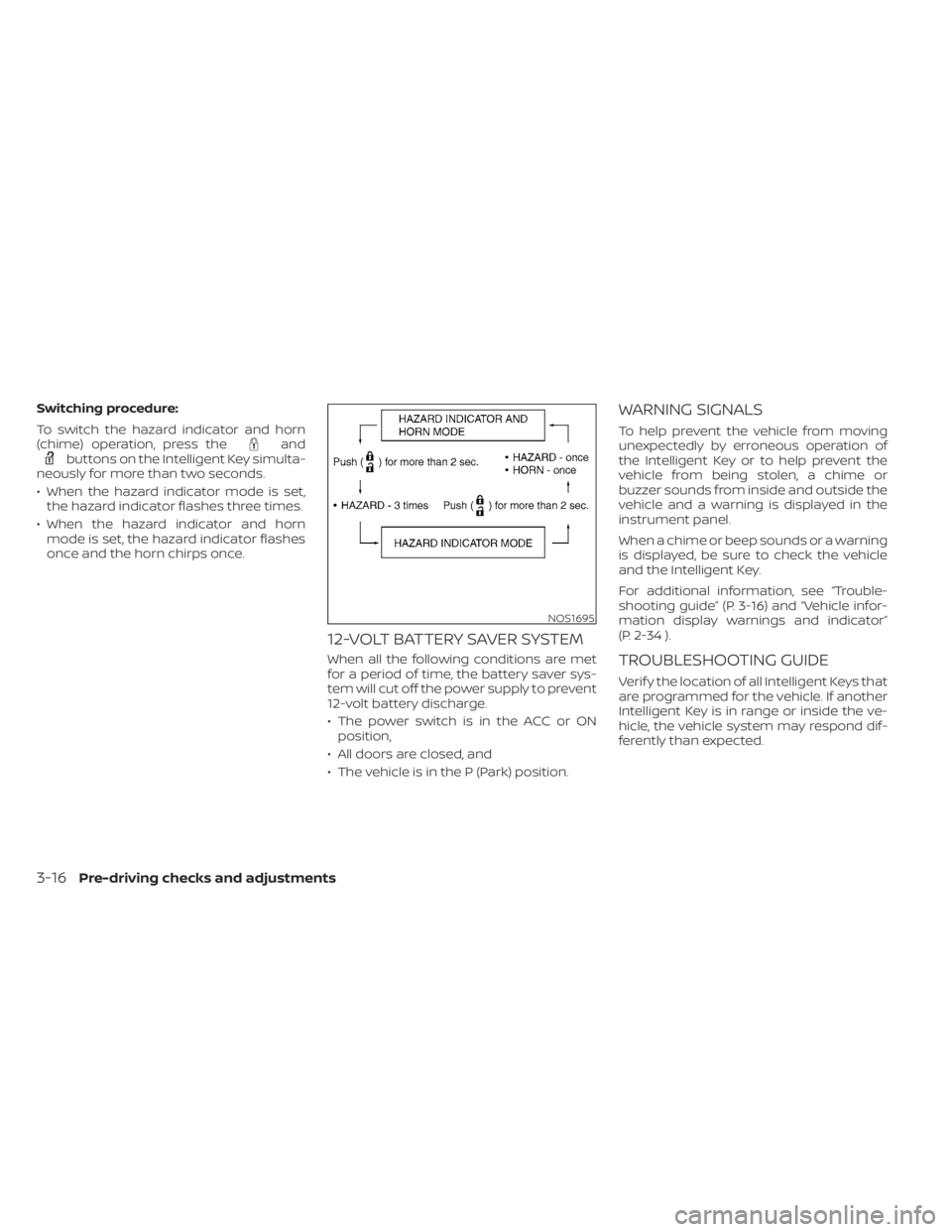
Switching procedure:
To switch the hazard indicator and horn
(chime) operation, press the
andbuttons on the Intelligent Key simulta-
neously for more than two seconds.
• When the hazard indicator mode is set, the hazard indicator flashes three times.
• When the hazard indicator and horn mode is set, the hazard indicator flashes
once and the horn chirps once.
12-VOLT BATTERY SAVER SYSTEM
When all the following conditions are met
for a period of time, the battery saver sys-
tem will cut off the power supply to prevent
12-volt battery discharge.
• The power switch is in the ACC or ONposition,
• All doors are closed, and
• The vehicle is in the P (Park) position.
WARNING SIGNALS
To help prevent the vehicle from moving
unexpectedly by erroneous operation of
the Intelligent Key or to help prevent the
vehicle from being stolen, a chime or
buzzer sounds from inside and outside the
vehicle and a warning is displayed in the
instrument panel.
When a chime or beep sounds or a warning
is displayed, be sure to check the vehicle
and the Intelligent Key.
For additional information, see “Trouble-
shooting guide” (P. 3-16) and “Vehicle infor-
mation display warnings and indicator”
(P. 2-34 ).
TROUBLESHOOTING GUIDE
Verif y the location of all Intelligent Keys that
are programmed for the vehicle. If another
Intelligent Key is in range or inside the ve-
hicle, the vehicle system may respond dif-
ferently than expected.
NOS1695
3-16Pre-driving checks and adjustments
Page 329 of 602
NISSAN INTELLIGENT KEY®
SYSTEM
The Intelligent Key system allows the driver
to start the EV system without taking the
key out of a pocket or purse. The operating
environment and/or conditions may affect
Intelligent Key system operation.
Some indicators and warnings for opera-
tion are displayed on the vehicle informa-
tion display. For additional information, see
“Vehicle information display” (P. 2-26).
CAUTION
• Be sure to carry the Intelligent Key
with you when operating the vehicle.
• Never leave the Intelligent Key inside
the vehicle when you leave the
vehicle.
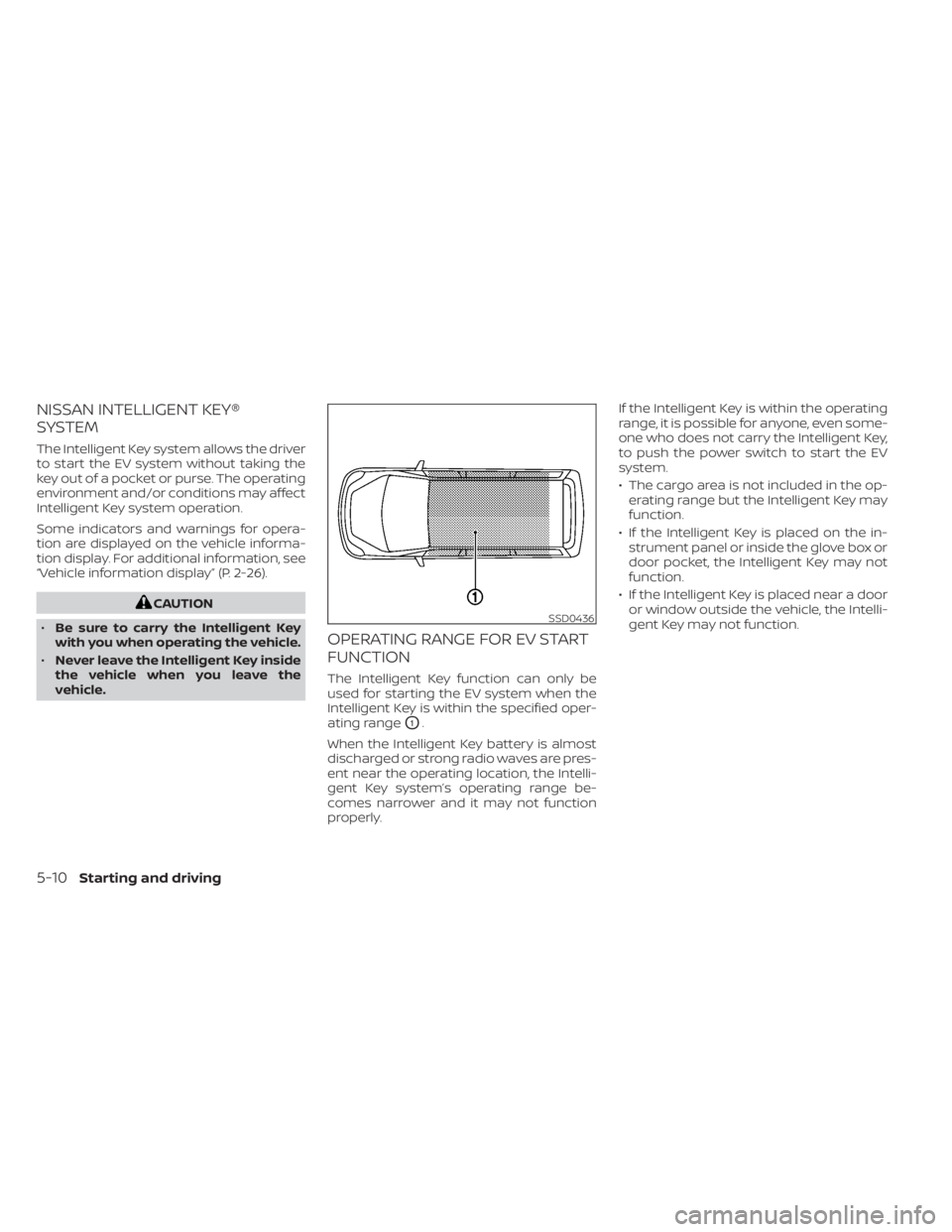
OPERATING RANGE FOR EV START
FUNCTION
The Intelligent Key function can only be
used for starting the EV system when the
Intelligent Key is within the specified oper-
ating range
O1.
When the Intelligent Key battery is almost
discharged or strong radio waves are pres-
ent near the operating location, the Intelli-
gent Key system’s operating range be-
comes narrower and it may not function
properly. If the Intelligent Key is within the operating
range, it is possible for anyone, even some-
one who does not carry the Intelligent Key,
to push the power switch to start the EV
system.
• The cargo area is not included in the op-
erating range but the Intelligent Key may
function.
• If the Intelligent Key is placed on the in- strument panel or inside the glove box or
door pocket, the Intelligent Key may not
function.
• If the Intelligent Key is placed near a door or window outside the vehicle, the Intelli-
gent Key may not function.
SSD0436
5-10Starting and driving
Page 488 of 602
CAUTION
To prevent damage to the Li-ion bat-
tery: Do not store the vehicle in tem-
peratures below -13°F (-25°C) for over
seven days. If the outside temperature
is -13°F (-25°C) or less, the Li-ion battery
may freeze and it cannot be charged or
provide power to run the vehicle. Move
the vehicle to a warm location.
NOTE:
• Connect the charger to the vehicle and place the power switch in the OFF po-
sition when parking the vehicle if tem-
peratures may go below -4°F (-20°C).
For models with 40 kWh battery
model, this provides external power to
the Li-ion battery warmer (if so
equipped) when it operates and does
not discharge the Li-ion battery. Ve-
hicle driving range is reduced if the Li-
ion battery warmer (if so equipped) op-
erates (Li-ion battery temperature
approximately -4°F (-20°C) or colder)
while driving the vehicle. You may need
to charge the Li-ion battery sooner
than in warmer temperatures.
• The Li-ion battery requires more time to charge when the Li-ion battery
warmer (if so equipped) operates. • The predicted charging time displayed
on the meter and navigation system (if
so equipped) increases when the Li-ion
battery warmer (if so equipped)
operates.
• Vehicle range may be substantially re- duced in extremely cold conditions (for
example under -4°F (-20°C)).
• Using the climate control system to heat the cabin when outside tempera-
ture is below 32°F (0°C) uses more elec-
tricity and affects vehicle range more
than when using the heater when the
temperature is above 32°F (0°C).
• Climate control performance is re- duced when using the Climate Ctrl.
Timer or Remote Climate Control while
the Li-ion battery warmer (if so
equipped) operates (for models with
40 kWh battery model). Set only the
charging timer [End Time] when charg-
ing in cold weather. The vehicle auto-
matically determines when to start
charging to fully charge the Li-ion bat-
tery, even if the Li-ion battery warmer
operates. Charging ends before the set
end time if the Li-ion battery is fully
charged.
FREEING A FROZEN DOOR LOCK
To prevent a door lock from freezing, apply
deicer through the key hole. If the lock be-
comes frozen, heat the key before inserting
it into the key hole or use the remote key-
less entry key fob.
ANTIFREEZE
In the winter when it is possible that the
outside temperature will drop below 32°F
(0°C), check the antifreeze to ensure proper
winter protection. For additional informa-
tion, see “Cooling system” (P. 8-5).
12-VOLT BATTERY
If the 12-volt battery is not fully charged
during extremely cold weather conditions,
the 12-volt battery fluid may freeze and
damage the 12-volt battery. To maintain
maximum efficiency, the 12-volt battery
should be checked regularly. For additional
information, see “12-volt battery” (P. 8-9).
DRAINING OF COOLANT WATER
If the vehicle is to be lef t outside without
antifreeze, drain the cooling system. Refill
before operating the vehicle. For additional
information, see “Cooling system” (P. 8-5).
COLD WEATHER DRIVING
Starting and driving5-169
Page 501 of 602
CAUTION
• Always connect positive (+) to posi-
tive (+) and negative (−) to body
ground (for example, as illustrated),
not to the 12-volt battery.
• Make sure the jumper cables do not
touch moving parts in the motor
compartment and that the cable
clamps do not contact any other
metal.
8. Start the engine of the booster vehicle
OB.
9. While the booster vehicle
OBengine is
running, place the EV system in the
READY to drive position.
CAUTION
If the system does not start right away,
push the power switch to the OFF posi-
tion and wait 10 seconds before trying
again.
10. Af ter starting your EV system, carefully disconnect the negative cable and
then the positive cable (
O4→O3→O2
→O1) and keep in the READY to drive
position over 20 minutes to charge the
12-volt battery. 11. If necessary, connect the vehicle to a
charging station or EVSE (Electric Ve-
hicle Supply Equipment) to charge the
Li-ion battery. Be sure to read the
“Charging” section and follow the proce-
dures and guidelines described. The ve-
hicle cannot be driven until the Li-ion
battery is charged.
12. Af ter jump starting your vehicle it is rec- ommended you visit a NISSAN certified
LEAF dealer to have the 12V battery
tested.
NOTE:
If it is not possible to turn the system ON
by following this procedure, it is recom-
mended that you visit a NISSAN certified
LEAF dealer immediately. If the power limitation indicator light
illuminates, the traction motor output is
limited resulting in reduced vehicle speed.
Stop the vehicle in a safe location before
the Li-ion battery becomes completely dis-
charged and no power is available to drive
the vehicle. Contact Roadside assistance;
refer to a NISSAN Warranty Information
Booklet.
If possible, place the power switch in the
OFF position while waiting for assistance to
prevent discharging the 12-volt battery.
NOTE:
If the Li-ion battery becomes completely
discharged:
• The vehicle is automatically placed in
the ON position and it will not be pos-
sible to switch to the READY to drive
position.
• The vehicle is automatically switched to the N (Neutral) position and it will not
be possible to drive the vehicle.
IF THE LI-ION BATTERY BECOMES
COMPLETELY DISCHARGED
6-12In case of emergency
Page 514 of 602
8 Do-it yourself
Maintenance precautions.......................8-2
Motor compartment check locations ...........8-4
Cooling system .................................8-5
Checking coolant level .......................8-6
Changing coolant ............................8-6
Reduction gear fluid .............................8-7
Brake fluid .......................................8-7
Windshield-washer fluid .........................8-8
12-volt battery ...................................8-9
Jump starting ................................ 8-11
Windshield wiper blades ........................8-12
Cleaning .................................... 8-12
Replacing ................................... 8-12
Rear window wiper blade ...................8-14
Brakes ......................................... 8-14
Brake pad wear warning ....................8-14Fuses
.......................................... 8-15
Motor compartment ........................ 8-15
Passenger compartment ...................8-18
Nissan Intelligent Key® battery replacement ....8-19
Lights .......................................... 8-21
Headlights .................................. 8-22
Fog lights (if so equipped) ...................8-22
Exterior and interior lights ...................8-23
Wheels and tires ............................... 8-25
Tire pressure ................................ 8-25
Tire labeling ................................. 8-30
Types of tires ................................ 8-32
Tire chains .................................. 8-33
Changing wheels and tires ..................8-34
Emergency tire puncture repair kit ..........8-37
Page 517 of 602
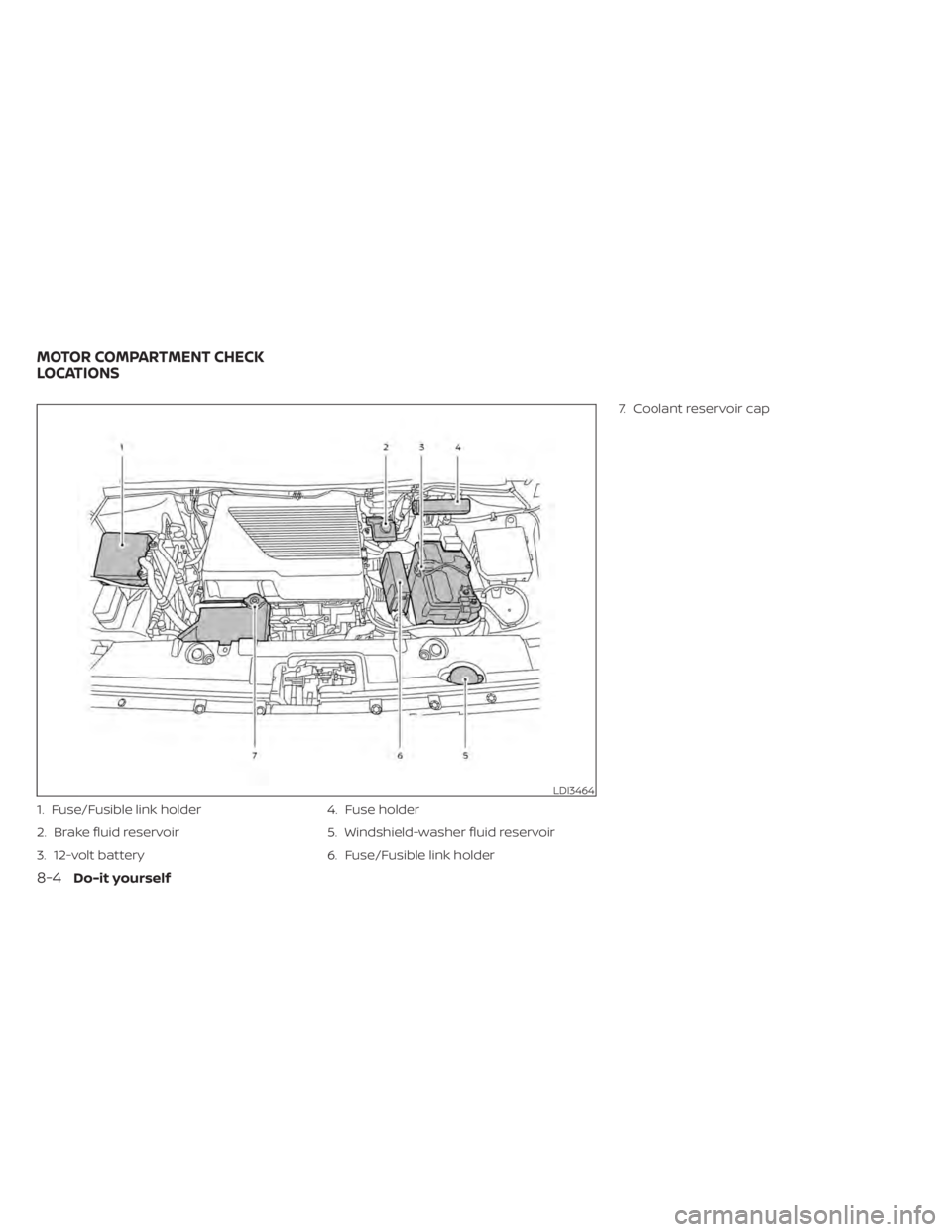
1. Fuse/Fusible link holder
2. Brake fluid reservoir
3. 12-volt battery4. Fuse holder
5. Windshield-washer fluid reservoir
6. Fuse/Fusible link holder7. Coolant reservoir cap
LDI3464
MOTOR COMPARTMENT CHECK
LOCATIONS
8-4Do-it yourself
Page 584 of 602
In addition to Event Data Recorders (EDRs)
mentioned in this Owner's Manual, this ve-
hicle is equipped with electronic modules
that monitor, control and record data con-
cerning various vehicle systems, including
the motor, batteries, braking and electrical
systems. Other electronic modules record
information concerning driving conditions,
including idling, braking, acceleration, trip
and other related data, information about
your use of the car and its features such as
air conditioner or headlight usage, diag-
nostic trouble codes, vehicle charging, ve-
hicle speed, direction and/or location.
Some of this data is stored by the vehicle
for use during vehicle servicing. Other data
concerning your vehicle's operation and
performance is wirelessly transmitted by
cellular connection through the vehicle on-
board telematics system upon vehicle
start-up or at other intervals to NISSAN.
This data may be used by NISSAN for vari-
ous purposes, including: to provide you
with NissanConnect® EV & Services or
NissanConnect® EV with Services powered
by SiriusXM® (For additional information, re-
fer to “NissanConnect® Manual”); trouble-
shooting; evaluation of your vehicle's qual-
ity, functionality and performance; analysis
and research by NISSAN designed to,
among other things, optimize perfor-mance of future electric vehicles including
improvements in future battery life; to offer
you new or additional products or services;
and as otherwise may be required by law.
Such data may be shared with NISSAN's
parents, subsidiaries, affiliates, successors
or assignees; authorized NISSAN certified
LEAF dealers; NISSAN's marketing part-
ners; your fleet company, if your vehicle is a
fleet vehicle; your rental company, if your
vehicle is a rental vehicle; and third party
service providers such as cellular, informa-
tion systems and data management
providers.
State and provincial laws allow access and
use of data recorded by vehicle devices
with the consent of the vehicle owner or
pursuant to subscription agreement. While
you are not required to allow such access
and use, if you do not so agree NISSAN may
be unable under applicable law to activate
the vehicle telematics system in your ve-
hicle, and certain features of your vehicle
which are dependent on vehicle telematics
will not operate as intended or designed.
These may include features such as auto-
matic charging station map updates, re-
mote battery state of charge check, charg-
ing complete notice, remote plug in
reminder, remote charging on, remote cli-
mate control on, drive route planning, driv-ing tips to improve range, driving history,
billing simulation, ECO ranking, ECO forest,
maintenance reminders, etc. Other fea-
tures that may be developed and offered
by NISSAN in the future may also not func-
tion without telematics data transmission.
NissanConnect® EV with Services powered
by SiriusXM® are provided by NISSAN pur-
suant to a subscription services agree-
ment covering your vehicle. This agree-
ment is necessary for all owners. This
agreement, and an explanation of its terms
and conditions, can be found at the NISSAN
Owner’s Portal webpage. Further, the op-
erator of the vehicle must also touch [OK]
on the Navi screen to indicate assent each
time he or she starts the car. If you decide
at any time that you do not want your ve-
hicle to transmit data to NISSAN, you can
deactivate the telematics account associ-
ated with this vehicle by canceling the sub-
scription services agreement by visiting
the NISSAN Owner’s Portal Webpage or
calling NISSAN at 1-877-NOGASEV (1-877-
664-2738). The service can be reactivated
later upon request if you choose. Simply
visit the same website or call the number
above. Alternatively, you can turn off the
transmission of certain categories of data
through the use of settings found in the
navigation system under Menu,
TELEMATICS OVERVIEW (models
with Navigation System)
Technical and consumer information10-17