lane assist NISSAN LEAF 2021 Owner´s Manual
[x] Cancel search | Manufacturer: NISSAN, Model Year: 2021, Model line: LEAF, Model: NISSAN LEAF 2021Pages: 602, PDF Size: 4.22 MB
Page 353 of 602
–When rain, snow or dirt adheres to
the windshield in front of the lane
camera unit.
– When the headlights are not
bright due to dirt on the lens or if
the aiming is not adjusted
properly.
– When strong light enters the lane
camera unit (for example, the light
directly shines on the front of the
vehicle at sunrise or sunset).
– When a sudden change in bright-
ness occurs (for example, when
the vehicle enters or exits a tunnel
or under a bridge).
While the I-LI system is operating, you may
hear a sound of brake operation. This is
normal and indicates that the I-LI system is
operating properly.SYSTEM TEMPORARILY
UNAVAILABLE
Condition A:
The warning and assist functions of the I-LI
system are not designed to work under the
following conditions:
• When you operate the lane change signal and change the traveling lanes in the di-
rection of the signal. (The I-LI system will
be deactivated for approximately 2 sec-
onds af ter the lane change signal is
turned off.)
• When the vehicle speed lowers to less than approximately 37 mph (60 km/h).
Af ter the above conditions have finished
and the necessary operating conditions
are satisfied, the warning and assist func-
tions will resume.
Condition B:
The assist function of the I-LI system is not
designed to work under the following con-
ditions (warning is still functional):
• When the brake pedal is depressed.
• When the steering wheel is turned as far as necessary for the vehicle to change
lanes.
• When the vehicle is accelerated during I-LI system operation. • When the Intelligent Cruise Control (ICC)
approach warning occurs.
• When the hazard warning flashers are operated.
• When driving on a curve at high speed.
Af ter the above conditions have finished
and the necessary operating conditions
are satisfied, the I-LI system application of
the brakes will resume.
Condition C:
If the following messages appear in the
vehicle information display, a chime will
sound and the I-LI system will be turned off
automatically.
• “Not Available - Poor Road Conditions”: When the Vehicle Dynamic Control (VDC)
system (except Traction Control System
[TCS] function) or ABS operates.
• “Currently not available”: When the VDC system is turned off.
Action to take:
When the above conditions no longer exist,
turn off the I-LI system. Push the ProPILOT
Assist switch (models with ProPILOT Assist)
or dynamic driver assistance switch (mod-
els without ProPILOT Assist) to turn the I-LI
system back on.
5-34Starting and driving
Page 365 of 602
WARNING
Failure to follow the warnings and in-
structions for proper use of the I-BSI
system could result in serious injury or
death.
• The I-BSI system is not a replace-
ment for proper driving procedure
and is not designed to prevent con-
tact with vehicles or objects. When
changing lanes, always use the side
and rear mirrors and turn and look in
the direction you will move to ensure
it is safe to change lanes. Never rely
solely on the I-BSI system.
• There is a limitation to the detection
capability of the radar or the sonar.
Not every moving object or vehicle
will be detected. Using the I-BSI sys-
tem under some road, ground, lane
marker, traffic or weather conditions
could lead to improper system op-
eration. Always rely on your own op-
eration to avoid accidents.
The I-BSI system helps alert the driver of
other vehicles in adjacent lanes when
changing lanes, and helps assist the driver
to return the vehicle to the center of the
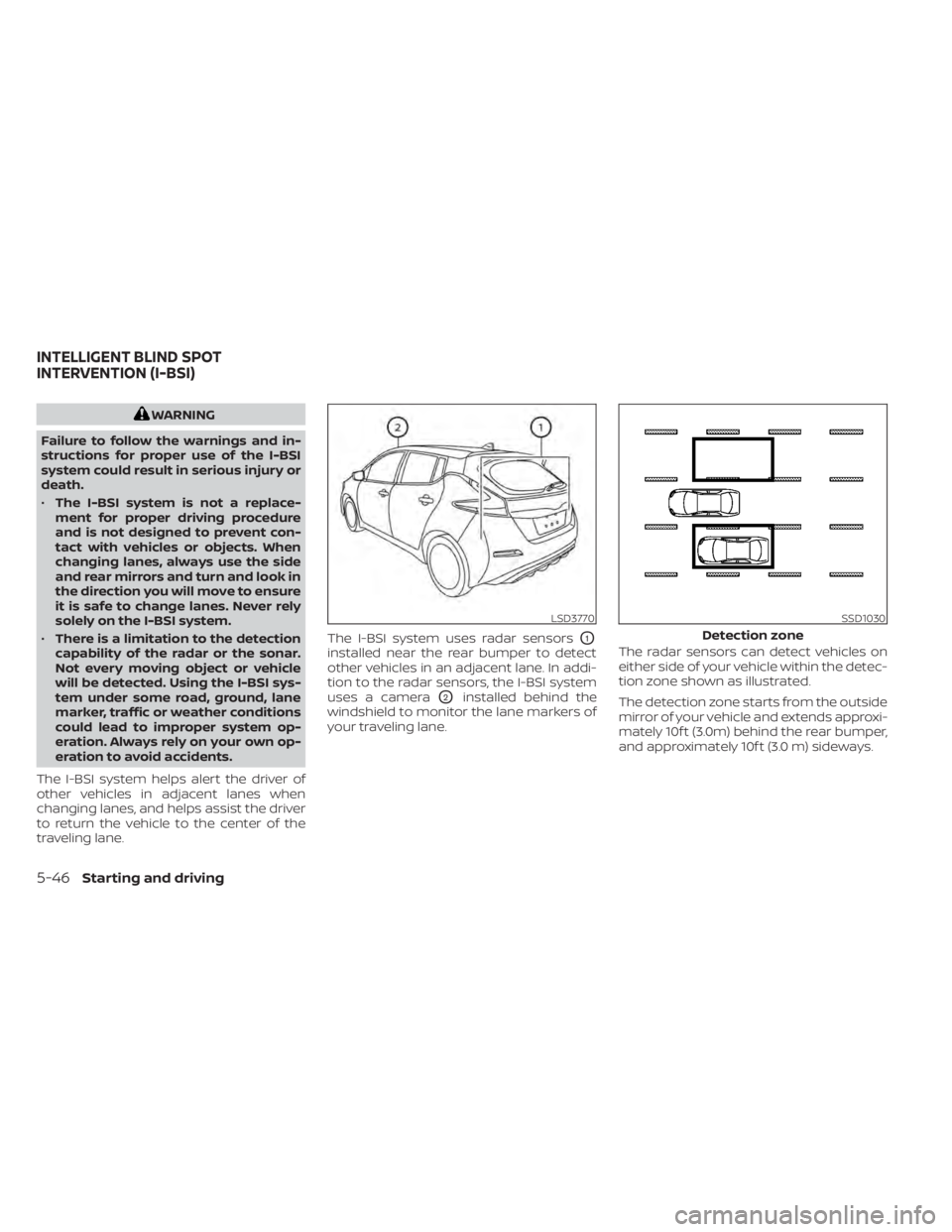
traveling lane. The I-BSI system uses radar sensors
O1
installed near the rear bumper to detect
other vehicles in an adjacent lane. In addi-
tion to the radar sensors, the I-BSI system
uses a camera
O2installed behind the
windshield to monitor the lane markers of
your traveling lane. The radar sensors can detect vehicles on
either side of your vehicle within the detec-
tion zone shown as illustrated.
The detection zone starts from the outside
mirror of your vehicle and extends approxi-
mately 10f t (3.0m) behind the rear bumper,
and approximately 10f t (3.0 m) sideways.
LSD3770SSD1030
Detection zone
INTELLIGENT BLIND SPOT
INTERVENTION (I-BSI)
5-46Starting and driving
Page 366 of 602
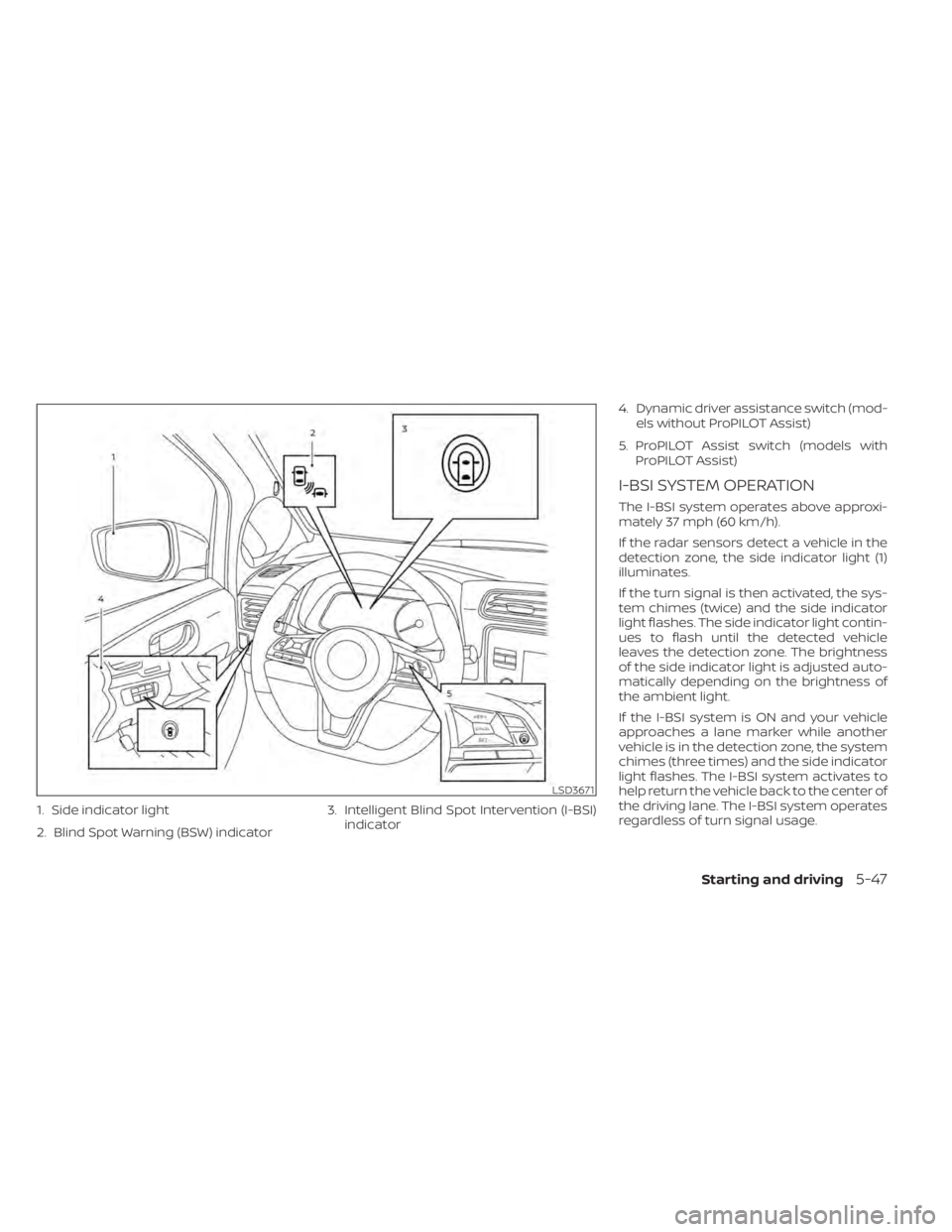
1. Side indicator light
2. Blind Spot Warning (BSW) indicator3. Intelligent Blind Spot Intervention (I-BSI)
indicator 4. Dynamic driver assistance switch (mod-
els without ProPILOT Assist)
5. ProPILOT Assist switch (models with ProPILOT Assist)
I-BSI SYSTEM OPERATION
The I-BSI system operates above approxi-
mately 37 mph (60 km/h).
If the radar sensors detect a vehicle in the
detection zone, the side indicator light (1)
illuminates.
If the turn signal is then activated, the sys-
tem chimes (twice) and the side indicator
light flashes. The side indicator light contin-
ues to flash until the detected vehicle
leaves the detection zone. The brightness
of the side indicator light is adjusted auto-
matically depending on the brightness of
the ambient light.
If the I-BSI system is ON and your vehicle
approaches a lane marker while another
vehicle is in the detection zone, the system
chimes (three times) and the side indicator
light flashes. The I-BSI system activates to
help return the vehicle back to the center of
the driving lane. The I-BSI system operates
regardless of turn signal usage.
LSD3671
Starting and driving5-47
Page 367 of 602
NOTE:
• I-BSI warning and system applicationwill only be activated if the side indica-
tor light is already illuminated when
your vehicle approaches a lane marker.
If another vehicle comes into the de-
tection zone af ter your vehicle has
crossed a lane marker, no I-BSI warn-
ing or system application will be acti-
vated. (For additional information, see
“I-BSI driving situations” (P. 5-50).).
• The I-BSI system is typically activated earlier than the Intelligent Lane Inter-
vention (I-LI) system when your vehicle
is approaching a lane marker.
To turn on the I-BSI system, push the ProPI-
LOT Assist switch on the steering wheel
(models with ProPILOT Assist) or the dy-
namic driver assistance switch (models
without ProPILOT Assist) af ter starting the
EV system. The I-BSI indicator will illumi-
nate. Push the ProPILOT Assist switch or
the dynamic driver assistance switch
again to turn off the I-BSI system. The I-BSI
indicator will turn off.
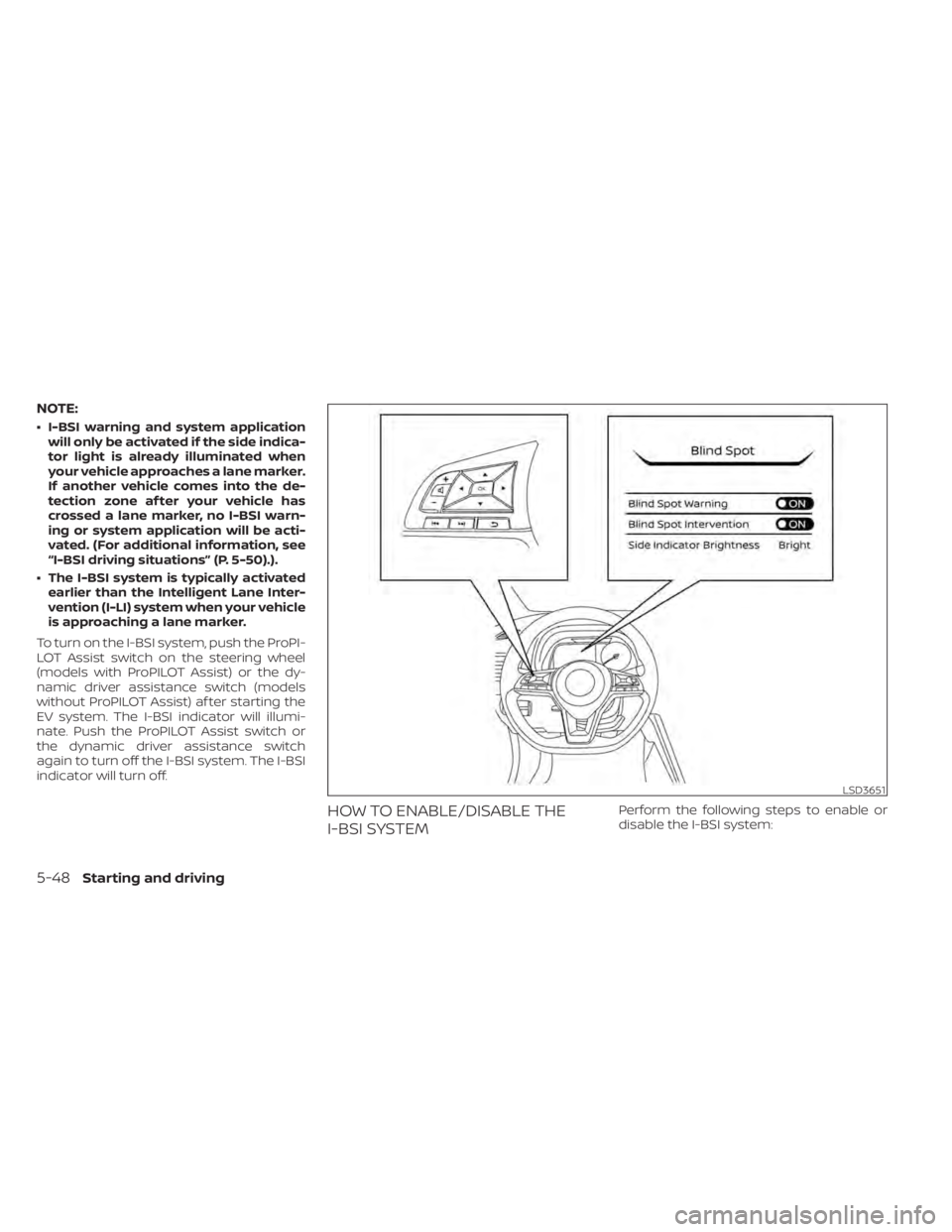
HOW TO ENABLE/DISABLE THE
I-BSI SYSTEMPerform the following steps to enable or
disable the I-BSI system:
LSD3651
5-48Starting and driving
Page 368 of 602
1. Press thebutton until “Settings” dis-
plays in the vehicle information display.
Use the
button to select “Driver As-
sistance.” Then press the OK button.
2. Select “Blind Spot” and press the OK button.
3. Select “Blind Spot Intervention” and use the OK button to turn the system on or
off.
4. Push the ProPILOT Assist switch (mod- els with ProPILOT Assist) or the dynamic
driver assistance switch (models with-
out ProPILOT Assist) to turn the system
on or off.
NOTE:
When Blind Spot Intervention is ON in the
settings menu, turning the ProPILOT As-
sist switch (if so equipped) ON will acti-
vate the Intelligent Blind Spot Interven-
tion (I-BSI) system at the same time. For
additional information, see “Intelligent
Lane Intervention (I-LI)” (P. 5-30).
I-BSI SYSTEM LIMITATIONS
WARNING
Listed below are the system limitations
for the I-BSI system. Failure to operate
the vehicle in accordance with these
system limitations could result in seri-
ous injury or death.
• The I-BSI system cannot detect all
vehicles under all conditions.
• The radar sensors may not be able to
detect and activate I-BSI when cer-
tain objects are present such as:
– Pedestrians, bicycles, or animals.
– Vehicles such as motorcycles, low
height vehicles, or high ground
clearance vehicles.
– Vehicles remaining in the detec-
tion zone when you accelerate
from a stop. For additional infor-
mation, see “BSI driving situa-
tions” (P. 5-50).
– Oncoming vehicles.
– A vehicle merging into an adjacent
lane at a speed approximately the
same as your vehicle.
– A vehicle approaching rapidly
from behind. –
A vehicle which your vehicle over-
takes rapidly.
– A vehicle that passes through the
detection zone quickly.
• The radar sensors’ detection zone is
designed based on a standard lane
width. When driving in a wider lane,
the radar sensors may not detect ve-
hicles in an adjacent lane. When driv-
ing in a narrow lane, the radar sen-
sors may detect vehicles driving two
lanes away.
• The radar sensors are designed to ig-
nore most stationary objects; how-
ever, objects such as guardrails,
walls, foliage and parked vehicles
may occasionally be detected. This is
a normal operation condition.
• The camera may not detect lane
markers in the following situations
and the I-BSI system may not oper-
ate properly.
– On roads where there are multiple
parallel lane markers; lane mark-
ers that are faded or not painted
clearly; yellow painted lane mark-
ers; non-standard lane markers;
lane markers covered with water,
dirt, snow, etc.
Starting and driving5-49
Page 410 of 602
• When the parking brake is applied
• When the VDC operates (including thetraction control system)
• When a wheel slips
When the system is not operating properly,
the chime sounds and the color of the
cruise indicator will change to orange.
Action to take
If the color of the cruise indicator changes
to orange, stop the vehicle in a safe place
and place the shif t lever in the P (Park) po-
sition. Turn the EV system off, restart the EV
system, resume driving, and then perform
the setting again.
If it is not possible to set or the indicator
stays on, it may indicate that the system
is malfunctioning. Although the vehicle
is still drivable under normal conditions,
have the vehicle checked. It is recom-
mended that you visit a NISSAN certified
LEAF dealer for this service.WARNING
Failure to follow the warnings and in-
structions for proper use of the ProPI-
LOT Assist system could result in seri-
ous injury or death.
• ProPILOT Assist is not a self-driving
system. Within the limits of its capa-
bilities, as described in this manual, it
helps the driver with certain driving
activities.
• The ProPILOT Assist system is not a
replacement for proper driving pro-
cedures and is not designed to cor-
rect careless, inattentive or absent-
minded driving. ProPILOT Assist will
not always steer the vehicle to keep it
in the lane. The ProPILOT Assist sys-
tem is not designed to prevent loss of
control. It is the driver’s responsibility
to stay alert, drive safely, keep the
vehicle in the traveling lane, and be in
control of the vehicle at all times. •
There are limitations to the ProPILOT
Assist system capability. The ProPI-
LOT Assist system does not function
in all driving, traffic, weather, and
road conditions. It is the driver’s re-
sponsibility to stay alert, drive safely,
keep the vehicle in the traveling lane,
and be in control of the vehicle at all
times.
• The ProPILOT Assist system is only an
aid to assist the driver and is not a
collision warning or avoidance
device.
• The ProPILOT Assist system is for
highway use only and is not intended
for city driving. Failure to apply the
brake or steer the vehicle when nec-
essary may result in a serious
accident.
• Always observe posted speed limits
and do not set the speed over them.
• Never take your hands off the steer-
ing wheel when driving. Always keep
your hands on the steering wheel
and drive your vehicle safely.
• Never unfasten your safety belt
when using ProPILOT Assist. Doing so
automatically cancels the ProPILOT
Assist system.
PROPILOT ASSIST (if so equipped)
Starting and driving5-91
Page 411 of 602
•The ProPILOT Assist system does not
react to stationary and slow-moving
vehicles.
• Always drive carefully and atten-
tively when using the ProPILOT Assist
system. Read and understand the
Owner’s Manual thoroughly before
using the ProPILOT Assist system. To
avoid serious injury or death, do not
rely on the system to prevent acci-
dents or to control the vehicle’s
speed in emergency situations. Do
not use the ProPILOT Assist system
except in appropriate road and traffic
conditions.
The ProPILOT Assist system is intended to
enhance the operation of the vehicle when
following a vehicle traveling in the same
lane and direction.
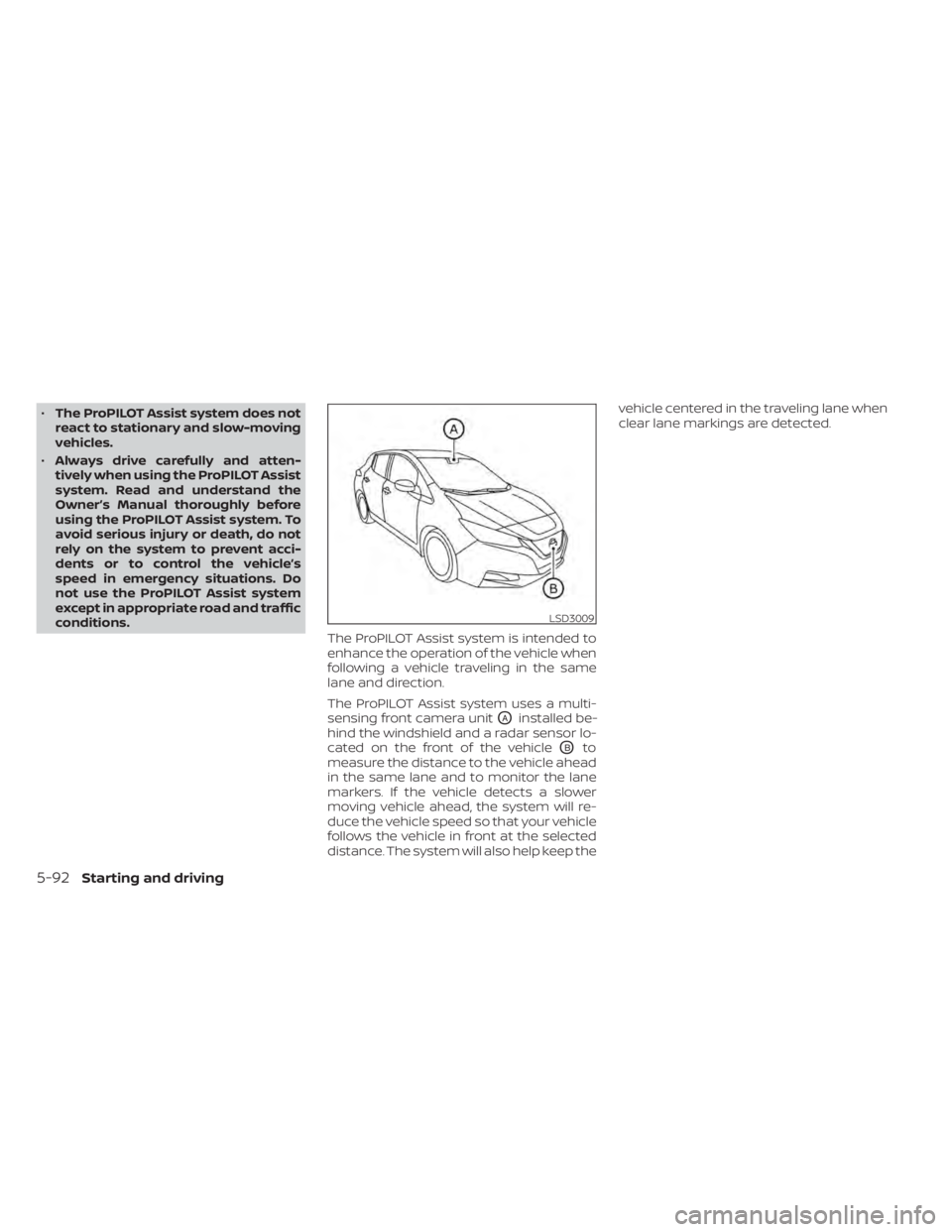
The ProPILOT Assist system uses a multi-
sensing front camera unit
OAinstalled be-
hind the windshield and a radar sensor lo-
cated on the front of the vehicle
OBto
measure the distance to the vehicle ahead
in the same lane and to monitor the lane
markers. If the vehicle detects a slower
moving vehicle ahead, the system will re-
duce the vehicle speed so that your vehicle
follows the vehicle in front at the selected
distance. The system will also help keep the vehicle centered in the traveling lane when
clear lane markings are detected.
LSD3009
5-92Starting and driving
Page 413 of 602
NOTE:When your vehicle is stopped for less
than 3 seconds and the vehicle ahead
begins to move, your vehicle will start
moving again automatically.
– When your vehicle is at a standstill for more than 3 seconds and the vehicle
ahead begins to accelerate, push the
RES+ switch or lightly depress the accel-
erator pedal. The ICC system starts to
follow the vehicle ahead.
– When no vehicle is detected ahead within the driver selected distance, the
vehicle travels at the speed set by the
driver. The speed must be above 20 mph
(32 km/h) to use this function.
NOTE:
Even if the Automatic Emergency Brak-
ing (AEB) with Pedestrian Detection set-
ting is turned off by the driver using the
“Settings” menu in the vehicle informa-
tion display, AEB with Pedestrian Detec-
tion will be automatically turned on
when ICC is used. 2.
Steering Assist
The Steering Assist function controls the
steering system to help keep your ve-
hicle within the traveling lane.
When there is no vehicle ahead, Steering
Assist is not available at speeds under 37
mph (60 km/h).
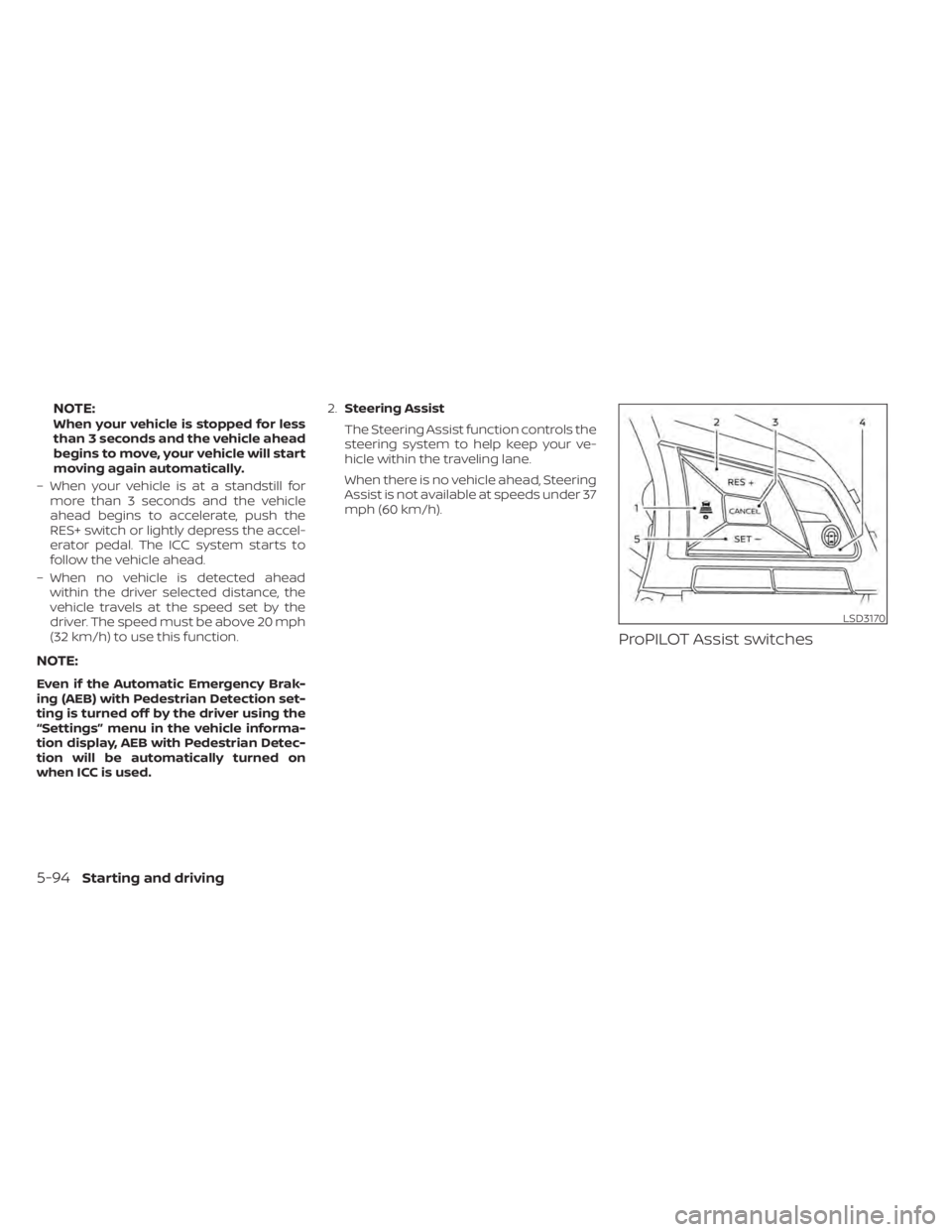
ProPILOT Assist switches
LSD3170
5-94Starting and driving
Page 415 of 602
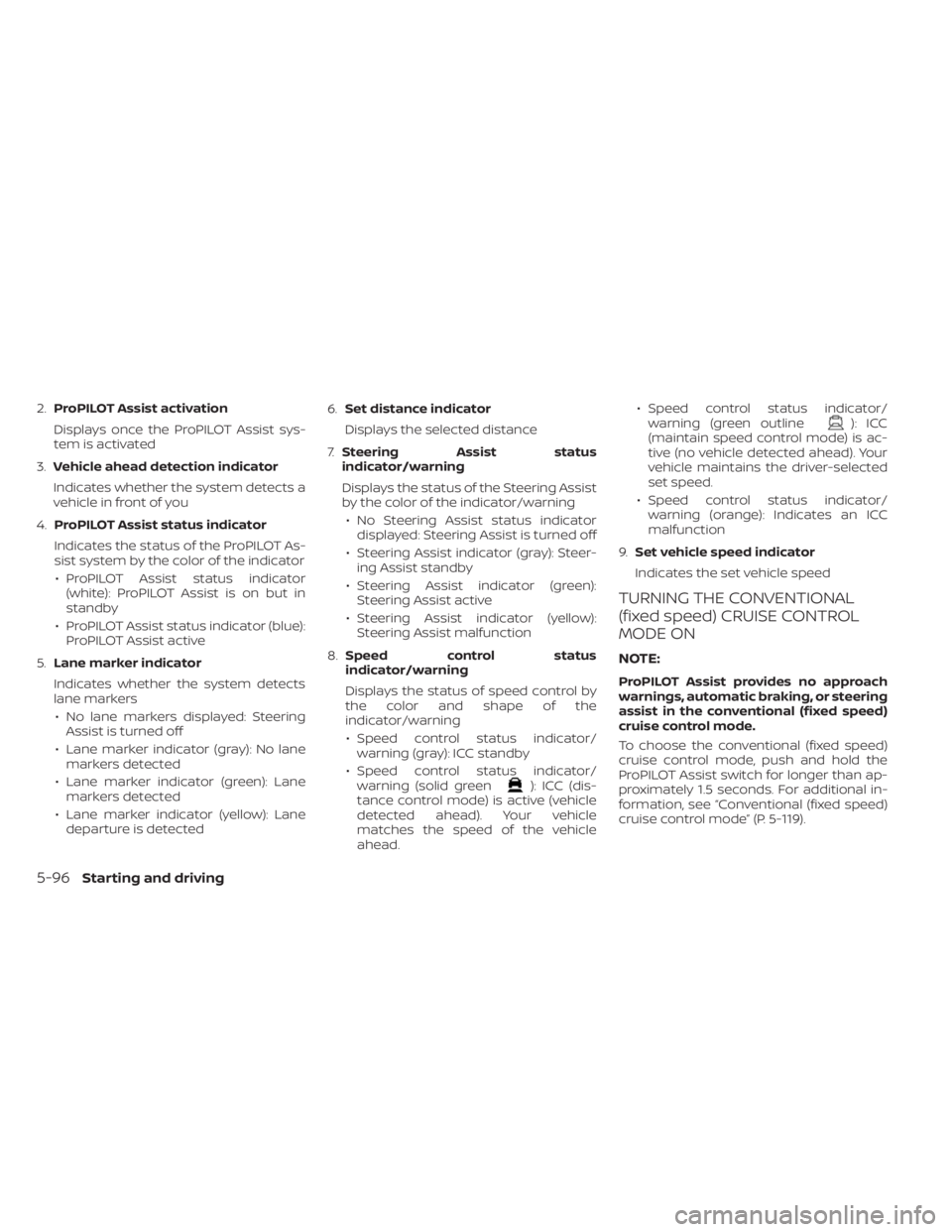
2.ProPILOT Assist activation
Displays once the ProPILOT Assist sys-
tem is activated
3. Vehicle ahead detection indicator
Indicates whether the system detects a
vehicle in front of you
4. ProPILOT Assist status indicator
Indicates the status of the ProPILOT As-
sist system by the color of the indicator • ProPILOT Assist status indicator (white): ProPILOT Assist is on but in
standby
• ProPILOT Assist status indicator (blue): ProPILOT Assist active
5. Lane marker indicator
Indicates whether the system detects
lane markers • No lane markers displayed: Steering Assist is turned off
• Lane marker indicator (gray): No lane markers detected
• Lane marker indicator (green): Lane markers detected
• Lane marker indicator (yellow): Lane departure is detected 6.
Set distance indicator
Displays the selected distance
7. Steering Assist status
indicator/warning
Displays the status of the Steering Assist
by the color of the indicator/warning
• No Steering Assist status indicator displayed: Steering Assist is turned off
• Steering Assist indicator (gray): Steer- ing Assist standby
• Steering Assist indicator (green): Steering Assist active
• Steering Assist indicator (yellow): Steering Assist malfunction
8. Speed control status
indicator/warning
Displays the status of speed control by
the color and shape of the
indicator/warning
• Speed control status indicator/ warning (gray): ICC standby
• Speed control status indicator/ warning (solid green
): ICC (dis-
tance control mode) is active (vehicle
detected ahead). Your vehicle
matches the speed of the vehicle
ahead. • Speed control status indicator/
warning (green outline
): ICC
(maintain speed control mode) is ac-
tive (no vehicle detected ahead). Your
vehicle maintains the driver-selected
set speed.
• Speed control status indicator/ warning (orange): Indicates an ICC
malfunction
9. Set vehicle speed indicator
Indicates the set vehicle speed
TURNING THE CONVENTIONAL
(fixed speed) CRUISE CONTROL
MODE ON
NOTE:
ProPILOT Assist provides no approach
warnings, automatic braking, or steering
assist in the conventional (fixed speed)
cruise control mode.
To choose the conventional (fixed speed)
cruise control mode, push and hold the
ProPILOT Assist switch for longer than ap-
proximately 1.5 seconds. For additional in-
formation, see “Conventional (fixed speed)
cruise control mode” (P. 5-119).
5-96Starting and driving
Page 416 of 602
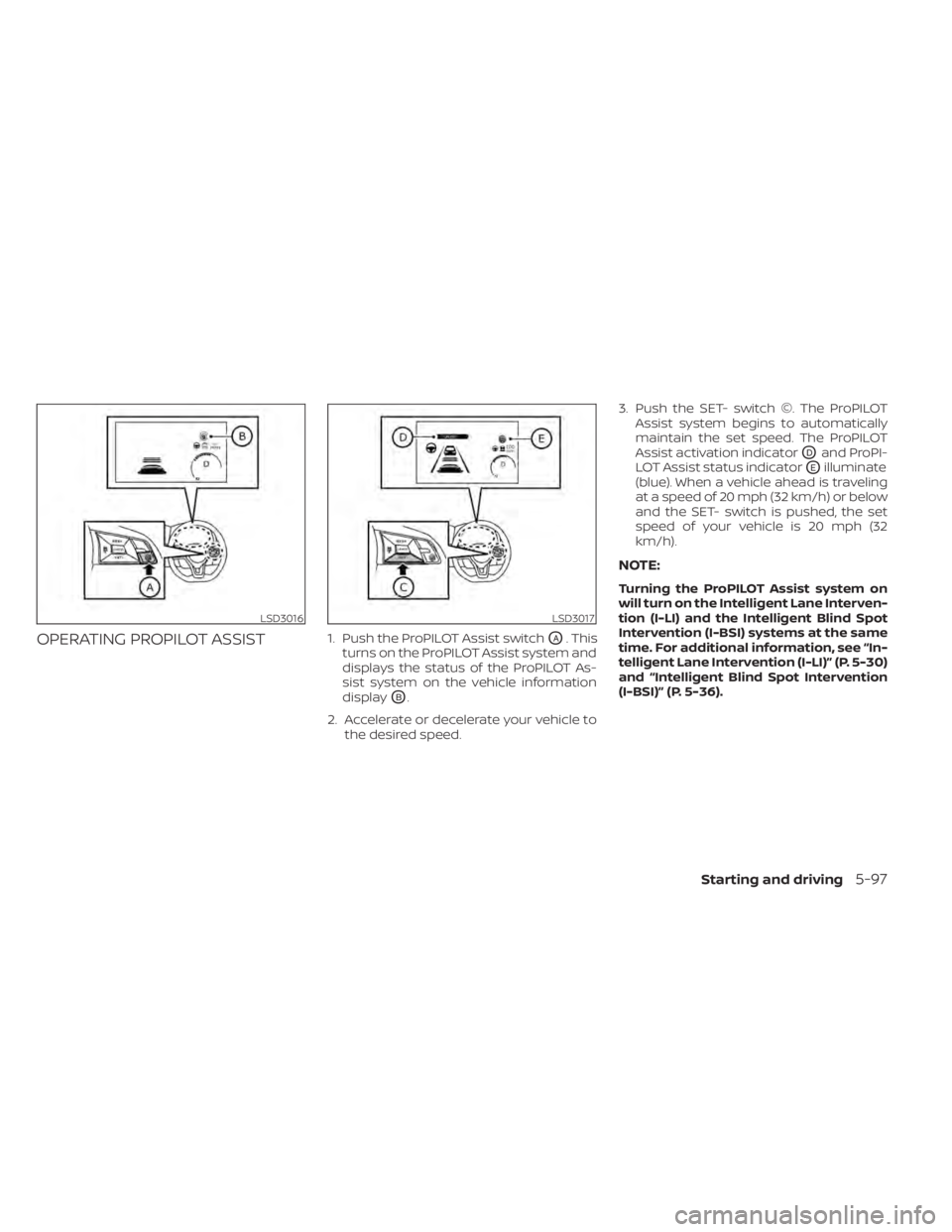
OPERATING PROPILOT ASSIST1. Push the ProPILOT Assist switchOA. This
turns on the ProPILOT Assist system and
displays the status of the ProPILOT As-
sist system on the vehicle information
display
OB.
2. Accelerate or decelerate your vehicle to the desired speed. 3. Push the SET- switch ©. The ProPILOT
Assist system begins to automatically
maintain the set speed. The ProPILOT
Assist activation indicator
ODand ProPI-
LOT Assist status indicator
OEilluminate
(blue). When a vehicle ahead is traveling
at a speed of 20 mph (32 km/h) or below
and the SET- switch is pushed, the set
speed of your vehicle is 20 mph (32
km/h).
NOTE:
Turning the ProPILOT Assist system on
will turn on the Intelligent Lane Interven-
tion (I-LI) and the Intelligent Blind Spot
Intervention (I-BSI) systems at the same
time. For additional information, see “In-
telligent Lane Intervention (I-LI)” (P. 5-30)
and “Intelligent Blind Spot Intervention
(I-BSI)” (P. 5-36).
LSD3016LSD3017
Starting and driving5-97