ECO mode NISSAN LEAF 2021 Owner´s Manual
[x] Cancel search | Manufacturer: NISSAN, Model Year: 2021, Model line: LEAF, Model: NISSAN LEAF 2021Pages: 602, PDF Size: 4.22 MB
Page 204 of 602
STARTUP DISPLAY
With the vehicle in the ON position, the ve-
hicle information display may display the
following screens:
• Battery information
• Audio
• Navigation
• Energy Economy
• Driving Aids
• Warnings
• Settings
Warnings will only display if there are any
present. For additional information, see
“Vehicle information display warnings and
indicators” (P. 2-34).
To control which items display in the ve-
hicle information display, see “How to use
the vehicle information display” (P. 2-26).
SETTINGS
The settings mode allows you to change
the information displayed in the vehicle in-
formation display as well as enable and
disable various vehicle features and sys-
tems. The settings include:
• VDC Setting
• Driver Assistance
• Customize Display
• Vehicle Settings
• EV Settings
• TPMS Settings
• Maintenance
• Clock
• Unit/Language
• Factory Reset
VDC Setting
The VDC setting menu allows the user to the adjust the VDC settings.
Menu ItemExplanation
System Allows user to turn the Vehicle Dynamic Control (VDC) system on or off.
Instruments and controls2-27
Page 213 of 602
e—Pedal system failure! Press brake
pedal to slow or stop
This warning is displayed when the e-Pedal
system is malfunctioning. Have the system
checked. It is recommended that you visit a
NISSAN certified LEAF dealer for this
service.
Indicators for maintenance
These indicators appear when the cus-
tomer set distance comes for replacing
tires or other maintenance items. You can
set or reset the distance for replacing tires
and other maintenance items.
WARNING
The tire replacement indicator is not a
substitute for regular tire checks, in-
cluding tire pressure checks. For addi-
tional information, see “Changing
wheels and tires” (P. 8-34). Many factors
including tire inflation, alignment, driv-
ing habits and road conditions affect
tire wear and when tires should be re-
placed. Setting the tire replacement in-
dicator for a certain driving distance
does not mean your tires will last that
long. Use the tire replacement indicator
as a guide only and always perform regular tire checks. Failure to perform
regular tire checks, including tire pres-
sure checks could result in tire failure.
Serious vehicle damage could occur
and may lead to a collision, which could
result in serious personal injury or
death.
For scheduled maintenance items and in-
tervals, see “Maintenance and schedules.”
Headlight System Error: See Owner’s
Manual
This warning appears when the LED head-
lights are not functioning properly.
If this warning appears, have your system
checked. It is recommended that you visit a
NISSAN certified LEAF dealer for this
service.
Low battery charge
indicator
This light appears when the available Li-ion
battery charge is getting low. Charge as
soon as it is possible, preferably before the
Li-ion battery available charge gauge
reaches 0%.
NOTE:
The low battery charge indicator turns
off immediately before the Li-ion battery
is completely discharged and the vehicle
will stop. If the Li-ion battery becomes
completely discharged, the vehicle must
be charged in order to be driven.
Low outside air
temperature
The outside air temperature is displayed in
°F or °C in the range of −20°F to 140°F (−30°C
to 60°C).
The outside air temperature mode in-
cludes a low temperature warning feature.
If the outside air temperature is below 37°F
(3°C), the warning is displayed on the
screen.
The outside temperature sensor is located
in front side of the vehicle. The sensor may
be affected by road, wind directions and
other driving conditions. The display may
differ from the actual outside temperature
or the temperature displayed on various
signs or billboards.
2-36Instruments and controls
Page 214 of 602
Low Washer Fluid
This warning appears when the washer
tank fluid is at a low level. Add washer fluid
as necessary. For additional information,
see “Windshield-washer fluid” (P. 8-8).
Press Brake Pedal
This message may appear in the following
situations:
• The driver tries to release the electronicparking brake manually without depress-
ing the brake pedal.
• The vehicle is stopped on a steep hill; and there is a possibility of moving back-
wards, even if the electronic parking
brake is applied.
• The vehicle moves while the automatic brake hold is activated.
For additional information, see “Electronic
parking brake” (P. 5-19).
Press brake pedal to
operate e-Pedal switch
This indicator appears when trying to turn
the e-Pedal off without depressing the
brake pedal when the vehicle is stopped.
Depress the brake pedal before pulling the
e-Pedal switch.
Push brake and power
switch to drive
This indicator appears while the vehicle is
in the P (Park) position. This indicator
means that the EV system will start when
the power switch is pressed with the brake
pedal depressed.
Release Parking Brake
This warning appears when the vehicle
speed is above 4 mph (7 km/h) (models not
equipped with electronic parking brake) or
2 mph (4 km/h) (models equipped with
electronic parking brake) and the parking
brake is applied. Stop the vehicle and re-
lease the parking brake.
Reminder Turn OFF
Headlights
This warning appears when the power
switch is turned to the OFF position but the
headlight switch is still on. Turn off the
headlight switch.
Shif t to P range
This warning appears alternately with
door/rear hatch open warning when the
driver's door is opened with the shif t posi-
tion in any position other than the P (Park) position. If this warning appears, push the P
(Park) position switch and place in the P
(Park) position.
For additional information, see “Door open”
(P. 2-35).
Shipping Mode On Push Storage Fuse
This warning may appear if the extended
storage switch is not pushed in. When this
warning appears, push in the extended
storage switch to turn off the warning.
For additional information, see “Extended
storage switch” (P. 8-19).
Tire Pressure Low - Add Air
This warning appears when the low tire
pressure warning light in the meter illumi-
nates and low tire pressure is detected. The
warning appears each time the power
switch is placed in the ON position as long
as the low tire pressure warning light re-
mains illuminated.
If this warning appears, stop the vehicle
and adjust the tire pressure to the recom-
mended COLD tire pressure shown on the
Tire and Loading Information label. For ad-
ditional information, see “Low tire pressure
warning light” (P. 2-20) and “Tire Pressure
Monitoring System (TPMS)” (P. 5-4).
Instruments and controls2-37
Page 220 of 602
3. Close all doors. Lock all doors. The doorscan be locked with:
• the LOCK
button on the Intelli-
gent Key
• any request switch
• the power door lock switch
4. Confirm that the security indicator light illuminates. The security indicator light
stays on for about 30 seconds. The ve-
hicle security system is now pre-armed.
Af ter about 30 seconds the vehicle se-
curity system automatically shif ts into
the armed phase. The security light be-
gins to flash once every approximately 3
seconds. If, during this 30-second pre-
arm time period, the door is unlocked, or
the power switch is placed in the ACC or
ON position, the system will not arm.
Even when the driver and/or passengers
are in the vehicle, the system will acti-
vate with all doors locked and the power
switch in the OFF position. When placing
the power switch to the ACC or ON posi-
tion, the system will be released.
Vehicle security system activation
The vehicle security system will give the
following alarm:
• The headlights blink and the horn sounds intermittently.
• The alarm automatically turns off af ter approximately 50 seconds. However, the
alarm reactivates if the vehicle is tam-
pered with again.
The alarm is activated by:
• Unlocking the door without using the In- telligent Key or the request switch. (Even if
the door is opened by releasing the door
inside lock knob, the alarm will activate.)
• Opening the hood.
How to stop an activated alarm
The alarm will stop when a door is un-
locked by pushing the UNLOCKbut-
ton on the Intelligent Key, door handle re-
quest switch, or when the power switch is
pushed in the ACC or ON position.
If the system does not operate as de-
scribed above, have it checked. It is rec-
ommended that you visit a NISSAN certi-
fied LEAF dealer for this service.
NISSAN VEHICLE IMMOBILIZER
SYSTEM
The NISSAN Vehicle Immobilizer System
will not allow the power switch to be placed
in the READY to drive position without the
use of the registered key.
If the power switch fails to place the vehicle
into the READY to drive position using the
registered key, it may be due to interfer-
ence caused by another registered key, an
automated toll road device or automated
payment device on the key ring. Restart the
EV system using the following procedure:
1. Leave the power switch in the ON posi- tion for approximately 5 seconds.
2. Place the power switch in the OFF posi- tion and wait approximately 10 seconds.
3. Repeat step 1 and 2 again.
4. Place the power switch in the READY to drive position while holding the device
(which may have caused the interfer-
ence) separate from the registered key.
If this procedure allows the power
switch to be placed in the READY to drive
mode, NISSAN recommends placing the
registered key on a separate key ring to
avoid interference from other devices.
Instruments and controls2-43
Page 232 of 602
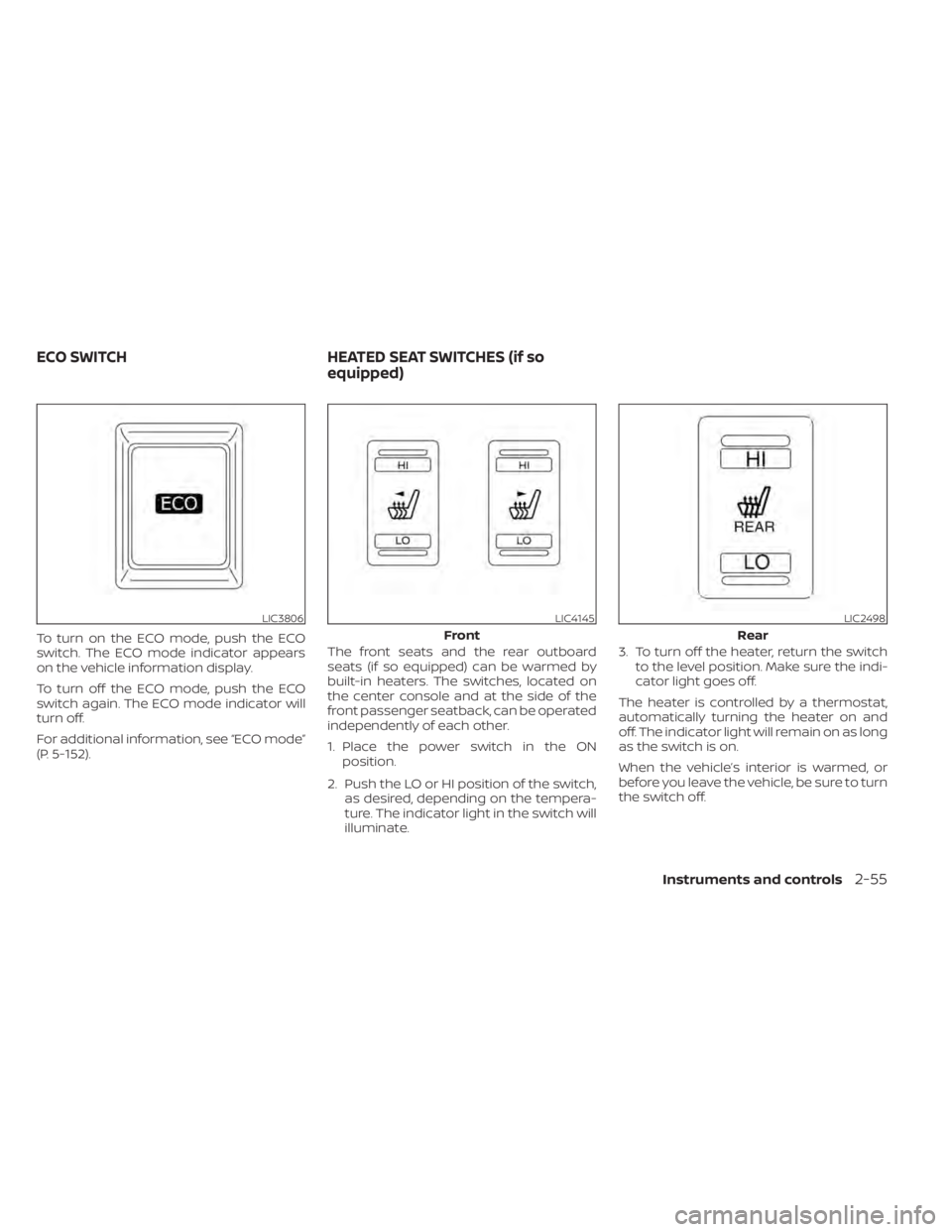
To turn on the ECO mode, push the ECO
switch. The ECO mode indicator appears
on the vehicle information display.
To turn off the ECO mode, push the ECO
switch again. The ECO mode indicator will
turn off.
For additional information, see “ECO mode”
(P. 5-152).The front seats and the rear outboard
seats (if so equipped) can be warmed by
built-in heaters. The switches, located on
the center console and at the side of the
front passenger seatback, can be operated
independently of each other.
1. Place the power switch in the ON
position.
2. Push the LO or HI position of the switch, as desired, depending on the tempera-
ture. The indicator light in the switch will
illuminate. 3. To turn off the heater, return the switch
to the level position. Make sure the indi-
cator light goes off.
The heater is controlled by a thermostat,
automatically turning the heater on and
off. The indicator light will remain on as long
as the switch is on.
When the vehicle’s interior is warmed, or
before you leave the vehicle, be sure to turn
the switch off.
LIC3806LIC4145
Front
LIC2498
Rear
ECO SWITCH HEATED SEAT SWITCHES (if so
equipped)
Instruments and controls2-55
Page 247 of 602
WARNING
• Your vehicle's EV system should be
turned off while programming the
HomeLink® Universal Transceiver. For
additional information, see “Push-
button power switch” (P. 5-9).
• Do not use the HomeLink® Universal
Transceiver with any garage door
opener that lacks safety stop and re-
verse features as required by federal
safety standards. (These standards
became effective for opener models
manufactured af ter April 1, 1982). A
garage door opener which cannot
detect an object in the path of a clos-
ing garage door and then automati-
cally stop and reverse, does not meet
current federal safety standards. Us-
ing a garage door opener without
these features increases the risk of
serious injury or death.
• During the programming procedure
your garage door or security gate will
open and close (if the transmitter is
within range). Make sure that people
or objects are clear of the garage
door, gate, etc. that you are
programming.PROGRAMMING HOMELINK®
If you have any questions or are having
difficulty programming your HomeLink®
buttons, refer to the HomeLink® web site at:
www.homelink.com or call 1-800-355-3515.
NOTE:
Place the power switch in the ON or ACC
position (without starting the EV system)
when programming HomeLink®. It is also
recommended that a new battery be
placed in the hand-held transmitter of
the device being programmed to
HomeLink® for quicker programming
and accurate transmission of the radio
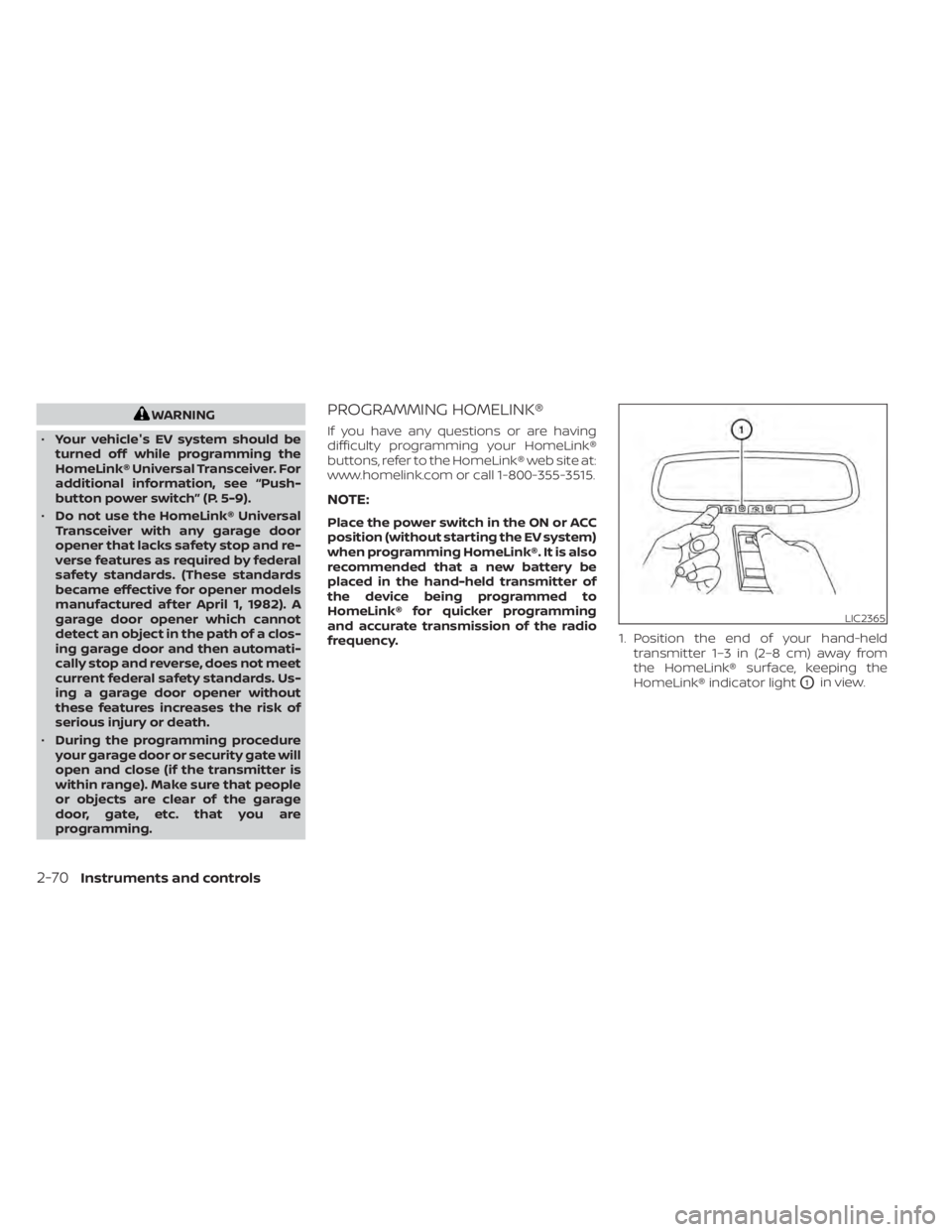
frequency. 1. Position the end of your hand-held
transmitter 1–3 in (2–8 cm) away from
the HomeLink® surface, keeping the
HomeLink® indicator light
O1in view.
LIC2365
2-70Instruments and controls
Page 250 of 602
If you have any questions or are having
difficulty programming your HomeLink®
buttons, refer to the HomeLink® web site at:
www.homelink.com or call 1-800-355-3515.
CLEARING THE PROGRAMMED
INFORMATION
The following procedure clears the pro-
grammed information from both buttons.
Individual buttons cannot be cleared. How-
ever, individual buttons can be repro-
grammed. For additional information, see
“Reprogramming a single HomeLink® but-
ton” (P. 2-73).
To clear all programming:
1. Press and hold the two outer HomeLink®buttons until the indicator light begins to
flash in approximately 10 seconds. Do
not hold for longer than 20 seconds.
2. Release both buttons.
HomeLink® is now in the programming
mode and can be programmed at any
time beginning with “Programming
HomeLink®” - Step 1.
REPROGRAMMING A SINGLE
HOMELINK® BUTTON
To reprogram a HomeLink® Universal
Transceiver button, complete the following:
1. Press and hold the desired HomeLink® button. DO NOT release the button.
2. The indicator light will begin to flash af- ter 20 seconds. Without releasing the
HomeLink® button, proceed with “Pro-
gramming HomeLink®” - Step 1.
For questions or comments, contact
HomeLink® at: www.homelink.com or
1–800–355–3515 (except Mexico).
The HomeLink® Universal Transceiver but-
ton has now been reprogrammed. The new
device can be activated by pressing the
HomeLink® button that was just pro-
grammed. This procedure will not affect any
other programmed HomeLink® buttons.
IF YOUR VEHICLE IS STOLEN
If your vehicle is stolen, you should change
the codes of any non-rolling code device
that has been programmed into
HomeLink®. Consult the Owner's Manual of
each device or call the manufacturer or
dealer of those devices for additional
information. When your vehicle is recovered, you will
need to reprogram the HomeLink® Uni-
versal Transceiver with your new trans-
mitter information.
FCC Notice:
For USA:
This device complies with Part 15 of the
FCC Rules. Operation is subject to the fol-
lowing two conditions: (1) This device
may not cause harmful interference, and
(2) this device must accept any interfer-
ence received, including interference
that may cause undesired operation.
NOTE:
Changes or modifications not expressly
approved by the party responsible for
compliance could void the user’s author-
ity to operate the equipment.
For Canada:
This device complies with Industry
Canada licence-exempt RSS standard(s).
Operation is subject to the following two
conditions: (1) this device may not cause
interference, and (2) this device must ac-
cept any received, including interference
that may cause undesired operation of
the device.
Instruments and controls2-73
Page 265 of 602
Opening charge port lid
The charge port lid may be opened by
pressing and holding thebutton.
For additional information, see "Opening
charge port lid" (P. 3-20).
Using the panic alarm
If you are near your vehicle and feel threat-
ened, you may activate the panic alarm to
call attention by pressing and holding the
button on the Intelligent Key for lon-
ger than 1 second.
The panic alarm and headlights will stay on
for a period of time.
The panic alarm stops when:
• It has run for a period of time.
• Any button is pressed on the Intelligent Key. (Note: The
button must be
pushed for more than 1 second.)
Setting hazard indicator and horn
mode
This vehicle is set in hazard indicator and
horn mode when you first receive the
vehicle.
In hazard indicator and horn mode, when
the
button is pressed, the hazard
indicator flashes twice and the horn chirps
once. When the
button is pressed, the
hazard indicator flashes once.
If horns are not necessary, the system can
be switched to the hazard indicator mode.
In hazard indicator mode, when the
button is pressed, the hazard indicator
flashes twice. When thebutton is
pressed, neither the hazard indicator nor
the horn operates.
3-14Pre-driving checks and adjustments
Page 267 of 602
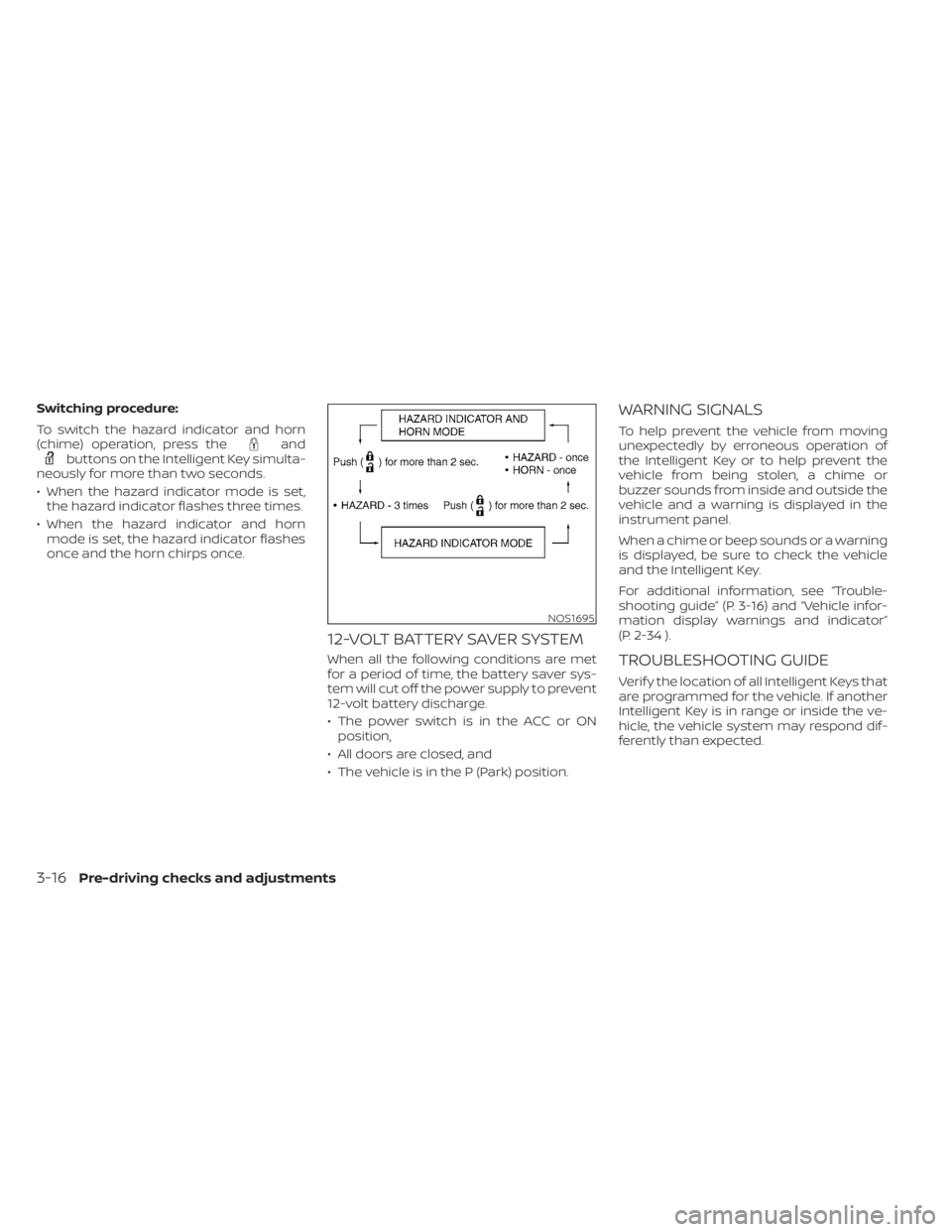
Switching procedure:
To switch the hazard indicator and horn
(chime) operation, press the
andbuttons on the Intelligent Key simulta-
neously for more than two seconds.
• When the hazard indicator mode is set, the hazard indicator flashes three times.
• When the hazard indicator and horn mode is set, the hazard indicator flashes
once and the horn chirps once.
12-VOLT BATTERY SAVER SYSTEM
When all the following conditions are met
for a period of time, the battery saver sys-
tem will cut off the power supply to prevent
12-volt battery discharge.
• The power switch is in the ACC or ONposition,
• All doors are closed, and
• The vehicle is in the P (Park) position.
WARNING SIGNALS
To help prevent the vehicle from moving
unexpectedly by erroneous operation of
the Intelligent Key or to help prevent the
vehicle from being stolen, a chime or
buzzer sounds from inside and outside the
vehicle and a warning is displayed in the
instrument panel.
When a chime or beep sounds or a warning
is displayed, be sure to check the vehicle
and the Intelligent Key.
For additional information, see “Trouble-
shooting guide” (P. 3-16) and “Vehicle infor-
mation display warnings and indicator”
(P. 2-34 ).
TROUBLESHOOTING GUIDE
Verif y the location of all Intelligent Keys that
are programmed for the vehicle. If another
Intelligent Key is in range or inside the ve-
hicle, the vehicle system may respond dif-
ferently than expected.
NOS1695
3-16Pre-driving checks and adjustments
Page 278 of 602
4 Monitor, climate, audio, phone and
voice recognition systems
NissanConnect® Manual........................4-2
RearView Monitor (if so equipped) ...............4-3
RearView Monitor system operation ..........4-4
How to read the displayed lines ..............4-5
Difference between predicted and
actual distances .............................4-5
How to park with predicted course
lines ..........................................4-7
Adjusting the screen .........................4-8
How to turn on and off predicted
course lines ..................................4-9
RearView Monitor system limitations .........4-9
System maintenance ....................... 4-10
Intelligent Around View Monitor
(if so equipped) .................................. 4-11
Intelligent Around View Monitor system
operation ................................... 4-12
Difference between predicted and
actual distances ............................ 4-13
How to park with predicted course
lines ......................................... 4-14
How to switch the display ...................4-15
Adjusting the screen ........................ 4-16
Intelligent Around View Monitor system
limitations .................................. 4-17System maintenance
....................... 4-19
Moving Object Detection (MOD)
(if so equipped) ................................. 4-20
MOD system operation ......................4-21
Turning MOD ON and OFF ...................4-23
MOD system limitations .....................4-23
System maintenance .......................4-24
Vents .......................................... 4-25
Heater and air conditioner (automatic) .........4-26
Displaying climate control system
status screen (models with navigation
system) ..................................... 4-27
Operating tips ............................... 4-27
In-cabin microfilter .......................... 4-28
Automatic climate control
(models without Navigation System) ........4-29
Automatic climate control
(models with Navigation System) ............4-32
Climate ctrl. timer ........................... 4-35
USB/iPod® charging ports ......................4-40
Antenna ........................................ 4-40
Car phone or CB radio .......................... 4-41
iPod®/iPhone® ................................. 4-41