lock NISSAN LEAF 2022 Owner´s Manual
[x] Cancel search | Manufacturer: NISSAN, Model Year: 2022, Model line: LEAF, Model: NISSAN LEAF 2022Pages: 618, PDF Size: 4.3 MB
Page 327 of 618
AEB with Pedestrian Detection system
limitations................................. 5-129
System temporarily unavailable ............5-132
System malfunction ........................ 5-134
System maintenance ......................5-134
Rear Automatic Braking (RAB) .................5-136
RAB system operation ......................5-137
Turning the RAB system on/off .............5-138
RAB system limitations .....................5-139
System malfunction ........................ 5-140
System maintenance ......................5-141
Intelligent Forward Collision Warning (I-FCW) . . 5-141 I-FCW System operation ....................5-142
Turning the I-FCW system on/off ...........5-144
I-FCW system limitations ...................5-145
System temporarily unavailable ............5-150
System malfunction ........................ 5-151
System maintenance ......................5-152
Intelligent Driver Alertness (I-DA)
(if so equipped) ................................ 5-154
I-DA system operation .....................5-154
How to enable/disable the I-DA system ....5-155
I-DA system limitations .....................5-155
ECO Mode ..................................... 5-157
Increasing power economy ...................5-157ECO drive report
.............................. 5-158
Parking/parking on hills .......................5-159
Power steering system ........................ 5-161
Brake system ................................. 5-161
Brake precautions .......................... 5-161
Anti-lock Braking System (ABS) .............5-163
Brake Assist ................................ 5-164
Vehicle Dynamic Control (VDC) system ........5-164
Chassis control ............................... 5-166
Intelligent Trace Control ....................5-167
Intelligent Ride Control .....................
5-167
R
ear sonar system (RSS) ......................5-168
System operation .......................... 5-169
How to enable/disable the rear sonar
system ..................................... 5-170
Sonar limitations ............................ 5-171
System temporarily unavailable .............5-171
System maintenance ......................5-172
Hill start assist system ........................ 5-172
Cold weather driving .......................... 5-173
Freeing a frozen door lock ..................5-174
Antifreeze .................................. 5-174
12-volt battery .............................. 5-174
Draining of coolant water ..................5-174
Page 336 of 618
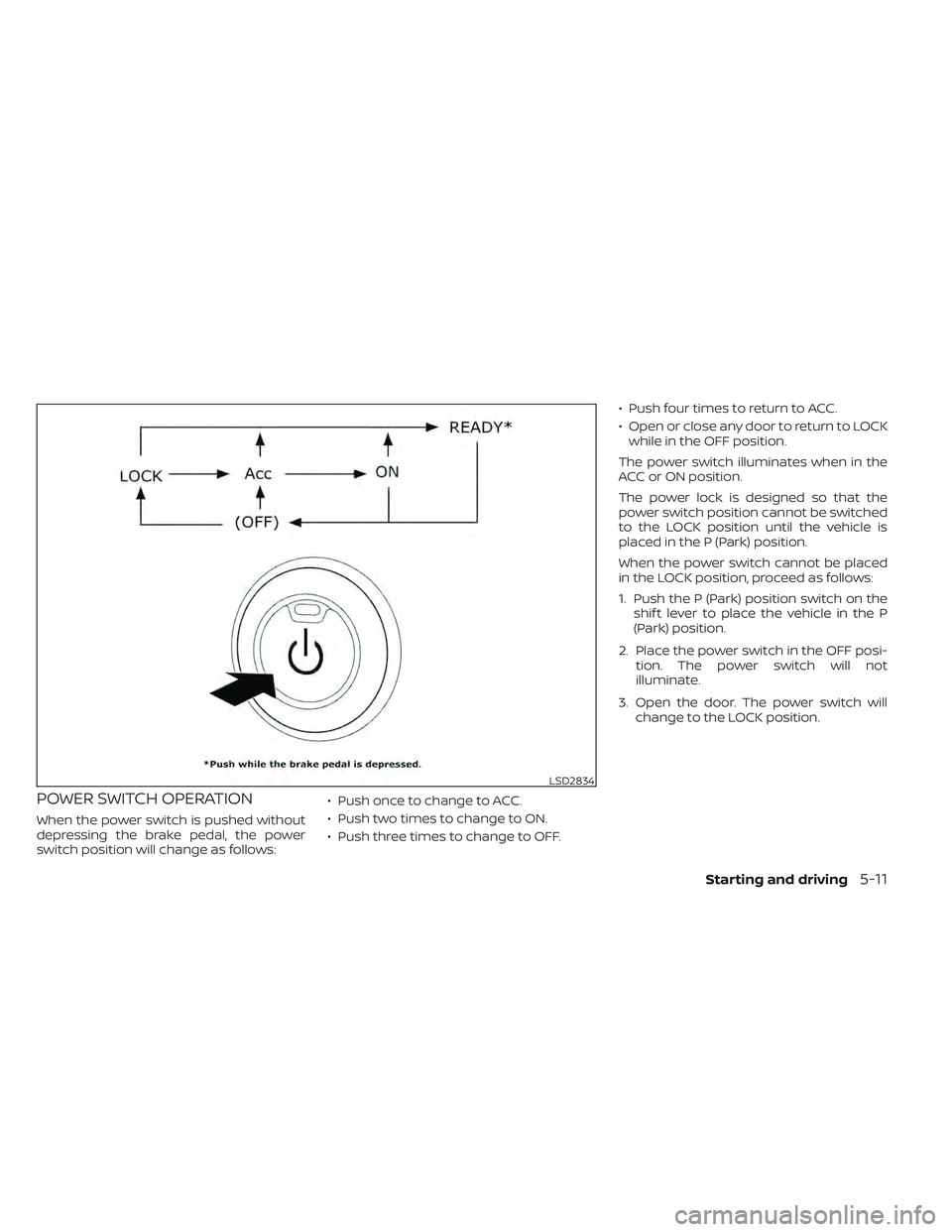
POWER SWITCH OPERATION
When the power switch is pushed without
depressing the brake pedal, the power
switch position will change as follows:• Push once to change to ACC.
• Push two times to change to ON.
• Push three times to change to OFF.• Push four times to return to ACC.
• Open or close any door to return to LOCK
while in the OFF position.
The power switch illuminates when in the
ACC or ON position.
The power lock is designed so that the
power switch position cannot be switched
to the LOCK position until the vehicle is
placed in the P (Park) position.
When the power switch cannot be placed
in the LOCK position, proceed as follows:
1. Push the P (Park) position switch on the shif t lever to place the vehicle in the P
(Park) position.
2. Place the power switch in the OFF posi- tion. The power switch will not
illuminate.
3. Open the door. The power switch will change to the LOCK position.
LSD2834
Starting and driving5-11
Page 337 of 618
POWER SWITCH POSITIONS
LOCK (Normal parking position)
The power switch can only be locked in this
position.
The power switch will be unlocked when it
is placed in the ACC position while the
driver is carrying the Intelligent Key.
ACC (Accessories)
This position activates electrical accesso-
ries, such as the radio, when the EV system
is off.
ON
This position turns on the EV system and
electrical accessories.
READY (Normal operating
position)
This position turns on the EV system and
electrical accessories and the vehicle can
be driven.
OFF
This position turns off the EV system.The power switch cannot be placed in the
LOCK position until the vehicle is in the P
(Park) position.
CAUTION
Do not leave the vehicle with the power
switch in the ACC position for an ex-
tended period of time. This can dis-
charge the 12-volt battery.
NOTE:
If the power switch is pushed quickly or
is pushed twice quickly, the switch may
not function even if a chime sound is
heard. Push the switch again more
slowly.
EMERGENCY EV SHUT OFF
To shut off the EV system in an emergency
situation while driving, perform the follow-
ing procedure:
• Rapidly push the power switch three con- secutive times in less than 1.5 seconds, or
• Push and hold the power switch for more than 2 seconds.
NISSAN INTELLIGENT KEY®
BATTERY DISCHARGE
If the Intelligent Key battery is discharged
or environmental conditions interfere with
the Intelligent Key operation, start the EV
system in the READY to drive mode accord-
ing to the following procedure:
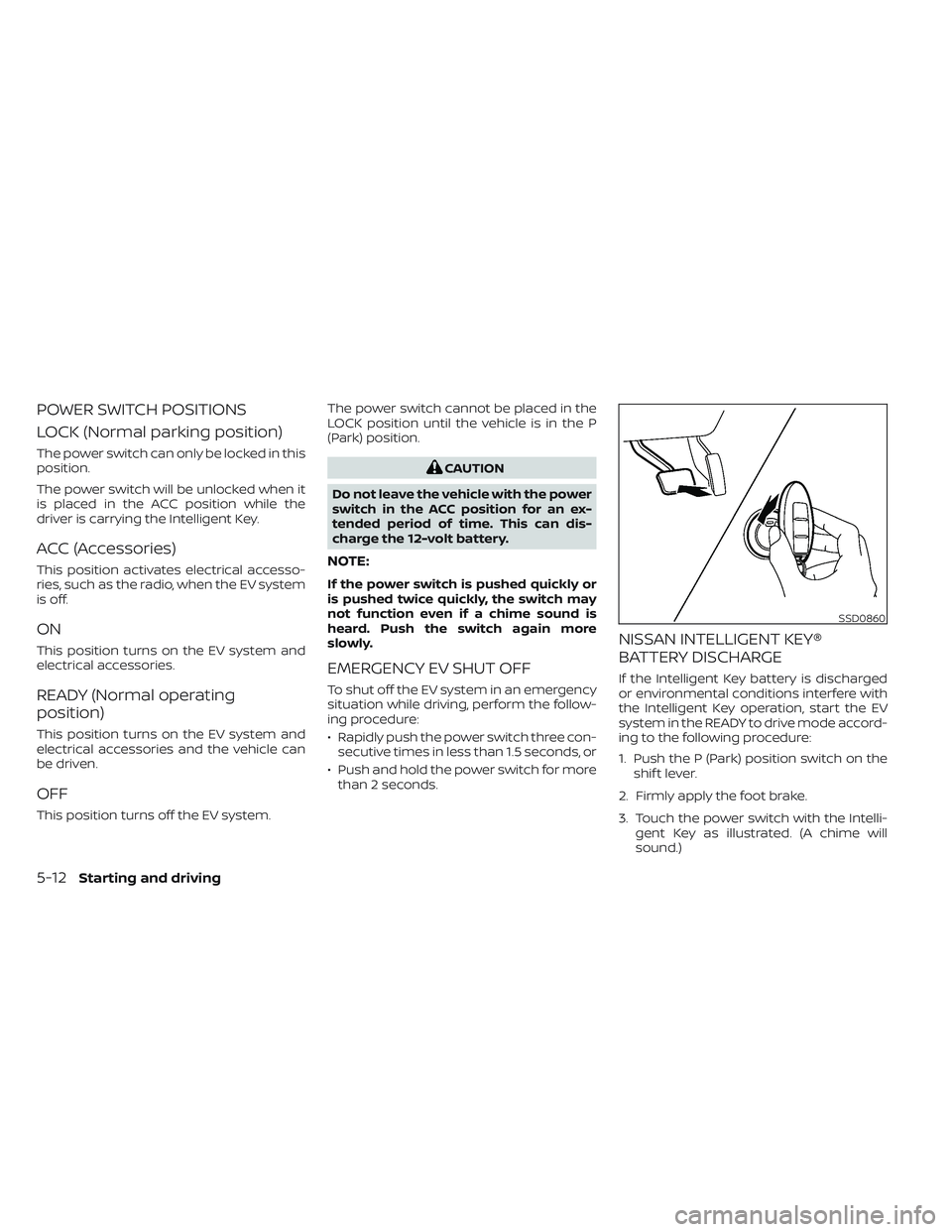
1. Push the P (Park) position switch on the shif t lever.
2. Firmly apply the foot brake.
3. Touch the power switch with the Intelli- gent Key as illustrated. (A chime will
sound.)
SSD0860
5-12Starting and driving
Page 339 of 618
1. Confirm the parking brake is applied.
2. Confirm that the vehicle is in the P (Park)position.
When the power switch is placed in the
ON position, the EV is designed not to
operate unless the shif t lever is in the P
(Park) or N (Neutral) position.
The Intelligent Key must be carried
with you when operating the power
switch.
3. Depress the brake pedal and push the power switch to place the EV system in
the READY to drive position.
To place the vehicle in the READY to drive
position immediately, push and release
the power switch while depressing the
brake pedal with the power switch in any
position. The READY to drive indicator
light
in the meter illuminates.
4. To stop the EV system, push the P (Park) position switch on the shif t lever, and
place the power switch in the OFF
position.
NOTE:
Care should be taken to avoid situations
that can lead to potential battery dis-
charge and potential no-start conditions
such as:
1. Installation or extended use of elec-tronic accessories that consume bat-
tery power when the EV system is not
running (phone chargers, GPS, DVD
players, etc.).
2. The vehicle is not driven regularly and/or only driven short distances.
In these cases, the battery may need to
be charged to maintain battery health.
ELECTRIC SHIFT CONTROL
SYSTEM
This vehicle is electronically controlled to
produce maximum available power and
smooth operation.
The recommended operating procedures
for this vehicle are shown on the following
pages.
Starting the vehicle
1. Af ter placing the vehicle in the READY to drive position, fully depress the foot
brake pedal before moving the shif t lever
to the D (Drive) position.
The shif t lever of this vehicle is de-
signed so that the foot brake pedal
must be depressed before shif ting
from the P (Park) position to any driv-
ing position while the power switch is
in the ON position.
The shif t lever cannot be moved out of
the P (Park) position and into any of
the other positions if the power switch
is placed in the LOCK, OFF or ACC posi-
tion or if the Intelligent Key is
removed.
STARTING THE EV SYSTEM DRIVING THE VEHICLE
5-14Starting and driving
Page 341 of 618
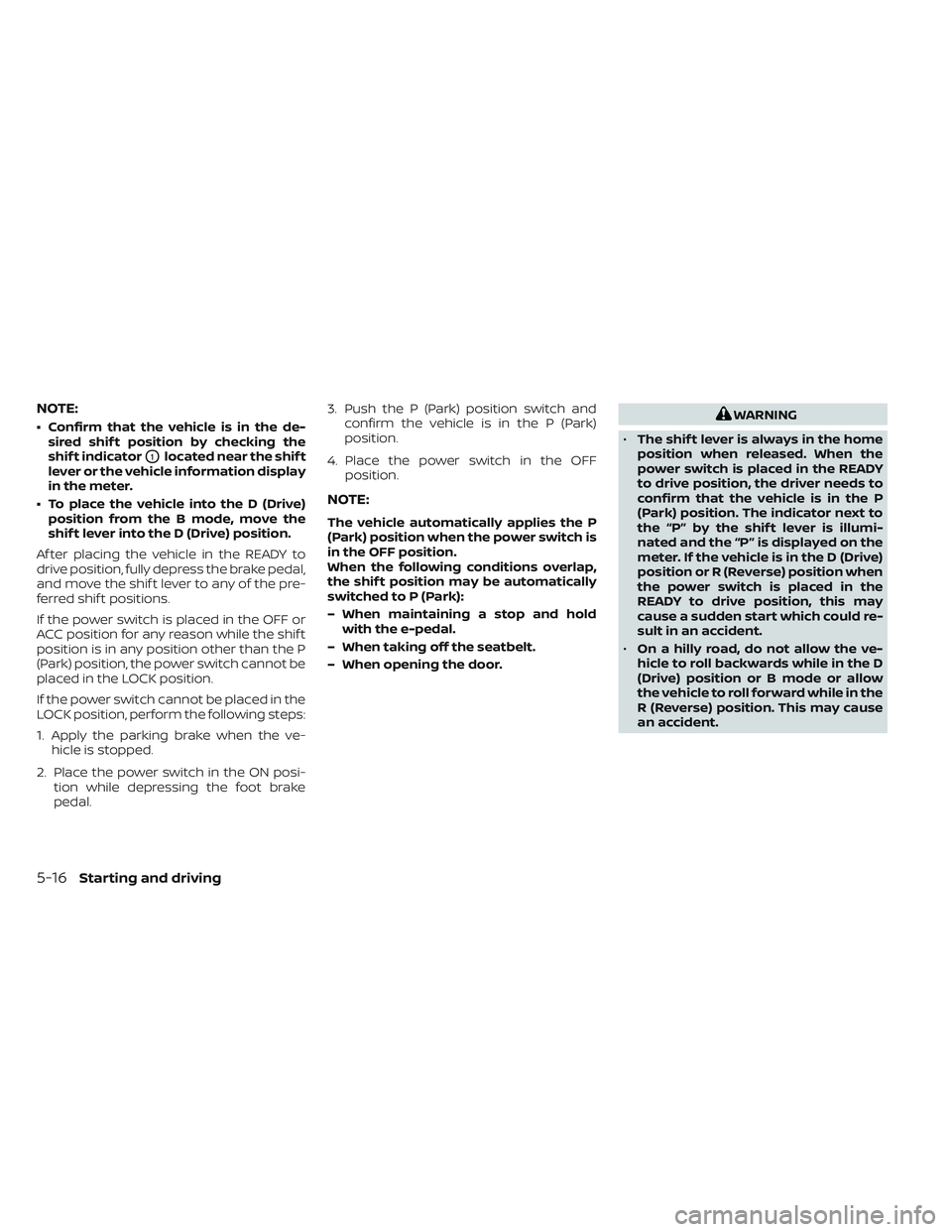
NOTE:
• Confirm that the vehicle is in the de-sired shif t position by checking the
shif t indicator
O1located near the shif t
lever or the vehicle information display
in the meter.
• To place the vehicle into the D (Drive) position from the B mode, move the
shif t lever into the D (Drive) position.
Af ter placing the vehicle in the READY to
drive position, fully depress the brake pedal,
and move the shif t lever to any of the pre-
ferred shif t positions.
If the power switch is placed in the OFF or
ACC position for any reason while the shif t
position is in any position other than the P
(Park) position, the power switch cannot be
placed in the LOCK position.
If the power switch cannot be placed in the
LOCK position, perform the following steps:
1. Apply the parking brake when the ve- hicle is stopped.
2. Place the power switch in the ON posi- tion while depressing the foot brake
pedal. 3. Push the P (Park) position switch and
confirm the vehicle is in the P (Park)
position.
4. Place the power switch in the OFF position.
NOTE:
The vehicle automatically applies the P
(Park) position when the power switch is
in the OFF position.
When the following conditions overlap,
the shif t position may be automatically
switched to P (Park):
– When maintaining a stop and holdwith the e-pedal.
– When taking off the seatbelt.
– When opening the door.
WARNING
• The shif t lever is always in the home
position when released. When the
power switch is placed in the READY
to drive position, the driver needs to
confirm that the vehicle is in the P
(Park) position. The indicator next to
the “P” by the shif t lever is illumi-
nated and the “P” is displayed on the
meter. If the vehicle is in the D (Drive)
position or R (Reverse) position when
the power switch is placed in the
READY to drive position, this may
cause a sudden start which could re-
sult in an accident.
• On a hilly road, do not allow the ve-
hicle to roll backwards while in the D
(Drive) position or B mode or allow
the vehicle to roll forward while in the
R (Reverse) position. This may cause
an accident.
5-16Starting and driving
Page 344 of 618
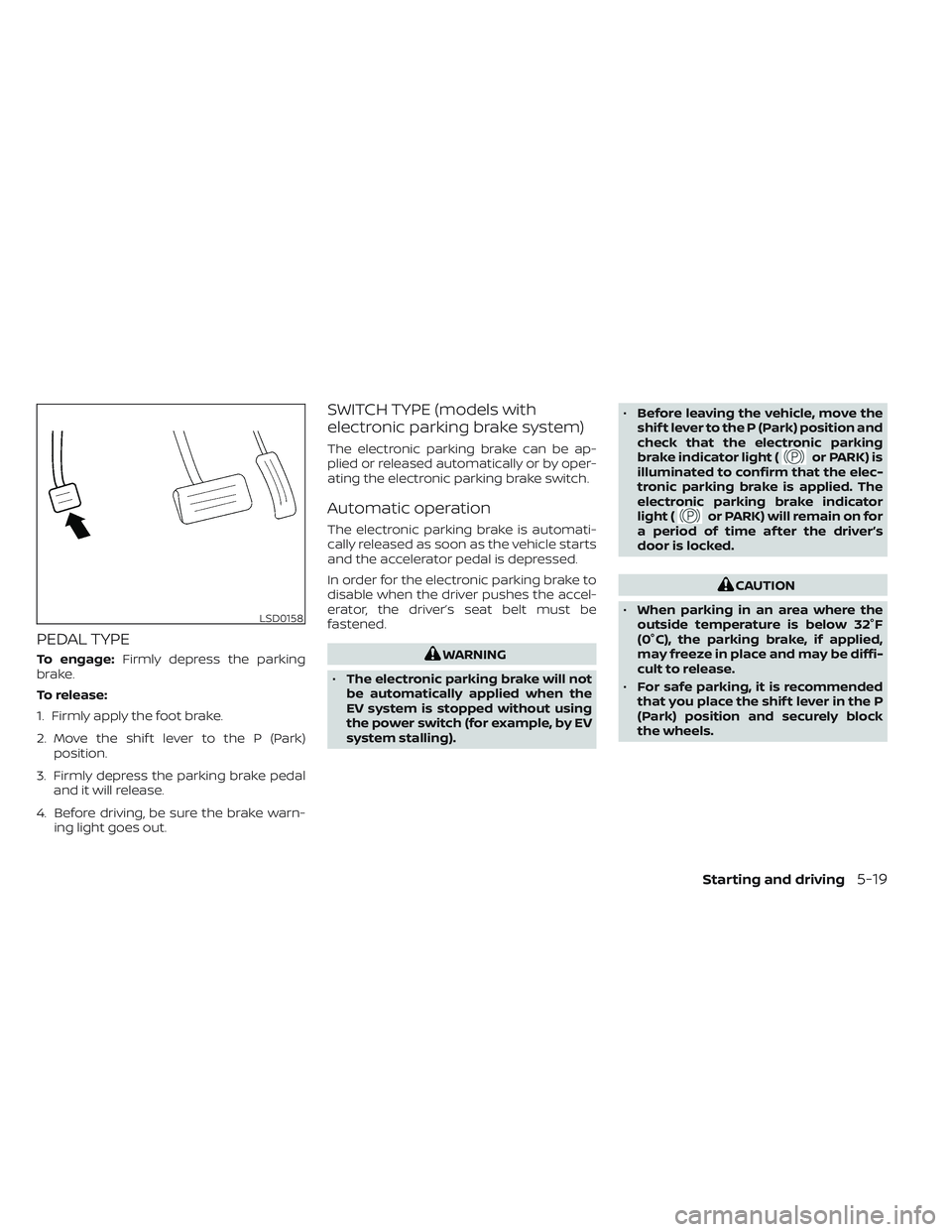
PEDAL TYPE
To engage:Firmly depress the parking
brake.
To release:
1. Firmly apply the foot brake.
2. Move the shif t lever to the P (Park) position.
3. Firmly depress the parking brake pedal and it will release.
4. Before driving, be sure the brake warn- ing light goes out.
SWITCH TYPE (models with
electronic parking brake system)
The electronic parking brake can be ap-
plied or released automatically or by oper-
ating the electronic parking brake switch.
Automatic operation
The electronic parking brake is automati-
cally released as soon as the vehicle starts
and the accelerator pedal is depressed.
In order for the electronic parking brake to
disable when the driver pushes the accel-
erator, the driver’s seat belt must be
fastened.
WARNING
• The electronic parking brake will not
be automatically applied when the
EV system is stopped without using
the power switch (for example, by EV
system stalling). •
Before leaving the vehicle, move the
shif t lever to the P (Park) position and
check that the electronic parking
brake indicator light (
or PARK) is
illuminated to confirm that the elec-
tronic parking brake is applied. The
electronic parking brake indicator
light (
or PARK) will remain on for
a period of time af ter the driver’s
door is locked.
CAUTION
• When parking in an area where the
outside temperature is below 32°F
(0°C), the parking brake, if applied,
may freeze in place and may be diffi-
cult to release.
• For safe parking, it is recommended
that you place the shif t lever in the P
(Park) position and securely block
the wheels.
LSD0158
Starting and driving5-19
Page 368 of 618
SYSTEM TEMPORARILY
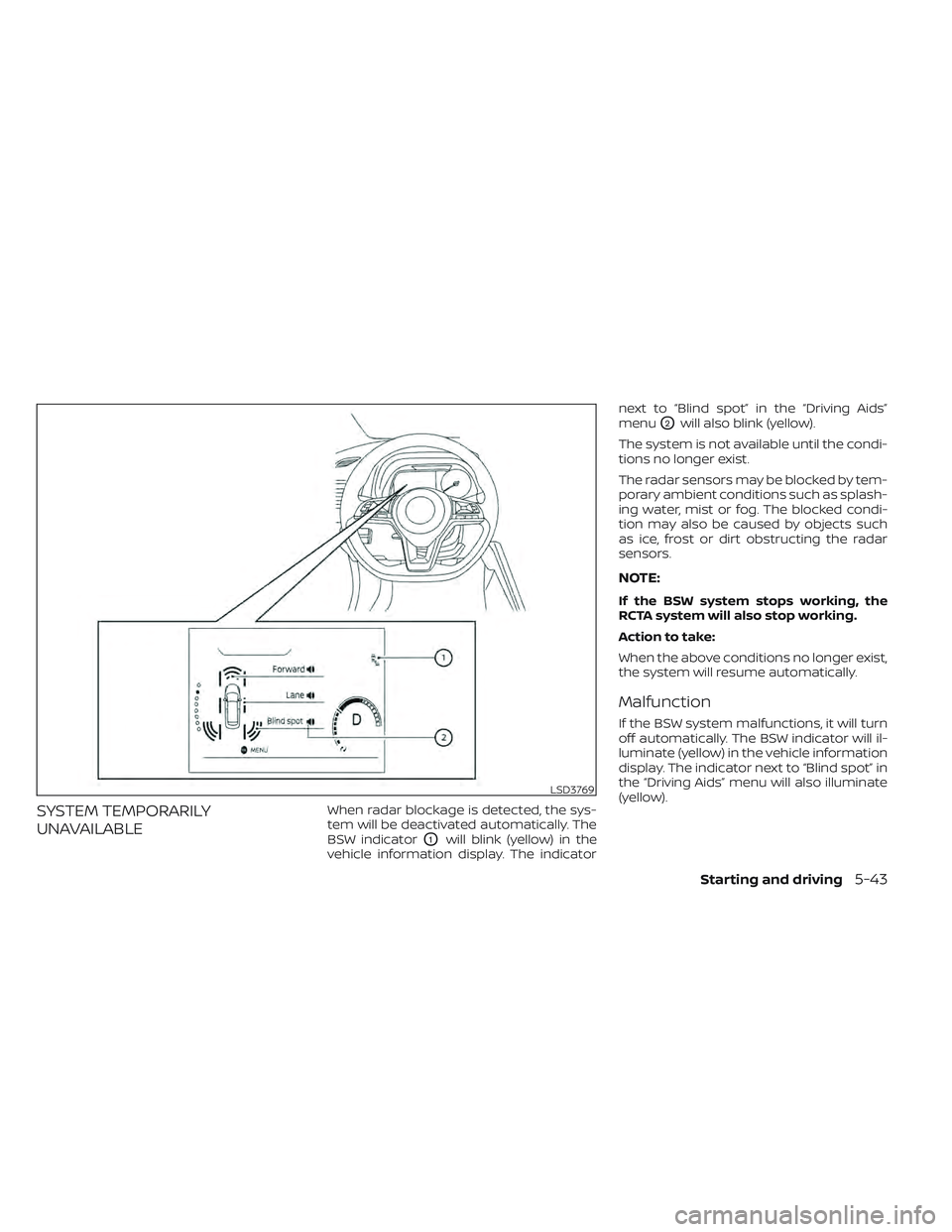
UNAVAILABLEWhen radar blockage is detected, the sys-
tem will be deactivated automatically. The
BSW indicator
O1will blink (yellow) in the
vehicle information display. The indicator next to “Blind spot” in the “Driving Aids”
menu
O2will also blink (yellow).
The system is not available until the condi-
tions no longer exist.
The radar sensors may be blocked by tem-
porary ambient conditions such as splash-
ing water, mist or fog. The blocked condi-
tion may also be caused by objects such
as ice, frost or dirt obstructing the radar
sensors.
NOTE:
If the BSW system stops working, the
RCTA system will also stop working.
Action to take:
When the above conditions no longer exist,
the system will resume automatically.
Malfunction
If the BSW system malfunctions, it will turn
off automatically. The BSW indicator will il-
luminate (yellow) in the vehicle information
display. The indicator next to “Blind spot” in
the “Driving Aids” menu will also illuminate
(yellow).
LSD3769
Starting and driving5-43
Page 369 of 618
NOTE:
If the BSW system stops working, the
RCTA system will also stop working.
Action to take:
Stop the vehicle in a safe location, place the
vehicle in the P (Park) position, turn the EV
system off and restart the EV system. If the
indicators continue to appear, have the
system checked. It is recommended that
you visit a NISSAN certified LEAF dealer for
this service.
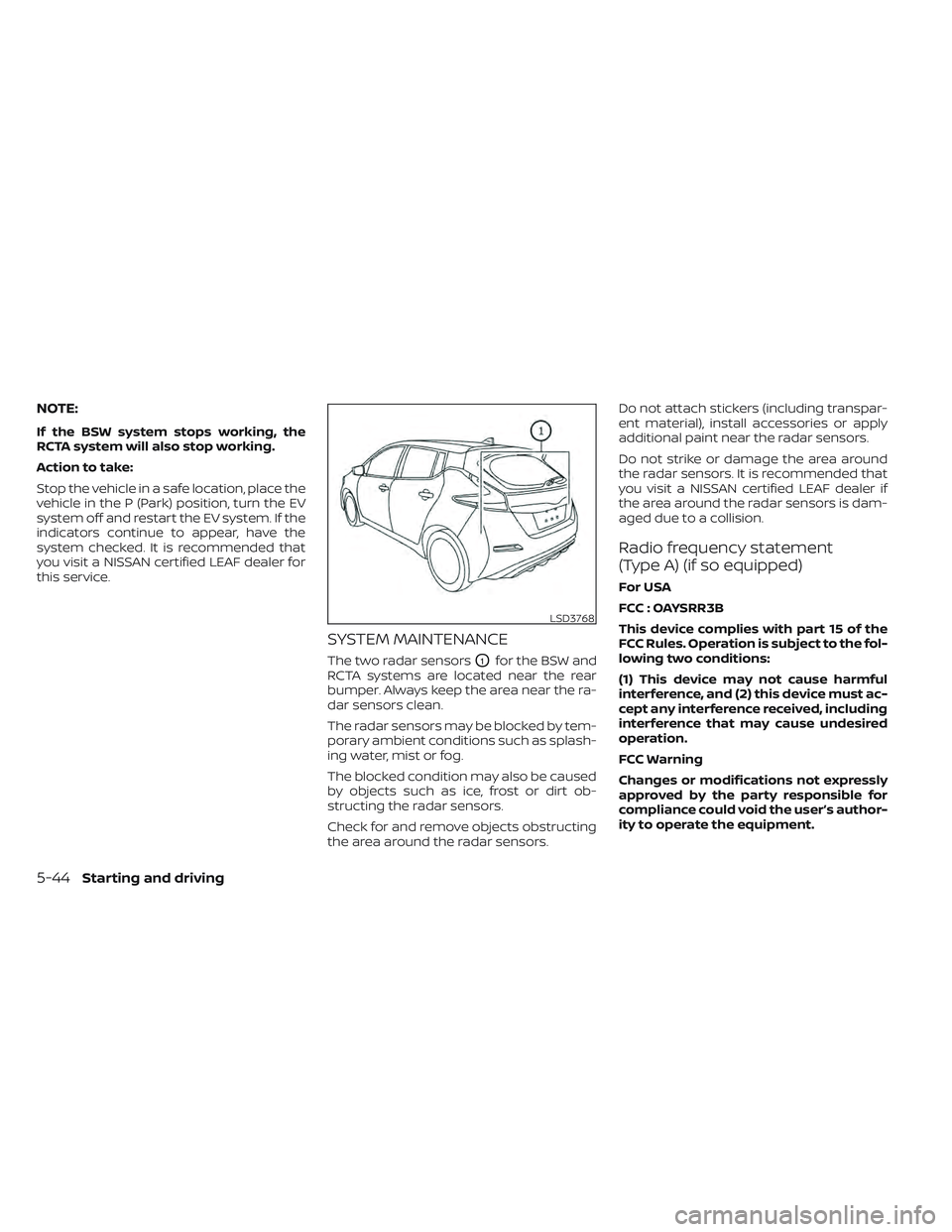
SYSTEM MAINTENANCE
The two radar sensorsO1for the BSW and
RCTA systems are located near the rear
bumper. Always keep the area near the ra-
dar sensors clean.
The radar sensors may be blocked by tem-
porary ambient conditions such as splash-
ing water, mist or fog.
The blocked condition may also be caused
by objects such as ice, frost or dirt ob-
structing the radar sensors.
Check for and remove objects obstructing
the area around the radar sensors. Do not attach stickers (including transpar-
ent material), install accessories or apply
additional paint near the radar sensors.
Do not strike or damage the area around
the radar sensors. It is recommended that
you visit a NISSAN certified LEAF dealer if
the area around the radar sensors is dam-
aged due to a collision.
Radio frequency statement
(Type A) (if so equipped)
For USA
FCC : OAYSRR3B
This device complies with part 15 of the
FCC Rules. Operation is subject to the fol-
lowing two conditions:
(1) This device may not cause harmful
interference, and (2) this device must ac-
cept any interference received, including
interference that may cause undesired
operation.
FCC Warning
Changes or modifications not expressly
approved by the party responsible for
compliance could void the user’s author-
ity to operate the equipment.
LSD3768
5-44Starting and driving
Page 380 of 618
• If the driver activates the turn signalbefore a vehicle enters the detection
zone, the side indicator light will flash
but no chime will sound when the
other vehicle is detected.
• I-BSI will not operate or will stop oper- ating and only a warning chime will
sound under the following conditions:– When the brake pedal is depressed.
– When the vehicle is accelerated dur- ing I-BSI system operation.
– When steering quickly.
– When the ICC, I-FCW or AEB with Pe- destrian Detection warnings sound.
– When the hazard warning flashers are operated.
– When driving on a curve at a high speed.
SYSTEM TEMPORARILY
UNAVAILABLE
Under the following conditions, a chime will
sound, the following message will appear
in the vehicle information display and the
I-BSI system will be turned off automati-
cally. The I-BSI system will not be available
until the conditions no longer exist.
• “Not available Poor Road Conditions”
• When the VDC system (except TCS func-tion) or ABS operates. • “Currently not available”
• When the VDC system is turned off.
Action to take:
When the above conditions no longer exist,
push the ProPILOT Assist switch (models
with ProPILOT Assist) or the dynamic driver
assistance switch (models without ProPI-
LOT Assist) again to turn the I-BSI system
back on.
When radar blockage is detected, the I-BSI
system will be turned off automatically, a
chime will sound and the “Unavailable: Side
Radar Obstruction” warning message will
appear in the vehicle information display.
The I-BSI system is not available until the
conditions no longer exist. For additional
information, see “System maintenance”
(P. 5-56).
Action to take:
When the above conditions no longer exist,
turn the I-BSI system on again. If the “Un-
available: Side Radar Obstruction” warning
message appears even af ter the I-BSI sys-
tem is turned on again, stop the vehicle in a
safe location, place the vehicle in the P
(Park) position and turn the EV system off.
Check for and remove objects obscuring
the radar sensors on the rear bumper, and
restart the EV system.
If the vehicle is parked in direct sunlight
under high temperature conditions (over
approximately 104°F (40°C)) and then the
I-BSI system is turned on, the I-BSI system
may be deactivated automatically. The
“Unavailable: High Cabin Temperature”
warning message will appear in the vehicle
information display.
Action to take:
When the interior temperature is reduced,
push the ProPILOT Assist switch (models
with ProPILOT Assist) or the dynamic driver
assistance switch (models without ProPI-
LOT Assist) again to turn the I-BSI system
back on.
SYSTEM MALFUNCTION
When the I-BSI system malfunctions, it will
be turned off automatically, a chime will
sound, and the “Not available System Mal-
function” warning message with the BSW
indicator (orange) will appear in the vehicle
information display.
Starting and driving5-55
Page 381 of 618
Action to take:
Stop the vehicle in a safe location, place the
vehicle in the P (Park) position, turn the EV
system off and restart the EV system. If the
“Not available System Malfunction” warning
message with the BSW indicator (orange)
continues to be displayed, have the I-BSI
system checked. It is recommended you
visit a NISSAN certified LEAF dealer for this
service.
SYSTEM MAINTENANCE
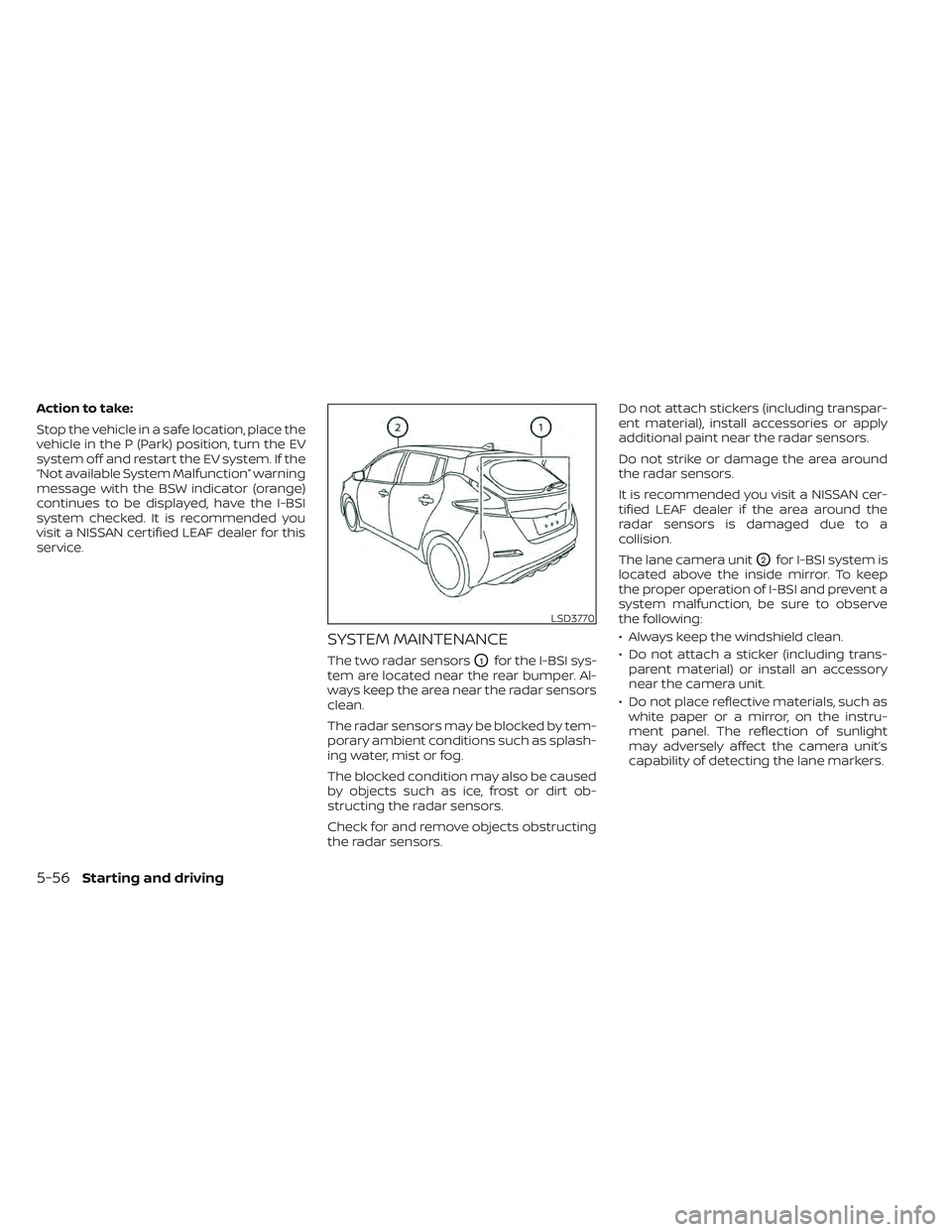
The two radar sensorsO1for the I-BSI sys-
tem are located near the rear bumper. Al-
ways keep the area near the radar sensors
clean.
The radar sensors may be blocked by tem-
porary ambient conditions such as splash-
ing water, mist or fog.
The blocked condition may also be caused
by objects such as ice, frost or dirt ob-
structing the radar sensors.
Check for and remove objects obstructing
the radar sensors. Do not attach stickers (including transpar-
ent material), install accessories or apply
additional paint near the radar sensors.
Do not strike or damage the area around
the radar sensors.
It is recommended you visit a NISSAN cer-
tified LEAF dealer if the area around the
radar sensors is damaged due to a
collision.
The lane camera unit
O2for I-BSI system is
located above the inside mirror. To keep
the proper operation of I-BSI and prevent a
system malfunction, be sure to observe
the following:
• Always keep the windshield clean.
• Do not attach a sticker (including trans- parent material) or install an accessory
near the camera unit.
• Do not place reflective materials, such as white paper or a mirror, on the instru-
ment panel. The reflection of sunlight
may adversely affect the camera unit’s
capability of detecting the lane markers.
LSD3770
5-56Starting and driving