cruise control NISSAN LEAF 2022 Owner´s Manual
[x] Cancel search | Manufacturer: NISSAN, Model Year: 2022, Model line: LEAF, Model: NISSAN LEAF 2022Pages: 618, PDF Size: 4.3 MB
Page 359 of 618
–When rain, snow or dirt adheres to
the windshield in front of the lane
camera unit.
– When the headlights are not
bright due to dirt on the lens or if
the aiming is not adjusted
properly.
– When strong light enters the lane
camera unit (for example, the light
directly shines on the front of the
vehicle at sunrise or sunset).
– When a sudden change in bright-
ness occurs (for example, when
the vehicle enters or exits a tunnel
or under a bridge).
While the I-LI system is operating, you may
hear a sound of brake operation. This is
normal and indicates that the I-LI system is
operating properly.SYSTEM TEMPORARILY
UNAVAILABLE
Condition A:
The warning and assist functions of the I-LI
system are not designed to work under the
following conditions:
• When you operate the lane change signal and change the traveling lanes in the di-
rection of the signal. (The I-LI system will
be deactivated for approximately 2 sec-
onds af ter the lane change signal is
turned off.)
• When the vehicle speed lowers to less than approximately 37 mph (60 km/h).
Af ter the above conditions have finished
and the necessary operating conditions
are satisfied, the warning and assist func-
tions will resume.
Condition B:
The assist function of the I-LI system is not
designed to work under the following con-
ditions (warning is still functional):
• When the brake pedal is depressed.
• When the steering wheel is turned as far as necessary for the vehicle to change
lanes.
• When the vehicle is accelerated during I-LI system operation. • When the Intelligent Cruise Control (ICC)
approach warning occurs.
• When the hazard warning flashers are operated.
• When driving on a curve at high speed.
Af ter the above conditions have finished
and the necessary operating conditions
are satisfied, the I-LI system application of
the brakes will resume.
Condition C:
If the following messages appear in the
vehicle information display, a chime will
sound and the I-LI system will be turned off
automatically.
• “Not Available - Poor Road Conditions”: When the Vehicle Dynamic Control (VDC)
system (except Traction Control System
[TCS] function) or ABS operates.
• “Currently not available”: When the VDC system is turned off.
Action to take:
When the above conditions no longer exist,
turn off the I-LI system. Push the ProPILOT
Assist switch (models with ProPILOT Assist)
or dynamic driver assistance switch (mod-
els without ProPILOT Assist) to turn the I-LI
system back on.
5-34Starting and driving
Page 390 of 618
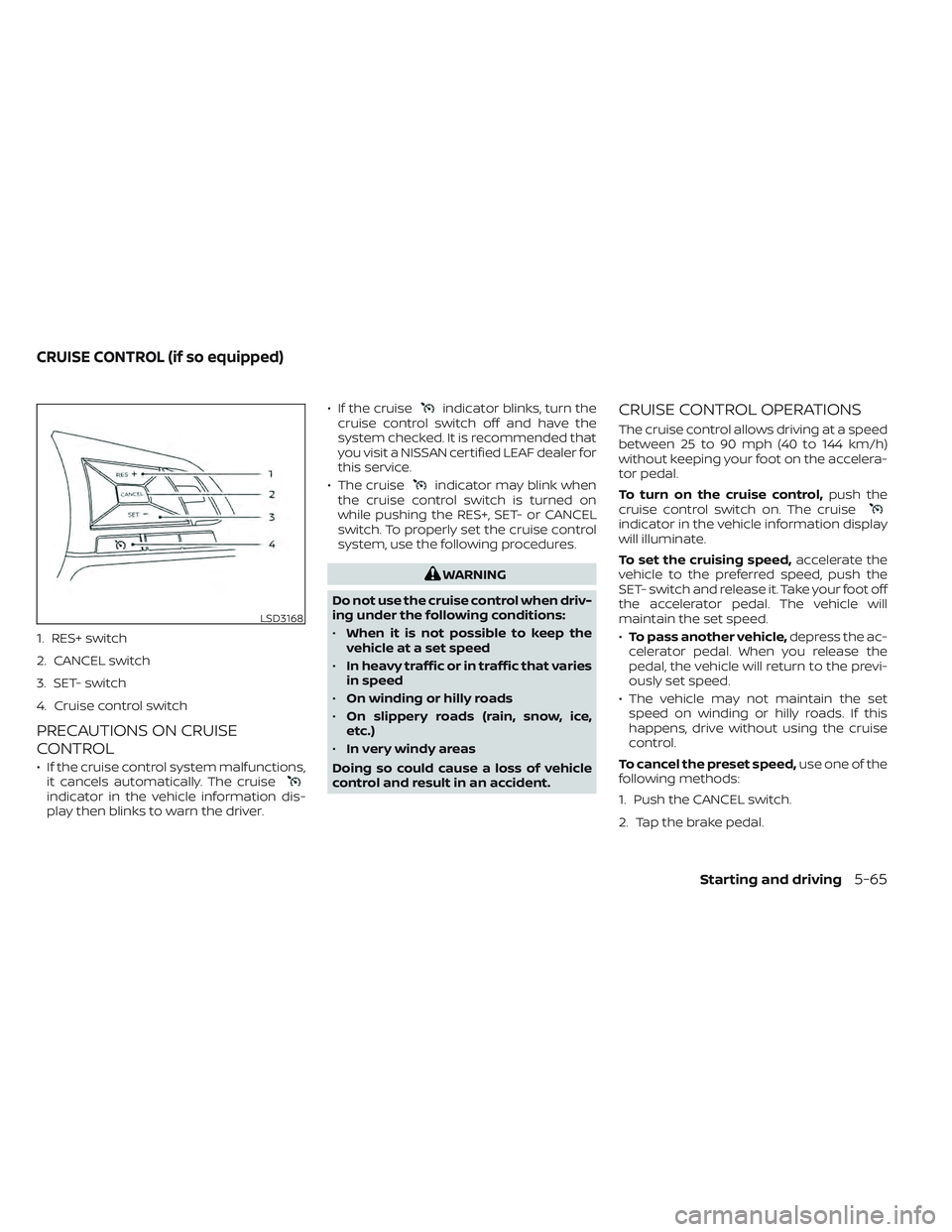
1. RES+ switch
2. CANCEL switch
3. SET- switch
4. Cruise control switch
PRECAUTIONS ON CRUISE
CONTROL
• If the cruise control system malfunctions,it cancels automatically. The cruise
indicator in the vehicle information dis-
play then blinks to warn the driver. • If the cruise
indicator blinks, turn the
cruise control switch off and have the
system checked. It is recommended that
you visit a NISSAN certified LEAF dealer for
this service.
• The cruise
indicator may blink when
the cruise control switch is turned on
while pushing the RES+, SET- or CANCEL
switch. To properly set the cruise control
system, use the following procedures.
WARNING
Do not use the cruise control when driv-
ing under the following conditions:
• When it is not possible to keep the
vehicle at a set speed
• In heavy traffic or in traffic that varies
in speed
• On winding or hilly roads
• On slippery roads (rain, snow, ice,
etc.)
• In very windy areas
Doing so could cause a loss of vehicle
control and result in an accident.
CRUISE CONTROL OPERATIONS
The cruise control allows driving at a speed
between 25 to 90 mph (40 to 144 km/h)
without keeping your foot on the accelera-
tor pedal.
To turn on the cruise control, push the
cruise control switch on. The cruise
indicator in the vehicle information display
will illuminate.
To set the cruising speed, accelerate the
vehicle to the preferred speed, push the
SET- switch and release it. Take your foot off
the accelerator pedal. The vehicle will
maintain the set speed.
• To pass another vehicle, depress the ac-
celerator pedal. When you release the
pedal, the vehicle will return to the previ-
ously set speed.
• The vehicle may not maintain the set speed on winding or hilly roads. If this
happens, drive without using the cruise
control.
To cancel the preset speed, use one of the
following methods:
1. Push the CANCEL switch.
2. Tap the brake pedal.
LSD3168
CRUISE CONTROL (if so equipped)
Starting and driving5-65
Page 391 of 618
3. Turn the cruise control switch off. Thecruiseindicator in the vehicle infor-
mation display will turn off.
• If you depress the brake pedal while pushing the RES+ or SET- switch and re-
set at the cruising speed, the cruise con-
trol will disengage. Turn the cruise control
switch off once and then turn it on again.
• The cruise control will automatically can- cel if the vehicle slows more than 8 mph
(13 km/h) below the set speed.
• If you move the shif t lever to the N (Neu- tral) position, the cruise control will be
canceled.
To reset at a faster cruising speed, use
one of the following methods:
• Depress the accelerator pedal. When the vehicle attains the preferred speed, push
and release the SET- switch.
• Push and hold the RES+ switch. When the vehicle attains the preferred speed, re-
lease the switch.
• Push, then quickly release the RES+ switch. Each time you do this, the set
speed will increase by about 1 mph or
1.6 km/h. To reset at a slower cruising speed,
use
one of the following methods:
• Lightly tap the brake pedal. When the ve- hicle attains the preferred speed, push
the SET- switch and release it.
• Push and hold the SET- switch. Release the switch when the vehicle slows down
to the preferred speed.
• Push, then quickly release, the SET- switch. Each time you do this, the set
speed will decrease by about 1 mph or
1km/h.
To resume the preset speed, push and
release the RES+ switch. The vehicle will
resume the last set cruising speed when
the vehicle speed is over 25 mph (40 km/h).
5-66Starting and driving
Page 392 of 618
WARNING
Failure to follow the warnings and in-
structions for proper use of the ICC sys-
tem could result in serious injury or
death.
• The ICC system is only an aid to assist
the driver and is not a collision warn-
ing or avoidance device. It is the driv-
er’s responsibility to stay alert, drive
safely, and be in control of the vehicle
at all times.
• Always observe posted speed limits
and do not set the speed over them.
• Always drive carefully and atten-
tively when using the ICC system.
Read and understand the Owner’s
Manual thoroughly before using the
ICC system. To avoid serious injury or
death, do not rely on the system to
prevent accidents or to control the
vehicle’s speed in emergency situa-
tions. Do not use the ICC system ex-
cept in appropriate road and traffic
conditions.
LSD3654
INTELLIGENT CRUISE CONTROL (ICC)
(for vehicles without ProPILOT
Assist) (if so equipped)
Starting and driving5-67
Page 393 of 618
•In the conventional (fixed speed)
cruise control mode, a warning
chime will not sound to warn you if
you are too close to the vehicle
ahead. Pay special attention to the
distance between your vehicle and
the vehicle ahead of you or a collision
could occur
NOTE:
For vehicles equipped with ProPILOT As-
sist, see “ProPILOT Assist (P. 5-92)
The ICC system maintains a selected dis-
tance from the vehicle in front of you within
the speed range of 0 to 90 mph (0 to 144
km/h) up to the set speed. The set speed
can be selected by the driver between 20 to
90 mph (32 to 144 km/h).
The vehicle travels at a set speed when the
road ahead is clear.
The ICC system can be set to one of two
cruise control modes:
• Vehicle-to-vehicle distance control
mode: For maintaining a selected dis-
tance between your vehicle and the ve-
hicle in front of you up to the present
speed •
Conventional (fixed speed) cruise con-
trol mode: For cruising at a preset speed
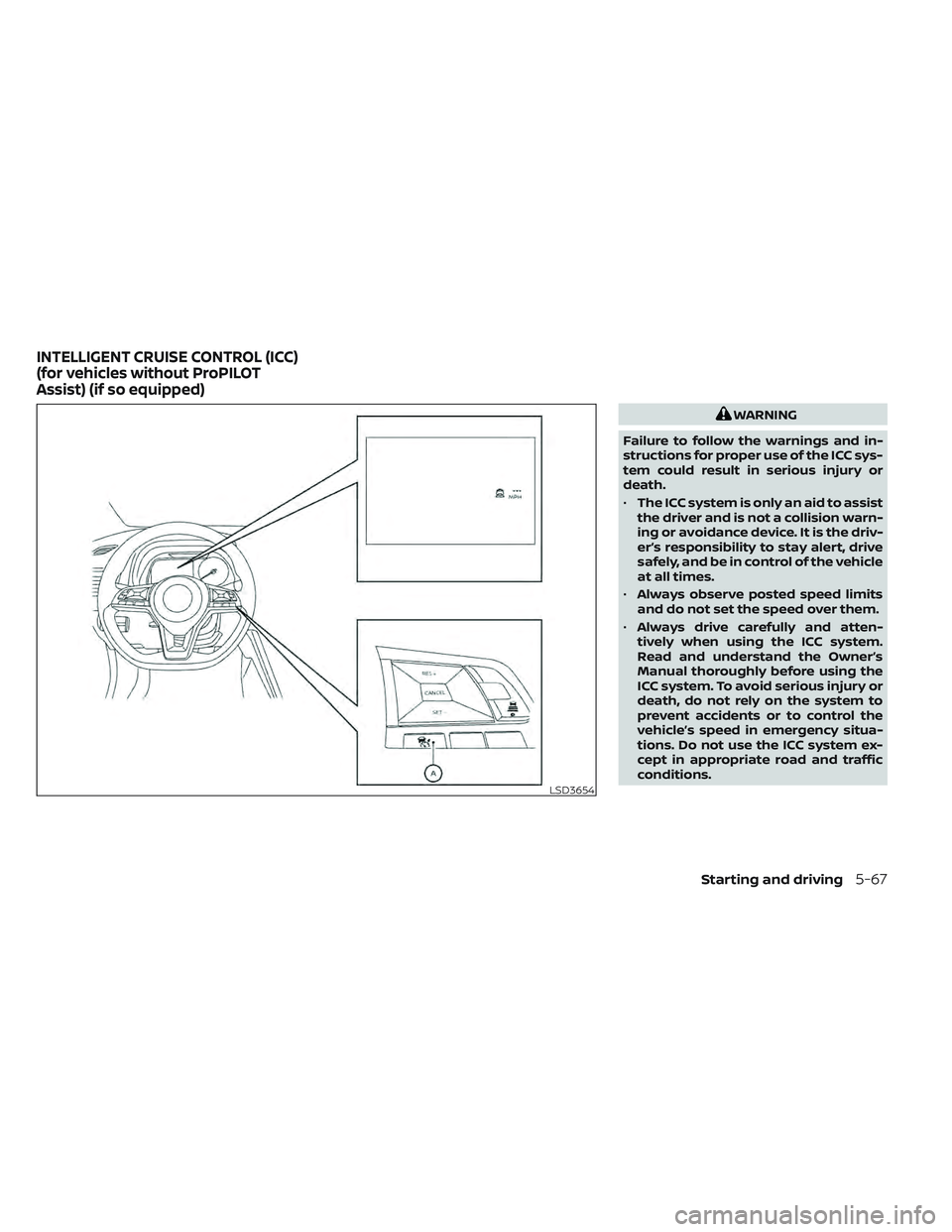
Push the ICC switch
OAto choose the
cruise control mode between the vehicle-
to-vehicle distance control mode and the
conventional (fixed speed) cruise control
mode.
Once a control mode is activated, it cannot
be changed to the other cruise control
mode. To change the mode, push the ICC
switch
OAonce to turn the system off. Then
push the ICC switch
OAagain to turn the
system back on and select the desired
cruise control mode.
Always confirm the setting in the ICC sys-
tem display.
For the vehicle-to-vehicle distance control
mode, see “Vehicle-to-vehicle distance
control mode” (P. 5-69).
For the conventional (fixed speed) cruise
control mode, see “Conventional (fixed
speed) cruise control mode” (P. 5-87).
5-68Starting and driving
Page 394 of 618
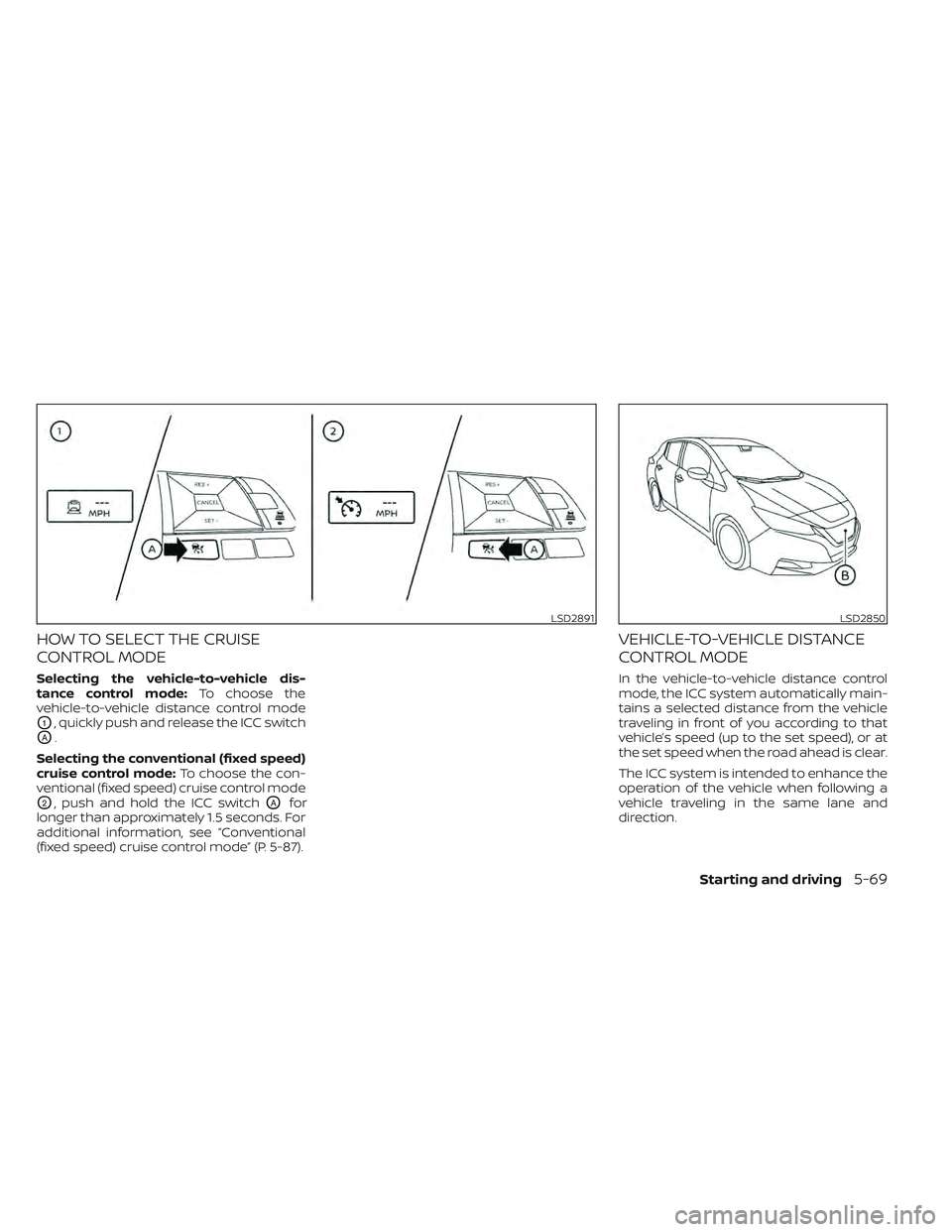
HOW TO SELECT THE CRUISE
CONTROL MODE
Selecting the vehicle-to-vehicle dis-
tance control mode:To choose the
vehicle-to-vehicle distance control mode
O1, quickly push and release the ICC switch
OA.
Selecting the conventional (fixed speed)
cruise control mode: To choose the con-
ventional (fixed speed) cruise control mode
O2, push and hold the ICC switchOAfor
longer than approximately 1.5 seconds. For
additional information, see “Conventional
(fixed speed) cruise control mode” (P. 5-87).
VEHICLE-TO-VEHICLE DISTANCE
CONTROL MODE
In the vehicle-to-vehicle distance control
mode, the ICC system automatically main-
tains a selected distance from the vehicle
traveling in front of you according to that
vehicle’s speed (up to the set speed), or at
the set speed when the road ahead is clear.
The ICC system is intended to enhance the
operation of the vehicle when following a
vehicle traveling in the same lane and
direction.
LSD2891LSD2850
Starting and driving5-69
Page 397 of 618
Normally when controlling the distance to
a vehicle ahead, this system automatically
accelerates or decelerates your vehicle ac-
cording to the speed of the vehicle ahead.
Depress the accelerator to properly accel-
erate your vehicle when acceleration is re-
quired for a lane change. Depress the brake
pedal when deceleration is required to
maintain a safe distance to the vehicle
ahead due to its sudden braking or if a
vehicle cuts in. Always stay alert when us-
ing the ICC system.
VEHICLE-TO-VEHICLE DISTANCE
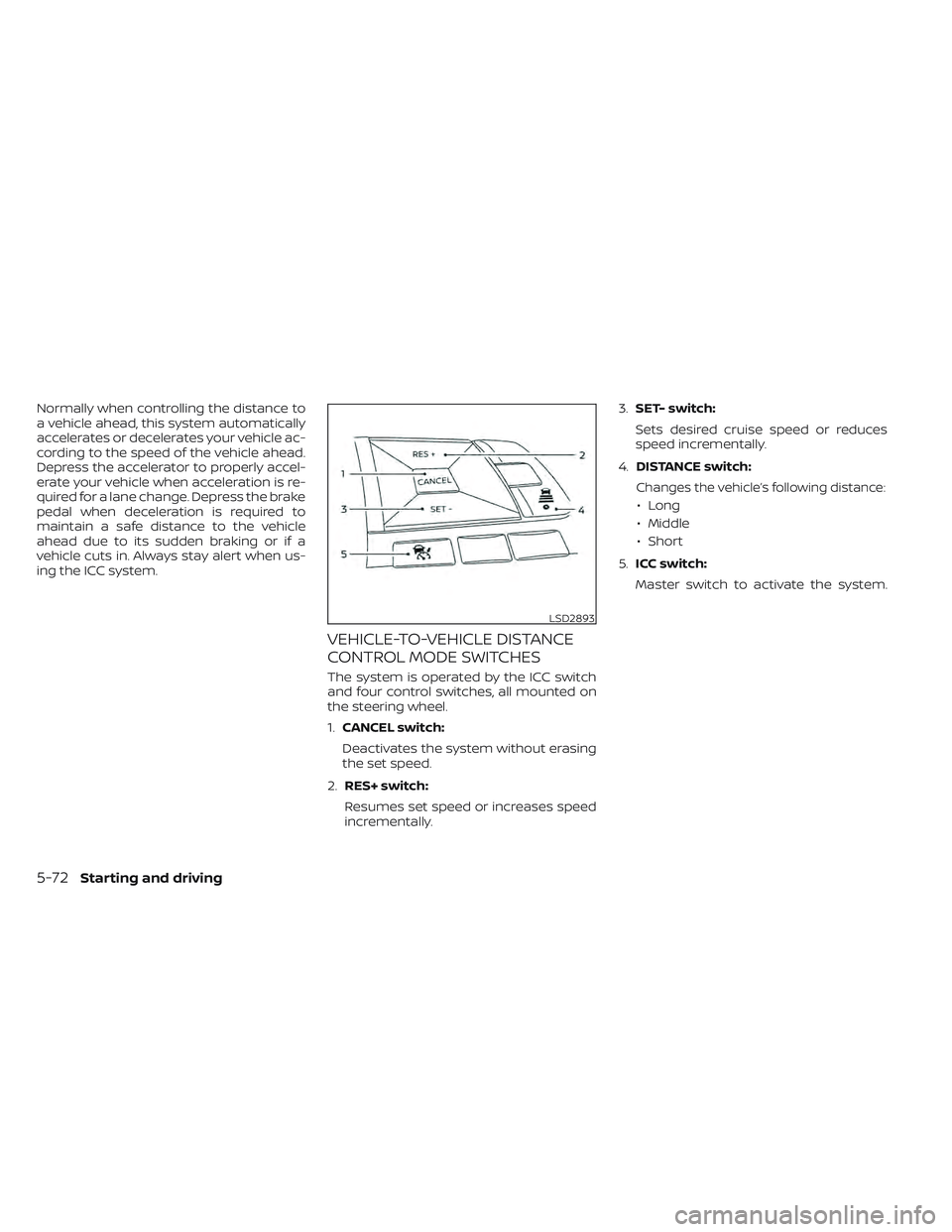
CONTROL MODE SWITCHES
The system is operated by the ICC switch
and four control switches, all mounted on
the steering wheel.
1.CANCEL switch:
Deactivates the system without erasing
the set speed.
2. RES+ switch:
Resumes set speed or increases speed
incrementally. 3.
SET- switch:
Sets desired cruise speed or reduces
speed incrementally.
4. DISTANCE switch:
Changes the vehicle’s following distance:
• Long
• Middle
• Short
5. ICC switch:
Master switch to activate the system.
LSD2893
5-72Starting and driving
Page 398 of 618
Vehicle-to-vehicle distance
control mode display and
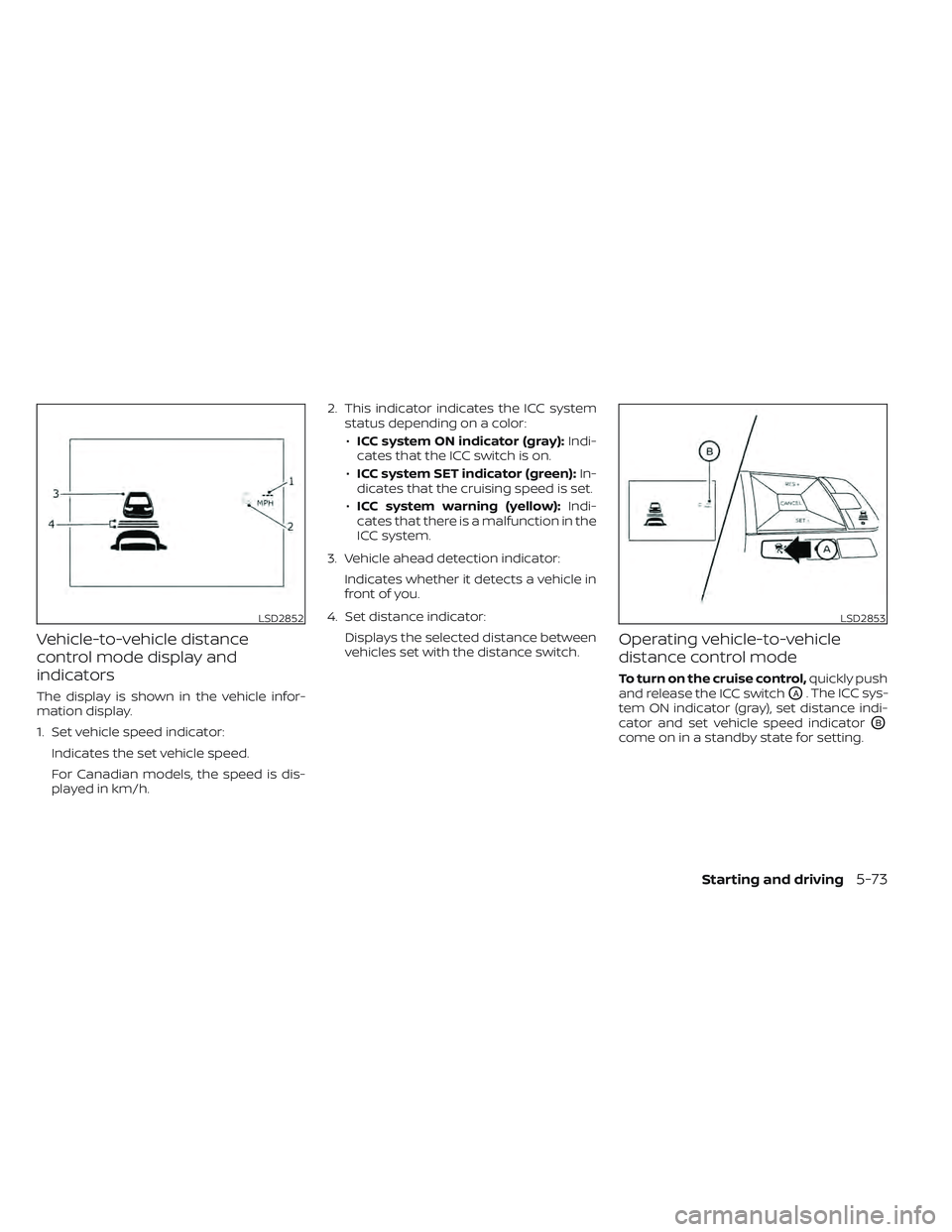
indicators
The display is shown in the vehicle infor-
mation display.
1. Set vehicle speed indicator:Indicates the set vehicle speed.
For Canadian models, the speed is dis-
played in km/h. 2. This indicator indicates the ICC system
status depending on a color:
• ICC system ON indicator (gray): Indi-
cates that the ICC switch is on.
• ICC system SET indicator (green): In-
dicates that the cruising speed is set.
• ICC system warning (yellow): Indi-
cates that there is a malfunction in the
ICC system.
3. Vehicle ahead detection indicator: Indicates whether it detects a vehicle in
front of you.
4. Set distance indicator: Displays the selected distance between
vehicles set with the distance switch.
Operating vehicle-to-vehicle
distance control mode
To turn on the cruise control, quickly push
and release the ICC switch
OA. The ICC sys-
tem ON indicator (gray), set distance indi-
cator and set vehicle speed indicator
OB
come on in a standby state for setting.
LSD2852LSD2853
Starting and driving5-73
Page 400 of 618
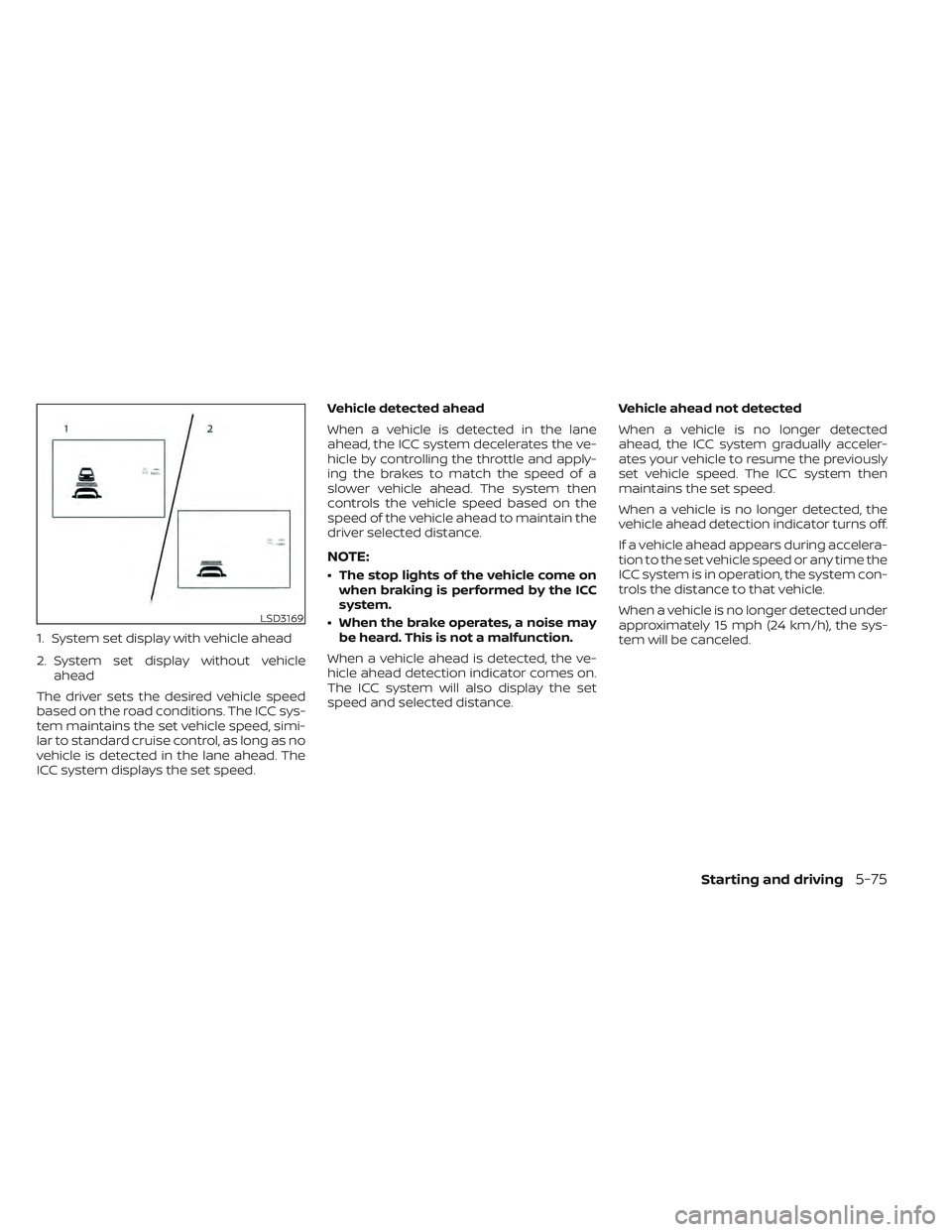
1. System set display with vehicle ahead
2. System set display without vehicleahead
The driver sets the desired vehicle speed
based on the road conditions. The ICC sys-
tem maintains the set vehicle speed, simi-
lar to standard cruise control, as long as no
vehicle is detected in the lane ahead. The
ICC system displays the set speed. Vehicle detected ahead
When a vehicle is detected in the lane
ahead, the ICC system decelerates the ve-
hicle by controlling the throttle and apply-
ing the brakes to match the speed of a
slower vehicle ahead. The system then
controls the vehicle speed based on the
speed of the vehicle ahead to maintain the
driver selected distance.
NOTE:
• The stop lights of the vehicle come on
when braking is performed by the ICC
system.
• When the brake operates, a noise may be heard. This is not a malfunction.
When a vehicle ahead is detected, the ve-
hicle ahead detection indicator comes on.
The ICC system will also display the set
speed and selected distance. Vehicle ahead not detected
When a vehicle is no longer detected
ahead, the ICC system gradually acceler-
ates your vehicle to resume the previously
set vehicle speed. The ICC system then
maintains the set speed.
When a vehicle is no longer detected, the
vehicle ahead detection indicator turns off.
If a vehicle ahead appears during accelera-
tion to the set vehicle speed or any time the
ICC system is in operation, the system con-
trols the distance to that vehicle.
When a vehicle is no longer detected under
approximately 15 mph (24 km/h), the sys-
tem will be canceled.
LSD3169
Starting and driving5-75
Page 410 of 618
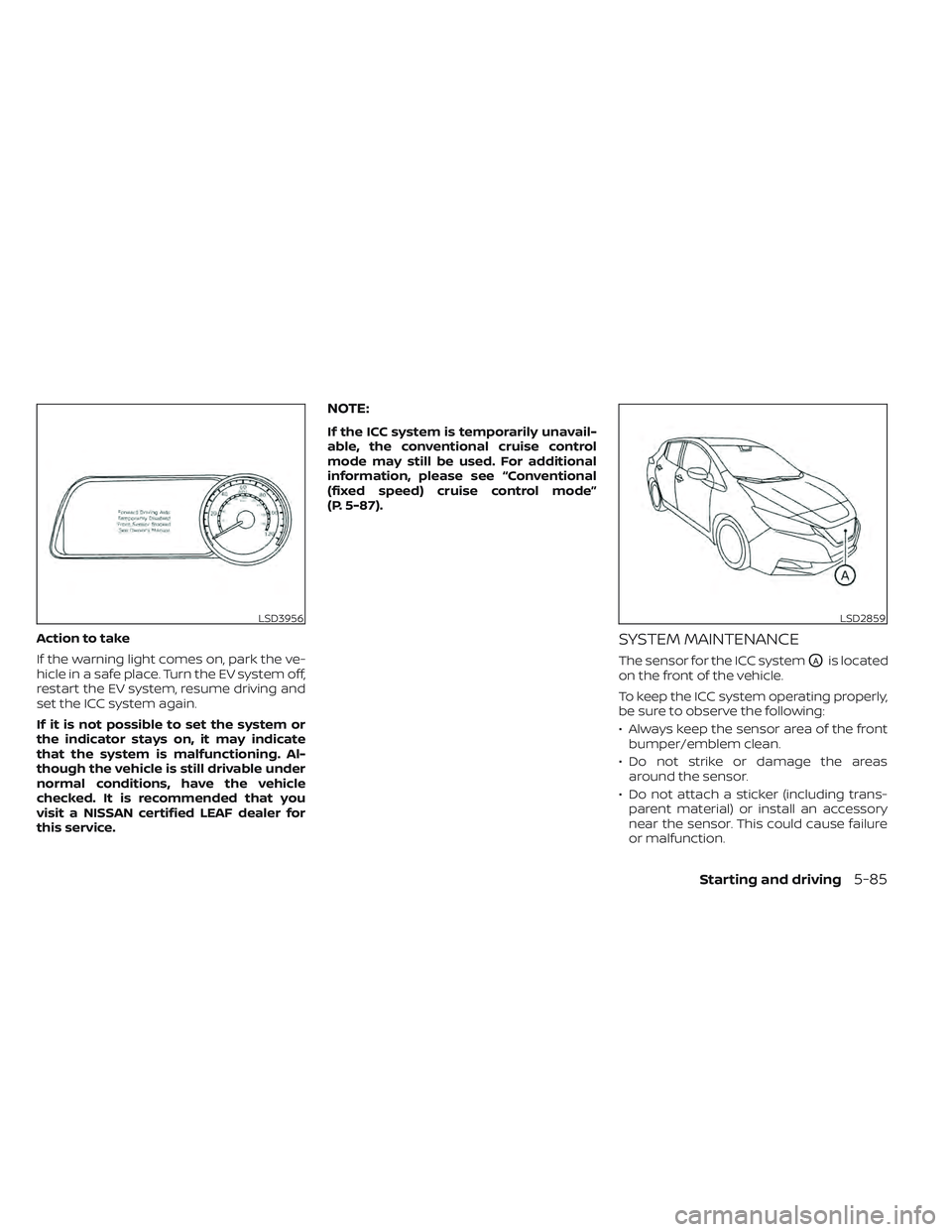
Action to take
If the warning light comes on, park the ve-
hicle in a safe place. Turn the EV system off,
restart the EV system, resume driving and
set the ICC system again.
If it is not possible to set the system or
the indicator stays on, it may indicate
that the system is malfunctioning. Al-
though the vehicle is still drivable under
normal conditions, have the vehicle
checked. It is recommended that you
visit a NISSAN certified LEAF dealer for
this service.
NOTE:
If the ICC system is temporarily unavail-
able, the conventional cruise control
mode may still be used. For additional
information, please see “Conventional
(fixed speed) cruise control mode”
(P. 5-87).
SYSTEM MAINTENANCE
The sensor for the ICC systemOAis located
on the front of the vehicle.
To keep the ICC system operating properly,
be sure to observe the following:
• Always keep the sensor area of the front bumper/emblem clean.
• Do not strike or damage the areas around the sensor.
• Do not attach a sticker (including trans- parent material) or install an accessory
near the sensor. This could cause failure
or malfunction.
LSD3956LSD2859
Starting and driving5-85