steering wheel NISSAN LEAF 2022 Owner´s Manual
[x] Cancel search | Manufacturer: NISSAN, Model Year: 2022, Model line: LEAF, Model: NISSAN LEAF 2022Pages: 618, PDF Size: 4.3 MB
Page 168 of 618
•Immediately af ter inflation, several
front air bag system components will
be hot. Do not touch them; you may
severely burn yourself.
• No unauthorized changes should be
made to any components or wiring
of the supplemental air bag system.
This is to prevent accidental inflation
of the supplemental air bag or dam-
age to the supplemental air bag
system.
• Do not make unauthorized changes
to your vehicle’s electrical system,
suspension system or front end
structure. This could affect proper
operation of the front air bag system.
• Tampering with the front air bag sys-
tem may result in serious personal
injury. Tampering includes changes
to the steering wheel and the instru-
ment panel assembly by placing ma-
terial over the steering wheel pad
and above the instrument panel or
by installing additional trim material
around the air bag system.
• Removing or modif ying the front
passenger seat may affect the func-
tion of the air bag system and result
in serious personal injury. •
Modif ying or tampering with the
front passenger seat may result in
serious personal injury. For example,
do not change the front seats by
placing material on the seat cushion
or by installing additional trim mate-
rial, such as seat covers, on the seat
that is not specifically designed to
assure proper air bag operation. Ad-
ditionally, do not stow any objects
under the front passenger seat or the
seat cushion and seatback. Such ob-
jects may interfere with the proper
operation of the occupant classifica-
tion sensor (weight sensor).
• No unauthorized changes should be
made to any components or wiring
of the seat belt system. This may af-
fect the front air bag system. Tam-
pering with the seat belt system may
result in serious personal injury. •
It is recommended that you visit a
NISSAN certified LEAF dealer for work
on and around the front air bag sys-
tem. It is also recommended that you
visit a NISSAN certified LEAF dealer
for installation of electrical equip-
ment. The Supplemental Restraint
System (SRS) wiring harnesses*
should not be modified or discon-
nected. Unauthorized electrical test
equipment and probing devices
should not be used on the air bag
system.
• A cracked windshield should be re-
placed immediately by a qualified re-
pair facility. A cracked windshield
could affect the function of the
supplemental air bag system.
*The SRS wiring harness connectors are
yellow and orange for easy identification.
When selling your vehicle, we request that
you inform the buyer about the front air
bag system and guide the buyer to the
appropriate sections in this Owner’s
Manual.
Safety–Seats, seat belts and supplemental restraint system1-61
Page 177 of 618
2 Instruments and controls
Cockpit.........................................2-2
Instrument Panel ................................2-4
Meters and Gauges .............................2-5
Speedometer and odometer .................2-5
Li-ion battery temperature gauge ............ 2-7
Power meter ................................. 2-7
Driving range .................................2-8
Li-ion battery available charge gauge ........2-9
Li-ion battery capacity level gauge ..........2-12
Outside air temperature .....................2-12
Clock ........................................ 2-12
ECO mode indicator ......................... 2-13
e-Pedal system indicator ....................2-13
Warning lights, indicator lights and audible
reminders ...................................... 2-14
Checking lights .............................. 2-15
Warning/Indicator lights (red) ...............2-15
Warning/Indicator lights (yellow) ............2-18
Warning/Indicator lights (other) .............2-24
Audible reminders ........................... 2-25
Vehicle information display .....................2-26
How to use the vehicle information
display ...................................... 2-26
Startup display .............................. 2-27
Settings ..................................... 2-27
Vehicle information display warnings
and indicators ............................... 2-34Warning information displays
(models with a navigation system)
..........2-42
Security systems ............................... 2-42
Vehicle security system .....................2-42
NISSAN Vehicle Immobilizer System .........2-44
Wiper and washer switch .......................2-45
Washer operation ........................... 2-46
Rear wiper operation ........................ 2-46
Rear window and outside mirror
(if so equipped) defroster switch ...............2-47
Headlight and turn signal switch ...............2-48
Headlight switch ............................ 2-48
LED Daytime Running Lights (DRL)
system (Type A) (if so equipped) .............2-53
LED Daytime Running Lights (DRL)
system (Type B) (if so equipped) .............
2-53
Instrument
brightness control ..............2-54
Turn signal switch ........................... 2-54
Fog light switch (if so equipped) ................2-55
Horn ........................................... 2-55
ECO switch ..................................... 2-56
Heated seat switches (if so equipped) ..........2-56
Heated steering wheel switch (if so equipped) . . 2-57
Emergency call (SOS) button (if so equipped) . . . 2-58
Charge port lid switch .......................... 2-58
Immediate Charge switch ......................2-59
Page 179 of 618
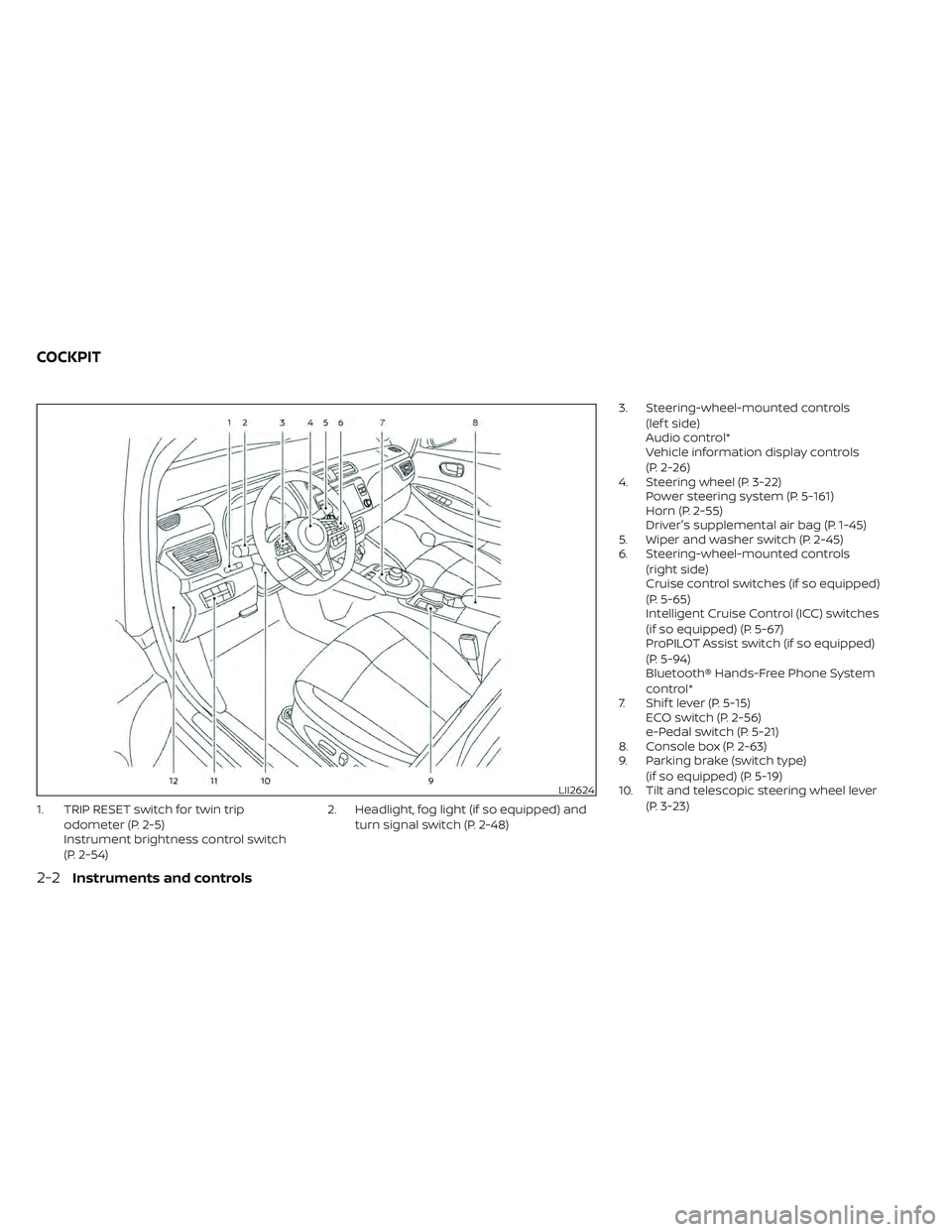
1. TRIP RESET switch for twin tripodometer (P. 2-5)
Instrument brightness control switch
(P. 2-54) 2. Headlight, fog light (if so equipped) and
turn signal switch (P. 2-48) 3. Steering-wheel-mounted controls
(lef t side)
Audio control*
Vehicle information display controls
(P. 2-26)
4. Steering wheel (P. 3-22) Power steering system (P. 5-161)
Horn (P. 2-55)
Driver's supplemental air bag (P. 1-45)
5. Wiper and washer switch (P. 2-45)
6. Steering-wheel-mounted controls
(right side)
Cruise control switches (if so equipped)
(P. 5-65)
Intelligent Cruise Control (ICC) switches
(if so equipped) (P. 5-67)
ProPILOT Assist switch (if so equipped)
(P. 5-94)
Bluetooth® Hands-Free Phone System
control*
7. Shif t lever (P. 5-15) ECO switch (P. 2-56)
e-Pedal switch (P. 5-21)
8. Console box (P. 2-63)
9. Parking brake (switch type)
(if so equipped) (P. 5-19)
10. Tilt and telescopic steering wheel lever
(P. 3-23)
LII2624
COCKPIT
2-2Instruments and controls
Page 180 of 618
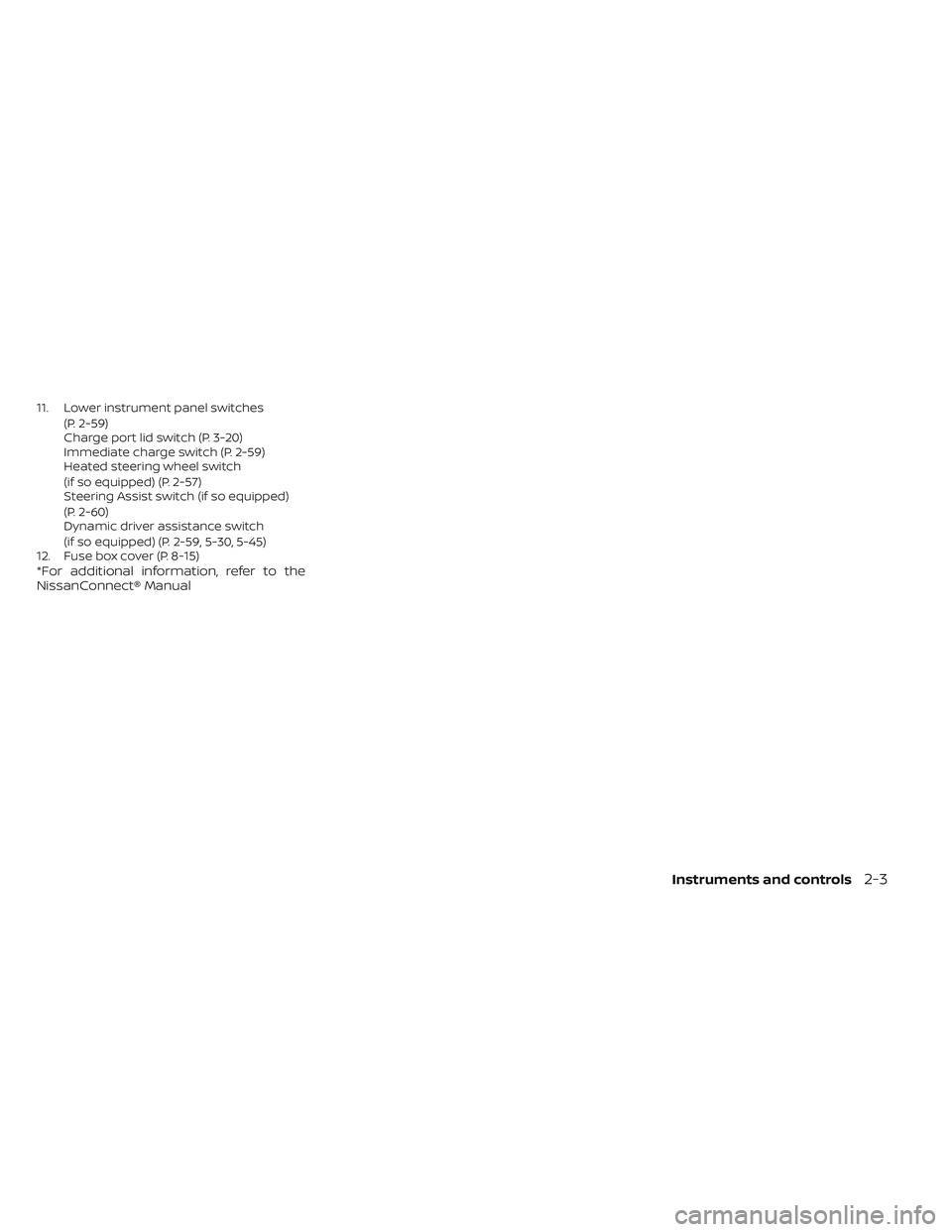
11. Lower instrument panel switches(P. 2-59)
Charge port lid switch (P. 3-20)
Immediate charge switch (P. 2-59)
Heated steering wheel switch
(if so equipped) (P. 2-57)
Steering Assist switch (if so equipped)
(P. 2-60)
Dynamic driver assistance switch
(if so equipped) (P. 2-59, 5-30, 5-45)
12. Fuse box cover (P. 8-15)
*For additional information, refer to the
NissanConnect® Manual
Instruments and controls2-3
Page 188 of 618
![NISSAN LEAF 2022 Owner´s Manual • When the currently remaining Li-ion bat-tery level exceeds each percentage level,
the charging time will be displayed as
[---].
• When the Li-ion battery was fully charge, all the charging time](/img/5/40303/w960_40303-187.png "NISSAN LEAF 2022 Owner´s Manual • When the currently remaining Li-ion bat-tery level exceeds each percentage level,
the charging time will be displayed as
[---].
• When the Li-ion battery was fully charge, all the charging time")
• When the currently remaining Li-ion bat-tery level exceeds each percentage level,
the charging time will be displayed as
[---].
• When the Li-ion battery was fully charge, all the charging time information will be
displayed as [---].
O3The currently selected electrical power
(supplied to the charger).
O4The estimated charge level of the Li-ion
battery to be reached when the remaining
charging time has passed.
O5The electrical power that is actually sup-
plied while quick charging.
O6The remaining charging time before the
quick charger is shut off.
When charging is not performed, pushing
the OKbutton on the steering wheel will
switch the display to the [Charge Time
Screen]. Select the electrical power that
you wish to show in the Estimated Charge
Time display.
NOTE:
• While charging, the estimated charg- ing time is calculated based on the
electrical power that is currently being
supplied to the charger.
• The electrical power for the normal charging is displayed at a fixed value.
Therefore, the displayed electrical
power may differ from the one that is
actually supplied.
• For the quick charging, the electrical power display will change to the actual
electrical power while charging. If the
charging is stopped or the power sup-
ply is stopped (unplugged, etc.), the
displayed electrical power returns to
the selected electrical power. • The displayed charging time on each
percentage level is the current estima-
tion, and the actual charging time will
vary depending on the conditions of
the vehicle or the state of charge.
• Right af ter starting of stopping charge, the estimated charging time
may differ from the actual charging
time. The actual charging time will be
displayed af ter a period of time.
LIC4177
While charging (quick charge [if so equipped])
Instruments and controls2-11
Page 200 of 618
The indicator illuminates when a part in the
EV system has malfunctioned. If the indica-
tor illuminates in a situation other than
those described above, or if it does not turn
off, there may be a system malfunction.
Have the system checked. It is recom-
mended that you visit a NISSAN certified
LEAF dealer for this service.
WARNING
Power limitation mode can result in re-
duced power and vehicle speed. The re-
duced speed may be lower than other
traffic, which could increase the chance
of a collision. Be especially careful
when driving. If the vehicle cannot
maintain a safe driving speed, pull to
the side of the road in a safe area.
Charge the Li-ion battery if the charge
is low or allow the Li-ion battery to cool.
NOTE:
You can reduce charging time and keep
the Li-ion battery temperature lower if
you:
• Charge more frequently in smaller amounts, and
• Keep the battery at a higher level of charge.
Power steering
warning light
When the power switch is in the ON posi-
tion, the electric power steering warning
light illuminates and turns off when the
power switch is placed in the READY to
drive position. This indicates the electric
power steering system is operational.
If the electric power steering warning light
illuminates while the READY to drive indica-
tor light is ON, it may indicate the electric
power steering system is not functioning
properly and may need servicing. Have the
electric power steering system checked. It
is recommended that you visit a NISSAN
certified LEAF dealer for this service.
When the electric power steering warning
light illuminates while the READY to drive
indicator is ON, the power assist to the
steering will cease operation but you will
still have control of the vehicle. At this time,
greater steering efforts are required to op-
erate the steering wheel, especially in
sharp turns and at low speeds.
For additional information, see “Power
steering system” (P. 5-161).
Rear Automatic Braking
(RAB) warning light
This light comes on when the power switch
is placed in the ON position. It turns off af ter
the EV system is started.
This light illuminates when the RAB system
is turned off in the vehicle information
display.
If the light illuminates when the RAB sys-
tem is on, it may indicate that the system is
unavailable. For additional information, see
“Rear Automatic Braking (RAB)” (P. 5-136).
Slip indicator light
This indicator light will blink when the VDC
system or the traction control system is
operating, thus alerting that the vehicle is
nearing its traction limits. The road surface
may be slippery.
You may feel or hear the system working;
this is normal. The light will blink for a few
seconds af ter the VDC system stops limit-
ing wheel spin.
The indicator light also comes on when
you place the power switch in the ON
position.
Instruments and controls2-23
Page 203 of 618
The vehicle information display is located
to the lef t of the speedometer. It displays
items such as:
• Battery information
• Energy economy
• Average vehicle speed
• Driving distance
• Driving time
• Cruise control information
• Intelligent Key information
• Indicators and warningsHOW TO USE THE VEHICLE
INFORMATION DISPLAY
The vehicle information display can be
changed by using the,,,,and OK buttons located on the steer-
ing wheel.
O1OK Use this button to change
or select items.
O2Use these buttons to navi-
gate the vehicle informa-
tion display.
O3Use this button to return to
the previous menu.
O4Use these buttons to navi-
gate the vehicle informa-
tion display.
The OK,
,,,, andbut-
tons also control audio and control panel
functions in some conditions. Most
screens and menus offer instruction
prompts of the steering switches to indi-
cate how to control the vehicle information
display. White dots appear on the lef t side
of the vehicle information display when
there is more than one page of menu
items. The OK,
andchange the
audio source and the buttons also control
voice recognition manual mode. For addi-
tional information, refer to the separate
NissanConnect® Manual.
LIC3872LHA4545
VEHICLE INFORMATION DISPLAY
2-26Instruments and controls
Page 212 of 618
Check position of shif t lever
This warning appears if the system cannot
detect the shif t position. Make sure the ve-
hicle is placed in a position properly.
The master warning light (yellow) also illu-
minates and the chime sounds. Check the
shif t position of the vehicle.
Check Rear Seat For All Articles
When the system is enabled, this message
appears when the vehicle comes to a com-
plete stop, the vehicle is transitioned from
the D (Drive) position to P (Park) position,
and the driver exits the vehicle. This mes-
sage alerts the driver, af ter a period of time,
to check for items in the rear seat af ter the
audible alert has been provided.
NOTE:
This system is disabled until a driver
enables it using the vehicle informa-
tion display. For additional informa-
tion, see “How to use the vehicle in-
formation display ” (P. 2-26).
For additional information, see “Rear Door
Alert” (P. 2-60).
Rear Door Alert is activated
When the system is enabled, this message
appears when the Rear Door Alert system
is active and can remind the driver to check
the back seat.
• Using the steering wheel switch, a drivercan select “Dismiss Message” to clear the
display for a period of time. If no selection
is made, this message automatically
turns off af ter a period of time.
• Using the steering wheel switch, a driver can select “Disable Alert” to disable the
horn alert for the remainder of the cur-
rent trip.
WARNING
Selecting “Dismiss Message” during a
stop within a trip temporarily dis-
misses the message for that stop with-
out turning the system off. Alerts can
be provided for other stops during the
trip. Selecting “Disable Alert” turns off
the Rear Door Alert system for the re-
mainder of a trip and no audible alert
will be provided.
NOTE:
This system is disabled until a driver en-
ables it using the vehicle information
display. For additional information, see
“How to use the vehicle information dis-
play ” (P. 2-26).
For additional information, see “Rear Door
Alert” (P. 2-60).
Door open
This warning appears if any of the doors
and/or the rear hatch are open or not
closed securely. The vehicle icon indicates
which door or the rear hatch is open on the
display. Make sure that all of the doors and
the rear hatch are closed.
This warning also appears alternating with
the Shif t to P range warning while the driv-
er's door is opened with the shif t position in
any position other than the P (Park) posi-
tion. For additional information, see “Shif t to
P range” (P. 2-37).
Driver alert
This warning appears when the previously
set time for a break is reached. You can set
the time for up to 6 hours in the setting
menu. For additional information, see “Ve-
hicle information display” (P. 2-26).
Instruments and controls2-35
Page 217 of 618
Not Available Bad Weather
This message may appear when the Steer-
ing Assist system is engaged.
When the wiper (HI) operates, the Steering
Assist system is automatically canceled.
The system will be available when the
above conditions no longer exist.
Not Available Parking Brake On
This message may appear when the Intel-
ligent Cruise Control (ICC) (with ProPILOT
Assist) system is engaged.
Under the following conditions, the ICC
(with ProPILOT Assist) system is automati-
cally canceled:
• The electronic parking brake is applied.
The above system cannot be used when
the electronic parking brake is activated.
Not Available Poor Road Conditions
This message may appear when the Intel-
ligent Cruise Control (ICC) (with ProPILOT
Assist) system, the ICC system, Intelligent
Blind Spot Intervention (I-BSI) or Intelligent
Lane Intervention (I-LI) is engaged.Under the following conditions, the ICC
(with ProPILOT Assist) system, ICC system,
Intelligent Blind Intervention (I-BSI) or Intel-
ligent Lane Intervention (I-LI) is automati-
cally canceled:
• When the VDC operates.
• When a wheel slips.
The above system cannot be used in some
situations (VDC operates and wheel slip.)
Not Available Seat Belt Not Fastened
This indicator appears when the ProPILOT
Assist system will not engage because the
driver’s seat belt is not fastened. For addi-
tional information, see “ProPILOT Assist”
(P. 5-92).
Not Available System Malfunction
This warning appears when one or more of
the following systems (if so equipped) are
not functioning properly:
• Intelligent Blind Spot Intervention (I-BSI)
• Blind Spot Warning (BSW)
• ProPILOT Assist
If one or more of these warning appears,
have the system checked. It is recom-
mended that you visit a NISSAN certified
LEAF dealer for this service.
Not Available Visibility is Impaired
This message may appear when the Intel-
ligent Cruise Control (ICC) (with ProPILOT
Assist) system is engaged.
Under the following conditions, the ICC
(with ProPILOT Assist) system is automati-
cally canceled:
• The camera area of the windshield is
fogged up or covered with dirt, water, ice,
snow, etc.
• Strong light, such as sunlight or high beams from oncoming vehicles, enters
the front camera
The system will be available when the
above conditions no longer exist.
If the warning message continues to ap-
pear, stop the vehicle in a safe location, turn
the EV system off and clean the windshield.
Parking Sensor
This indicator illuminates when the sensor
is activated. Pressing the OK button while
the sonar screen is displayed will dismiss
this message until the next time the sen-
sors are activated. The Parking Sensor sys-
tem will remain on, unless it is disabled in
the vehicle information display. For addi-
tional information, see “Rear Sonar System
(RSS) (P. 5-168).
2-40Instruments and controls
Page 218 of 618
Parking Sensor Error: See Owner’s
Manual
This warning illuminates when there is an
error with the system. For additional infor-
mation, see “Rear Sonar System (RSS)
(P. 5-168).
ProPILOT Assist/Intelligent
Lane Intervention (I-LI)/
Intelligent Blind Spot
Intervention (I-BSI)
indicator
This indicator appears when the following
systems (if so equipped) is engaged:
• ProPILOT Assist system (if so equipped)
• Intelligent Lane Intervention (I-LI)
• Intelligent Blind Spot Intervention (I-BSI)
For additional information, see “ProPILOT
Assist” (P. 5-92), “Intelligent Lane Interven-
tion (I-LI) (P. 5-30), or “Intelligent Blind Spot
Intervention (I-BSI) (P. 5-45).
Rear Automatic Braking
(RAB) system warning
indicator
This indicator appears to indicate the status
of the Rear Automatic Braking (RAB) system.
For additional information, see "Rear Auto-
matic Braking (RAB) (P. 5-136).
Steering Assist warning
indicator
This message may appear when the Steer-
ing Assist system is engaged.
It will be displayed under the following
conditions:
• Gray — When in standby mode.
• Yellow — When there is a failure.
When the steering operation is detected,
the warning turns off and the steering as-
sist function is automatically restored.
Steering Assist warning
indicator
This message may appear when the Steer-
ing Assist system is engaged.
It will be displayed under the following
conditions:
• Red — When not holding the steeringwheel or when there is no steering wheel
operation.
• Green — When in active mode.
• Black — When the system is off.
When the steering assist warning indicator
appears red, please hold the steering
wheel immediately. When the steering op-
eration is detected, the warning turns off and the steering assist function is auto-
matically restored.
Unavailable High Cabin Temperature
This message appears when the camera
detects an interior temperature of more
than approximately 104°F (40°C).
For additional information, see “Lane De-
parture Warning (LDW)” (P. 5-25), “Intelligent
Lane Intervention (I-LI) (P. 5-30) or “Intelli-
gent Blind Spot Intervention (I-BSI) (P. 5-45).
Unavailable Side Radar Obstruction
This warning appears when there is radar
blockage detected. For additional informa-
tion, see “Blind Spot Warning (BSW)” (P. 5-36)
or “Intelligent Blind Spot Intervention (I-BSI)”
(P. 5-45).
Vehicle ahead detection
indicator
This indicator shows when the Automatic
Emergency Braking with Pedestrian Detec-
tion system is engaged and has detected a
vehicle.
For additional information, see “Automatic
Emergency Braking (AEB) with Pedestrian
Detection” (P. 5-125).
Instruments and controls2-41