fog light NISSAN LEAF 2022 Owner´s Manual
[x] Cancel search | Manufacturer: NISSAN, Model Year: 2022, Model line: LEAF, Model: NISSAN LEAF 2022Pages: 618, PDF Size: 4.3 MB
Page 437 of 618
• When the radar signal is temporarilyinterrupted.
Action to take:
When the conditions listed above are no
longer present, turn the system off using
the ProPILOT Assist switch. Turn the ProPI-
LOT Assist system back on to use the
system.
NOTE:
When the ICC system is canceled under
the following conditions at a standstill,
the electronic parking brake is auto-
matically activated:
• Any door is open.
• The driver’s seat belt is not fastened.
• Your vehicle has been stopped by the ICC system for approximately 3 min-
utes or longer.
• The shif t lever is not in the D (Drive) position or B mode.
• The VDC system is turned off.
• When distance measurement be- comes impaired due to adhesion of dirt
or obstruction to the sensor.
• When the radar signal is temporarily interrupted. Condition B
When there is inclement weather (rain, fog,
snow, etc.) blocking the front radar sensor,
the ICC system will automatically be can-
celed, the chime will sound and the "For-
ward Driving Aids Temporarily Disabled
Front Sensor Blocked See Owner’s Manual"
warning message will appear in the vehicle
information display.
Action to take:
When the conditions listed above are no
longer present, the warning message will
no longer be available in the vehicle infor-
mation display and the system will operate
normally. If the "Forward Driving Aids Tem-
porarily Disabled Front Sensor Blocked See
Owner’s Manual" warning message con-
tinues to be displayed, have the system
checked. It is recommended that you visit a
NISSAN dealer for this service.
Condition C
When the radar sensor of the front bumper
is covered with dirt or is obstructed, the ICC
system will automatically be canceled.
The chime will sound and the "Forward
Driving Aids Temporarily Disabled Front
Sensor Blocked See Owner’s Manual"
warning message will appear in the vehicle
information display.
Action to take:
If the warning message appears, stop the
vehicle in a safe place, place the shif t lever
in the P (Park) position, and turn the EV
system off. When the radar signal is tempo-
rarily interrupted, clean the sensor area of
the front bumper and restart the EV sys-
tem. If the "Forward Driving Aids Temporar-
ily Disabled Front Sensor Blocked See Own-
er’s Manual" warning message continues
to be displayed, have the system checked.
It is recommended that you visit a NISSAN
dealer for this service.
Condition D
When driving on roads with limited road
structures or buildings (for example, long
bridges, deserts, snow fields, driving next to
long walls), the system may illuminate the
system warning light and display the "For-
ward Driving Aids Temporarily Disabled
Front Sensor Blocked See Owner’s Manual"
warning message.
5-112Starting and driving
Page 443 of 618
NOTE:
If the driver lightly touches (instead of
firmly grips) the steering wheel, the
steering torque sensor may not detect
the driver’s hand(s) on the wheel and a
sequence of warnings may occur. When
the driver holds and operates the steer-
ing wheel again, the warnings turn off.
Steering Assist limitations
WARNING
• In the following situations, the cam-
era may not detect lane markers cor-
rectly or may detect lane markers in-
correctly and the Steering Assist may
not operate properly:
– When driving on roads where
there are multiple parallel lane
markers, lane markers that are
faded or not painted clearly, non-
standard lane markers, or lane
markers covered with water, dirt,
snow, etc.
– When driving on roads with dis-
continued lane markers
– When driving on roads with a wid-
ening or narrowing lane width –
When driving on roads where
there are multiple lanes or unclear
lane markers due to road
construction
– When driving on roads where
there are sharply contrasting ob-
jects, such as shadows, snow, wa-
ter, wheel ruts, seams, or lines re-
maining af ter road repairs (the
Steering Assist could detect these
items as lane markers)
–When driving on roads where the traveling lane merges or separates
• Do not use the Steering Assist under
the following conditions because the
system may not properly detect lane
markers. Doing so could cause a loss
of vehicle control and result in an
accident.
– During bad weather (rain, fog,
snow, dust, etc.)
– When rain, snow, sand, etc., is
thrown up by the wheels of other
vehicles
– When dirt, oil, ice, snow, water, or
another object adheres to the
camera unit
– When the lens of the camera unit
is foggy –
When strong light (for example,
sunlight or high beams from on-
coming vehicles) shines on the
camera
– When the headlights are not
bright due to dirt on the lens or
the headlights are off in tunnels or
in darkness
– When a sudden change in bright-
ness occurs (for example, when
the vehicle enters or exits a tunnel
or is under a bridge)
– When driving on roads where the
traveling lane merges or sepa-
rates or where there are tempo-
rary lane markers because of road
construction
– When there is a lane closure due to
road repairs
– When driving on a bumpy road
surface, such as an uneven dirt
road
– When driving on sharp curves or
winding roads
– When driving on repeated uphill
and downhill roads
5-118Starting and driving
Page 454 of 618
AEB WITH PEDESTRIAN
DETECTION SYSTEM LIMITATIONS
WARNING
Listed below are the system limitations
for the AEB with Pedestrian Detection
system. Failure to operate the vehicle in
accordance with these system limita-
tions could result in serious injury or
death.
• The AEB with Pedestrian Detection
system cannot detect all vehicles or
pedestrians under all conditions.
• The AEB with Pedestrian Detection
system does not detect the following
objects:
– Pedestrians that are small (for ex-
ample, children), in a sitting posi-
tion, operating toys/skateboards,
on scooters or in wheelchairs, or
not in an upright standing or
walking position.
– Animals of any size.
– Obstacles (for example, cargo or
debris) on the roadway or
roadside.
– Oncoming or crossing vehicles. –
Vehicles where the tires are diffi-
cult to see or the shape of the rear
of the vehicle is unclear or
obstructed.
– Parked vehicles.
• The AEB with Pedestrian Detection
system has some performance
limitations.
– If a stationary vehicle is in the ve-
hicle’s path, the system will not
function when the vehicle is
driven at speeds over approxi-
mately 50 mph (80 km/h).
– Pedestrian detection will not
function when the vehicle is
driven at speeds over approxi-
mately 37 mph (60 km/h) or below
approximately 6 mph (10 km/h).
• For pedestrians, the AEB with Pedes-
trian Detection system will not issue
the first warning.
• The AEB with Pedestrian Detection
system may not function properly or
detect a vehicle or pedestrian ahead
in the following conditions:
– In poor visibility (conditions such
as rain, snow, fog, dust storms,
sand storms, smoke, and road
spray from other vehicles). –
If dirt, ice, snow, fog or other mate-
rial is covering the radar sensor
area or camera area of the
windshield.
– If strong light (for example, sun-
light or high beams) enters the
front camera or a sudden change
in brightness occurs (for example,
entering a tunnel or driving in
lightning).
– In dark or dimly lit conditions,
such as at night or in tunnels, in-
cluding cases where your vehi-
cle’s headlights are off or dim, or
the tail lights of the vehicle ahead
are off.
– When driving on a steep downhill
slope, on roads with sharp curves,
and/or bumpy or dirt roads.
– If there is interference by other ra-
dar sources.
– When your vehicle’s position or
movement is changed quickly or
significantly (for example, lane
change, turning the vehicle,
abrupt steering, sudden accelera-
tion or deceleration).
Starting and driving5-129
Page 458 of 618
Condition B:
When there is inclement weather (rain, fog,
snow, etc.) blocking the front radar sensor,
the AEB with Pedestrian Detection system
will be canceled, the chime will sound and
the "Forward Driving Aids Temporarily Dis-
abled Front Sensor Blocked See Owner’s
Manual" warning message will appear in
the vehicle information display.
Action to take:
When the conditions listed above are no
longer present, the warning message will
no longer be available in the vehicle infor-
mation display. If the "Forward Driving Aids
Temporarily Disabled Front Sensor Blocked
See Owner’s Manual" warning message
continues to be displayed, have the system
checked. It is recommended that you visit a
NISSAN dealer for this service.
Condition C:
When the radar sensor of the front bumper
is covered with dirt or is obstructed, the
AEB with Pedestrian Detection system will
automatically be canceled. The chime will
sound and the "Forward Driving Aids Tem-
porarily Disabled Front Sensor Blocked See
Owner’s Manual" warning message will ap-
pear in the vehicle information display.Action to take:
If the warning message appears, stop the
vehicle in a safe place, place the shif t lever
in the P (Park) position, and turn the EV
system off. When the radar signal is tempo-
rarily interrupted, clean the sensor area of
the front bumper and restart the EV sys-
tem. If the "Forward Driving Aids Temporar-
ily Disabled Front Sensor Blocked See Own-
er’s Manual" warning message continues
to be displayed, have the system checked.
It is recommended that you visit a NISSAN
dealer for this service.
Condition D
When driving on roads with limited road
structures or buildings (for example, long
bridges, deserts, snowfields, driving next to
long walls), the system may illuminate the
system warning light and display the "For-
ward Driving Aids Temporarily Disabled
Front Sensor Blocked See Owner’s Manual"
message.
Action to take:
When the above driving conditions no lon-
ger exist, turn the system back on.NOTE:
If the AEB with Pedestrian Detection sys-
tem stops working, the I-FCW system will
also stop working.
Starting and driving5-133
Page 465 of 618
•Once the automatic brake control
operates, it does not operate again if
the vehicle approaches the same
obstacle.
• The automatic brake control can only
operate for a short period of time.
Therefore, the driver must depress
the brake pedal.
• In the following situations, the RAB
system may not operate properly or
may not function sufficiently:
– The vehicle is driven in bad
weather (rain, fog, snow, etc.).
– The vehicle is driven on a steep
hill.
– The vehicle’s posture is changed
(e.g., when driving over a bump).
– The vehicle is driven on a slippery
road.
– The vehicle is turned sharply by
turning the steering wheel fully.
– Snow chains are used.
– Wheels or tires other than NISSAN
recommended are used.
– The brakes are cold at low ambi-
ent temperatures or immediately
af ter driving has started. –
The braking force becomes poor
due to wet brakes af ter driving
through a puddle or washing the
vehicle.
• Turn the RAB system off in the follow-
ing conditions to prevent the occur-
rence of an unexpected accident re-
sulting from sudden system
operation:
– The vehicle is towed.
– The vehicle is carried on a flatbed
truck.
– The vehicle is on the chassis
dynamometer.
– The vehicle drives on an uneven
road surface.
– The vehicle is towing an object (if
so equipped).
– Suspension parts other than
those designated as Genuine
NISSAN parts are used. (If the ve-
hicle height or the vehicle body in-
clination is changed, the system
may not detect an obstacle
correctly.)
– If the vehicle is using an accessory
like a bike rack, or cargo carrier
that blocks the sensors. •
Excessive noise (e.g., audio system
volume, an open vehicle window) will
interfere with the chime sound, and it
may not be heard.
SYSTEM MALFUNCTION
If the RAB system malfunctions, it will be
turned off automatically, the RAB system
warning light will illuminate, and the “Mal-
function: See Owner’s Manual” warning
message will appear in the vehicle infor-
mation display.
Action to take
If the warning light illuminates, park the ve-
hicle in a safe location, turn the EV system
off, and restart the EV system. If the warn-
ing light continues to illuminate, have the
RAB system checked. It is recommended
that you visit a NISSAN certified LEAF dealer
for this service.
NOTE:
If the RAB system cannot be operated
temporarily, the RAB system warning
light blinks.
5-140Starting and driving
Page 475 of 618
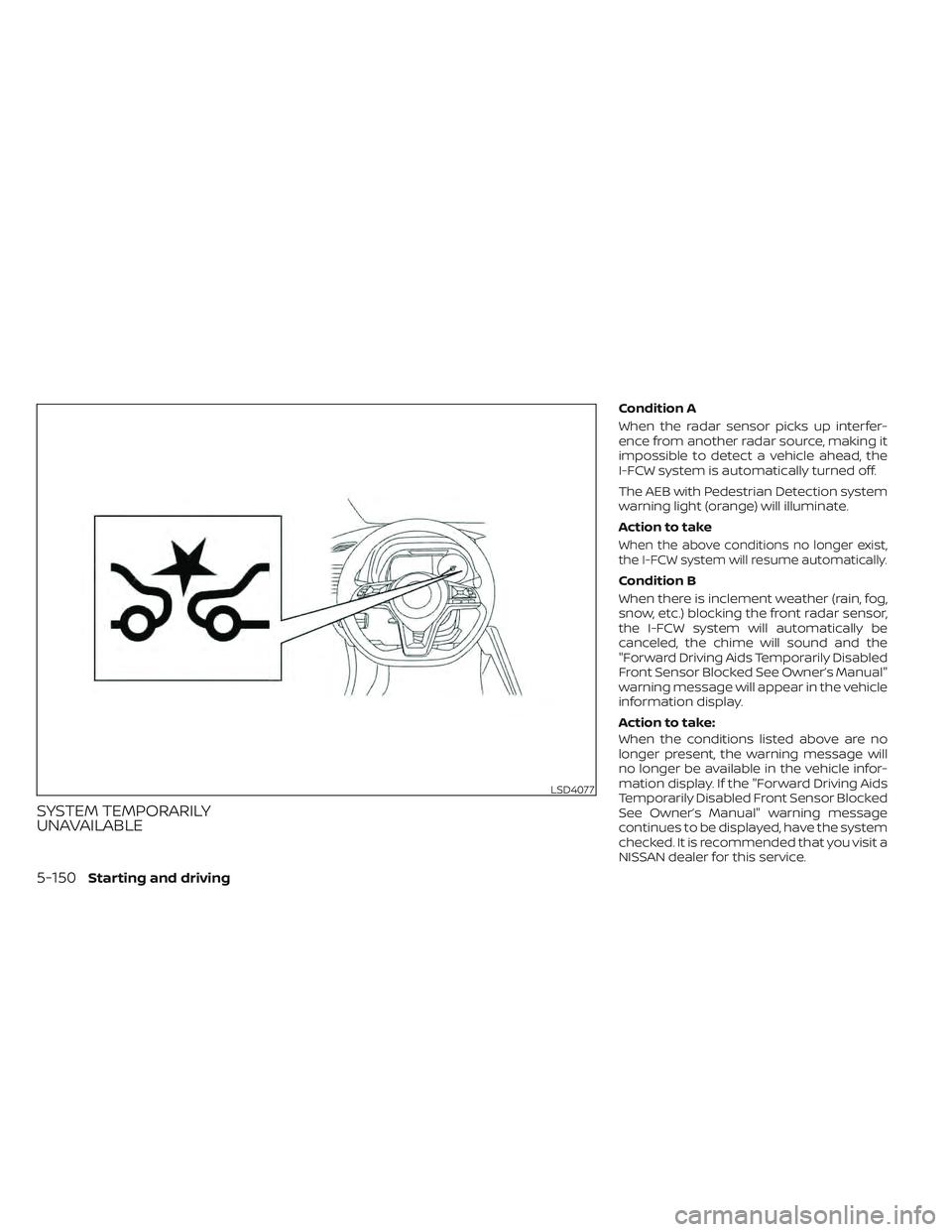
SYSTEM TEMPORARILY
UNAVAILABLE
Condition A
When the radar sensor picks up interfer-
ence from another radar source, making it
impossible to detect a vehicle ahead, the
I-FCW system is automatically turned off.
The AEB with Pedestrian Detection system
warning light (orange) will illuminate.
Action to take
When the above conditions no longer exist,
the I-FCW system will resume automatically.
Condition B
When there is inclement weather (rain, fog,
snow, etc.) blocking the front radar sensor,
the I-FCW system will automatically be
canceled, the chime will sound and the
"Forward Driving Aids Temporarily Disabled
Front Sensor Blocked See Owner’s Manual"
warning message will appear in the vehicle
information display.
Action to take:
When the conditions listed above are no
longer present, the warning message will
no longer be available in the vehicle infor-
mation display. If the "Forward Driving Aids
Temporarily Disabled Front Sensor Blocked
See Owner’s Manual" warning message
continues to be displayed, have the system
checked. It is recommended that you visit a
NISSAN dealer for this service.
LSD4077
5-150Starting and driving
Page 526 of 618
8 Do-it yourself
Maintenance precautions.......................8-2
Motor compartment check locations ...........8-4
Cooling system .................................8-5
Checking coolant level .......................8-6
Changing coolant ............................8-6
Reduction gear fluid .............................8-7
Brake fluid .......................................8-7
Windshield-washer fluid .........................8-8
12-volt battery ...................................8-9
Jump starting ................................ 8-11
Windshield wiper blades ........................8-12
Cleaning .................................... 8-12
Replacing ................................... 8-12
Rear window wiper blade ...................8-14
Brakes ......................................... 8-14
Brake pad wear warning ....................8-14Fuses
.......................................... 8-15
Motor compartment ........................ 8-15
Passenger compartment ...................8-18
NISSAN Intelligent Key® battery replacement . . . 8-19
Lights .......................................... 8-21
Headlights .................................. 8-22
Fog lights (if so equipped) ...................8-22
Exterior and interior lights ...................8-23
Wheels and tires ............................... 8-25
Tire pressure ................................ 8-25
Tire labeling ................................. 8-30
Types of tires ................................ 8-32
Tire chains .................................. 8-33
Changing wheels and tires ..................8-34
Emergency tire puncture repair kit ..........8-37
Page 547 of 618
6. Door mirror turn signal light (if soequipped)
7. Cargo light
8. License plate light
9. Fog light (if so equipped)
Fog may temporarily form inside the lens
of the exterior lights in the rain or in a car
wash. A temperature difference between
the inside and the outside of the lens
causes the fog. This is not a malfunction. If
large drops of water collect inside the lens,
it is recommended that you visit a NISSAN
certified LEAF dealer for this service.
HEADLIGHTS
If headlight bulb replacement is required, it
is recommended that you visit a NISSAN
certified LEAF dealer for this service.
Replacing the LED headlight bulb
(if so equipped)
If LED headlight bulb replacement is neces-
sary, it is recommended that you visit a
NISSAN certified LEAF dealer for this
service.
Replacing the halogen headlight
bulb (if so equipped)
The headlight is a semi-sealed beam type
that uses a headlight (halogen) bulb. If bulb
replacement is required, it is recom-
mended that you visit a NISSAN certified
LEAF dealer.
CAUTION
• Do not leave the bulb out of the head-
light reflector for a long period of
time. Dust, moisture, smoke, etc. en-
tering the headlight body may affect
bulb performance
• High-pressure halogen gas is sealed
inside the halogen bulb. The bulb
may break if the glass envelope is
scratched or the bulb is dropped.
• Only touch the base when handling
the bulb. Never touch the glass enve-
lope. Touching the glass envelope
could significantly affect bulb life
and/or headlight performance.
• Aiming is not necessary af ter replac-
ing the bulb. When aiming adjust-
ment is necessary, it is recom-
mended that you visit a NISSAN
certified LEAF dealer for this service. •
Fog may temporarily form inside the
lens of the exterior lights in the rain
or in a car wash. A temperature dif-
ference between the inside and the
outside of the lens causes the fog. If
large drops of water collect inside
the lens, it is recommended that you
visit a NISSAN certified LEAF dealer.
Use the same number and wattage as
originally installed as shown in the chart.
FOG LIGHTS (if so equipped)
For additional information on fog light bulb
replacement, refer to the instruction out-
lined in this section
Replacing the fog light bulb
If fog light bulb replacement is required, it is
recommended that you visit a NISSAN cer-
tified LEAF dealer for this service.
8-22Do-it yourself
Page 548 of 618
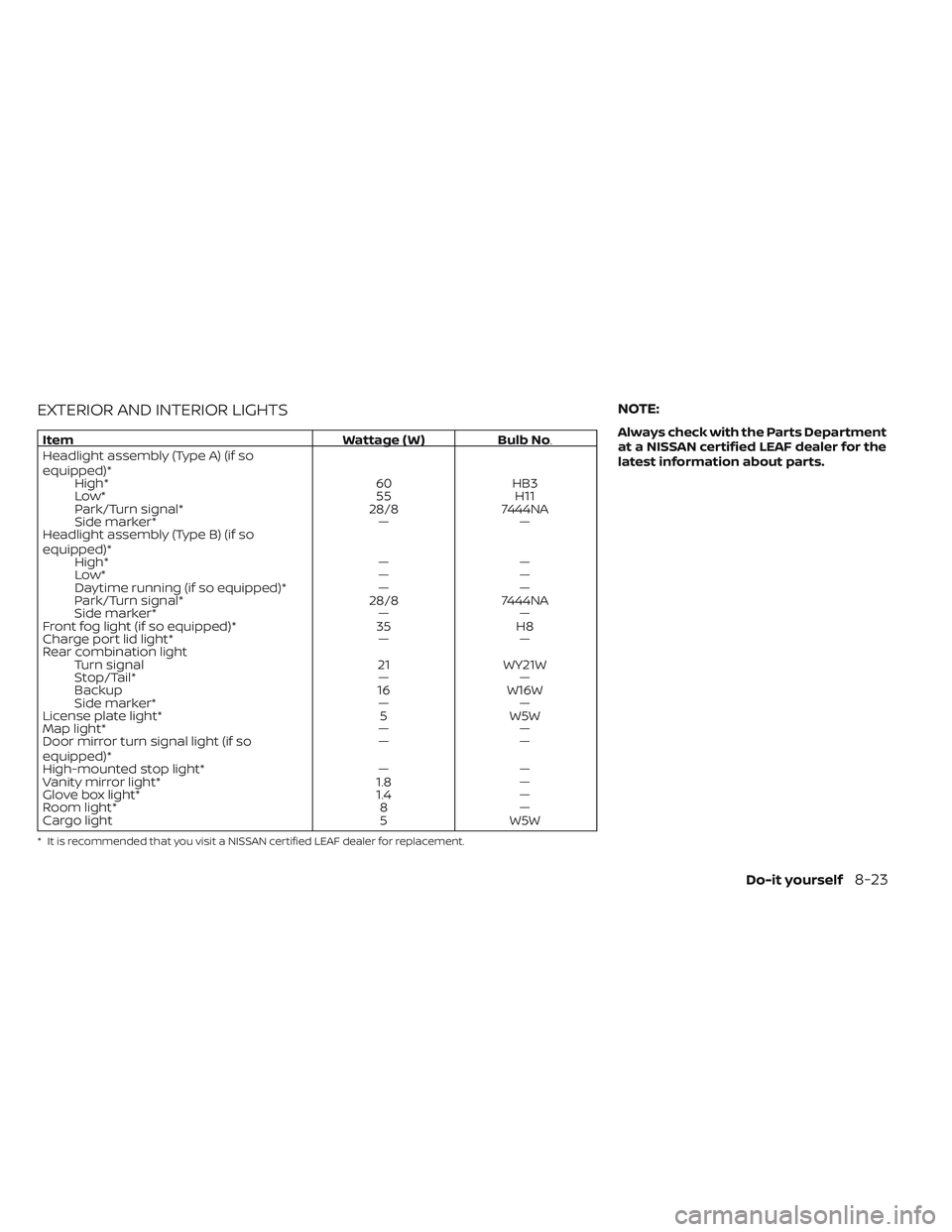
EXTERIOR AND INTERIOR LIGHTS
ItemWattage ( W )Bulb No.
Headlight assembly (Type A) (if so
equipped)* High* 60HB3
Low* 55H11
Park/Turn signal* 28/87444NA
Side marker* ——
Headlight assembly (Type B) (if so
equipped)* High* ——
Low* ——
Daytime running (if so equipped)* ——
Park/Turn signal* 28/87444NA
Side marker* ——
Front fog light (if so equipped)* 35H8
Charge port lid light* ——
Rear combination light Turn signal 21WY21W
Stop/Tail* ——
Backup 16W16W
Side marker* ——
License plate light* 5W5W
Map light* ——
Door mirror turn signal light (if so
equipped)* ——
High-mounted stop light* ——
Vanity mirror light* 1.8—
Glove box light* 1.4—
Room light* 8—
Cargo light 5W5W
* It is recommended that you visit a NISSAN certified LEAF dealer for replacement.
NOTE:
Always check with the Parts Department
at a NISSAN certified LEAF dealer for the
latest information about parts.
Do-it yourself8-23
Page 608 of 618
EV unique information...........EV-25Event Data recorders............10-21EVSE
(Electric Vehicle Supply Equipment). . .CH-11Explanation of maintenance items.....9-2Explanation of scheduled maintenance
items.......................9-5Extended storage switch..........8-19
F
F.M.V.S.S./C.M.V.S.S. certification label. . .10-8Flashers (See hazard warning flasher
switch)......................6-2Flat tire......................6-3Flat towing...................10-15Floor mat cleaning...............7-5Fluid
Brake fluid...................8-7Capacities and recommended
fuel/lubricants...............10-2Coolant................... .8-5Reduction gear fluid............8-7Windshield-washer fluid..........8-8Fog light switch................2-55Fog lights
Bulb replacement.............8-22Front and rear sonar system.......5-168Front passenger air bag status
light................... .1-56, 1-58Front-seat mounted side-impact
supplemental air bag system........1-62Fuses.......................8-15
Fusible links...................8-17
G
Garage door opener, HomeLink® Universal
Transceiver......2-71,2-72,2-73,2-74,2-75Gauge
Driving range................ .2-8Li-ion battery available charge
gauge.................... .2-9Li-ion battery temperature gauge. . . .2-7Odometer...................2-5Power meter.................2-7Speedometer................2-5General maintenance.............9-2Glove box................... .2-63
H
Hazard warning flasher switch........6-2Head restraints
Headrests...................1-7Headlights...................8-22Bulb replacement.............8-22Headlight switch..............2-48Heated seat switches............2-56Heated seats................. .2-56Heated steering wheel............2-57Heated steering wheel switch.......2-57Heater......................4-29High voltage precautions..........EV-8Hill start....................5-172Hill start assist................5-172
Home charge.................CH-9HomeLink® Universal
Transceiver......2-71,2-72,2-73,2-74,2-75Hood.......................3-18Horn...................... .2-55How to normal charge...........CH-9How to quick charge.......CH-35, CH-38How to trickle charge............CH-11
I
If the Li-ion battery becomes completely
discharged...................6-12Immediate charge.........CH-48, 2-59Immediate charge switch.....CH-48, 2-59Immobilizer system..............5-13Indicator lights.................2-24Indicator lights and audible reminders
(See warning/indicator lights and audible
reminders)
...................2-14Indicators for maintenance.........2-36Indicators for operation...........2-34Infants......................1-20Inside automatic anti-glare mirror. . . .3-24Instrument brightness control.......2-54Instrument panel dimmer switch.....2-54Intelligent Around View Monitor (I-AVM). .4-11Intelligent Cruise Control (ICC) (for vehicles
without ProPILOT Assist)...........5-67Intelligent Driver Alertness (I-DA).....5-154Intelligent Forward Collision Warning
(I-FCW).....................5-141Intelligent Key battery............8-19
11-3