ECO mode NISSAN LEAF 2023 User Guide
[x] Cancel search | Manufacturer: NISSAN, Model Year: 2023, Model line: LEAF, Model: NISSAN LEAF 2023Pages: 612, PDF Size: 7.42 MB
Page 61 of 612
CAUTION
Do not use any charging equipment
that is not compatible with the LEAF.
Doing so could prevent the Li-ion bat-
tery from charging properly or could
result in damage to the vehicle or Li-ion
battery.
• Normal charge uses the charging device (AC 220 - 240 volt, 16A or 32A) that can be
installed in your home to charge the Li-
ion battery.
• Immediate charge, charging timer and remote charge (models with Navigation
System) can be performed in the normal
charge mode. For additional information,
see “Charging methods” (P. CH-43).
• The charging equipment communicates with the vehicle before Li-ion battery
charging starts. If this communication
does not occur because other equip-
ment is used, the Li-ion battery will not
charge. • NISSAN recommends that you connect
the charging device when getting out of
the vehicle, even if it is not going to be
used. By doing this, you can get the most
out of the remote climate control (mod-
els with Navigation System) and Climate
Ctrl. Timer functions the next time you
use the vehicle.
To start normal charge:
1. Push the P (Park) position switch to place the vehicle in the P (Park) position and
apply the parking brake.
2. When charging the Li-ion battery, place the power switch in the OFF position.
When the power switch is in the ON po-
sition, the Li-ion battery will not start
charging.
3. Open the charge port lid and charge port cap. For additional information, see
“Charge port lid” (P. 3-20) and “Charge
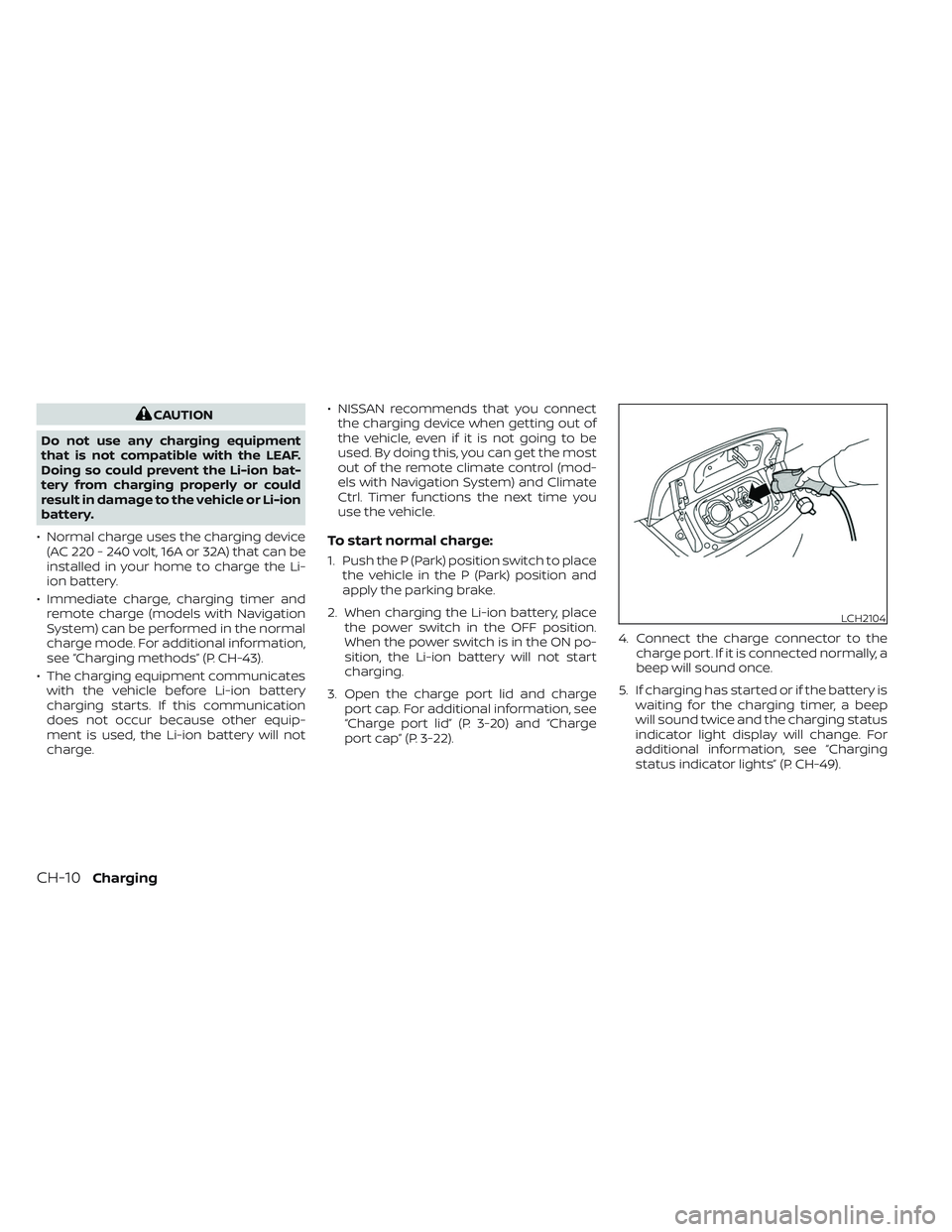
port cap” (P. 3-22). 4. Connect the charge connector to the
charge port. If it is connected normally, a
beep will sound once.
5. If charging has started or if the battery is waiting for the charging timer, a beep
will sound twice and the charging status
indicator light display will change. For
additional information, see “Charging
status indicator lights” (P. CH-49).
LCH2104
CH-10Charging
Page 86 of 612
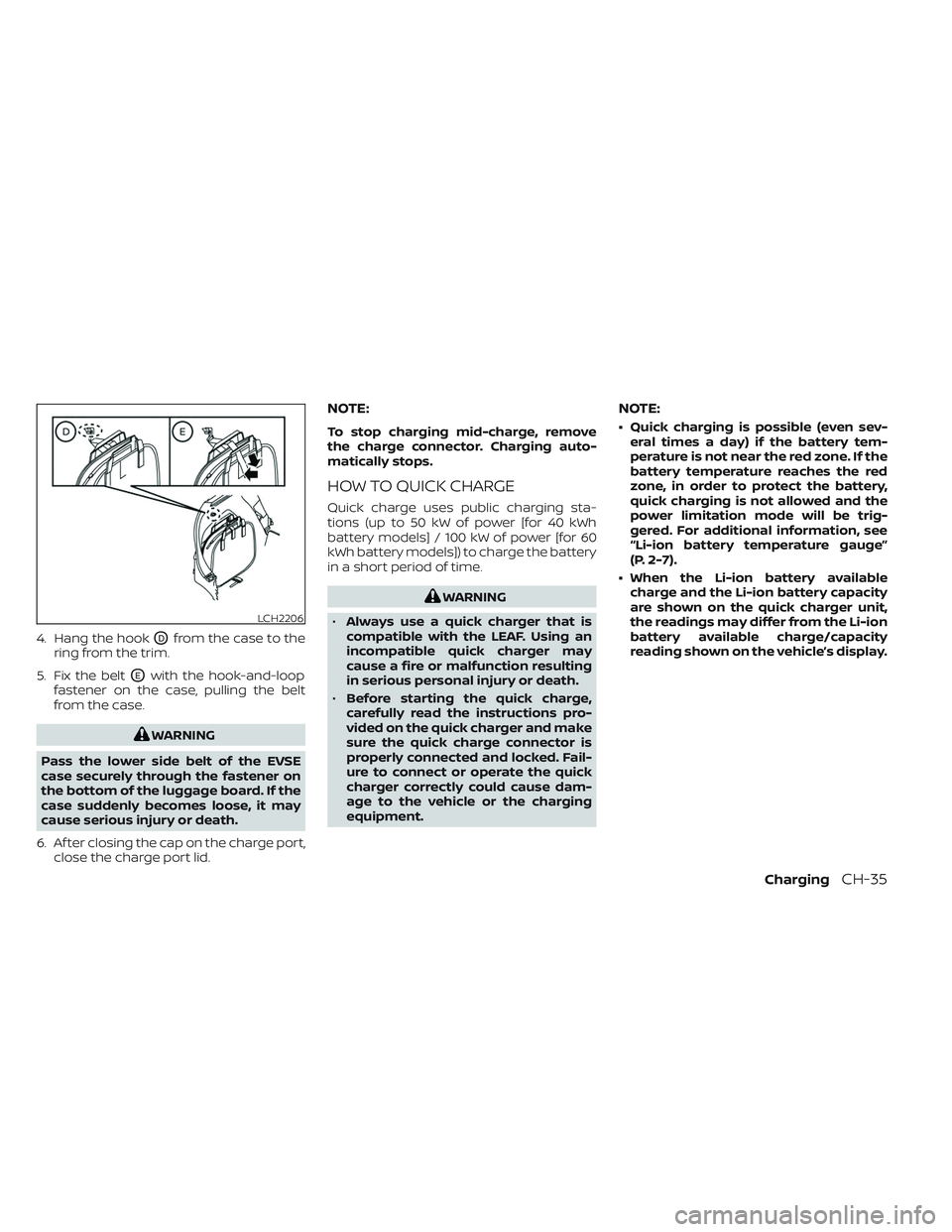
4. Hang the hookODfrom the case to the
ring from the trim.
5. Fix the belt
OEwith the hook-and-loop
fastener on the case, pulling the belt
from the case.
WARNING
Pass the lower side belt of the EVSE
case securely through the fastener on
the bottom of the luggage board. If the
case suddenly becomes loose, it may
cause serious injury or death.
6. Af ter closing the cap on the charge port, close the charge port lid.
NOTE:
To stop charging mid-charge, remove
the charge connector. Charging auto-
matically stops.
HOW TO QUICK CHARGE
Quick charge uses public charging sta-
tions (up to 50 kW of power [for 40 kWh
battery models] / 100 kW of power [for 60
kWh battery models]) to charge the battery
in a short period of time.
WARNING
• Always use a quick charger that is
compatible with the LEAF. Using an
incompatible quick charger may
cause a fire or malfunction resulting
in serious personal injury or death.
• Before starting the quick charge,
carefully read the instructions pro-
vided on the quick charger and make
sure the quick charge connector is
properly connected and locked. Fail-
ure to connect or operate the quick
charger correctly could cause dam-
age to the vehicle or the charging
equipment.
NOTE:
• Quick charging is possible (even sev- eral times a day) if the battery tem-
perature is not near the red zone. If the
battery temperature reaches the red
zone, in order to protect the battery,
quick charging is not allowed and the
power limitation mode will be trig-
gered. For additional information, see
“Li-ion battery temperature gauge”
(P. 2-7).
• When the Li-ion battery available charge and the Li-ion battery capacity
are shown on the quick charger unit,
the readings may differ from the Li-ion
battery available charge/capacity
reading shown on the vehicle’s display.
LCH2206
ChargingCH-35
Page 97 of 612
NOTE:
If “Full charge has priority ” is turned on, it
is possible that the battery is not
charged fully by the charge end time due
to the operating condition of Climate
Ctrl. Timer and the tolerance of charging
time, etc. In that case, the charging con-
tinues until the Li-ion battery is fully
charged.
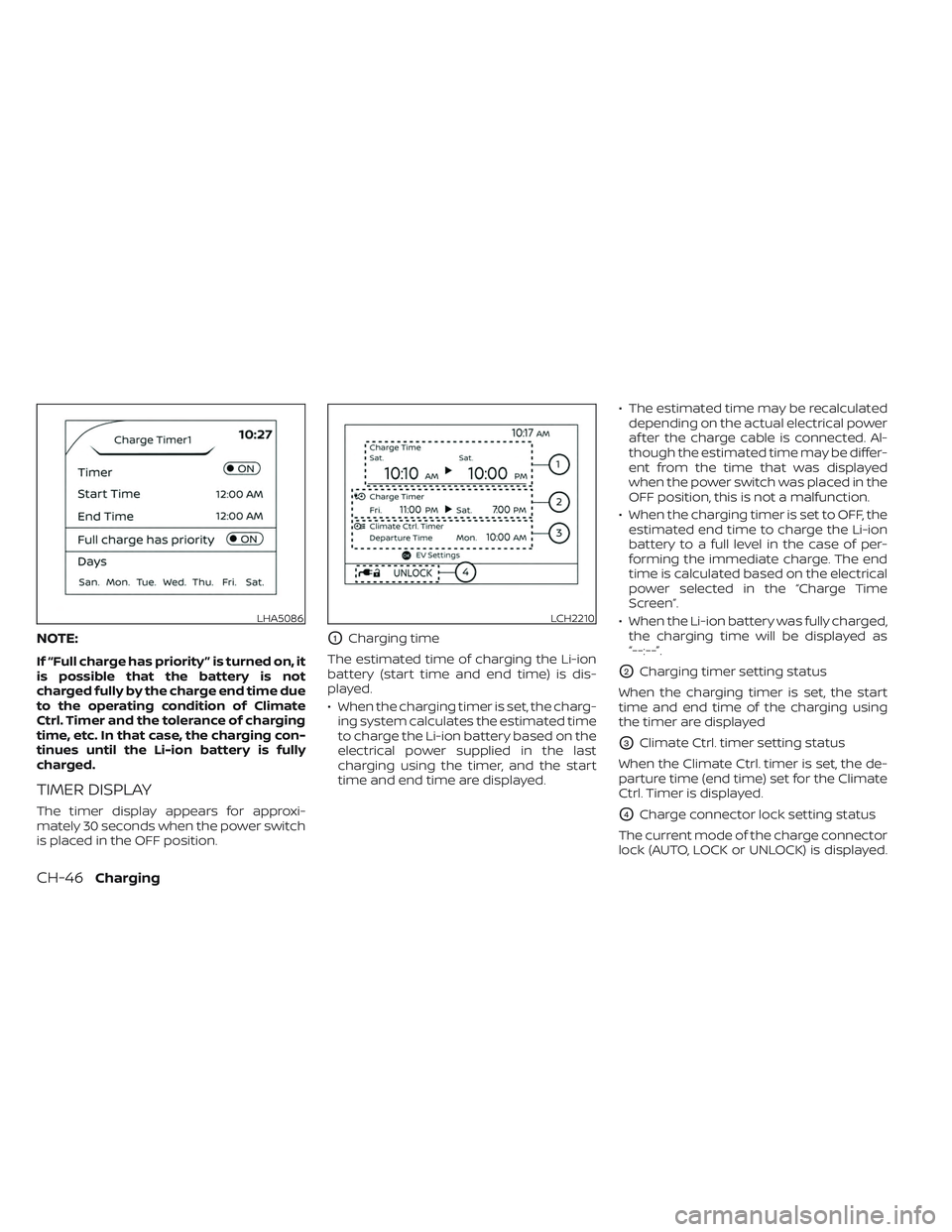
TIMER DISPLAY
The timer display appears for approxi-
mately 30 seconds when the power switch
is placed in the OFF position.
O1Charging time
The estimated time of charging the Li-ion
battery (start time and end time) is dis-
played.
• When the charging timer is set, the charg- ing system calculates the estimated time
to charge the Li-ion battery based on the
electrical power supplied in the last
charging using the timer, and the start
time and end time are displayed. • The estimated time may be recalculated
depending on the actual electrical power
af ter the charge cable is connected. Al-
though the estimated time may be differ-
ent from the time that was displayed
when the power switch was placed in the
OFF position, this is not a malfunction.
• When the charging timer is set to OFF, the estimated end time to charge the Li-ion
battery to a full level in the case of per-
forming the immediate charge. The end
time is calculated based on the electrical
power selected in the “Charge Time
Screen”.
• When the Li-ion battery was fully charged, the charging time will be displayed as
“--:--”.
O2Charging timer setting status
When the charging timer is set, the start
time and end time of the charging using
the timer are displayed
O3Climate Ctrl. timer setting status
When the Climate Ctrl. timer is set, the de-
parture time (end time) set for the Climate
Ctrl. Timer is displayed.
O4Charge connector lock setting status
The current mode of the charge connector
lock (AUTO, LOCK or UNLOCK) is displayed.
LHA5086LCH2210
CH-46Charging
Page 98 of 612
For additional information, see “Charge
connector lock system” (P. CH-41).
When the OK button on the steering wheel
is pressed, the display will be switched to
the “EV Settings” menu. In the EV Settings,
the setting of the charging timer, Climate
Ctrl. timer and charge connector lock
mode can be changed. For additional infor-
mation, see “Vehicle information display”
(P. 2-26).
When the
button on the steering
wheel is pressed while the timer display is
shown, the display is switched to the ECO
Drive Report (if the vehicle was driven).
Either display will continue to be displayed
for another 30 seconds when the button is
operated. If the doors are locked af ter the
power switch was placed in the OFF posi-
tion, the display will turn off before the pre-
set time.
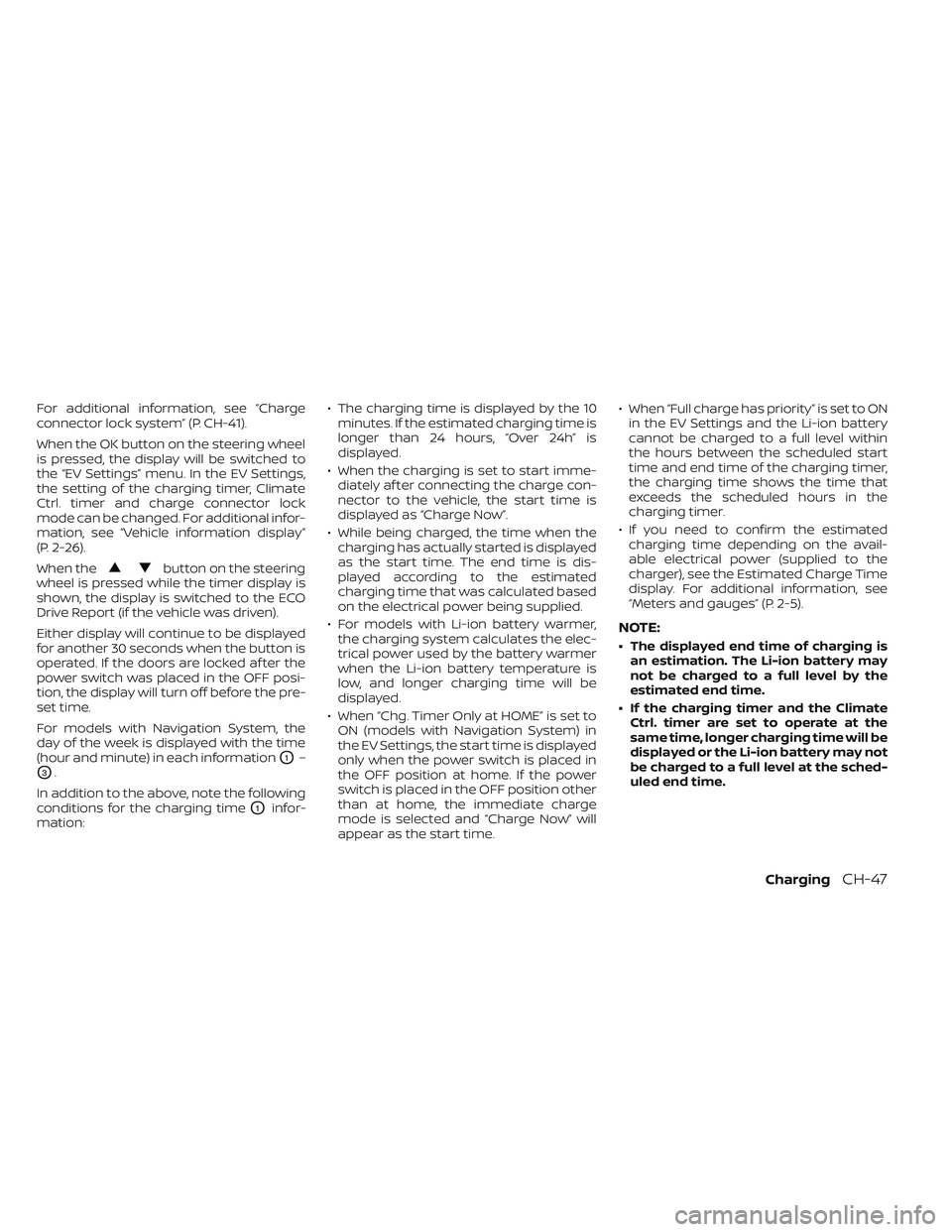
For models with Navigation System, the
day of the week is displayed with the time
(hour and minute) in each information
O1–
O3.
In addition to the above, note the following
conditions for the charging time
O1infor-
mation: • The charging time is displayed by the 10
minutes. If the estimated charging time is
longer than 24 hours, “Over 24h” is
displayed.
• When the charging is set to start imme- diately af ter connecting the charge con-
nector to the vehicle, the start time is
displayed as “Charge Now”.
• While being charged, the time when the charging has actually started is displayed
as the start time. The end time is dis-
played according to the estimated
charging time that was calculated based
on the electrical power being supplied.
• For models with Li-ion battery warmer, the charging system calculates the elec-
trical power used by the battery warmer
when the Li-ion battery temperature is
low, and longer charging time will be
displayed.
• When “Chg. Timer Only at HOME” is set to ON (models with Navigation System) in
the EV Settings, the start time is displayed
only when the power switch is placed in
the OFF position at home. If the power
switch is placed in the OFF position other
than at home, the immediate charge
mode is selected and “Charge Now” will
appear as the start time. • When “Full charge has priority” is set to ON
in the EV Settings and the Li-ion battery
cannot be charged to a full level within
the hours between the scheduled start
time and end time of the charging timer,
the charging time shows the time that
exceeds the scheduled hours in the
charging timer.
• If you need to confirm the estimated charging time depending on the avail-
able electrical power (supplied to the
charger), see the Estimated Charge Time
display. For additional information, see
“Meters and gauges” (P. 2-5).
NOTE:
• The displayed end time of charging is an estimation. The Li-ion battery may
not be charged to a full level by the
estimated end time.
• If the charging timer and the Climate Ctrl. timer are set to operate at the
same time, longer charging time will be
displayed or the Li-ion battery may not
be charged to a full level at the sched-
uled end time.
ChargingCH-47
Page 101 of 612
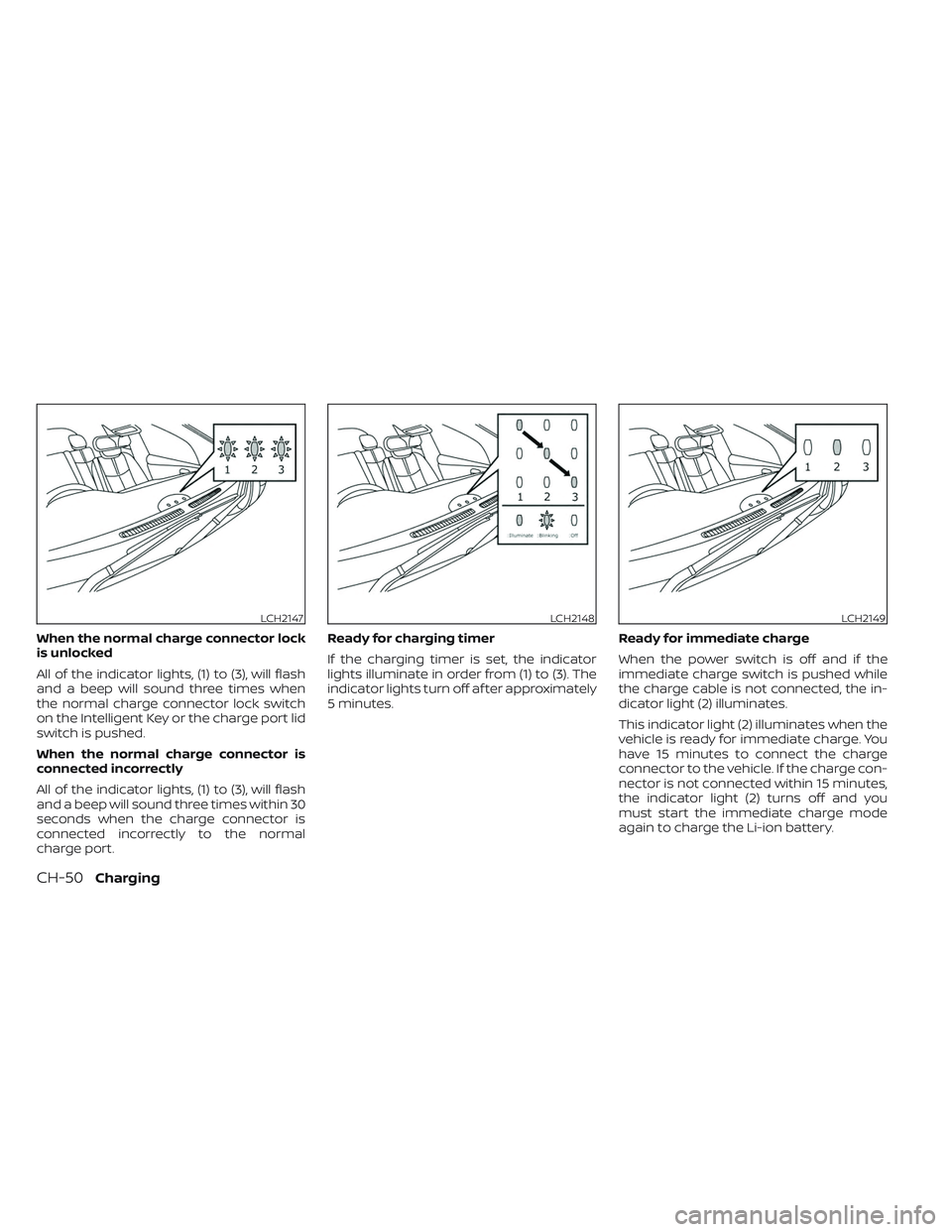
When the normal charge connector lock
is unlocked
All of the indicator lights, (1) to (3), will flash
and a beep will sound three times when
the normal charge connector lock switch
on the Intelligent Key or the charge port lid
switch is pushed.
When the normal charge connector is
connected incorrectly
All of the indicator lights, (1) to (3), will flash
and a beep will sound three times within 30
seconds when the charge connector is
connected incorrectly to the normal
charge port.Ready for charging timer
If the charging timer is set, the indicator
lights illuminate in order from (1) to (3). The
indicator lights turn off af ter approximately
5 minutes.
Ready for immediate charge
When the power switch is off and if the
immediate charge switch is pushed while
the charge cable is not connected, the in-
dicator light (2) illuminates.
This indicator light (2) illuminates when the
vehicle is ready for immediate charge. You
have 15 minutes to connect the charge
connector to the vehicle. If the charge con-
nector is not connected within 15 minutes,
the indicator light (2) turns off and you
must start the immediate charge mode
again to charge the Li-ion battery.
LCH2147LCH2148LCH2149
CH-50Charging
Page 113 of 612
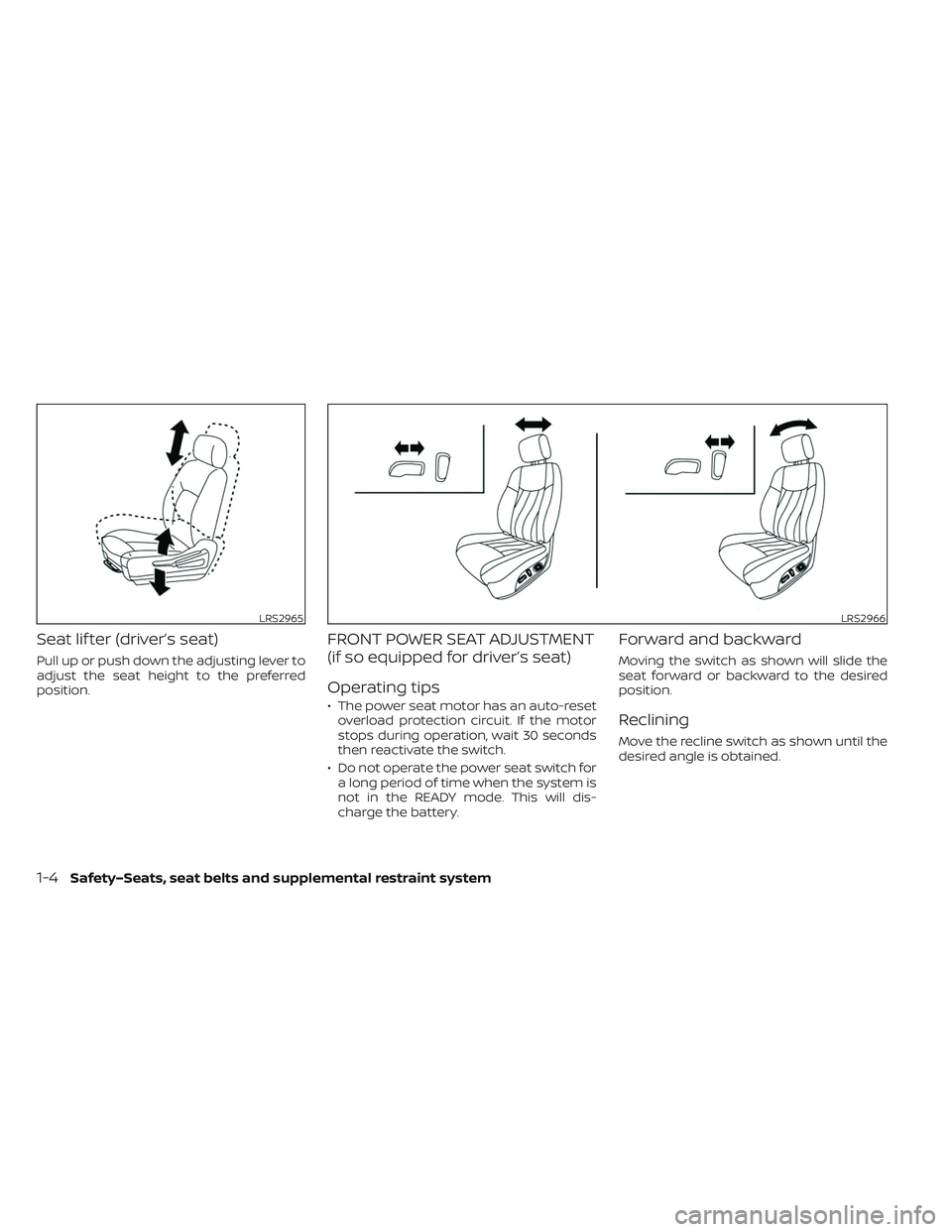
Seat lif ter (driver’s seat)
Pull up or push down the adjusting lever to
adjust the seat height to the preferred
position.
FRONT POWER SEAT ADJUSTMENT
(if so equipped for driver’s seat)
Operating tips
• The power seat motor has an auto-resetoverload protection circuit. If the motor
stops during operation, wait 30 seconds
then reactivate the switch.
• Do not operate the power seat switch for a long period of time when the system is
not in the READY mode. This will dis-
charge the battery.
Forward and backward
Moving the switch as shown will slide the
seat forward or backward to the desired
position.
Reclining
Move the recline switch as shown until the
desired angle is obtained.
LRS2965LRS2966
1-4Safety–Seats, seat belts and supplemental restraint system
Page 124 of 612
• An object placed under the front passen-ger seat.
• An object placed between the seat cush- ion and center console or between the
seat cushion and the door.
• An object hanging on the seat or placed in the seatback pocket.
• A child restraint or other object pressing against the rear of the seatback.
NOTE:
The rear seats may be equipped with a
seat belt warning in the vehicle informa-
tion display.
For additional information, see “Vehicle In-
formation display” (P. 2-26).
PREGNANT WOMEN
NISSAN recommends that pregnant
women use seat belts. The seat belt should
be worn snug, and always position the lap
belt as low as possible around the hips, not
the waist. Place the shoulder belt over your
shoulder and across your chest. Never put
the lap/shoulder belt over your abdominal
area. Contact your doctor for specific
recommendations.
INJURED PERSONS
NISSAN recommends that injured persons
use seat belts, depending on the injury.
Check with your doctor for specific
recommendations.
THREE-POINT TYPE SEAT BELT
WITH RETRACTOR
WARNING
• Every person who drives or rides in
this vehicle should use a seat belt at
all times.
• Do not ride in a moving vehicle when
the seatback is reclined. This can be
dangerous. The shoulder belt will not
be against your body. In an accident,
you could be thrown into it and re-
ceive neck or other serious injuries.
You could also slide under the lap belt
and receive serious internal injuries.
• For the most effective protection
when the vehicle is in motion, the
seat should be upright. Always sit
well back and upright in the seat with
both feet on the floor and adjust the
seat belt properly. •
Do not allow children to play with the
seat belts. Most seating positions are
equipped with Automatic Locking
Retractor (ALR) mode seat belts. If
the seat belt becomes wrapped
around a child’s neck with the ALR
mode activated, the child can be se-
riously injured or killed if the seat belt
retracts and becomes tight. This can
occur even if the vehicle is parked.
Unbuckle the seat belt to release the
child. If the seat belt cannot be un-
buckled or is already unbuckled, re-
lease the child by cutting the seat
belt with a suitable tool (such as a
knife or scissors) to release the seat
belt.
Fastening the seat belts
1. Adjust the seat. For additional informa- tion, see “Seats” (P. 1-2).
Safety–Seats, seat belts and supplemental restraint system1-15
Page 128 of 612
WARNING
• Only NISSAN seat belt extenders,
made by the same company which
made the original equipment seat
belts, should be used with NISSAN
seat belts.
• Adults and children who can use the
standard seat belt should not use an
extender. Such unnecessary use
could result in serious personal injury
in the event of an accident.
• Never use seat belt extenders to in-
stall child restraints. If the child re-
straint is not secured properly, the
child could be seriously injured or
killed in a collision or a sudden stop.
SEAT BELT MAINTENANCE
• To clean the seat belt webbing, apply a
mild soap solution or any solution rec-
ommended for cleaning upholstery or
carpets. Then wipe with a cloth and allow
the seat belts to dry in the shade. Do not
allow the seat belts to retract until they
are completely dry.
• If dirt builds up in the shoulder belt
guide of the seat belt anchors, the seat
belts may retract slowly. Wipe the shoul-
der belt guide with a clean, dry cloth. •
Periodically check to see that the seat
belt and the metal components, such
as buckles, tongues, retractors, flexible
wires and anchors, work properly. If loose
parts, deterioration, cuts or other dam-
age on the webbing is found, the entire
seat belt assembly should be replaced.
WARNING
Do not allow children to play with the
seat belts. Most seating positions are
equipped with Automatic Locking Re-
tractor (ALR) mode seat belts. If the seat
belt becomes wrapped around a child’s
neck with the ALR mode activated, the
child can be seriously injured or killed if
the seat belt retracts and becomes
tight. This can occur even if the vehicle
is parked. Unbuckle the seat belt to re-
lease the child. If the seat belt cannot
be unbuckled or is already unbuckled,
release the child by cutting the seat
belt with a suitable tool (such as a knife
or scissors) to release the seat belt.
Children need adults to help protect
them. They need to be properly
restrained.
In addition to the general information in
this manual, child safety information is
available from many other sources, includ-
ing doctors, teachers, government traffic
safety offices, and community organiza-
tions. Every child is different, so be sure to
learn the best way to transport your child.
CHILD SAFETY
Safety–Seats, seat belts and supplemental restraint system1-19
Page 145 of 612

4. Refer to the appropriate child restraintinstallation procedure steps in this sec-
tion before tightening the tether strap.
If you have any questions when install-
ing a top tether strap, it is recommended
that you visit a NISSAN certified LEAF
dealer for details.
WARNING
Child restraint anchorages are de-
signed to withstand only those loads
imposed by correctly fitted child re-
straints. Under no circumstances are
they to be used to attach adult seat
belts, or other items or equipment to
the vehicle. Doing so could damage the
child restraint anchorages. The child
restraint will not be properly installed
using the damaged anchorage, and a
child could be seriously injured or killed
in a collision.
FORWARD-FACING CHILD
RESTRAINT INSTALLATION USING
THE SEAT BELTS
WARNING
The three-point seat belt with Auto-
matic Locking Retractor (ALR) must be
used when installing a child restraint.
Failure to use the ALR mode will result
in the child restraint not being properly
secured. The restraint could tip over or
be loose and cause injury to a child in a
sudden stop or collision. Also, it can
change the operation of the front pas-
senger air bag. For additional informa-
tion, see “Front passenger air bag and
status light” (P. 1-35). For additional information, see all Warnings
and Cautions in “Child safety” (P. 1-19) and
“Child restraints” (P. 1-22) before installing a
child restraint.
Do not use the lower anchors if the com-
bined weight of the child and the child re-
straint exceeds 65 lbs. (29.5 kg). If the com-
bined weight of the child and the child
restraint is greater than 65 lbs. (29.5 kg), use
the vehicle's seat belt (not the lower an-
chors) to install the child restraint. Be sure
to follow the child restraint manufacturer's
instructions for installation.
SSS0640
Forward-facing (front passenger seat)
— step 1
1-36Safety–Seats, seat belts and supplemental restraint system
Page 148 of 612
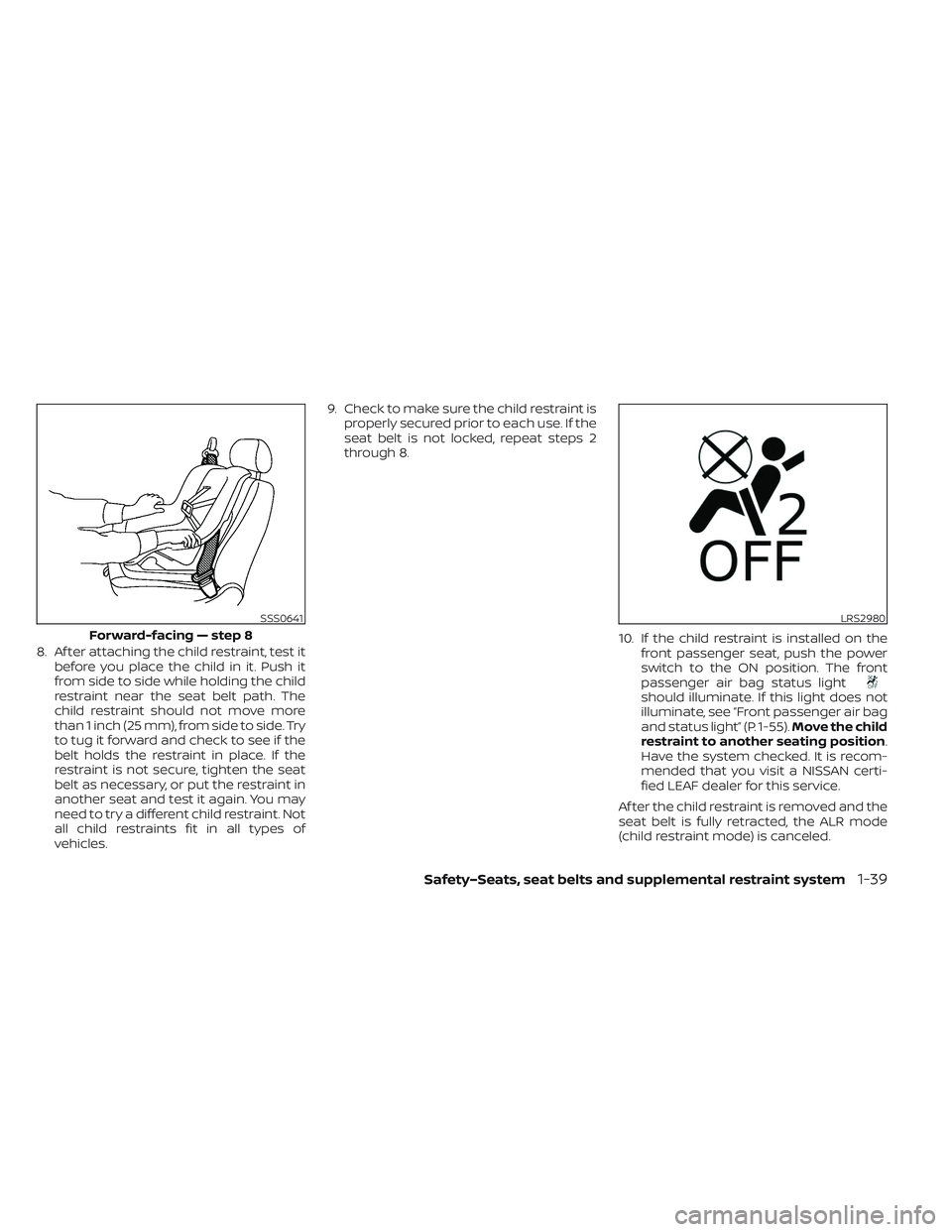
8. Af ter attaching the child restraint, test itbefore you place the child in it. Push it
from side to side while holding the child
restraint near the seat belt path. The
child restraint should not move more
than 1 inch (25 mm), from side to side. Try
to tug it forward and check to see if the
belt holds the restraint in place. If the
restraint is not secure, tighten the seat
belt as necessary, or put the restraint in
another seat and test it again. You may
need to try a different child restraint. Not
all child restraints fit in all types of
vehicles. 9. Check to make sure the child restraint is
properly secured prior to each use. If the
seat belt is not locked, repeat steps 2
through 8.
10. If the child restraint is installed on thefront passenger seat, push the power
switch to the ON position. The front
passenger air bag status light
should illuminate. If this light does not
illuminate, see “Front passenger air bag
and status light” (P. 1-55). Move the child
restraint to another seating position.
Have the system checked. It is recom-
mended that you visit a NISSAN certi-
fied LEAF dealer for this service.
Af ter the child restraint is removed and the
seat belt is fully retracted, the ALR mode
(child restraint mode) is canceled.
SSS0641
Forward-facing — step 8
LRS2980
Safety–Seats, seat belts and supplemental restraint system1-39