child lock NISSAN LEAF 2023 User Guide
[x] Cancel search | Manufacturer: NISSAN, Model Year: 2023, Model line: LEAF, Model: NISSAN LEAF 2023Pages: 612, PDF Size: 7.42 MB
Page 151 of 612
Booster seat installation
WARNING
To avoid injury to child, do not use the
lap/shoulder belt in the Automatic
Locking Retractor (ALR) mode when us-
ing a booster seat with the seat belts.
For additional information, see all Warnings
and Cautions in “Child safety” (P. 1-19),“Child
restraints” (P. 1-22) and “Booster seats”
(P. 1-40) before installing a child restraint.
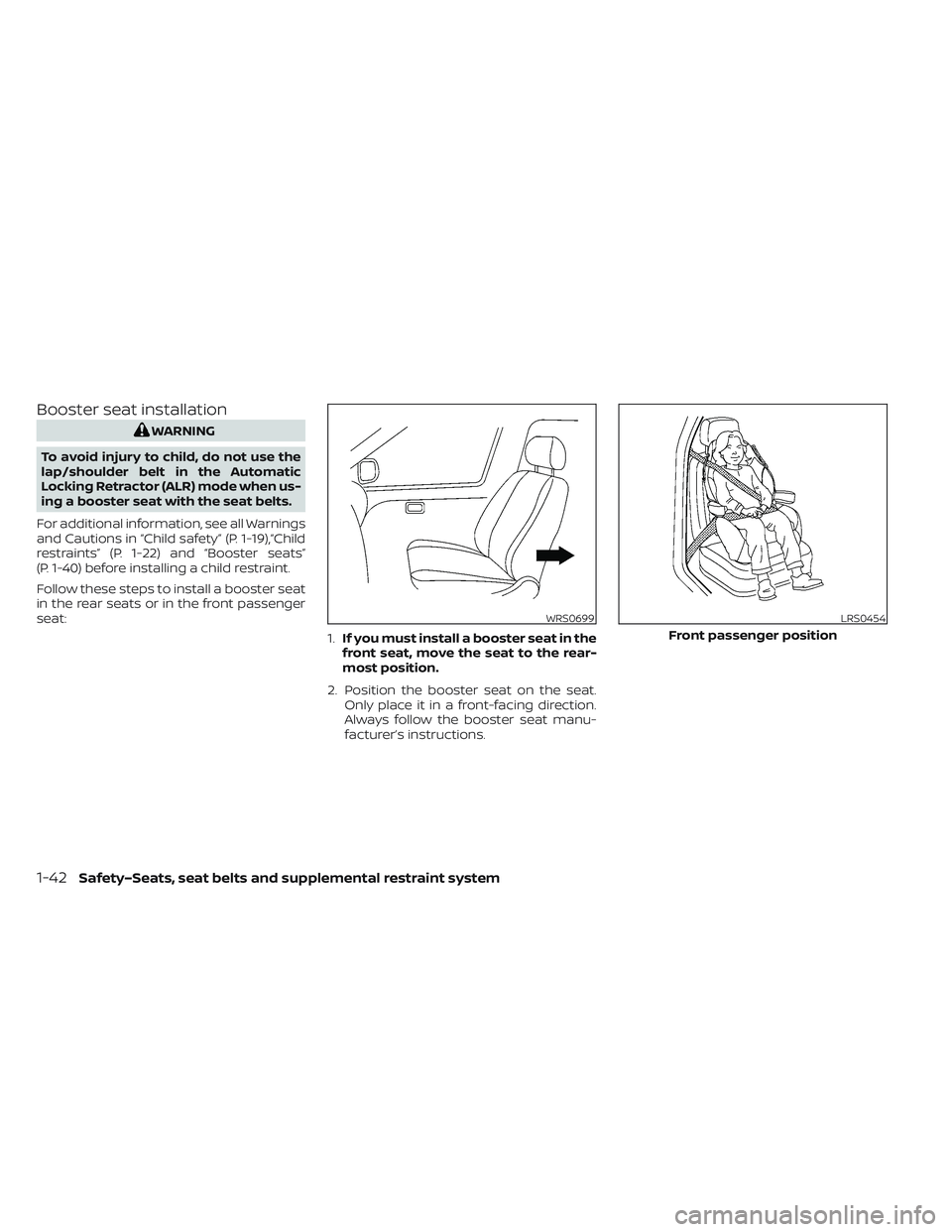
Follow these steps to install a booster seat
in the rear seats or in the front passenger
seat: 1.If you must install a booster seat in the
front seat, move the seat to the rear-
most position.
2. Position the booster seat on the seat. Only place it in a front-facing direction.
Always follow the booster seat manu-
facturer’s instructions.
WRS0699LRS0454
Front passenger position
1-42Safety–Seats, seat belts and supplemental restraint system
Page 167 of 612
3. Fasten the seat belt as outlined in the“Seat belts” (P. 1-11) section of this
manual. Front passenger seat belt
buckle status is monitored by the occu-
pant classification system and is used
as an input to determine occupancy
status. So, it is highly recommended that
the front passenger fasten their seat
belt.
4. Remain in this position for 30 seconds allowing the system to classif y the front
passenger before the vehicle is put into
motion.
5. Ensure proper classification by checking the front passenger air bag status light.
NOTE:
This vehicle’s occupant classification
sensor system generally keeps the clas-
sification locked during driving, so it is
important that you confirm that the
front passenger is properly classified
prior to driving. However, the occupant
classification sensor may recalculate the
weight of the occupant under some con-
ditions (both while driving and when
stopped), so front passenger seat occu-
pants should continue to remain seated
as outlined above. Troubleshooting
If you think the front passenger air bag
status light is incorrect:
1. If the light is ON with an adult occupying
the front passenger seat:
• Occupant is a small adult — the air bag light is functioning as intended. The
front passenger air bag and front pas-
senger supplemental knee air bag are
suppressed.
However, if the occupant is not a small
adult, then this may be due to the following
conditions that may be interfering with the
weight sensors: • Occupant is not sitting upright, lean-ing against the seatback, and cen-
tered on the seat cushion with his/her
feet comfortably extended to the floor.
• A child restraint or other object press- ing against the rear of the seatback.
• A rear passenger pushing or pulling on the back of the front passenger seat.
• Forcing the front seat or seatback against an object on the seat or floor
behind it.
• An object placed under the front pas- senger seat. • An object placed between the seat
cushion and center console or be-
tween the seat cushion and the door.
If the vehicle is moving, please come to a
stop when it is safe to do so. Check and
correct any of the above conditions. Re-
start the vehicle and wait 1 minute.
NOTE:
A system check will be performed during
which the front passenger air bag status
light will remain lit for about 7 seconds
initially.
If the light is still ON af ter this, the person
should be advised not to ride in the front
passenger seat and the vehicle should be
checked as soon as possible. It is recom-
mended that you visit a NISSAN certified
LEAF dealer for this service.
2. If the light is OFF with a small adult, child or child restraint occupying the front
passenger seat.
This may be due to the following condi-
tions that may be interfering with the
weight sensors:
•
Small adult or child is not sitting upright,
leaning against the seatback, and cen-
tered on the seat cushion with his/her
feet comfortably extended to the floor.
1-58Safety–Seats, seat belts and supplemental restraint system
Page 252 of 612
3 Pre-driving checks and adjustments
Keys.............................................3-2NISSAN Intelligent Key® .......................3-2
NISSAN Vehicle Immobilizer System
keys..........................................3-3
Doors ...........................................3-4
Locking with key .............................3-5
Locking with inside lock knob ................3-5
Locking with power door lock switch .........3-5
Automatic door locks ........................3-6
Child safety rear door lock ....................3-6
NISSAN Intelligent Key® system ..................3-6
Operating range .............................3-8
Door locks/unlocks precaution ...............3-8
NISSAN Intelligent Key® Operation ............3-9
How to use the remote keyless entry
function ..................................... 3-12
12-volt battery saver system ................3-16
Warning signals ............................. 3-16Troubleshooting guide
......................3-16
Hood ........................................... 3-18
Rear hatch ..................................... 3-19
Secondary rear hatch release ...............3-19
Charge port lid ................................. 3-20
Opening charge port lid .....................3-20
Charge port cap ............................ 3-22
Steering wheel ................................. 3-22
Tilt and telescopic operation ................3-23
Sun visors ...................................... 3-23
Vanity mirrors ............................... 3-24
Mirrors ......................................... 3-24
Manual anti-glare rearview mirror
(if so equipped) .............................. 3-24
Automatic anti-glare rearview mirror ........3-24
Outside mirrors ............................. 3-25
Page 255 of 612
Vehicle Immobilizer System keys that you
have to the NISSAN certified LEAF dealer for
registration. This is because the registra-
tion process will erase the memory of all
key codes previously registered into the
NISSAN Vehicle Immobilizer System. Af ter
the registration process, these compo-
nents will only recognize keys coded into
the NISSAN Vehicle Immobilizer System
during registration. Any virtual key acces-
sories (if so equipped) will also have to be
reregistered. Any key that is not given to the
dealer at the time of registration will no
longer be able to start your vehicle.
CAUTION
Do not allow the immobilizer system
key, which contains an electrical tran-
sponder, to come into contact with wa-
ter or salt water. This could affect sys-
tem function. When the doors are locked using one of the
following methods, the doors cannot be
opened using the inside or outside door
handles. The doors must be unlocked to
open the doors.
WARNING
• Always have the doors locked while
driving. Along with the use of seat
belts, this provides greater safety in
the event of an accident by helping to
prevent persons from being thrown
from the vehicle. This also helps keep
children and others from uninten-
tionally opening the doors, and will
help keep out intruders.
• Before opening any door, always look
for and avoid oncoming traffic. •
To help avoid risk of injury or death
through unintended operation of the
vehicle and/or its systems, including
entrapment in windows or inadver-
tent door lock activation, do not
leave children, people who require
the assistance of others or pets unat-
tended in your vehicle. Additionally,
the temperature inside a closed ve-
hicle on a warm day can quickly be-
come high enough to cause a signifi-
cant risk of injury or death to people
and pets.
DOORS
3-4Pre-driving checks and adjustments
Page 257 of 612
Lockout protection
When any door is open and the power door
lock switch is moved to the lock position, all
doors will lock. If the Intelligent Key is lef t in
the vehicle af ter all the doors are closed, all
doors will unlock automatically and a
chime will sound.
These functions help to prevent the Intelli-
gent Key from being accidentally locked
inside the vehicle.
AUTOMATIC DOOR LOCKS
• All doors lock automatically when the ve-hicle speed reaches 15 mph (24 km/h).
• All doors unlock automatically when the power switch is placed in the OFF
position.
CHILD SAFETY REAR DOOR LOCK
Child safety locks help prevent the rear
doors from being opened accidentally, es-
pecially when small children are in the
vehicle.
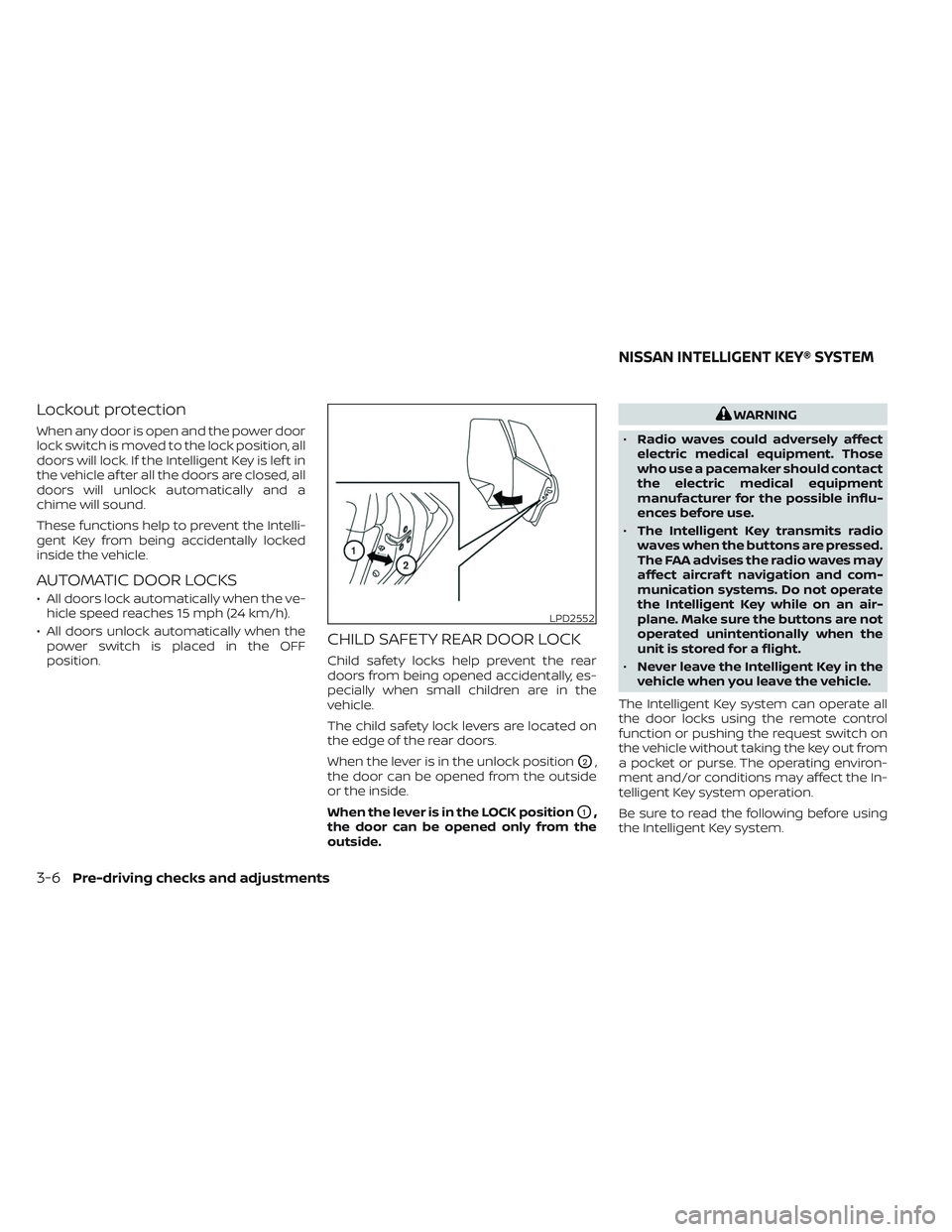
The child safety lock levers are located on
the edge of the rear doors.
When the lever is in the unlock position
O2,
the door can be opened from the outside
or the inside.
When the lever is in the LOCK position
O1,
the door can be opened only from the
outside.
WARNING
• Radio waves could adversely affect
electric medical equipment. Those
who use a pacemaker should contact
the electric medical equipment
manufacturer for the possible influ-
ences before use.
• The Intelligent Key transmits radio
waves when the buttons are pressed.
The FAA advises the radio waves may
affect aircraf t navigation and com-
munication systems. Do not operate
the Intelligent Key while on an air-
plane. Make sure the buttons are not
operated unintentionally when the
unit is stored for a flight.
• Never leave the Intelligent Key in the
vehicle when you leave the vehicle.
The Intelligent Key system can operate all
the door locks using the remote control
function or pushing the request switch on
the vehicle without taking the key out from
a pocket or purse. The operating environ-
ment and/or conditions may affect the In-
telligent Key system operation.
Be sure to read the following before using
the Intelligent Key system.
LPD2552
NISSAN INTELLIGENT KEY® SYSTEM
3-6Pre-driving checks and adjustments
Page 306 of 612
WARNING
• The air conditioning cooling function
operates only when the power
switch is in the ON position or when
the READY to drive indicator light is
ON.
• Do not leave children or adults who
would normally require the assis-
tance of others alone in your vehicle.
Pets should also not be lef t alone.
They could accidentally injure them-
selves or others through inadvertent
operation of the vehicle. Also, on hot,
sunny days, temperatures in a closed
vehicle could quickly become high
enough to causes severe or possibly
fatal injuries to people or animals. •
Do not use the recirculation mode for
long periods as it may cause the inte-
rior air to become stale and the win-
dows to fog up.
NOTE:
• Odors from inside and outside the ve- hicle can build up in the air conditioner
unit. Odor can enter the passenger
compartment through the vents.
• When parking, set the heater or air conditioner controls to turn off air re-
circulation to allow fresh air into the
passenger compartment. This should
help reduce odors inside the vehicle. The climate control system (air conditioner
and heater functions) can be operated
when the READY to drive indicator light is
illuminated. However, while charging, the
climate control system can be used when
the power switch is in the ON position.
The fan, heater and air conditioning can be
turned on manually, using the timer func-
tion and using the remote climate control
function.
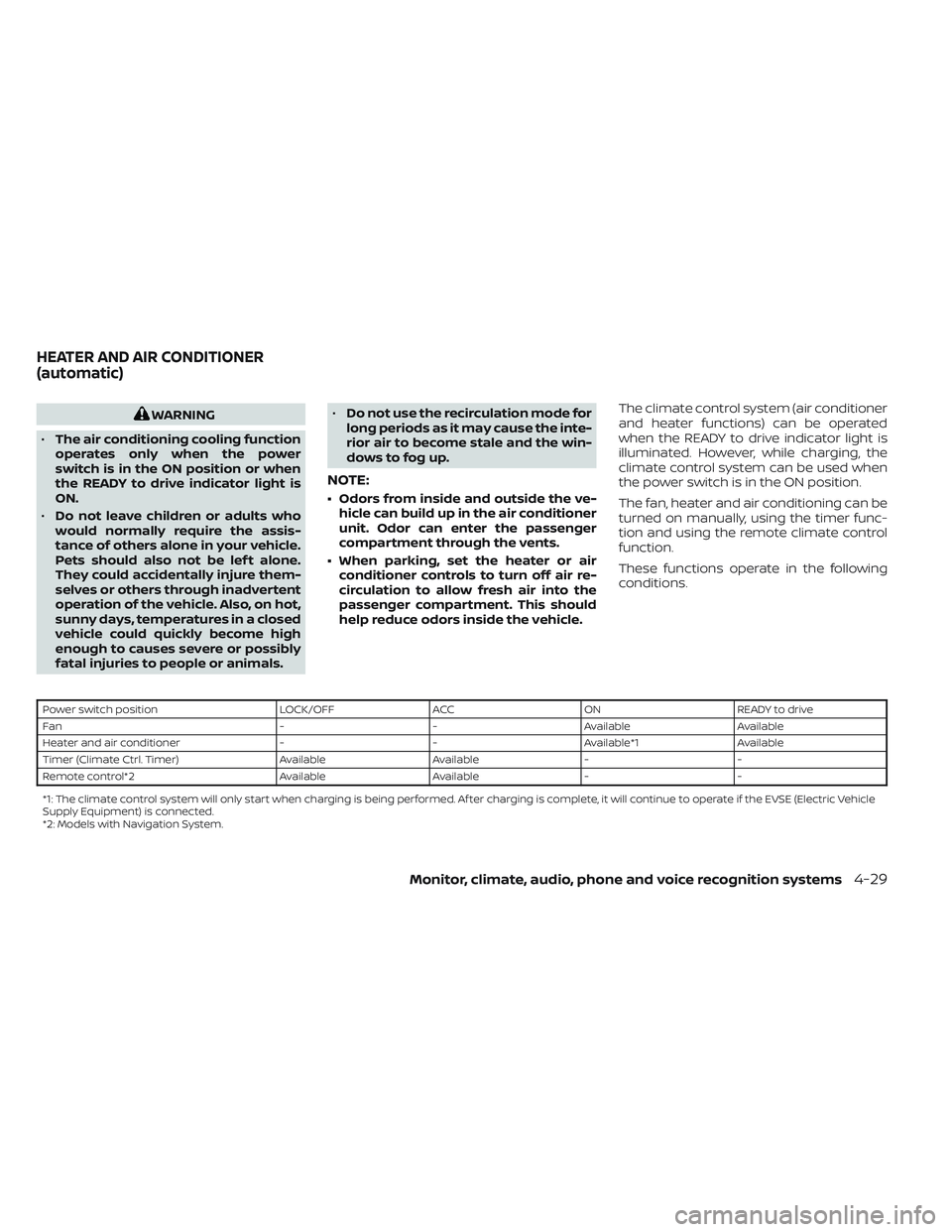
These functions operate in the following
conditions.
Power switch position
LOCK/OFFACCON READY to drive
Fan --Available Available
Heater and air conditioner --Available*1 Available
Timer (Climate Ctrl. Timer) AvailableAvailable- -
Remote control*2 AvailableAvailable- -
*1: The climate control system will only start when charging is being performed. Af ter charging is complete, it will continue to operate if the EVSE (El ectric Vehicle
Supply Equipment) is connected.
*2: Models with Navigation System.
HEATER AND AIR CONDITIONER
(automatic)
Monitor, climate, audio, phone and voice recognition systems4-29
Page 319 of 612
WARNING
• Radio waves could adversely affect
electric medical equipment. For ad-
ditional information, refer to your
electric medical equipment manu-
facturer for the possible effect on
pacemakers before using the remote
climate control.
• Even if the remote climate control is
set, the temperature in the passen-
ger room may become high if the
system automatically stops. Do not
leave children or adults who would
normally require the support of oth-
ers alone in your vehicle. Pets should
not be lef t alone either. On hot, sunny
days, temperatures in a closed ve-
hicle could quickly become high
enough to cause severe or possibly
fatal injuries to people or animals.
NOTE:
• To check the Li-ion battery charging status using an internet enabled smart
phone or personal computer.– The vehicle must be located in a cel- lular phone coverage area.
– The cellular phone must be located in an area with cellular phone
coverage. – The computer must be connected to
the internet.
• Some cellular phones are not compat- ible with this system and cannot be
used to check the Li-ion battery charg-
ing status. Confirm this beforehand.
Operating tips
• When the charge connector is con-nected, the climate control operates us-
ing electric power. When the charge con-
nector is disconnected from the vehicle,
the climate control operates using ve-
hicle battery electric power.
• The climate control can be operated for a maximum of 2 hours when the charge
connector is connected to the vehicle, or
a maximum of 15 minutes when the
charge connector is disconnected.
• The remote climate control will only start to operate when the power switch is in
the LOCK/OFF or ACC position.
• Remote climate control operation is not available when the vehicle is in an area of
cellular communication range. • Communication becomes unavailable
when the vehicle is not used for two
weeks or more. When the power switch is
placed in the ON position, communica-
tion with the Nissan Data Center can be
restored.
• Air conditioning is limited to the capacity of the electric power when the charge
connector is connected to the vehicle.
Therefore, the temperature may not
reach a comfortable level due to perfor-
mance of the air conditioning being lim-
ited, if the outside temperature is exces-
sively high or low, or if the charge
connector is connected to a 110 – 120-volt
outlet.
• If the power switch is in the ON position or the charge connector is disconnected,
while the remote climate control is being
operated, remote climate control opera-
tion is automatically stopped and an
e-mail is sent.
• If remote climate control operation is started while the vehicle is in normal
charge mode, the climate control oper-
ates in climate control priority mode and
charging is continued.
4-42Monitor, climate, audio, phone and voice recognition systems
Page 542 of 612
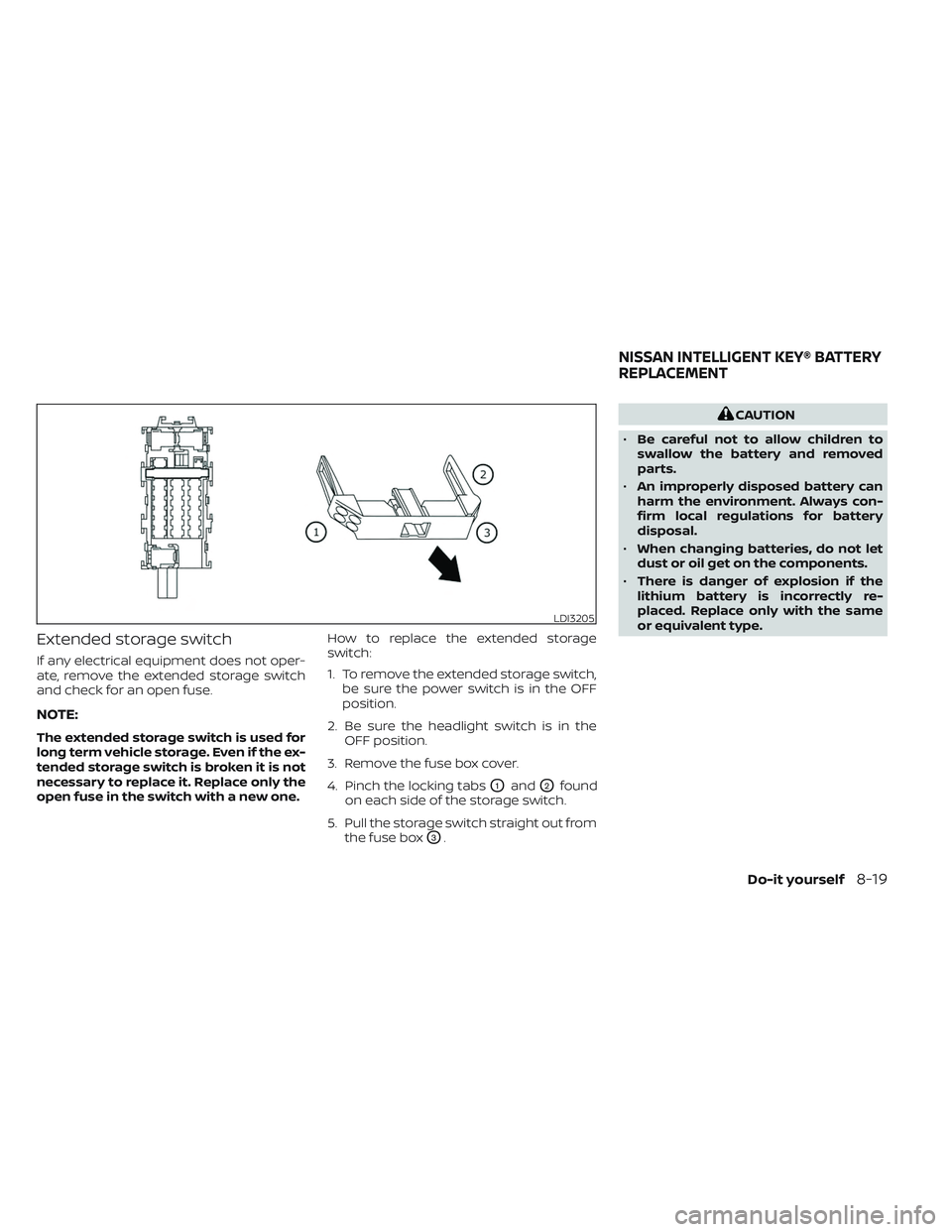
Extended storage switch
If any electrical equipment does not oper-
ate, remove the extended storage switch
and check for an open fuse.
NOTE:
The extended storage switch is used for
long term vehicle storage. Even if the ex-
tended storage switch is broken it is not
necessary to replace it. Replace only the
open fuse in the switch with a new one.How to replace the extended storage
switch:
1. To remove the extended storage switch,
be sure the power switch is in the OFF
position.
2. Be sure the headlight switch is in the OFF position.
3. Remove the fuse box cover.
4. Pinch the locking tabs
O1andO2found
on each side of the storage switch.
5. Pull the storage switch straight out from the fuse box
O3.
CAUTION
• Be careful not to allow children to
swallow the battery and removed
parts.
• An improperly disposed battery can
harm the environment. Always con-
firm local regulations for battery
disposal.
• When changing batteries, do not let
dust or oil get on the components.
• There is danger of explosion if the
lithium battery is incorrectly re-
placed. Replace only with the same
or equivalent type.
LDI3205
NISSAN INTELLIGENT KEY® BATTERY
REPLACEMENT
Do-it yourself8-19
Page 605 of 612
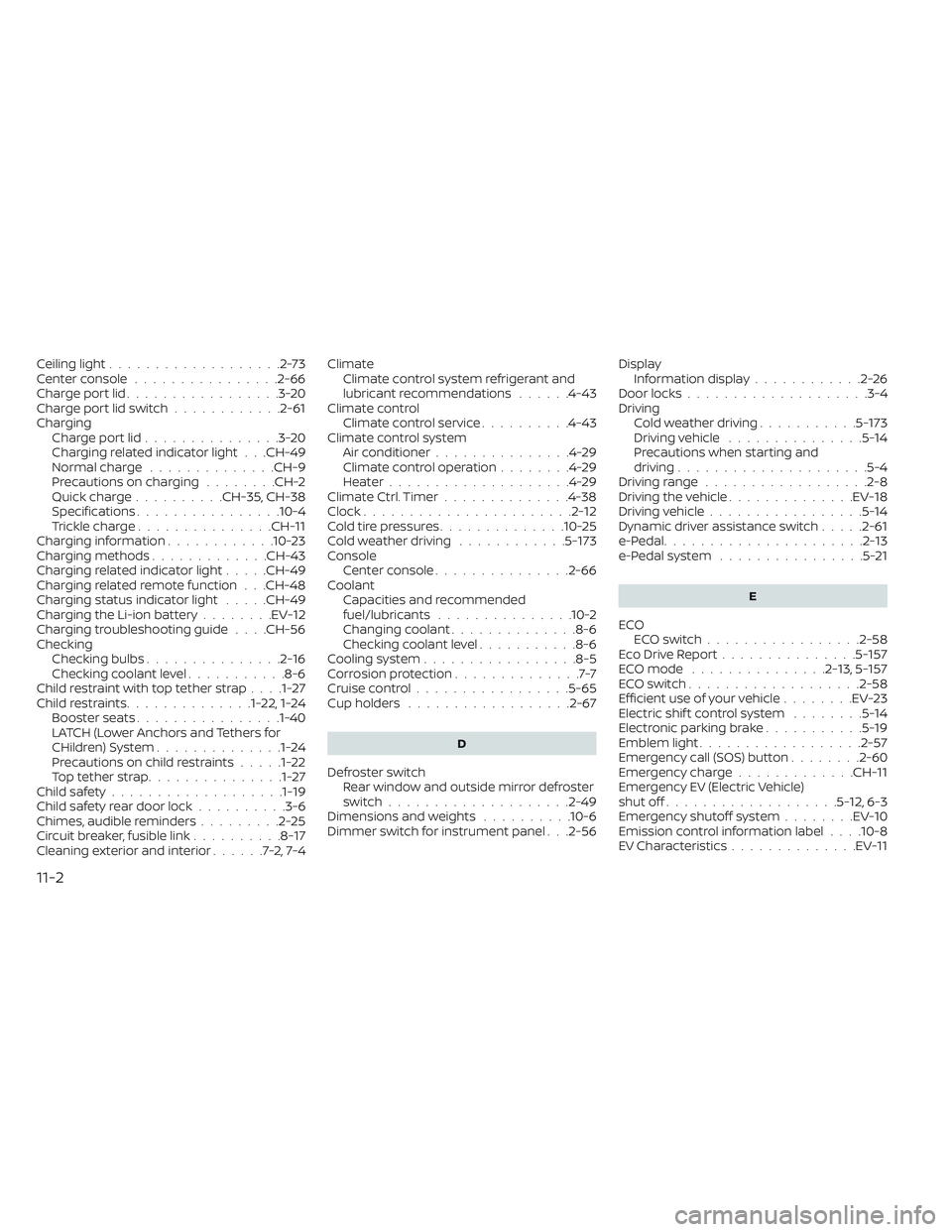
Ceiling light...................2-73Center console................2-66Charge port lid.................3-20Charge port lid switch............2-61ChargingCharge port lid...............3-20Charging related indicator light. . .CH-49Normal charge..............CH-9Precautions on charging........CH-2Quick charge..........CH-35, CH-38Specifications................10-4Trickle charge...............CH-11Charging information............10-23Charging methods.............CH-43Charging related indicator light.....CH-49Charging related remote function. . .CH-48Charging status indicator light.....CH-49Charging the Li-ion battery........EV-12Charging troubleshooting guide. . . .CH-56CheckingChecking bulbs...............2-16Checking coolant level...........8-6Child restraint with top tether strap. . . .1-27Child restraints..............1-22,1-24Booster seats................1-40LATCH (Lower Anchors and Tethers for
CHildren) System..............1-24Precautions on child restraints.....1-22Top tether strap...............1-27Child safety...................1-19Child safety rear door lock..........3-6Chimes, audible reminders.........2-25Circuit breaker, fusible link..........8-17Cleaning exterior and interior......7-2,7-4
ClimateClimate control system refrigerant and
lubricant recommendations
......4-43Climate controlClimate control service..........4-43Climate control systemAir conditioner...............4-29Climate control operation........4-29Heater....................4-29Climate Ctrl. Timer..............4-38Clock.......................2-12Cold tire pressures..............10-25Cold weather driving............5-173ConsoleCenter console...............2-66CoolantCapacities and recommended
fuel/lubricants
...............10-2Changing coolant..............8-6Checking coolant level...........8-6Cooling system................ .8-5Corrosion protection..............7-7Cruise control.................5-65Cup holders................. .2-67
D
Defroster switch
Rear window and outside mirror defroster
switch
................... .2-49Dimensions and weights..........10-6Dimmer switch for instrument panel. . .2-56
Display
Information display............2-26Door locks................... .3-4Driving
Cold weather driving...........5-173Driving vehicle...............5-14Precautions when starting and
driving.................... .5-4Driving range..................2-8Driving the vehicle..............EV-18Driving vehicle.................5-14Dynamic driver assistance switch.....2-61e-Pedal......................2-13e-Pedal system................5-21
E
ECO
ECO switch................ .2-58Eco Drive Report...............5-157ECO mode...............2-13,5-157ECO switch.................. .2-58Efficient use of your vehicle........EV-23Electric shif t control system........5-14Electronic parking brake...........5-19Emblem light..................2-57Emergency call (SOS) button........2-60Emergency charge.............CH-11Emergency EV (Electric Vehicle)
shut off...................5-12,6-3Emergency shutoff system........EV-10Emission control information label. . . .10-8EV Characteristics..............EV-11
11-2
Page 607 of 612
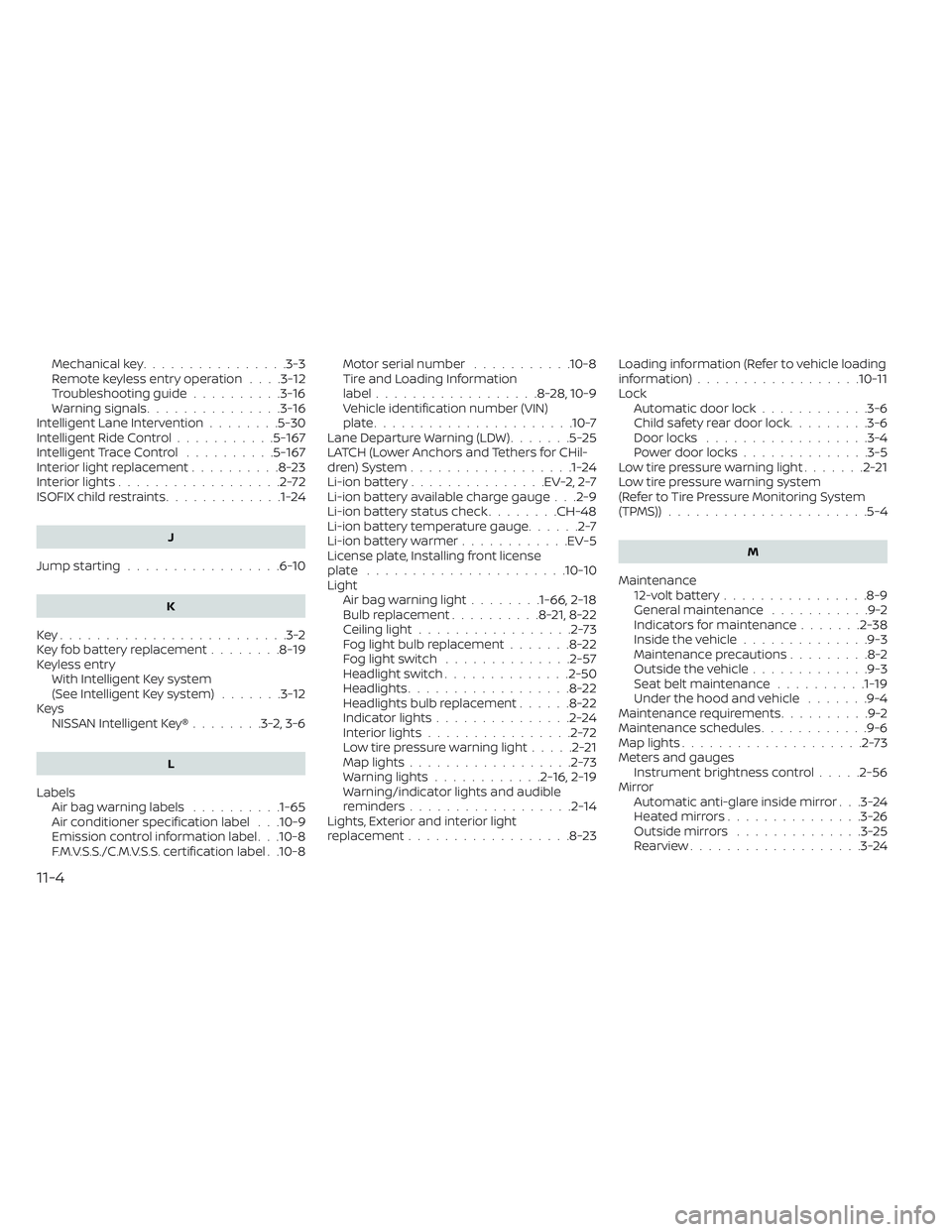
Mechanical key................3-3Remote keyless entry operation. . . .3-12Troubleshooting guide..........3-16Warning signals...............3-16Intelligent Lane Intervention........5-30Intelligent Ride Control...........5-167Intelligent Trace Control..........5-167Interior light replacement..........8-23Interior lights..................2-72ISOFIX child restraints.............1-24
J
Jump starting.................6-10
K
Key.........................3-2Key fob battery replacement........8-19Keyless entryWith Intelligent Key system
(See Intelligent Key system)
.......3-12KeysNISSAN Intelligent Key®........3-2,3-6
L
LabelsAir bag warning labels..........1-65Air conditioner specification label. . .10-9Emission control information label. . .10-8F.M.V.S.S./C.M.V.S.S. certification label. .10-8
Motor serial number...........10-8Tire and Loading Information
label..................8-28, 10-9Vehicle identification number (VIN)
plate..................... .10-7Lane Departure Warning (LDW).......5-25LATCH (Lower Anchors and Tethers for CHil-
dren) System..................1-24Li-ion battery...............EV-2, 2-7Li-ion battery available charge gauge. . .2-9Li-ion battery status check........CH-48Li-ion battery temperature gauge......2-7Li-ion battery warmer............EV-5License plate, Installing front license
plate......................10-10Light
Air bag warning light........1-66, 2-18Bulb replacement..........8-21,8-22Ceiling light.................2-73Fog light bulb replacement.......8-22Fog light switch..............2-57Headlight switch..............2-50Headlights..................8-22Headlights bulb replacement......8-22Indicator lights...............2-24Interior lights................2-72Low tire pressure warning light.....2-21Map lights..................2-73Warning lights............2-16,2-19Warning/indicator lights and audible
reminders..................2-14Lights, Exterior and interior light
replacement..................8-23
Loading information (Refer to vehicle loading
information)................. .10-11Lock
Automatic door lock............3-6Child safety rear door lock.........3-6Door locks................. .3-4Power door locks..............3-5Low tire pressure warning light.......2-21Low tire pressure warning system
(Refer to Tire Pressure Monitoring System
(TPMS))
..................... .5-4
M
Maintenance
12-volt battery................8-9General maintenance...........9-2Indicators for maintenance.......2-38Inside the vehicle..............9-3Maintenance precautions.........8-2Outside the vehicle.............9-3Seat belt maintenance..........1-19Under the hood and vehicle.......9-4Maintenance requirements..........9-2Maintenance schedules............9-6Map lights....................2-73Meters and gaugesInstrument brightness control.....2-56MirrorAutomatic anti-glare inside mirror. . .3-24Heated mirrors...............3-26Outside mirrors..............3-25Rearview...................3-24
11-4