door lock NISSAN LEAF 2023 Owner's Manual
[x] Cancel search | Manufacturer: NISSAN, Model Year: 2023, Model line: LEAF, Model: NISSAN LEAF 2023Pages: 612, PDF Size: 7.42 MB
Page 262 of 612
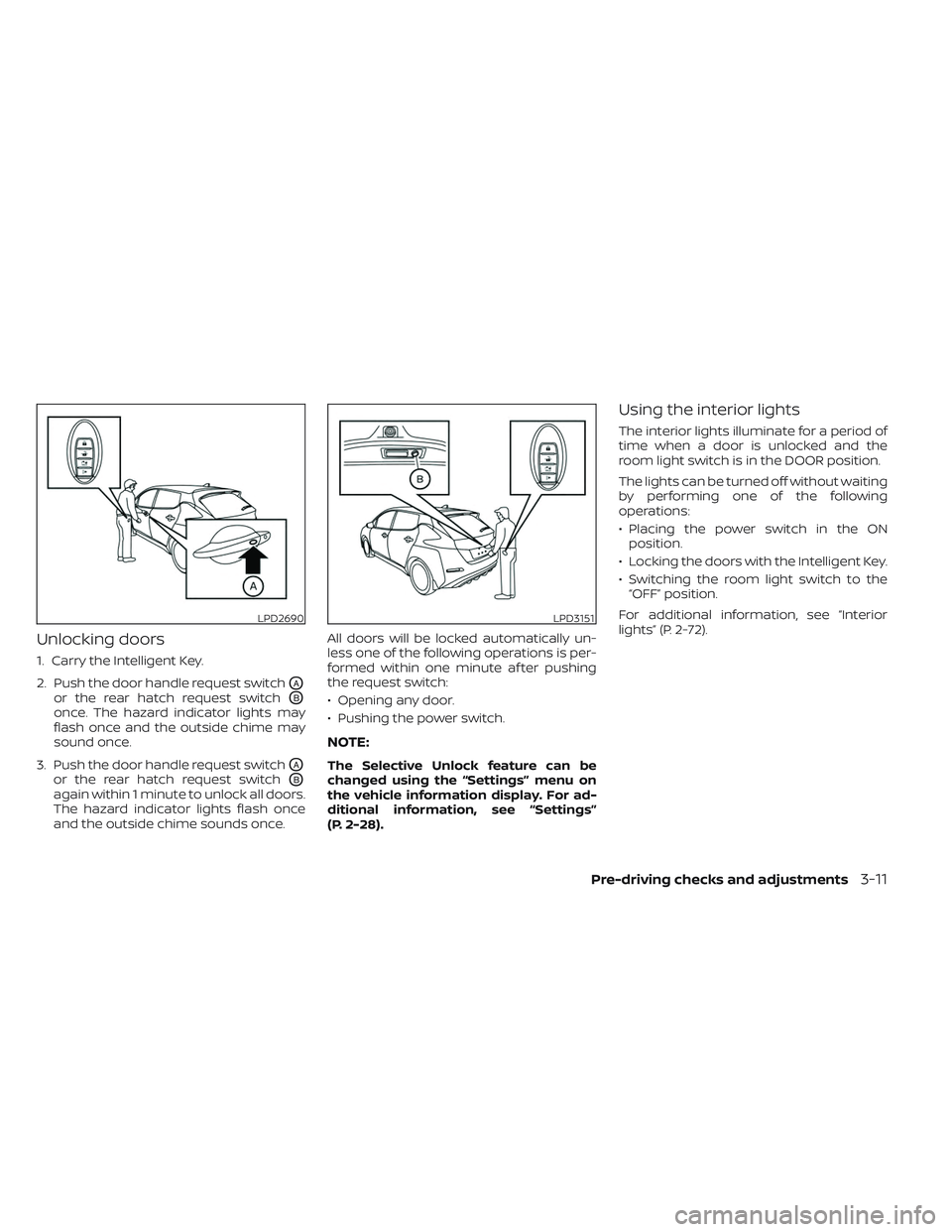
Unlocking doors
1. Carry the Intelligent Key.
2. Push the door handle request switch
OA
or the rear hatch request switchOB
once. The hazard indicator lights may
flash once and the outside chime may
sound once.
3. Push the door handle request switch
OA
or the rear hatch request switchOB
again within 1 minute to unlock all doors.
The hazard indicator lights flash once
and the outside chime sounds once. All doors will be locked automatically un-
less one of the following operations is per-
formed within one minute af ter pushing
the request switch:
• Opening any door.
• Pushing the power switch.
NOTE:
The Selective Unlock feature can be
changed using the “Settings” menu on
the vehicle information display. For ad-
ditional information, see “Settings”
(P. 2-28).
Using the interior lights
The interior lights illuminate for a period of
time when a door is unlocked and the
room light switch is in the DOOR position.
The lights can be turned off without waiting
by performing one of the following
operations:
• Placing the power switch in the ON
position.
• Locking the doors with the Intelligent Key.
• Switching the room light switch to the “OFF” position.
For additional information, see “Interior
lights” (P. 2-72).
LPD2690LPD3151
Pre-driving checks and adjustments3-11
Page 263 of 612
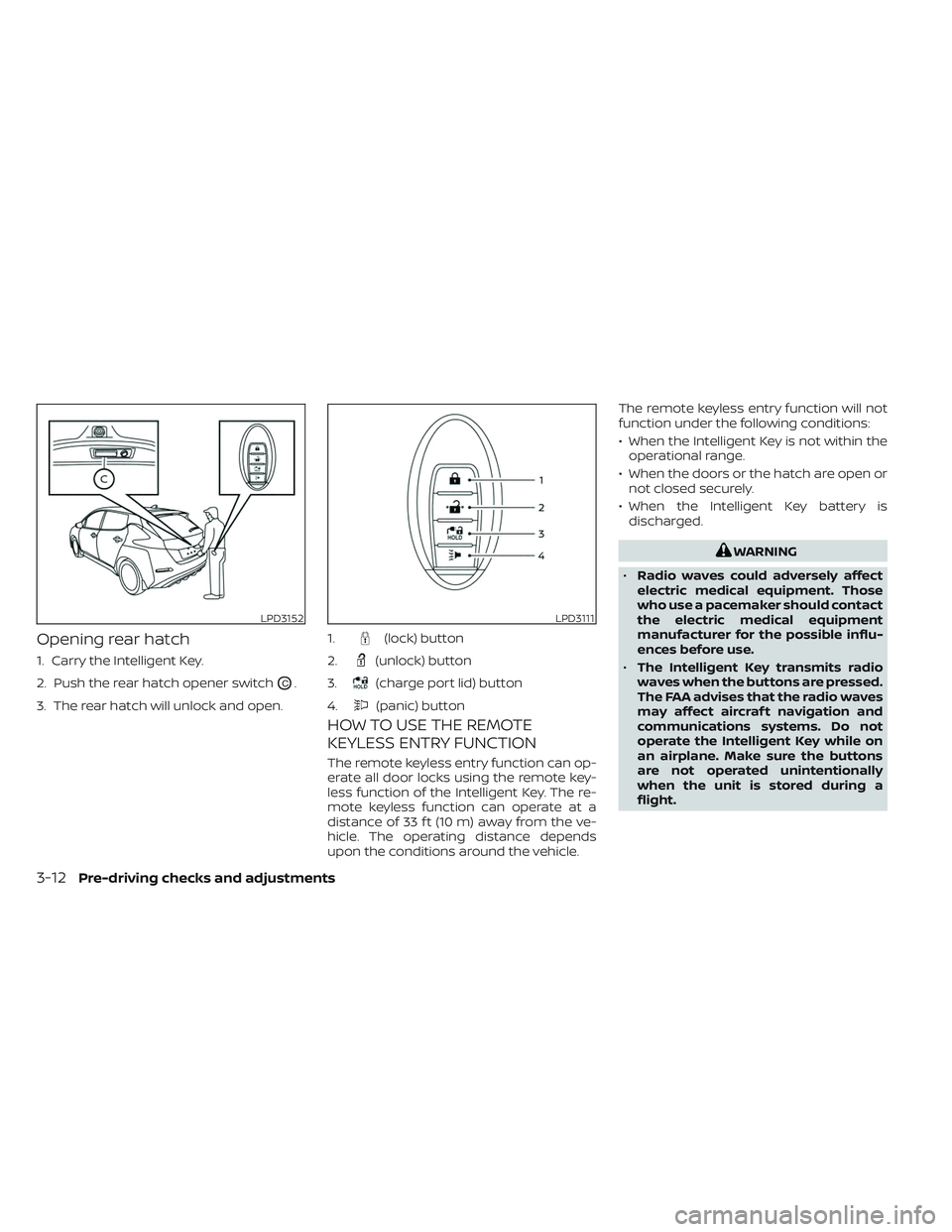
Opening rear hatch
1. Carry the Intelligent Key.
2. Push the rear hatch opener switch
OC.
3. The rear hatch will unlock and open.
HOW TO USE THE REMOTE
KEYLESS ENTRY FUNCTION
The remote keyless entry function can op-
erate all door locks using the remote key-
less function of the Intelligent Key. The re-
mote keyless function can operate at a
distance of 33 f t (10 m) away from the ve-
hicle. The operating distance depends
upon the conditions around the vehicle. The remote keyless entry function will not
function under the following conditions:
• When the Intelligent Key is not within the
operational range.
• When the doors or the hatch are open or not closed securely.
• When the Intelligent Key battery is discharged.
WARNING
• Radio waves could adversely affect
electric medical equipment. Those
who use a pacemaker should contact
the electric medical equipment
manufacturer for the possible influ-
ences before use.
• The Intelligent Key transmits radio
waves when the buttons are pressed.
The FAA advises that the radio waves
may affect aircraf t navigation and
communications systems. Do not
operate the Intelligent Key while on
an airplane. Make sure the buttons
are not operated unintentionally
when the unit is stored during a
flight.
LPD3152LPD3111
1.(lock) button
2.
(unlock) button
3.
(charge port lid) button
4.
(panic) button
3-12Pre-driving checks and adjustments
Page 264 of 612
CAUTION
• Do not allow the Intelligent Key,
which contains electrical compo-
nents, to come into contact with wa-
ter or salt water. This could affect the
system function.
• Do not drop the Intelligent Key.
• Do not strike the Intelligent Key
sharply against another object.
• Do not change or modif y the Intelli-
gent Key.
• Wetting may damage the Intelligent
Key. If the Intelligent Key gets wet,
immediately wipe until it is com-
pletely dry.
• Do not place the Intelligent Key for an
extended period in an area where
temperatures exceed 140°F (60°C).
• Do not attach the Intelligent Key with
a key holder that contains a magnet.
• Do not place the Intelligent Key near
equipment that produces a magnetic
field, such as a TV, audio equipment,
personal computers or cellular
phone.
• When locking the doors using the In-
telligent Key, be sure not to leave the
key in the vehicle.Locking doors
1. Place the power switch in the LOCK position.
2. Close all doors.
3. Press the
button on the Intelli-
gent Key.
4. The hazard indicator lights flash twice and the horn beeps once.
5. All doors and the rear hatch will be locked.
WARNING
Af ter locking the doors using the Intel-
ligent Key, be sure that the doors have
been securely locked by operating the
door handles. Failure to follow these in-
structions may result in inadvertently
unlocking the doors, which may de-
crease the safety and security of your
vehicle.
Unlocking doors
1. Press thebutton on the Intelligent
Key to unlock the driver’s door.
2. The hazard indicator lights flash once.
3.
Press thebutton again within 1 min-
ute to unlock all doors and rear hatch.
All doors and rear hatch will be locked au-
tomatically unless one of the following op-
erations is performed within 1 minute af ter
pressing the
button:
• Opening any doors or rear hatch.
• Pushing the power switch.
Using the interior lights
The interior lights illuminate for a period of
time when a door is unlocked and the
room light switch is in the DOOR position.
The lights can be turned off without waiting
by performing one of the following
operations:
• Placing the power switch in the ON position.
• Locking the doors with the Intelligent Key.
• Switching the room light switch to the “OFF” position.
For additional information, see “Interior
lights” (P. 2-72).
Pre-driving checks and adjustments3-13
Page 266 of 612
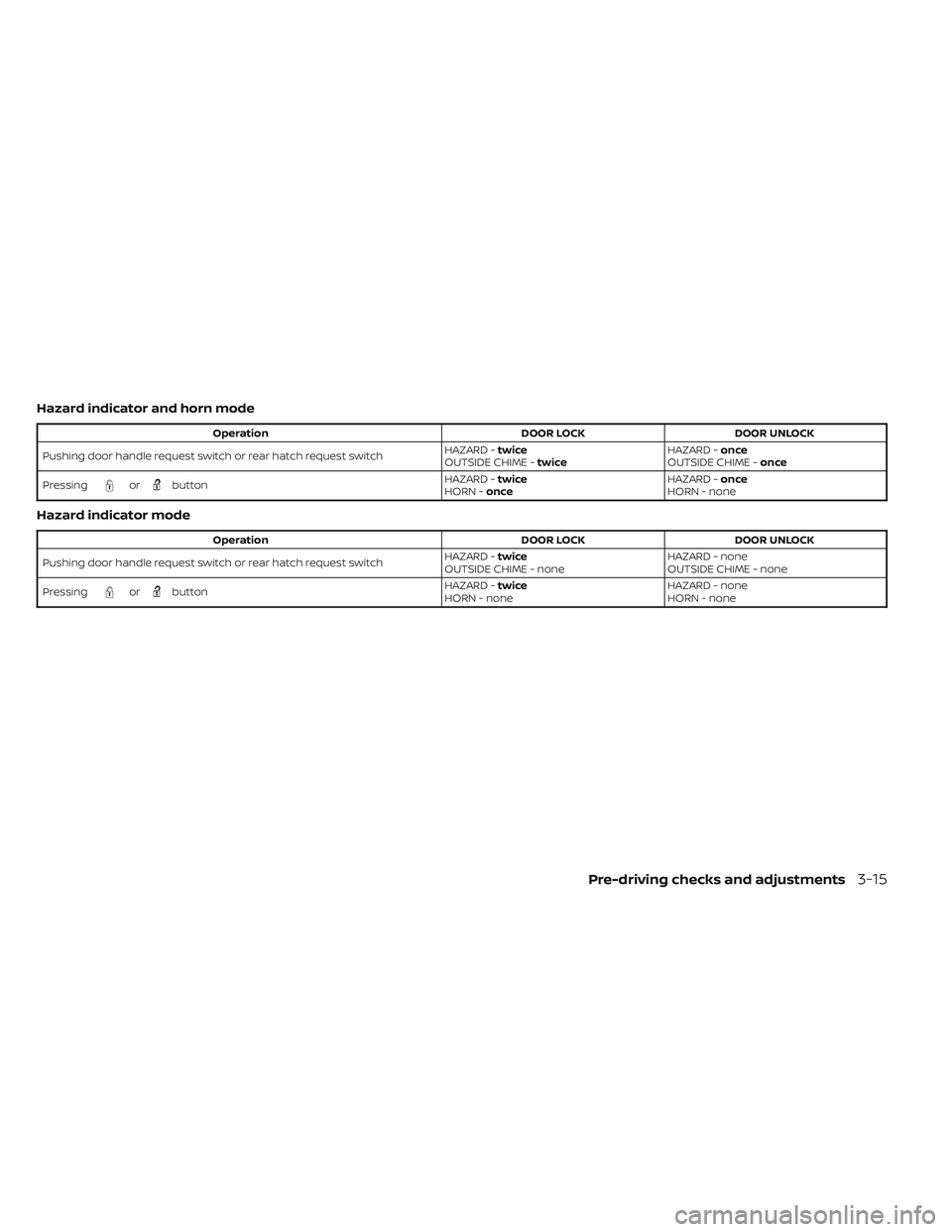
Hazard indicator and horn mode
OperationDOOR LOCKDOOR UNLOCK
Pushing door handle request switch or rear hatch request switch HAZARD -
twice
OUTSIDE CHIME - twice HAZARD -
once
OUTSIDE CHIME - once
Pressing
orbutton HAZARD -
twice
HORN - once HAZARD -
once
HORN - none
Hazard indicator mode
Operation DOOR LOCKDOOR UNLOCK
Pushing door handle request switch or rear hatch request switch HAZARD -
twice
OUTSIDE CHIME - none HAZARD - none
OUTSIDE CHIME - none
Pressing
orbutton HAZARD -
twice
HORN - none HAZARD - none
HORN - none
Pre-driving checks and adjustments3-15
Page 268 of 612
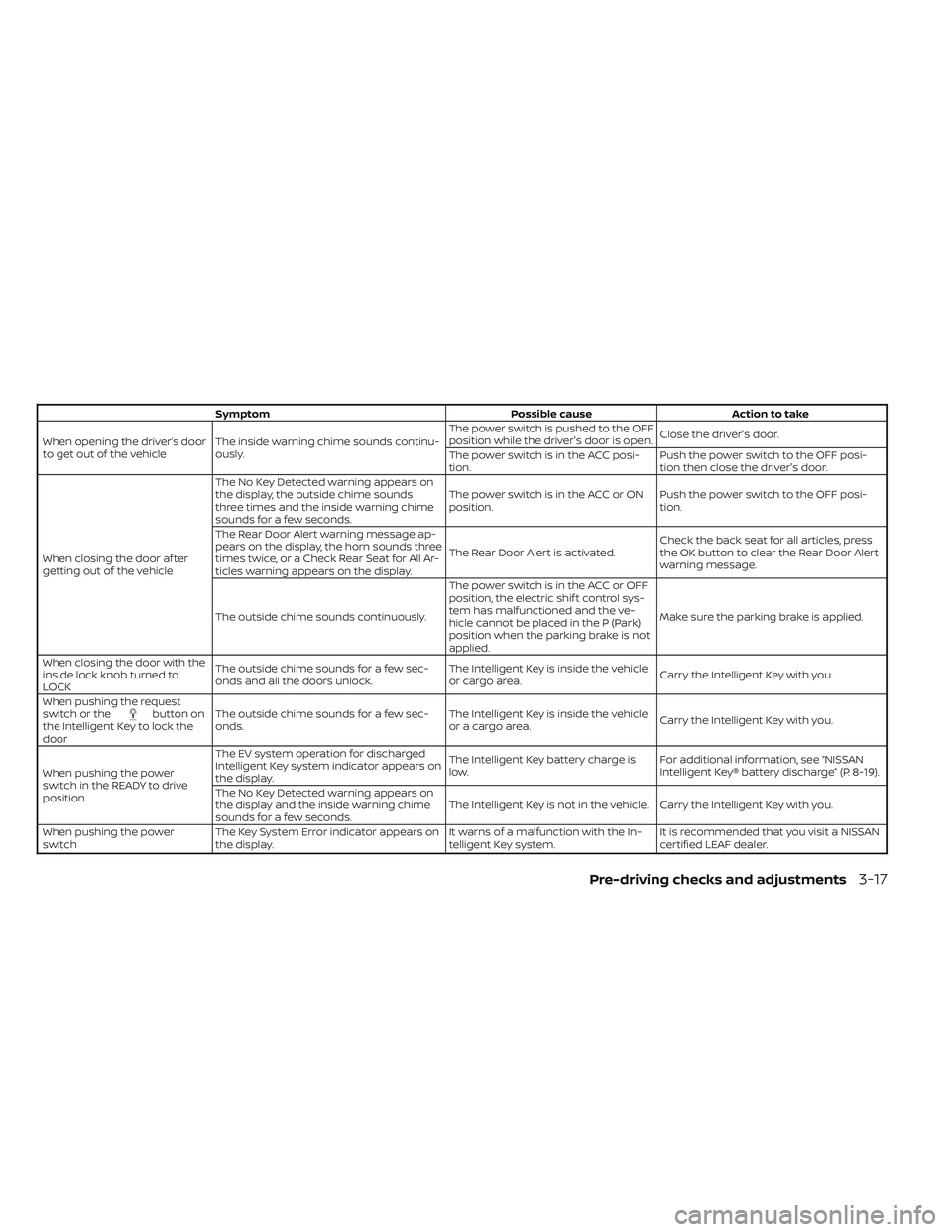
SymptomPossible causeAction to take
When opening the driver’s door
to get out of the vehicle The inside warning chime sounds continu-
ously. The power switch is pushed to the OFF
position while the driver's door is open.
Close the driver's door.
The power switch is in the ACC posi-
tion. Push the power switch to the OFF posi-
tion then close the driver's door.
When closing the door af ter
getting out of the vehicle The No Key Detected warning appears on
the display, the outside chime sounds
three times and the inside warning chime
sounds for a few seconds.
The power switch is in the ACC or ON
position.
Push the power switch to the OFF posi-
tion.
The Rear Door Alert warning message ap-
pears on the display, the horn sounds three
times twice, or a Check Rear Seat for All Ar-
ticles warning appears on the display. The Rear Door Alert is activated.
Check the back seat for all articles, press
the OK button to clear the Rear Door Alert
warning message.
The outside chime sounds continuously. The power switch is in the ACC or OFF
position, the electric shif t control sys-
tem has malfunctioned and the ve-
hicle cannot be placed in the P (Park)
position when the parking brake is not
applied.Make sure the parking brake is applied.
When closing the door with the
inside lock knob turned to
LOCK The outside chime sounds for a few sec-
onds and all the doors unlock.
The Intelligent Key is inside the vehicle
or cargo area.
Carry the Intelligent Key with you.
When pushing the request
switch or the
button on
the Intelligent Key to lock the
door The outside chime sounds for a few sec-
onds.
The Intelligent Key is inside the vehicle
or a cargo area.
Carry the Intelligent Key with you.
When pushing the power
switch in the READY to drive
position The EV system operation for discharged
Intelligent Key system indicator appears on
the display.
The Intelligent Key battery charge is
low.
For additional information, see “NISSAN
Intelligent Key® battery discharge” (P. 8-19).
The No Key Detected warning appears on
the display and the inside warning chime
sounds for a few seconds. The Intelligent Key is not in the vehicle. Carry the Intelligent Key with you.
When pushing the power
switch The Key System Error indicator appears on
the display. It warns of a malfunction with the In-
telligent Key system.It is recommended that you visit a NISSAN
certified LEAF dealer.
Pre-driving checks and adjustments3-17
Page 270 of 612
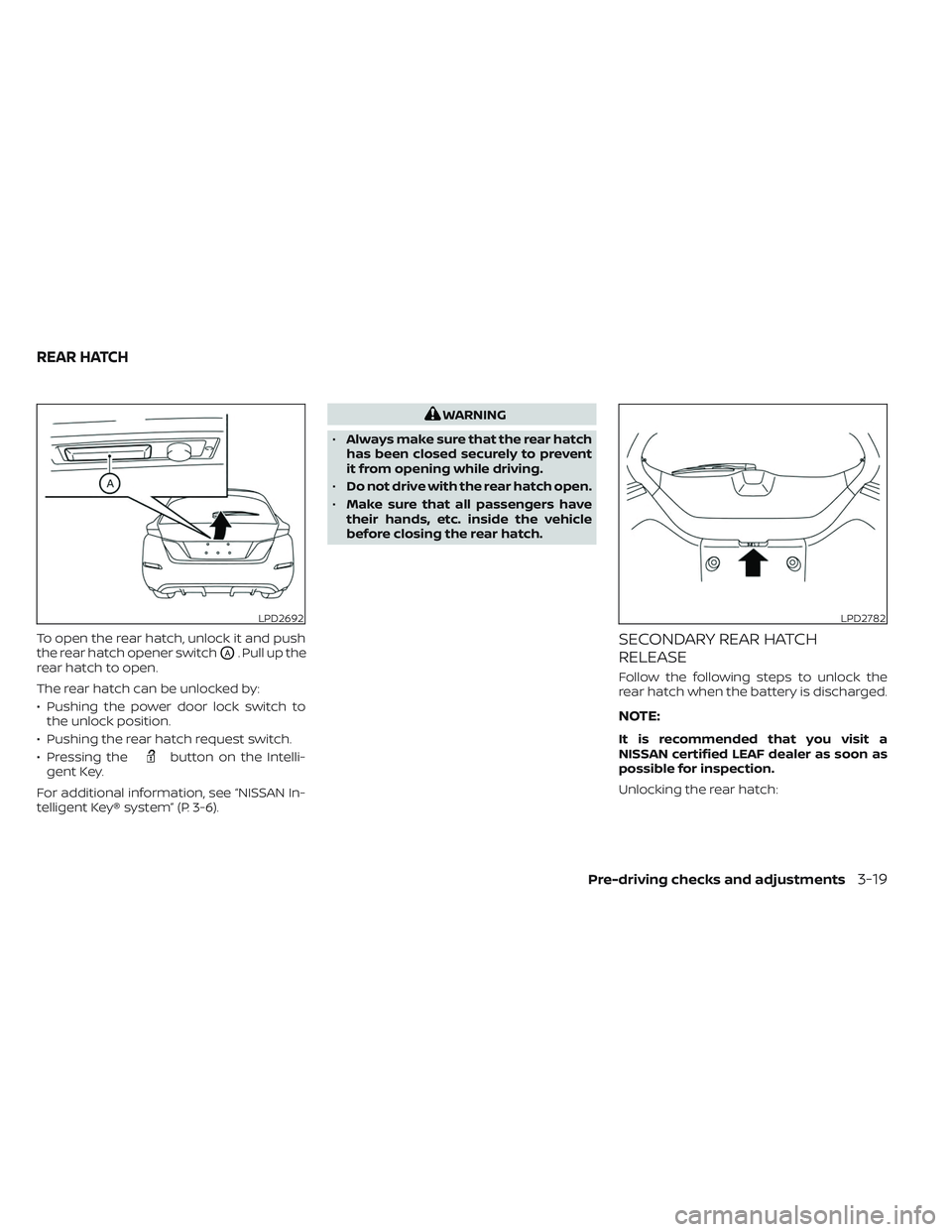
To open the rear hatch, unlock it and push
the rear hatch opener switch
OA. Pull up the
rear hatch to open.
The rear hatch can be unlocked by:
• Pushing the power door lock switch to the unlock position.
• Pushing the rear hatch request switch.
• Pressing the
button on the Intelli-
gent Key.
For additional information, see “NISSAN In-
telligent Key® system” (P. 3-6).
WARNING
• Always make sure that the rear hatch
has been closed securely to prevent
it from opening while driving.
• Do not drive with the rear hatch open.
• Make sure that all passengers have
their hands, etc. inside the vehicle
before closing the rear hatch.
SECONDARY REAR HATCH
RELEASE
Follow the following steps to unlock the
rear hatch when the battery is discharged.
NOTE:
It is recommended that you visit a
NISSAN certified LEAF dealer as soon as
possible for inspection.
Unlocking the rear hatch:
LPD2692LPD2782
REAR HATCH
Pre-driving checks and adjustments3-19
Page 325 of 612
Automatic Emergency Braking (AEB) with
Pedestrian Detection.......................... 5-130
AEB with Pedestrian Detection system
operation .................................. 5-131
Turning the AEB with Pedestrian
Detection system on/off ...................5-133
AEB with Pedestrian Detection system
limitations ................................. 5-134
System temporarily unavailable ............5-137
System malfunction ........................ 5-139
System maintenance ......................5-139
Intelligent Forward Collision Warning (I-FCW) . . 5-141 I-FCW System operation ....................5-142
Turning the I-FCW system on/off ...........5-144
I-FCW system limitations ...................5-145
System temporarily unavailable ............5-150
System malfunction ........................ 5-151
System maintenance ......................5-152
Intelligent Driver Alertness (I-DA)
(if so equipped) ................................ 5-154
I-DA system operation .....................5-154
How to enable/disable the I-DA system ....5-155
I-DA system limitations .....................5-155
ECO Mode ..................................... 5-157
ECO drive report ........................... 5-157Increasing power economy
...................5-158
Parking/parking on hills .......................5-159
Power steering system ........................ 5-161
Brake system ................................. 5-161
Brake precautions .......................... 5-161
Anti-lock Braking System (ABS) .............5-163
Brake Assist ................................ 5-164
Vehicle Dynamic Control (VDC) system ........5-164
Brake force distribution ....................5-166
Chassis control ............................... 5-167
Intelligent Trace Control (I-TC) ..............5-167
Active Ride Control (ARC) ...................5-168
Hill start assist system ........................5-168
Rear sonar system (RSS) ......................
5-169
S
ystem operation .......................... 5-170
How to enable/disable the rear sonar
system ...................................... 5-171
Sonar limitations ........................... 5-172
System temporarily unavailable ............5-172
System maintenance ......................5-173
Cold weather driving .......................... 5-173
Freeing a frozen door lock ..................5-174
Antifreeze .................................. 5-174
12-volt battery .............................. 5-174
Page 334 of 612
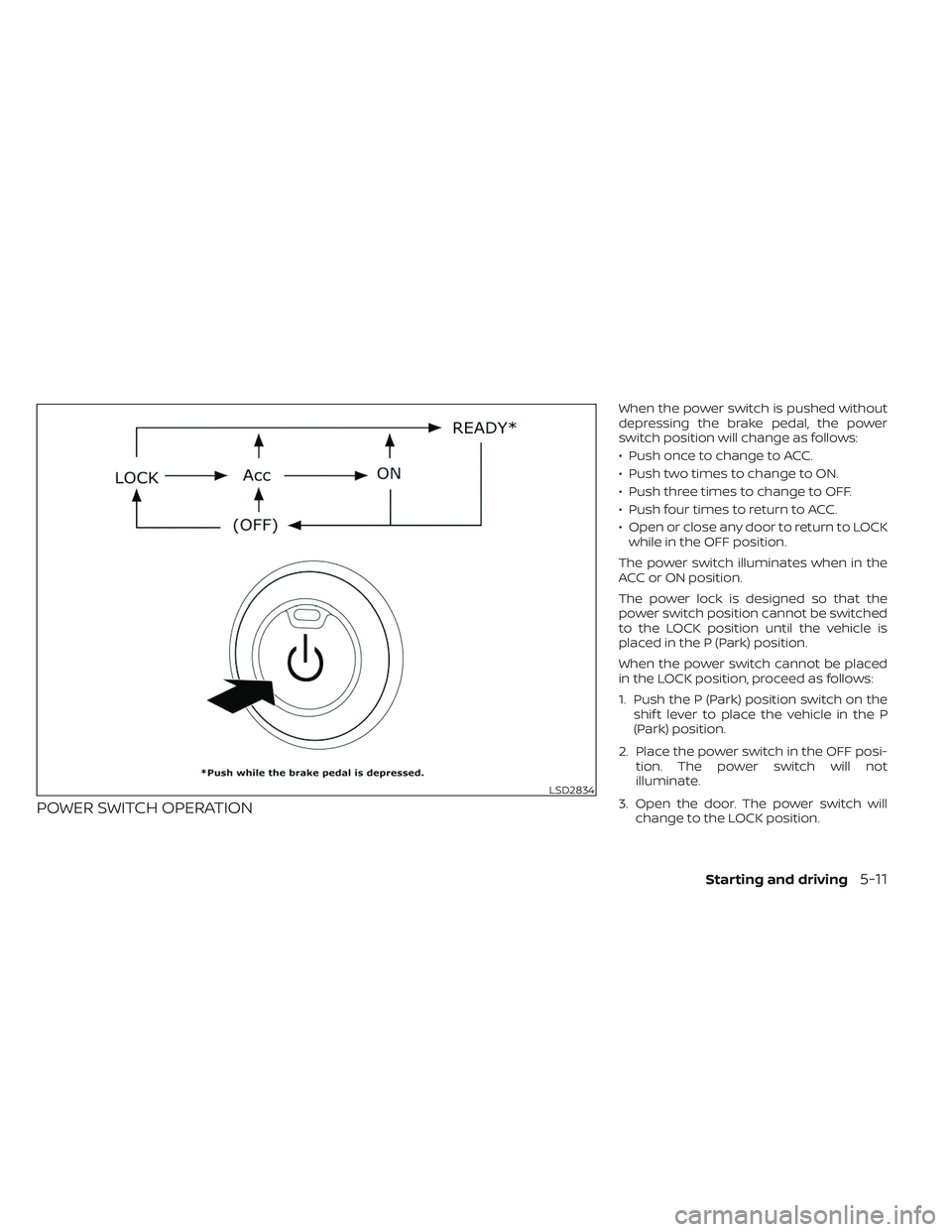
POWER SWITCH OPERATION
When the power switch is pushed without
depressing the brake pedal, the power
switch position will change as follows:
• Push once to change to ACC.
• Push two times to change to ON.
• Push three times to change to OFF.
• Push four times to return to ACC.
• Open or close any door to return to LOCKwhile in the OFF position.
The power switch illuminates when in the
ACC or ON position.
The power lock is designed so that the
power switch position cannot be switched
to the LOCK position until the vehicle is
placed in the P (Park) position.
When the power switch cannot be placed
in the LOCK position, proceed as follows:
1. Push the P (Park) position switch on the shif t lever to place the vehicle in the P
(Park) position.
2. Place the power switch in the OFF posi- tion. The power switch will not
illuminate.
3. Open the door. The power switch will change to the LOCK position.
LSD2834
Starting and driving5-11
Page 339 of 612
NOTE:
• Confirm that the vehicle is in the de-sired shif t position by checking the
shif t indicator
O1located near the shif t
lever or the vehicle information display
in the meter.
• To place the vehicle into the D (Drive) position from the B mode, move the
shif t lever into the D (Drive) position.
Af ter placing the vehicle in the READY to
drive position, fully depress the brake pedal,
and move the shif t lever to any of the pre-
ferred shif t positions.
If the power switch is placed in the OFF or
ACC position for any reason while the shif t
position is in any position other than the P
(Park) position, the power switch cannot be
placed in the LOCK position.
If the power switch cannot be placed in the
LOCK position, perform the following steps:
1. Apply the parking brake when the ve- hicle is stopped.
2. Place the power switch in the ON posi- tion while depressing the foot brake
pedal.
3. Push the P (Park) position switch and confirm the vehicle is in the P (Park)
position. 4. Place the power switch in the OFF
position.NOTE:
The vehicle automatically applies the P
(Park) position when the power switch is
in the OFF position.
When the following conditions overlap,
the shif t position may be automatically
switched to P (Park):
– When maintaining a stop and holdwith the e-pedal.
– When taking off the seatbelt.
– When opening the door.
WARNING
• The shif t lever is always in the home
position when released. When the
power switch is placed in the READY
to drive position, the driver needs to
confirm that the vehicle is in the P
(Park) position. The indicator next to
the “P” by the shif t lever is illumi-
nated and the “P” is displayed on the
meter. If the vehicle is in the D (Drive)
position or R (Reverse) position when
the power switch is placed in the
READY to drive position, this may
cause a sudden start which could re-
sult in an accident.
• On a hilly road, do not allow the ve-
hicle to roll backwards while in the D
(Drive) position or B mode or allow
the vehicle to roll forward while in the
R (Reverse) position. This may cause
an accident.
5-16Starting and driving
Page 342 of 612
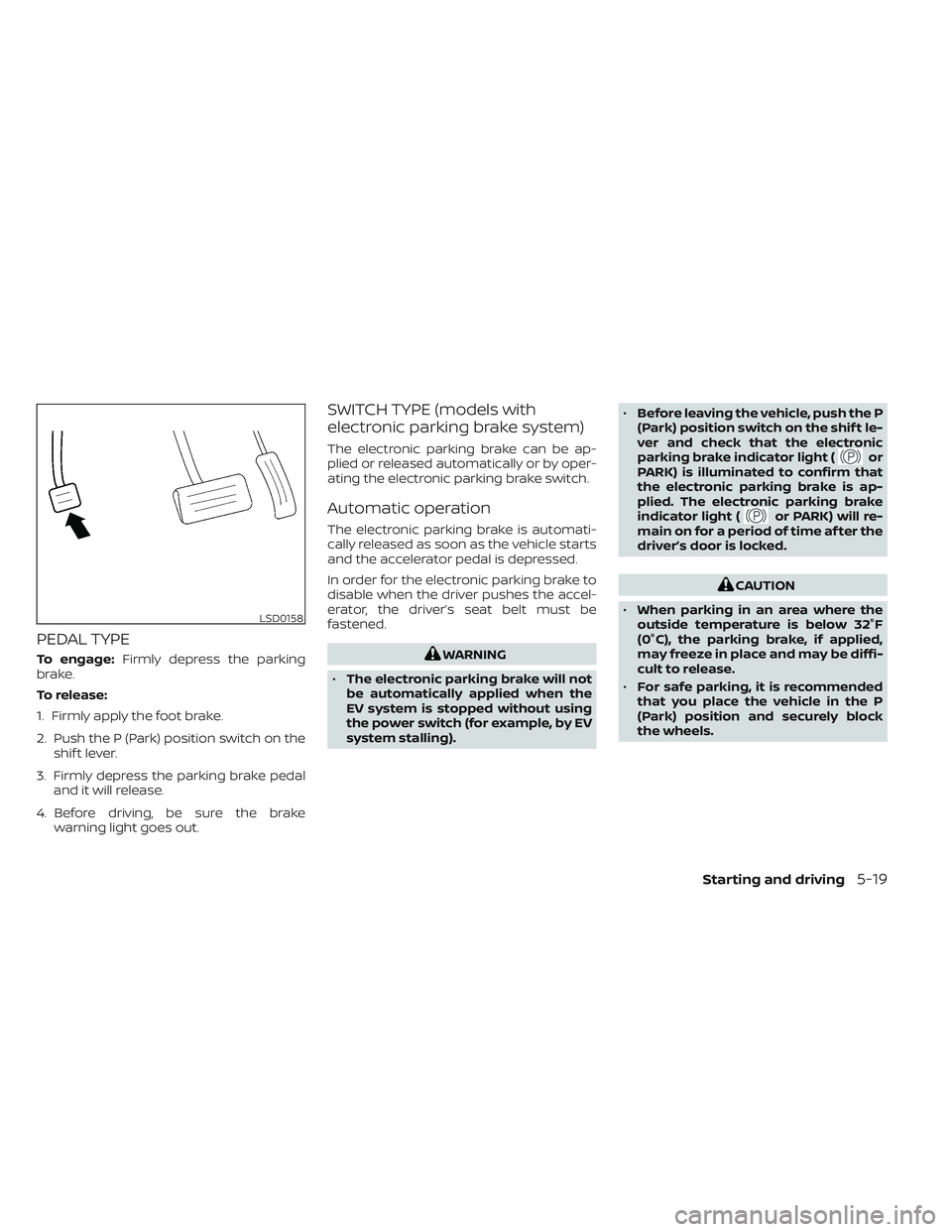
PEDAL TYPE
To engage:Firmly depress the parking
brake.
To release:
1. Firmly apply the foot brake.
2. Push the P (Park) position switch on the shif t lever.
3. Firmly depress the parking brake pedal and it will release.
4. Before driving, be sure the brake warning light goes out.
SWITCH TYPE (models with
electronic parking brake system)
The electronic parking brake can be ap-
plied or released automatically or by oper-
ating the electronic parking brake switch.
Automatic operation
The electronic parking brake is automati-
cally released as soon as the vehicle starts
and the accelerator pedal is depressed.
In order for the electronic parking brake to
disable when the driver pushes the accel-
erator, the driver’s seat belt must be
fastened.
WARNING
• The electronic parking brake will not
be automatically applied when the
EV system is stopped without using
the power switch (for example, by EV
system stalling). •
Before leaving the vehicle, push the P
(Park) position switch on the shif t le-
ver and check that the electronic
parking brake indicator light (
or
PARK) is illuminated to confirm that
the electronic parking brake is ap-
plied. The electronic parking brake
indicator light (
or PARK) will re-
main on for a period of time af ter the
driver’s door is locked.
CAUTION
• When parking in an area where the
outside temperature is below 32°F
(0°C), the parking brake, if applied,
may freeze in place and may be diffi-
cult to release.
• For safe parking, it is recommended
that you place the vehicle in the P
(Park) position and securely block
the wheels.
LSD0158
Starting and driving5-19