cruise control NISSAN LEAF 2023 Owner's Guide
[x] Cancel search | Manufacturer: NISSAN, Model Year: 2023, Model line: LEAF, Model: NISSAN LEAF 2023Pages: 612, PDF Size: 7.42 MB
Page 444 of 612
Le present appareil est conforme aux CNR
d’Industrie Canada applicables aux appar-
eils radio exempts de licence. L’exploitation
est autorisee aux deux conditions
suivantes:
1. L’appareil ne doit pas produire de brouil-lage, et
2. L’utilisateur de l’appareil doit accepter tout brouillage radioelectrique subi,
meme si le brouillage est susceptible
d’en compromettre le fonctionnement.
Radio Frequency Radiation Exposure
Information:
This equipment complies with FCC radia-
tion exposure limits set forth for an uncon-
trolled environment.
This equipment should be installed and
operated with minimum distance of 30 cm
between the radiator and your body.
The transmitter must not be co-located or
operating in conjunction with any other an-
tenna or transmitter. Cet equipement est conforme aux limites
d’exposition aux rayonnements IC etablies
pour un environnement non controle. Cet
equipement doit etre installe et utilise avec
un minimum de 30 cm de distance entre la
source de rayonnement et votre corps.
FCC Notice
Changes or modifications not expressly
approved by the party responsible for
compliance could void the user’s authority
to operate the equipment.
CONVENTIONAL (fixed speed)
CRUISE CONTROL MODE
NOTE:
ProPILOT Assist provides no approach
warnings, automatic braking, or steering
assist in the conventional (fixed speed)
cruise control mode.
This mode allows driving at a speed be-
tween 25 to 90 mph (40 to 144 km/h) with-
out keeping your foot on the accelerator
pedal.
WARNING
• In the conventional (fixed speed)
cruise control mode, a warning
chime does not sound to warn you if
you are too close to the vehicle
ahead, as neither the presence of the
vehicle ahead nor the vehicle-to-
vehicle distance is detected.
• Pay special attention to the distance
between your vehicle and the vehicle
ahead of you or a collision could
occur.
• Always confirm the setting in the ICC
system display.
• Do not use the conventional (fixed
speed) cruise control mode when
driving under the following
conditions:
– When it is not possible to keep the
vehicle at a set speed
– In heavy traffic or in traffic that
varies in speed
– On winding or hilly roads
– On slippery roads (rain, snow, ice,
etc.)
– In very windy areas
• Doing so could cause a loss of vehicle
control and result in an accident.
Starting and driving5-121
Page 445 of 612
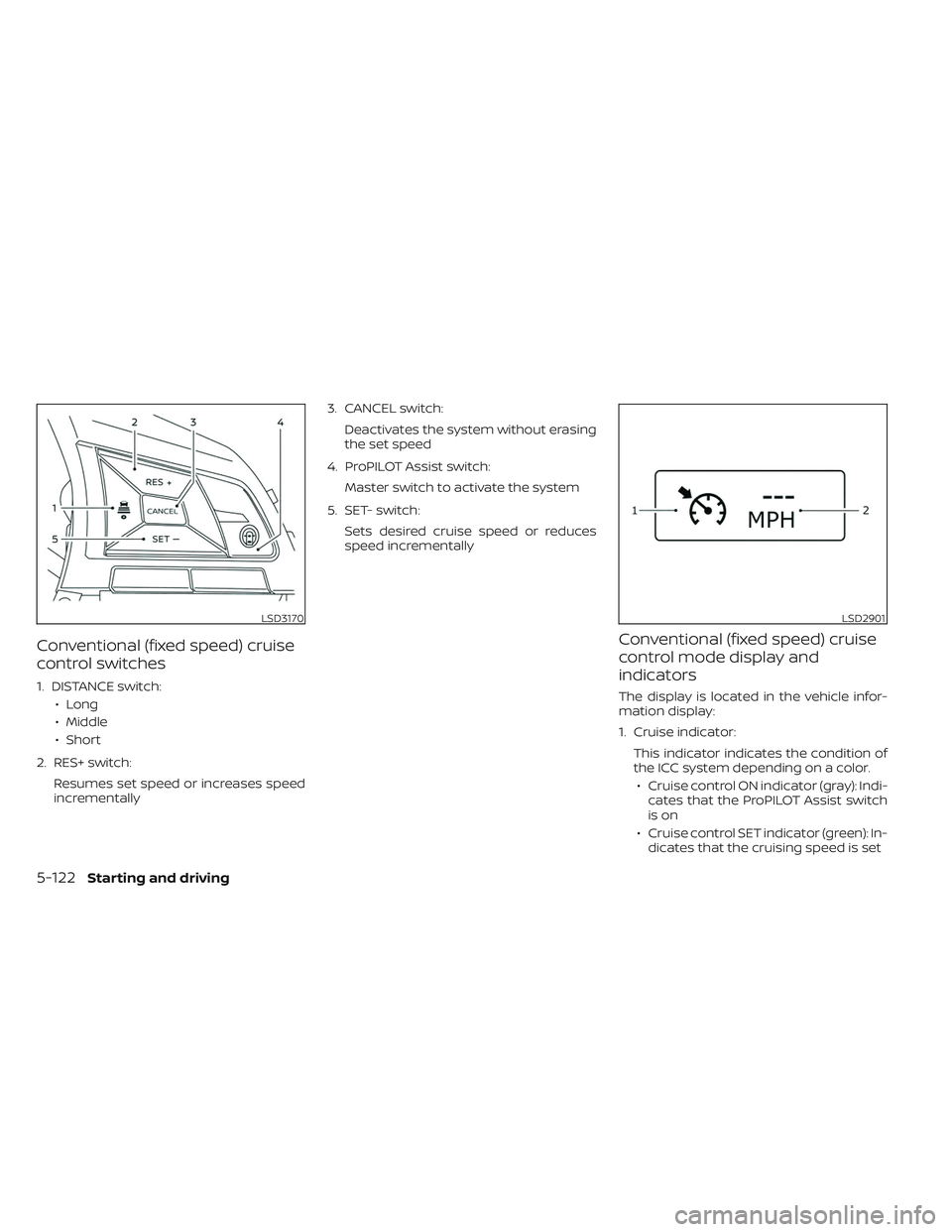
Conventional (fixed speed) cruise
control switches
1. DISTANCE switch:• Long
• Middle
• Short
2. RES+ switch: Resumes set speed or increases speed
incrementally 3. CANCEL switch:
Deactivates the system without erasing
the set speed
4. ProPILOT Assist switch: Master switch to activate the system
5. SET- switch: Sets desired cruise speed or reduces
speed incrementally
Conventional (fixed speed) cruise
control mode display and
indicators
The display is located in the vehicle infor-
mation display:
1. Cruise indicator:This indicator indicates the condition of
the ICC system depending on a color.• Cruise control ON indicator (gray): Indi- cates that the ProPILOT Assist switch
is on
• Cruise control SET indicator (green): In- dicates that the cruising speed is set
LSD3170LSD2901
5-122Starting and driving
Page 446 of 612
• Cruise control warning (yellow): Indi-cates that there is a malfunction in the
ICC system
2. Set vehicle speed indicator: This indicator indicates the set vehicle
speed. For Canadian models, the speed
is displayed in km/h.
Operating conventional (fixed
speed) cruise control mode
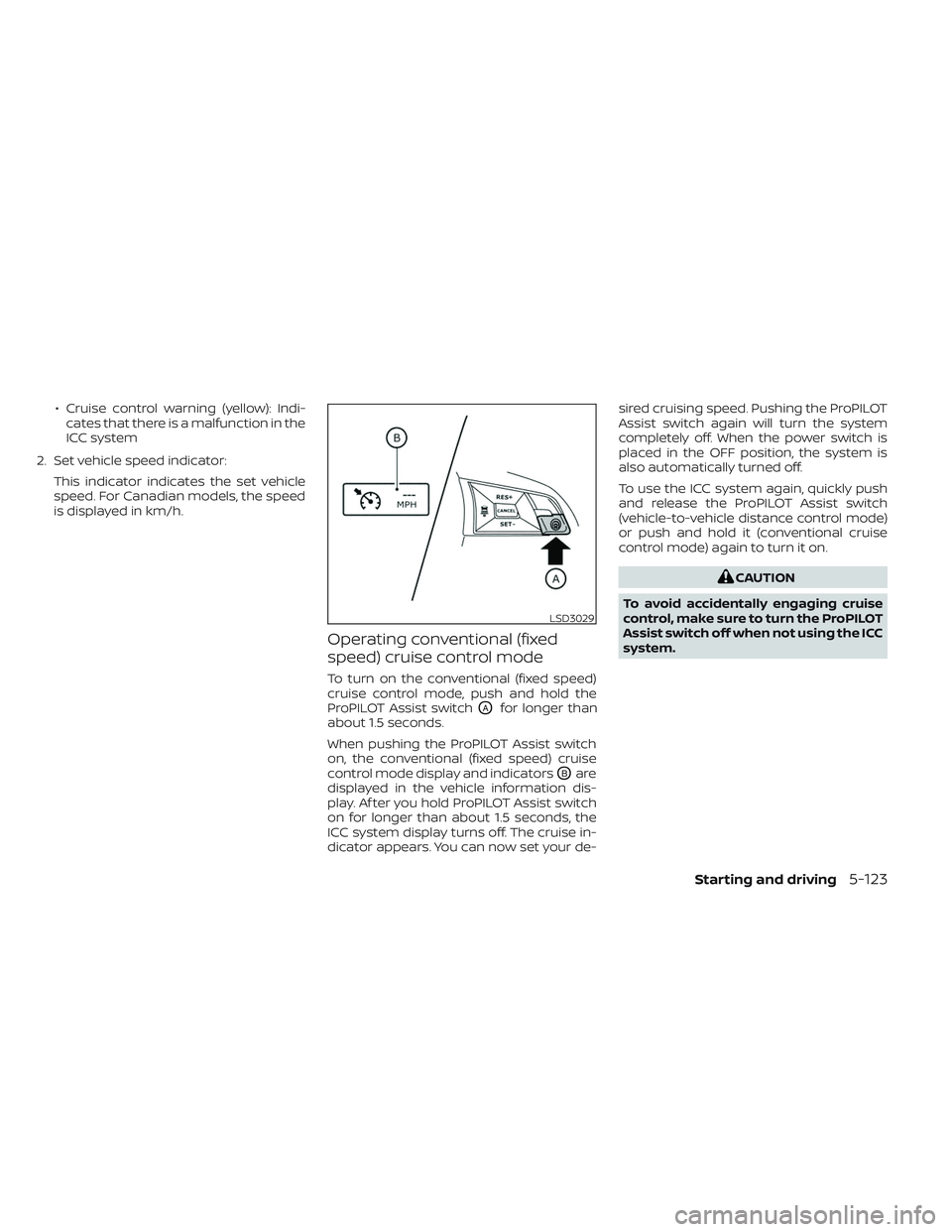
To turn on the conventional (fixed speed)
cruise control mode, push and hold the
ProPILOT Assist switch
OAfor longer than
about 1.5 seconds.
When pushing the ProPILOT Assist switch
on, the conventional (fixed speed) cruise
control mode display and indicators
OBare
displayed in the vehicle information dis-
play. Af ter you hold ProPILOT Assist switch
on for longer than about 1.5 seconds, the
ICC system display turns off. The cruise in-
dicator appears. You can now set your de- sired cruising speed. Pushing the ProPILOT
Assist switch again will turn the system
completely off. When the power switch is
placed in the OFF position, the system is
also automatically turned off.
To use the ICC system again, quickly push
and release the ProPILOT Assist switch
(vehicle-to-vehicle distance control mode)
or push and hold it (conventional cruise
control mode) again to turn it on.
CAUTION
To avoid accidentally engaging cruise
control, make sure to turn the ProPILOT
Assist switch off when not using the ICC
system.
LSD3029
Starting and driving5-123
Page 480 of 612
The ECO mode helps reduce power con-
sumption by reducing acceleration when
compared to the same accelerator pedal
position in the D (Drive) position. Use the
ECO mode for maximum driving range and
for city driving.
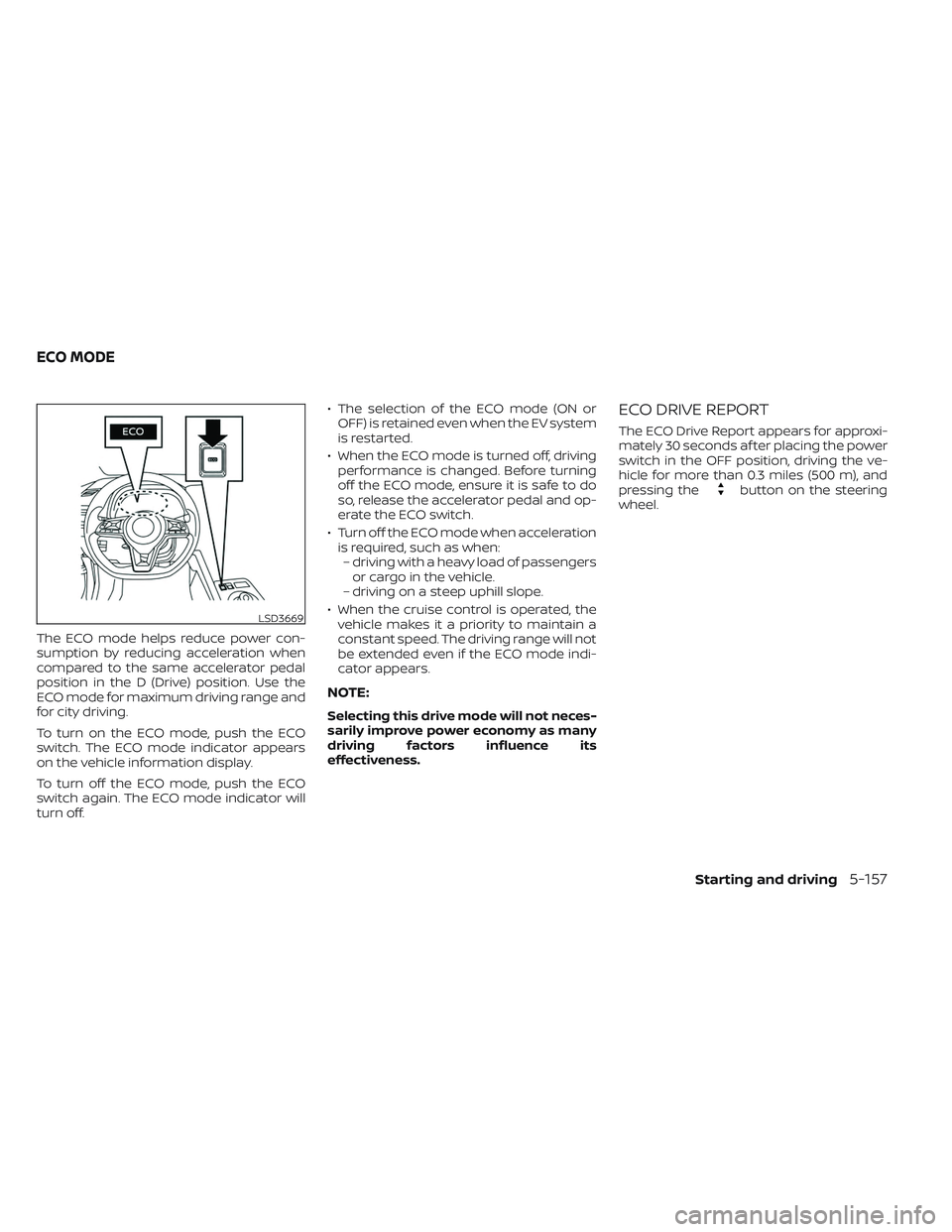
To turn on the ECO mode, push the ECO
switch. The ECO mode indicator appears
on the vehicle information display.
To turn off the ECO mode, push the ECO
switch again. The ECO mode indicator will
turn off.• The selection of the ECO mode (ON or
OFF) is retained even when the EV system
is restarted.
• When the ECO mode is turned off, driving performance is changed. Before turning
off the ECO mode, ensure it is safe to do
so, release the accelerator pedal and op-
erate the ECO switch.
• Turn off the ECO mode when acceleration is required, such as when:– driving with a heavy load of passengers or cargo in the vehicle.
– driving on a steep uphill slope.
• When the cruise control is operated, the vehicle makes it a priority to maintain a
constant speed. The driving range will not
be extended even if the ECO mode indi-
cator appears.
NOTE:
Selecting this drive mode will not neces-
sarily improve power economy as many
driving factors influence its
effectiveness.
ECO DRIVE REPORT
The ECO Drive Report appears for approxi-
mately 30 seconds af ter placing the power
switch in the OFF position, driving the ve-
hicle for more than 0.3 miles (500 m), and
pressing the
button on the steering
wheel.
LSD3669
ECO MODE
Starting and driving5-157
Page 482 of 612
• Drive at a constant speed. Maintain cruis-ing speeds with a constant accelerator
position or by using cruise control when
appropriate.
• Accelerate slowly and smoothly. Gently press and release the accelerator pedal
for acceleration and deceleration.
• Drive at moderate speeds on the highway.
• Avoid frequent stopping and braking. Maintain a safe distance behind other
vehicles.
• Turn off the air conditioner/heater when it is not necessary.
• Select a moderate temperature setting for heating or cooling to help reduce
power consumption.
• Use the air conditioner/heater and close windows to reduce drag when cruising at
a highway speed. • Release the accelerator pedal to slow
down and do not apply the brakes when
traffic and road conditions allow.– This vehicle is equipped with a regen- erative brake system. The primary pur-
pose of the regenerative brake system
is to provide some power to recharge
the Li-ion battery and extend driving
range. A secondary benefit is “engine
braking” that operates based on Li-ion
battery conditions. In the D (Drive) posi-
tion, when the accelerator pedal is re-
leased, the regenerative brake system
provides some deceleration and some
power to the Li-ion battery.WARNING
• Do not stop or park the vehicle over
flammable materials such as dry
grass, waste paper or rags. They may
ignite and cause a fire.
• Never leave the vehicle in the READY
to drive mode while the vehicle is
unattended.
• Safe parking procedures require that
both the parking brake be applied
and the vehicle placed in the park po-
sition. Failure to do so could cause
the vehicle to move unexpectedly or
roll away and result in an accident.
• Do not leave children unattended in-
side the vehicle. They could unknow-
ingly activate switches or controls or
make the vehicle move. Unattended
children could become involved in
serious accidents.
PARKING/PARKING ON HILLS
Starting and driving5-159
Page 498 of 612
SPECIAL WINTER EQUIPMENT
It is recommended that the following items
be carried in the vehicle during winter:
• A scraper and stiff-bristled brush to re-move ice and snow from the windows
and wiper blades.
• A shovel to dig the vehicle out of snow-drif ts.
• Extra windshield-washer fluid to refill the reservoir tank.
DRIVING ON SNOW OR ICE
WARNING
• Wet ice (32°F, 0°C and freezing rain),
very cold snow or ice can be slick and
very hard to drive on. The vehicle will
have much less traction or “grip” un-
der these conditions. Try to avoid
driving on wet ice until the road is
salted or sanded.
• Whatever the conditions, drive with
caution. Accelerate and slow down
with care. If accelerating too fast, the
drive wheels will lose even more
traction. •
Allow more stopping distance under
these conditions. Braking should be
started sooner than on dry
pavement.
• Allow greater following distances on
slippery roads.
• Watch for slippery spots (glare ice).
These may appear on an otherwise
clear road in shaded areas. If a patch
of ice is seen ahead, brake before
reaching it. Try not to brake while on
the ice, and avoid any sudden steer-
ing maneuvers.
• Do not use cruise control on slippery
roads.
FREEING A FROZEN CHARGE PORT
LID
When the charge port is frozen, melt the ice
using a hair dryer.
PARKING BRAKE
CAUTION
• When parking in an area where the
outside temperature is below 32°F
(0°C), the parking brake, if applied,
may freeze in place and may be diffi-
cult to release.
• For safe parking, it is recommended
that you place the vehicle in the P
(Park) position and securely block
the wheels.
Starting and driving5-175
Page 605 of 612
Ceiling light...................2-73Center console................2-66Charge port lid.................3-20Charge port lid switch............2-61ChargingCharge port lid...............3-20Charging related indicator light. . .CH-49Normal charge..............CH-9Precautions on charging........CH-2Quick charge..........CH-35, CH-38Specifications................10-4Trickle charge...............CH-11Charging information............10-23Charging methods.............CH-43Charging related indicator light.....CH-49Charging related remote function. . .CH-48Charging status indicator light.....CH-49Charging the Li-ion battery........EV-12Charging troubleshooting guide. . . .CH-56CheckingChecking bulbs...............2-16Checking coolant level...........8-6Child restraint with top tether strap. . . .1-27Child restraints..............1-22,1-24Booster seats................1-40LATCH (Lower Anchors and Tethers for
CHildren) System..............1-24Precautions on child restraints.....1-22Top tether strap...............1-27Child safety...................1-19Child safety rear door lock..........3-6Chimes, audible reminders.........2-25Circuit breaker, fusible link..........8-17Cleaning exterior and interior......7-2,7-4
ClimateClimate control system refrigerant and
lubricant recommendations
......4-43Climate controlClimate control service..........4-43Climate control systemAir conditioner...............4-29Climate control operation........4-29Heater....................4-29Climate Ctrl. Timer..............4-38Clock.......................2-12Cold tire pressures..............10-25Cold weather driving............5-173ConsoleCenter console...............2-66CoolantCapacities and recommended
fuel/lubricants
...............10-2Changing coolant..............8-6Checking coolant level...........8-6Cooling system................ .8-5Corrosion protection..............7-7Cruise control.................5-65Cup holders................. .2-67
D
Defroster switch
Rear window and outside mirror defroster
switch
................... .2-49Dimensions and weights..........10-6Dimmer switch for instrument panel. . .2-56
Display
Information display............2-26Door locks................... .3-4Driving
Cold weather driving...........5-173Driving vehicle...............5-14Precautions when starting and
driving.................... .5-4Driving range..................2-8Driving the vehicle..............EV-18Driving vehicle.................5-14Dynamic driver assistance switch.....2-61e-Pedal......................2-13e-Pedal system................5-21
E
ECO
ECO switch................ .2-58Eco Drive Report...............5-157ECO mode...............2-13,5-157ECO switch.................. .2-58Efficient use of your vehicle........EV-23Electric shif t control system........5-14Electronic parking brake...........5-19Emblem light..................2-57Emergency call (SOS) button........2-60Emergency charge.............CH-11Emergency EV (Electric Vehicle)
shut off...................5-12,6-3Emergency shutoff system........EV-10Emission control information label. . . .10-8EV Characteristics..............EV-11
11-2
Page 606 of 612
EV system...................EV-2EV unique information...........EV-25Event Data recorders............10-21EVSE
(Electric Vehicle Supply Equipment). . .CH-11Explanation of maintenance items.....9-2Explanation of scheduled maintenance
items...................... .9-5Extended storage switch..........8-19
F
F.M.V.S.S./C.M.V.S.S. certification label. . .10-8Flashers (See hazard warning flasher
switch)......................6-2Flat tire......................6-3Flat towing...................10-15Floor mat cleaning...............7-5Fluid
Brake fluid...................8-7Capacities and recommended
fuel/lubricants...............10-2Coolant................... .8-5Reduction gear fluid............8-7Windshield-washer fluid..........8-8Fog light switch................2-57Fog lights
Bulb replacement.............8-22Front and rear sonar system.......5-169Front passenger air bag status
light................... .1-55, 1-57Front-seat mounted side-impact
supplemental air bag system........1-61
Fuses.......................8-15Fusible links...................8-17
G
Gauge
Driving range................ .2-8Li-ion battery available charge
gauge.................... .2-9Li-ion battery temperature gauge. . . .2-7Odometer...................2-5Power meter.................2-7Speedometer................2-5General maintenance.............9-2Glove box................... .2-66
H
Hazard warning flasher switch........6-2Head restraints
Headrests...................1-7Headlights...................8-22Bulb replacement.............8-22Headlight switch..............2-50Heated mirrors................3-26Heated seat switches............2-58Heated seats................. .2-58Heated steering wheel............2-60Heated steering wheel switch.......2-60Heater......................4-29High voltage precautions..........EV-8Hill start....................5-168Hill start assist................5-168
Home charge.................CH-9Hood.......................3-18Horn...................... .2-58How to normal charge...........CH-9How to quick charge.......CH-35, CH-38How to trickle charge............CH-11
I
If the Li-ion battery becomes completely
discharged...................6-12Immediate charge..........CH-48, 2-61Immediate charge switch.....CH-48, 2-61Immobilizer system..............5-13Indicator lights.................2-24Indicator lights and audible reminders
(See warning/indicator lights and audible
reminders)
...................2-14Indicators for maintenance.........2-38Indicators for operation...........2-36Infants......................1-20Inside automatic anti-glare mirror. . . .3-24Instrument brightness control.......2-56Instrument panel dimmer switch.....2-56Intelligent Around View® Monitor......4-11Intelligent Cruise Control (ICC)
(for vehicles without ProPILOT Assist). . .5-67Intelligent Driver Alertness (I-DA).....5-154Intelligent Forward Collision Warning
(I-FCW).....................5-141Intelligent Key battery............8-19Intelligent Key system
Key operating range............3-8Key operation................3-9
11-3
Page 608 of 612
Vanity mirror................3-24Mirror defroster................2-49Mirrors......................3-24Motor......................10-5Before starting system..........5-13Starting the traction motor.......5-14Motor compartment..............8-4Motor serial number.............10-8Moving Object Detection (MOD)......4-23
N
NISSAN Intelligent Key®..........3-2,3-6NISSAN Intelligent Key® system.......5-10NissanConnectOwner's Manual.......4-2Normal charge................CH-9Home charge...............CH-9Occasional charge............CH-9Public charge...............CH-9
O
Occasional charge..............CH-9Odometer....................2-5Off-road recovery................5-8Oil
Capacities and recommended
fuel/lubricants
...............10-2Outside air temperature...........2-12Outside mirrors................3-25Owner's manual/service manual order
information................. .10-22
P
Parking..................5-18,5-19Parking brake operation.........5-19Parking/parking on hills.........5-159Parking brake.................5-18Parking brake break-in...........5-163Power
Power door locks..............3-5Power outlet................2-64Powerrearwindows............2-71Power steering system.........5-161Power windows..............2-69Rear power windows...........2-71Power economy...............5-158Power meter...................2-7Power outlet................. .2-64Power steering................5-161Power switch...............5-9, 5-11Precautions
Brake precautions............5-161Charging................. .CH-2Cruise control...............5-65High voltage precautions........EV-8Maintenance precautions.........8-2Precautions on booster seats......1-22Precautions on child restraints.....1-22Precautions on seat belt usage.....1-11Precautions on supplemental restraint
system................... .1-44Precautions when starting and
driving.................... .5-4Road accident precautions.......EV-9ProPILOT Assist................5-92
Public charge.................CH-9Push starting..................6-13
Q
Quick charge............CH-35, CH-38
R
Radio
Car phone or CB radio..........4-43Radio frequency remote controlWarning signals...............3-16Rapid air pressure loss............5-8Rear Automatic Braking (RAB).......5-125Rear center seat belt.............1-18Rear Cross Traffic Alert (RCTA).......5-58Rear Door Alert................2-62Rear hatch...................3-19Rear power windows.............2-71Rear window and outside mirror defroster
switch..................... .2-49Rear window wiper and washer
switches....................2-48Rearview mirror................3-24RearView Monitor................4-3Recorders
Event Data................ .10-21Reduction gear fluid..............8-7Registering a vehicle in another
country..................... .10-7Remote charge...............CH-48Remote climate control...........4-41
11-5