headlight NISSAN LEAF 2023 Owners Manual
[x] Cancel search | Manufacturer: NISSAN, Model Year: 2023, Model line: LEAF, Model: NISSAN LEAF 2023Pages: 612, PDF Size: 7.42 MB
Page 12 of 612
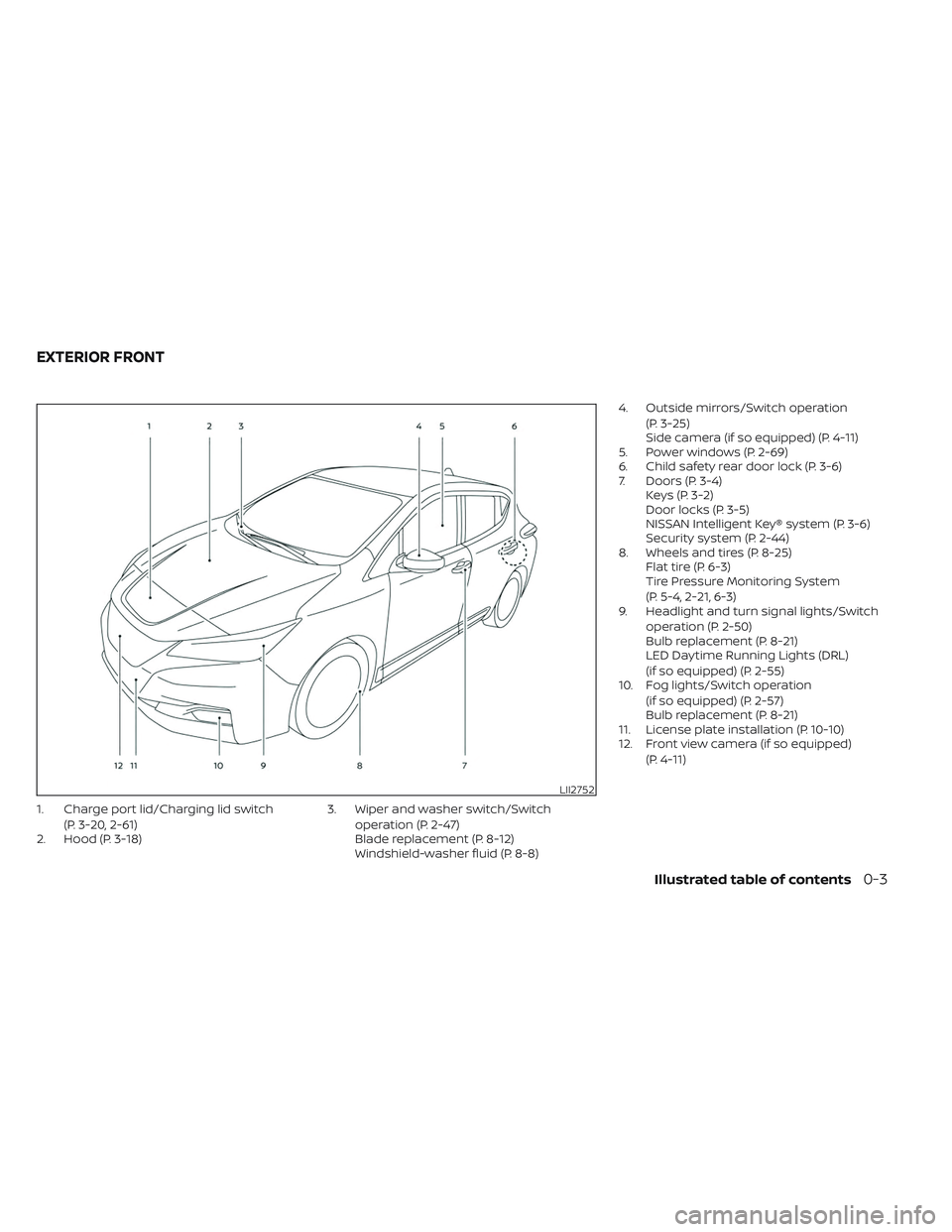
1. Charge port lid/Charging lid switch(P. 3-20, 2-61)
2. Hood (P. 3-18) 3. Wiper and washer switch/Switch
operation (P. 2-47)
Blade replacement (P. 8-12)
Windshield-washer fluid (P. 8-8) 4. Outside mirrors/Switch operation
(P. 3-25)
Side camera (if so equipped) (P. 4-11)
5. Power windows (P. 2-69)
6. Child safety rear door lock (P. 3-6)
7. Doors (P. 3-4) Keys (P. 3-2)
Door locks (P. 3-5)
NISSAN Intelligent Key® system (P. 3-6)
Security system (P. 2-44)
8. Wheels and tires (P. 8-25) Flat tire (P. 6-3)
Tire Pressure Monitoring System
(P. 5-4, 2-21, 6-3)
9. Headlight and turn signal lights/Switch
operation (P. 2-50)
Bulb replacement (P. 8-21)
LED Daytime Running Lights (DRL)
(if so equipped) (P. 2-55)
10. Fog lights/Switch operation
(if so equipped) (P. 2-57)
Bulb replacement (P. 8-21)
11. License plate installation (P. 10-10)
12. Front view camera (if so equipped)
(P. 4-11)
LII2752
EXTERIOR FRONT
Illustrated table of contents0-3
Page 15 of 612
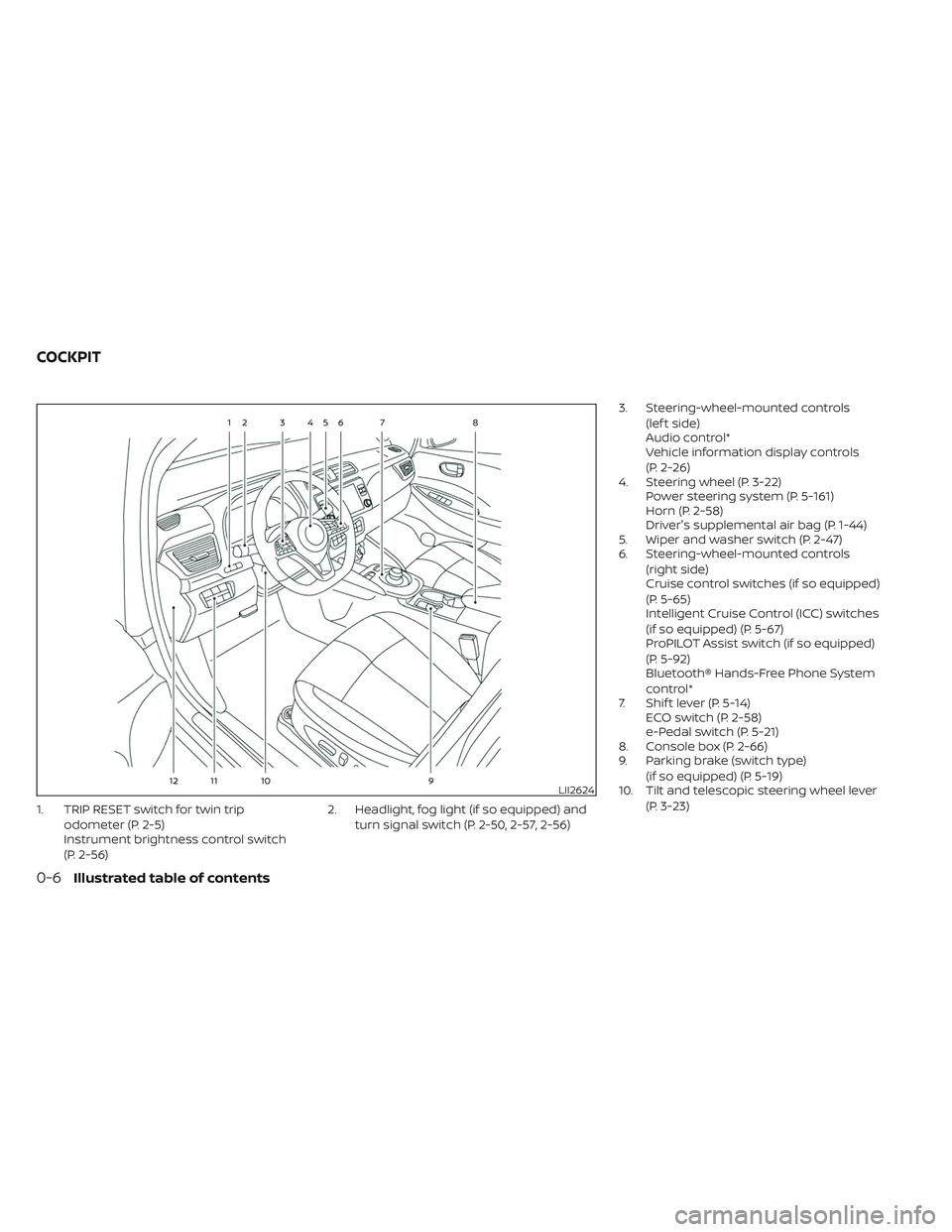
1. TRIP RESET switch for twin tripodometer (P. 2-5)
Instrument brightness control switch
(P. 2-56) 2. Headlight, fog light (if so equipped) and
turn signal switch (P. 2-50, 2-57, 2-56) 3. Steering-wheel-mounted controls
(lef t side)
Audio control*
Vehicle information display controls
(P. 2-26)
4. Steering wheel (P. 3-22) Power steering system (P. 5-161)
Horn (P. 2-58)
Driver's supplemental air bag (P. 1-44)
5. Wiper and washer switch (P. 2-47)
6. Steering-wheel-mounted controls
(right side)
Cruise control switches (if so equipped)
(P. 5-65)
Intelligent Cruise Control (ICC) switches
(if so equipped) (P. 5-67)
ProPILOT Assist switch (if so equipped)
(P. 5-92)
Bluetooth® Hands-Free Phone System
control*
7. Shif t lever (P. 5-14) ECO switch (P. 2-58)
e-Pedal switch (P. 5-21)
8. Console box (P. 2-66)
9. Parking brake (switch type)
(if so equipped) (P. 5-19)
10. Tilt and telescopic steering wheel lever
(P. 3-23)
LII2624
COCKPIT
0-6Illustrated table of contents
Page 24 of 612
EV Overview
The EV (Electric Vehicle) system................EV-2
Li-ion battery ................................... EV-2
Driving with a discharged Li-ion battery .....EV-3
Charging the 12-volt battery .................EV-5
Li-ion battery warmer (if so equipped) .......EV-5
High voltage precautions .......................EV-8
High-voltage components ..................EV-8
Road accident precautions .....................EV-9
Emergency shut-off system ................EV-10
EV characteristics ............................. EV-11
Noise and vibration ........................ EV-12
Life with an EV (scene guide) ..................EV-12
Charging the Li-ion battery .................EV-12
Before driving your vehicle
(models with Navigation System) ...........EV-14
Checking Li-ion battery charging
status ...................................... EV-15
Operating the climate control system
before driving .............................. EV-16Starting your vehicle
....................... EV-17
Driving the vehicle .......................... EV-18
Charging af ter driving .....................EV-22
Efficient use of your vehicle ....................EV-23
Range ...................................... EV-23
Improve driving range ......................EV-23
Li-ion battery life .......................... EV-24
Li-ion battery maintenance ...............EV-24
EV unique information .......................EV-25
Meters and indicators .....................EV-25
Approaching Vehicle Sound for
Pedestrians (VSP) system ..................EV-27
Electric shif t control system ...............EV-28
LED headlight (low beam)
(if so equipped) ............................ EV-28
Driving range .............................. EV-28
Page 25 of 612
The LEAF is an electric vehicle. Some of the
vehicle’s systems operate differently and
have different operating characteristics
than vehicles equipped with an internal
combustion engine. It is important to care-
fully review the entire owner's manual for
this reason. The main difference is the LEAF
is powered by electricity. The LEAF does not
require and it is not capable of using gaso-
line like a vehicle powered by a traditional
internal combustion engine. The LEAF uses
electricity stored in the lithium ion (Li-ion)
battery. The vehicle’s Li-ion battery must
be charged with electricity before the ve-
hicle can be driven. As the vehicle operates,
the Li-ion battery gradually discharges. If
the Li-ion battery becomes completely dis-
charged, the vehicle will not operate until it
is re-charged.
This vehicle uses two types of batteries.
One is the 12-volt battery that is the same
as the battery in vehicles powered by
gasoline engines, the other is the Li-ion
battery (high voltage).
The 12-volt battery provides power to the
vehicle systems and features such as the
audio system, supplemental restraint sys-
tems, headlights and windshield wipers.The Li-ion battery provides power to the
electric motor (traction motor) that moves
the vehicle.
The Li-ion battery also charges the 12-volt
battery.
The vehicle must be plugged in for the Li-
ion battery to be charged. Additionally, the
vehicle system can extend the vehicle
range by converting driving force into elec-
tricity that is stored in the Li-ion battery
while the vehicle is decelerating or being
driven downhill. This is called regenerative
braking. This vehicle is considered to be an
environmentally friendly vehicle because it
does not emit exhaust gases, such as car-
bon dioxide and nitrogen oxide.WARNING
Your vehicle contains a sealed Li-ion
high voltage battery. If the Li-ion bat-
tery is disposed of improperly, there is a
risk of severe burns and electrical
shock that may result in serious injury
or death and there is also a risk of envi-
ronmental damage.
CAUTION
To prevent damage to the Li-ion
battery:
• Do not expose the vehicle to extreme
ambient temperatures for extended
periods.
• Do not store the vehicle in tempera-
tures below −13°F (−25°C) for more
than seven days.
• Do not leave the vehicle for more
than 14 days where the Li-ion battery
available charge gauge reaches a
zero or near zero.
• Do not use the Li-ion battery for any
other purpose.
THE EV (Electric Vehicle) SYSTEM LI-ION BATTERY
EV-2EV Overview
Page 51 of 612
The sound starts when the vehicle speed is
less than 22 mph (35 km/h) while
decelerating.
WARNING
• If the sound cannot be heard, pedes-
trians may not notice the oncoming
vehicle, which may cause an accident
resulting in serious injury or death. It
is recommended that you immedi-
ately visit a NISSAN certified LEAF
dealer for VSP system inspection.
• If the VSP system OFF warning light
illuminates while the power switch is
in the ON position, or in the READY to
drive position, it may indicate the VSP
system is not functioning properly.
Have the VSP system checked. It is
recommended that you visit a
NISSAN certified LEAF dealer for this
service. For additional information,
see “Approaching Vehicle Sound for
Pedestrians (VSP) system OFF
warning light” (P. 2-19).
NOTE:
The volume of the (VSP) sound cannot be
raised or lowered.
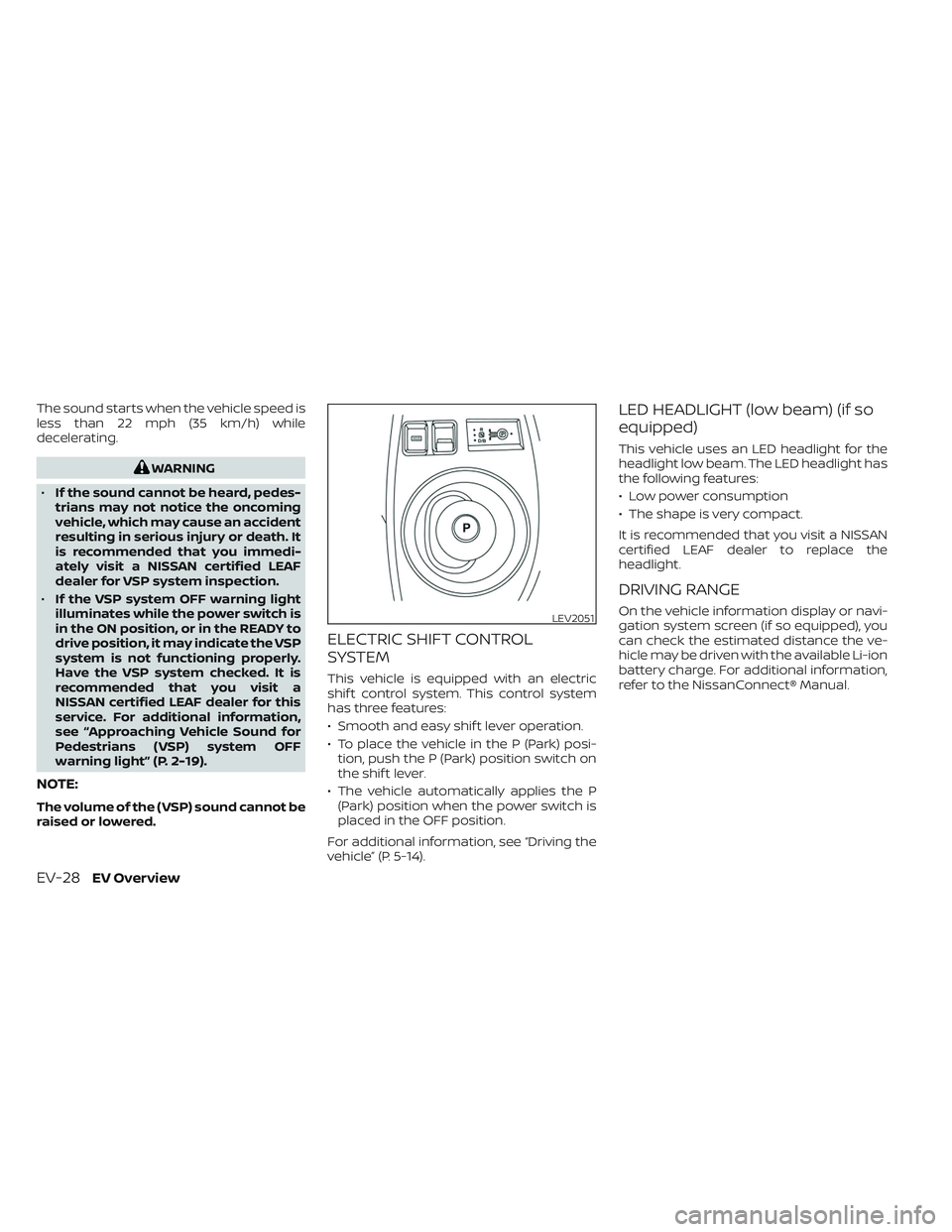
ELECTRIC SHIFT CONTROL
SYSTEM
This vehicle is equipped with an electric
shif t control system. This control system
has three features:
• Smooth and easy shif t lever operation.
• To place the vehicle in the P (Park) posi- tion, push the P (Park) position switch on
the shif t lever.
• The vehicle automatically applies the P (Park) position when the power switch is
placed in the OFF position.
For additional information, see “Driving the
vehicle” (P. 5-14).
LED HEADLIGHT (low beam) (if so
equipped)
This vehicle uses an LED headlight for the
headlight low beam. The LED headlight has
the following features:
• Low power consumption
• The shape is very compact.
It is recommended that you visit a NISSAN
certified LEAF dealer to replace the
headlight.
DRIVING RANGE
On the vehicle information display or navi-
gation system screen (if so equipped), you
can check the estimated distance the ve-
hicle may be driven with the available Li-ion
battery charge. For additional information,
refer to the NissanConnect® Manual.LEV2051
EV-28EV Overview
Page 177 of 612
2 Instruments and controls
Cockpit.........................................2-2
Instrument Panel ................................2-4
Meters and Gauges .............................2-5
Speedometer and odometer .................2-5
Li-ion battery temperature gauge ............ 2-7
Power meter ................................. 2-7
Driving range .................................2-8
Li-ion battery available charge gauge ........2-9
Li-ion battery capacity level gauge ..........2-12
Outside air temperature .....................2-12
Clock ........................................ 2-12
ECO mode indicator ......................... 2-13
e-Pedal system indicator ....................2-13
Warning lights, indicator lights and audible
reminders ...................................... 2-14
Checking lights .............................. 2-16
Warning/Indicator lights (red) ...............2-16
Warning/Indicator lights (yellow) ............2-19
Warning/Indicator lights (other) .............2-24
Audible reminders ........................... 2-25
Vehicle information display .....................2-26
How to use the vehicle information
display ...................................... 2-27
Startup display .............................. 2-27
Settings ..................................... 2-28
Vehicle information display warnings
and indicators ............................... 2-36Warning information displays
(models with a navigation system)
..........2-44
Security systems ............................... 2-44
Vehicle security system .....................2-44
NISSAN Vehicle Immobilizer System .........2-46
Wiper and washer switch .......................2-47
Washer operation ........................... 2-48
Rear wiper operation ........................ 2-48
Rear window and outside mirror
(if so equipped) defroster switch ...............2-49
Headlight and turn signal switch ...............2-50
Headlight switch ............................ 2-50
LED Daytime Running Lights (DRL)
system (Type A) (if so equipped) .............2-55
LED Daytime Running Lights (DRL)
system (Type B) (if so equipped) .............
2-55
Instrument
brightness control ..............2-56
Turn signal switch ........................... 2-56
Fog light switch (if so equipped) .............2-57
Emblem Light ............................... 2-57
Horn ........................................... 2-58
ECO switch ..................................... 2-58
Heated seat switches (if so equipped) ..........2-58
Heated steering wheel switch (if so equipped) . . 2-60
Emergency call (SOS) button (if so equipped) . . . 2-60
Charge port lid switch .......................... 2-61
Page 179 of 612
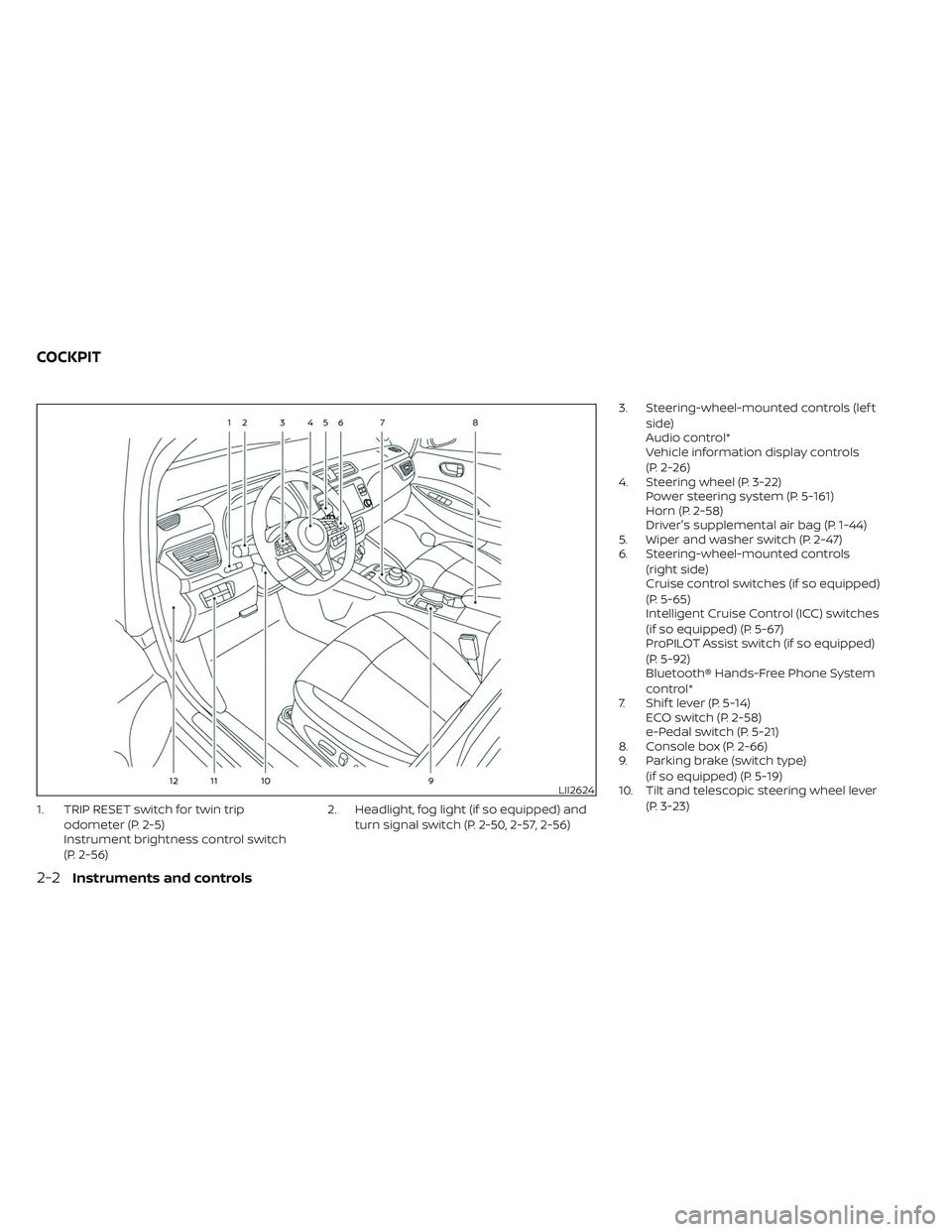
1. TRIP RESET switch for twin tripodometer (P. 2-5)
Instrument brightness control switch
(P. 2-56) 2. Headlight, fog light (if so equipped) and
turn signal switch (P. 2-50, 2-57, 2-56) 3. Steering-wheel-mounted controls (lef t
side)
Audio control*
Vehicle information display controls
(P. 2-26)
4. Steering wheel (P. 3-22) Power steering system (P. 5-161)
Horn (P. 2-58)
Driver's supplemental air bag (P. 1-44)
5. Wiper and washer switch (P. 2-47)
6. Steering-wheel-mounted controls
(right side)
Cruise control switches (if so equipped)
(P. 5-65)
Intelligent Cruise Control (ICC) switches
(if so equipped) (P. 5-67)
ProPILOT Assist switch (if so equipped)
(P. 5-92)
Bluetooth® Hands-Free Phone System
control*
7. Shif t lever (P. 5-14) ECO switch (P. 2-58)
e-Pedal switch (P. 5-21)
8. Console box (P. 2-66)
9. Parking brake (switch type)
(if so equipped) (P. 5-19)
10. Tilt and telescopic steering wheel lever
(P. 3-23)
LII2624
COCKPIT
2-2Instruments and controls
Page 201 of 612
still have control of the vehicle. At this time,
greater steering efforts are required to op-
erate the steering wheel, especially in
sharp turns and at low speeds.
For additional information, see “Power
steering system” (P. 5-161).
Rear Automatic Braking
(RAB) warning light
This light comes on when the power switch
is placed in the ON position. It turns off af ter
the EV system is started.
This light illuminates when the RAB system
is turned off in the vehicle information
display.
If the light illuminates when the RAB sys-
tem is on, it may indicate that the system is
unavailable. For additional information, see
“Rear Automatic Braking (RAB)” (P. 5-125).
Slip indicator light
This indicator light will blink when the VDC
system or the traction control system is
operating, thus alerting that the vehicle is
nearing its traction limits. The road surface
may be slippery.You may feel or hear the system working;
this is normal. The light will blink for a few
seconds af ter the VDC system stops limit-
ing wheel spin.
The indicator light also comes on when
you place the power switch in the ON
position.
The light will turn off af ter approximately 2
seconds if the system is operational. If the
light does not come on, have the system
checked. It is recommended that you visit a
NISSAN certified LEAF dealer for this
service.
Vehicle Dynamic Control
(VDC) OFF indicator light
This light illuminates when the Vehicle Dy-
namic Control (VDC) is turned off in the
vehicle information display. This indicates
that the VDC system is not operating. For
additional information, see “Vehicle Dy-
namic Control (VDC) system” (P. 5-164).
WARNING/INDICATOR LIGHTS
(other)
For additional information, see “Vehicle in-
formation display” (P. 2-26)
Exterior light
indicator light (green)
This indicator illuminates when the head-
light switch is turned to the AUTO,orposition and the front parking lights,
side marker lights, tail and license plate
lights are on. The indicator turns off when
these lights are turned off.
Front fog light indicator
light (green) (if so
equipped)
The front fog indicator light illuminates
when the front fog lights are on. For addi-
tional information, see “Fog light switch”
(P. 2-57).
High Beam Assist indicator
light (green)
The indicator light illuminates when the
headlights come on while the headlight
switch is in the AUTO position with the high
beam selected. This indicates that the high
beam assist system is operational. For ad-
ditional information, see “High Beam Assist”
(P. 2-53).
2-24Instruments and controls
Page 202 of 612
High beam indicator light
(blue)
This light illuminates when the headlight
high beam is on and goes out when the low
beam is selected.
Plug-in
indicator light (green)
This light illuminates when the charge con-
nector is connected to the vehicle and
blinks during charging.
NOTE:
If the charge connector is connected to
the vehicle, the power switch cannot be
placed in the READY to drive position.
READY to drive
indicator light (green)
The READY to drive indicator light illumi-
nates when the EV system is powered and
the vehicle may be driven.
The READY to drive indicator light will turn
off in the following conditions.
• Certain EV system malfunctions.• The READY to drive indicator light turns
off immediately before the Li-ion battery
is completely discharged. If the Li-ion bat-
tery becomes completely discharged,
the vehicle must be charged in order to
be driven. For additional information, see
“Low battery charge indicator” (P. 2-38).
Turn signal/hazard
indicator lights (green)
This light flashes when the turn signal
switch lever or hazard switch is turned on.
AUDIBLE REMINDERS
Brake pad wear warning
The disc brake pads have audible wear
warnings. When a brake pad requires re-
placement, it will make a high-pitched
scraping sound when the vehicle is in mo-
tion. This scraping sound will first occur
only when the brake pedal is depressed.
Af ter more wear of the brake pad, the
sound will always be heard even if the
brake pedal is not depressed. Have the
brakes checked as soon as possible if the
warning sound is heard.
Electric shif t control system
reminder chime
If an improper shif t operation is performed,
for safety reasons a chime will sound and
at the same time, depending on the condi-
tions, the operation will be canceled or the
shif t position will switch to the N (Neutral)
position.
For additional information, see “Driving the
vehicle” (P. 5-14).
Key reminder chime
A chime will sound if the driver's side door is
opened while the power switch is pushed
to the ON or ACC position.
Make sure that the power switch is pushed
to the OFF position, and take the Intelligent
Key with you when leaving the vehicle.
Light reminder chime
The light reminder chime will sound when
the driver side door is opened with the light
switch in the
orposition, and
the power switch is in the ACC, OFF or LOCK
position.
Turn the light switch off when you leave the
vehicle.
Instruments and controls2-25
Page 209 of 612
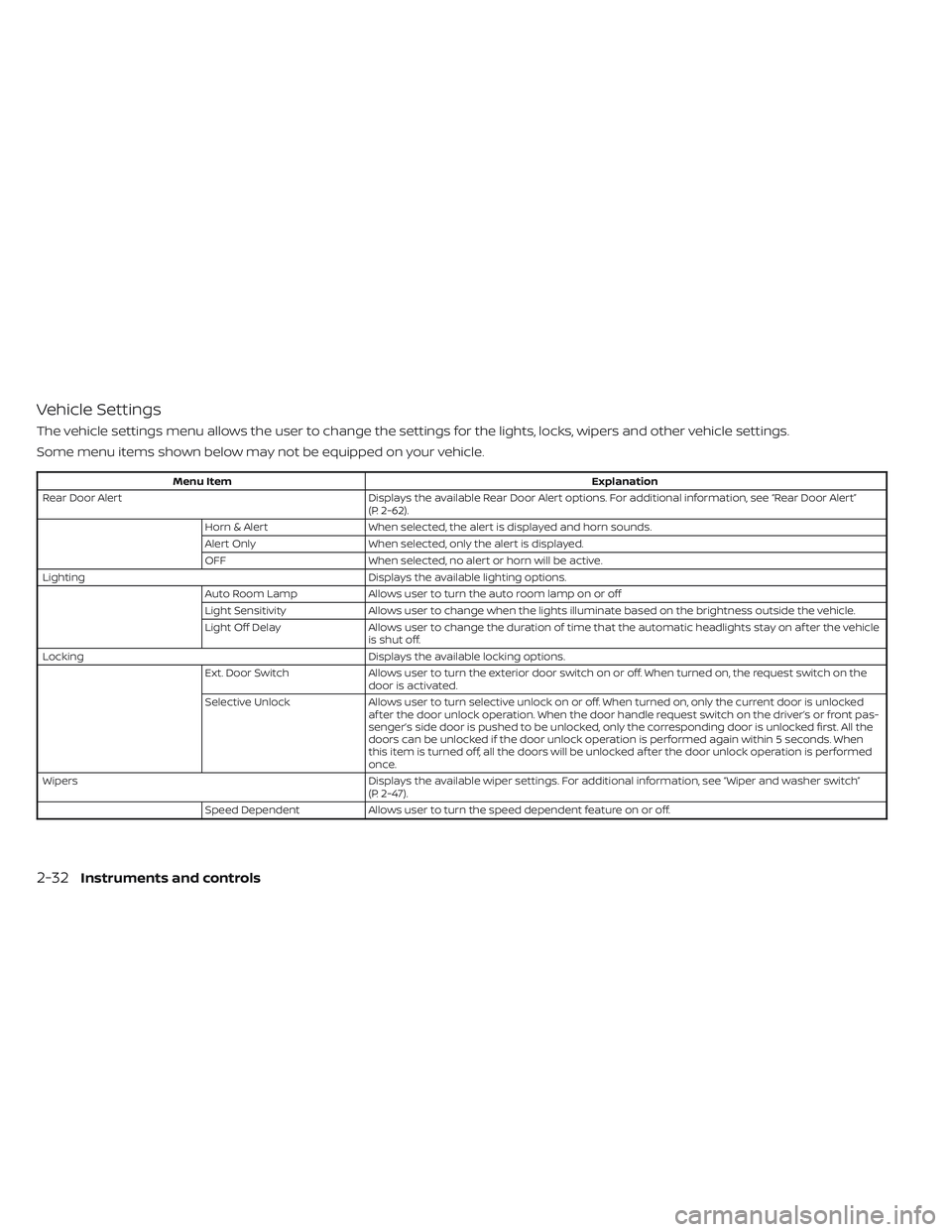
Vehicle Settings
The vehicle settings menu allows the user to change the settings for the lights, locks, wipers and other vehicle settings.
Some menu items shown below may not be equipped on your vehicle.
Menu ItemExplanation
Rear Door Alert Displays the available Rear Door Alert options. For additional information, see “Rear Door Alert”
(P. 2-62).
Horn & Alert When selected, the alert is displayed and horn sounds.
Alert Only When selected, only the alert is displayed.
OFF When selected, no alert or horn will be active.
Lighting Displays the available lighting options.
Auto Room Lamp Allows user to turn the auto room lamp on or off
Light Sensitivity Allows user to change when the lights illuminate based on the brightness outside the vehicle.
Light Off Delay Allows user to change the duration of time t hat the automatic headlights stay on af ter the vehicle
is shut off.
Locking Displays the available locking options.
Ext. Door Switch Allows user to turn the exterior door switch on or off. When turned on, the request switch on the
door is activated.
Selective Unlock Allows user to turn selective unlock on or off. When turned on, only the current door is unlocked
af ter the door unlock operation. When the door handle request switch on the driver’s or front pas-
senger’s side door is pushed to be unlocked, only the corresponding door is unlocked first. All the
doors can be unlocked if the door unlock operation is performed again within 5 seconds. When
this item is turned off, all the doors will be unlocked af ter the door unlock operation is performed
once.
Wipers Displays the available wiper settings. For additional information, see “Wiper and washer switch”
(P. 2-47).
Speed Dependent Allows user to turn the speed dependent feature on or off.
2-32Instruments and controls