ignition NISSAN MAXIMA 1996 A32 / 4.G Owner's Manual
[x] Cancel search | Manufacturer: NISSAN, Model Year: 1996, Model line: MAXIMA, Model: NISSAN MAXIMA 1996 A32 / 4.GPages: 197, PDF Size: 1.53 MB
Page 65 of 197
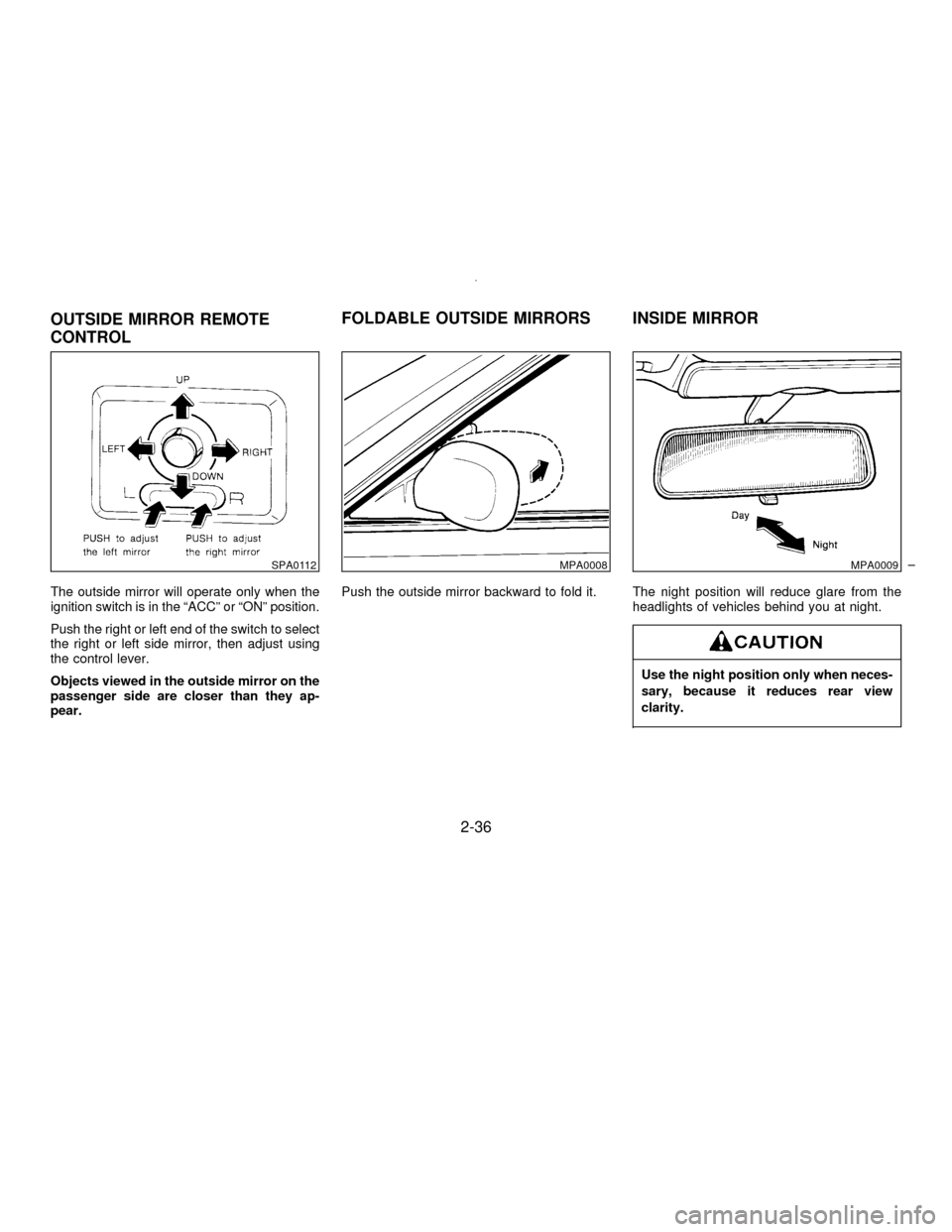
The outside mirror will operate only when the
ignition switch is in the ªACCº or ªONº position.
Push the right or left end of the switch to select
the right or left side mirror, then adjust using
the control lever.
Objects viewed in the outside mirror on the
passenger side are closer than they ap-
pear.Push the outside mirror backward to fold it. The night position will reduce glare from the
headlights of vehicles behind you at night.
Use the night position only when neces-
sary, because it reduces rear view
clarity.
SPA0112MPA0008MPA0009
OUTSIDE MIRROR REMOTE
CONTROLFOLDABLE OUTSIDE MIRRORS INSIDE MIRROR
2-36
Z01.2.1/A32-DX
Page 76 of 197

The sensor on the instrument panel helps
maintain a constant temperature; do not put
anything on or around this sensor.
Servicing air conditioner
The air conditioning system in your NISSAN
vehicle is charged with a new refrigerant de-
signed with the environment in mind.This new
refrigerant will not harm the earth's ozone
layer.However, special charging equipment
and lubricant are required when servicing your
NISSAN air conditioner. Using improper refrig-
erants or lubricants will cause severe damage
to your air conditioning system. See AIR CON-
DITIONING SYSTEM REFRIGERANT AND
LUBRICANT RECOMMENDATIONS in the
TECHNICAL AND CONSUMER INFORMA-
TION section of this manual.
Your NISSAN dealer will be able to service
your environmentally ªfriendlyº air conditioning
system.To turn the radio on, turn the ignition key to
ªACCº or ªONº. If you listen to the radio with
the engine not running, turn the key to the
ªACCº position.
Radio reception is affected by station signal
strength, distance from radio transmitter, build-
ings, bridges, mountains and other external
influences. Intermittent changes in reception
quality normally are caused by these external
influences.
HA1011
RADIO
3-11
Z01.2.1/A32-DX
Page 79 of 197

than 2 seconds. (For example, in the dia-
gram ch2 is to be memorized. The radio
mutes when the select button is pushed.)
3. The indicator ªch2º will then come on and
the sound will resume. Memorizing is now
complete.
4. Other buttons can be set in the same
manner.
If the battery cable is disconnected, or if the
fuse blows, the radio memory will be can-
celled. In that case, reset the desired stations.
Adjusting tone quality
Push then turn the BASS and TREB
(TREBLE) control knob to obtain the most
pleasant sound.
Adjusting speaker sound balance
Push then pull the BAL (BALANCE) control
knob to adjust the volume between the right
and left speakers.
FADER volume control
Push then pull the FADER control knob to
adjust the volume between the front and rear
speakers.
Cassette tape operation
Turn the ignition key to ªACCº or ªONº, then
carefully insert the cassette tape into the tape
door.
The cassette tape will automatically pull into
the player.
Do not force the cassette tape into the tape
door.
Pressing strongly could cause player dam-
age.
The cassette tape will automatically change
directions to play the other side when the first
side is completed.
ITo maintain good quality sound, NIS-
SAN recommends that you use cassette
tapes of 60 minutes or shorter in length.
ICassette tapes should be removed from
the player when not in use. Store cas-
settes in their protective cases and away
from direct sunlight, heat, moisture and
magnetic sources.
Direct sunlight can cause the cassette to
become deformed. The use of deformed
cassettes may cause the cassette to jam
in the player.
IDo not use cassettes that have labels
HA1078
3-14
Z01.2.1/A32-DX
Page 81 of 197

AM-FM RADIO WITH CASSETTE
PLAYER AND COMPACT DISC
PLAYER (Bose audio system)
Head unit
The radio has an FM Diversity reception sys-
tem, which employs two antennas. One is a
rod type antenna; the other is an antenna
printed on the window. This system automati-
cally switches to the antenna which is receiv-
ing less noise.
The tape deck employs a permalloy head
which allows for improved reproduction of high
frequency ranges. Noise is also greatly re-
duced by the combined use of the Dolby NR
(noise reduction) system. The auto loudness
circuit enhances the low frequency range au-
tomatically in both radio reception and tape
playback.
Power button
Turn the ignition key to ªACCº or ªONº, and
then push the POWER button while the sys-
tem is off to call up the mode (radio, tape or
CD) which was playing immediately before the
system was turned off. When no CD or tape is
loaded, the radio will come on. While the
system is on, pushing the POWER button
turns the system off.
SAA0045A
3-16
Z01.2.1/A32-DX
Page 82 of 197

To turn the radio off, press the POWER button.
VOL (volume) control knob
Turn the VOLUME control knob to adjust the
volume.
Adjusting tone quality
Push then turn the BASS and TREB
(TREBLE) control knobs to obtain the most
pleasant sound.
Adjusting speaker sound balance
Push then pull the BAL (BALANCE) control
knob to adjust the volume between the right
and left speakers.
FADER volume control
Push then pull the FADER control knob to
adjust the volume between the front and rear
speakers.
RADIO OPERATION
FM/AM band select button
Pushing the FM/AM band select button will
change the band.
When FM/AM band select button is pushed
while the ignition switch is at ªACCº or ªONº,
the radio will come on at the station last
played.
The last station played will also come on when
the power button is turned to ON.
If a compact disc or tape is inserted when the
power button is turned to ON, the compact disc
or tape will automatically be turned off and the
last radio station played will come on.
The FM stereo indicator ªSTº will glow during
FM stereo reception. When the stereo broad-
cast signal is weak, the radio will automatically
change from stereo to monaural reception.
HA1081
3-17
Z01.2.1/A32-DX
Page 84 of 197

than 1.5 seconds. (For example, in the
diagram ch2 is to be memorized. The radio
ceases emitting sounds when the select
button is pushed.)
3. The indicator ªch2º will then come on and
the sound will resume. Memorizing is now
complete.
4. Other buttons can be set in the same
manner.
If the battery cable is disconnected, or if the
fuse blows, the radio memory will be can-
celled. In that case, reset the desired stations.
Cassette tape operation
Turn the ignition key to ªACCº or ªONº, and
then lightly insert the cassette tape into the
tape door. The cassette tape will be automati-
cally pulled into the player.
The radio or CD will turn off (if it is on) and the
cassette tape will begin to play.
Do not force the cassette tape into the tape
door.
Pressing strongly could cause player dam-
age.
If the system is turned off by pushing the
ª
º button with the cassette tape still in the
player, the tape will resume playing when thesystem is turned back on.
TAPE button
IWhen this button is pushed with the system
turned off and a tape loaded, the system
will come on and the tape will play.
IWhen this button is pushed with either the
radio or compact disc turned on and the
tape loaded, the compact disc or the radio
will automatically be turned off and the tape
will play.
While the tape is playing, pushing the TAPE
button stops the tape. Pushing the button
again allows the tape to play.
FF (fast forward), REW (rewind)
button
Push the FF (fast forward) button to fast for-
ward the tape. To rewind the tape, push the
REW (rewind) button. Either the indicator light
ª
ºorªº will come on when the FF or
REW function is started.
APS FF, APS REW button
When the APS FF button is pushed while the
tape is being played, the next program will
start to play from the beginning. Push the APS
FF button several times to skip through pro-grams. The tape will advance the number of
times the button is pushed (up to 9 programs).
When the APS REW button is pushed once,
the program being played starts over from the
beginning. Push several times to fast rewind
programs. The tape will go back the number of
times the button is pushed. Either the indicator
light ª
ºorªº will come on when the
APS FF or APS REW function is started.
This system searches at the blank intervals
between selections. If there is a blank interval
within one program or there is no interval
between programs, the system may not stop in
the desired or expected location.
PROG (program) button
Push the PROG (program) button to change
the tape side while the tape is being played.
The cassette tape will automatically change
directions to play the other side when the first
side is completed.
3-19
Z01.2.1/A32-DX
Page 86 of 197

COMPACT DISC (CD) PLAYER
OPERATION
Turn the ignition key to the ªACCº or ªONº
position and insert the compact disc into the
slot with the label side facing up. The compact
disc will be guided automatically into the slot
and start playing.
After loading the disc, the number of tracks on
the disc and the play time will appear on the
display.
If the radio or tape is already operating, it will
automatically turn off and the compact disc will
play.
Forcing in the compact disc will damage
the player.
If the system has been turned off while the
compact disc was playing, pushing the
POWER button will start the compact disc.
CD button
When this button is pushed with the system off
and the compact disc loaded, the system will
turn on and the compact disc will start to play.
When this button is pushed with the compact
disc loaded but the tape or the radio playing,
the tape or radio will automatically be turned
off and the compact disc will start to play.When this button is pushed while the compact
disc is playing, the compact disc will stop
playing. When this button is pushed with the
compact disc stopped, the compact disc will
start to play.
FF (fast forward), REW (rewind)
button
When the FF (fast forward) or REW (rewind)
button is pushed while the compact disc is
being played, the compact disc will play while
fast forwarding or rewinding. When the button
is released, the compact disc will return to
normal play speed.
APS FF, APS REW button
When the APS FF button is pushed while the
compact disc is being played, the program
next to the present one will start to play from its
beginning. Push several times to skip through
programs. The compact disc will advance the
number of times the button is pushed. (When
the last program on the compact disc is
skipped through, the first program will be
played.) When the APS REW button is
pushed, the program being played returns to
its beginning. Push several times to skip back
through programs. The compact disc will go
back the number of times the button is pushed.
PROG (program) button
When this button is pushed while the compact
disc is being played, the play pattern will
change as follows:
ALL: All the programs will be played repeat-
edly in sequence.
1: Only one program (the one being played
when the PROG button is pushed) will be
repeated.
RANDOM: Programs will be played at random,
not following the sequence on the compact
disc. The same program may be repeated
twice.
(no mark): All the programs will be played in
sequence and stop when the last program is
finished.
IWhen the compact disc is ejected, the
play pattern will automatically change to
ALL.
3-21
Z01.2.1/A32-DX
Page 87 of 197

CD EJECT button
When the CD EJECT button is pushed with the
compact disc loaded, the compact disc will be
ejected.
When this button is pushed while the compact
disc is being played, the compact disc will
come out and the system will turn off.
If the compact disc comes out and is not
removed, it will be pulled back into the slot
to protect it.
CD (DISC) indicator light
This light comes on when the compact disc is
loaded.
IDuring cold weather or rainy days,
the player may malfunction due to the
humidity. If this occurs, remove the
CD and dehumidify or ventilate the
player completely.
IThe player may skip while driving on
rough roads.
IThe CD player sometimes cannot
function when the compartment tem-
perature is extremely high. Decreasethe temperature before use.
IDo not expose the CD to direct
sunlight.
Power antenna
The antenna will automatically extend when
the radio is turned on, and retract when
switched off. If the radio is left on, the antenna
will retract and extend with the ignition key
ªOFF-ONº operation.
IBefore turning the radio on, make
sure that there is no one near the
antenna outlet and there is enough
space for it to extend.
ITo prevent damage, be sure that an-
tenna is fully retracted before the
vehicle enters an automated car
wash.
IDirt and other foreign matter on the
power antenna rod may interrupt its
operation. Clean the rod periodically
with a damp cloth. This type of clean-
ing is especially important during the
winter seasons in areas where road
salt and other chemicals may be
spread on road surfaces and
splashed onto the antenna rod.
ANTENNA
3-22
Z01.2.1/A32-DX
Page 90 of 197

4 Starting and driving
Precautions when starting and driving ...................... 4-2
Avoiding collision and rollover................................... 4-3
Drinking alcohol/drugs and driving ............................ 4-4
Ignition switch............................................................ 4-4
Before starting the engine ......................................... 4-6
Driving with automatic transmission.......................... 4-6
Driving with manual transmission ............................. 4-9
Starting the engine .................................................. 4-10
Parking brake .......................................................... 4-11
Cruise control .......................................................... 4-12
Break-in schedule ................................................... 4-13
Economy hints......................................................... 4-14
Parking/Parking on hills........................................... 4-15
Precautions when driving ........................................ 4-16
Anti-lock brake system ............................................ 4-17
Cold weather driving cautions ................................. 4-18
Z01.2.1/A32-DX
Page 92 of 197

IThe exhaust gas and the exhaust sys-
tem are very hot. While the engine is
running, keep people or flammable
materials away from the exhaust
pipe.
IDo not stop or park the vehicle over
flammable materials such as dry
grass, waste paper or rags, as they
may burn easily.
To help prevent damage
IDo not use leaded gasoline.
Deposits from leaded gasoline will seri-
ously reduce the three way catalyst's
ability to help reduce exhaust pollut-
ants.
IKeep your engine tuned up. Malfunc-
tions in the ignition, fuel injection, or
electrical systems can cause overrich
fuel flow into the converter, causing it to
overheat. Do not keep driving if the en-
gine misfires, or if noticeable loss of
performance or other unusual operating
conditions are detected. Have the ve-hicle inspected promptly by an autho-
rized NISSAN dealer.
IAvoid driving with an extremely low fuel
level. Running out of fuel could cause
the engine to misfire, damaging the
three way catalyst.
IDo not race the engine while warming it
up.
IDo not push or tow your vehicle to start
the engine.Failure to operate this vehicle in a safe and
prudent manner may result in loss of control or
an accident. Be alert and drive defensively at
all times. Obey all traffic regulations. Avoid
excessive speed, high speed cornering, or
sudden steering maneuvers, because these
driving practices could cause you to lose con-
trol of your vehicle.As with any vehicle, a
loss of control could result in a collision
with other vehicles or objects, or cause the
vehicle to rollover, particularly if the loss of
control causes the vehicle to slide side-
ways.Be attentive at all times, and avoid
driving when tired. Never drive when under the
influence of alcohol or drugs (including pre-
scription or over-the-counter drugs which may
cause drowsiness). Always wear your seat belt
as outlined in the ªSeat Beltsº section of this
manual, and also instruct your passengers to
do so.
AVOIDING COLLISION AND
ROLLOVER
4-3
Z01.2.1/A32-DX