lock NISSAN MAXIMA 2000 A33 / 5.G User Guide
[x] Cancel search | Manufacturer: NISSAN, Model Year: 2000, Model line: MAXIMA, Model: NISSAN MAXIMA 2000 A33 / 5.GPages: 239, PDF Size: 1.97 MB
Page 37 of 239

5. Before placing the child in the child re-
straint, use force to tilt the child restraint
from side to side, and tug it forward to make
sure that it is securely held in place.
6. Check that the retractor is in the automatic
locking mode by trying to pull more belt out
of the retractor. If you cannot pull any more
belt webbing out of the retractor, the belt is
in the automatic locking mode.
7. Check to make sure that the child restraint
is properly secured prior to each use. If the
belt is not locked, repeat steps 3 through 6.
After the child restraint is removed and the
seat belt is allowed to wind back into theretractor, the automatic locking mode (child
restraint mode) is canceled; the seat belt only
locks during a sudden stop or impact.
Rear facingWhen you install a child restraint in a rear
outboard or center seat, follow these steps:
1. Position the child restraint on the seat. The
direction of the child restraint depends on
the type of the child restraint and the size of
the child. Always follow the restraint manu-
facturer's instructions.
SSS0108
SSS0155
1-32
Seats, restraints and supplemental air bag systems
Z
00.1.17/A33-D/V5.0
X
Page 38 of 239
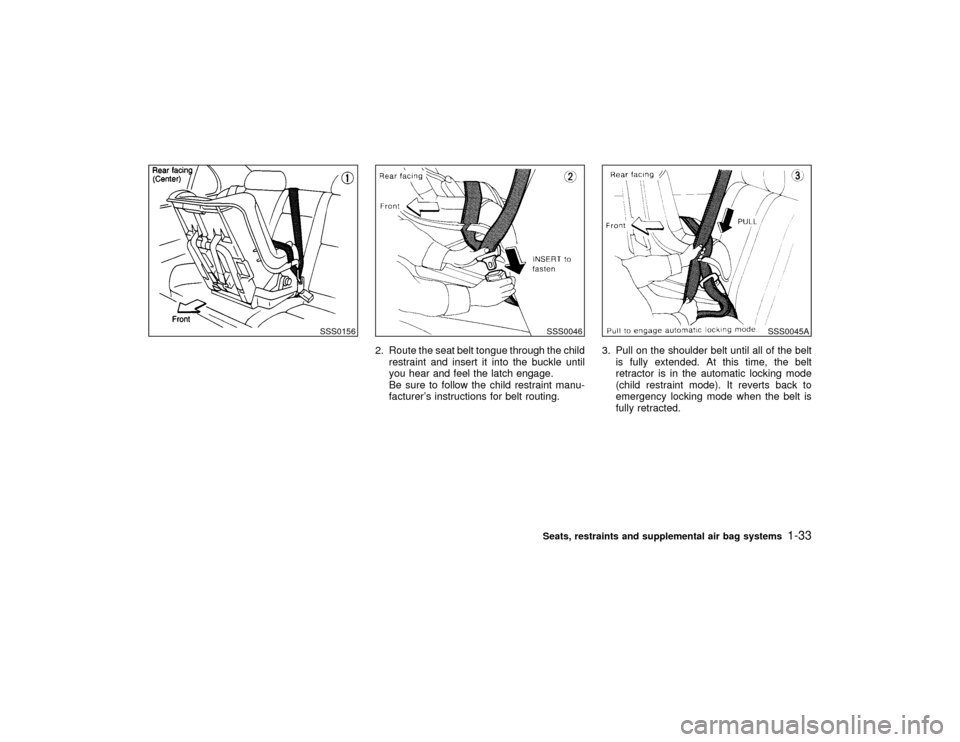
2. Route the seat belt tongue through the child
restraint and insert it into the buckle until
you hear and feel the latch engage.
Be sure to follow the child restraint manu-
facturer's instructions for belt routing.3. Pull on the shoulder belt until all of the belt
is fully extended. At this time, the belt
retractor is in the automatic locking mode
(child restraint mode). It reverts back to
emergency locking mode when the belt is
fully retracted.
SSS0156
SSS0046
SSS0045A
Seats, restraints and supplemental air bag systems
1-33
Z
00.1.17/A33-D/V5.0
X
Page 39 of 239
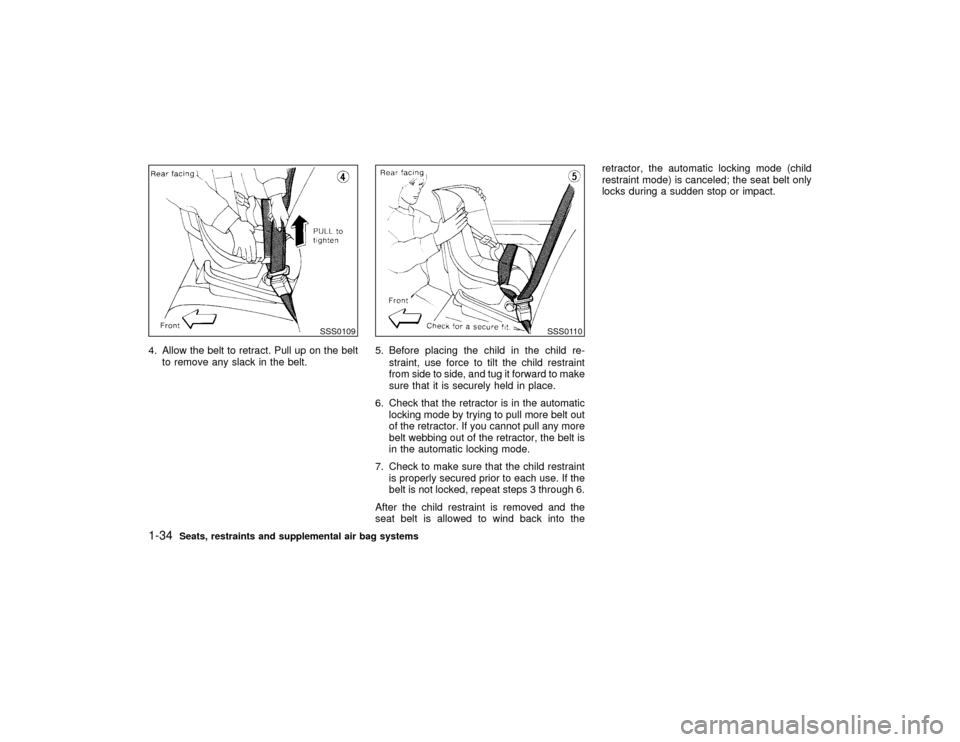
4. Allow the belt to retract. Pull up on the belt
to remove any slack in the belt.5. Before placing the child in the child re-
straint, use force to tilt the child restraint
from side to side, and tug it forward to make
sure that it is securely held in place.
6. Check that the retractor is in the automatic
locking mode by trying to pull more belt out
of the retractor. If you cannot pull any more
belt webbing out of the retractor, the belt is
in the automatic locking mode.
7. Check to make sure that the child restraint
is properly secured prior to each use. If the
belt is not locked, repeat steps 3 through 6.
After the child restraint is removed and the
seat belt is allowed to wind back into theretractor, the automatic locking mode (child
restraint mode) is canceled; the seat belt only
locks during a sudden stop or impact.
SSS0109
SSS0110
1-34
Seats, restraints and supplemental air bag systems
Z
00.1.17/A33-D/V5.0
X
Page 41 of 239
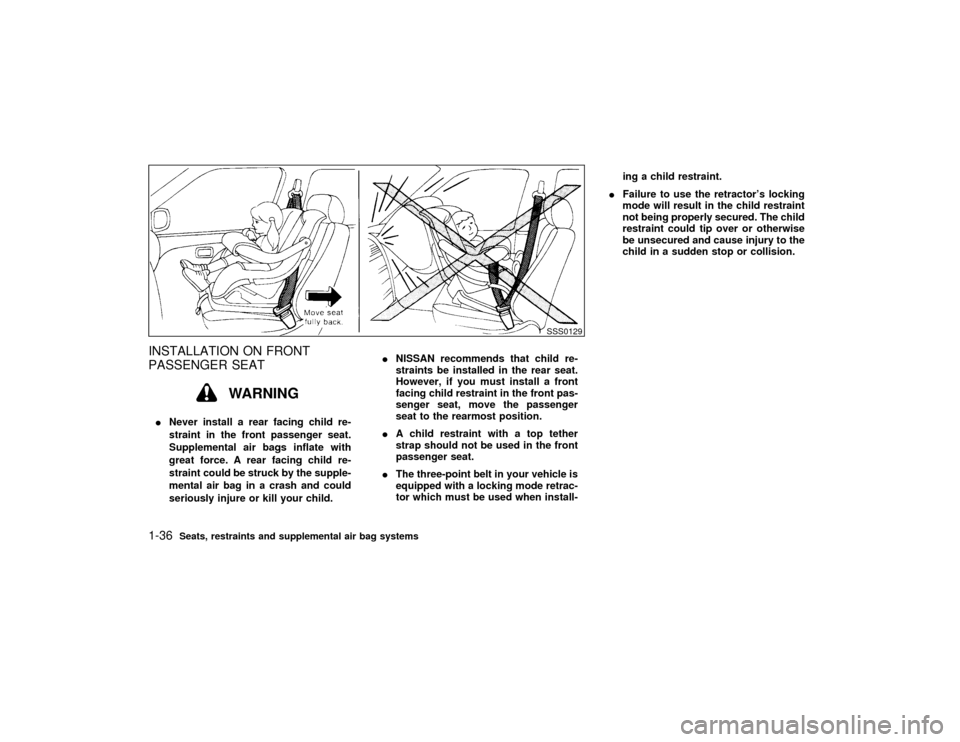
INSTALLATION ON FRONT
PASSENGER SEAT
WARNING
INever install a rear facing child re-
straint in the front passenger seat.
Supplemental air bags inflate with
great force. A rear facing child re-
straint could be struck by the supple-
mental air bag in a crash and could
seriously injure or kill your child.INISSAN recommends that child re-
straints be installed in the rear seat.
However, if you must install a front
facing child restraint in the front pas-
senger seat, move the passenger
seat to the rearmost position.
IA child restraint with a top tether
strap should not be used in the front
passenger seat.
IThe three-point belt in your vehicle is
equipped with a locking mode retrac-
tor which must be used when install-ing a child restraint.
IFailure to use the retractor's locking
mode will result in the child restraint
not being properly secured. The child
restraint could tip over or otherwise
be unsecured and cause injury to the
child in a sudden stop or collision.
SSS0129
1-36
Seats, restraints and supplemental air bag systems
Z
00.1.17/A33-D/V5.0
X
Page 42 of 239
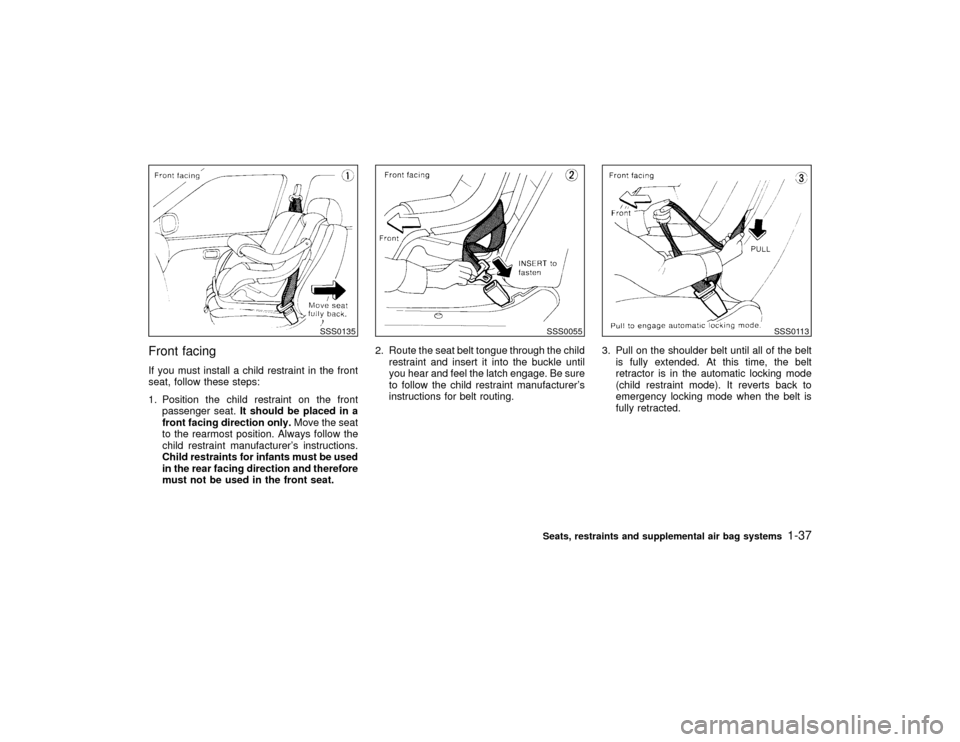
Front facingIf you must install a child restraint in the front
seat, follow these steps:
1. Position the child restraint on the front
passenger seat.It should be placed in a
front facing direction only.Move the seat
to the rearmost position. Always follow the
child restraint manufacturer's instructions.
Child restraints for infants must be used
in the rear facing direction and therefore
must not be used in the front seat.2. Route the seat belt tongue through the child
restraint and insert it into the buckle until
you hear and feel the latch engage. Be sure
to follow the child restraint manufacturer's
instructions for belt routing.3. Pull on the shoulder belt until all of the belt
is fully extended. At this time, the belt
retractor is in the automatic locking mode
(child restraint mode). It reverts back to
emergency locking mode when the belt is
fully retracted.
SSS0135
SSS0055
SSS0113
Seats, restraints and supplemental air bag systems
1-37
Z
00.1.17/A33-D/V5.0
X
Page 43 of 239
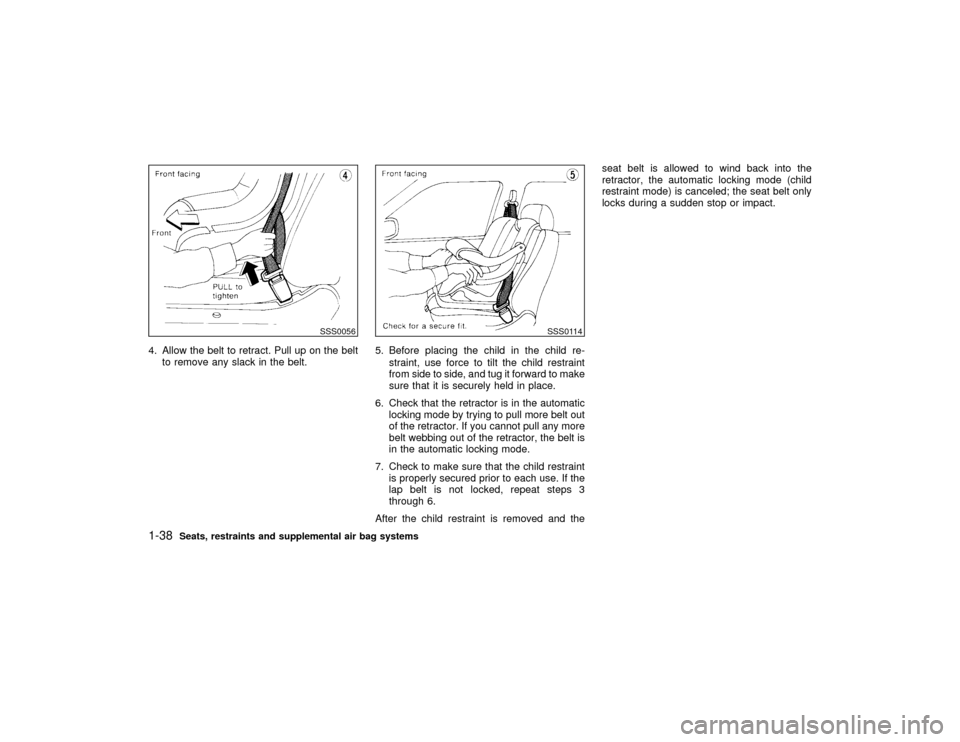
4. Allow the belt to retract. Pull up on the belt
to remove any slack in the belt.5. Before placing the child in the child re-
straint, use force to tilt the child restraint
from side to side, and tug it forward to make
sure that it is securely held in place.
6. Check that the retractor is in the automatic
locking mode by trying to pull more belt out
of the retractor. If you cannot pull any more
belt webbing out of the retractor, the belt is
in the automatic locking mode.
7. Check to make sure that the child restraint
is properly secured prior to each use. If the
lap belt is not locked, repeat steps 3
through 6.
After the child restraint is removed and theseat belt is allowed to wind back into the
retractor, the automatic locking mode (child
restraint mode) is canceled; the seat belt only
locks during a sudden stop or impact.
SSS0056
SSS0114
1-38
Seats, restraints and supplemental air bag systems
Z
00.1.17/A33-D/V5.0
X
Page 45 of 239

2 Instruments and controlsInstrument panel ....................................................... 2-2
Meters and gauges ................................................... 2-3
Speedometer and odometer ..................................... 2-4
Tachometer ............................................................... 2-4
Engine coolant temperature gauge ........................... 2-5
Fuel gauge ................................................................ 2-5
Warning/indicator lights and chimes ......................... 2-7
Checking bulbs.......................................................... 2-7
Warning lights ........................................................... 2-7
Indicator lights ........................................................... 2-9
Chimes .................................................................... 2-11
Security systems ..................................................... 2-12
Theft warning (if so equipped) ................................ 2-12
Nissan Vehicle Immobilizer System ....................... 2-13
Windshield wiper and washer switch ...................... 2-15
Rear window and outside mirror (if so equipped)
defogger switch ....................................................... 2-16
Headlight and turn signal switch ............................. 2-17
Headlight switch ...................................................... 2-17
Turn signal switch ................................................... 2-19
Fog light switch (if so equipped) ............................. 2-19
Hazard warning flasher switch ................................ 2-20
Horn......................................................................... 2-20
Heated seats (if so equipped) ................................. 2-21Traction control system (TCS) cancel switch
(if so equipped) ....................................................... 2-22
Power outlet ............................................................ 2-22
Cigarette lighter and ashtray (accessory) ............... 2-23
Storage .................................................................... 2-23
Trays ....................................................................... 2-23
Glasses case........................................................... 2-24
Cup holder............................................................... 2-24
Glove box ................................................................ 2-25
Console box ............................................................ 2-26
Luggage net (if so equipped) .................................. 2-26
Windows .................................................................. 2-27
Power windows ....................................................... 2-27
Sunroof (if so equipped) ......................................... 2-29
Automatic sunroof ................................................... 2-29
Clock ....................................................................... 2-30
Adjusting the time ................................................... 2-30
Interior light ............................................................. 2-30
Ceiling ..................................................................... 2-30
Personal light .......................................................... 2-31
Vanity mirror light (if so equipped) .......................... 2-32
Trunk light ............................................................... 2-33
Integrated HomeLink
Universal Transceiver
(if so equipped) ....................................................... 2-33
Z
00.1.17/A33-D/V5.0
X
Page 47 of 239

Windshield wiper/washer switch (P.2-15)
Instrument brightness control switch (P.2-18)Meters/gauges (P.2-3)Security indicator light (P.2-12) Cruise control main switch (P.5-14)
Headlight, fog light (if so equipped)
and turn signal switch (P.2-17)
Outside mirror remote control (P.3-13)Fuse box cover (P.8-23)
Tilting steering wheel lock lever (P.3-12) Driver supplemental air bag (P.1-8)
Ignition switch/steering lock (P.5-4) Cruise control set switch (P.5-14)
Power outlet (P.2-22) or cigarette lighter (accessory) (P.2-23)
Hazard warning flasher switch (P.2-20)Ventilator (P.4-2)
Heater/air conditioner control (P.4-3)
Clock (P.2-30)
Radio/cassette player (P.4-14)/CD player (P.4-19) Rear window and outside mirror (if so equipped) defogger switch (P.2-16)
Passenger supplemental air bag (P.1-8)
Glove box (P.2-25)
Tray (P.2-23) or ashtray (accessory) (P.2-23)
SIC1225
See the page indicated in parentheses for operating details.
Traction control system (TCS) cancel switch (if so equipped) (P.2-22)
INSTRUMENT PANEL2-2
Instruments and controls
Z
00.1.17/A33-D/V5.0
X
Page 52 of 239
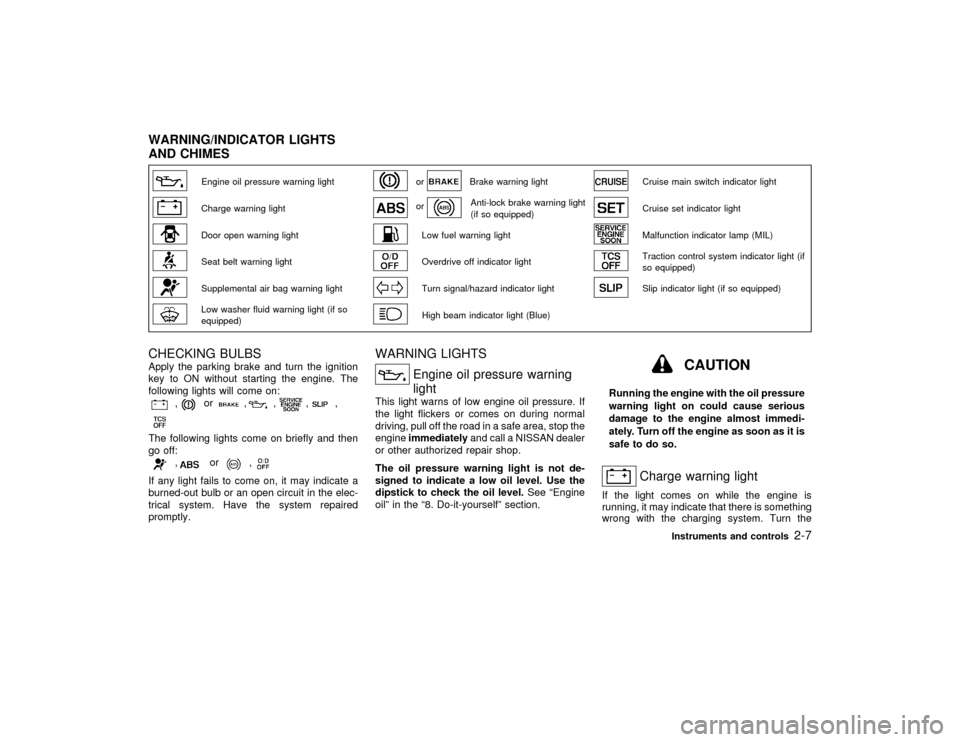
Engine oil pressure warning light
or
Brake warning light
Cruise main switch indicator light
Charge warning light
or
Anti-lock brake warning light
(if so equipped)
Cruise set indicator light
Door open warning light
Low fuel warning light
Malfunction indicator lamp (MIL)
Seat belt warning light
Overdrive off indicator light
Traction control system indicator light (if
so equipped)
Supplemental air bag warning light
Turn signal/hazard indicator light
Slip indicator light (if so equipped)
Low washer fluid warning light (if so
equipped)
High beam indicator light (Blue)
CHECKING BULBSApply the parking brake and turn the ignition
key to ON without starting the engine. The
following lights will come on:
,
or
,
,
,
,
The following lights come on briefly and then
go off:
,
or
,
If any light fails to come on, it may indicate a
burned-out bulb or an open circuit in the elec-
trical system. Have the system repaired
promptly.
WARNING LIGHTS
Engine oil pressure warning
light
This light warns of low engine oil pressure. If
the light flickers or comes on during normal
driving, pull off the road in a safe area, stop the
engineimmediatelyand call a NISSAN dealer
or other authorized repair shop.
The oil pressure warning light is not de-
signed to indicate a low oil level. Use the
dipstick to check the oil level.See ªEngine
oilº in the ª8. Do-it-yourselfº section.
CAUTION
Running the engine with the oil pressure
warning light on could cause serious
damage to the engine almost immedi-
ately. Turn off the engine as soon as it is
safe to do so.
Charge warning light
If the light comes on while the engine is
running, it may indicate that there is something
wrong with the charging system. Turn the
WARNING/INDICATOR LIGHTS
AND CHIMES
Instruments and controls
2-7
Z
00.1.17/A33-D/V5.0
X
Page 54 of 239
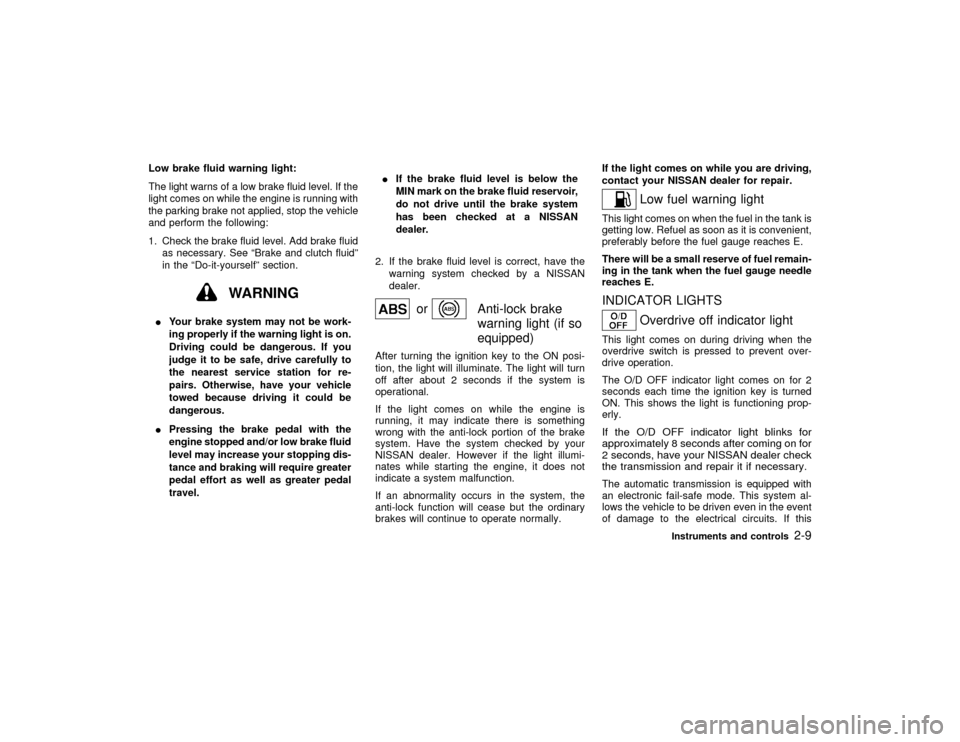
Low brake fluid warning light:
The light warns of a low brake fluid level. If the
light comes on while the engine is running with
the parking brake not applied, stop the vehicle
and perform the following:
1. Check the brake fluid level. Add brake fluid
as necessary. See ªBrake and clutch fluidº
in the ªDo-it-yourselfº section.
WARNING
IYour brake system may not be work-
ing properly if the warning light is on.
Driving could be dangerous. If you
judge it to be safe, drive carefully to
the nearest service station for re-
pairs. Otherwise, have your vehicle
towed because driving it could be
dangerous.
IPressing the brake pedal with the
engine stopped and/or low brake fluid
level may increase your stopping dis-
tance and braking will require greater
pedal effort as well as greater pedal
travel.IIf the brake fluid level is below the
MIN mark on the brake fluid reservoir,
do not drive until the brake system
has been checked at a NISSAN
dealer.
2. If the brake fluid level is correct, have the
warning system checked by a NISSAN
dealer.
or
Anti-lock brake
warning light (if so
equipped)
After turning the ignition key to the ON posi-
tion, the light will illuminate. The light will turn
off after about 2 seconds if the system is
operational.
If the light comes on while the engine is
running, it may indicate there is something
wrong with the anti-lock portion of the brake
system. Have the system checked by your
NISSAN dealer. However if the light illumi-
nates while starting the engine, it does not
indicate a system malfunction.
If an abnormality occurs in the system, the
anti-lock function will cease but the ordinary
brakes will continue to operate normally.If the light comes on while you are driving,
contact your NISSAN dealer for repair.
Low fuel warning light
This light comes on when the fuel in the tank is
getting low. Refuel as soon as it is convenient,
preferably before the fuel gauge reaches E.
There will be a small reserve of fuel remain-
ing in the tank when the fuel gauge needle
reaches E.INDICATOR LIGHTS
Overdrive off indicator light
This light comes on during driving when the
overdrive switch is pressed to prevent over-
drive operation.
The O/D OFF indicator light comes on for 2
seconds each time the ignition key is turned
ON. This shows the light is functioning prop-
erly.If the O/D OFF indicator light blinks for
approximately 8 seconds after coming on for
2 seconds, have your NISSAN dealer check
the transmission and repair it if necessary.The automatic transmission is equipped with
an electronic fail-safe mode. This system al-
lows the vehicle to be driven even in the event
of damage to the electrical circuits. If this
Instruments and controls
2-9
Z
00.1.17/A33-D/V5.0
X