ignition NISSAN MAXIMA 2000 A33 / 5.G Owner's Guide
[x] Cancel search | Manufacturer: NISSAN, Model Year: 2000, Model line: MAXIMA, Model: NISSAN MAXIMA 2000 A33 / 5.GPages: 239, PDF Size: 1.97 MB
Page 85 of 239

CHILD SAFETY REAR DOOR
LOCKChild safety locking helps prevent doors from
being opened accidentally, especially when
small children are in the vehicle.
When the lever is in the lock position, the
rear door can be opened only from the
outside.It is possible to lock/unlock all doors to release
the trunk lid and activate the panic alarm by
using the remote controller from outside the
vehicle.
Before locking the doors, make sure the
key is not left in the vehicle.
The remote controller can operate at a dis-
tance of approximately 33 ft (10 m) from the
vehicle. (The effective distance depends upon
the conditions around the vehicle.)
As many as four remote controllers can be
used with one vehicle. For information con-
cerning the purchase and use of additional
remote controllers, contact your NISSAN
dealer.
The multi-remote controller will not function
when:
Ithe battery is dead,
Ithe distance between the vehicle and the
remote controller is over 33 ft (10 m).
The panic alarm will not activate when the
key is in the ignition switch.
CAUTION
The following conditions or occurrences
will damage the remote controller.IDo not allow the remote controller to
become wet.
IDo not drop the remote controller.
IDo not strike the remote controller
sharply against another object.
IDo not place the remote controller for
an extended period in an area where
temperatures exceed 140ÉF (60ÉC).
If a multi-remote controller is lost or
stolen, NISSAN recommends erasing
the ID code of that controller. This will
prevent the controller from unautho-
rized use to unlock the vehicle. For in-
formation regarding the erasing proce-
dure, please contact an authorized
NISSAN dealer.
HOW TO USE MULTI-REMOTE
CONTROL SYSTEM
Setting hazard and horn chirp modeThis vehicle is set in hazard and horn chirp
mode when you first receive the vehicle.
In hazard and horn chirp mode, when the
LOCK button is pushed, the hazard indicator
SPA0086
MULTI-REMOTE CONTROL
SYSTEM (if so equipped)
3-4
Pre-driving checks and adjustments
Z
00.1.17/A33-D/V5.0
X
Page 86 of 239

flashes twice and the horn chirps once. When
the UNLOCK button is pushed, the hazard
indicator flashes once.
If hazard and horn chirp mode is not neces-
sary, you can switch to normal mode by fol-
lowing the switching procedure.
In normal mode, when the LOCK button is
pushed, the hazard indicator flashes twice.
When the UNLOCK button is pushed, neither
the hazard indicator nor the horn operates.
(Switching procedure)
Push the LOCK and UNLOCK buttons on the
multi-remote controller simultaneously for
more than 2 seconds to switch from one mode
to the other.
When pushing the buttons to set normal mode,
the hazard indicator flashes 3 times.
When pushing the buttons to set hazard and
horn chirp mode, the hazard indicator flashes
once and the horn chirps once.
Locking doors1. Remove the ignition key.*1
2. Close all the doors.*2
3. Push the LOCK button on the multi-remote
controller.
4. All the doors will lock.
All of the doors will lock when the LOCK
button on the multi-remote controller is
pushed even though a door remains open
and/or the ignition key is in the ON posi-
tion.5. The hazard indicator flashes twice and the
horn chirps once.
IWhen the LOCK button is pushed with all
doors locked, the hazard indicator flashes
twice and the horn chirps once as a re-
minder that the doors are already locked.
*1: Doors lock with the remote controller while
a key is in the ignition switch. However, the
panic alarm will not activate when the key
is in the ignition switch.
*2: Doors lock with the remote controller while
any door is open. However, hazard and
horn chirp mode will not function.
SPA0982
Pre-driving checks and adjustments
3-5
Z
00.1.17/A33-D/V5.0
X
Page 87 of 239

Unlocking doors1. Push the UNLOCK button on the multi-
remote controller once.
IOnly the driver's door unlocksIThe hazard indicator flashes once if all
doors are completely closed.
IThe interior light turns on and the light timer
activates for 30 seconds when the switch is
in the centerqposition.2. Keep pushing the UNLOCK button on the
multi-remote controller or push the button
again within 5 seconds.
IAll doors unlock
IThe hazard indicator flashes once if all
doors are completely closed.
The interior light can be turned off without
waiting for 30 seconds by turning the ignition
switch to the ON position or by locking the
doors with the multi-remote controller.
Releasing the trunk lid1. Push the trunk button on the multi-remote
controller for longer than 0.5 second with
the key removed from the key cylinder.
2. The trunk lid opens.
The trunk lid will not open when the trunk lid
cancel lever is in the CANCEL position.
It can be opened only with the key.
See ªTrunk lidº later in this section for cancel
lever.Using the panic alarmIf you are near your vehicle and feel threat-
ened, you may activate the alarm to call atten-
tion as follows:
1. Push the PANIC button on the remote
SPA0981
3-6
Pre-driving checks and adjustments
Z
00.1.17/A33-D/V5.0
X
Page 94 of 239

INSIDE MIRRORThe night position will reduce glare from the
headlights of vehicles behind you at night.
WARNING
Use the night position only when neces-
sary, because it reduces rear view clar-
ity.
OUTSIDE MIRRORS
WARNING
Objects viewed in the outside mirror on
the passenger side are closer than they
appear. Be careful when moving to the
right. Using only this mirror could cause
an accident. Use inside mirror or glance
over your shoulder to properly judge
distances to other objects.
The outside mirror will operate only when theignition switch is in the ACC or ON position.
Turn the control knob to right or left to select
the right or left outside mirror, then adjust.
SPA0470
SPA0987
MIRRORS
Pre-driving checks and adjustments
3-13
Z
00.1.17/A33-D/V5.0
X
Page 107 of 239

Turn the ignition key to ACC or ON and press
the power on switch to turn on the radio. If you
listen to the radio with the engine not running,
the key should be turned to the ACC position.
Radio reception is affected by station signal
strength, distance from radio transmitter, build-
ings, bridges, mountains and other external
influences. Intermittent changes in reception
quality normally are caused by these external
influences.
Using a cellular phone in or near the ve-
hicle may influence radio reception quality.Radio receptionYour radio system is equipped with state-of-
the-art electronic circuits to enhance radio
reception. These circuits are designed to ex-
tend reception range, and to enhance the
quality of that reception.
However there are some general characteris-
tics of both FM and AM radio signals that can
affect radio reception quality in a moving ve-
hicle, even when the finest equipment is used.
These characteristics are completely normal in
a given reception area, and do not indicate any
malfunction in your radio system.
Remember that a moving vehicle is not the
ideal place to listen to a radio. Because of the
movement, reception conditions will constantlychange. Buildings, terrain, signal distance and
interference from other vehicles can work
against ideal reception. Described below are
some of the factors that can affect your radio
reception.
FM RADIO RECEPTIONRange: FM range is normally limited to 25 to
30 miles (40 to 48 km), with monaural (single
channel) FM having slightly more range than
stereo FM. External influences may some-
times interfere with FM station reception even
if the FM station is within 25 miles (40 km). The
strength of the FM signal is directly related to
the distance between the transmitter and re-
ceiver. FM signals follow a line-of-sight path,
exhibiting many of the same characteristics as
light. For example they will reflect off objects.
Fade and drift: As your vehicle moves away
SAA0306
AUDIO SYSTEM4-12
Heater, air conditioner and audio systems
Z
00.1.17/A33-D/V5.0
X
Page 109 of 239

FM-AM RADIO WITH CASSETTE
PLAYER
Audio main operationPower/Volume control:
Turn the ignition key to ACC or ON, then push
the Power/Volume control knob. The mode
(radio or cassette) which was playing immedi-
ately before the system was turned off re-
sumes playing. When no cassette is loaded,
the radio comes on. Pushing the Power/
Volume control knob again turns the system
off.
Turn the Power/Volume control knob to adjust
the volume.
SAA0263
4-14
Heater, air conditioner and audio systems
Z
00.1.17/A33-D/V5.0
X
Page 111 of 239

tion. Pushing the button again continues the
SEEK function. Once the highest broadcasting
station is reached, the radio continues in the
SEEK mode at the lowest broadcast station.
Push the SEEK/SCAN tuning button
or
for more than 1.5 seconds. SCAN illu-
minates in the display window. SCAN tuning
begins from high to low or low to high frequen-
cies and stops at each broadcasting station for
5 seconds. Pushing the button again during
this 5 second period stops SCAN tuning and
the radio remains tuned to that station.Station memory operations:
Six stations can be set for the AM band. 12
stations can be set for the FM band (six for
FM1, six for FM2).
1. Push the FM-AM band select button to
select AM, FM1, or FM2. The selected band
illuminates in the display.
2. Tune to the desired station.
3. Push the desired select button for more
than 1.5 seconds. For example, in the
illustrations ch2 is to be memorized. The
radio mutes when the select button is
pushed.
4. When the sound resumes, memorizing is
complete.
5. Other station select buttons can be set in
the same manner.
If the battery cable is disconnected, or if the
radio fuse opens, the radio memory is can-
celled. In that case, reset the desired stations.
Cassette tape player operationTurn the ignition key to ACC or ON, then
carefully insert a cassette tape into the tape
door.
The cassette tape automatically pulls into the
player. The word TAPE and moving digital
SAA0264
4-16
Heater, air conditioner and audio systems
Z
00.1.17/A33-D/V5.0
X
Page 114 of 239

FM-AM RADIO WITH CASSETTE
PLAYER AND COMPACT DISC
(CD) PLAYER
Audio main operationHead unit
The radio has an FM diversity reception sys-
tem, which employs two antennas. One is a
rod type antenna; the other is an antenna
printed on the window. This system automati-
cally switches to the antenna which is receiv-
ing less noise.
The tape deck employs a permalloy head
which allows for improved reproduction of high
frequency ranges. Noise is also greatly re-
duced by the combined use of the Dolby NR
(Noise Reduction) system. The auto loudness
circuit enhances the low frequency range au-
tomatically in both radio reception and tape
and CD playback.
ON×OFF/Volume control:
Turn the ignition key to ACC or ON, and then
push the ON×OFF/VOL control knob while the
system is off to call up the mode (radio, tape or
CD) which was playing immediately before the
system was turned off. When no CD or tape is
loaded, the radio will come on. While the
system is on, pushing the ON×OFF/VOL con-
SAA0380
Heater, air conditioner and audio systems
4-19
Z
00.1.17/A33-D/V5.0
X
Page 115 of 239
trol knob turns the system off.
To turn the radio off, press the ON×OFF/VOL
control knob.
Turn the ON×OFF/VOL control knob to adjust
the volume.
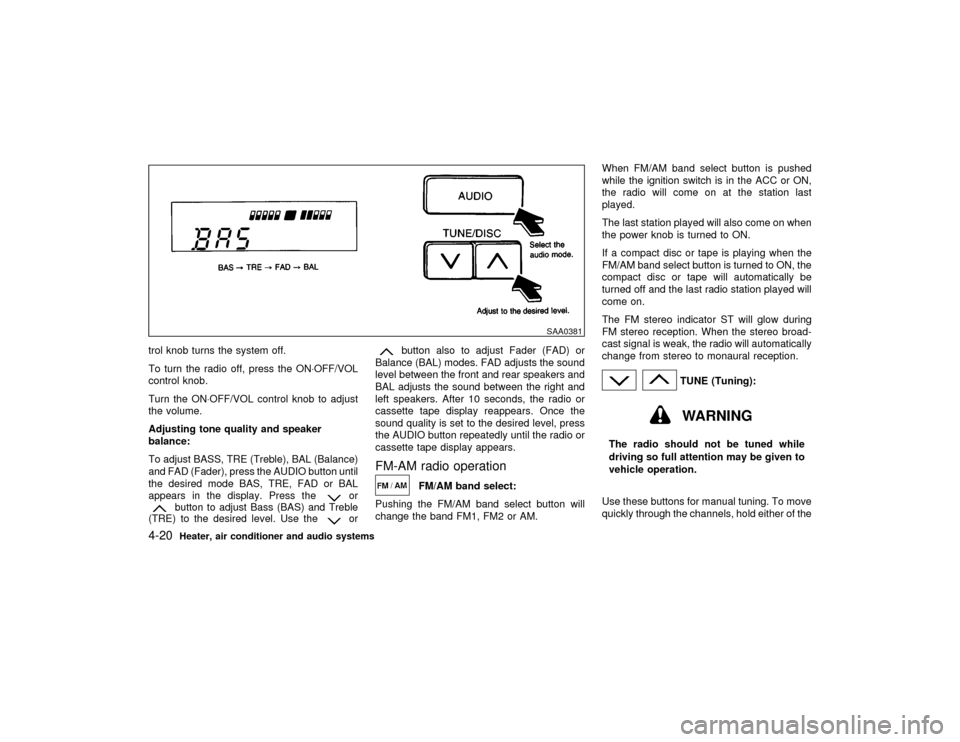
Adjusting tone quality and speaker
balance:
To adjust BASS, TRE (Treble), BAL (Balance)
and FAD (Fader), press the AUDIO button until
the desired mode BAS, TRE, FAD or BAL
appears in the display. Press the
or
button to adjust Bass (BAS) and Treble
(TRE) to the desired level. Use the
or
button also to adjust Fader (FAD) or
Balance (BAL) modes. FAD adjusts the sound
level between the front and rear speakers and
BAL adjusts the sound between the right and
left speakers. After 10 seconds, the radio or
cassette tape display reappears. Once the
sound quality is set to the desired level, press
the AUDIO button repeatedly until the radio or
cassette tape display appears.
FM-AM radio operation
FM/AM band select:
Pushing the FM/AM band select button will
change the band FM1, FM2 or AM.When FM/AM band select button is pushed
while the ignition switch is in the ACC or ON,
the radio will come on at the station last
played.
The last station played will also come on when
the power knob is turned to ON.
If a compact disc or tape is playing when the
FM/AM band select button is turned to ON, the
compact disc or tape will automatically be
turned off and the last radio station played will
come on.
The FM stereo indicator ST will glow during
FM stereo reception. When the stereo broad-
cast signal is weak, the radio will automatically
change from stereo to monaural reception.
TUNE (Tuning):WARNING
The radio should not be tuned while
driving so full attention may be given to
vehicle operation.
Use these buttons for manual tuning. To move
quickly through the channels, hold either of the
SAA0381
4-20
Heater, air conditioner and audio systems
Z
00.1.17/A33-D/V5.0
X
Page 116 of 239
TUNE buttons down for more than 0.5 sec-
onds.
SEEK/SCAN tuning:
SEEK tuning:
Push the SEEK/SCAN tuning button
or
for less than 1.5 seconds. SEEK tuning
begins from high to low or low to high frequen-
cies and stops at the next broadcasting sta-
tion.
SCAN tuning:
Push the SEEK/SCAN tuning button
or
for more than 1.5 seconds. SCAN tuning
begins from high to low or low to high frequen-
cies and stops at each broadcasting station for
10 seconds. Pushing the button again during
this 10 seconds period will stop SCAN tuning
and the radio will remain tuned to that station.
If the SEEK/SCAN tuning button is not pushed
within 10 seconds, SCAN tuning moves to the
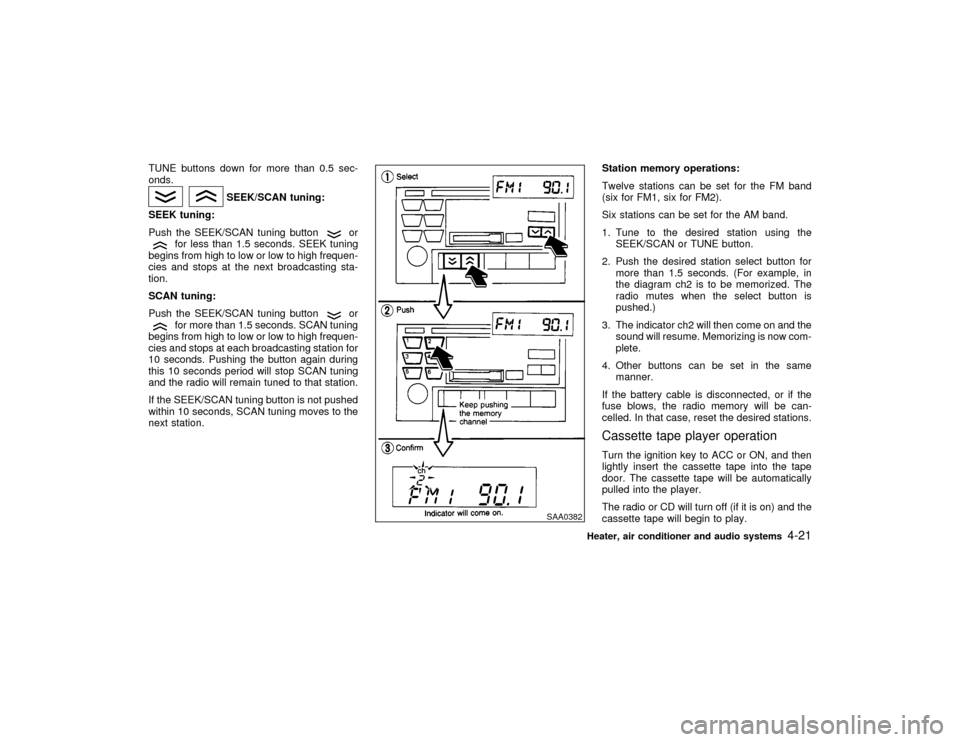
next station.Station memory operations:
Twelve stations can be set for the FM band
(six for FM1, six for FM2).
Six stations can be set for the AM band.
1. Tune to the desired station using the
SEEK/SCAN or TUNE button.
2. Push the desired station select button for
more than 1.5 seconds. (For example, in
the diagram ch2 is to be memorized. The
radio mutes when the select button is
pushed.)
3. The indicator ch2 will then come on and the
sound will resume. Memorizing is now com-
plete.
4. Other buttons can be set in the same
manner.
If the battery cable is disconnected, or if the
fuse blows, the radio memory will be can-
celled. In that case, reset the desired stations.
Cassette tape player operationTurn the ignition key to ACC or ON, and then
lightly insert the cassette tape into the tape
door. The cassette tape will be automatically
pulled into the player.
The radio or CD will turn off (if it is on) and the
cassette tape will begin to play.
SAA0382
Heater, air conditioner and audio systems
4-21
Z
00.1.17/A33-D/V5.0
X