display NISSAN MAXIMA 2004 A34 / 6.G Owners Manual
[x] Cancel search | Manufacturer: NISSAN, Model Year: 2004, Model line: MAXIMA, Model: NISSAN MAXIMA 2004 A34 / 6.GPages: 280, PDF Size: 3.99 MB
Page 5 of 280
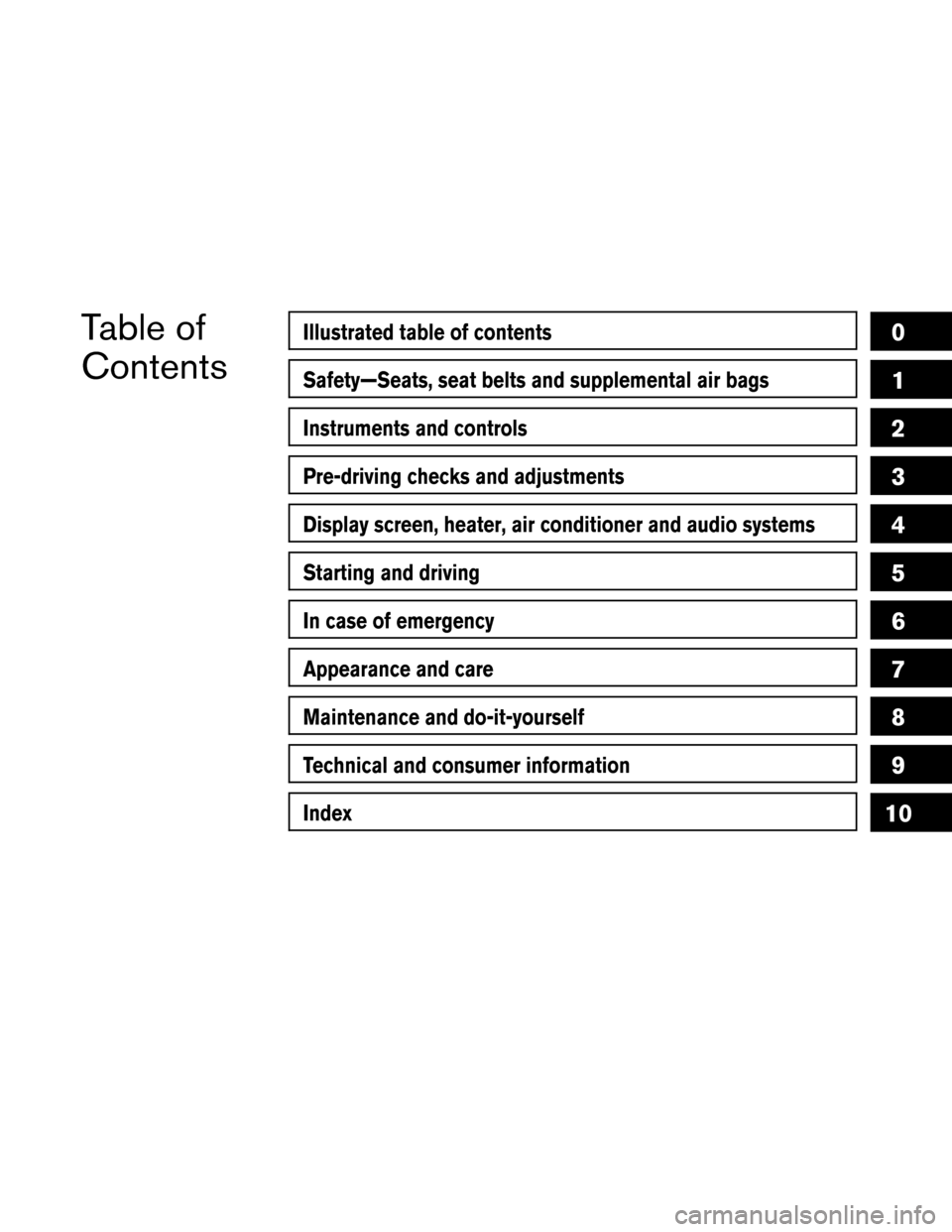
Table of
ContentsIllustrated table of contents
Safety—Seats, seat belts and supplemental air bags
Instruments and controls
Pre-driving checks and adjustments
Display screen, heater, air conditioner and audio systems
Starting and driving
In case of emergency
Appearance and care
Maintenance and do-it-yourself
Technical and consumer information
Index
0
1
2
3
4
5
6
7
8
9
10
Page 12 of 280
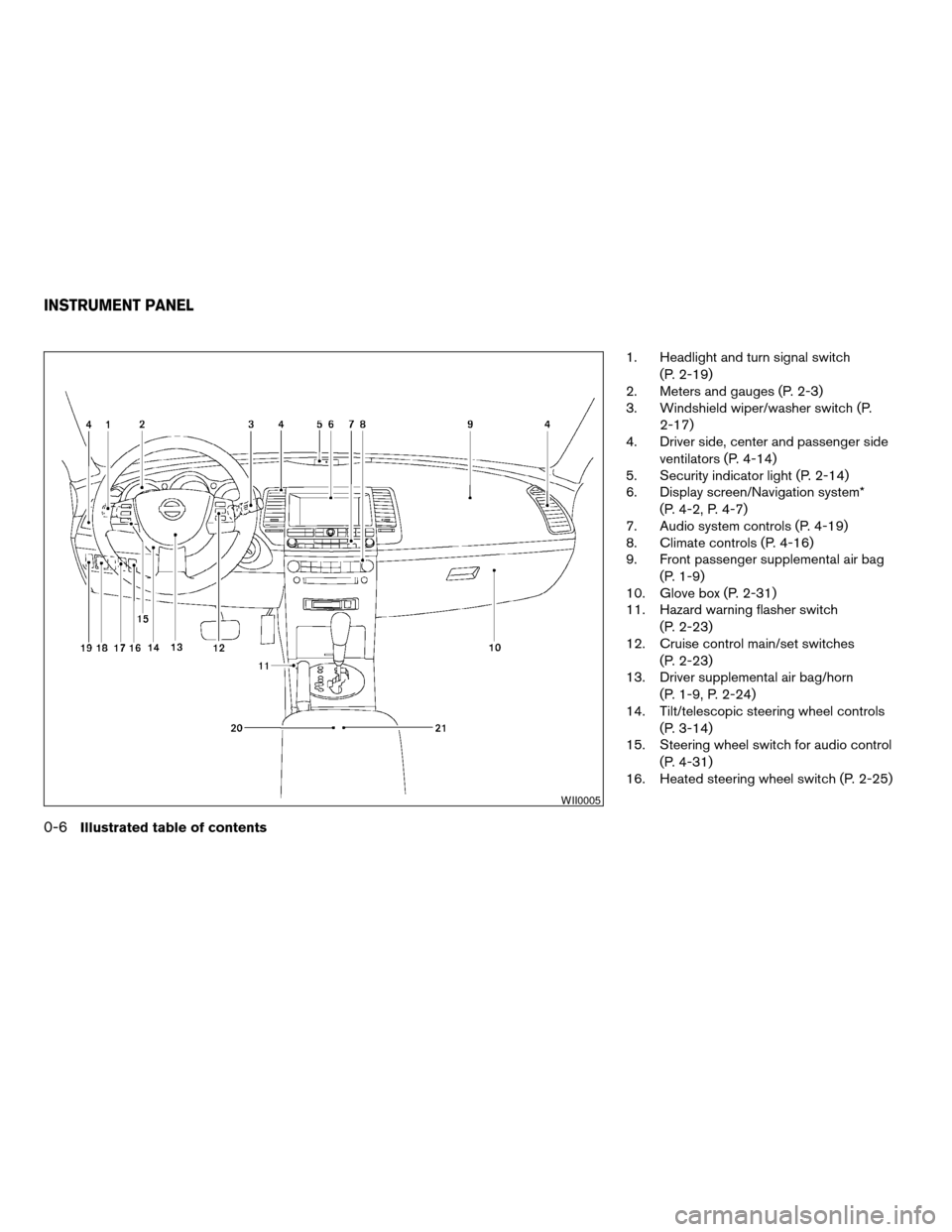
1. Headlight and turn signal switch
(P. 2-19)
2. Meters and gauges (P. 2-3)
3. Windshield wiper/washer switch (P.
2-17)
4. Driver side, center and passenger side
ventilators (P. 4-14)
5. Security indicator light (P. 2-14)
6. Display screen/Navigation system*
(P. 4-2, P. 4-7)
7. Audio system controls (P. 4-19)
8. Climate controls (P. 4-16)
9. Front passenger supplemental air bag
(P. 1-9)
10. Glove box (P. 2-31)
11. Hazard warning flasher switch
(P. 2-23)
12. Cruise control main/set switches
(P. 2-23)
13. Driver supplemental air bag/horn
(P. 1-9, P. 2-24)
14. Tilt/telescopic steering wheel controls
(P. 3-14)
15. Steering wheel switch for audio control
(P. 4-31)
16. Heated steering wheel switch (P. 2-25)
WII0005
INSTRUMENT PANEL
0-6Illustrated table of contents
ZREVIEW COPY:Ð2004 Maxima(max)
Owners Manual(owners)ÐUSA English(nna)
10/20/03Ðarosenma
X
Page 37 of 280

1. SRS Air Bag Warning Labels (located
on the sun visors)
2. SRS Side Air Bag Warning Labels (lo-
cated on the door pillar)
SUPPLEMENTAL AIR BAG
WARNING LABELS
Warning labels about the supplemental front air
bag, supplemental side air bag and curtain side-
impact air bag systems are placed in the vehicle
as shown in the illustration.
SUPPLEMENTAL AIR BAG
WARNING LIGHT
The supplemental air bag warning light,
displayingin the instrument panel, moni-
tors the circuits of the supplemental front air bag,
supplemental side air bag and curtain side-
impact air bag and pre-tensioner seat belt sys-
tems. The circuits monitored by the supplemental
air bag warning light are the diagnosis sensor
unit, crash zone sensor, satellite sensors, front air
bag modules, side air bag modules, curtain side-
impact air bag modules, pre-tensioner seat belts
and all related wiring.When the ignition key is in the ON or START
position, the supplemental air bag warning light
illuminates for about 7 seconds and then turns
off. This means the system is operational.
If any of the following conditions occur, the
supplemental front air bag, supplemental side air
bag and curtain side-impact air bag and pre-
tensioner seat belt systems need servicing:
cThe supplemental air bag warning light re-
mains on after approximately 7 seconds.
cThe supplemental air bag warning light
flashes intermittently.
cThe supplemental air bag warning light does
not come on at all.
Under these conditions, the supplemental front
air bag, supplemental side air bags and curtain
side-impact air bag or pre-tensioner seat belt
systems may not operate properly. It must be
checked and repaired. Take your vehicle to the
nearest NISSAN dealer.
WRS0169LRS0100
Safety—Seats, seat belts and supplemental air bags1-21
ZREVIEW COPY:Ð2004 Maxima(max)
Owners Manual(owners)ÐUSA English(nna)
10/07/03Ðtbrooks
X
Page 60 of 280
2 Instruments and controls
Instrument panel...................................2-2
Meters and gauges................................2-3
Speedometer and odometer.....................2-4
Tachometer....................................2-5
Engine coolant temperature gauge...............2-5
Fuel gauge....................................2-6
Compass display (if so equipped)...................2-6
Zone variation change procedure.................2-7
Warning/indicator lights and audible reminders.......2-9
Checking bulbs................................2-9
Warning lights.................................2-9
Indicator lights................................2-12
Audible reminders.............................2-14
Security systems.................................2-14
Vehicle security system.........................2-14
Nissan vehicle immobilizer system (NVIS)........2-16
Windshield wiper and washer switch...............2-17
Switch operation..............................2-17
Rear window and outside mirror (if so equipped)
defroster switch..................................2-18
Headlight and turn signal switch....................2-19
Xenon headlights (if so equipped)...............2-19
Headlight control switch........................2-20Daytime running light system (Canada only)......2-21
Instrument brightness control...................2-22
Turn signal switch.............................2-22
Fog light switch...............................2-23
Cornering light................................2-23
Hazard warning flasher switch.....................2-23
Horn............................................2-24
Heated seats (if so equipped)......................2-24
Heated steering wheel (if so equipped).............2-25
Traction control system (TCS) off switch
(if so equipped)..................................2-26
Vehicle dynamic control (VDC) off switch
(if so equipped)..................................2-26
Power outlet.....................................2-27
Storage.........................................2-28
Seatback pockets.............................2-28
Sunglasses holder.............................2-29
Cup holders..................................2-29
Glove box....................................2-31
Console box..................................2-31
Rear center console (if so equipped).............2-32
Covered storage box...........................2-33
Cargo nets...................................2-33
ZREVIEW COPY:Ð2004 Maxima(max)
Owners Manual(owners)ÐUSA English(nna)
10/20/03Ðarosenma
X
Page 62 of 280
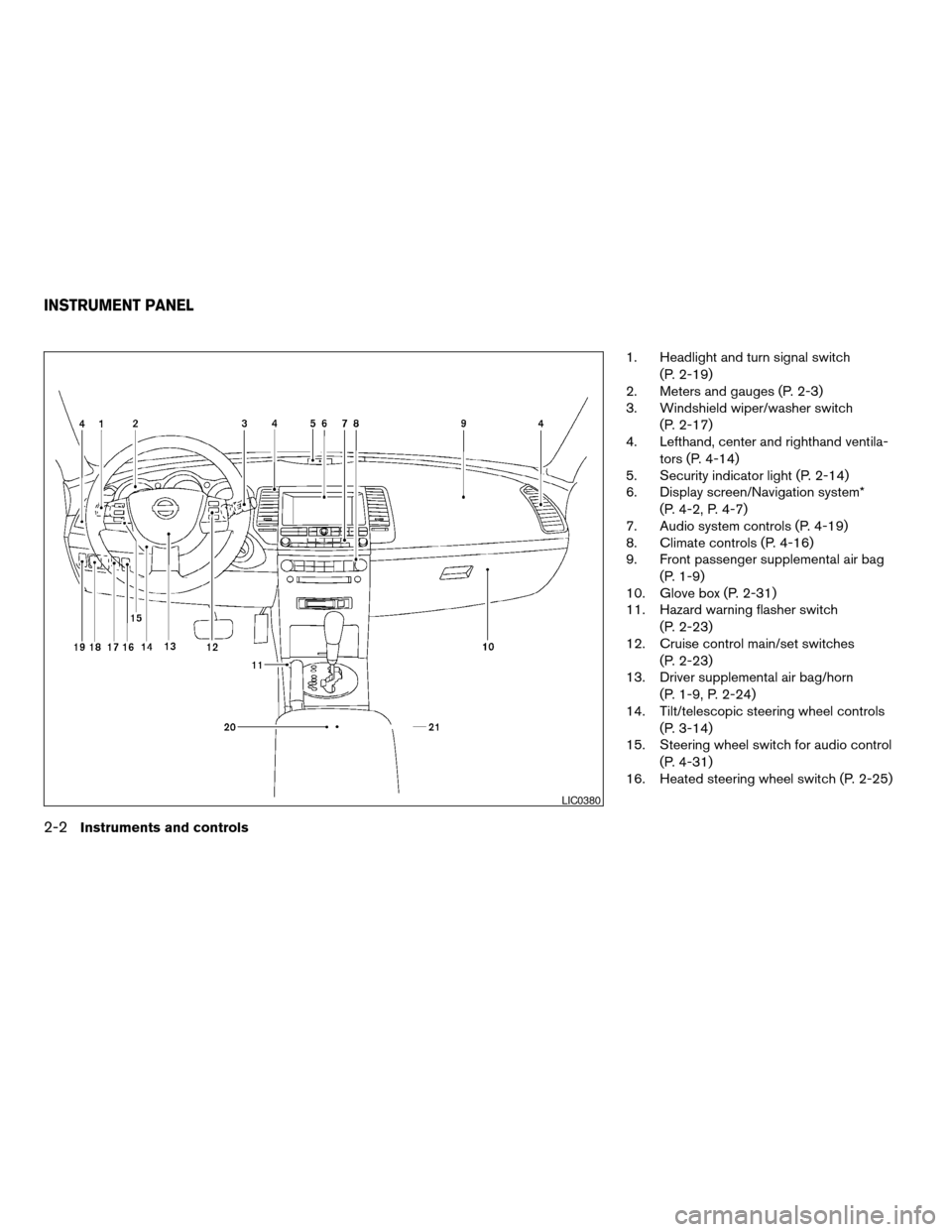
1. Headlight and turn signal switch
(P. 2-19)
2. Meters and gauges (P. 2-3)
3. Windshield wiper/washer switch
(P. 2-17)
4. Lefthand, center and righthand ventila-
tors (P. 4-14)
5. Security indicator light (P. 2-14)
6. Display screen/Navigation system*
(P. 4-2, P. 4-7)
7. Audio system controls (P. 4-19)
8. Climate controls (P. 4-16)
9. Front passenger supplemental air bag
(P. 1-9)
10. Glove box (P. 2-31)
11. Hazard warning flasher switch
(P. 2-23)
12. Cruise control main/set switches
(P. 2-23)
13. Driver supplemental air bag/horn
(P. 1-9, P. 2-24)
14. Tilt/telescopic steering wheel controls
(P. 3-14)
15. Steering wheel switch for audio control
(P. 4-31)
16. Heated steering wheel switch (P. 2-25)
LIC0380
INSTRUMENT PANEL
2-2Instruments and controls
ZREVIEW COPY:Ð2004 Maxima(max)
Owners Manual(owners)ÐUSA English(nna)
10/20/03Ðarosenma
X
Page 64 of 280

1. Speedometer
2. Odometer/twin trip display
3. Change button
SPEEDOMETER AND ODOMETER
Speedometer
The speedometer indicates vehicle speed in
miles per hour (MPH) and kilometers per hour
(km/h) .
Odometer/Twin trip odometer
The odometer/twin trip odometer is displayed
when the ignition key is in the ON position.The odometer records the total distance the ve-
hicle has been driven.
The twin trip odometer records the distance of
individual trips.Changing the display:
Pushing the change button changes the display
as follows:
Trip
!Trip!Trip
Resetting the trip odometer:
Pushing the change button for more than 1 sec-
ond resets the trip odometer to zero.
LIC0382LIC0432
2-4Instruments and controls
ZREVIEW COPY:Ð2004 Maxima(max)
Owners Manual(owners)ÐUSA English(nna)
10/07/03Ðtbrooks
X
Page 66 of 280

FUEL GAUGE
The gauge indicates theapproximatefuel level
in the tank.
The gauge may move slightly during braking,
turning, acceleration, or going up or down hills.
The gauge needle returns to E (Empty) after the
ignition key is turned to OFF.
The low fuel warning light comes on when the
amount of fuel in the tank is getting low.
Refill the fuel tank before the gauge regis-
ters E (Empty) .The
indicates that the fuel filler lid is
located on the driver’s side of the vehicle.
CAUTION
cIf the vehicle runs out of fuel,
the
malfunction indicator lamp
(MIL) may come on. Refuel as soon as
possible. After a few driving trips,
the
lamp should turn off. If the
lamp remains on after a few driving
trips, have the vehicle inspected by a
NISSAN dealer.
cFor additional information, see “Mal-
function indicator lamp (MIL)” later in
this section.When the COMPASS switch is in the ON posi-
tion, the compass display
s1will indicate the
direction the vehicle is heading.
N: north
E: east
S: south
W: west
If the display reads “C”, calibrate the compass by
driving the vehicle in three complete circles at
less than 5 MPH (8 km/h) .
You can also calibrate the compass by driving
your vehicle on your everyday route. The com-
pass will be calibrated once it has tracked three
complete circles.
LIC0385LIC0422
COMPASS DISPLAY (if so equipped)
2-6Instruments and controls
ZREVIEW COPY:Ð2004 Maxima(max)
Owners Manual(owners)ÐUSA English(nna)
10/07/03Ðtbrooks
X
Page 67 of 280
ZONE VARIATION CHANGE
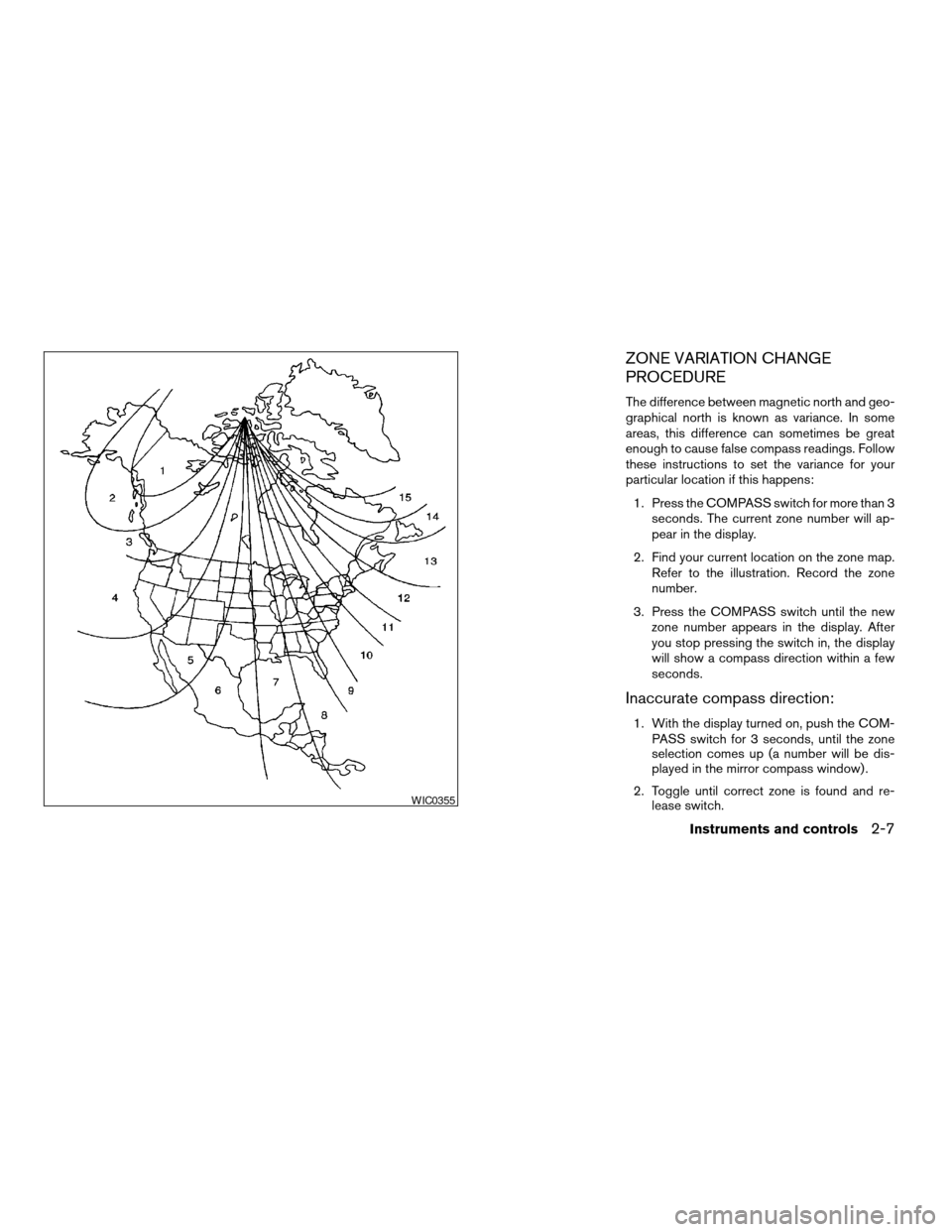
PROCEDURE
The difference between magnetic north and geo-
graphical north is known as variance. In some
areas, this difference can sometimes be great
enough to cause false compass readings. Follow
these instructions to set the variance for your
particular location if this happens:
1. Press the COMPASS switch for more than 3
seconds. The current zone number will ap-
pear in the display.
2. Find your current location on the zone map.
Refer to the illustration. Record the zone
number.
3. Press the COMPASS switch until the new
zone number appears in the display. After
you stop pressing the switch in, the display
will show a compass direction within a few
seconds.
Inaccurate compass direction:
1. With the display turned on, push the COM-
PASS switch for 3 seconds, until the zone
selection comes up (a number will be dis-
played in the mirror compass window) .
2. Toggle until correct zone is found and re-
lease switch.
WIC0355
Instruments and controls2-7
ZREVIEW COPY:Ð2004 Maxima(max)
Owners Manual(owners)ÐUSA English(nna)
10/07/03Ðtbrooks
X
Page 68 of 280

3. The display will show all segments, and re-
turn to the normal compass mode within 10
seconds of no switch activity.
4. If the vehicle changes zone, repeat steps 1
through 3. See map.
cIf the compass deviates from the correct
indication soon after repeated adjustment,
have the compass checked at an authorized
dealer.
cThe compass may not indicate the correct
compass point in tunnels or while driving up
or down a steep hill. (The compass returns
to the correct compass point when the ve-
hicle moves to an area where the geomag-
netism is stabilized.)
CAUTION
cDo not install a ski rack, antenna, etc.,
which are attached to the vehicle by
means of a magnet. They affect the op-
eration of the compass.
cWhen cleaning the mirror, use a paper
towel or similar material dampened
with glass cleaner. Do not spray glass
cleaner directly on the mirror as it may
cause the liquid cleaner to enter the
mirror housing.
2-8Instruments and controls
ZREVIEW COPY:Ð2004 Maxima(max)
Owners Manual(owners)ÐUSA English(nna)
10/07/03Ðtbrooks
X
Page 75 of 280
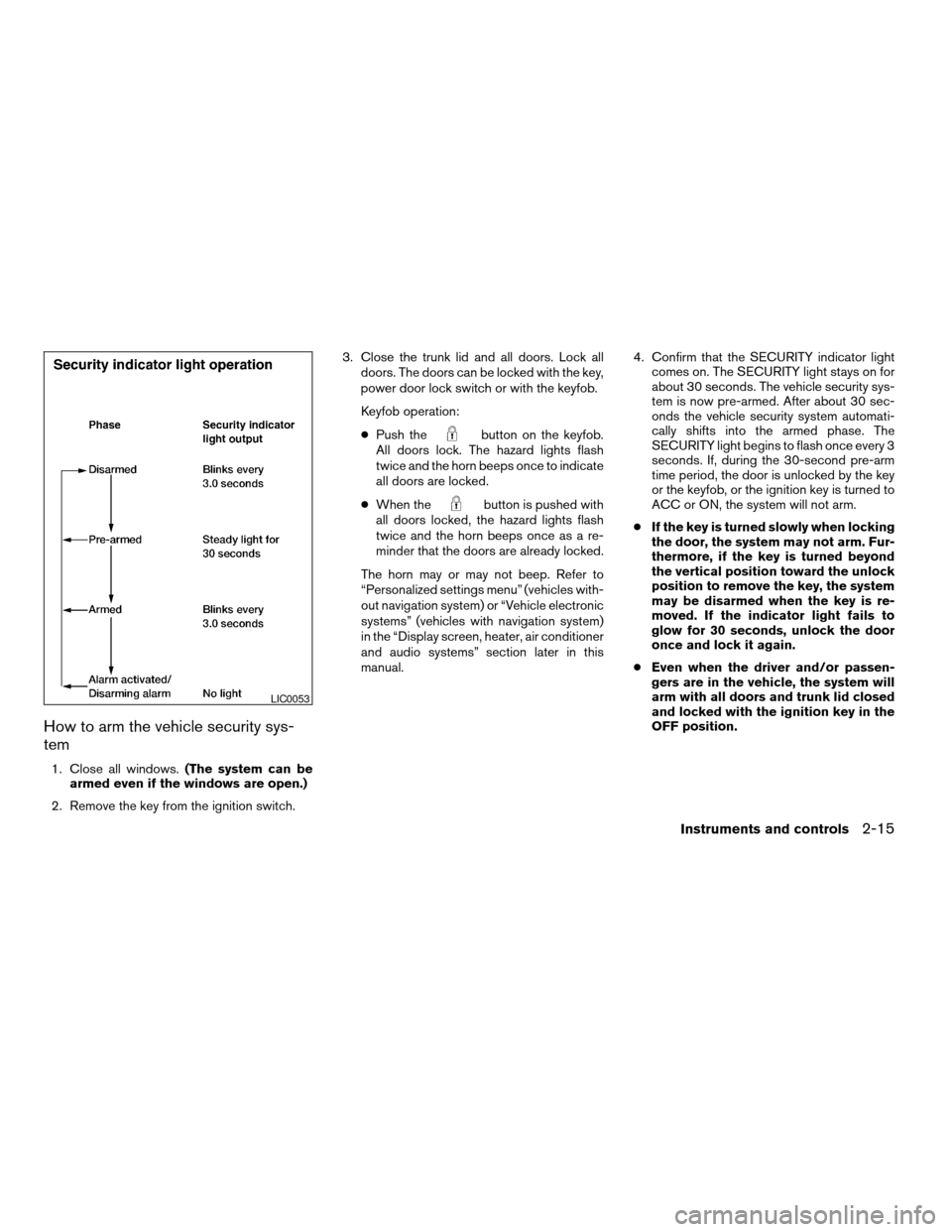
How to arm the vehicle security sys-
tem
1. Close all windows.(The system can be
armed even if the windows are open.)
2. Remove the key from the ignition switch.3. Close the trunk lid and all doors. Lock all
doors. The doors can be locked with the key,
power door lock switch or with the keyfob.
Keyfob operation:
cPush the
button on the keyfob.
All doors lock. The hazard lights flash
twice and the horn beeps once to indicate
all doors are locked.
cWhen the
button is pushed with
all doors locked, the hazard lights flash
twice and the horn beeps once as a re-
minder that the doors are already locked.
The horn may or may not beep. Refer to
“Personalized settings menu” (vehicles with-
out navigation system) or “Vehicle electronic
systems” (vehicles with navigation system)
in the “Display screen, heater, air conditioner
and audio systems” section later in this
manual.4. Confirm that the SECURITY indicator light
comes on. The SECURITY light stays on for
about 30 seconds. The vehicle security sys-
tem is now pre-armed. After about 30 sec-
onds the vehicle security system automati-
cally shifts into the armed phase. The
SECURITY light begins to flash once every 3
seconds. If, during the 30-second pre-arm
time period, the door is unlocked by the key
or the keyfob, or the ignition key is turned to
ACC or ON, the system will not arm.
cIf the key is turned slowly when locking
the door, the system may not arm. Fur-
thermore, if the key is turned beyond
the vertical position toward the unlock
position to remove the key, the system
may be disarmed when the key is re-
moved. If the indicator light fails to
glow for 30 seconds, unlock the door
once and lock it again.
cEven when the driver and/or passen-
gers are in the vehicle, the system will
arm with all doors and trunk lid closed
and locked with the ignition key in the
OFF position.
LIC0053
Instruments and controls2-15
ZREVIEW COPY:Ð2004 Maxima(max)
Owners Manual(owners)ÐUSA English(nna)
10/07/03Ðtbrooks
X