radio NISSAN MAXIMA 2005 A34 / 6.G User Guide
[x] Cancel search | Manufacturer: NISSAN, Model Year: 2005, Model line: MAXIMA, Model: NISSAN MAXIMA 2005 A34 / 6.GPages: 288, PDF Size: 4.71 MB
Page 165 of 288
cTrying to load a CD with the CD door
closed could damage the CD and/or CD
changer.
Turn the ignition key to the ACC or ON position
and insert the compact disc into the slot with the
label side facing up. The compact disc will be
guided automatically into the slot and start play-
ing.
If the radio or tape is already operating, it will
automatically turn off and the compact disc will
play.
If the system has been turned off while the com-
pact disc was playing, pushing the ON·OFF/VOL
control knob will start the compact disc.
3.1 in (8 cm) diameter compact discs can also be
used without an adapter.
CD button:When the CD button is pushed with
the system off and the compact disc loaded, the
system will turn on and the compact disc will start
to play.
When the CD button is pushed with the compact
disc loaded but the tape or the radio playing, the
tape or radio will automatically be turned off and
the compact disc will start to play.REW (Rewind) , FF (Fast
Forward):
When the
(rewind) button or(fast
forward) is pushed while the compact disc is
being played, the compact disc will play while
rewinding or fast forwarding. When the button is
released, the compact disc will return to normal
play speed.
SEEK/TRACK:
When the
button is pushed for less than
1.5 seconds while a compact disc is playing, the
track being played returns to its beginning. Push
several times to skip back through tracks. The
compact disc will go back the number of times
the button is pushed.
When the
button is pushed for less than
1.5 seconds while a compact disc is playing, the
next track will start to play from its beginning.
Push several times to skip through tracks. The
compact disc will advance the number of times
the button is pushed. (When the last track on the
compact disc is skipped through, the first track
will be played.)
When the
orbutton is pushed for
more than 1.5 seconds, each track will play for
about 10 seconds. To stop playing, push
the
button.REPEAT (RPT):
When the PROG/RPT button is pushed while the
compact disc is being played, the play pattern
can be changed as follows:
ALL DISC RPT!1 TRACK RPT!1 DISC RDM
!ALL DISC RPT
ALL DISC RPT: the entire disk will be repeated
1 TRACK RPT: the current track will be repeated
1 DISC RDM: all tracks will be played randomly
CD EJECT:
When the
button is pushed with the com-
pact disc loaded, the compact disc will be
ejected.
When
button is pushed while the compact
disc is being played, the compact disc will eject
and the system will turn off.
If the compact disc ejects and is not re-
moved, it will be pulled back into the slot to
protect it (except 3.1 in (8 cm) diameter
compact discs) .
CD IN indicator:
CD IN indicator appears on the display when the
CD is loaded with the system on.
Display screen, heater, air conditioner and audio systems4-29
ZREVIEW COPYÐ2005 Maxima(max)
Owners ManualÐUSA_English(nna)
09/01/04Ðtbrooks
X
Page 166 of 288
Compact disc (CD) changer operation
(Type B)
CAUTION
cDo not force a compact disc into the CD
insert slot. This could damage the CD
and/or CD changer/player.
cTrying to load a CD with the CD door
closed could damage the CD and/or CD
changer.
Turn the ignition key to the ACC or ON position
and insert the compact disc into the slot with the
label side facing up. The compact disc will be
guided automatically into the slot and start play-
ing. To insert the disc, first push the LOAD button.
If the radio or tape is already operating, it will
automatically turn off and the compact disc will
play.
If the system has been turned off while the com-
pact disc was playing, pushing the ON·OFF/VOL
control knob will start the compact disc.
LOAD button:
To insert a CD in the CD changer, push the LOAD
button for less than 1.5 seconds. Select the
loading slot by pushing the CD insert select
button (1 - 6) , then insert the CD.To insert 6 CDs to the CD changer, push the
LOAD button for more than 1.5 seconds.
The slot numbers (1 - 6) will illuminate on the
display when CDs are loaded into the changer.
CD button:When the CD button is pushed with
the system off and the compact disc loaded, the
system will turn on and the compact disc will start
to play.
When the CD button is pushed with the compact
disc loaded with the tape or the radio playing, the
tape or radio will automatically be turned off and
the compact disc will start to play.
REW (Rewind) , FF (Fast
Forward):
When the
(rewind) or(fast for-
ward) button is pushed while a compact disc is
playing, the compact disc will play while rewind-
ing or fast forwarding . When the button is re-
leased, the compact disc will return to normal
play speed.
SEEK/TRACK:
When the
button is pushed for less than
1.5 seconds while a compact disc is playing, the
track being played returns to its beginning. Push
several times to skip back through tracks. The
compact disc will go back the number of times
the button is pushed.When the
button is pushed for less than
1.5 seconds while the compact disc is playing,
the next track will start to play from its beginning.
Push several times to skip through tracks. The
compact disc will advance the number of times
the button is pushed. (When the last track on the
compact disc is skipped through, the first track
will be played.)
When pushing the
orbutton for
more than 1.5 seconds, each track will play for
about 10 seconds. To stop playing, push
the
button again.
CD select buttons:
To play another CD that has been loaded, push a
CD select button (1 - 6) .
REPEAT (RPT):
When the PROG/RPT play button is pushed
while the compact disc is played, the play pattern
can be changed as follows:
ALL DISC RPT!1 DISC RPT!1 TRACK RPT
!ALL DISC RDM!1 DISC RDM!ALL DISC
RPT
ALL DISC RPT: All discs loaded will be repeated.
1 DISC RPT: The disc that is currently playing will
be repeated.
1 TRACK RPT: The track that is currently playing
will be repeated
4-30Display screen, heater, air conditioner and audio systems
ZREVIEW COPYÐ2005 Maxima(max)
Owners ManualÐUSA_English(nna)
09/01/04Ðtbrooks
X
Page 168 of 288

cA new disc may be rough on the inner and
outer edges. Remove the rough edges by
rubbing the inner and outer edges with the
side of a pen or pencil as illustrated.
1. Volume control switch
2. MODE select switch
3. POWER on/off switch
4. Tuning switch
STEERING WHEEL SWITCH FOR
AUDIO CONTROL
The audio system can be operated using the
controls on the steering wheel.
POWER on/off switch
With the ignition key turned to the ACC or ON
position, push the POWER switch to turn the
audio system on or off.
MODE select switch
Push the mode select switch to change the mode
in the following sequence: Preset A, Preset B,
Preset C, TAPE, CD and SAT (if so equipped) .
Volume control switches
Push the volume control switch to increase or
decrease the volume.
Tuning
Memory change (radio):
Push the tuning switch (
or) for less
than 1.5 seconds to change the radio frequency.
Seek tuning (radio):
Push the tuning switch (
or) for
more than 1.5 seconds to seek the next or previ-
ous radio station.
FF, REW (tape and CD):
Push the tuning switch (
or) for less
1.5 seconds to return to the beginning of the
present program or skip to the next program.
Push several times to skip back or skip through
programs.
The automatic program search searches for the
blank intervals between selections on cassette
tapes. If there is a blank interval within a program
LHA0269
4-32Display screen, heater, air conditioner and audio systems
ZREVIEW COPYÐ2005 Maxima(max)
Owners ManualÐUSA_English(nna)
09/01/04Ðtbrooks
X
Page 169 of 288
or there is no interval between programs, the
system may not stop in the desired or expected
location.
When playing a tape, push the tuning switch
(
or) for more than 1.5 seconds to
rewind or fast forward the tape.
To stop the FF or REW function, press the
orbutton for less than 1.5 seconds again.
When playing a CD in the CD changer (if so
equipped) , push the tuning switch (
or) for more than 1.5 seconds to change
between discs when multiple CDs are loaded.
ANTENNA
Window antenna
The antenna pattern is printed inside the rear
window.
CAUTION
cDo not place metalized film near the
rear window glass or attach any metal
parts to it. This may cause poor recep-
tion or noise.cWhen cleaning the inside of the rear
window, be careful not to scratch or
damage the rear window antenna.
Lightly wipe along the antenna with a
dampened soft cloth.When installing a CB, ham radio or car phone in
your NISSAN, be sure to observe the following
cautions, otherwise the new equipment may ad-
versely affect the engine control system and
other electronic parts.
WARNING
cA cellular telephone should not be used
while driving so full attention may be
given to vehicle operation. Some juris-
dictions prohibit the use of cellular tele-
phones while driving.
cIf you must make a call while your ve-
hicle is in motion, the hands free cellu-
lar phone operational mode (if so
equipped) is highly recommended. Ex-
ercise extreme caution at all times so
full attention may be given to vehicle
operation.
cIf a conversation in a moving vehicle
requires you to take notes, pull off the
road to a safe location and stop your
vehicle before doing so.
CAR PHONE OR CB RADIO
Display screen, heater, air conditioner and audio systems4-33
ZREVIEW COPYÐ2005 Maxima(max)
Owners ManualÐUSA_English(nna)
09/01/04Ðtbrooks
X
Page 170 of 288
CAUTION
cKeep the antenna as far away as pos-
sible from the electronic control
modules.
cKeep the antenna wire more than 8 in
(20 cm) away from the electronic con-
trol system harnesses. Do not route the
antenna wire next to any harness.
cAdjust the antenna standing-wave ratio
as recommended by the manufacturer.
cConnect the ground wire from the CB
radio chassis to the body.
cFor details, consult a NISSAN dealer.
4-34Display screen, heater, air conditioner and audio systems
ZREVIEW COPYÐ2005 Maxima(max)
Owners ManualÐUSA_English(nna)
09/14/04Ðskoniecz
X
Page 175 of 288
MANUAL TRANSMISSION
The ignition switch includes a device that helps
prevent accidental removal of the key while driv-
ing.
The key can only be removed when the ignition
switch is in the LOCK position.
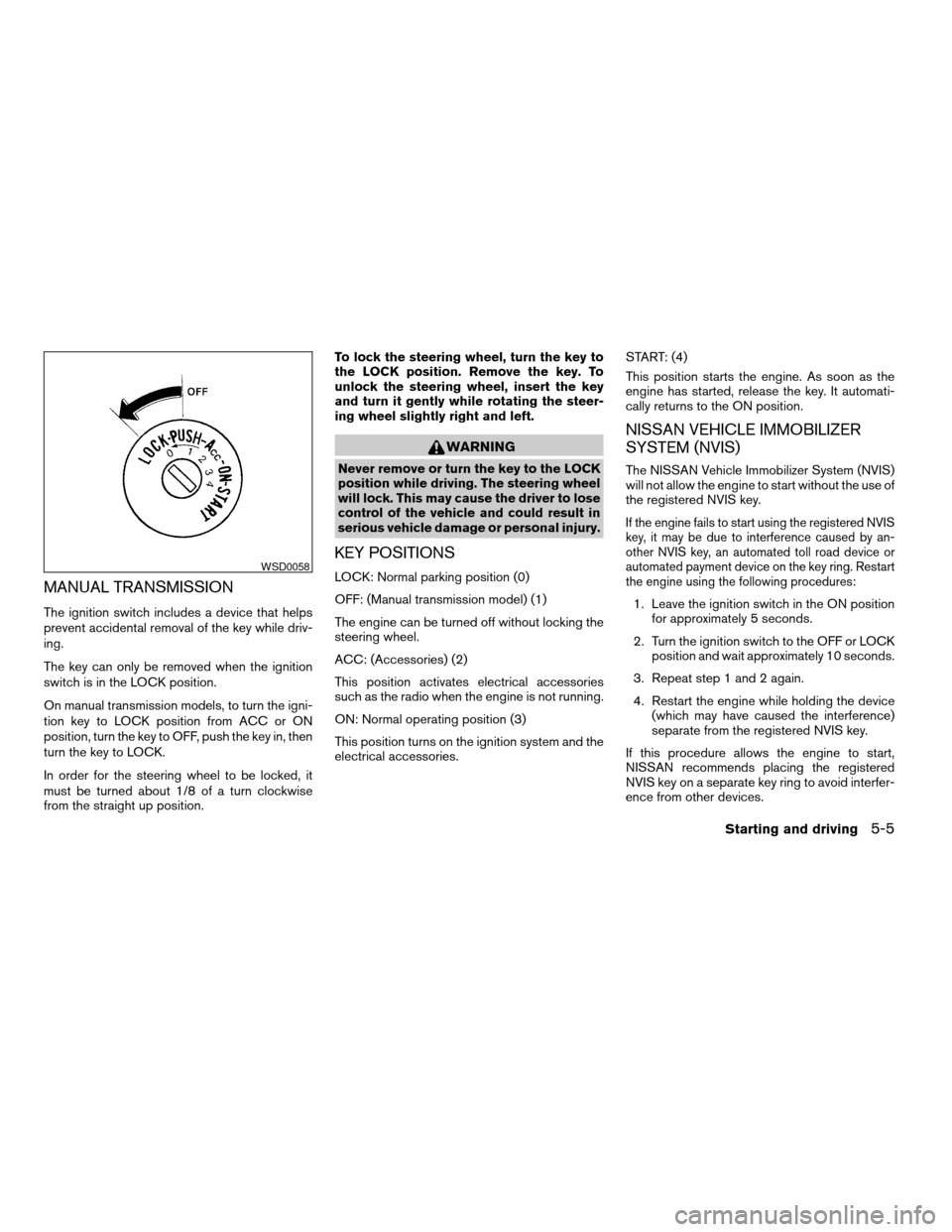
On manual transmission models, to turn the igni-
tion key to LOCK position from ACC or ON
position, turn the key to OFF, push the key in, then
turn the key to LOCK.
In order for the steering wheel to be locked, it
must be turned about 1/8 of a turn clockwise
from the straight up position.To lock the steering wheel, turn the key to
the LOCK position. Remove the key. To
unlock the steering wheel, insert the key
and turn it gently while rotating the steer-
ing wheel slightly right and left.
WARNING
Never remove or turn the key to the LOCK
position while driving. The steering wheel
will lock. This may cause the driver to lose
control of the vehicle and could result in
serious vehicle damage or personal injury.
KEY POSITIONS
LOCK: Normal parking position (0)
OFF: (Manual transmission model) (1)
The engine can be turned off without locking the
steering wheel.
ACC: (Accessories) (2)
This position activates electrical accessories
such as the radio when the engine is not running.
ON: Normal operating position (3)
This position turns on the ignition system and the
electrical accessories.START: (4)
This position starts the engine. As soon as the
engine has started, release the key. It automati-
cally returns to the ON position.
NISSAN VEHICLE IMMOBILIZER
SYSTEM (NVIS)
The NISSAN Vehicle Immobilizer System (NVIS)
will not allow the engine to start without the use of
the registered NVIS key.
If the engine fails to start using the registered NVIS
key, it may be due to interference caused by an-
other NVIS key, an automated toll road device or
automated payment device on the key ring. Restart
the engine using the following procedures:
1. Leave the ignition switch in the ON position
for approximately 5 seconds.
2. Turn the ignition switch to the OFF or LOCK
position and wait approximately 10 seconds.
3. Repeat step 1 and 2 again.
4. Restart the engine while holding the device
(which may have caused the interference)
separate from the registered NVIS key.
If this procedure allows the engine to start,
NISSAN recommends placing the registered
NVIS key on a separate key ring to avoid interfer-
ence from other devices.
WSD0058
Starting and driving5-5
ZREVIEW COPYÐ2005 Maxima(max)
Owners ManualÐUSA_English(nna)
09/01/04Ðtbrooks
X
Page 209 of 288
UNDERBODY
In areas where road salt is used in winter, it is
necessary to clean the underbody regularly in
order to prevent dirt and salt from building up and
causing the acceleration of corrosion on the un-
derbody and suspension. Before the winter pe-
riod and again in the spring, the underseal must
be checked and, if necessary, retreated.
GLASS
When cleaning the rear window, it may be easier
to clean if the high-mounted stop light is removed
first.
Be careful when removing the high-mounted
stop light to reduce the risk of damaging the
high-mounted stop light wires.
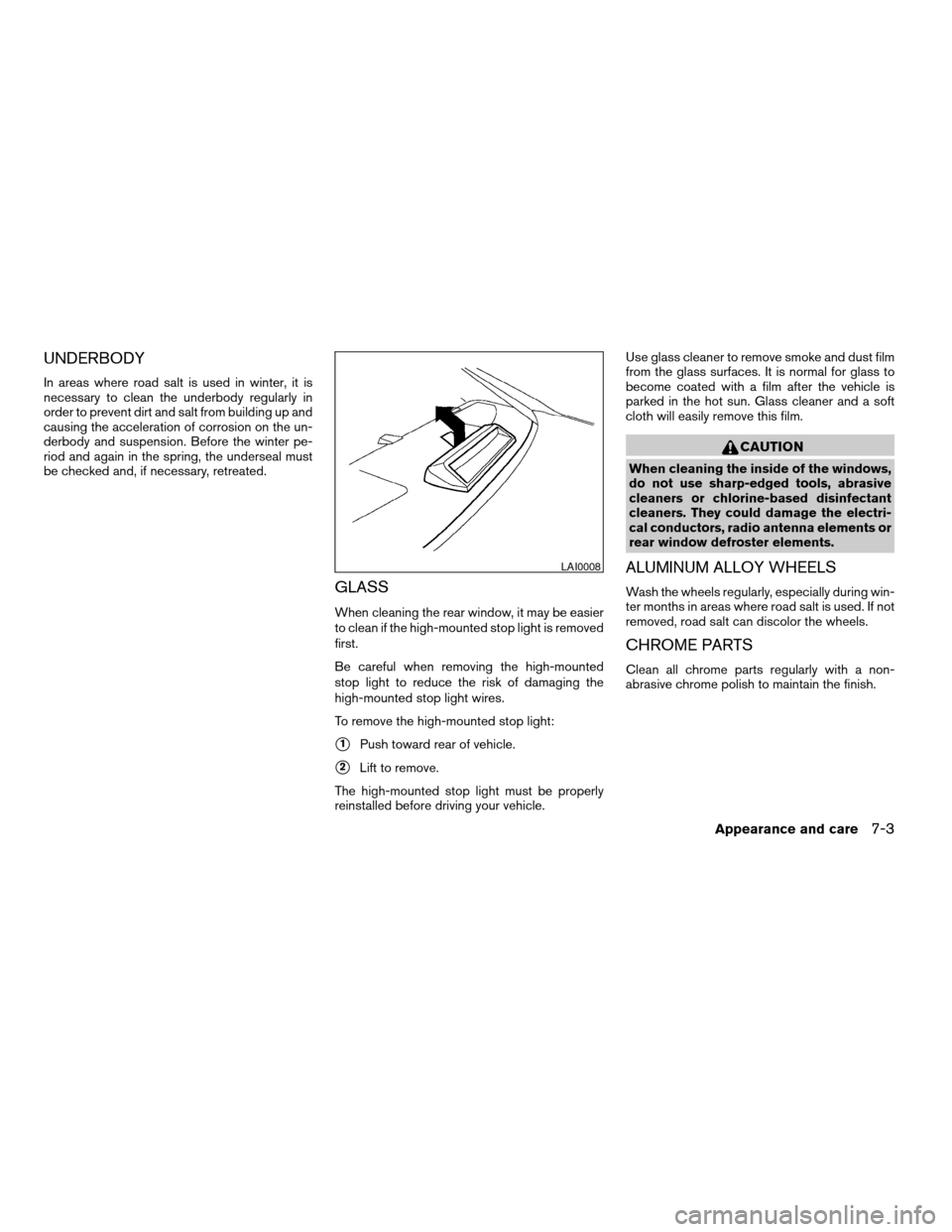
To remove the high-mounted stop light:
s1Push toward rear of vehicle.
s2Lift to remove.
The high-mounted stop light must be properly
reinstalled before driving your vehicle.Use glass cleaner to remove smoke and dust film
from the glass surfaces. It is normal for glass to
become coated with a film after the vehicle is
parked in the hot sun. Glass cleaner and a soft
cloth will easily remove this film.
CAUTION
When cleaning the inside of the windows,
do not use sharp-edged tools, abrasive
cleaners or chlorine-based disinfectant
cleaners. They could damage the electri-
cal conductors, radio antenna elements or
rear window defroster elements.
ALUMINUM ALLOY WHEELS
Wash the wheels regularly, especially during win-
ter months in areas where road salt is used. If not
removed, road salt can discolor the wheels.
CHROME PARTS
Clean all chrome parts regularly with a non-
abrasive chrome polish to maintain the finish.
LAI0008
Appearance and care7-3
ZREVIEW COPYÐ2005 Maxima(max)
Owners ManualÐUSA_English(nna)
09/01/04Ðtbrooks
X
Page 279 of 288

10 Index
A
Active head restraint...............1-9
Air bag (See supplemental restraint
system).....................1-35
Air bag system
Front (See supplemental front impact
air bag system)...............1-42
Air bag warning light...........1-49, 2-11
Air cleaner housing filter............8-16
Air conditioner
Air conditioner service...........4-20
Air conditioner specification label.....9-11
Air conditioner system refrigerant and
lubrication recommendations........9-6
Servicing air conditioner..........4-20
Alarm system
(See vehicle security system).........2-14
Anchor point locations.............1-27
Antenna.....................4-33
Anti-lock brake system (ABS).........5-18
Anti-lock brake warning light..........2-9
Armrests.....................1-7
Audible reminders................2-14
Audio system..................4-20
AM-FM radio with cassette player.....4-27
Cassette player...............4-27
Compact Disc (CD) changer.......4-30
Compact disc (CD) player.........4-28
FM-AM-SAT radio with cassette player and
compact disc (CD) changer........4-24FM-AM-SAT radio with cassette player and
compact disc (CD) player.........4-24
Radio....................4-20
Steering wheel audio control switch. . . .4-32
Autolight switch.................2-20
Automatic
Automatic drive positioner.........3-19
Automatic power window switch.....2-37
Driving with automatic transmission.....5-7
Transmission selector lever lock release .5-10
B
Battery......................8-13
Charge warning light............2-10
Battery replacement
(See remote keyless entry system)......8-25
Before starting the engine............5-6
Belts (See drive belts).............8-15
Brake
Anti-lock brake system (ABS).......5-18
Brake booster................8-21
Brake fluid..................8-11
Brake light (See stop light).........8-26
Brake pedal.................8-20
Brake system................5-17
Brake warning light.............2-10
Brake wear indicators........2-14, 8-21
Parking brake check............8-20
Parking brake operation..........5-12
Self-adjusting brakes............8-21Break-in schedule................5-14
Brightness control
Instrument panel..............2-22
Brightness/Contrast button........4-6, 4-16
Control panel buttons.........4-6, 4-16
Bulb check/instrument panel..........2-9
Bulb replacement................8-26
C
Capacities and recommended fuel/lubricants. .9-2
Car phone or CB radio.............4-33
Cargo (See vehicle loading information) . . .9-12
Cassette player (See audio system)......4-27
CD care and cleaning.............4-31
CD changer (See audio system)........4-30
CD player (See audio system).........4-28
Check engine indicator light
(See malfunction indicator lamp).......2-12
Child restraint with top tether strap......1-26
Child restraints.......1-12, 1-13, 1-18, 1-25
Precautions on child restraints . . .1-18, 1-31
Top tether strap anchor point locations . .1-27
Child safety rear door lock............3-5
Chimes, audible reminders...........2-14
Cigarette lighter.................2-28
Cleaning exterior and interior..........7-2
Clock
(models with navigation system)......4-14
(models without navigation system).....4-4
Clock set
Control panel buttons.........4-4, 4-14
ZREVIEW COPYÐ2005 Maxima(max)
Owners ManualÐUSA_English(nna)
09/01/04Ðtbrooks
X
Page 282 of 288

Power door locks...............3-4
Trunk lid lock opener lever..........3-9
Low fuel warning light.............2-11
Low washer fluid warning light.........2-11
Luggage (See vehicle loading information) . .9-12
M
Maint (maintenance) button
Control panel buttons..........4-5, 4-9
Maint (Maintenance) button, control panel
display....................4-5, 4-9
Maintenance
General maintenance............8-2
Inside the vehicle...............8-3
Maintenance precautions..........8-5
Outside the vehicle..............8-2
Seat belt maintenance...........1-17
Under the hood and vehicle.........8-4
Malfunction indicator lamp (MIL)........2-12
Manual front seat adjustment..........1-2
Map pocket...................2-29
Meters and gauges................2-3
Instrument brightness control.......2-22
Mirror
Outside mirror control...........3-17
Outside mirrors...............3-17
Vanity mirror.................3-16
Multi-remote control system
(See remote keyless entry system).......3-5N
Nissan vehicle immobilizer system (NVIS) . .2-16,
3-2, 5-5
O
Octane rating (See fuel octane rating).....9-4
Odometer.....................2-4
Oil
Capacities and recommended
fuel/lubricants.................9-2
Changing engine oil.............8-9
Changing engine oil filter..........8-10
Checking engine oil level..........8-8
Engine oil...................8-8
Engine oil and oil filter recommendation . .9-5
Engine oil pressure low/engine coolant
temperature high warning light.......2-10
Engine oil viscosity..............9-5
Outside mirror control.............3-17
Outside mirrors.................3-17
Overheat
If your vehicle overheats...........6-9
Owner’s manual order form..........9-22
Owner’s manual/service manual order
information....................9-22
P
Parking
Parking brake check............8-20
Parking brake operation..........5-12Parking/parking on hills...........5-16
Personal lights.................2-42
Power
Power door locks...............3-4
Power outlet.................2-27
Power rear windows............2-37
Power steering fluid.............8-11
Power steering system...........5-17
Power windows...............2-36
Rear power windows............2-37
Precautions
Maintenance precautions..........8-5
Precautions on child restraints . . .1-18, 1-31
Precautions on seat belt usage......1-10
Precautions on supplemental restraint
system....................1-35
Precautions when starting and driving . . .5-2
PREV button.................4-3, 4-8
Prev button
Control panel buttons..........4-3, 4-8
Programmable features.......4-8, 4-5, 4-11
Push starting...................6-8
R
Radio
AM-FM radio with cassette player.....4-27
Car phone or CB radio...........4-33
Compact Disc (CD) changer.......4-30
Steering wheel audio control switch. . . .4-32
Readiness for inspection maintenance (I/M)
test........................9-20
Rear power windows..............2-37
Rear seat.....................1-6
Rear sun shade.................2-40
10-4
ZREVIEW COPYÐ2005 Maxima(max)
Owners ManualÐUSA_English(nna)
09/01/04Ðtbrooks
X