radio antenna NISSAN MAXIMA 2005 A34 / 6.G Owners Manual
[x] Cancel search | Manufacturer: NISSAN, Model Year: 2005, Model line: MAXIMA, Model: NISSAN MAXIMA 2005 A34 / 6.GPages: 288, PDF Size: 4.71 MB
Page 137 of 288

4 Display screen, heater, air conditioner
and audio systems
Control panel buttons — without navigation system....4-2
Names of components..........................4-3
How to use JOYSTICK and “ENTER” button.......4-3
How to use “PREV” button......................4-3
How to use “TRIP” button.......................4-3
How to use “FUEL ECON” button................4-4
Clock.........................................4-4
How to use “E/M” (English/Metric) button.........4-4
How to use
(maintenance) button..........4-5
How to use the “SETTING” button................4-5
button...................................4-6
Control panel buttons — with navigation system.......4-7
Names of the components.......................4-8
How to use joystick and “ENTER” button..........4-8
How to use “PREV” button......................4-8
Setting up the start-up screen...................4-8
How to use the “TRIP” button....................4-9
How to use the “SETTING” button...............4-11
Setting the display (Audio or HVAC display):.....4-11
button..................................4-16
Ventilators.......................................4-16
Heater and air conditioner (automatic)..............4-17
Automatic operation...........................4-18
Manual operation..............................4-18
Operating tips.................................4-19
Servicing air conditioner...........................4-20
Audio system....................................4-20
Radio........................................4-20
FM radio reception............................4-20
AM radio reception............................4-21
Satellite radio reception........................4-21
Audio operation precautions....................4-21
FM-AM-SAT radio with cassette player and
compact disc (CD) player (Type A)/CD
changer (Type B)..............................4-24
CD care and cleaning..........................4-31
Steering wheel switch for audio control..........4-32
Antenna......................................4-33
Car phone or CB radio............................4-33
ZREVIEW COPYÐ2005 Maxima(max)
Owners ManualÐUSA_English(nna)
09/01/04Ðtbrooks
X
Page 156 of 288
The air conditioner system in your NISSAN ve-
hicle is charged with a refrigerant designed with
the environment in mind.
This refrigerant does not harm the earth’s
ozone layer.
Special charging equipment and lubricant is re-
quired when servicing your NISSAN air condi-
tioner. Using improper refrigerants or lubricants
will cause severe damage to your air conditioner
system. See “Air conditioner system refrigerant
and lubricant recommendations” in the “Techni-
cal and consumer information” section of this
manual.
A NISSAN dealer is able to service your “environ-
mentally friendly” air conditioning system.
WARNING
The air conditioner system contains re-
frigerant under high pressure. To avoid
personal injury, any air conditioner ser-
vice should be done only by an experi-
enced technician with proper equipment.
RADIO
Turn the ignition key to the ACC or ON position
and press the PWR (power)/VOL (volume) knob
to turn the radio on. If you listen to the radio with
the engine not running, the key should be turned
to the ACC position.
Radio reception is affected by station signal
strength, distance from radio transmitter, build-
ings, bridges, mountains and other external influ-
ences. Intermittent changes in reception quality
normally are caused by these external influences.
Using a cellular phone in or near the ve-
hicle may influence radio reception quality.
Radio reception
Your NISSAN radio system is equipped with
state-of-the-art electronic circuits to enhance ra-
dio reception. These circuits are designed to
extend reception range, and to enhance the qual-
ity of that reception.
However there are some general characteristics
of both FM and AM radio signals that can affect
radio reception quality in a moving vehicle, even
when the finest equipment is used. These char-
acteristics are completely normal in a given re-
ception area, and do not indicate any malfunction
in your NISSAN radio system.Reception conditions will constantly change be-
cause of vehicle movement. Buildings, terrain,
signal distance and interference from other ve-
hicles can work against ideal reception. De-
scribed below are some of the factors that can
affect your radio reception.
FM RADIO RECEPTION
Range: FM range is normally limited to 25 - 30
miles (40 - 48 km) , with monaural (single chan-
nel) FM having slightly more range than stereo
FM. External influences may sometimes interfere
with FM station reception even if the FM station is
within 25 miles (40 km) . The strength of the FM
signal is directly related to the distance between
the transmitter and receiver. FM signals follow a
line-of-sight path, exhibiting many of the same
characteristics as light. For example they will
reflect off objects.
Fade and drift: As your vehicle moves away from
a station transmitter, the signals will tend to fade
and/or drift.
Static and flutter: During signal interference from
buildings, large hills or due to antenna position
(usually in conjunction with increased distance
from the station transmitter) static or flutter can
be heard. This can be reduced by adjusting the
treble control to reduce treble response.
SERVICING AIR CONDITIONER AUDIO SYSTEM
4-20Display screen, heater, air conditioner and audio systems
ZREVIEW COPYÐ2005 Maxima(max)
Owners ManualÐUSA_English(nna)
09/01/04Ðtbrooks
X
Page 157 of 288

Multipath reception: Because of the reflective
characteristics of FM signals, direct and reflected
signals reach the receiver at the same time. The
signals may cancel each other, resulting in mo-
mentary flutter or loss of sound.
AM RADIO RECEPTION
AM signals, because of their low frequency, can
bend around objects and skip along the ground.
In addition, the signals can be bounced off the
ionosphere and bent back to earth. Because of
these characteristics, AM signals are also sub-
ject to interference as they travel from transmitter
to receiver.
Fading: Occurs while the vehicle is passing
through freeway underpasses or in areas with
many tall buildings. It can also occur for several
seconds during ionospheric turbulence even in
areas where no obstacles exist.
Static: Caused by thunderstorms, electrical
power lines, electric signs and even traffic lights.
SATELLITE RADIO RECEPTION
When the satellite radio is first installed or the
battery has been replaced, the satellite radio may
not work properly. This is not a malfunction. Wait
more than 10 minutes with satellite radio ON andthe vehicle outside of any metal or large building
for satellite radio to receive all of the necessary
data.
No satellite radio reception is available and “NO
SAT” is displayed when the SAT button is
pressed unless optional satellite receiver and
antenna are installed and an XMTor SIRIUS™
satellite radio service subscription is active.
Satellite radio performance may be affected if
cargo carried on the roof blocks the satellite radio
signal.
If possible, do not put cargo over the satellite
antenna.AUDIO OPERATION PRECAUTIONS
Cassette player
cTo maintain good quality sound, NISSAN
recommends using cassette tapes of 60
minutes or shorter in length.
LHA0099
Display screen, heater, air conditioner and audio systems4-21
ZREVIEW COPYÐ2005 Maxima(max)
Owners ManualÐUSA_English(nna)
09/01/04Ðtbrooks
X
Page 159 of 288

1. SEEK/APS REW, APS FF/TRACK
change button
2. TUNE/REW FF button
3. PAUSE/MUTE button
4. PROG/RPT button5. ON·OFF/VOLUME control knob
6. PRESET A-B-C select button
7. Station select buttons (1 - 6)
8. FM-AM band select button
9. CD play button10. TAPE play/side select button
11. SAT (satellite) radio select button*
12. Tuning and AUDIO control knob
(BASS, TREBLE, FADE and BAL-
ANCE)
13. CD insert slot
14. CD eject button
15. Cassette tape insert slot
16. Cassette tape eject button
*No satellite radio reception is available
and “NO SAT” is displayed when the
SAT button is pressed unless optional
satellite receiver and antenna are in-
stalled and an XMTor SIRIUS™ satellite
radio service subscription is active.
Type A
LHA0304
Display screen, heater, air conditioner and audio systems4-23
ZREVIEW COPYÐ2005 Maxima(max)
Owners ManualÐUSA_English(nna)
09/01/04Ðtbrooks
X
Page 160 of 288

1. SEEK/APS REW, APS FF/TRACK
change button
2. TUNE/REW FF button
3. PAUSE/MUTE button
4. PROG/RPT button5. ON·OFF/VOLUME control knob
6. PRESET A-B-C select button
7. Station and CD select buttons (1 - 6)
8. FM-AM band select button
9. CD play button10. TAPE play/side select button
11. SAT (satellite) radio select button*
12. Tuning and AUDIO control knob
(BASS, TREBLE, FADE and
BALANCE, SSV and NR (Dolby))
13. CD load button
14. CD insert slot
15. CD eject button
16. Cassette tape insert slot
17. Cassette tape eject button
*No satellite radio reception is available
and “NO SAT” is displayed when the
SAT button is pressed unless optional
satellite receiver and antenna are in-
stalled and an XMTor SIRIUS™ satellite
radio service subscription is active.
FM-AM-SAT RADIO WITH
CASSETTE PLAYER AND
COMPACT DISC (CD) PLAYER
(Type A)/CD CHANGER (Type B)
No satellite radio reception is available and “NO
SAT” is displayed when the SAT button is
pressed unless optional satellite receiver and
antenna are installed and an XMTor SIRIUS™
satellite radio service subscription is active.
Type B
LHA0248
4-24Display screen, heater, air conditioner and audio systems
ZREVIEW COPYÐ2005 Maxima(max)
Owners ManualÐUSA_English(nna)
09/01/04Ðtbrooks
X
Page 162 of 288
FM/AM/SAT radio operation
FM/AM/SAT radio select:
Pushing the FM-AM or SAT radio select button
will change the band as follows:
AMÃ!FM or SAT (Satellite)
When FM-AM or SAT radio select button is
pushed while the ignition switch is in the ACC or
ON, the radio will come on at the station last
played.
The last station played will also come on when
the ON·OFF/Volume control knob is depressed
to ON.
No satellite radio reception is available and “NO
SAT” is displayed when the SAT button is
pressed unless optional satellite receiver and
antenna are installed and an XMTor SIRIUS™
satellite radio service subscription is active.
If a compact disc or tape is playing when the
FM-AM or SAT radio select button is pushed, the
compact disc or tape will automatically be turned
off and the last radio station played will come on.
The FM stereo indicator ST will glow during FM
stereo reception. When the stereo broadcast
signal is weak, the radio will automatically change
from stereo to monaural reception.
TUNE (Tuning):
WARNING
The radio should not be tuned while driv-
ing so full attention may be given to ve-
hicle operation.
To manually tune the radio, push the TUNE button
(
or) or turn the tuning knob to right
or left.
To move quickly through the channels, hold either
the
orbutton down for more than
1.5 seconds.
SEEK tuning:
Push the SEEK button (
or) for less
than 1.5 seconds to tune from high to low or low
to high frequencies and stop at the next broad-
casting station.
SCAN tuning:
Push the
orbutton for more than
1.5 seconds to stop at each broadcasting station
for 5 seconds. Pushing the button again during
this 5 seconds period will stop SCAN tuning and
the radio will remain tuned to that station. If
the
orbutton is not pushed within 5
seconds, SCAN tuning moves to the next station.Station memory operations:
18 stations can be set for the FM, AM and SAT
radio to the A, B and C preset button.
1. Choose preset channel A, B or C using the
preset select button.
2. Select the station band that you would like to
preset, either AM, FM or SAT.
3. Tune to the desired station using manual,
SEEK or SCAN tuning. Push and hold any of
the desired station memory buttons (1 - 6)
until a beep sound is heard. (The radio mutes
when the select button is pushed.)
4. The channel indicator will then come on and
the sound will resume. Memorizing is now
complete.
5.
Other buttons can be set in the same manner.
If the battery cable is disconnected, or if the fuse
blows, the radio memory will be canceled. In that
case, reset the desired stations.
Radio data system (RDS) (if so equipped):
RDS stands for Radio Data System, and is a data
information service transmitted by some radio
stations on the FM band (not AM band) and/or
SAT radio encoded within a regular radio broad-
cast. Currently, most RDS stations are in large
cities, but many stations are now considering
broadcasting RDS data.
4-26Display screen, heater, air conditioner and audio systems
ZREVIEW COPYÐ2005 Maxima(max)
Owners ManualÐUSA_English(nna)
09/01/04Ðtbrooks
X
Page 169 of 288
or there is no interval between programs, the
system may not stop in the desired or expected
location.
When playing a tape, push the tuning switch
(
or) for more than 1.5 seconds to
rewind or fast forward the tape.
To stop the FF or REW function, press the
orbutton for less than 1.5 seconds again.
When playing a CD in the CD changer (if so
equipped) , push the tuning switch (
or) for more than 1.5 seconds to change
between discs when multiple CDs are loaded.
ANTENNA
Window antenna
The antenna pattern is printed inside the rear
window.
CAUTION
cDo not place metalized film near the
rear window glass or attach any metal
parts to it. This may cause poor recep-
tion or noise.cWhen cleaning the inside of the rear
window, be careful not to scratch or
damage the rear window antenna.
Lightly wipe along the antenna with a
dampened soft cloth.When installing a CB, ham radio or car phone in
your NISSAN, be sure to observe the following
cautions, otherwise the new equipment may ad-
versely affect the engine control system and
other electronic parts.
WARNING
cA cellular telephone should not be used
while driving so full attention may be
given to vehicle operation. Some juris-
dictions prohibit the use of cellular tele-
phones while driving.
cIf you must make a call while your ve-
hicle is in motion, the hands free cellu-
lar phone operational mode (if so
equipped) is highly recommended. Ex-
ercise extreme caution at all times so
full attention may be given to vehicle
operation.
cIf a conversation in a moving vehicle
requires you to take notes, pull off the
road to a safe location and stop your
vehicle before doing so.
CAR PHONE OR CB RADIO
Display screen, heater, air conditioner and audio systems4-33
ZREVIEW COPYÐ2005 Maxima(max)
Owners ManualÐUSA_English(nna)
09/01/04Ðtbrooks
X
Page 170 of 288
CAUTION
cKeep the antenna as far away as pos-
sible from the electronic control
modules.
cKeep the antenna wire more than 8 in
(20 cm) away from the electronic con-
trol system harnesses. Do not route the
antenna wire next to any harness.
cAdjust the antenna standing-wave ratio
as recommended by the manufacturer.
cConnect the ground wire from the CB
radio chassis to the body.
cFor details, consult a NISSAN dealer.
4-34Display screen, heater, air conditioner and audio systems
ZREVIEW COPYÐ2005 Maxima(max)
Owners ManualÐUSA_English(nna)
09/14/04Ðskoniecz
X
Page 209 of 288
UNDERBODY
In areas where road salt is used in winter, it is
necessary to clean the underbody regularly in
order to prevent dirt and salt from building up and
causing the acceleration of corrosion on the un-
derbody and suspension. Before the winter pe-
riod and again in the spring, the underseal must
be checked and, if necessary, retreated.
GLASS
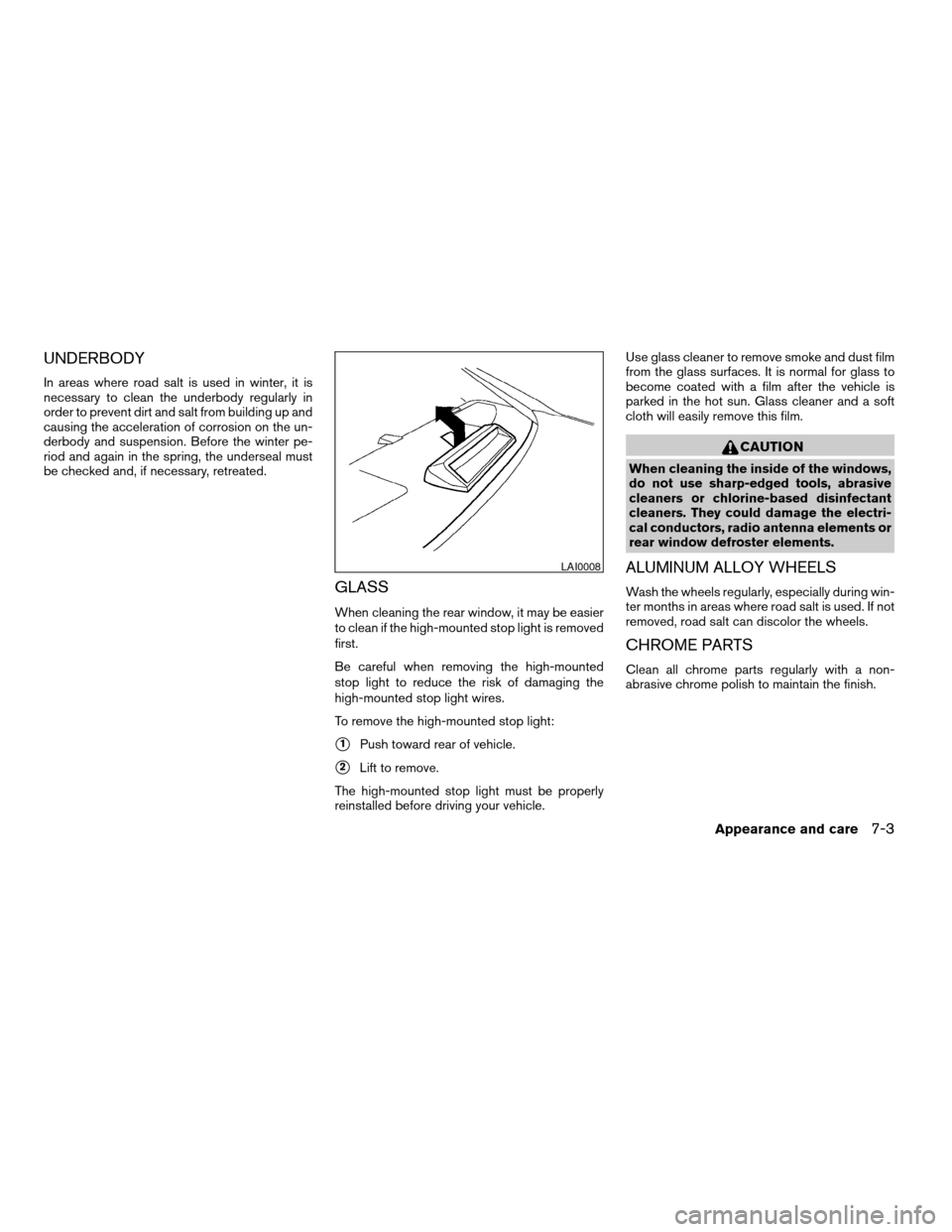
When cleaning the rear window, it may be easier
to clean if the high-mounted stop light is removed
first.
Be careful when removing the high-mounted
stop light to reduce the risk of damaging the
high-mounted stop light wires.
To remove the high-mounted stop light:
s1Push toward rear of vehicle.
s2Lift to remove.
The high-mounted stop light must be properly
reinstalled before driving your vehicle.Use glass cleaner to remove smoke and dust film
from the glass surfaces. It is normal for glass to
become coated with a film after the vehicle is
parked in the hot sun. Glass cleaner and a soft
cloth will easily remove this film.
CAUTION
When cleaning the inside of the windows,
do not use sharp-edged tools, abrasive
cleaners or chlorine-based disinfectant
cleaners. They could damage the electri-
cal conductors, radio antenna elements or
rear window defroster elements.
ALUMINUM ALLOY WHEELS
Wash the wheels regularly, especially during win-
ter months in areas where road salt is used. If not
removed, road salt can discolor the wheels.
CHROME PARTS
Clean all chrome parts regularly with a non-
abrasive chrome polish to maintain the finish.
LAI0008
Appearance and care7-3
ZREVIEW COPYÐ2005 Maxima(max)
Owners ManualÐUSA_English(nna)
09/01/04Ðtbrooks
X
Page 279 of 288

10 Index
A
Active head restraint...............1-9
Air bag (See supplemental restraint
system).....................1-35
Air bag system
Front (See supplemental front impact
air bag system)...............1-42
Air bag warning light...........1-49, 2-11
Air cleaner housing filter............8-16
Air conditioner
Air conditioner service...........4-20
Air conditioner specification label.....9-11
Air conditioner system refrigerant and
lubrication recommendations........9-6
Servicing air conditioner..........4-20
Alarm system
(See vehicle security system).........2-14
Anchor point locations.............1-27
Antenna.....................4-33
Anti-lock brake system (ABS).........5-18
Anti-lock brake warning light..........2-9
Armrests.....................1-7
Audible reminders................2-14
Audio system..................4-20
AM-FM radio with cassette player.....4-27
Cassette player...............4-27
Compact Disc (CD) changer.......4-30
Compact disc (CD) player.........4-28
FM-AM-SAT radio with cassette player and
compact disc (CD) changer........4-24FM-AM-SAT radio with cassette player and
compact disc (CD) player.........4-24
Radio....................4-20
Steering wheel audio control switch. . . .4-32
Autolight switch.................2-20
Automatic
Automatic drive positioner.........3-19
Automatic power window switch.....2-37
Driving with automatic transmission.....5-7
Transmission selector lever lock release .5-10
B
Battery......................8-13
Charge warning light............2-10
Battery replacement
(See remote keyless entry system)......8-25
Before starting the engine............5-6
Belts (See drive belts).............8-15
Brake
Anti-lock brake system (ABS).......5-18
Brake booster................8-21
Brake fluid..................8-11
Brake light (See stop light).........8-26
Brake pedal.................8-20
Brake system................5-17
Brake warning light.............2-10
Brake wear indicators........2-14, 8-21
Parking brake check............8-20
Parking brake operation..........5-12
Self-adjusting brakes............8-21Break-in schedule................5-14
Brightness control
Instrument panel..............2-22
Brightness/Contrast button........4-6, 4-16
Control panel buttons.........4-6, 4-16
Bulb check/instrument panel..........2-9
Bulb replacement................8-26
C
Capacities and recommended fuel/lubricants. .9-2
Car phone or CB radio.............4-33
Cargo (See vehicle loading information) . . .9-12
Cassette player (See audio system)......4-27
CD care and cleaning.............4-31
CD changer (See audio system)........4-30
CD player (See audio system).........4-28
Check engine indicator light
(See malfunction indicator lamp).......2-12
Child restraint with top tether strap......1-26
Child restraints.......1-12, 1-13, 1-18, 1-25
Precautions on child restraints . . .1-18, 1-31
Top tether strap anchor point locations . .1-27
Child safety rear door lock............3-5
Chimes, audible reminders...........2-14
Cigarette lighter.................2-28
Cleaning exterior and interior..........7-2
Clock
(models with navigation system)......4-14
(models without navigation system).....4-4
Clock set
Control panel buttons.........4-4, 4-14
ZREVIEW COPYÐ2005 Maxima(max)
Owners ManualÐUSA_English(nna)
09/01/04Ðtbrooks
X