light NISSAN MAXIMA 2008 A34 / 6.G Repair Manual
[x] Cancel search | Manufacturer: NISSAN, Model Year: 2008, Model line: MAXIMA, Model: NISSAN MAXIMA 2008 A34 / 6.GPages: 328, PDF Size: 4.17 MB
Page 131 of 328

To deactivate:Press and hold theandbuttonsfor at least 2 seconds.
The hazard warning lights will flash three times to
confirm that the horn beep feature has been
deactivated.
To activate:Press and hold the
andbuttonsfor at least 2 seconds
once more.
The hazard warning lights will flash once and the
horn will sound once to confirm that the horn
beep feature has been reactivated.
Deactivating the horn beep feature does not si-
lence the horn if the alarm is triggered.
s1P (Park) position selecting warning
light
s2Intelligent Key system warning light
WARNING LIGHTS AND AUDIBLE
REMINDERS
The Intelligent Key system is equipped with a
function that is designed to minimize improper
operations and to help prevent the vehicle from
being stolen. The warning buzzer sounds and the
warning light illuminates when improper opera-
tions are detected.
CAUTION
When the buzzer sounds and the warning
light illuminates, be sure to check both
the vehicle and the Intelligent Key.
WARNING SIGNALS
To help prevent the vehicle from moving unex-
pectedly by erroneous operation of the Intelligent
Key or to help prevent the vehicle from being
stolen, a chime or buzzer sounds from inside and
outside the vehicle and a warning light comes on
in the instrument panel.
When a chime or beep sounds or the warning
light comes on, be sure to check the vehicle and
the Intelligent Key.
Audible reminder and warning when
locking the doors
When the chime or buzzer sounds from inside
and outside the vehicle, check for the following:
cThe ignition switch is turned to the LOCK
position.
cThe Intelligent Key is not left inside the ve-
hicle.
cThe selector lever is in the P (Park) position.
WPD0380
Pre-driving checks and adjustments3-15
ZREVIEW COPYÐ2008 Maxima(max)
Owners ManualÐUSA_English(nna)
06/08/07Ðdebbie
X
Page 132 of 328

Audible reminder and warning when
the engine stops
When the P position selecting warning light
() in the instrument panel blinks in red:
cMake sure the selector lever is in the P
position.
When the chime sounds intermittently:
cMake sure the selector lever is in the P
position and the ignition switch is turned to
the LOCK position.
If the chime sounds continuously when the driv-
er’s door is opened, check the following:
cThe selector lever is in the P position and the
ignition switch is turned to the LOCK posi-
tion.
cThe mechanical key is not inserted into the
ignition switch.cThe warning chime may stop when one of
the following is performed:
– Returning the ignition switch to the LOCK
position.
– Removing the mechanical key.
– Closing the doors.
Alarm and warning when the engine
starts
When the Intelligent Key system warning light
() blinks red and the outside buzzer
sounds, make sure the Intelligent Key is inside the
vehicle.
Warning for low battery power
When the Intelligent Key battery is low, the Intel-
ligent Key system warning light () will blink
green for about 30 seconds after the ignition
switch is turned to the ON position. This warning
is to let you know that the battery of the Intelligent
Key will run down soon. Replace it with a new
one. Refer to “Battery replacement” in the “Main-
tenance and do-it-yourself” section.NISSAN recommends replacing the battery at a
NISSAN dealer.
Preventing the Intelligent Key from
being left in the vehicle
If you lock all doors using the power door lock
switch with the Intelligent Key in the vehicle, all of
the doors unlock immediately and the buzzer will
warn you when the door is closed.
3-16Pre-driving checks and adjustments
ZREVIEW COPYÐ2008 Maxima(max)
Owners ManualÐUSA_English(nna)
06/09/07Ðcathy
X
Page 133 of 328
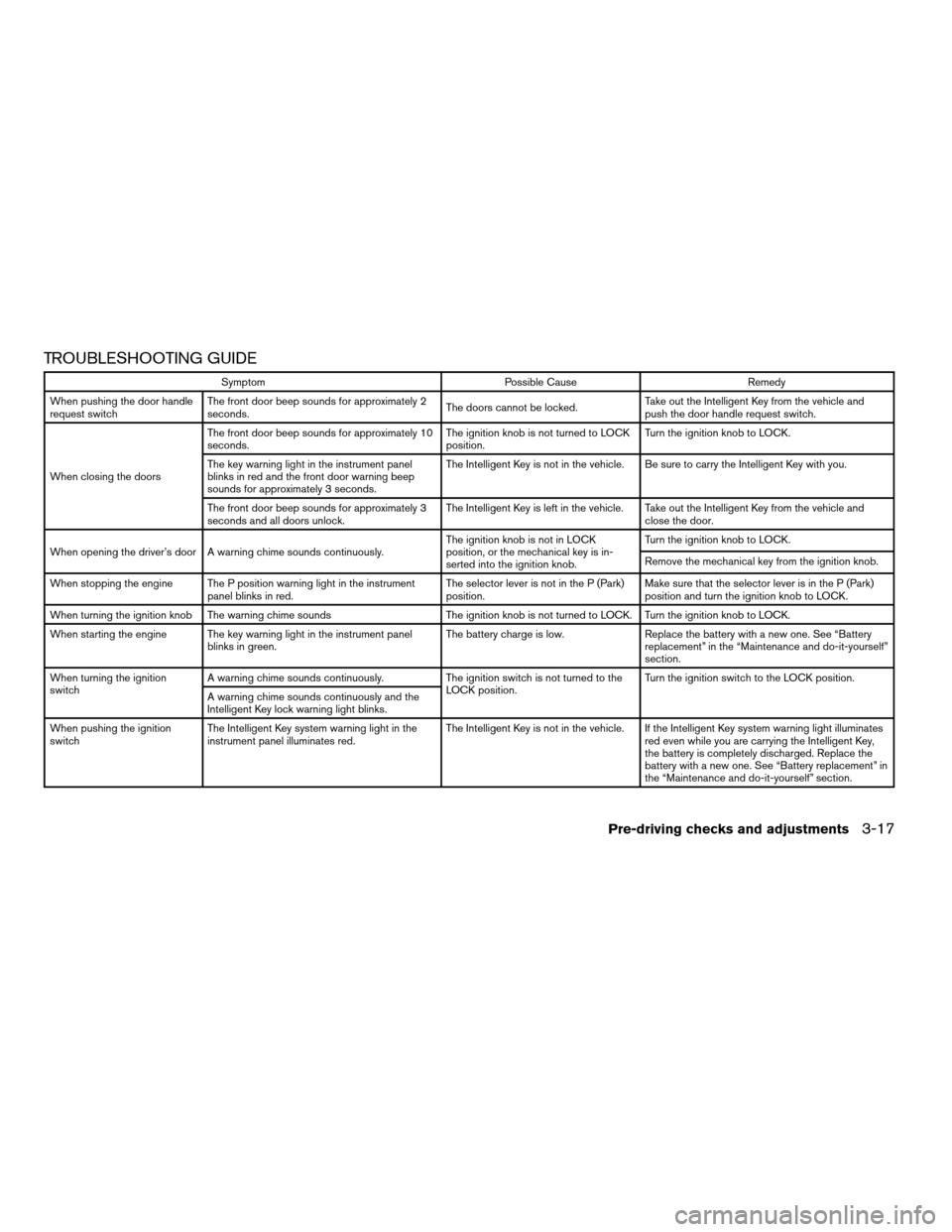
TROUBLESHOOTING GUIDE
Symptom Possible Cause Remedy
When pushing the door handle
request switchThe front door beep sounds for approximately 2
seconds.The doors cannot be locked.Take out the Intelligent Key from the vehicle and
push the door handle request switch.
When closing the doorsThe front door beep sounds for approximately 10
seconds.The ignition knob is not turned to LOCK
position.Turn the ignition knob to LOCK.
The key warning light in the instrument panel
blinks in red and the front door warning beep
sounds for approximately 3 seconds.The Intelligent Key is not in the vehicle. Be sure to carry the Intelligent Key with you.
The front door beep sounds for approximately 3
seconds and all doors unlock.The Intelligent Key is left in the vehicle. Take out the Intelligent Key from the vehicle and
close the door.
When opening the driver’s door A warning chime sounds continuously.The ignition knob is not in LOCK
position, or the mechanical key is in-
serted into the ignition knob.Turn the ignition knob to LOCK.
Remove the mechanical key from the ignition knob.
When stopping the engine The P position warning light in the instrument
panel blinks in red.The selector lever is not in the P (Park)
position.Make sure that the selector lever is in the P (Park)
position and turn the ignition knob to LOCK.
When turning the ignition knob The warning chime sounds The ignition knob is not turned to LOCK. Turn the ignition knob to LOCK.
When starting the engine The key warning light in the instrument panel
blinks in green.The battery charge is low. Replace the battery with a new one. See “Battery
replacement” in the “Maintenance and do-it-yourself”
section.
When turning the ignition
switchA warning chime sounds continuously. The ignition switch is not turned to the
LOCK position.Turn the ignition switch to the LOCK position.
A warning chime sounds continuously and the
Intelligent Key lock warning light blinks.
When pushing the ignition
switchThe Intelligent Key system warning light in the
instrument panel illuminates red.The Intelligent Key is not in the vehicle. If the Intelligent Key system warning light illuminates
red even while you are carrying the Intelligent Key,
the battery is completely discharged. Replace the
battery with a new one. See “Battery replacement” in
the “Maintenance and do-it-yourself” section.
Pre-driving checks and adjustments3-17
ZREVIEW COPYÐ2008 Maxima(max)
Owners ManualÐUSA_English(nna)
06/08/07Ðdebbie
X
Page 134 of 328
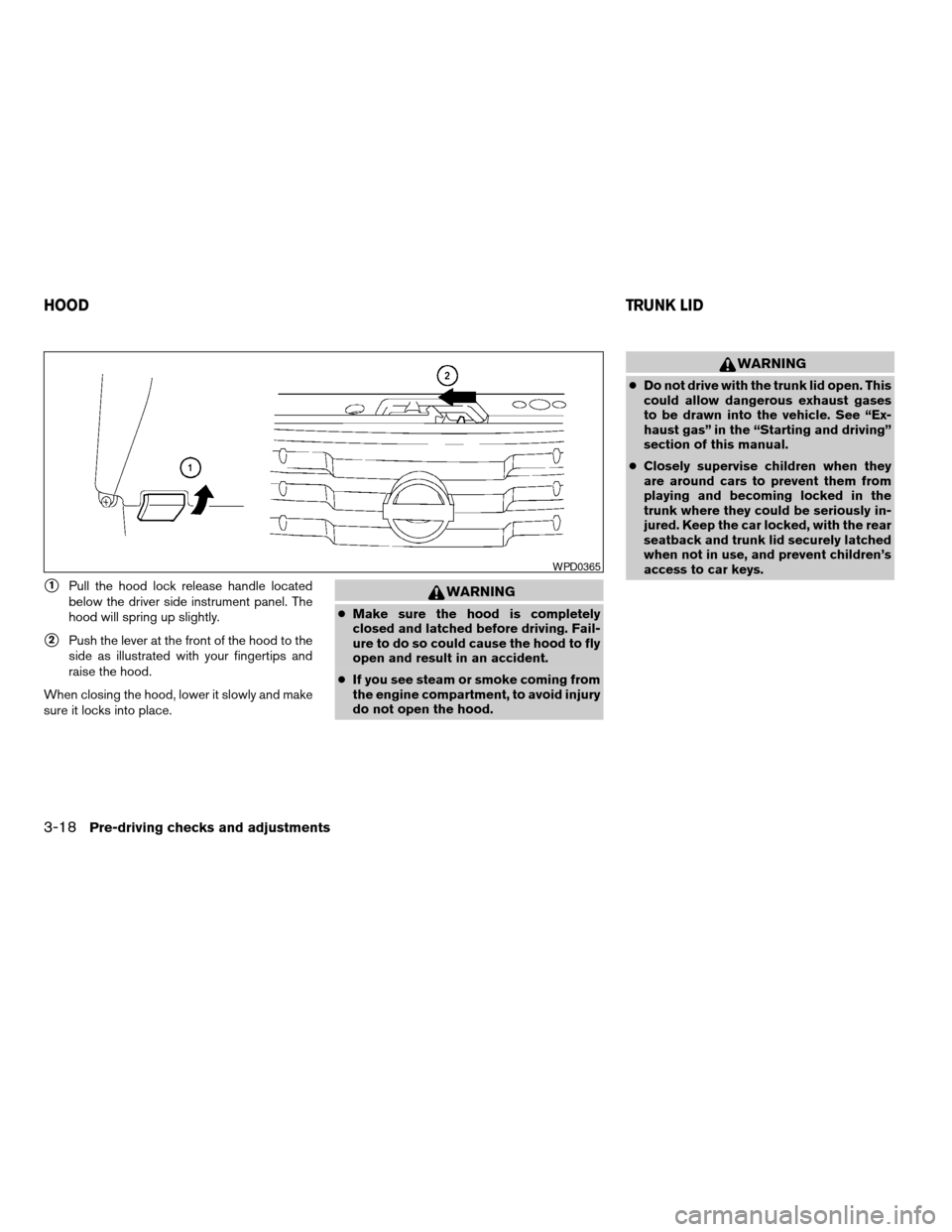
s1Pull the hood lock release handle located
below the driver side instrument panel. The
hood will spring up slightly.
s2Push the lever at the front of the hood to the
side as illustrated with your fingertips and
raise the hood.
When closing the hood, lower it slowly and make
sure it locks into place.
WARNING
cMake sure the hood is completely
closed and latched before driving. Fail-
ure to do so could cause the hood to fly
open and result in an accident.
cIf you see steam or smoke coming from
the engine compartment, to avoid injury
do not open the hood.
WARNING
cDo not drive with the trunk lid open. This
could allow dangerous exhaust gases
to be drawn into the vehicle. See “Ex-
haust gas” in the “Starting and driving”
section of this manual.
cClosely supervise children when they
are around cars to prevent them from
playing and becoming locked in the
trunk where they could be seriously in-
jured. Keep the car locked, with the rear
seatback and trunk lid securely latched
when not in use, and prevent children’s
access to car keys.
WPD0365
HOODTRUNK LID
3-18Pre-driving checks and adjustments
ZREVIEW COPYÐ2008 Maxima(max)
Owners ManualÐUSA_English(nna)
06/08/07Ðdebbie
X
Page 136 of 328

To open the trunk from the inside, pull the illumi-
nated release handle until the lock releases and
push up on the trunk lid. The release handle is
made of a material that glows in the dark after a
brief exposure to ambient light.
The handle is located inside the trunk compart-
ment on the interior of the trunk lid.
OPENER OPERATION
The fuel-filler door release is located on the driv-
er’s door. To open the fuel-filler door, push the
release. To lock, close the fuel-filler door se-
curely.
FUEL-FILLER CAP
The fuel-filler cap is a ratcheting type. Turn the
cap counterclockwise to remove. To tighten, turn
the cap clockwise until ratcheting clicks are
heard.
Put the fuel-filler cap on the cap holder
s1while
refueling.
LPD0188LPD0189
FUEL-FILLER DOOR
3-20Pre-driving checks and adjustments
ZREVIEW COPYÐ2008 Maxima(max)
Owners ManualÐUSA_English(nna)
06/08/07Ðdebbie
X
Page 137 of 328
WARNING
cGasoline is extremely flammable and
highly explosive under certain condi-
tions. You could be burned or seriously
injured if it is misused or mishandled.
Always stop the engine and do not
smoke or allow open flames or sparks
near the vehicle when refueling.
cDo not attempt to top off the fuel tank
after the fuel pump nozzle shuts off
automatically. Continued refueling may
cause fuel overflow, resulting in fuel
spray and possibly a fire.
cUse only an original equipment type
fuel-filler cap as a replacement. It has a
built-in safety valve needed for proper
operation of the fuel system and emis-
sion control system. An incorrect cap
can result in a serious malfunction and
possible injury. It could also cause the
malfunction indicator light to come on.
cNever pour fuel into the throttle body to
attempt to start your vehicle.cDo not fill a portable fuel container in
the vehicle or trailer. Static electricity
can cause an explosion of flammable
liquid, vapor or gas in any vehicle or
trailer. To reduce the risk of serious
injury or death when filling portable fuel
containers:
– Always place the container on the
ground when filling.
– Do not use electronic devices when
filling.
– Keep the pump nozzle in contact
with the container while you are fill-
ing it.
– Use only approved portable fuel con-
tainers for flammable liquid.
CAUTION
cIf fuel is spilled on the vehicle body,
flush it away with water to avoid paint
damage.
cTighten until the fuel-filler cap clicks.
Failure to tighten the fuel-filler cap
properly may cause the
Mal-
function Indicator Light (MIL) to illumi-
nate. If the
light illuminates be-
cause the fuel-filler cap is loose or
missing, tighten or install the cap and
continue to drive the vehicle.
The
light should turn off after a
few driving trips. If the
light
does not turn off after a few driving
trips, have the vehicle inspected by a
NISSAN dealer.
cFor additional information, see the
“Malfunction Indicator Light (MIL)” in
the “Instruments and Controls” section
earlier in this manual.
Pre-driving checks and adjustments3-21
ZREVIEW COPYÐ2008 Maxima(max)
Owners ManualÐUSA_English(nna)
06/08/07Ðdebbie
X
Page 140 of 328
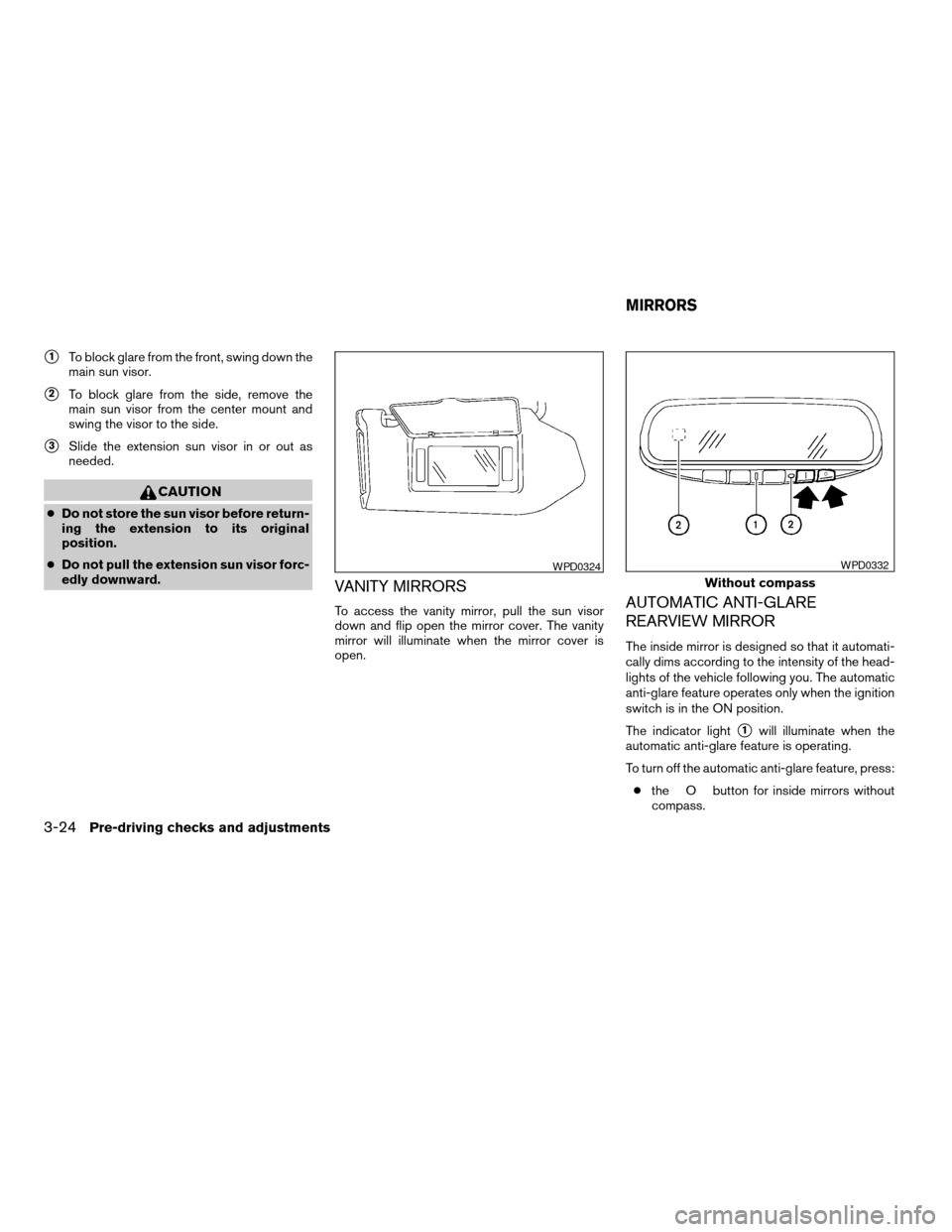
s1To block glare from the front, swing down the
main sun visor.
s2To block glare from the side, remove the
main sun visor from the center mount and
swing the visor to the side.
s3Slide the extension sun visor in or out as
needed.
CAUTION
cDo not store the sun visor before return-
ing the extension to its original
position.
cDo not pull the extension sun visor forc-
edly downward.
VANITY MIRRORS
To access the vanity mirror, pull the sun visor
down and flip open the mirror cover. The vanity
mirror will illuminate when the mirror cover is
open.AUTOMATIC ANTI-GLARE
REARVIEW MIRROR
The inside mirror is designed so that it automati-
cally dims according to the intensity of the head-
lights of the vehicle following you. The automatic
anti-glare feature operates only when the ignition
switch is in the ON position.
The indicator light
s1will illuminate when the
automatic anti-glare feature is operating.
To turn off the automatic anti-glare feature, press:
cthe O button for inside mirrors without
compass.
WPD0324
Without compass
WPD0332
MIRRORS
3-24Pre-driving checks and adjustments
ZREVIEW COPYÐ2008 Maxima(max)
Owners ManualÐUSA_English(nna)
06/08/07Ðdebbie
X
Page 141 of 328

cthebutton for inside mirrors with
compass.
The indicator light will turn off.
To turn on the automatic anti-glare feature again,
press:
cthe | button for inside mirrors without
compass.
cthe
button for inside mirrors with
compass.
The indicator light will turn on.Some vehicles are also equipped with automatic
anti-glare outside mirrors. For additional informa-
tion, see “Automatic anti-glare outside mirrors”
later in this section.
For information on HomeLinkTUniversal Trans-
ceiver operation, see the “HomeLinkTUniversal
Transceiver” in the “Instrument and controls” sec-
tion of this manual.
For information on the compass display (if so
equipped) , see “Compass display” in the “Instru-
ments and controls” section of this manual.
NOTE:
Do not hang any objects over the sensors
s2or apply glass cleaner to the sensors.
Doing so will reduce the sensitivity of the
sensors, resulting in improper operation.OUTSIDE MIRRORS
The outside mirror remote control will operate
only when the ignition switch is in the ACC or ON
position.
Move the small switch
s1to select the right or left
mirror. Adjust each mirror to the desired position
using the large switch
s2.
With compass
WPD0333LPD0237
Pre-driving checks and adjustments3-25
ZREVIEW COPYÐ2008 Maxima(max)
Owners ManualÐUSA_English(nna)
06/08/07Ðdebbie
X
Page 142 of 328
WARNING
cObjects viewed in the outside mirror on
the passenger side are closer than they
appear. Be careful when moving to the
right. Using only this mirror could cause
an accident. Use the inside mirror or
glance over your shoulder to properly
judge distances to other objects.
cDo not adjust the mirrors while driving.
You could lose control of your vehicle
and cause an accident.
Automatic anti-glare outside mirrors (if
so equipped)
The outside mirrors will automatically dim during
nighttime conditions to reduce the glare from the
headlights of trailing vehicles. The automatic anti-
glare feature operates only when the ignition
switch is in the ON position.
The automatic anti-glare feature will be on when
starting the vehicle. The indicator light on the
automatic anti-glare rearview mirror will illuminate
when the automatic anti-glare feature is on.
To turn off the automatic anti-glare feature, press:
cthe O button on rearview mirrors without
compass.cthe
button on rearview mirrors with
compass.
The indicator light will turn off.
To turn on the automatic anti-glare feature again,
press:
cthe | button on rearview mirrors without
compass.
cthe
button on rearview mirrors
equipped with compass.
The indicator light will turn on.
For information on the automatic anti-glare rear-
view mirror, see “Automatic anti-glare rearview
mirror” earlier in this section.
Manual folding outside mirrors (if so
equipped)
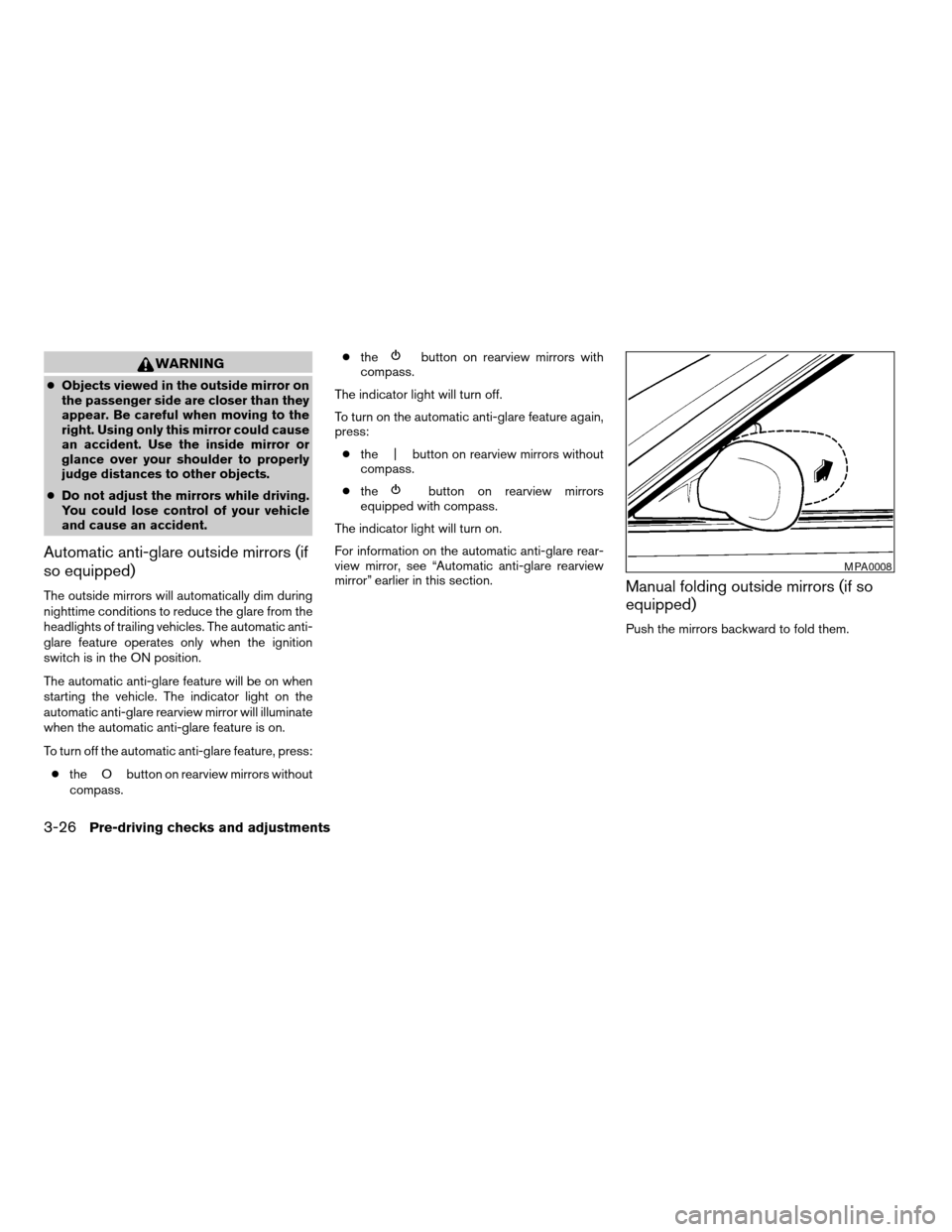
Push the mirrors backward to fold them.
MPA0008
3-26Pre-driving checks and adjustments
ZREVIEW COPYÐ2008 Maxima(max)
Owners ManualÐUSA_English(nna)
06/08/07Ðdebbie
X
Page 144 of 328

The automatic drive positioner system has two
features:
cMemory storage function
cEntry/exit function
MEMORY STORAGE FUNCTION
Two positions for the driver’s seat, steering col-
umn, and outside mirrors can be stored in the
automatic drive positioner memory. Follow these
procedures to use the memory system.
1. Set the Continuously Variable Transmission
(CVT) selector lever to the P (Park) position.
2. Turn the ignition ON.3. Adjust the driver’s seat, steering column,
and outside mirrors to the desired positions
by manually operating each adjusting
switch. For additional information, see
“Seats” in the “Safety—Seats, seat belts and
supplemental restraint system” section and
“Pedal position adjustment” and “Outside
mirrors” earlier in this section.
During this step, do not turn the ignition to
any position other than ON.
4. Push the SET switch and, within 5 seconds,
push the memory switch (1 or 2) fully for at
least 1 second.
The indicator light for the pushed memory
switch will come on and stay on for approxi-
mately 5 seconds after pushing the switch.
After the indicator light goes off, the se-
lected positions are stored in the selected
memory (1 or 2) .
If a new memory is stored in the same memory
switch, the previous memory will be deleted.
Linking a keyfob to a stored memory
position
Each keyfob can be linked to a stored memory
position (memory switch 1 or 2) with the follow-
ing procedure.
LPD0197
AUTOMATIC DRIVE POSITIONER (if
so equipped)
3-28Pre-driving checks and adjustments
ZREVIEW COPYÐ2008 Maxima(max)
Owners ManualÐUSA_English(nna)
06/08/07Ðdebbie
X