ad blue NISSAN MAXIMA 2010 Owner´s Manual
[x] Cancel search | Manufacturer: NISSAN, Model Year: 2010, Model line: MAXIMA, Model: NISSAN MAXIMA 2010Pages: 457, PDF Size: 4.66 MB
Page 190 of 457
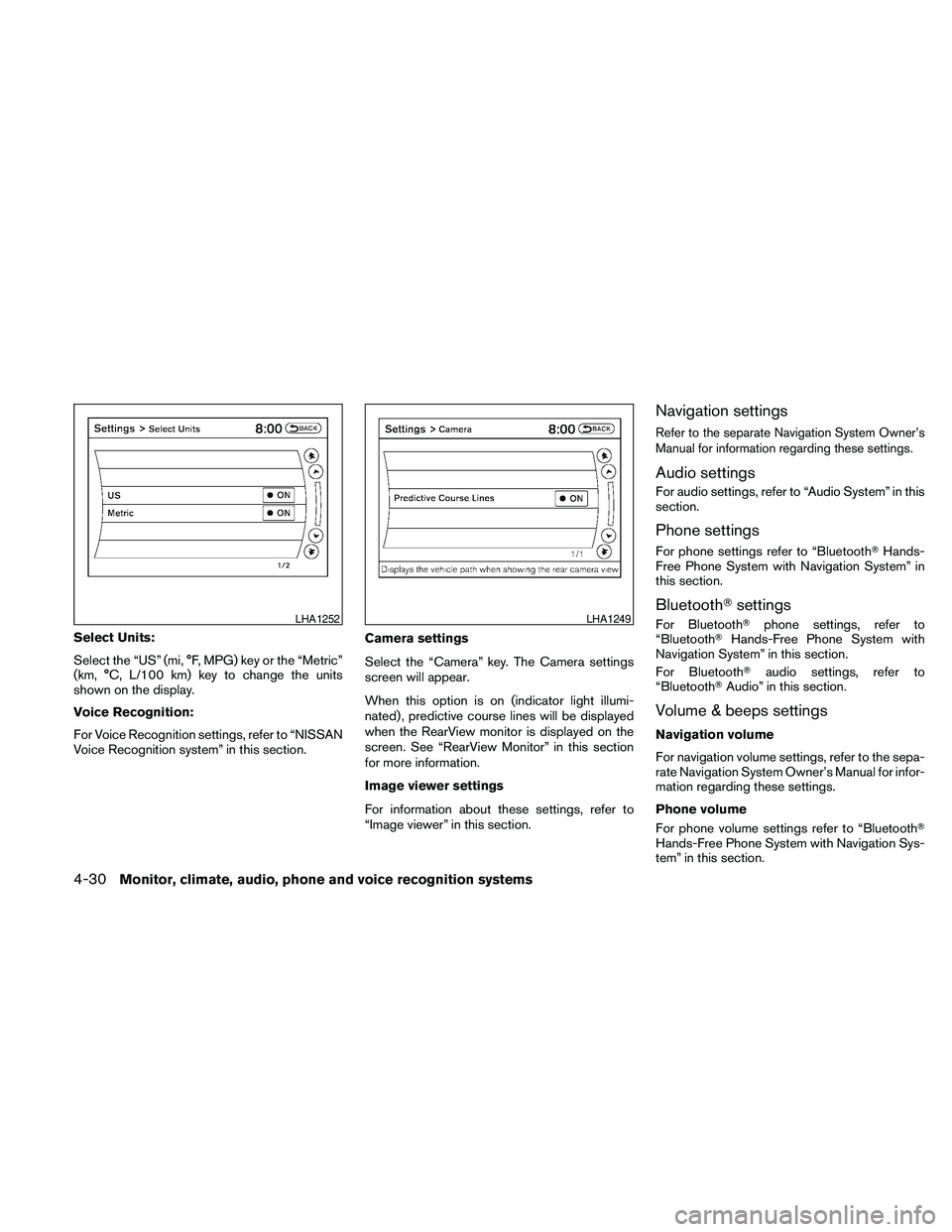
Select Units:
Select the “US” (mi, °F, MPG) key or the “Metric”
(km, °C, L/100 km) key to change the units
shown on the display.
Voice Recognition:
For Voice Recognition settings, refer to “NISSAN
Voice Recognition system” in this section.Camera settings
Select the “Camera” key. The Camera settings
screen will appear.
When this option is on (indicator light illumi-
nated) , predictive course lines will be displayed
when the RearView monitor is displayed on the
screen. See “RearView Monitor” in this section
for more information.
Image viewer settings
For information about these settings, refer to
“Image viewer” in this section.
Navigation settings
Refer to the separate Navigation System Owner’s
Manual for information regarding these settings.
Audio settings
For audio settings, refer to “Audio System” in this
section.
Phone settings
For phone settings refer to “BluetoothTHands-
Free Phone System with Navigation System” in
this section.
BluetoothTsettings
For BluetoothTphone settings, refer to
“BluetoothTHands-Free Phone System with
Navigation System” in this section.
For BluetoothTaudio settings, refer to
“BluetoothTAudio” in this section.
Volume & beeps settings
Navigation volume
For navigation volume settings, refer to the sepa-
rate Navigation System Owner’s Manual for infor-
mation regarding these settings.
Phone volume
For phone volume settings refer to “BluetoothT
Hands-Free Phone System with Navigation Sys-
tem” in this section.
LHA1252LHA1249
4-30Monitor, climate, audio, phone and voice recognition systems
Page 213 of 457
cDuring cold weather or rainy days, the player
may malfunction due to the humidity. If this
occurs, remove the USB memory stick and
dehumidify or ventilate the player com-
pletely.
cThe player sometimes cannot function when
the passenger compartment temperature is
extremely high. Decrease the temperature
before use.
cDo not leave the USB memory in a place
prone to static electricity or where the air
conditioner blows directly. The data in the
USB memory may be damaged.
cPrepare the USB device by yourself be-
cause it is not equipped with the vehicle.
cThe USB device cannot be formatted with
this system. If you want to format the USB
memory, use your personal computer.
cPartitioned USB devices may not be played
correctly.
cSome characters used in other languages
(Chinese, Japanese, etc.) are not displayed
properly on the vehicle center screen.
NISSAN recommends using English lan-
guage characters with USB devices.cDo not connect the USB device if the con-
nector or cable is wet. Allow the cable
and/or connectors to dry completely before
connecting the USB device.
cLarge video podcast files cause slow re-
sponses in the iPodT. The vehicle center
display may momentarily black out, but it will
soon recover.
cIf the iPodTautomatically selects large video
podcast files while in the shuffle mode, the
vehicle center display may momentarily
black out, but it will soon recover.
cAudiobooks may not play in the same order
as they appear on the iPodT.
cThe iPodTnano (1st Generation) may re-
main in fast forward or rewind mode if it is
connected during a seek operation. In this
case, please manually reset the iPodT.
cThe iPodTnano (2nd Generation) will con-
tinue to fast forward or rewind if it is discon-
nected during a seek operation.
cAn incorrect song title may appear when the
Play Mode is changed while using the iPodT
nano (2nd generation) .cIf you are using an iPodT(3rd Generation
with Dock connector) , do not use very long
names for the song title, album name or artist
name to avoid the iPodTresetting itself.
iPodTis a trademark of Apple Inc., registered in
the U.S. and other countries.
BluetoothTaudio player (if so
equipped)
cSome BluetoothTaudio devices may not be
recognized by the in-vehicle audio system.
Contact a NISSAN dealer for the compatible
device.
cIt is necessary to set up the wireless con-
nection between a compatible BluetoothT
audio device and the in-vehicle BluetoothT
module before using the BluetoothTaudio.
cOperating procedure of the BluetoothTau-
dio will vary depending on the devices. Make
sure how to operate your audio device be-
fore using it with this system.
cThe BluetoothTaudio may be stopped under
the following conditions:
cReceiving a call on the Hands-Free
Phone System.
cChecking the connection to the hands-
free phone.
Monitor, climate, audio, phone and voice recognition systems4-53
Page 214 of 457
cDo not place the BluetoothTaudio device in
an area surrounded by metal or far away from
the in-vehicle BluetoothTmodule to prevent
tone quality degradation and wireless con-
nection disruption.
cWhile an audio device is connected through
the BluetoothTwireless connection, the bat-
tery power of the device may discharge
quicker than usual.
cThis system supports the BluetoothTAudio
Distribution Profile (A2DP, AVRCP) .
BLUETOOTHtis a
trademark owned by
Bluetooth SIG, Inc.
CD or USB with Compressed Audio
Files (models without Navigation
System)
The file types supported by this system are MP3
and WMA.Explanation of terms:
cMP3 — MP3 is short for Moving Pictures
Experts Group Audio Layer 3. MP3 is the
most well-known compressed digital audio
file format. This format allows for near “CD
quality” sound, but at a fraction of the size of
normal audio files. MP3 conversion of an
audio track from CD-ROM can reduce the
file size by approximately a 10:1 ratio with
virtually no perceptible loss in quality. MP3
compression removes the redundant and
irrelevant parts of a sound signal that the
human ear doesn’t hear.
cWMA — Windows Media Audio (WMA)* is a
compressed audio format created by Mi-
crosoft as an alternative to MP3. The WMA
codec offers greater file compression than
the MP3 codec, enabling storage of more
digital audio tracks in the same amount of
space when compared to MP3s at the same
level of quality.
cBit rate — Bit rate denotes the number of
bits per second used by a digital music file.
The size and quality of a compressed digital
audio file is determined by the bit rate used
when encoding the file.cSampling frequency — Sampling frequency
is the rate at which the samples of a signal
are converted from analog to digital (A/D
conversion) per second.
cMultisession — Multisession is one of the
methods for writing data to media. Writing
data once to the media is called a single
session, and writing more than once is called
a multisession.
cID3/WMA Tag — The ID3/WMA tag is the
part of the encoded MP3 or WMA file that
contains information about the digital music
file such as song title, artist, encoding bit
rate, track time duration, etc. ID3 tag infor-
mation is displayed on the Artist/song title
line on the display.
* WindowsT, Windows MediaTand Windows
VistaTare registered trademarks and trademarks
in the United States of America and other coun-
tries of Microsoft Corporation of the USA.
4-54Monitor, climate, audio, phone and voice recognition systems
Page 264 of 457
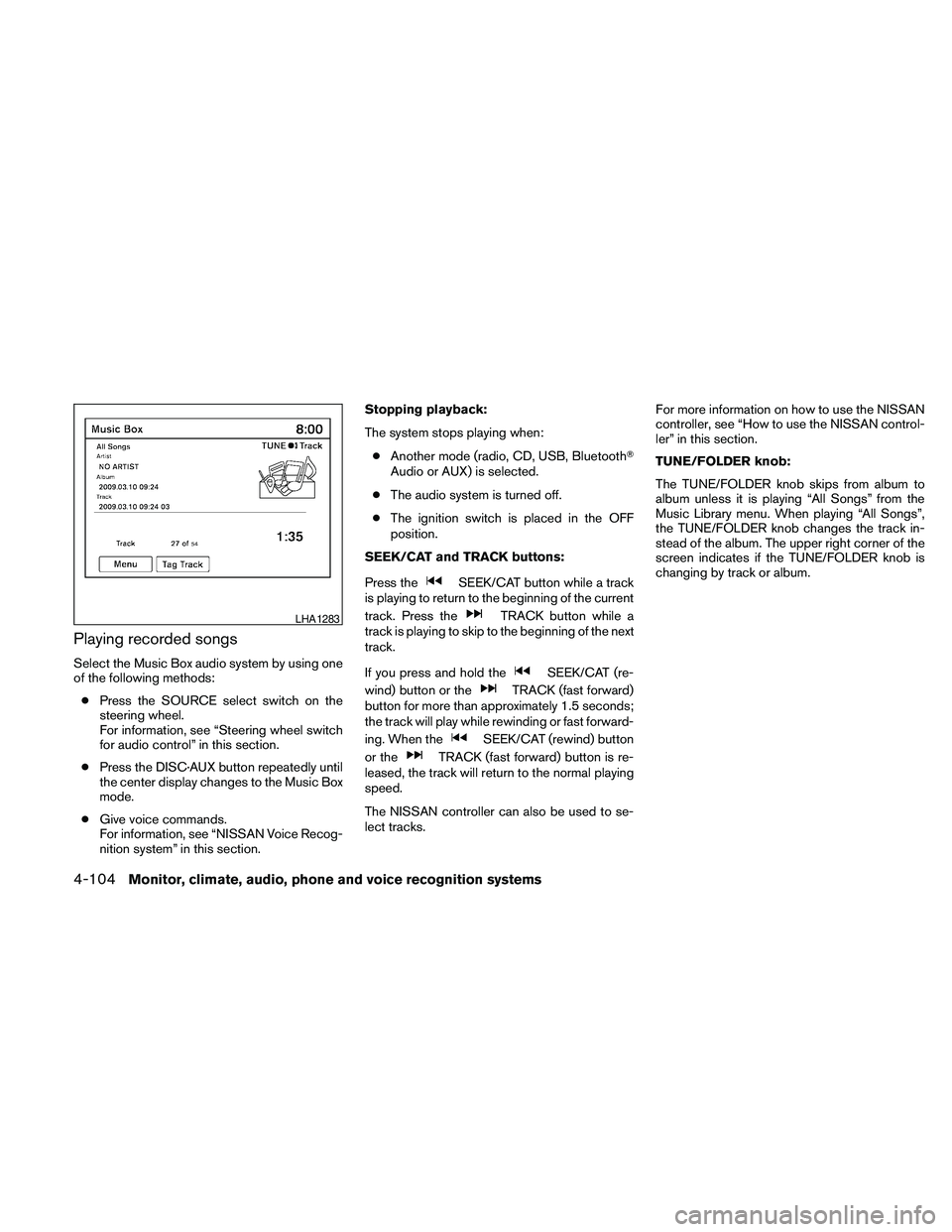
Playing recorded songs
Select the Music Box audio system by using one
of the following methods:
cPress the SOURCE select switch on the
steering wheel.
For information, see “Steering wheel switch
for audio control” in this section.
cPress the DISC·AUX button repeatedly until
the center display changes to the Music Box
mode.
cGive voice commands.
For information, see “NISSAN Voice Recog-
nition system” in this section.Stopping playback:
The system stops playing when:
cAnother mode (radio, CD, USB, BluetoothT
Audio or AUX) is selected.
cThe audio system is turned off.
cThe ignition switch is placed in the OFF
position.
SEEK/CAT and TRACK buttons:
Press the
SEEK/CAT button while a track
is playing to return to the beginning of the current
track. Press the
TRACK button while a
track is playing to skip to the beginning of the next
track.
If you press and hold the
SEEK/CAT (re-
wind) button or the
TRACK (fast forward)
button for more than approximately 1.5 seconds;
the track will play while rewinding or fast forward-
ing. When the
SEEK/CAT (rewind) button
or the
TRACK (fast forward) button is re-
leased, the track will return to the normal playing
speed.
The NISSAN controller can also be used to se-
lect tracks.For more information on how to use the NISSAN
controller, see “How to use the NISSAN control-
ler” in this section.
TUNE/FOLDER knob:
The TUNE/FOLDER knob skips from album to
album unless it is playing “All Songs” from the
Music Library menu. When playing “All Songs”,
the TUNE/FOLDER knob changes the track in-
stead of the album. The upper right corner of the
screen indicates if the TUNE/FOLDER knob is
changing by track or album.
LHA1283
4-104Monitor, climate, audio, phone and voice recognition systems
Page 269 of 457
web page for the Gracenote Privacy Policy for
the Gracenote MusicID Service.
The Gracenote Software and each item of
Gracenote Data are licensed to you “AS IS.”
Gracenote makes no representations or warran-
ties, express or implied, regarding the accuracy
of any Gracenote Data from in the Gracenote
Servers. Gracenote reserves the right to delete
data from the Gracenote Servers or to change
data categories for any cause that Gracenote
deems sufficient. No warranty is made that the
Gracenote Software or Gracenote Servers are
error-free or that functioning of Gracenote Soft-
ware or Gracenote Servers will be uninterrupted.
Gracenote is not obligated to provide you with
new enhanced or additional data types or cat-
egories that Gracenote may provide in the future
and is free to discontinue its online services at
any time.
GRACENOTE DISCLAIMS ALL WARRANTIES
EXPRESS OR IMPLIED, INCLUDING, BUT NOT
LIMITED TO, IMPLIED WARRANTIES OF MER-
CHANTABILITY, FITNESS FOR A PARTICULAR
PURPOSE, TITLE, AND NONINFRINGEMENT.
GRACENOTE DOES NOT WARRANT THE RE-
SULTS THAT WILL BE OBTAINED BY YOUR
USE OF THE GRACENOTE SOFTWARE OR
ANY GRACENOTE SERVER. IN NO CASE
WILL GRACENOTE BE LIABLE FOR ANYCONSEQUENTIAL OR INCIDENTAL DAM-
AGES OR FOR ANY LOST PROFITS OR LOST
REVENUES.
Copyright:
Music recognition technology and related data
are provided by GracenoteT. Gracenote is the
industry standard in music recognition technol-
ogy and related content delivery. For more infor-
mation visit www.gracenote.com.
CD and music-related data from Gracenote, Inc.,
copyright © 2000-2007 Gracenote. Gracenote
Software, copyright © 2000-2007 Gracenote.
This product and service may practice one or
more of the following U.S. Patents: #5,987,525;
#6,061,680; #6,154,773, #6,161,132,
#6,230,192, #6,230,207, #6,240,459,
#6,330,593, and other patents issued or pend-
ing. Some services supplied under license from
Open Globe, Inc. for U.S. Patent: #6,304,523.
Gracenote and CDDB are registered trademarks
of Gracenote. The Gracenote logo and logotype,
and the “Powered by Gracenote” logo are trade-
marks of Gracenote.BLUETOOTHTAUDIO (if so
equipped)
If you have a compatible BluetoothTaudio device
that is capable of playing audio files, the device
can be connected to the vehicle’s audio system
so that the audio files on the device play through
the vehicle’s speakers.
Monitor, climate, audio, phone and voice recognition systems4-109
Page 270 of 457
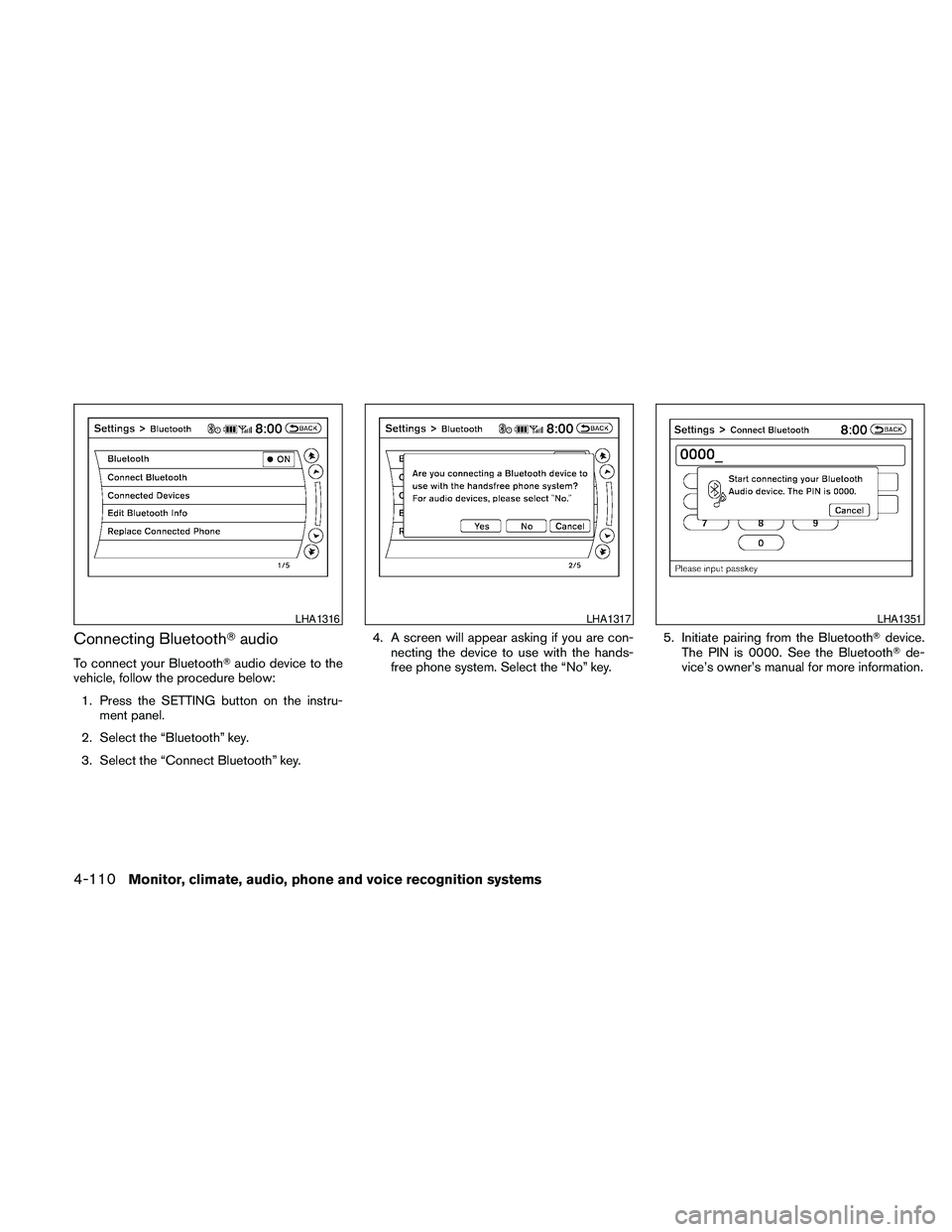
Connecting BluetoothTaudio
To connect your BluetoothTaudio device to the
vehicle, follow the procedure below:
1. Press the SETTING button on the instru-
ment panel.
2. Select the “Bluetooth” key.
3. Select the “Connect Bluetooth” key.4. A screen will appear asking if you are con-
necting the device to use with the hands-
free phone system. Select the “No” key.5. Initiate pairing from the BluetoothTdevice.
The PIN is 0000. See the BluetoothTde-
vice’s owner’s manual for more information.
LHA1316LHA1317LHA1351
4-110Monitor, climate, audio, phone and voice recognition systems
Page 271 of 457
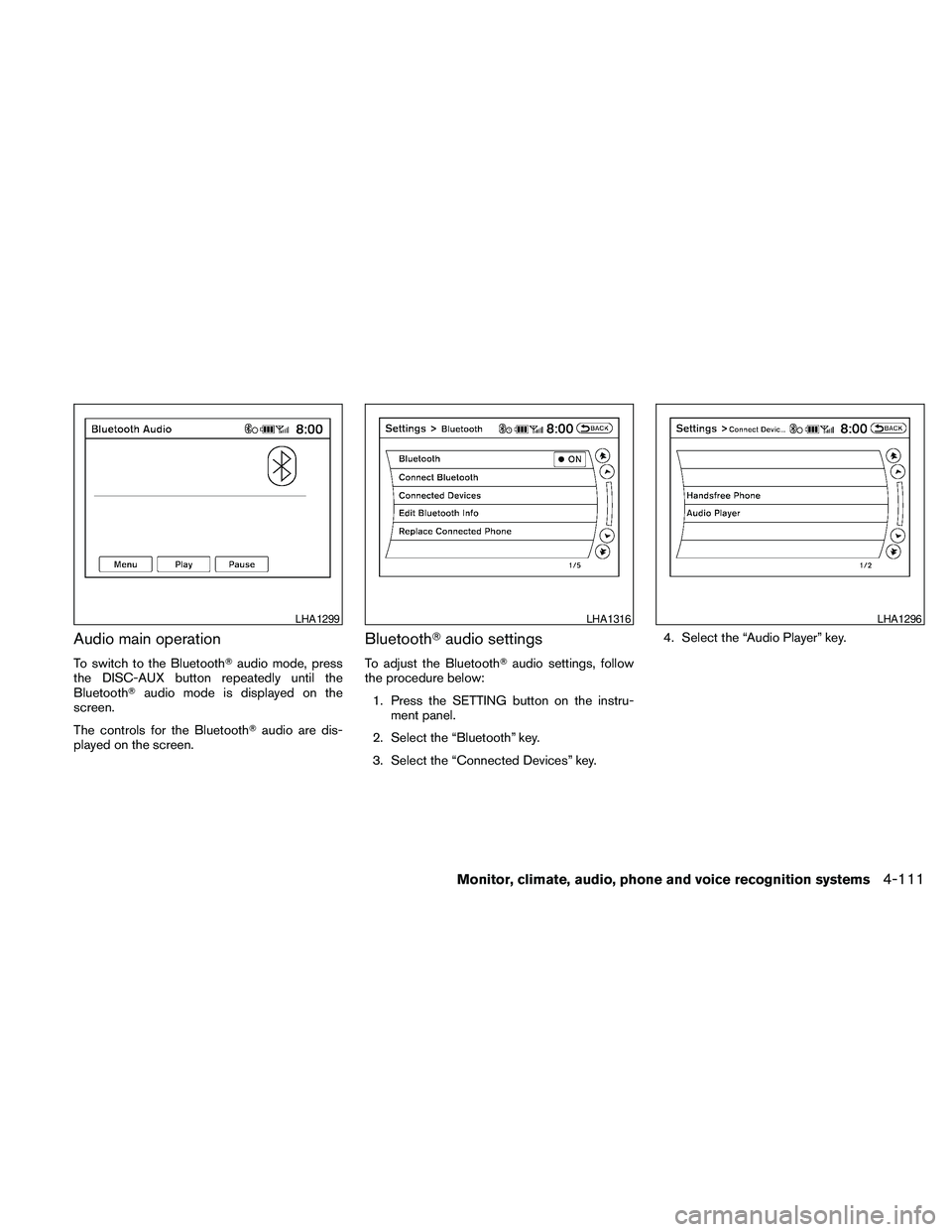
Audio main operation
To switch to the BluetoothTaudio mode, press
the DISC-AUX button repeatedly until the
BluetoothTaudio mode is displayed on the
screen.
The controls for the BluetoothTaudio are dis-
played on the screen.
BluetoothTaudio settings
To adjust the BluetoothTaudio settings, follow
the procedure below:
1. Press the SETTING button on the instru-
ment panel.
2. Select the “Bluetooth” key.
3. Select the “Connected Devices” key.4. Select the “Audio Player” key.
LHA1299LHA1316LHA1296
Monitor, climate, audio, phone and voice recognition systems4-111
Page 272 of 457
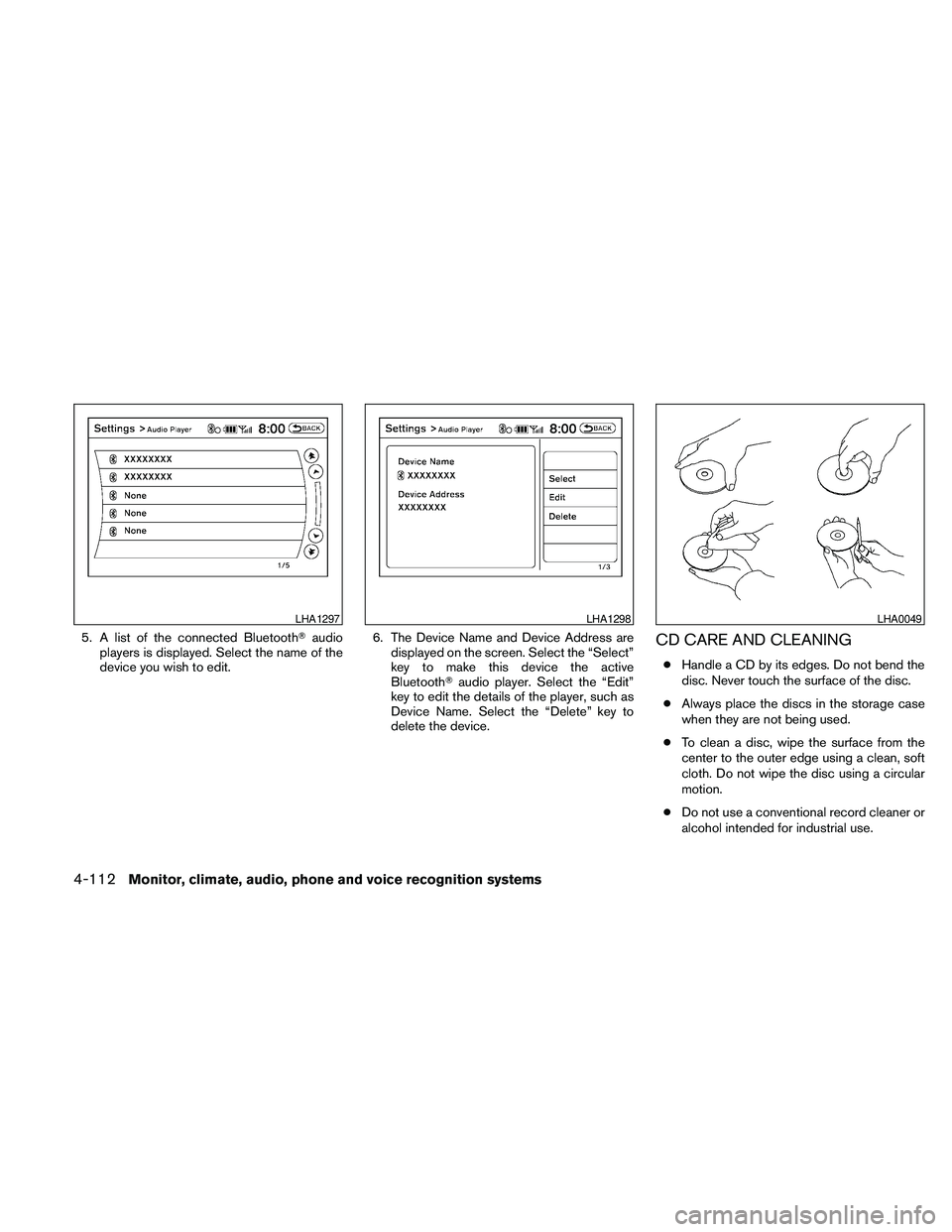
5. A list of the connected BluetoothTaudio
players is displayed. Select the name of the
device you wish to edit.6. The Device Name and Device Address are
displayed on the screen. Select the “Select”
key to make this device the active
BluetoothTaudio player. Select the “Edit”
key to edit the details of the player, such as
Device Name. Select the “Delete” key to
delete the device.CD CARE AND CLEANING
cHandle a CD by its edges. Do not bend the
disc. Never touch the surface of the disc.
cAlways place the discs in the storage case
when they are not being used.
cTo clean a disc, wipe the surface from the
center to the outer edge using a clean, soft
cloth. Do not wipe the disc using a circular
motion.
cDo not use a conventional record cleaner or
alcohol intended for industrial use.
LHA1297LHA1298LHA0049
4-112Monitor, climate, audio, phone and voice recognition systems
Page 274 of 457
SOURCE select switch
Push the source select switch to change the
mode in the following sequence:
Models without Navigation System:
AM!FM1!FM2!XM1!XM2!XM3
(satellite radio, if so equipped)!USB* (if so
equipped)!CD/DVD*!Music Box** (if so
equipped)!AUX*!AM.
Models with Navigation System:
AM!FM1!FM2!XM1!XM2!XM3
(satellite radio, if so equipped)!CD/DVD*!
Music Box**!USB/iPodT*!BluetoothTAu-
dio*!AUX*!AM.
* These modes are only available when compat-
ible media storage is inserted into the device.
** This mode is only available when music has
been downloaded into the Music Box system.
Volume control switch
Push the volume control switch to increase or
decrease the volume.
Menu control
switch/ENTER button
While the display is showing a MAP, STATUS or
Audio screen, tilt the Menu Control switch up-
ward or downward to select a station, track, CDor folder. For most audio sources, tilting the
switch up/down for more than 1.5 seconds pro-
vides a different function than a tilting up/down
for less than 1.5 seconds.
AM and FM:
cTilt up/down for less than 1.5 seconds to
increase or decrease the preset station.
cTilt up/down for more than 1.5 seconds to
seek up or down to the next station.
cPress the ENTER button to show the list of
preset stations.
XM (if so equipped):
cTilt up/down for less than 1.5 seconds to
increase or decrease the preset station.
cTilt up/down for more than 1.5 seconds to
go to the next or previous category.
cPress the ENTER button to show the XM
Menu.
iPodT(if so equipped):
cTilt up/down for less than 1.5 seconds to
increase or decrease the track number.
cPress the ENTER button to show the iPod
Menu.CD:
cTilt up/down for less than 1.5 seconds to
increase or decrease the track number.
cTilt up/down for more than 1.5 seconds to
increase or decrease the folder number (if
playing compressed audio files) .
cPress the ENTER button to show the CD
Menu.
DVD (if so equipped):
cTilt up/down for less than 1.5 seconds to
increase or decrease the track number.
cTilt up/down for more than 1.5 seconds to
increase or decrease the title number.
cPress the ENTER button to select an item
from the DVD display.
cWhen the transparent operation menu ap-
pears, the switch will control the menu.
USB (if so equipped):
cTilt up/down for less than 1.5 seconds to
increase or decrease the track number.
cTilt up/down for more than 1.5 seconds to
increase or decrease the folder number.
cPress the ENTER button to show the USB
Menu.
4-114Monitor, climate, audio, phone and voice recognition systems
Page 275 of 457
Music Box (if so equipped):
cTilt up/down for less than 1.5 seconds to
increase or decrease the track number.
cTilt up/down for more than 1.5 seconds to
increase or decrease the album (folder)
number (if playing compressed audio files) .
cPress the ENTER button to show the Music
Box Menu.
BluetoothTAudio (if so equipped):
cTilt up/down for less than 1.5 seconds to
increase or decrease the track number.
AUX:
cPress the ENTER button to show the AUX
Menu.
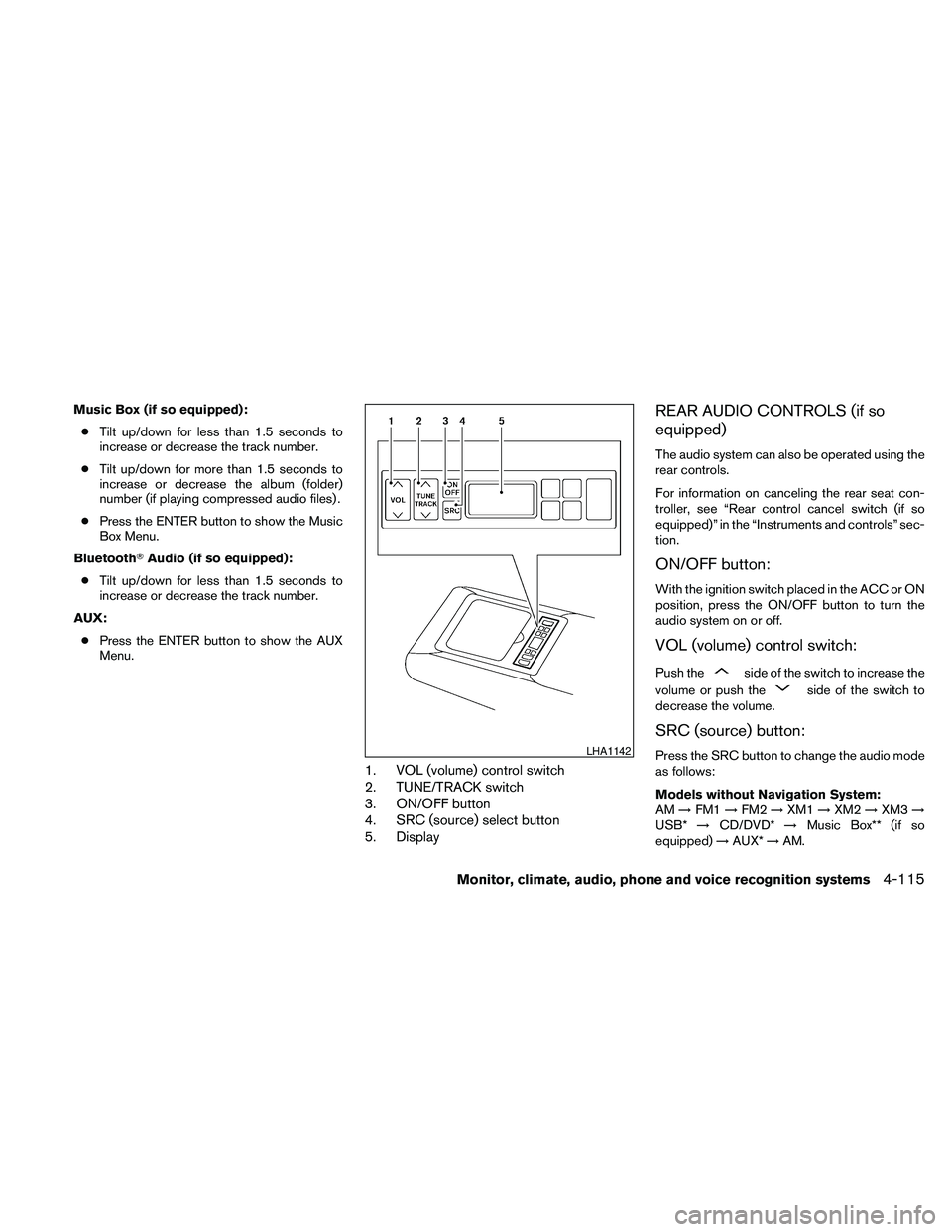
1. VOL (volume) control switch
2. TUNE/TRACK switch
3. ON/OFF button
4. SRC (source) select button
5. Display
REAR AUDIO CONTROLS (if so
equipped)
The audio system can also be operated using the
rear controls.
For information on canceling the rear seat con-
troller, see “Rear control cancel switch (if so
equipped)” in the “Instruments and controls” sec-
tion.
ON/OFF button:
With the ignition switch placed in the ACC or ON
position, press the ON/OFF button to turn the
audio system on or off.
VOL (volume) control switch:
Push theside of the switch to increase the
volume or push the
side of the switch to
decrease the volume.
SRC (source) button:
Press the SRC button to change the audio mode
as follows:
Models without Navigation System:
AM!FM1!FM2!XM1!XM2!XM3!
USB*!CD/DVD*!Music Box** (if so
equipped)!AUX*!AM.LHA1142
Monitor, climate, audio, phone and voice recognition systems4-115