window NISSAN MAXIMA 2010 Owner´s Manual
[x] Cancel search | Manufacturer: NISSAN, Model Year: 2010, Model line: MAXIMA, Model: NISSAN MAXIMA 2010Pages: 457, PDF Size: 4.66 MB
Page 9 of 457
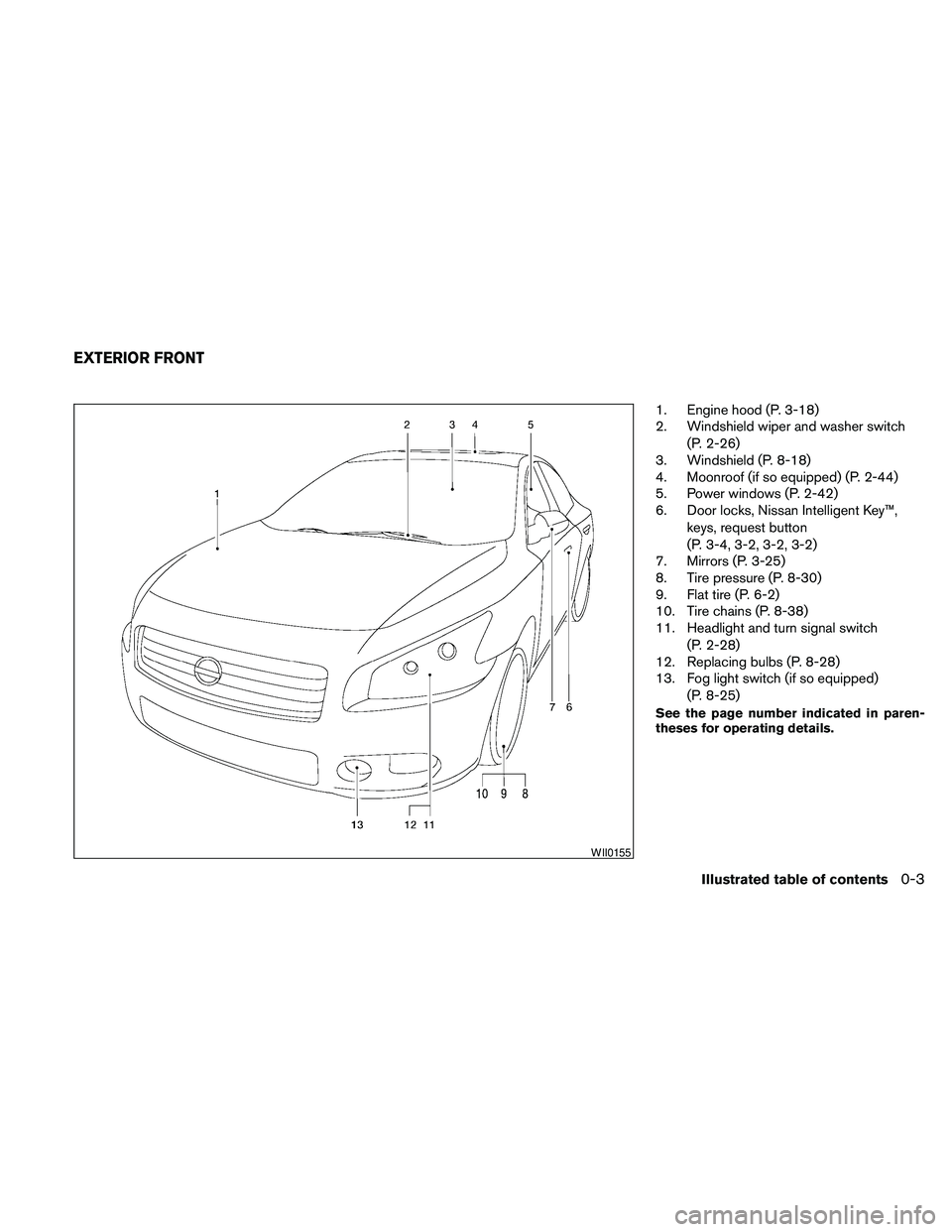
1. Engine hood (P. 3-18)
2. Windshield wiper and washer switch
(P. 2-26)
3. Windshield (P. 8-18)
4. Moonroof (if so equipped) (P. 2-44)
5. Power windows (P. 2-42)
6. Door locks, Nissan Intelligent Key™,
keys, request button
(P. 3-4, 3-2, 3-2, 3-2)
7. Mirrors (P. 3-25)
8. Tire pressure (P. 8-30)
9. Flat tire (P. 6-2)
10. Tire chains (P. 8-38)
11. Headlight and turn signal switch
(P. 2-28)
12. Replacing bulbs (P. 8-28)
13. Fog light switch (if so equipped)
(P. 8-25)
See the page number indicated in paren-
theses for operating details.
WII0155
EXTERIOR FRONT
Illustrated table of contents0-3
Page 10 of 457
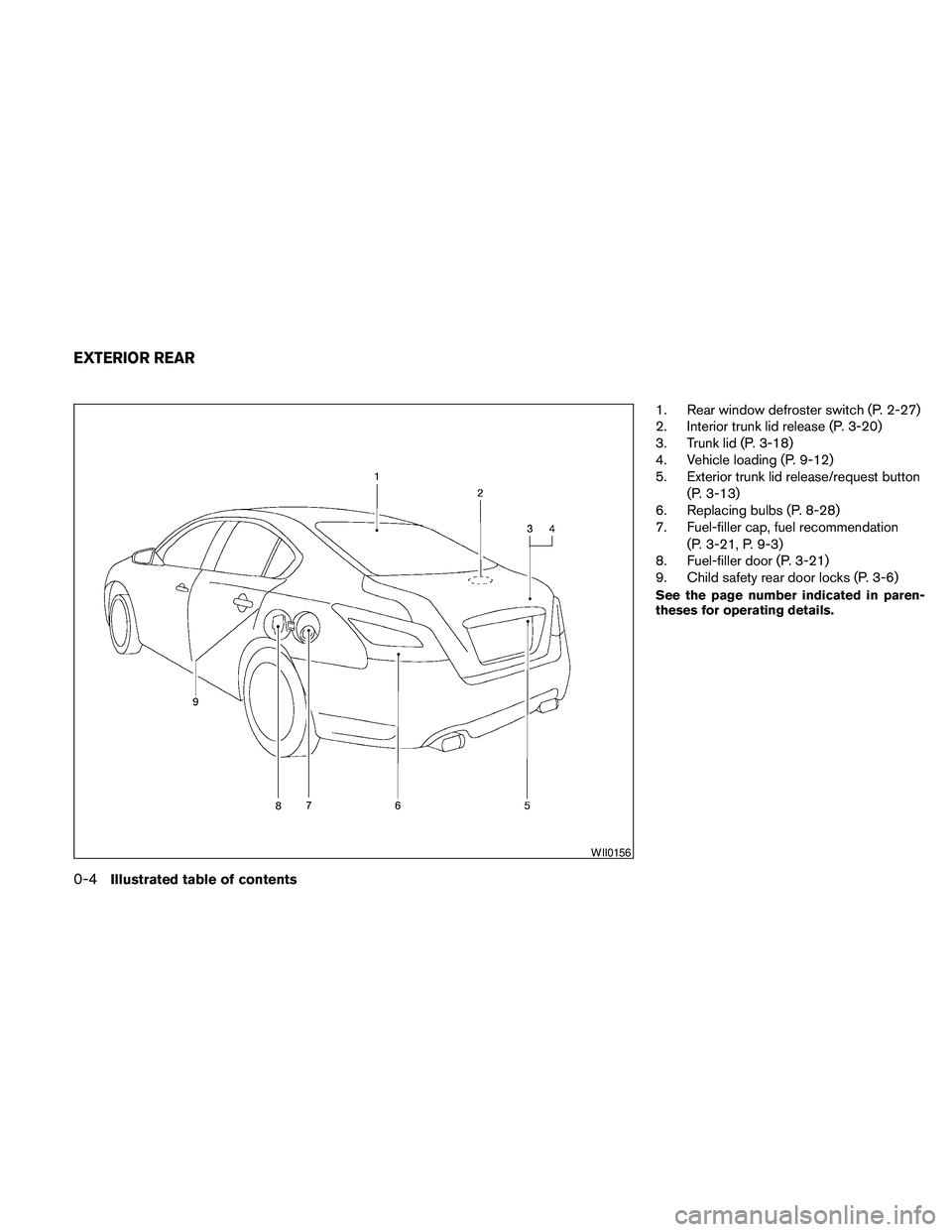
1. Rear window defroster switch (P. 2-27)
2. Interior trunk lid release (P. 3-20)
3. Trunk lid (P. 3-18)
4. Vehicle loading (P. 9-12)
5. Exterior trunk lid release/request button
(P. 3-13)
6. Replacing bulbs (P. 8-28)
7. Fuel-filler cap, fuel recommendation
(P. 3-21, P. 9-3)
8. Fuel-filler door (P. 3-21)
9. Child safety rear door locks (P. 3-6)
See the page number indicated in paren-
theses for operating details.
WII0156
EXTERIOR REAR
0-4Illustrated table of contents
Page 14 of 457
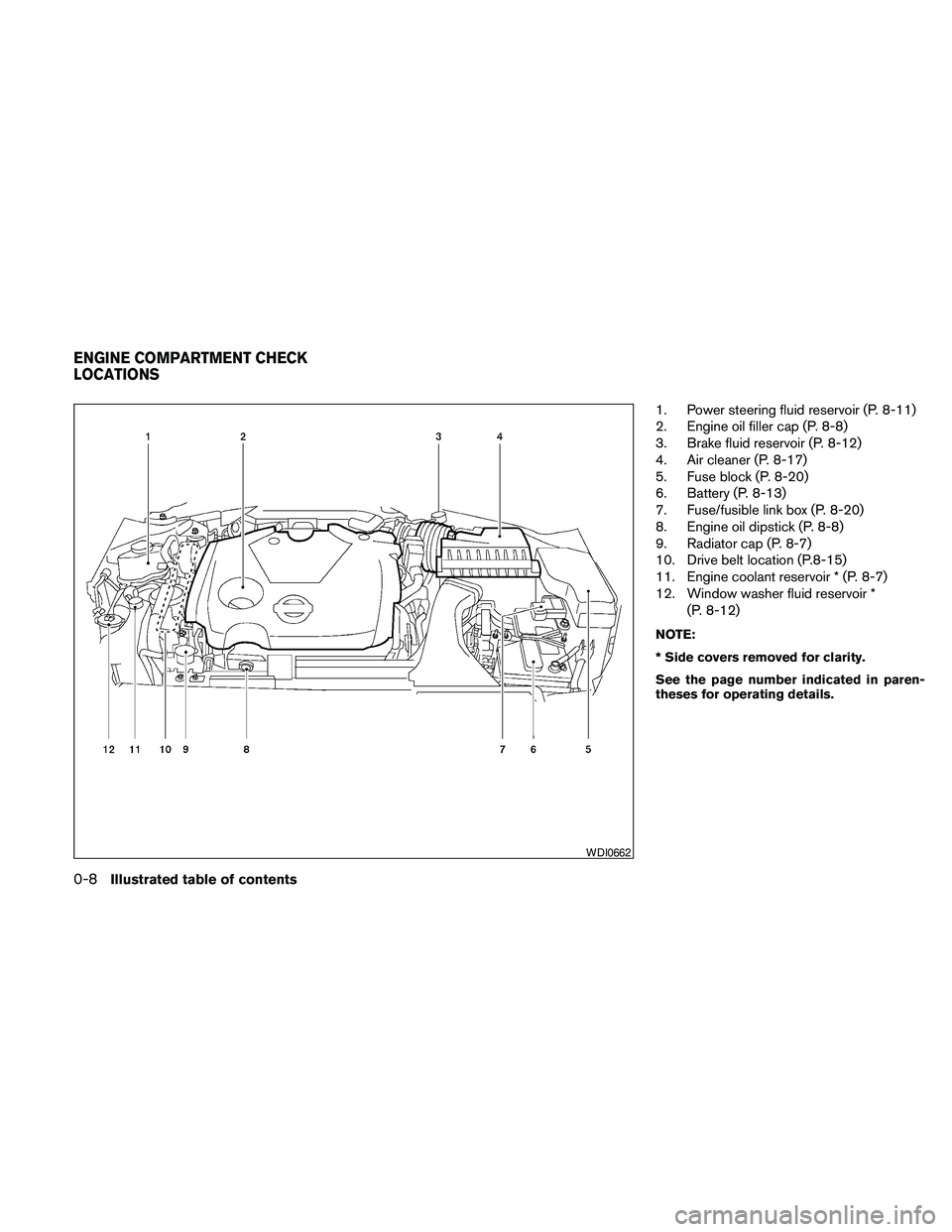
1. Power steering fluid reservoir (P. 8-11)
2. Engine oil filler cap (P. 8-8)
3. Brake fluid reservoir (P. 8-12)
4. Air cleaner (P. 8-17)
5. Fuse block (P. 8-20)
6. Battery (P. 8-13)
7. Fuse/fusible link box (P. 8-20)
8. Engine oil dipstick (P. 8-8)
9. Radiator cap (P. 8-7)
10. Drive belt location (P.8-15)
11. Engine coolant reservoir * (P. 8-7)
12. Window washer fluid reservoir *
(P. 8-12)
NOTE:
* Side covers removed for clarity.
See the page number indicated in paren-
theses for operating details.
WDI0662
ENGINE COMPARTMENT CHECK
LOCATIONS
0-8Illustrated table of contents
Page 57 of 457
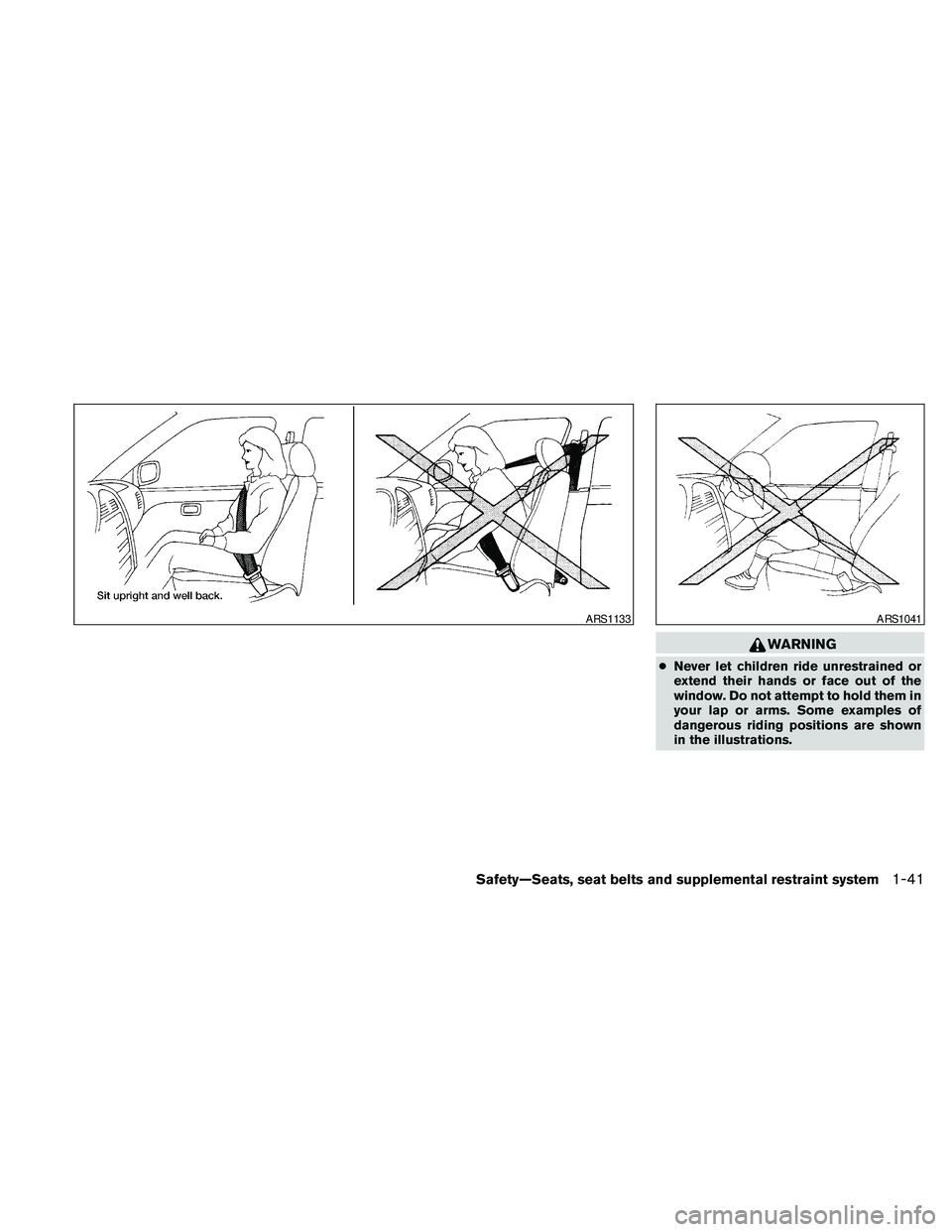
WARNING
cNever let children ride unrestrained or
extend their hands or face out of the
window. Do not attempt to hold them in
your lap or arms. Some examples of
dangerous riding positions are shown
in the illustrations.
ARS1133ARS1041
Safety—Seats, seat belts and supplemental restraint system1-41
Page 60 of 457
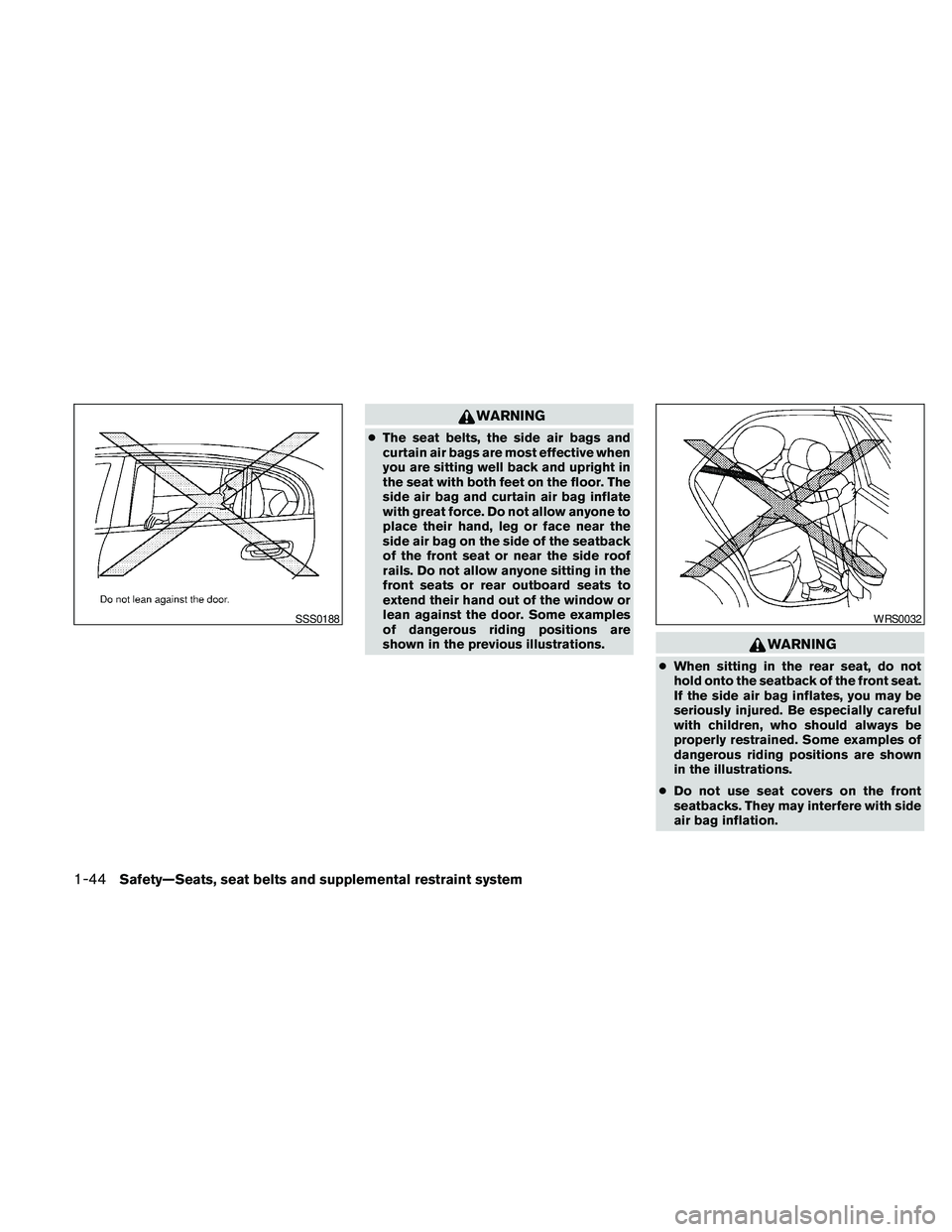
WARNING
cThe seat belts, the side air bags and
curtain air bags are most effective when
you are sitting well back and upright in
the seat with both feet on the floor. The
side air bag and curtain air bag inflate
with great force. Do not allow anyone to
place their hand, leg or face near the
side air bag on the side of the seatback
of the front seat or near the side roof
rails. Do not allow anyone sitting in the
front seats or rear outboard seats to
extend their hand out of the window or
lean against the door. Some examples
of dangerous riding positions are
shown in the previous illustrations.
WARNING
cWhen sitting in the rear seat, do not
hold onto the seatback of the front seat.
If the side air bag inflates, you may be
seriously injured. Be especially careful
with children, who should always be
properly restrained. Some examples of
dangerous riding positions are shown
in the illustrations.
cDo not use seat covers on the front
seatbacks. They may interfere with side
air bag inflation.
SSS0188WRS0032
1-44Safety—Seats, seat belts and supplemental restraint system
Page 72 of 457
2 Instruments and controls
Instrument panel...................................2-2
Meters and gauges................................2-3
Speedometer and odometer.....................2-4
Tachometer....................................2-5
Engine coolant temperature gauge...............2-5
Fuel gauge....................................2-6
Compass display (if so equipped)...................2-6
Compass display...............................2-7
Warning/indicator lights and audible reminders......2-10
Checking bulbs...............................2-10
Warning lights................................2-10
Indicator lights................................2-14
Audible reminders.............................2-16
Vehicle information display.........................2-17
How to use the vehicle information display.......2-17
Security systems.................................2-24
Vehicle security system.........................2-24
NISSAN vehicle immobilizer system.............2-25
Windshield wiper and washer switch...............2-26
Switch operation..............................2-26
Rear window and outside mirror (if so equipped)
defroster switch..................................2-27
Headlight and turn signal switch....................2-28Xenon headlights (if so equipped)...............2-28
Headlight control switch........................2-29
Daytime running light system (Canada only)......2-31
Instrument brightness control...................2-32
Turn signal switch.............................2-32
Fog light switch (if so equipped)................2-32
Hazard warning flasher switch.....................2-33
Horn............................................2-33
Climate control seat switch (if so equipped).........2-34
Heated seats (if so equipped)......................2-35
Heated steering wheel (if so equipped).............2-35
Vehicle Dynamic Control (VDC) OFF switch.........2-36
Power outlet.....................................2-36
Storage.........................................2-37
Map pockets..................................2-37
Seatback pockets.............................2-37
Sunglasses holder (if so equipped)..............2-38
Cup holders..................................2-38
Glove box....................................2-39
Console box..................................2-40
Grocery hooks................................2-40
Cargo net (if so equipped)......................2-41
Windows........................................2-42
Page 73 of 457
Power windows...............................2-42
Moonroof (if so equipped).........................2-44
Automatic moonroof...........................2-44
Dual Panel Moonroof (if so equipped)...............2-46
Automatic moonroof...........................2-46
Rear Control Cancel Switch (if so equipped)........2-48
Rear power sun shade (if so equipped).............2-48
Interior light......................................2-49
Console light..................................2-50
Personal lights...................................2-50
Front.........................................2-50
Rear.........................................2-51Trunk light.......................................2-52
HomeLinkTuniversal transceiver (if so equipped).....2-52
Programming HomeLinkT.......................2-53
Programming HomeLinkTfor Canadian
customers....................................2-54
Operating the HomeLinkTuniversal
transceiver....................................2-54
Programming trouble-diagnosis.................2-54
Clearing the programmed information............2-54
Reprogramming a single HomeLinkTbutton......2-55
If your vehicle is stolen.........................2-55
Page 95 of 457
Door and trunk open warning
This warning illuminates when a door or the trunk
has been opened when the engine is running.
Push warning
After the Shift P warning illuminates, the Push
warning will illuminate if the ignition switch is
placed in the ACC position when the shift selec-
tor is moved to the P (Park) position.
See “Shift P warning” in this section for additional
information.
To turn off the Push warning, place the ignition
switch in the ON position and then to the LOCK
position.
Low fuel warning
This warning illuminates when the fuel level in the
fuel tank is getting low. Refuel as soon as it is
convenient, preferably before the fuel gauge
reaches E (Empty) .There will be a small re-
serve of fuel in the tank when the fuel
gauge needle reaches E (Empty) .
Low windshield washer fluid warning
This warning illuminates when the windshield
washer fluid is at a low level. Add windshield
washer fluid as necessary. See “Window washer
fluid” in the “Maintenance and do-it-yourself”
section of this manual.No key warning
This warning illuminates following two condi-
tions:
1. When the ignition switch is pushed and the
Intelligent Key cannot be recognized by the
system. If this warning illuminates, you can-
not start the engine.
Check for the following causes and perform
the assigned remedies:
– The battery of the Intelligent Key carried
with you is discharged completely. Re-
place the battery with a new one.
– The Intelligent Key carried with you is not
registered to the system. Use the regis-
tered Intelligent Key.
– You do not have an Intelligent Key with
you. Carry an Intelligent Key with you.
2. When the door is closed with the Intelligent
Key left outside the vehicle and the ignition
switch is placed in the ACC or ON position.
A chime will also sound.
Parking brake warning
This warning illuminates when the parking brake
is set and the vehicle is driven.SHIFT P warning
This warning illuminates when the ignition switch
is pushed to stop the engine with the shift selec-
tor in any position except in the P (Park) position.
If this warning illuminates, the ignition switch is in
the OFF position. Move the shift selector to the P
(Park) position or push the ignition switch to the
ON position.
An inside warning chime will also sound.
If the shift selector is moved to the P (Park)
position, the Push warning will appear. Refer to
“Push warning” in this section.
For additional information about Intelligent Key,
see “NISSAN Intelligent Key™” in the “Pre-driving
checks and adjustments” section.
Engine start operation indicator
This indicator illuminates when the ignition switch
is in the LOCK, OFF, ACC or ON position with
the shift selector in the P (Park) position.
This indicator means that the engine will start by
pushing the push-button ignition switch with the
brake pedal depressed.
Instruments and controls2-23
Page 97 of 457
ways secure your vehicle even if parking for a
brief period. Never leave your Intelligent Key in
the vehicle, and always lock the vehicle when
unattended. Be aware of your surroundings, and
park in secure, well-lit areas whenever possible.
Many devices offering additional protection, such
as component locks, identification markers, and
tracking systems, are available at auto supply
stores and specialty shops. Your NISSAN dealer
may also offer such equipment. Check with your
insurance company to see if you may be eligible
for discounts for various theft protection features.
How to arm the vehicle security
system
1. Close all windows.(The system can be
armed even if the windows are open.)
2. Remove the Intelligent Key from the vehicle.
3. Close all doors, hood and trunk. Lock all
doors. The doors can be locked with the
Intelligent Key, door handle request switch,
power door lock switch or mechanical key.
4. Confirm that the security indicator light
comes on. The security light stays on for
about 30 seconds. The vehicle security sys-
tem is now pre-armed. After about 30 sec-
onds the vehicle security system automati-
cally shifts into the armed phase. Thesecurity light begins to flash once every 3
seconds. If, during the 30-second pre-arm
time period, the driver’s door is unlocked by
the key or the keyfob, or the ignition switch is
placed in the ACC or ON position, the sys-
tem will not arm.
cEven when the driver and/or passen-
gers are in the vehicle, the system will
activate with all the doors, hood and
trunk lid locked with the ignition
switch placed in the LOCK position.
When placing the ignition switch in the
ACC or ON position, the system will be
released.
Vehicle security system activation
The vehicle security system will give the following
alarm:
cThe headlights blink and the horn sounds
intermittently.
cThe alarm automatically turns off after ap-
proximately 50 seconds. However, the alarm
reactivates if the vehicle is tampered with
again. The alarm can be shut off by unlocking
the driver’s door or trunk lid with the key, or
by pressing the
button on the Intelli-
gent Key.The alarm is activated by:
copening the door or trunk lid without using
the key or Intelligent Key (even if the door is
unlocked by releasing the door inside lock
switch) .
How to stop an activated alarm
The alarm stops only by unlocking the driver’s
door or the trunk lid with the key, pressing
the
button on the Intelligent Key, or press-
ing the request switch on the driver’s or passen-
ger’s door with the Intelligent Key in range of the
door handle.
NISSAN VEHICLE IMMOBILIZER
SYSTEM
The NISSAN Vehicle Immobilizer System will not
allow the engine to start without the use of a
registered key.
If the engine fails to start using a registered key (for
example, when interference is caused by another
registered key, an automated toll road device or
automatic payment device on the key ring) , restart
the engine using the following procedures:
1. Leave the ignition switch placed in the ON
position for approximately 5 seconds.
2. Place the ignition switch in the OFF or
LOCK position and wait approximately 10
seconds.
Instruments and controls2-25
Page 99 of 457
NOTE:
You can turn on or turn off the driving
speed dependent intermittent wiper func-
tion for vehicles with navigation system.
Refer to “Comfort settings” in the “Monitor,
climate, audio, phone and voice recogni-
tion systems” section.
s2Low — continuous low speed operation
s3High — continuous high speed operation
Push the lever up
s4to have one sweep opera-
tion of the wiper.
Pull the lever toward you
s5to operate the
washer. The wiper will also operate several times.
WARNING
In freezing temperatures the washer solu-
tion may freeze on the windshield and
obscure your vision which may lead to an
accident. Warm the windshield with the
defroster before you wash the windshield.
CAUTION
cDo not operate the washer continu-
ously for more than 30 seconds.
cDo not operate the washer if the reser-
voir tank is empty.
cDo not fill the window washer reservoir
tank with washer fluid concentrates at
full strength. Some methyl alcohol
based washer fluid concentrates may
permanently stain the grille if spilled
while filling the window washer reser-
voir tank.
cPre-mix washer fluid concentrates with
water to the manufacturer’s recom-
mended levels before pouring the fluid
into the window washer reservoir tank.
Do not use the window washer reservoir
tank to mix the washer fluid concen-
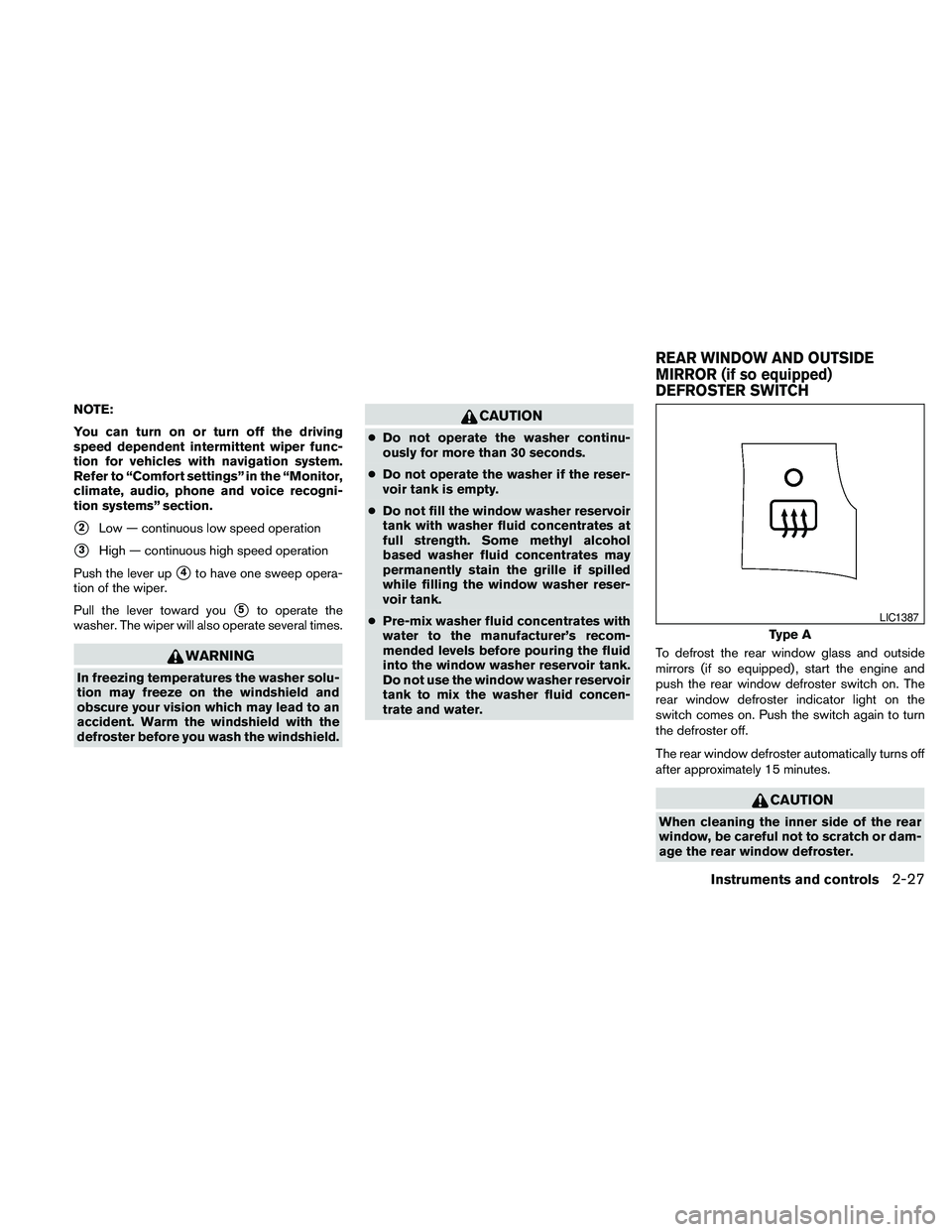
trate and water.To defrost the rear window glass and outside
mirrors (if so equipped) , start the engine and
push the rear window defroster switch on. The
rear window defroster indicator light on the
switch comes on. Push the switch again to turn
the defroster off.
The rear window defroster automatically turns off
after approximately 15 minutes.
CAUTION
When cleaning the inner side of the rear
window, be careful not to scratch or dam-
age the rear window defroster.
Type A
LIC1387
REAR WINDOW AND OUTSIDE
MIRROR (if so equipped)
DEFROSTER SWITCH
Instruments and controls2-27