display NISSAN MAXIMA 2013 A35 / 7.G Owners Manual
[x] Cancel search | Manufacturer: NISSAN, Model Year: 2013, Model line: MAXIMA, Model: NISSAN MAXIMA 2013 A35 / 7.GPages: 444, PDF Size: 3.18 MB
Page 286 of 444
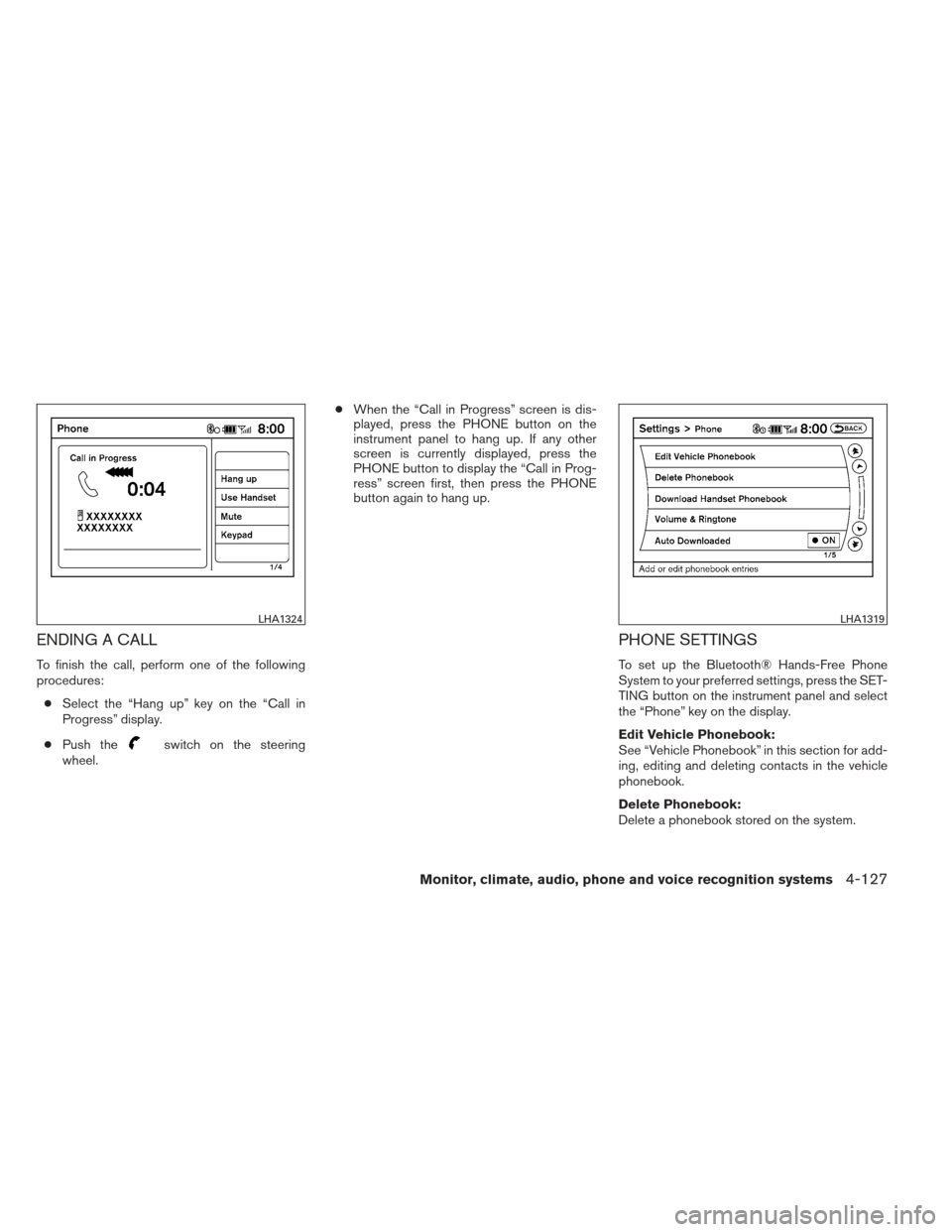
ENDING A CALL
To finish the call, perform one of the following
procedures:● Select the “Hang up” key on the “Call in
Progress” display.
● Push the
switch on the steering
wheel. ●
When the “Call in Progress” screen is dis-
played, press the PHONE button on the
instrument panel to hang up. If any other
screen is currently displayed, press the
PHONE button to display the “Call in Prog-
ress” screen first, then press the PHONE
button again to hang up.
PHONE SETTINGS
To set up the Bluetooth® Hands-Free Phone
System to your preferred settings, press the SET-
TING button on the instrument panel and select
the “Phone” key on the display.
Edit Vehicle Phonebook:
See “Vehicle Phonebook” in this section for add-
ing, editing and deleting contacts in the vehicle
phonebook.
Delete Phonebook:
Delete a phonebook stored on the system.
LHA1324LHA1319
Monitor, climate, audio, phone and voice recognition systems4-127
Page 287 of 444
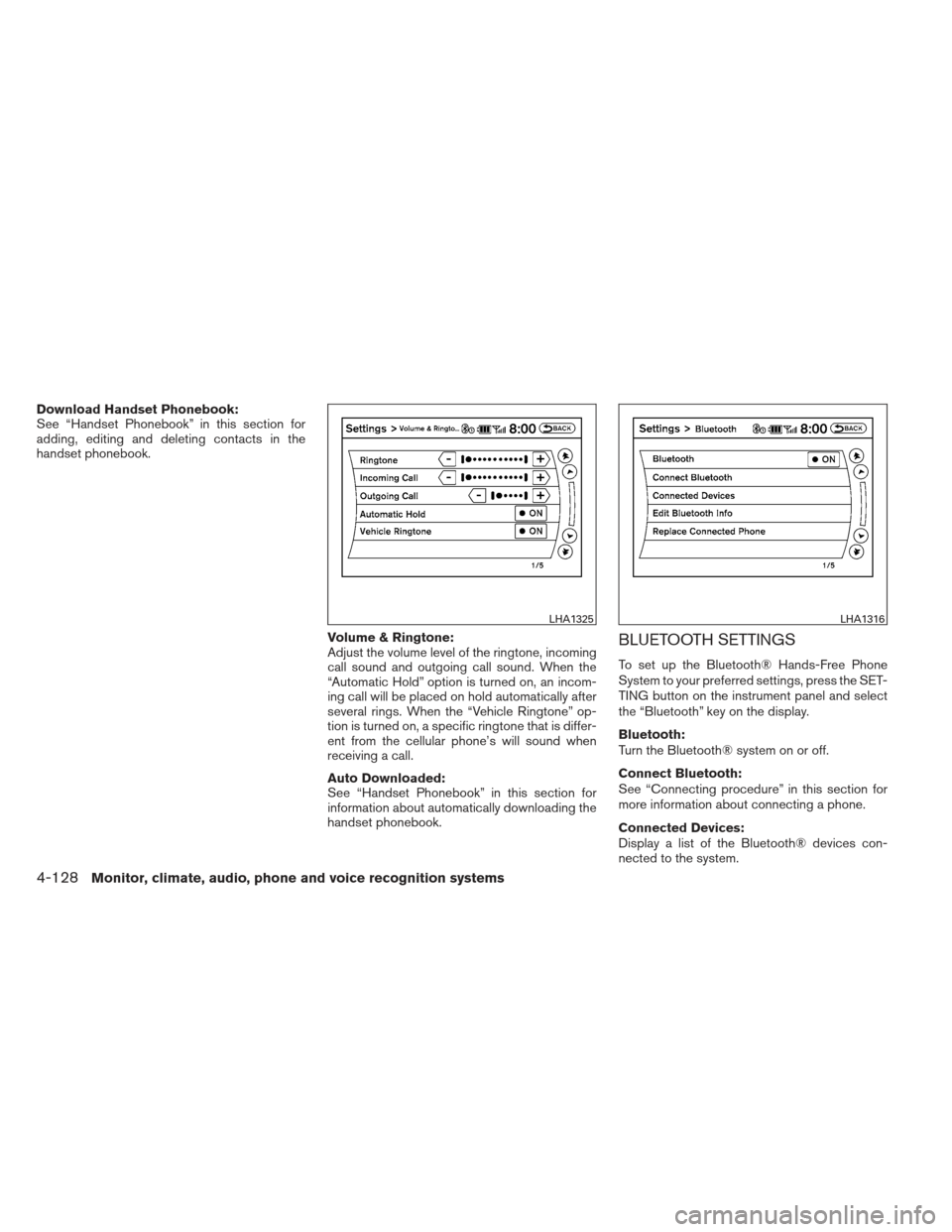
Download Handset Phonebook:
See “Handset Phonebook” in this section for
adding, editing and deleting contacts in the
handset phonebook.Volume & Ringtone:
Adjust the volume level of the ringtone, incoming
call sound and outgoing call sound. When the
“Automatic Hold” option is turned on, an incom-
ing call will be placed on hold automatically after
several rings. When the “Vehicle Ringtone” op-
tion is turned on, a specific ringtone that is differ-
ent from the cellular phone’s will sound when
receiving a call.
Auto Downloaded:
See “Handset Phonebook” in this section for
information about automatically downloading the
handset phonebook.
BLUETOOTH SETTINGS
To set up the Bluetooth® Hands-Free Phone
System to your preferred settings, press the SET-
TING button on the instrument panel and select
the “Bluetooth” key on the display.
Bluetooth:
Turn the Bluetooth® system on or off.
Connect Bluetooth:
See “Connecting procedure” in this section for
more information about connecting a phone.
Connected Devices:
Display a list of the Bluetooth® devices con-
nected to the system.
LHA1325LHA1316
4-128Monitor, climate, audio, phone and voice recognition systems
Page 289 of 444
NISSAN Voice Recognition allows hands-free
operation of the systems equipped on this ve-
hicle, such as phone and vehicle information.
There are two voice recognition modes of opera-
tion available. They are:● Standard Mode
● Alternate Command Mode
In Standard Mode (the factory default setting) ,
commands that are available are always shown
on the display and announced by the system. You
can complete your desired operation by simply
following the prompts given by the system. Not all
NISSAN Voice Recognition options are available
while in Standard Mode.
For advanced operation, you can change to an
Alternate Command Mode that enables the op-
eration of the display and audio system through
NISSAN Voice Recognition. When this mode is
active, an expanded list of commands can be
spoken after pushing the TALK
switch on
the steering wheel, and the voice command
menu prompts are turned off.
In Alternate Command Mode the recognition
success rate may be affected because the num-
ber of available commands and the ways of
speaking each command are increased. See
“NISSAN Voice Recognition Alternate Com-
mand Mode” in this section. To improve the recognition success rate when
Alternate Command Mode is active, try using the
Speaker Adaptation Function available in that
mode. See “Speaker Adaptation Function” in this
section. Otherwise, it is recommended that Alter-
nate Command Mode be turned off and Standard
Mode be used for the best recognition perfor-
mance.
While using the NISSAN Voice Recognition sys-
tem for certain Phone and Navigation features,
you can switch to using manual controls (touch-
screen, NISSAN controller, steering wheel con-
trols) and the information you have already en-
tered by voice control will be retained. To switch
to manual controls, select the “Manual Controls”
key on the display when it appears. The system
will respond by speaking “Changing to manual
operation. Please use manual controls to con-
tinue.”
For the voice commands for the navigation sys-
tem, refer to the Navigation System Owner’s
Manual of your vehicle.
For vehicles in the U.S., the factory default setting
is the Standard Mode. See “Standard Mode” in
this section. For vehicles in Canada, the factory
default setting is the Alternate Command Mode.
See “Alternate Command Mode” in this section.
NISSAN VOICE RECOGNITION
STANDARD MODE
The Standard Mode enables control of naviga-
tion, phone and vehicle information. With this
setting active, commands that are available are
always shown on the display and announced by
the system.
Displaying user guide
If you use the NISSAN Voice Recognition system
for the first time or you do not know how to
operate it, you can display the User Guide for
confirmation.
You can confirm how to use voice commands by
accessing a simplified User Guide, which con-
tains basic instructions and tutorials for several
voice commands.
NISSAN VOICE RECOGNITION
SYSTEM (if so equipped)
4-130Monitor, climate, audio, phone and voice recognition systems
Page 290 of 444
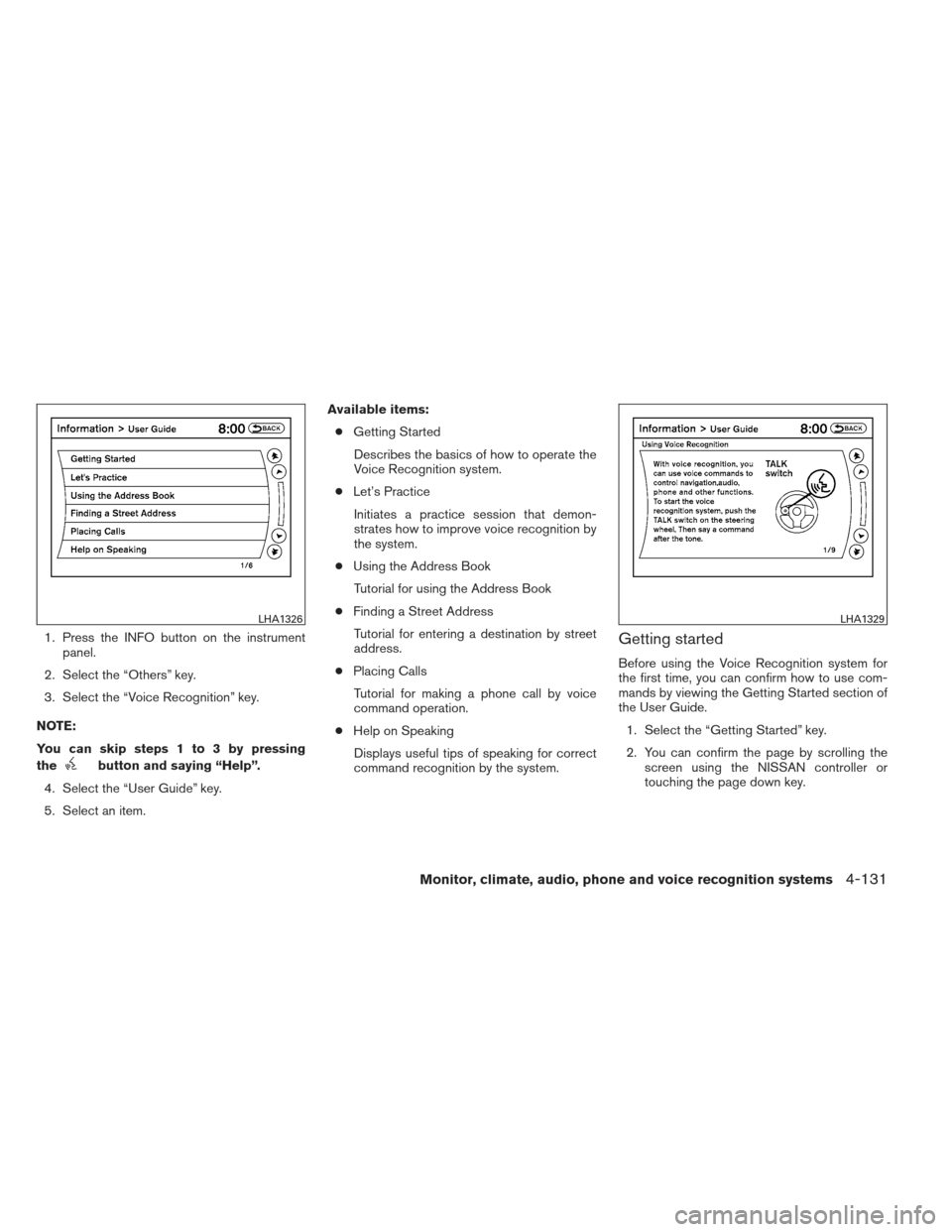
1. Press the INFO button on the instrumentpanel.
2. Select the “Others” key.
3. Select the “Voice Recognition” key.
NOTE:
You can skip steps 1 to 3 by pressing
the
button and saying “Help”.
4. Select the “User Guide” key.
5. Select an item. Available items:
● Getting Started
Describes the basics of how to operate the
Voice Recognition system.
● Let’s Practice
Initiates a practice session that demon-
strates how to improve voice recognition by
the system.
● Using the Address Book
Tutorial for using the Address Book
● Finding a Street Address
Tutorial for entering a destination by street
address.
● Placing Calls
Tutorial for making a phone call by voice
command operation.
● Help on Speaking
Displays useful tips of speaking for correct
command recognition by the system.
Getting started
Before using the Voice Recognition system for
the first time, you can confirm how to use com-
mands by viewing the Getting Started section of
the User Guide. 1. Select the “Getting Started” key.
2. You can confirm the page by scrolling the screen using the NISSAN controller or
touching the page down key.
LHA1326LHA1329
Monitor, climate, audio, phone and voice recognition systems4-131
Page 291 of 444
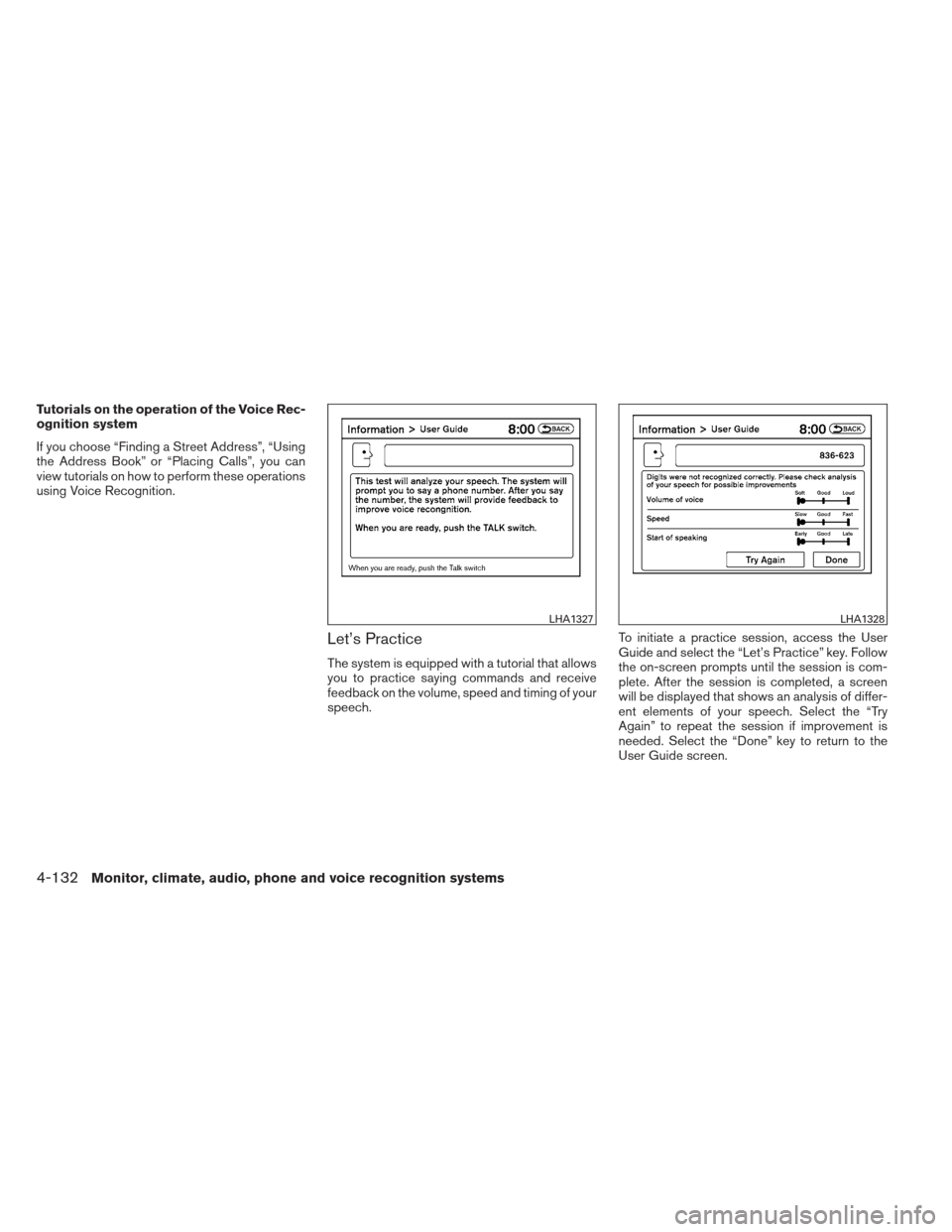
Tutorials on the operation of the Voice Rec-
ognition system
If you choose “Finding a Street Address”, “Using
the Address Book” or “Placing Calls”, you can
view tutorials on how to perform these operations
using Voice Recognition.
Let’s Practice
The system is equipped with a tutorial that allows
you to practice saying commands and receive
feedback on the volume, speed and timing of your
speech.To initiate a practice session, access the User
Guide and select the “Let’s Practice” key. Follow
the on-screen prompts until the session is com-
plete. After the session is completed, a screen
will be displayed that shows an analysis of differ-
ent elements of your speech. Select the “Try
Again” to repeat the session if improvement is
needed. Select the “Done” key to return to the
User Guide screen.
LHA1327LHA1328
4-132Monitor, climate, audio, phone and voice recognition systems
Page 292 of 444
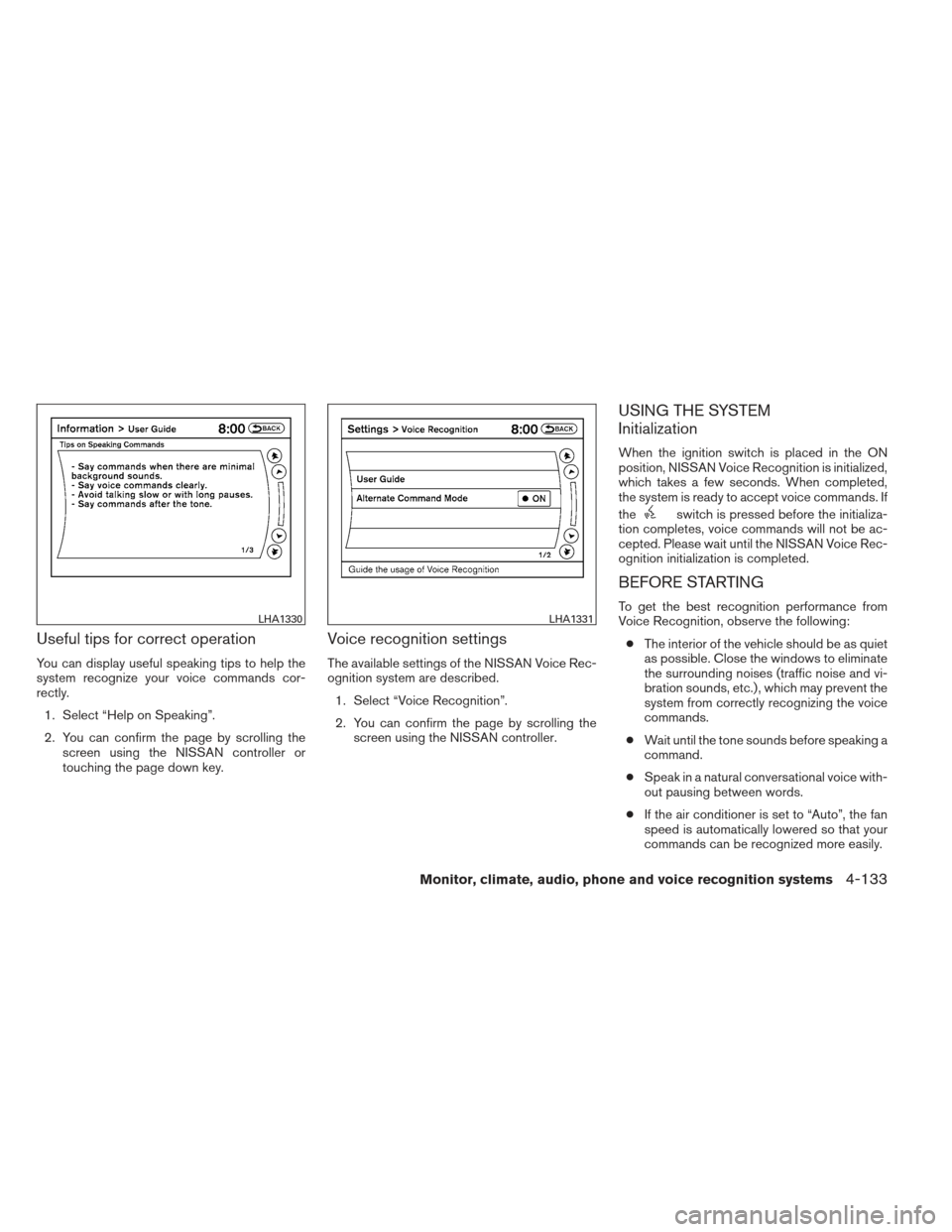
Useful tips for correct operation
You can display useful speaking tips to help the
system recognize your voice commands cor-
rectly.1. Select “Help on Speaking”.
2. You can confirm the page by scrolling the screen using the NISSAN controller or
touching the page down key.
Voice recognition settings
The available settings of the NISSAN Voice Rec-
ognition system are described.
1. Select “Voice Recognition”.
2. You can confirm the page by scrolling the screen using the NISSAN controller.
USING THE SYSTEM
Initialization
When the ignition switch is placed in the ON
position, NISSAN Voice Recognition is initialized,
which takes a few seconds. When completed,
the system is ready to accept voice commands. If
the
switch is pressed before the initializa-
tion completes, voice commands will not be ac-
cepted. Please wait until the NISSAN Voice Rec-
ognition initialization is completed.
BEFORE STARTING
To get the best recognition performance from
Voice Recognition, observe the following:
● The interior of the vehicle should be as quiet
as possible. Close the windows to eliminate
the surrounding noises (traffic noise and vi-
bration sounds, etc.) , which may prevent the
system from correctly recognizing the voice
commands.
● Wait until the tone sounds before speaking a
command.
● Speak in a natural conversational voice with-
out pausing between words.
● If the air conditioner is set to “Auto”, the fan
speed is automatically lowered so that your
commands can be recognized more easily.LHA1330LHA1331
Monitor, climate, audio, phone and voice recognition systems4-133
Page 293 of 444
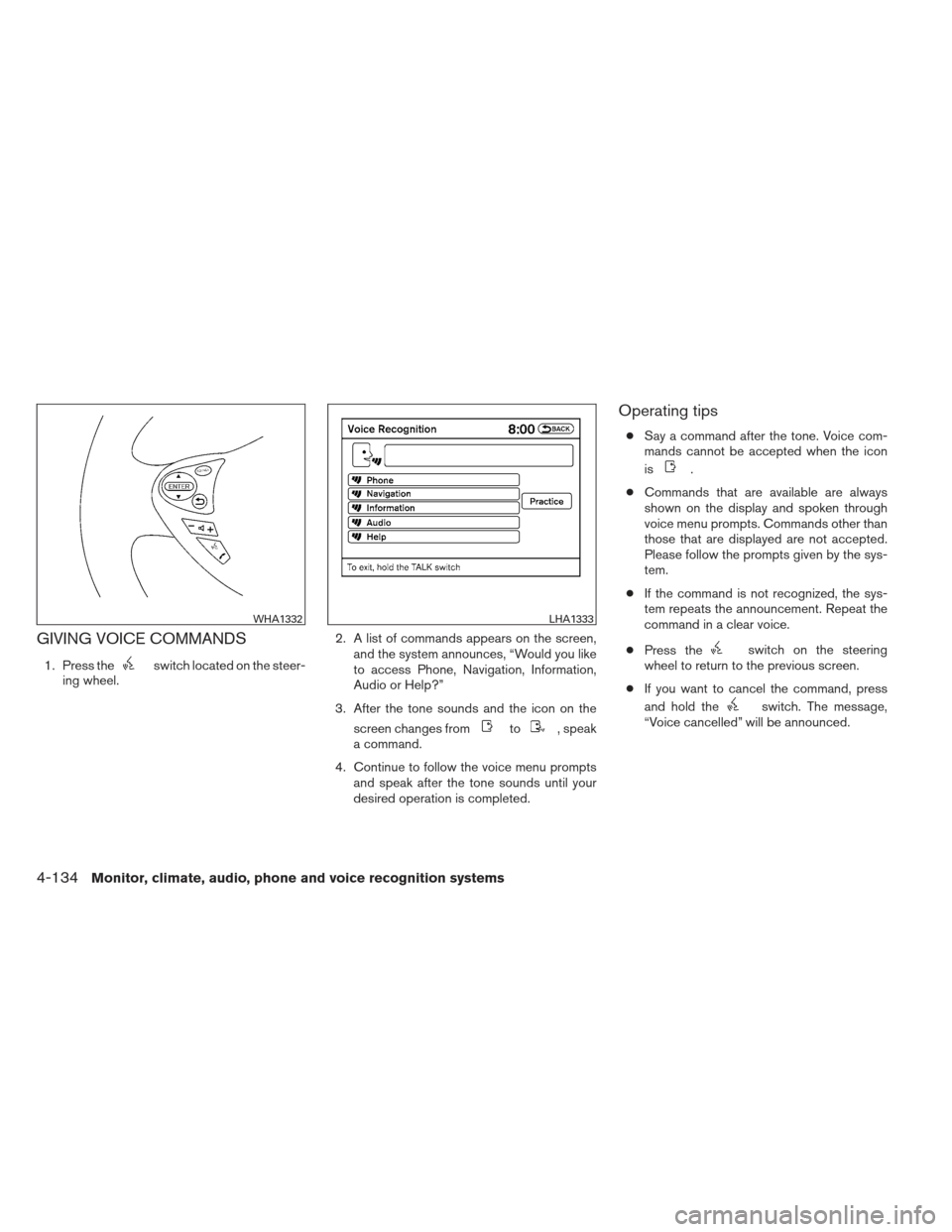
GIVING VOICE COMMANDS
1. Press theswitch located on the steer-
ing wheel. 2. A list of commands appears on the screen,
and the system announces, “Would you like
to access Phone, Navigation, Information,
Audio or Help?”
3. After the tone sounds and the icon on the screen changes from
to, speak
a command.
4. Continue to follow the voice menu prompts and speak after the tone sounds until your
desired operation is completed.
Operating tips
●Say a command after the tone. Voice com-
mands cannot be accepted when the icon
is
.
● Commands that are available are always
shown on the display and spoken through
voice menu prompts. Commands other than
those that are displayed are not accepted.
Please follow the prompts given by the sys-
tem.
● If the command is not recognized, the sys-
tem repeats the announcement. Repeat the
command in a clear voice.
● Press the
switch on the steering
wheel to return to the previous screen.
● If you want to cancel the command, press
and hold the
switch. The message,
“Voice cancelled” will be announced.
WHA1332LHA1333
4-134Monitor, climate, audio, phone and voice recognition systems
Page 295 of 444
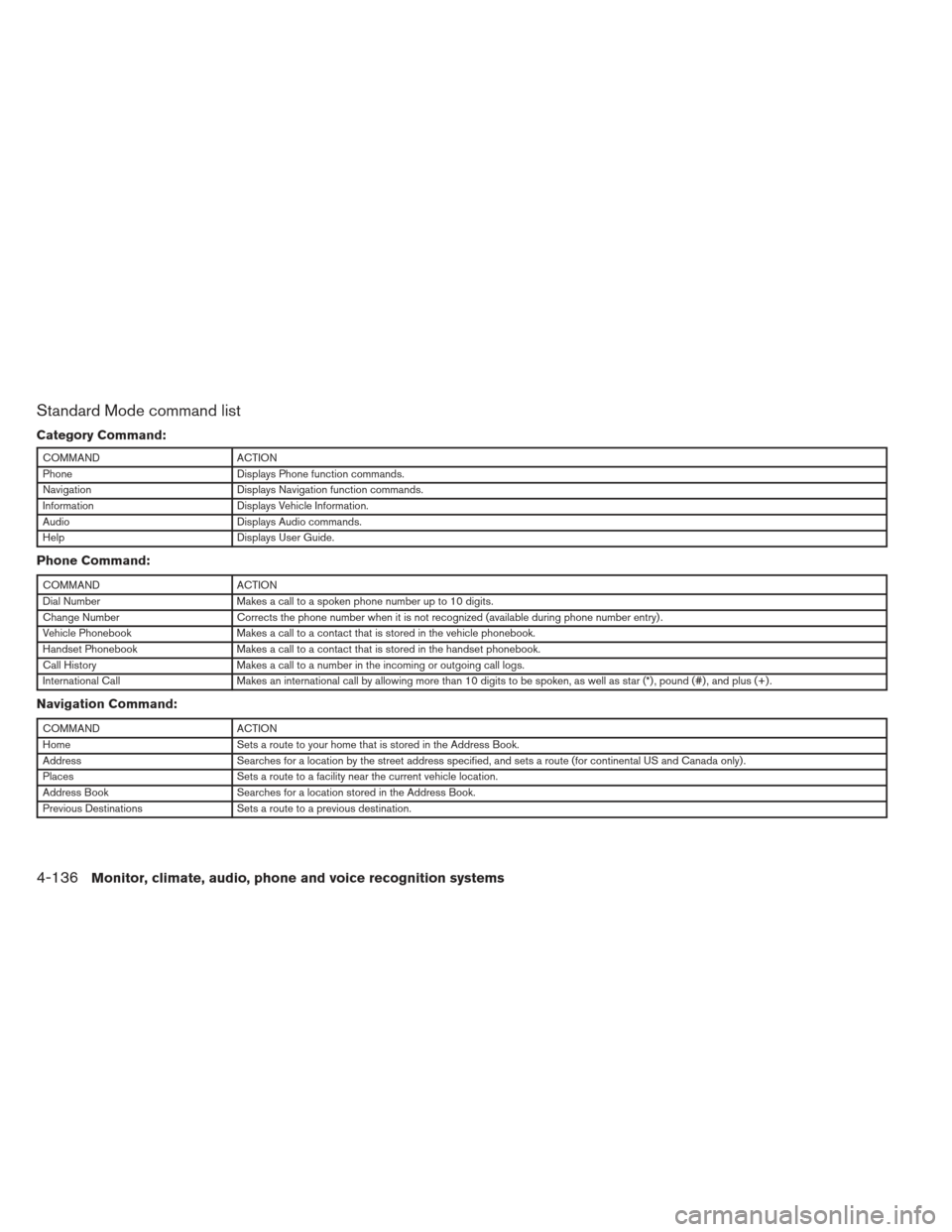
Standard Mode command list
Category Command:
COMMANDACTION
Phone Displays Phone function commands.
Navigation Displays Navigation function commands.
Information Displays Vehicle Information.
Audio Displays Audio commands.
Help Displays User Guide.
Phone Command:
COMMANDACTION
Dial Number Makes a call to a spoken phone number up to 10 digits.
Change Number Corrects the phone number when it is not recognized (available during phone number entry) .
Vehicle Phonebook Makes a call to a contact that is stored in the vehicle phonebook.
Handset Phonebook Makes a call to a contact that is stored in the handset phonebook.
Call History Makes a call to a number in the incoming or outgoing call logs.
International Call Makes an international call by allowing more than 10 digits to be spoken, as well as star (*) , pound (#) , and plus (+) .
Navigation Command:
COMMANDACTION
Home Sets a route to your home that is stored in the Address Book.
Address Searches for a location by the street address specified, and sets a route (for continental US and Canada only) .
Places Sets a route to a facility near the current vehicle location.
Address Book Searches for a location stored in the Address Book.
Previous Destinations Sets a route to a previous destination.
4-136Monitor, climate, audio, phone and voice recognition systems
Page 296 of 444
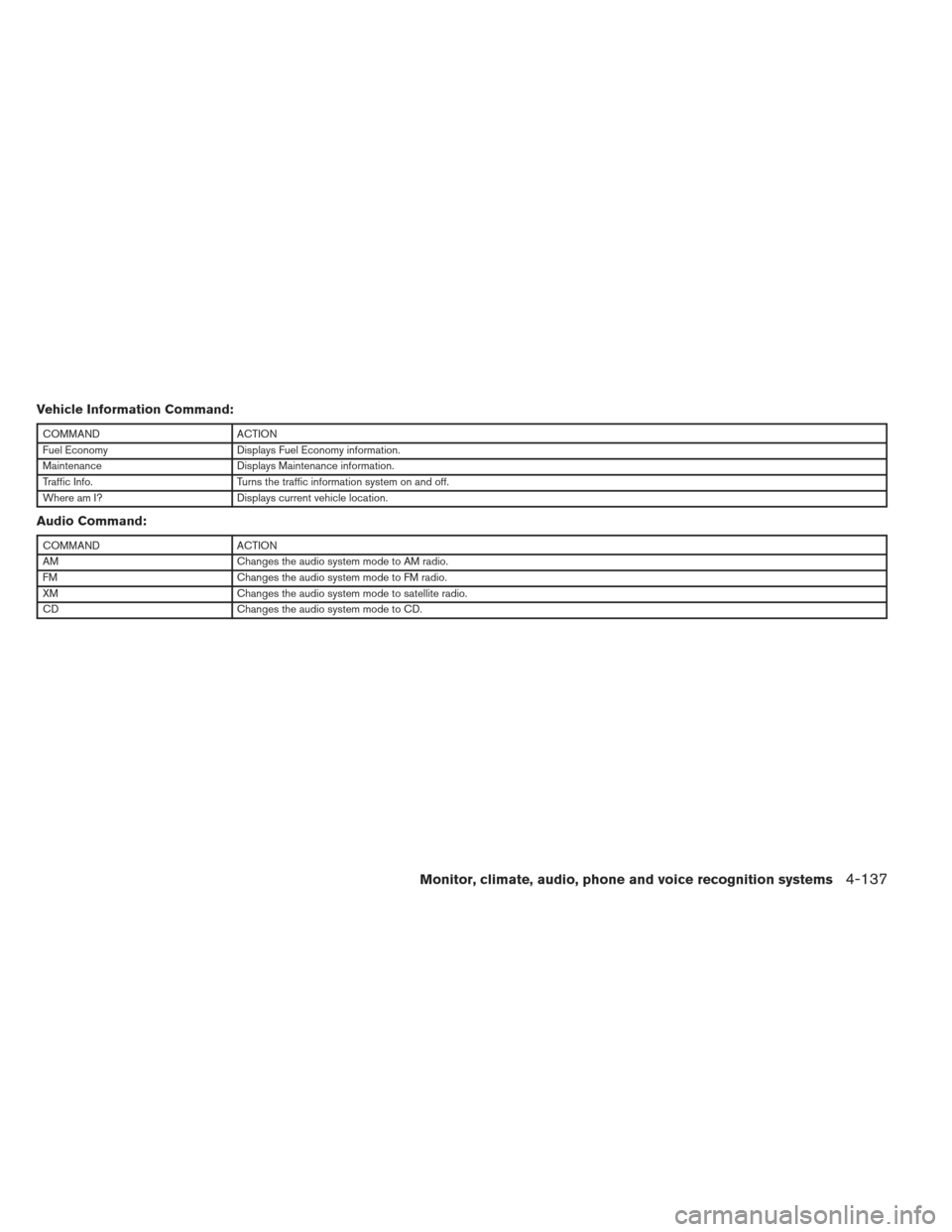
Vehicle Information Command:
COMMANDACTION
Fuel Economy Displays Fuel Economy information.
Maintenance Displays Maintenance information.
Traffic Info. Turns the traffic information system on and off.
Where am I? Displays current vehicle location.
Audio Command:
COMMANDACTION
AM Changes the audio system mode to AM radio.
FM Changes the audio system mode to FM radio.
XM Changes the audio system mode to satellite radio.
CD Changes the audio system mode to CD.
Monitor, climate, audio, phone and voice recognition systems4-137
Page 301 of 444
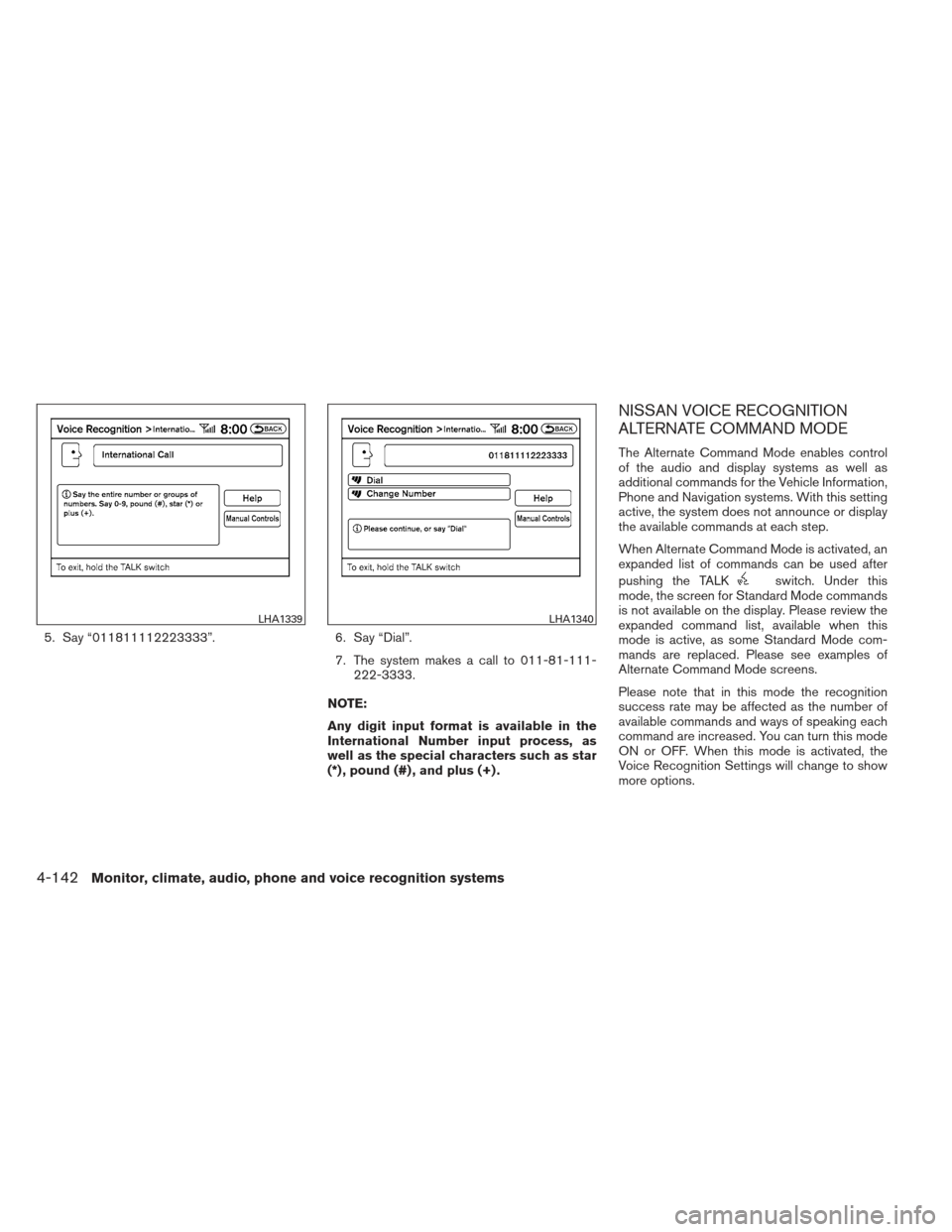
5. Say “011811112223333”.6. Say “Dial”.
7. The system makes a call to 011-81-111- 222-3333.
NOTE:
Any digit input format is available in the
International Number input process, as
well as the special characters such as star
(*) , pound (#) , and plus (+) .
NISSAN VOICE RECOGNITION
ALTERNATE COMMAND MODE
The Alternate Command Mode enables control
of the audio and display systems as well as
additional commands for the Vehicle Information,
Phone and Navigation systems. With this setting
active, the system does not announce or display
the available commands at each step.
When Alternate Command Mode is activated, an
expanded list of commands can be used after
pushing the TALK
switch. Under this
mode, the screen for Standard Mode commands
is not available on the display. Please review the
expanded command list, available when this
mode is active, as some Standard Mode com-
mands are replaced. Please see examples of
Alternate Command Mode screens.
Please note that in this mode the recognition
success rate may be affected as the number of
available commands and ways of speaking each
command are increased. You can turn this mode
ON or OFF. When this mode is activated, the
Voice Recognition Settings will change to show
more options.
LHA1339LHA1340
4-142Monitor, climate, audio, phone and voice recognition systems