key NISSAN MAXIMA 2017 A36 / 8.G Nissan Connect Navigation Manual
[x] Cancel search | Manufacturer: NISSAN, Model Year: 2017, Model line: MAXIMA, Model: NISSAN MAXIMA 2017 A36 / 8.GPages: 243, PDF Size: 1.72 MB
Page 78 of 243
![NISSAN MAXIMA 2017 A36 / 8.G Nissan Connect Navigation Manual 4. Hands-Free Phone
.[Call]:
If the sender of the message is registered in
the Phonebook, touch this icon to make a call
to the sender.
. [Reply]:
A reply message can be selected from the
template.
â€](/img/5/539/w960_539-77.png "NISSAN MAXIMA 2017 A36 / 8.G Nissan Connect Navigation Manual 4. Hands-Free Phone
.[Call]:
If the sender of the message is registered in
the Phonebook, touch this icon to make a call
to the sender.
. [Reply]:
A reply message can be selected from the
template.
â€")
4. Hands-Free Phone
.[Call]:
If the sender of the message is registered in
the Phonebook, touch this icon to make a call
to the sender.
. [Reply]:
A reply message can be selected from the
template.
“Sending a text message” (page 4-8)
. [Exit]:
Touch to exit the text messaging screen.
INFO:
. Available keys may vary depending on the
situations.
. If the sender’s name and phone number is
registered in the Phonebook, the name of the
sender is displayed when a message is
received.
. The volume of the voice for text message
reading can be adjusted.
“Volume and Beeps settings”
(page 2-20)
. Some of the operations are also available on
the vehicle information display. Refer to the
vehicle Owner’s Manual for details.
Sending a text message
This function may not be supported depending
on the phone device.
1. Touch [Phone] on the Launch Bar.
2. Touch [Text Message].
3. Touch [Create Message].
4-8
Page 79 of 243
![NISSAN MAXIMA 2017 A36 / 8.G Nissan Connect Navigation Manual The following items are available.
Available itemAction
[To] [Quick Dial]
Select a recipient from Quick Dial.
[Phonebook] Select a contact from the Phonebook.
[Call History] Select a contact/phone num](/img/5/539/w960_539-78.png "NISSAN MAXIMA 2017 A36 / 8.G Nissan Connect Navigation Manual The following items are available.
Available itemAction
[To] [Quick Dial]
Select a recipient from Quick Dial.
[Phonebook] Select a contact from the Phonebook.
[Call History] Select a contact/phone num")
The following items are available.
Available itemAction
[To] [Quick Dial]
Select a recipient from Quick Dial.
[Phonebook] Select a contact from the Phonebook.
[Call History] Select a contact/phone number from call history.
[Enter Number by Keypad] Enter the phone number of the recipient using the keypad. Touch [OK] to confirm the
address.
[Select Text] [Fixed Text] Touch to display a list of pre-defined text messages.
[Custom Text] Touch to display a list of custom text message templates.
Custom text can be created or edited from the setting menu.
“Phone and text message assistant settings” (page 4-10)
[Send] Touch to send the message.
4. Hands-Free Phone
4-9
Page 82 of 243

4. Hands-Free Phone
Phonebook
Phonebook information in cellular phones can be
downloaded to be used for making calls and
sending text messages.
“Phone settings” (page 4-10)
Quick Dial
Up to 5 Quick Dial entries can be registered.
Quick Dial entries can be used to make a call or
to send text messages.Registration:
1. Touch [Phone] on the Launch Bar.
2. Touch [Quick Dial].
3. Touch [Add New] to register a phone number
to the Quick Dial list.
4. Select a method for registration.
Available methods:
.[Copy from Call History]:A phone number can be selected from
[Incoming], [Outgoing], or [Missed] call
history lists.
.[Copy from Phonebook]:A phone number can be selected from the
Phonebook.
.[Enter Number by Keypad]:A phone number can be entered manually
using keypad.
INFO:
Available methods may vary depending on
conditions.
5. The registration screen is displayed. Enter the phone number and edit the entry
information as necessary. 6. Touch [OK] to save the entry.
INFO:
Quick Dial entries can also be registered by
touching [Settings] on the Launch Bar and
then selecting [Phone].
“Phone settings” (page 4-10)
Voice Tag:
A custom voice tag can be recorded for each of
the items registered in the Quick Dial and be
used to dial the number by speaking it.
On the Quick Dial registration screen, select
[VoiceTag].
4-12
Page 98 of 243
![NISSAN MAXIMA 2017 A36 / 8.G Nissan Connect Navigation Manual 5. Information
INFO:
. You can also connect to the NissanCon-
nect
SMServices Interactive Voice Menu by
touching the Voice Menu button
*1on the
map.
. After selecting [Connect to Voice Menu], it
may t](/img/5/539/w960_539-97.png "NISSAN MAXIMA 2017 A36 / 8.G Nissan Connect Navigation Manual 5. Information
INFO:
. You can also connect to the NissanCon-
nect
SMServices Interactive Voice Menu by
touching the Voice Menu button
*1on the
map.
. After selecting [Connect to Voice Menu], it
may t")
5. Information
INFO:
. You can also connect to the NissanCon-
nect
SMServices Interactive Voice Menu by
touching the Voice Menu button
*1on the
map.
. After selecting [Connect to Voice Menu], it
may take some time until the system initiates
connection, depending on the technical
environment and whether the TCU (Tele-
matics Control Unit) is being used by other
services.
. To avoid disconnecting the line, do not turn
off the engine or the hybrid system.
Setting route to a searched destination
Use Connected Search to find destinations via
the internet and set a route to them directly from
your navigation system.
1. Touch [Info] on the Launch Bar.
2. Touch [NissanConnect Services].
3. Touch [Connected Search]. A keyboard is
displayed.
4. Enter the keyword and touch [Search]. The system will connect to the Internet and the
search results will be displayed.
5. Touch a preferred destination from the list and touch [Start] to start the route guidance.
INFO:
The Connected Search can also be set by
touching [Navi] on the Launch Bar and then
touching [Connected Search].
Message Box
The text messages from the NissanConnectSM
Data Center that were previously received to are
displayed.
1. Touch [Info] on the Launch Bar.
2. Touch [NissanConnect Services]. 3. Touch [Message Box].
4. A history list is displayed. Highlight the
information.
Viewing information feeds
Contents of the various NissanConnectSMSer-
vices information can be downloaded.
1. Touch [Info] on the Launch Bar.
2. Touch [NissanConnect Services].
3. Touch [All Information Feeds]. A list screen is displayed.
4. Touch a preferred folder. A list of information feeds is displayed. The content is announced
by the system (Text-to-Speech) while the
vehicle is being driven, or if parked, you can
read the content on the display.
INFO:
. Touch [Stop] during communication with the
NissanConnect
SMServices Data Center to
cancel the connection.
. A message is displayed when the commu-
nication is disconnected while downloading
information due to a poor communication
status. Select [Yes] to restart the download.
5-14
Page 114 of 243
6. Navigation
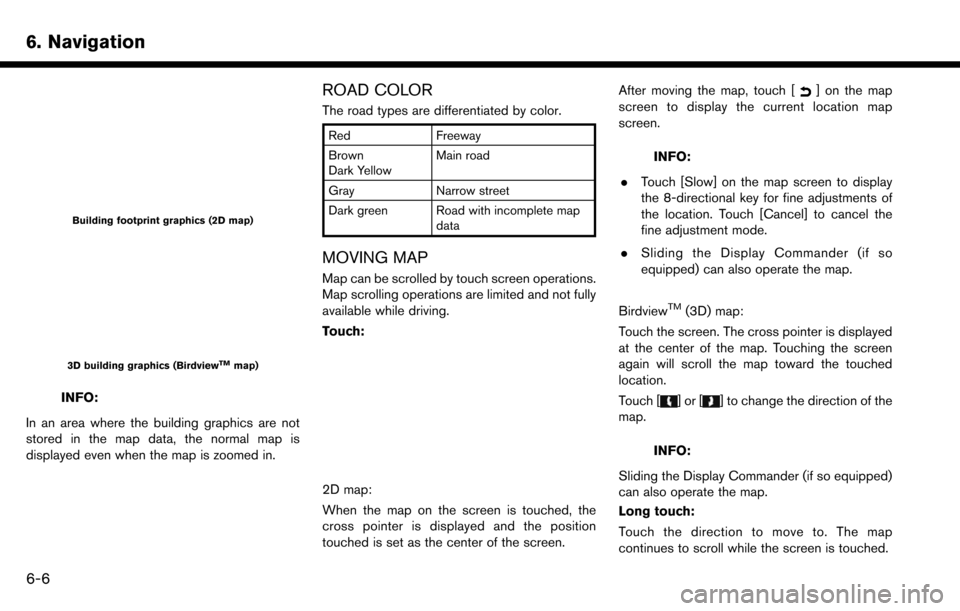
Building footprint graphics (2D map)
3D building graphics (BirdviewTMmap)
INFO:
In an area where the building graphics are not
stored in the map data, the normal map is
displayed even when the map is zoomed in.
ROAD COLOR
The road types are differentiated by color.
Red Freeway
Brown
Dark Yellow Main road
Gray Narrow street
Dark green Road with incomplete map data
MOVING MAP
Map can be scrolled by touch screen operations.
Map scrolling operations are limited and not fully
available while driving.
Touch:
2D map:
When the map on the screen is touched, the
cross pointer is displayed and the position
touched is set as the center of the screen. After moving the map, touch [
] on the map
screen to display the current location map
screen.
INFO:
. Touch [Slow] on the map screen to display
the 8-directional key for fine adjustments of
the location. Touch [Cancel] to cancel the
fine adjustment mode.
. Sliding the Display Commander (if so
equipped) can also operate the map.
Birdview
TM(3D) map:
Touch the screen. The cross pointer is displayed
at the center of the map. Touching the screen
again will scroll the map toward the touched
location.
Touch [
]or[] to change the direction of the
map.
INFO:
Sliding the Display Commander (if so equipped)
can also operate the map.
Long touch:
Touch the direction to move to. The map
continues to scroll while the screen is touched.
6-6
Page 120 of 243
6. Navigation
SETTING INFORMATION ON MAP
Some information on the map can be displayed
or hidden.
Displaying map icons
Displays map icons of certain points of interest
(such as restaurants and gas stations, etc.) on
the map around the current vehicle location.
1. Touch [Settings] on the Launch Bar.
2. Touch [Navigation].
3. Touch [Map Icons].
4. Touch the preferred icon. The indicator of theselected icon illuminates.
Available setting icons . Restaurant:
.Gas Station:
.Hotel:
.ATM:
.Rest Area:
INFO:
. [Map Icons] can also be accessed from
[
] on the Map screen.
. The map icons are not displayed on the map
screen when the map scale is set to 1/4 mile
(500 m) or wider in the 2D and Birdview
TM
map.
. If brand icons are registered in the map data,
the brand will be displayed on the map
instead of the general map icons listed.
Displaying map scrolling information
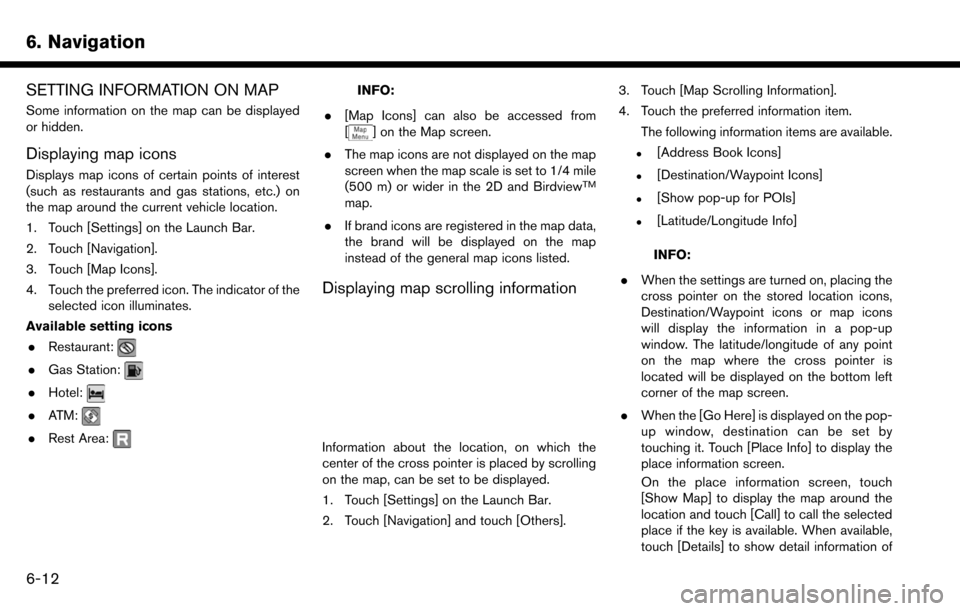
Information about the location, on which the
center of the cross pointer is placed by scrolling
on the map, can be set to be displayed.
1. Touch [Settings] on the Launch Bar.
2. Touch [Navigation] and touch [Others]. 3. Touch [Map Scrolling Information].
4. Touch the preferred information item.
The following information items are available.
.[Address Book Icons]
.[Destination/Waypoint Icons]
.[Show pop-up for POIs]
.[Latitude/Longitude Info]
INFO:
. When the settings are turned on, placing the
cross pointer on the stored location icons,
Destination/Waypoint icons or map icons
will display the information in a pop-up
window. The latitude/longitude of any point
on the map where the cross pointer is
located will be displayed on the bottom left
corner of the map screen.
. When the [Go Here] is displayed on the pop-
up window, destination can be set by
touching it. Touch [Place Info] to display the
place information screen.
On the place information screen, touch
[Show Map] to display the map around the
location and touch [Call] to call the selected
place if the key is available. When available,
touch [Details] to show detail information of
6-12
Page 123 of 243
![NISSAN MAXIMA 2017 A36 / 8.G Nissan Connect Navigation Manual INFO:
If a route is set, the route menu screen will be
displayed when [Navi] on the Launch Bar is
touched. Touch [New Destination] to set a
destination.
“Route menu” (page 6-33)
Available destinat](/img/5/539/w960_539-122.png "NISSAN MAXIMA 2017 A36 / 8.G Nissan Connect Navigation Manual INFO:
If a route is set, the route menu screen will be
displayed when [Navi] on the Launch Bar is
touched. Touch [New Destination] to set a
destination.
“Route menu” (page 6-33)
Available destinat")
INFO:
If a route is set, the route menu screen will be
displayed when [Navi] on the Launch Bar is
touched. Touch [New Destination] to set a
destination.
“Route menu” (page 6-33)
Available destination setting methods:
Setting item Action
[Street Address] Searches for a destination by address.
“Finding address” (page 6-17)
[Nearby Points of Interest] Searches for points of interest near the current vehicle location, such as restaurants and gas stations,
etc.
“Finding nearby place” (page 6-18)
[Points of Interest] Searches for a destination from various categories of businesses or locations.
“Finding points of interest” (page 6-19)
[Home] Searches for a route from the current location to the previously stored home location.
“Setting home as destination” (page 6-20)
[Address Book] Searches for a destination from Address Book.
“Searching from address book” (page 6-21)
[Previous Destinations] Searches for the destination from the previous destinations and a previous start point.
“Searching from previous destinations” (page 6-21)
[Connected Search] (if so equipped) Input a keyword of a point of interest and connect and search the NissanConnectedSMServices Data
Center.
“Searching by connecting to the internet” (page 6-22)
[Intersection] Sets an intersection as a destination.
“Setting intersection” (page 6-22)
6. Navigation
6-15
Page 127 of 243
Voice command
1. Push <
>located on the steering wheel.
2. After the tone sounds, speak a command.
Use the following voice command to set a nearby
place as a destination:
“Nearby”
FINDING POINTS OF INTEREST
This allows you to find a facility by name or by
category. Specify the region and city of the
destination to find it more quickly.
NOTE:
Locations and business hours of facilities
are subject to change, which may not be
reflected in the map data. Double-check
this information before you go to an
emergency facility to ensure that you can
receive the proper support. Otherwise, you
may not receive emergency help when you
arrive at the destination.
A confirmation message also appears on
the navigation screen. Follow the displayed
instructions and check the items required.
Searching for a specific name
1. Touch [Navi] on the Launch Bar.
2. Touch [Points of Interest].
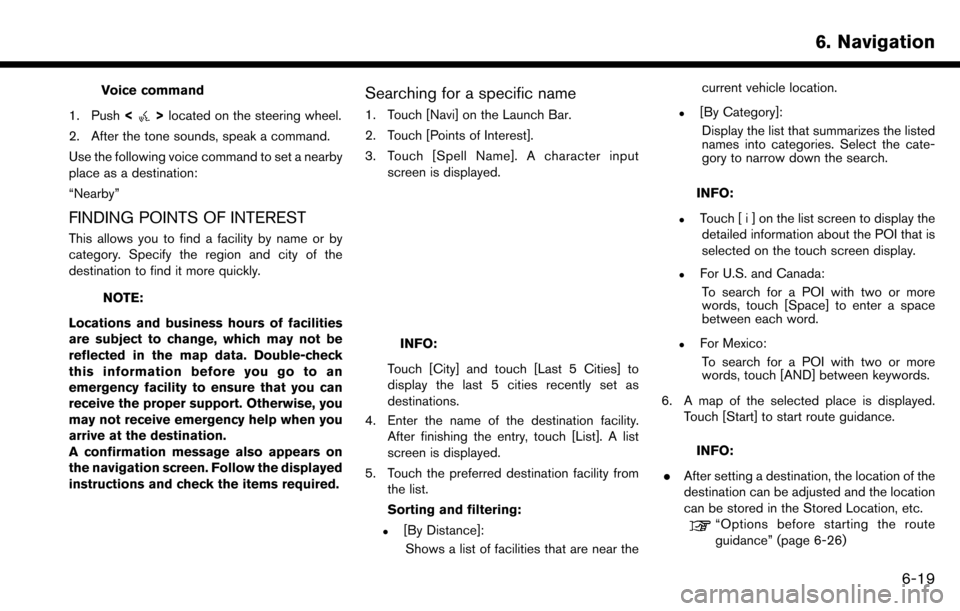
3. Touch [Spell Name]. A character input screen is displayed.
INFO:
Touch [City] and touch [Last 5 Cities] to
display the last 5 cities recently set as
destinations.
4. Enter the name of the destination facility. After finishing the entry, touch [List]. A list
screen is displayed.
5. Touch the preferred destination facility from the list.
Sorting and filtering:
.[By Distance]:
Shows a list of facilities that are near the current vehicle location.
.[By Category]:
Display the list that summarizes the listed
names into categories. Select the cate-
gory to narrow down the search.
INFO:
.Touch [ i ] on the list screen to display thedetailed information about the POI that is
selected on the touch screen display.
.For U.S. and Canada:
To search for a POI with two or more
words, touch [Space] to enter a space
between each word.
.For Mexico:To search for a POI with two or more
words, touch [AND] between keywords.
6. A map of the selected place is displayed. Touch [Start] to start route guidance.
INFO:
. After setting a destination, the location of the
destination can be adjusted and the location
can be stored in the Stored Location, etc.
“Options before starting the route
guidance” (page 6-26)
6. Navigation
6-19
Page 130 of 243
![NISSAN MAXIMA 2017 A36 / 8.G Nissan Connect Navigation Manual 6. Navigation
4. Touch [Start] to start route guidance.
Voice command
1. Push <
>located on the steering wheel.
2. After the tone sounds, speak a command.
Use the following voice commands to display t](/img/5/539/w960_539-129.png "NISSAN MAXIMA 2017 A36 / 8.G Nissan Connect Navigation Manual 6. Navigation
4. Touch [Start] to start route guidance.
Voice command
1. Push <
>located on the steering wheel.
2. After the tone sounds, speak a command.
Use the following voice commands to display t")
6. Navigation
4. Touch [Start] to start route guidance.
Voice command
1. Push <
>located on the steering wheel.
2. After the tone sounds, speak a command.
Use the following voice commands to display the
previous destinations/start point list:
“Previous Destinations”
“Previous Start Point”
SEARCHING BY CONNECTING TO
THE INTERNET (if so equipped)
It is possible to find a point of interest by
inputting a keyword and connecting to the
Internet. The searched location can be set as a
destination.
1. Touch [Navi] on the Launch Bar.
2. Touch [Connected Search].
3. Enter the keyword and touch [Search]. The system will connect to the NissanConnect
SM
Services and the search results will be
displayed.
4. Touch the preferred destination from the list.
5. The entire destination is displayed. Touch [Start] to start route guidance.
INFO:
Connected Search is a NissanConnect
SMSer-
vices feature. It is necessary to subscribe to
NissanConnect
SMServices in order to use the
feature.
SETTING INTERSECTION
It is possible to set an intersection of any two
streets as the destination and have the system
calculate a route.
1. Touch [Navi] on the Launch Bar.
2. Touch [Intersection]. Intersection screen is displayed.
3. Input the Intersection.
.Touch [State/Province] to enter the state
or province name if necessary.
.Touch [City] to enter the city name.
.Touch [1st Street] to enter the first streetname. After finishing the entry, touch [List]. A list screen is displayed.
.After first street information is entered,
touch [2nd Street] to enter the second
street name. After finishing the entry,
touch [List]. A list screen is displayed.
4. Enter the state/province, city, and street of the destination and then touch [OK]. The
route is displayed.
5. The selected destination is displayed at the center of the map. Touch [Start] to start route
guidance.
Voice command
For U.S. and Canada
1. Push <
>located on the steering wheel.
2. After the tone sounds, speak a command.
Use the following voice command to set an
intersection as destination:
“Intersection”*
*: This voice command operation is available only
when the language setting is set to English.
6-22
Page 131 of 243
SETTING BY PHONE NUMBER
If the phone number of a facility is known, it is
possible to search for a facility by entering the
phone number.
INFO:
. If the area code of the specified telephone
number does not exist in the map data, the
system cannot search for the location.
. Only the locations included in the database
in the map data can be searched for by
phone number. Residential phone numbers
cannot be used to search for a location.
1. Touch [Navi] on the Launch Bar.
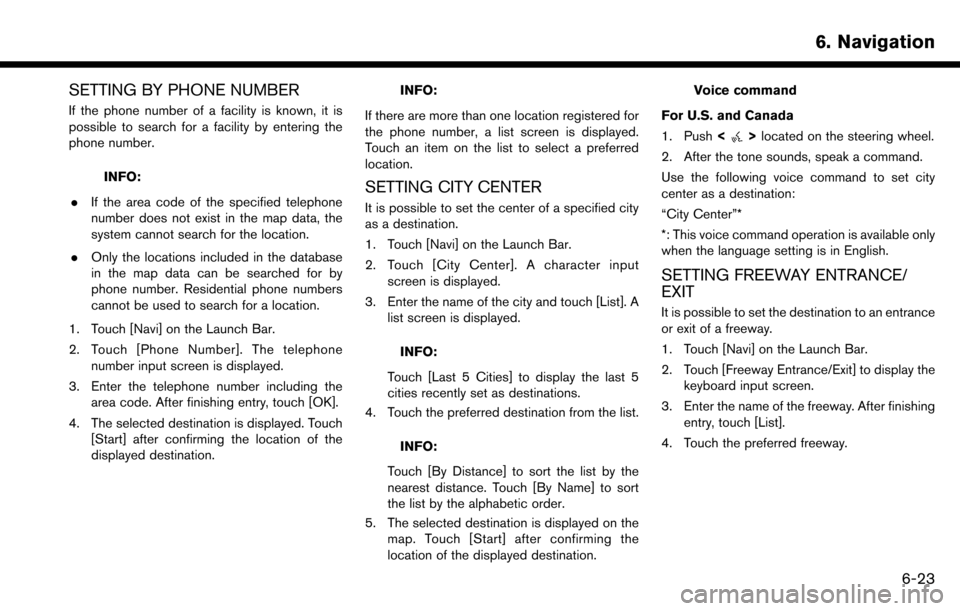
2. Touch [Phone Number]. The telephone number input screen is displayed.
3. Enter the telephone number including the area code. After finishing entry, touch [OK].
4. The selected destination is displayed. Touch [Start] after confirming the location of the
displayed destination.
INFO:
If there are more than one location registered for
the phone number, a list screen is displayed.
Touch an item on the list to select a preferred
location.
SETTING CITY CENTER
It is possible to set the center of a specified city
as a destination.
1. Touch [Navi] on the Launch Bar.
2. Touch [City Center]. A character input screen is displayed.
3. Enter the name of the city and touch [List]. A list screen is displayed.
INFO:
Touch [Last 5 Cities] to display the last 5
cities recently set as destinations.
4. Touch the preferred destination from the list.
INFO:
Touch [By Distance] to sort the list by the
nearest distance. Touch [By Name] to sort
the list by the alphabetic order.
5. The selected destination is displayed on the map. Touch [Start] after confirming the
location of the displayed destination.
Voice command
For U.S. and Canada
1. Push <
>located on the steering wheel.
2. After the tone sounds, speak a command.
Use the following voice command to set city
center as a destination:
“City Center”*
*: This voice command operation is available only
when the language setting is in English.
SETTING FREEWAY ENTRANCE/
EXIT
It is possible to set the destination to an entrance
or exit of a freeway.
1. Touch [Navi] on the Launch Bar.
2. Touch [Freeway Entrance/Exit] to display the keyboard input screen.
3. Enter the name of the freeway. After finishing entry, touch [List].
4. Touch the preferred freeway.
6. Navigation
6-23