glove box NISSAN MAXIMA 2023 Owners Manual
[x] Cancel search | Manufacturer: NISSAN, Model Year: 2023, Model line: MAXIMA, Model: NISSAN MAXIMA 2023Pages: 494, PDF Size: 5.7 MB
Page 15 of 494
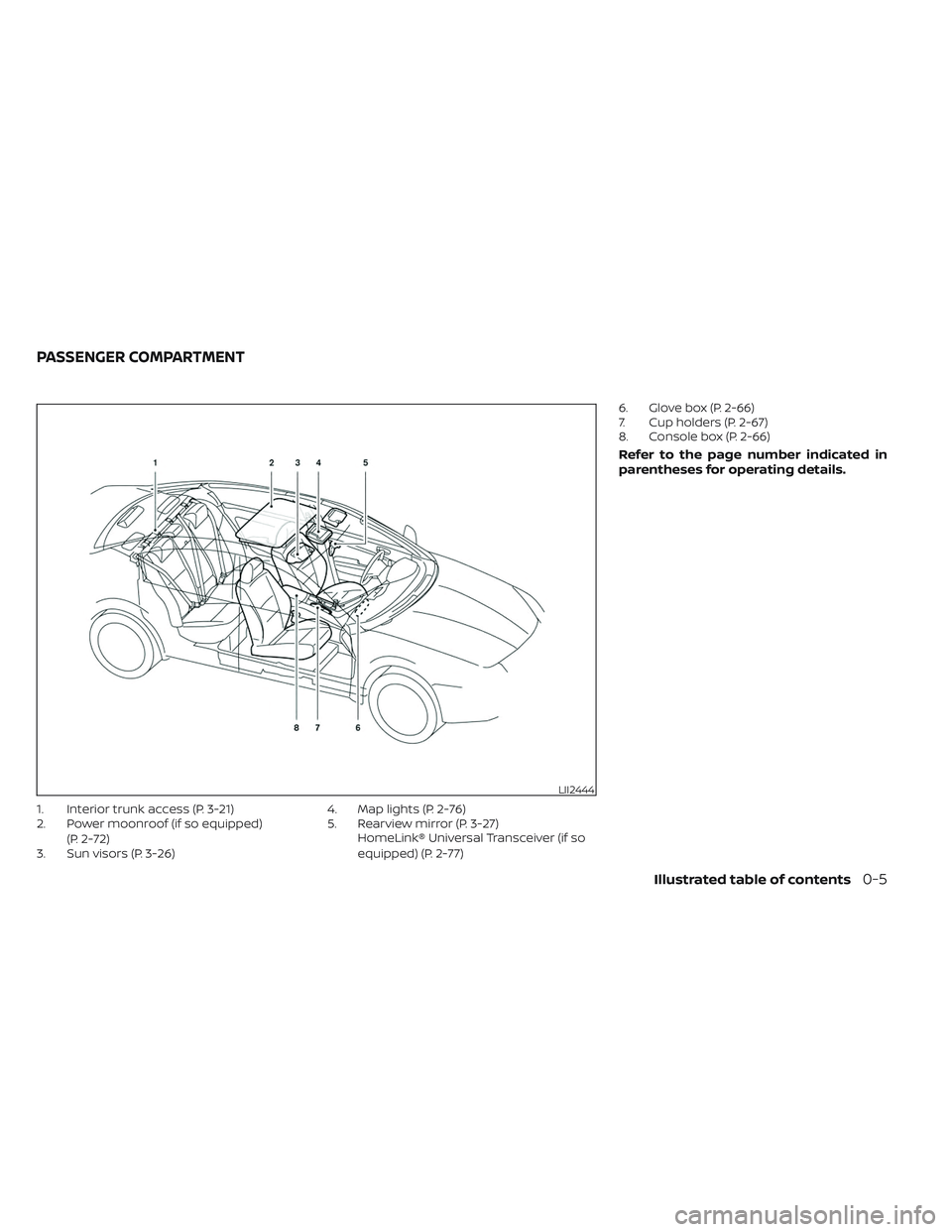
1. Interior trunk access (P. 3-21)
2. Power moonroof (if so equipped)(P. 2-72)
3. Sun visors (P. 3-26) 4. Map lights (P. 2-76)
5. Rearview mirror (P. 3-27)
HomeLink® Universal Transceiver (if so
equipped) (P. 2-77) 6. Glove box (P. 2-66)
7. Cup holders (P. 2-67)
8. Console box (P. 2-66)
Refer to the page number indicated in
parentheses for operating details.
LII2444
PASSENGER COMPARTMENT
Illustrated table of contents0-5
Page 16 of 494
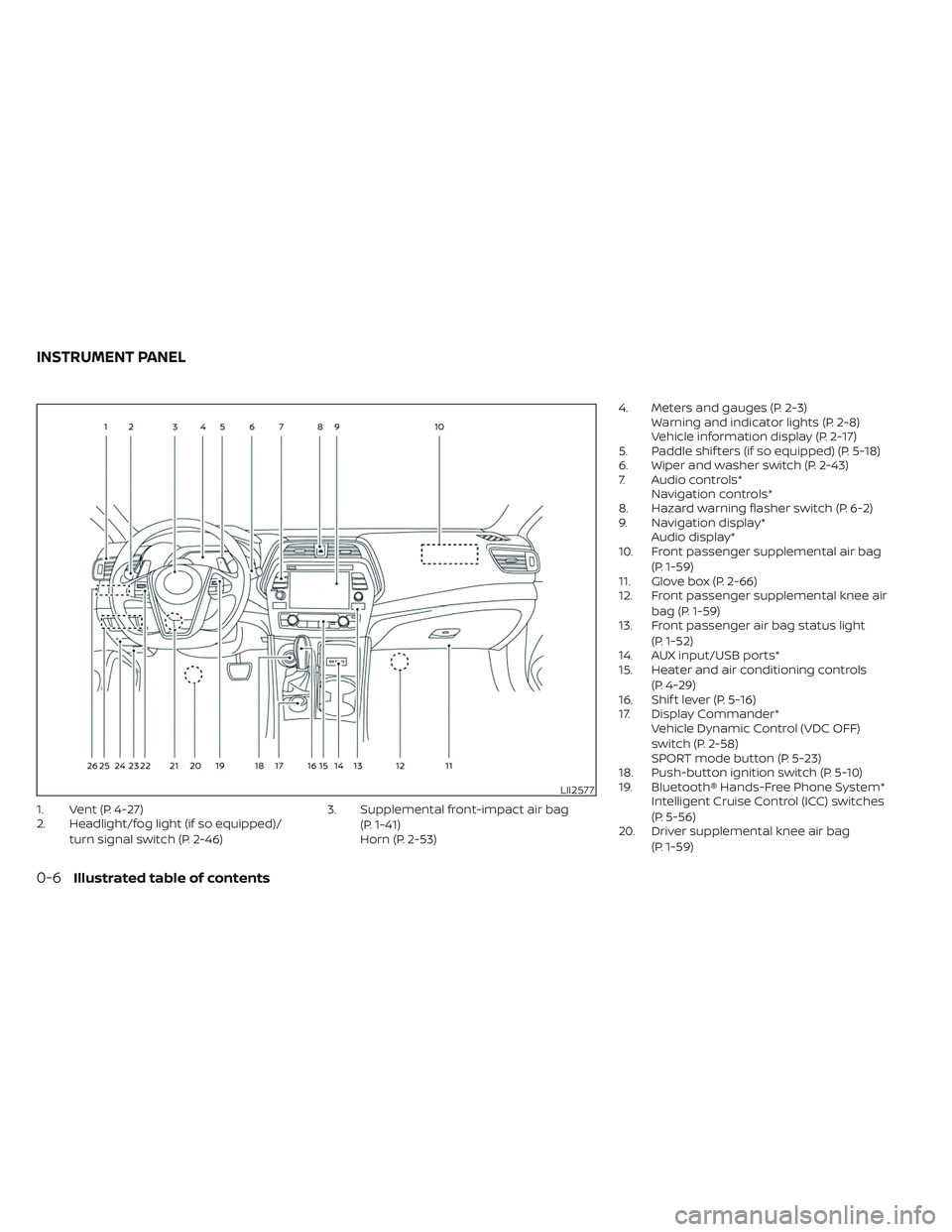
1. Vent (P. 4-27)
2. Headlight/fog light (if so equipped)/turn signal switch (P. 2-46) 3. Supplemental front-impact air bag
(P. 1-41)
Horn (P. 2-53) 4. Meters and gauges (P. 2-3)
Warning and indicator lights (P. 2-8)
Vehicle information display (P. 2-17)
5. Paddle shif ters (if so equipped) (P. 5-18)
6. Wiper and washer switch (P. 2-43)
7. Audio controls* Navigation controls*
8. Hazard warning flasher switch (P. 6-2)
9. Navigation display* Audio display*
10. Front passenger supplemental air bag
(P. 1-59)
11. Glove box (P. 2-66)
12. Front passenger supplemental knee air
bag (P. 1-59)
13. Front passenger air bag status light
(P. 1-52)
14. AUX input/USB ports*
15. Heater and air conditioning controls
(P. 4-29)
16. Shif t lever (P. 5-16)
17. Display Commander* Vehicle Dynamic Control (VDC OFF)
switch (P. 2-58)
SPORT mode button (P. 5-23)
18. Push-button ignition switch (P. 5-10)
19. Bluetooth® Hands-Free Phone System* Intelligent Cruise Control (ICC) switches
(P. 5-56)
20. Driver supplemental knee air bag
(P. 1-59)
LII2577
INSTRUMENT PANEL
0-6Illustrated table of contents
Page 70 of 494
WARNING
To ensure proper operation of the pas-
senger’s NISSAN Advanced Air Bag Sys-
tem, please observe the following
items.
• Do not allow a passenger in the rear
bench seats to push or pull on the
seatback pocket.
•
Do not place heavy loads heavier than
9.1 lbs. (4 kg) on the seatback, head
restraint or in the seatback pocket.
•Make sure that there is nothing press-
ing against the rear of the seatback,
such as a child restraint installed in the
rear seat or an object stored on the
floor.
•Make sure that there is no object
placed under the front passenger seat.
• Make sure that there is no object
placed between the seat cushion and
center console or between the seat
cushion and the door. •
If a forward-facing child restraint is
installed in the front passenger seat,
do not position the front passenger
seat so the child restraint contacts
the instrument panel. If the child re-
straint does contact the instrument
panel, the system may determine the
seat is occupied and the passenger
air bag and front passenger supple-
mental knee air bag may deploy in a
collision. Also the front passenger air
bag status light may not illuminate.
For additional information, see “Child
restraints” (P. 1-21).
• Confirm the operating condition with
the front passenger air bag status
light.
• If you notice that the front passenger
air bag status light is not operating
as described in this section, get the
occupant classification system
checked. It is recommended that you
visit a NISSAN dealer for this service.
• Until you have confirmed with a
dealer that your passenger seat oc-
cupant classification system is work-
ing properly, position the occupants
in the rear seating positions. •
Do not position the front passenger
seat so it contacts the rear seat. If the
front seat does contact the rear seat,
the air bag system may determine a
sensor malfunction has occurred
and the front passenger air bag sta-
tus light may illuminate and the
supplemental air bag warning light
may flash.
This vehicle is equipped with the NISSAN
Advanced Air Bag System for the driver and
front passenger seats. This system is de-
signed to meet certification requirements
under U.S. regulations. It is also permitted in
Canada. However, all of the information,
cautions and warnings in this manual
still apply and must be followed.
The driver supplemental front-impact air
bag is located in the center of the steering
wheel. The front passenger supplemental
front-impact air bag is mounted in the
dashboard above the glove box. The front
air bags are designed to inflate in higher
severity frontal collisions, although they
may inflate if the forces in another type of
collision are similar to those of a higher
severity frontal impact. They may not in-
flate in certain frontal collisions. Vehicle
1-50Safety-Seats, seat belts and supplemental restraint system
Page 87 of 494
Dynamic driver assistance switch (if so
equipped)...................................... 2-58
Vehicle Dynamic Control (VDC) OFF switch .....2-58
Emergency Call (SOS) button ...................2-59
Emergency support ......................... 2-59
USB/iPod® charging ports (if so equipped) ......2-61
Rear Door Alert ................................. 2-61
Power outlet ................................... 2-62
Extended storage switch .......................2-63
Storage ........................................ 2-64
Front-door pockets ......................... 2-64
Seatback pockets ........................... 2-64
Storagetrays................................ 2-65
Glovebox ................................... 2-66
Console box ................................. 2-66
Overhead sunglasses storage ...............2-66
Cup holders ................................. 2-67
Windows ....................................... 2-69
Power windows ............................. 2-69Dual Panel Moonroof (if so equipped)
...........2-72
Power moonroof ............................ 2-72
Rear power sunshade (if so equipped) ..........2-74
Interior lights ................................... 2-75
Console light ................................ 2-76
Map lights ................................... 2-76
Personal lights .............................. 2-76
Trunk light ................................... 2-76
HomeLink® Universal Transceiver (if so
equipped) ...................................... 2-77
Programming HomeLink® ...................2-77
Programming HomeLink® for Canadian
customers and gate openers ...............2-79
Operating the HomeLink® Universal
Transceiver .................................. 2-80
Programming trouble-shooting .............2-80
Clearing the programmed information ......2-80
Reprogramming a single HomeLink®
button ...................................... 2-81
If your vehicle is stolen ......................2-81
Page 88 of 494
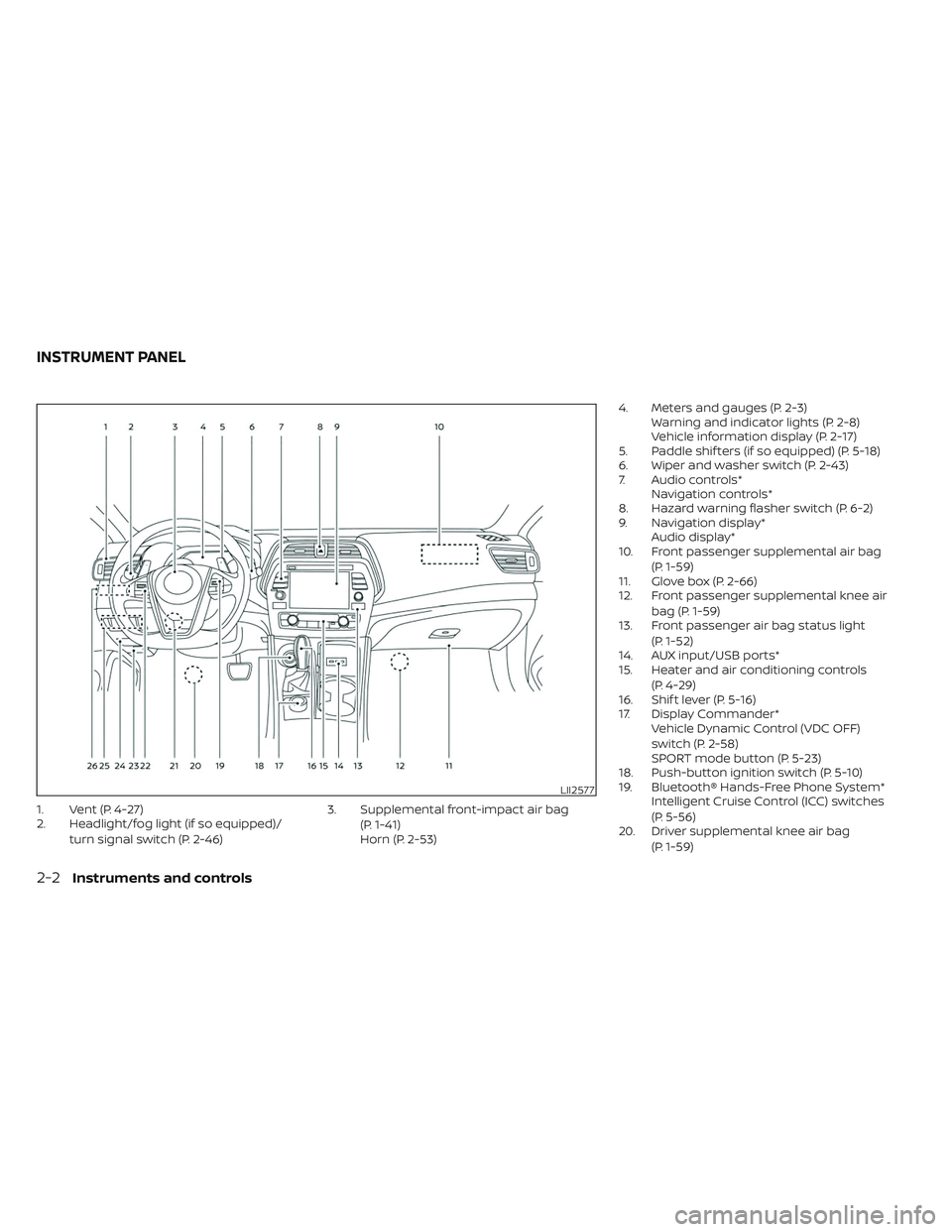
1. Vent (P. 4-27)
2. Headlight/fog light (if so equipped)/turn signal switch (P. 2-46) 3. Supplemental front-impact air bag
(P. 1-41)
Horn (P. 2-53) 4. Meters and gauges (P. 2-3)
Warning and indicator lights (P. 2-8)
Vehicle information display (P. 2-17)
5. Paddle shif ters (if so equipped) (P. 5-18)
6. Wiper and washer switch (P. 2-43)
7. Audio controls* Navigation controls*
8. Hazard warning flasher switch (P. 6-2)
9. Navigation display* Audio display*
10. Front passenger supplemental air bag
(P. 1-59)
11. Glove box (P. 2-66)
12. Front passenger supplemental knee air
bag (P. 1-59)
13. Front passenger air bag status light
(P. 1-52)
14. AUX input/USB ports*
15. Heater and air conditioning controls
(P. 4-29)
16. Shif t lever (P. 5-16)
17. Display Commander* Vehicle Dynamic Control (VDC OFF)
switch (P. 2-58)
SPORT mode button (P. 5-23)
18. Push-button ignition switch (P. 5-10)
19. Bluetooth® Hands-Free Phone System* Intelligent Cruise Control (ICC) switches
(P. 5-56)
20. Driver supplemental knee air bag
(P. 1-59)
LII2577
INSTRUMENT PANEL
2-2Instruments and controls
Page 152 of 494

GLOVE BOX
Open the glove box by pulling the handle.
Use the master key when locking or un-
locking the glove box.
WARNING
Keep glove box lid closed while driving
to help prevent injury in an accident or
a sudden stop.
CONSOLE BOX
To open the console box, press up on the
lever
O1and raise the lidO2.
To close, push the lid down until the lock
latches.
OVERHEAD SUNGLASSES
STORAGE
To open the sunglasses holder, push and
release.
Only store one pair of sunglasses in the
holder.
WARNING
Keep the sunglasses holder closed
while driving to avoid obstructing the
driver’s view and to help prevent an
accident.
LIC2429WIC1504LIC2312
2-66Instruments and controls
Page 171 of 494
Mechanical key
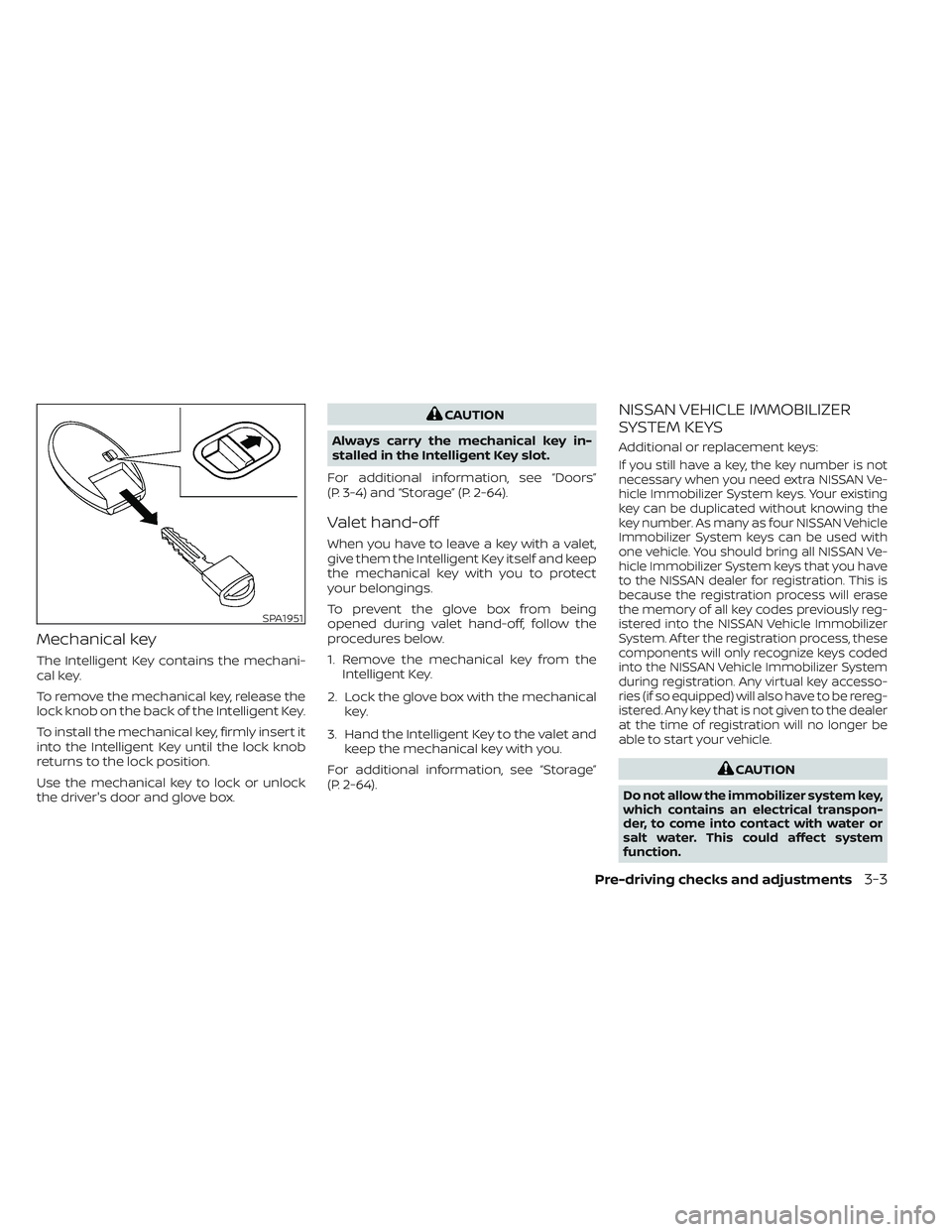
The Intelligent Key contains the mechani-
cal key.
To remove the mechanical key, release the
lock knob on the back of the Intelligent Key.
To install the mechanical key, firmly insert it
into the Intelligent Key until the lock knob
returns to the lock position.
Use the mechanical key to lock or unlock
the driver's door and glove box.
CAUTION
Always carry the mechanical key in-
stalled in the Intelligent Key slot.
For additional information, see “Doors”
(P. 3-4) and “Storage” (P. 2-64).
Valet hand-off
When you have to leave a key with a valet,
give them the Intelligent Key itself and keep
the mechanical key with you to protect
your belongings.
To prevent the glove box from being
opened during valet hand-off, follow the
procedures below.
1. Remove the mechanical key from the Intelligent Key.
2. Lock the glove box with the mechanical key.
3. Hand the Intelligent Key to the valet and keep the mechanical key with you.
For additional information, see “Storage”
(P. 2-64).
NISSAN VEHICLE IMMOBILIZER
SYSTEM KEYS
Additional or replacement keys:
If you still have a key, the key number is not
necessary when you need extra NISSAN Ve-
hicle Immobilizer System keys. Your existing
key can be duplicated without knowing the
key number. As many as four NISSAN Vehicle
Immobilizer System keys can be used with
one vehicle. You should bring all NISSAN Ve-
hicle Immobilizer System keys that you have
to the NISSAN dealer for registration. This is
because the registration process will erase
the memory of all key codes previously reg-
istered into the NISSAN Vehicle Immobilizer
System. Af ter the registration process, these
components will only recognize keys coded
into the NISSAN Vehicle Immobilizer System
during registration. Any virtual key accesso-
ries (if so equipped) will also have to be rereg-
istered. Any key that is not given to the dealer
at the time of registration will no longer be
able to start your vehicle.
CAUTION
Do not allow the immobilizer system key,
which contains an electrical transpon-
der, to come into contact with water or
salt water. This could affect system
function.
SPA1951
Pre-driving checks and adjustments3-3
Page 178 of 494
Lockout protection
To prevent the Intelligent Key from being
accidentally locked in the vehicle, lockout
protection is equipped with the Intelligent
Key system.
When any door is open, the doors are
locked, and then the Intelligent Key is put
inside the vehicle and all the doors are
closed, a warning chime will sound and the
doors will automatically unlock.
NOTE:
The doors may not lock when the Intelli-
gent Key is in the same hand that is op-
erating the request switch to lock the
door. Put the Intelligent Key in a purse,
pocket or your other hand.
CAUTION
The lockout protection may not func-
tion under the following conditions:
• When the Intelligent Key is placed on
top of the instrument panel.
• When the Intelligent Key is placed in-
side the glove box or a storage bin.
• When the Intelligent Key is placed in-
side the door pockets.
• When the Intelligent Key is placed in-
side or near metallic materials.
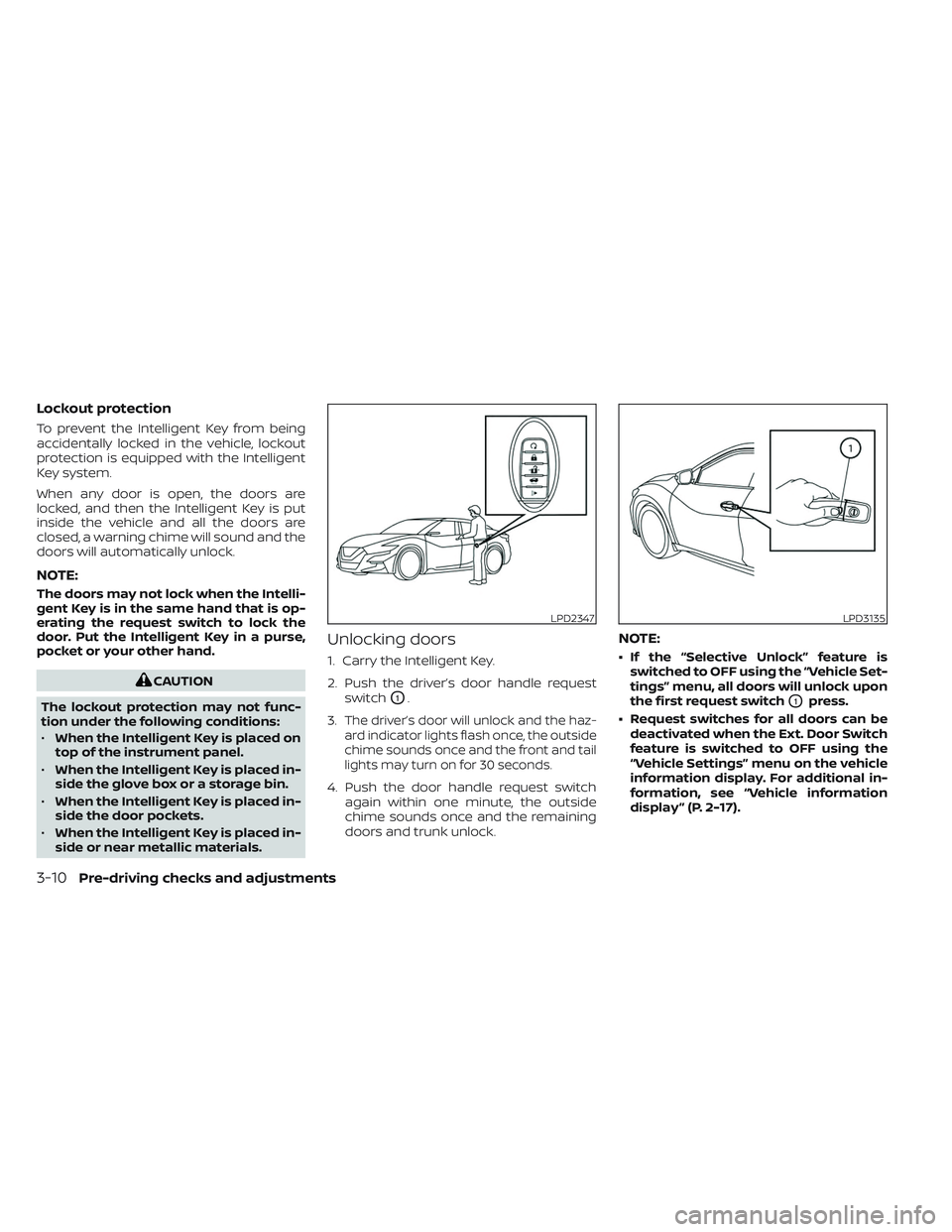
Unlocking doors
1. Carry the Intelligent Key.
2. Push the driver’s door handle request
switch
O1.
3.
The driver’s door will unlock and the haz-
ard indicator lights flash once, the outside
chime sounds once and the front and tail
lights may turn on for 30 seconds.
4. Push the door handle request switch again within one minute, the outside
chime sounds once and the remaining
doors and trunk unlock.
NOTE:
• If the “Selective Unlock” feature isswitched to OFF using the “Vehicle Set-
tings” menu, all doors will unlock upon
the first request switch
O1press.
• Request switches for all doors can be deactivated when the Ext. Door Switch
feature is switched to OFF using the
“Vehicle Settings” menu on the vehicle
information display. For additional in-
formation, see “Vehicle information
display ” (P. 2-17).
LPD2347LPD3135
3-10Pre-driving checks and adjustments
Page 246 of 494
If the Intelligent Key is within the operating
range, it is possible for anyone, even some-
one who does not carry the Intelligent Key,
to push the ignition switch to start the
engine.
The operating range of the engine start
function is inside of the vehicle
O1.
• The luggage area is not included in the operating range, but the Intelligent Key
may function.
• If the Intelligent Key is placed on the in- strument panel, inside the glove box,
storage bin or door pocket, the Intelligent
Key may not function.
• If the Intelligent Key is placed near the door or window outside the vehicle, the
Intelligent Key may function.
PUSH-BUTTON IGNITION SWITCH
POSITIONS
LOCK (Normal parking position)
The ignition switch can only be locked in
this position.
The ignition switch will be unlocked when it
is pushed to the ACC position while carry-
ing the Intelligent Key. The ignition switch will lock when any door
is opened or closed with the ignition
switched off.
ACC (Accessories)
This position activates electrical accesso-
ries, such as the radio, when the engine is
not running.
ACC has a battery saver feature that will
place the ignition switch in the OFF position
af ter a period of time under the following
conditions:
• All doors are closed.
• The shif t lever is in P (Park).
• The hazard lamps are off.
• The turn signals are off.
The battery saver feature will be canceled if
any of the following occur:
• Any door is opened.
• The shif t lever is moved out of P (Park).
• The ignition switch changes position.
• The hazard lamps are turned on.
ON (Normal operating position)
This position turns on the ignition system
and electrical accessories.
ON has a battery saver feature that will
place the ignition switch in the OFF posi-
tion, if the vehicle is not running, af ter some
time under the following conditions:
• All doors are closed.
• The shif t lever is in P (Park).
• The hazard lamps are off.
• The turn signals are off.
The battery saver feature will be canceled if
any of the following occur:
• Any door is opened.
• The shif t lever is moved out of the P (Park)
position.
• The ignition switch changes position.
• The hazard lamps are turned on.
• The turn signals are turned on.
CAUTION
Do not leave the vehicle with the igni-
tion switch in the ACC or ON position
when the engine is not running for an
extended period. This can discharge
the battery.
5-12Starting and driving
Page 401 of 494
WARNING
Be sure the engine and ignition switch
are off and that the parking brake is
engaged securely.
CAUTION
Be sure to use the correct socket to re-
move the spark plugs. An incorrect
socket can damage the spark plugs.
If replacement is required, it is recom-
mended that you visit a NISSAN dealer for
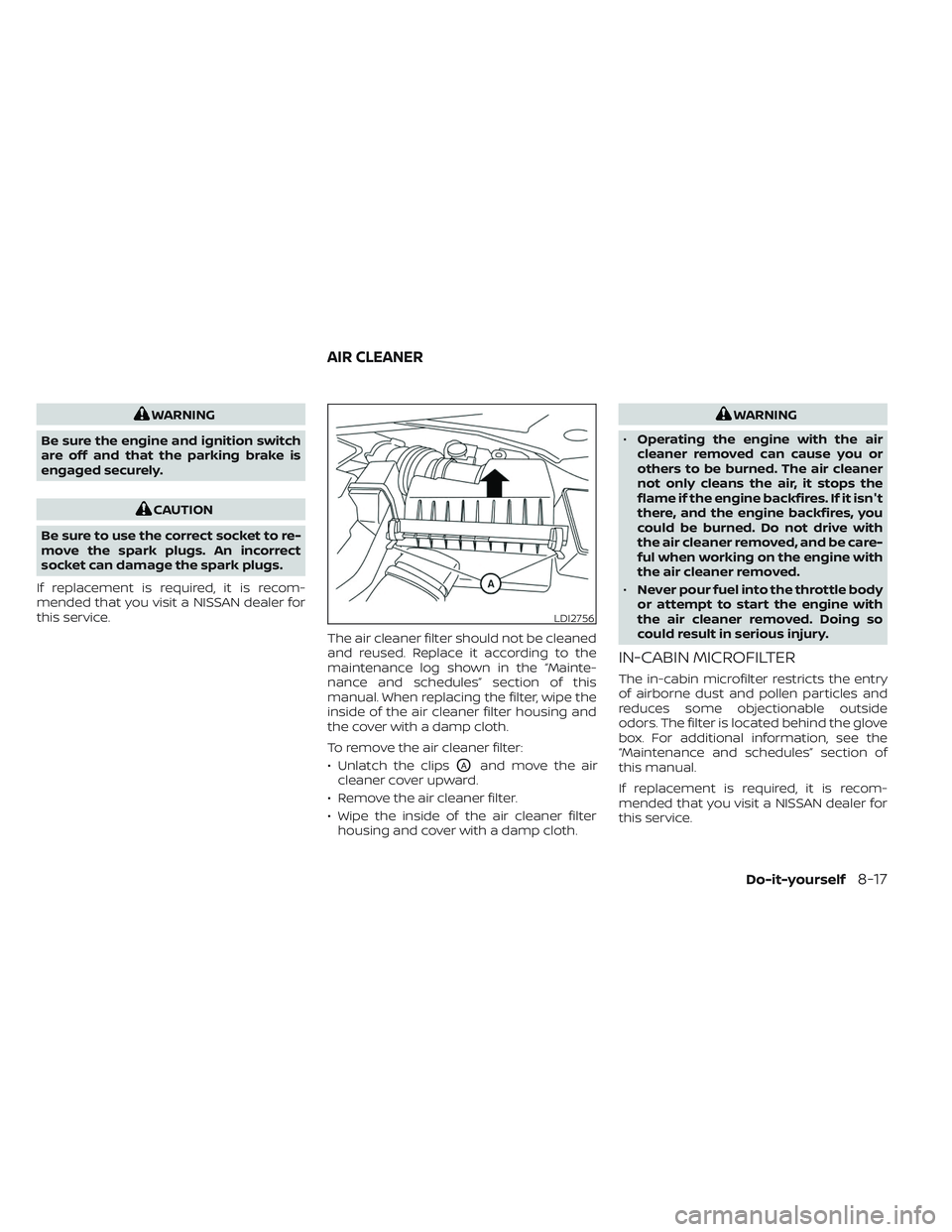
this service. The air cleaner filter should not be cleaned
and reused. Replace it according to the
maintenance log shown in the “Mainte-
nance and schedules” section of this
manual. When replacing the filter, wipe the
inside of the air cleaner filter housing and
the cover with a damp cloth.
To remove the air cleaner filter:
• Unlatch the clips
OAand move the air
cleaner cover upward.
• Remove the air cleaner filter.
• Wipe the inside of the air cleaner filter housing and cover with a damp cloth.
WARNING
• Operating the engine with the air
cleaner removed can cause you or
others to be burned. The air cleaner
not only cleans the air, it stops the
flame if the engine backfires. If it isn't
there, and the engine backfires, you
could be burned. Do not drive with
the air cleaner removed, and be care-
ful when working on the engine with
the air cleaner removed.
• Never pour fuel into the throttle body
or attempt to start the engine with
the air cleaner removed. Doing so
could result in serious injury.
IN-CABIN MICROFILTER
The in-cabin microfilter restricts the entry
of airborne dust and pollen particles and
reduces some objectionable outside
odors. The filter is located behind the glove
box. For additional information, see the
“Maintenance and schedules” section of
this manual.
If replacement is required, it is recom-
mended that you visit a NISSAN dealer for
this service.
LDI2756
AIR CLEANER
Do-it-yourself8-17