Vent NISSAN MICRA 2015 Owner´s Manual
[x] Cancel search | Manufacturer: NISSAN, Model Year: 2015, Model line: MICRA, Model: NISSAN MICRA 2015Pages: 293, PDF Size: 3.21 MB
Page 126 of 293
Air conditioner button (if soequipped)
Start the engine, turn the fan control dial to the
desired position and press the
button to
turn on the air conditioner. The indicator light
comes on when the air conditioner is operating.
To turn off the air conditioner, press the
button again.
Rear window and outside mirror (if so
equipped) defroster button
For additional information, refer to “Rear window
and outside mirror (if so equipped) defroster
switch” in the “Instruments and controls” section
of this manual.
HEATER OPERATION
Heating
This mode is used to direct heated air to the foot
outlets. Some air also flows from the defrost
outlets.
1. Move the air intake lever to the
posi-
tion for normal heating.
2. Turn the air flow control dial to the
position.
3. Turn the fan control dial to the desired posi- tion. 4. Turn the temperature control dial to the de-
sired position between the middle and the
hot position.
Ventilation
This mode directs outside air to the side and
center vents.
1. Move the air intake lever to the
posi-
tion.
2. Turn the air flow control dial to the
position.
3. Turn the fan control dial to the desired posi- tion.
4. Turn the temperature control dial to the de- sired position.
Defrosting or defogging
This mode directs the air to the defrost outlets to
defrost/defog the windows.
1. Move the air intake lever to the
posi-
tion.
2. Turn the air flow control dial to the
position.
3. Turn the fan control dial to the desired posi- tion. 4. Turn the temperature control dial to the de-
sired position between the middle and the
hot position.
5. Align left and right vents to direct air flow toward the front side windows.
● To quickly remove ice or fog from the win-
dows, turn the fan control dial to the maxi-
mum position and the temperature control
dial to the full hot position.
When the
orposition is selected,
press the
button to turn on the air condi-
tioner for better performance. This will dehumidify
the air and help defog the windows.
Bi-level heating
This mode directs cooler air from the side and
center vents and warmer air from the floor outlets.
When the temperature control dial is moved to
the full hot or full cool position, the air between
the vents and the floor outlets is the same tem-
perature.
1. Move the air intake lever to the
posi-
tion.
2. Turn the air flow control dial to the
position.
Display screen, heater, air conditioner, audio and phone systems4-9
Page 128 of 293
3. Turn the fan control dial to the desired posi-tion.
4. Turn the temperature control dial to the de- sired position.
Operating tips
●Keep the windows and moonroof closed
while the air conditioner is in operation.
● After parking in the sun, drive for 2 or 3 min-
utes with the windows open to vent hot air
from the passenger compartment. Then
close the windows. This allows the air con-
ditioner to cool the interior more quickly.
● The air conditioning system should be
operated for approximately 10 minutes
at least once a month. This helps pre-
vent damage to the system due to lack
of lubrication.
● A visible mist may be seen coming from the
ventilators in hot, humid conditions as the air
is cooled rapidly. This does not indicate a
malfunction. ●
If the engine coolant temperature
gauge indicates engine coolant tem-
perature over the normal range, turn
the air conditioner off. Refer to “If your
vehicle overheats” in the “In case of
emergency” section of this manual.AIR FLOW CHARTS
The following charts show the button and dial
positions for MAXIMUM AND QUICK heating,
cooling or defrosting. The air intake lever
should always be in the
position for
heating and defrosting.
Display screen, heater, air conditioner, audio and phone systems4-11
Page 132 of 293
WARNING
●The air conditioner cooling function op-
erates only when the engine is running.
● Do not leave children or adults who
would normally require the assistance
of others alone in your vehicle. Pets
should also not be left alone. They
could accidentally injure themselves or
others through inadvertent operation of
the vehicle. Also, on hot, sunny days,
temperatures in a closed vehicle could
quickly become high enough to cause
severe or possibly fatal injuries to
people or animals.
● Do not use the recirculation mode for
long periods as it may cause the interior
air to become stale and the windows to
fog up. NOTE:
● Odors from inside and outside the vehicle
can build up in the air conditioner unit. Odor
can enter the passenger compartment
through the vents.
● When parking, set the heater and air condi-
tioner controls to turn off air recirculation to
allow fresh air into the passenger compart-
ment. This should help reduce odors inside
the vehicle.
HEATER AND AIR CONDITIONER
(manual) (Type B) (if so equipped)
Display screen, heater, air conditioner, audio and phone systems4-15
Page 133 of 293
CONTROLS
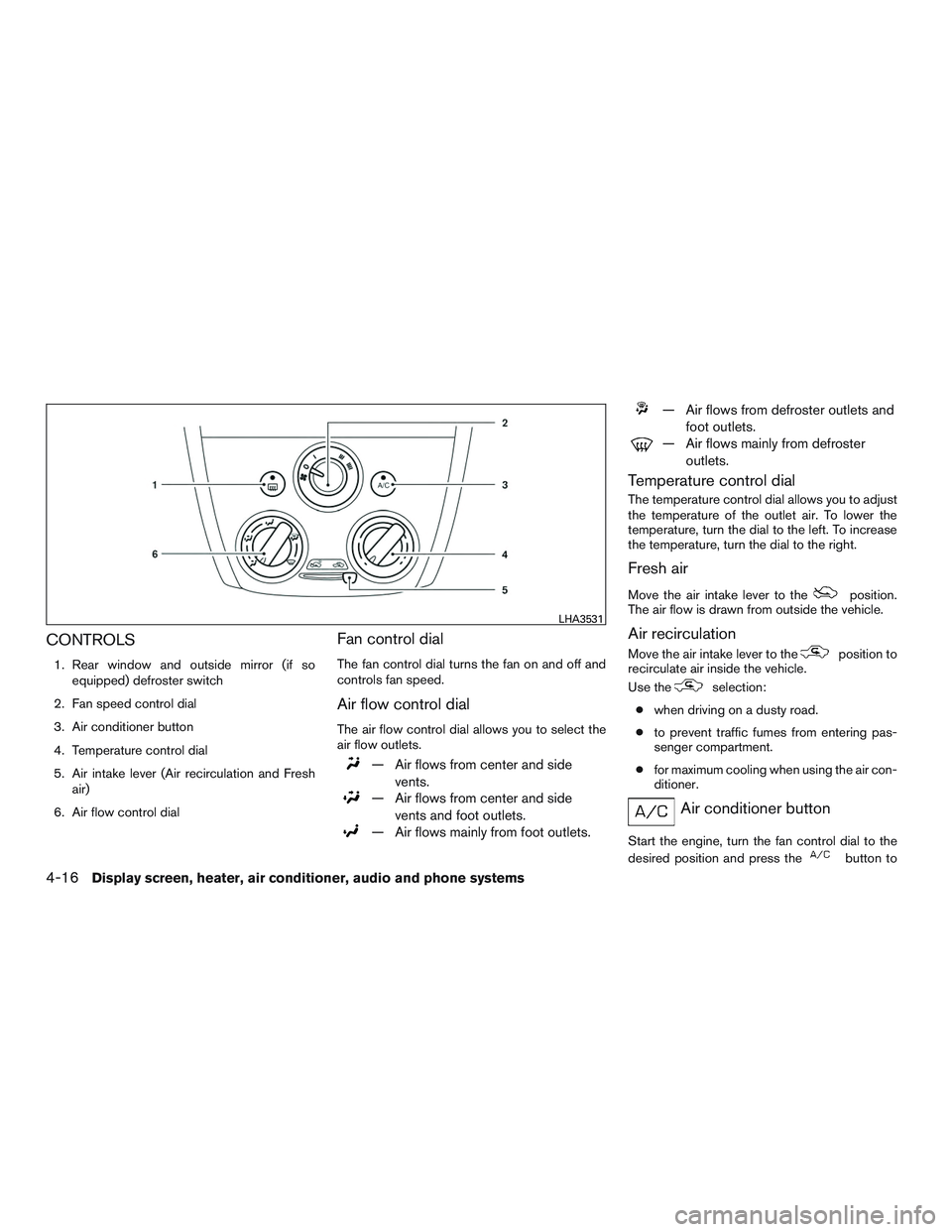
1. Rear window and outside mirror (if soequipped) defroster switch
2. Fan speed control dial
3. Air conditioner button
4. Temperature control dial
5. Air intake lever (Air recirculation and Fresh air)
6. Air flow control dial
Fan control dial
The fan control dial turns the fan on and off and
controls fan speed.
Air flow control dial
The air flow control dial allows you to select the
air flow outlets.
— Air flows from center and side vents.
— Air flows from center and sidevents and foot outlets.
— Air flows mainly from foot outlets.
— Air flows from defroster outlets and foot outlets.
— Air flows mainly from defrosteroutlets.
Temperature control dial
The temperature control dial allows you to adjust
the temperature of the outlet air. To lower the
temperature, turn the dial to the left. To increase
the temperature, turn the dial to the right.
Fresh air
Move the air intake lever to theposition.
The air flow is drawn from outside the vehicle.
Air recirculation
Move the air intake lever to theposition to
recirculate air inside the vehicle.
Use the
selection:
● when driving on a dusty road.
● to prevent traffic fumes from entering pas-
senger compartment.
● for maximum cooling when using the air con-
ditioner.
Air conditioner button
Start the engine, turn the fan control dial to the
desired position and press the
button to
LHA3531
4-16Display screen, heater, air conditioner, audio and phone systems
Page 134 of 293
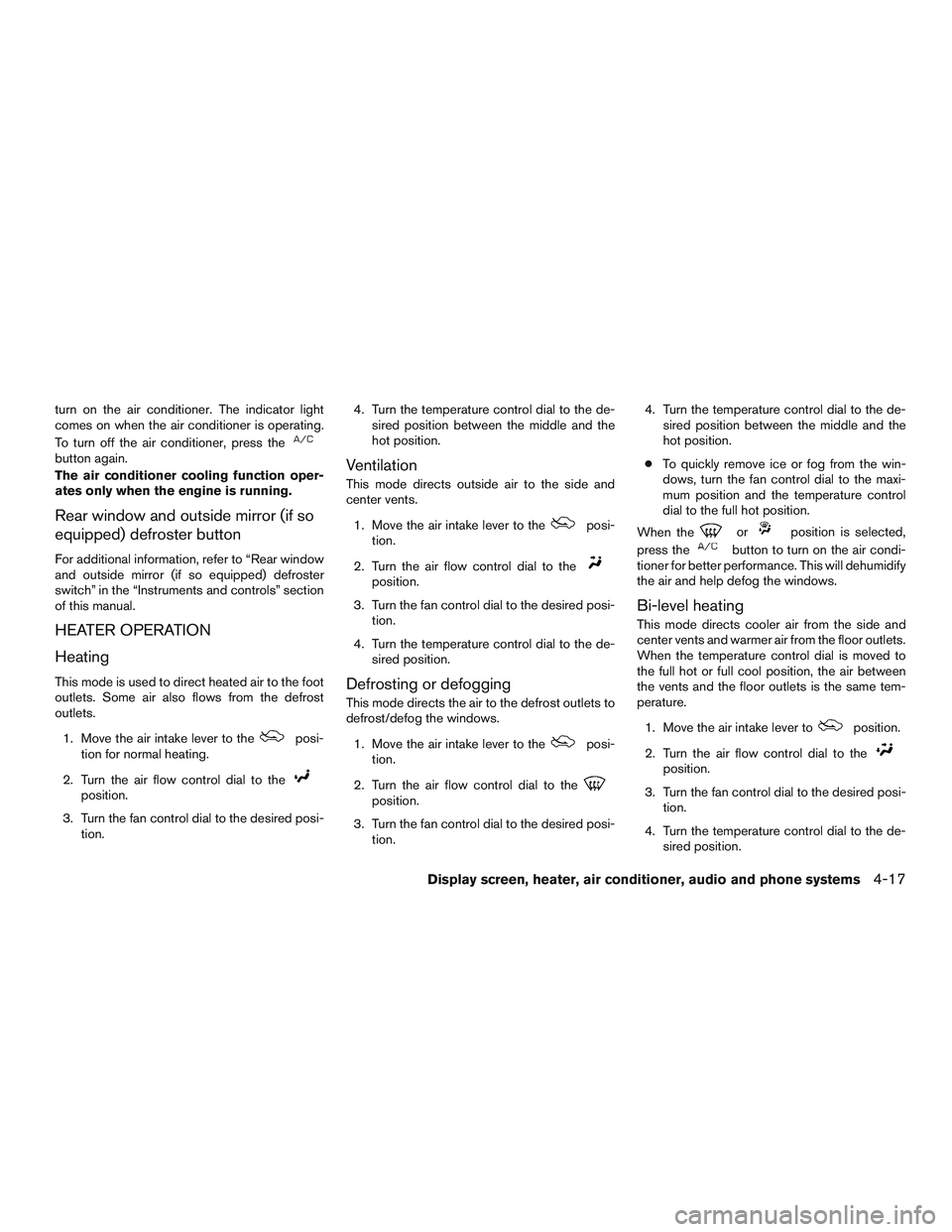
turn on the air conditioner. The indicator light
comes on when the air conditioner is operating.
To turn off the air conditioner, press the
button again.
The air conditioner cooling function oper-
ates only when the engine is running.
Rear window and outside mirror (if so
equipped) defroster button
For additional information, refer to “Rear window
and outside mirror (if so equipped) defroster
switch” in the “Instruments and controls” section
of this manual.
HEATER OPERATION
Heating
This mode is used to direct heated air to the foot
outlets. Some air also flows from the defrost
outlets.1. Move the air intake lever to the
posi-
tion for normal heating.
2. Turn the air flow control dial to the
position.
3. Turn the fan control dial to the desired posi- tion. 4. Turn the temperature control dial to the de-
sired position between the middle and the
hot position.
Ventilation
This mode directs outside air to the side and
center vents.
1. Move the air intake lever to the
posi-
tion.
2. Turn the air flow control dial to the
position.
3. Turn the fan control dial to the desired posi- tion.
4. Turn the temperature control dial to the de- sired position.
Defrosting or defogging
This mode directs the air to the defrost outlets to
defrost/defog the windows.
1. Move the air intake lever to the
posi-
tion.
2. Turn the air flow control dial to the
position.
3. Turn the fan control dial to the desired posi- tion. 4. Turn the temperature control dial to the de-
sired position between the middle and the
hot position.
● To quickly remove ice or fog from the win-
dows, turn the fan control dial to the maxi-
mum position and the temperature control
dial to the full hot position.
When the
orposition is selected,
press the
button to turn on the air condi-
tioner for better performance. This will dehumidify
the air and help defog the windows.
Bi-level heating
This mode directs cooler air from the side and
center vents and warmer air from the floor outlets.
When the temperature control dial is moved to
the full hot or full cool position, the air between
the vents and the floor outlets is the same tem-
perature.
1. Move the air intake lever to
position.
2. Turn the air flow control dial to the
position.
3. Turn the fan control dial to the desired posi- tion.
4. Turn the temperature control dial to the de- sired position.
Display screen, heater, air conditioner, audio and phone systems4-17
Page 136 of 293
Operating tips
●Keep the windows closed while the air con-
ditioner is in operation.
● After parking in the sun, drive for 2 or 3 min-
utes with the windows open to vent hot air
from the passenger compartment. Then,
close the windows. This allows the air con-
ditioner to cool the interior more quickly.
● The air conditioning system should be
operated for approximately 10 minutes
at least once a month. This helps pre-
vent damage to the system due to lack
of lubrication.
● A visible mist may be seen coming from the
ventilators in hot, humid conditions as the air
is cooled rapidly. This does not indicate a
malfunction.
● If the engine coolant temperature
gauge indicates engine coolant tem-
perature over the normal range, turn
the air conditioner off. Refer to “If your
vehicle overheats” in the “In case of
emergency” section of this manual.
AIR FLOW CHARTS
The following charts show the button and dial
positions for MAXIMUM AND QUICK heating,
cooling or defrosting. The air intake lever
should always be in the
position for
heating and defrosting.
Display screen, heater, air conditioner, audio and phone systems4-19
Page 141 of 293
Static and flutter: During signal interference from
buildings, large hills or due to antenna position
(usually in conjunction with increased distance
from the station transmitter) , static or flutter can
be heard. This can be reduced by adjusting the
treble control to reduce treble response.
Multipath reception: Because of the reflective
characteristics of FM signals, direct and reflected
signals reach the receiver at the same time. The
signals may cancel each other, resulting in mo-
mentary flutter or loss of sound.
AM RADIO RECEPTION
AM signals, because of their low frequency, can
bend around objects and skip along the ground.
In addition, the signals can be bounced off the
ionosphere and bent back to earth. Because of
these characteristics, AM signals are also sub-
ject to interference as they travel from transmitter
to receiver.
Fading: Occurs while the vehicle is passing
through freeway underpasses or in areas with
many tall buildings. It can also occur for several
seconds during ionospheric turbulence even in
areas where no obstacles exist.
Static: Caused by thunderstorms, electrical
power lines, electric signs and even traffic lights.
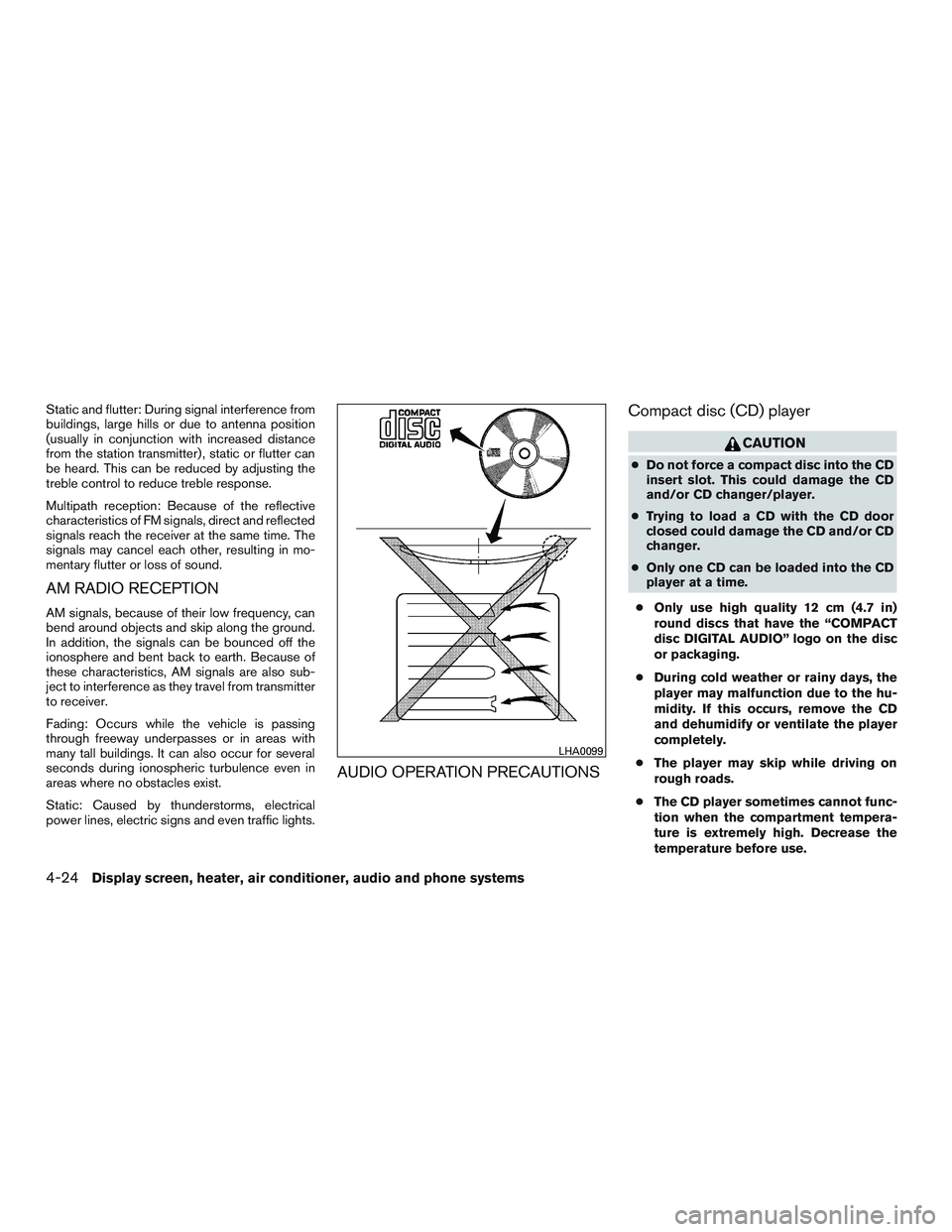
AUDIO OPERATION PRECAUTIONSCompact disc (CD) player
CAUTION
●
Do not force a compact disc into the CD
insert slot. This could damage the CD
and/or CD changer/player.
● Trying to load a CD with the CD door
closed could damage the CD and/or CD
changer.
● Only one CD can be loaded into the CD
player at a time.
● Only use high quality 12 cm (4.7 in)
round discs that have the “COMPACT
disc DIGITAL AUDIO” logo on the disc
or packaging.
● During cold weather or rainy days, the
player may malfunction due to the hu-
midity. If this occurs, remove the CD
and dehumidify or ventilate the player
completely.
● The player may skip while driving on
rough roads.
● The CD player sometimes cannot func-
tion when the compartment tempera-
ture is extremely high. Decrease the
temperature before use.
LHA0099
4-24Display screen, heater, air conditioner, audio and phone systems
Page 147 of 293
iPod®* player (if so equipped)
●Some characters used in other languages
(Chinese, Japanese, etc.) are not displayed
properly on the vehicle center screen. We
recommend using English or Spanish lan-
guage characters with an iPod®.
● Large video podcast files cause slow re-
sponses in the iPod®. The vehicle center
display may momentarily black out, but it will
soon recover.
● If the iPod® automatically selects large
video podcast files while in the shuffle mode,
the vehicle center display may momentarily
black out, but it will soon recover.
● Improperly plugging in the iPod® may cause
a checkmark to be displayed on and off
(flickering) . Always make sure that the
iPod® is connected properly.
● The iPod® nano (2nd Generation) will con-
tinue to fast forward or rewind if it is discon-
nected during a seek operation.
● An incorrect song title may appear when the
Play Mode is changed while using the iPod®
nano (2nd Generation) .
● Audiobooks may not play in the same order
as they appear on the iPod®. ●
The iPod® nano (1st Generation) may re-
main in fast forward or rewind mode if it is
connected during a seek operation. In this
case, please manually reset the iPod®.
● If you are using an iPod® (3rd Generation
with Dock connector) , do not use very long
names for the song title, album name or artist
name to prevent the iPod® from resetting
itself.
● Be careful not to do the following, or the
cable could be damaged and a loss of func-
tion may occur:
● Bend the cable excessively (40 mm
[1.6 in] radius maximum) .
● Twist the cable excessively (more than
180 degrees) .
● Pull or drop the cable.
● Do not force the iPod® cable connector
into the device port.
● Close the center console lid on the cable
or connectors.
● Store objects with sharp edges in the
storage where the cable is stored.
● Spill liquids on the cable and connectors. ●
Do not connect the cable to the iPod® if the
cable and/or connectors are wet. It may
damage the iPod®.
● If the cable and connectors are exposed to
water, allow the cable and/or connectors to
dry completely before connecting the cable
to the iPod® (wait 24 hours for it to dry) .
● If the connector is exposed to fluids other
than water, evaporative residue may cause a
short between the connector pins. In this
case, replace the cable, otherwise damage
to the iPod® and a loss of function may
occur.
● If the cable is damaged (insulation cut, con-
nectors cracked, contamination such as liq-
uids, dust, dirt, etc., in the connectors) , do
not use the cable and contact a NISSAN
dealer to replace the cable with a new one.
● When not in use for extended periods of
time, store the cable in a clean, dust-free
environment at room temperature and with-
out direct sun exposure.
● Do not use the cable for any other purposes
other than its intended use in the vehicle.
*iPod® is a trademark of Apple Inc., registered in
the U.S. and other countries.
4-30Display screen, heater, air conditioner, audio and phone systems
Page 160 of 293
If another audio source is playing and the iPod®
is connected, press the iPod® button to switch
to the iPod® mode.
If the system is turned off while the iPod® is
playing, the iPod® will start when the PWR but-
ton is pressed.
Top menu item selecting:
Press the iPod® MENU button while the iPod®
is connected to show the interface for iPod®
operation on the audio display. The items can be
chosen from the menu list screen by pressing the
SEEK button
orwhile the iPod® is
operational. The display pattern can be changed
as follows:
Playlists →Artists →Albums →Songs →Pod-
casts →Genres →Composers →Audiobooks
For additional information about each item, refer
to the iPod® owner’s manual.
ENTER and BACK buttons:
Press the ENTER button while the top menu is
displayed to show program details on the audio
display. Use the SEEK buttons
orto
scroll through the choices and press the ENTER
button to make a selection. Press the BACK
button to return to the previous display. TUNE/FOLDER button, ENTER/SETTING
button:
When the TUNE/FOLDER, ENTER/SETTING
button is pressed
orfor more than
1.5 seconds while the iPod® is playing, the
iPod® will play while fast forwarding or reversing.
When the button is released, the iPod® will
return to the normal play speed.
When the TUNE/FOLDER, ENTER/SETTING
button is pressed
orfor less than
1.5 seconds while the iPod® is playing, the next
track or the beginning of the current track on the
iPod® will be played.
RDM/RPT button:
Press the RDM/RPT button while a track is play-
ing to change the play pattern as follows:
Excluding Podcast and Audiobook:
1 TRACK REPEAT→ ALL REPEAT→OFF
TRACK SHUFFLE→ ALBUM SHUFFLE→OFF
For additional information about Podcasts, refer
to the iPod® owner’s manual.
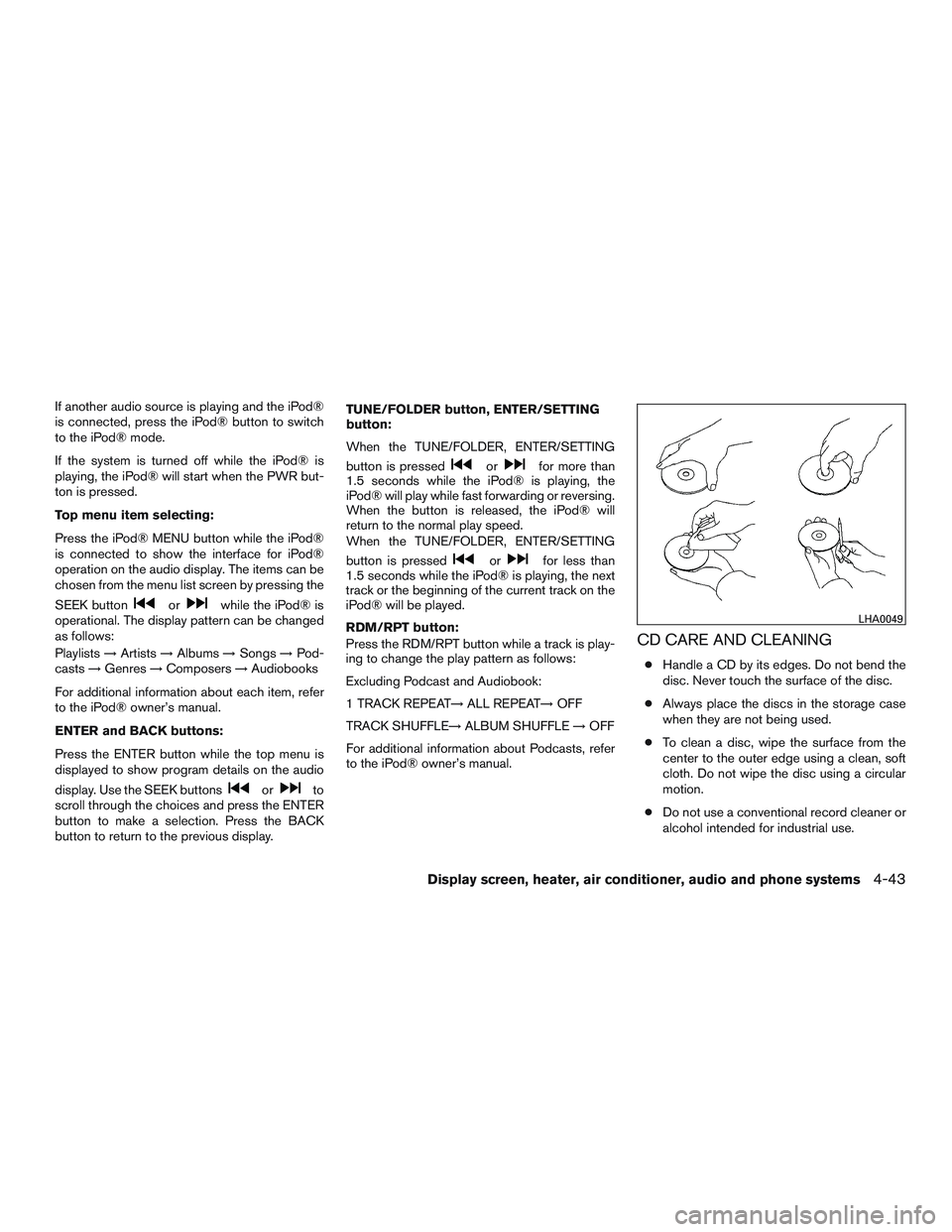
CD CARE AND CLEANING
● Handle a CD by its edges. Do not bend the
disc. Never touch the surface of the disc.
● Always place the discs in the storage case
when they are not being used.
● To clean a disc, wipe the surface from the
center to the outer edge using a clean, soft
cloth. Do not wipe the disc using a circular
motion.
● Do not use a conventional record cleaner or
alcohol intended for industrial use.
LHA0049
Display screen, heater, air conditioner, audio and phone systems4-43
Page 165 of 293
– Your cellular phone is locked to prevent itfrom being dialed.
● When the radio wave condition is not ideal
or ambient sound is too loud, it may be
difficult to hear the other person’s voice dur-
ing a call.
● Do not place the cellular phone in an area
surrounded by metal or far away from the
in-vehicle phone module to prevent tone
quality degradation and wireless connection
disruption.
● While a cellular phone is connected through
the Bluetooth® wireless connection, the
battery power of the cellular phone may dis-
charge quicker than usual. The Bluetooth®
Hands-Free Phone System cannot charge
cellular phones.
● Some cellular phones or other devices may
cause interference or a buzzing noise to
come from the audio system speakers. Stor-
ing the device in a different location may
reduce or eliminate the noise.
● Refer to the cellular phone Owner’s Manual
regarding the telephone charges, cellular
phone antenna and body, etc.REGULATORY INFORMATION
FCC Regulatory information
– CAUTION: To maintain compliance with
FCC’s RF exposure guidelines, use only the
supplied antenna. Unauthorized antenna,
modification, or attachments could damage
the transmitter and may violate FCC regula-
tions.
– Operation is subject to the following two con- ditions:
1. This device may not cause interference and
2. this device must accept any interference, including interference that may cause unde-
sired operation of the device.
IC Regulatory information
– Operation is subject to the following two con- ditions: (1) this device may not cause interfer-
ence, and (2) this device must accept any
interference, including interference that may
cause undesired operation of the device.
– This Class B digital apparatus meets all re- quirements of the Canadian Interference-
Causing Equipment Regulations.
BLUETOOTH® is a
trademark owned by
Bluetooth SIG, Inc.
and licensed to
Visteon.
USING THE SYSTEM
The system allows hands-free operation of the
Bluetooth® Phone System.
If the vehicle is in motion, some commands may
not be available so full attention may be given to
vehicle operation.
Initialization
When the ignition switch is placed in the ON
position, NISSAN Voice Recognition is initialized,
which takes a few seconds. If the
button is
pressed before the initialization completes, the
system will announce “Hands-free phone system
not ready” and will not react to voice commands.
Giving voice commands
To operate NISSAN Voice Recognition, press
and release the
button located on the
steering wheel. After the tone sounds, speak a
command.
4-48Display screen, heater, air conditioner, audio and phone systems