AUX NISSAN MICRA 2018 Owner´s Manual
[x] Cancel search | Manufacturer: NISSAN, Model Year: 2018, Model line: MICRA, Model: NISSAN MICRA 2018Pages: 330, PDF Size: 3.9 MB
Page 13 of 330
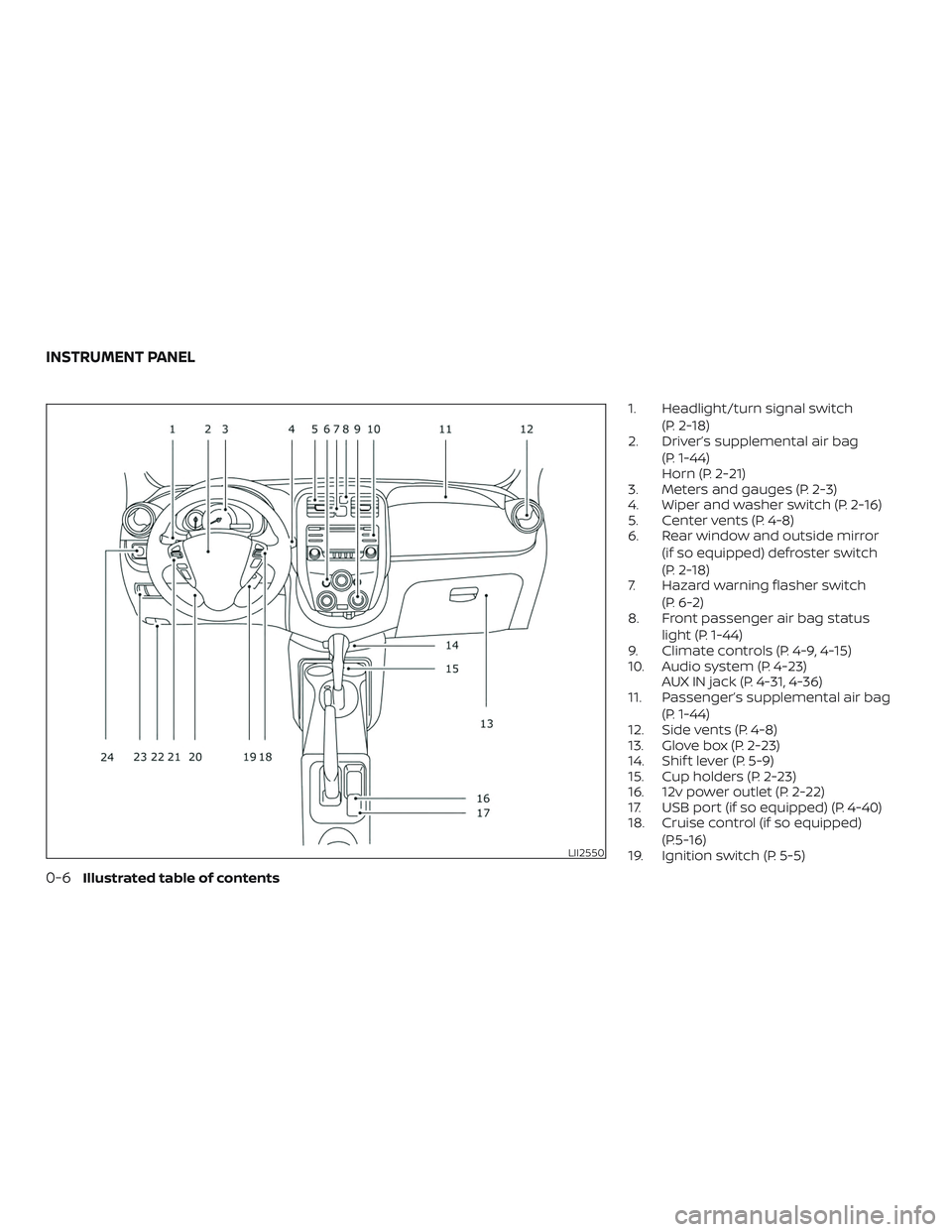
1. Headlight/turn signal switch(P. 2-18)
2. Driver’s supplemental air bag
(P. 1-44)
Horn (P. 2-21)
3. Meters and gauges (P. 2-3)
4. Wiper and washer switch (P. 2-16)
5. Center vents (P. 4-8)
6. Rear window and outside mirror
(if so equipped) defroster switch
(P. 2-18)
7. Hazard warning flasher switch
(P. 6-2)
8. Front passenger air bag status
light (P. 1-44)
9. Climate controls (P. 4-9, 4-15)
10. Audio system (P. 4-23) AUX IN jack (P. 4-31, 4-36)
11. Passenger’s supplemental air bag
(P. 1-44)
12. Side vents (P. 4-8)
13. Glove box (P. 2-23)
14. Shif t lever (P. 5-9)
15. Cup holders (P. 2-23)
16. 12v power outlet (P. 2-22)
17. USB port (if so equipped) (P. 4-40)
18. Cruise control (if so equipped)
(P.5-16)
19. Ignition switch (P. 5-5)
LII2550
INSTRUMENT PANEL
0-6Illustrated table of contents
Page 83 of 330
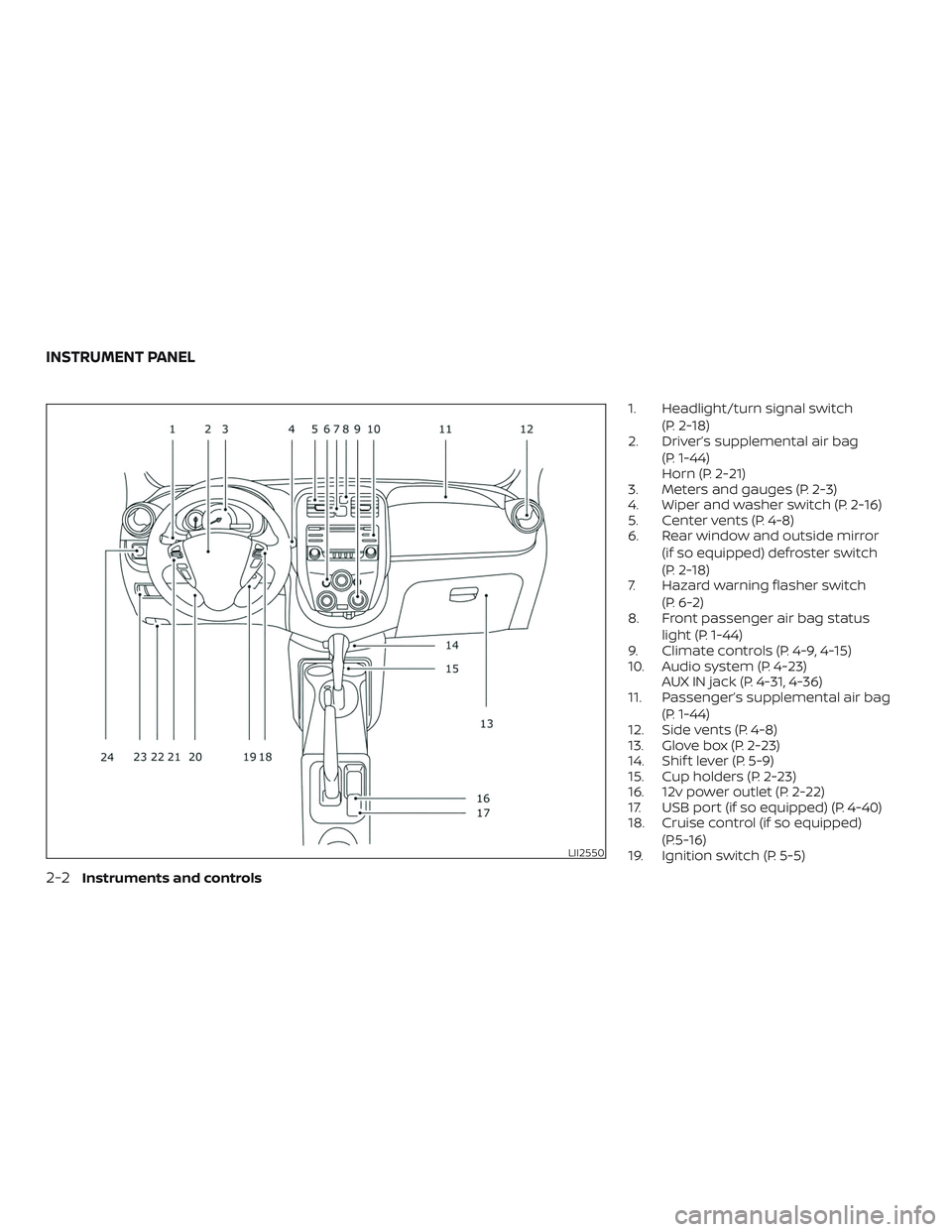
1. Headlight/turn signal switch(P. 2-18)
2. Driver’s supplemental air bag
(P. 1-44)
Horn (P. 2-21)
3. Meters and gauges (P. 2-3)
4. Wiper and washer switch (P. 2-16)
5. Center vents (P. 4-8)
6. Rear window and outside mirror
(if so equipped) defroster switch
(P. 2-18)
7. Hazard warning flasher switch
(P. 6-2)
8. Front passenger air bag status
light (P. 1-44)
9. Climate controls (P. 4-9, 4-15)
10. Audio system (P. 4-23) AUX IN jack (P. 4-31, 4-36)
11. Passenger’s supplemental air bag
(P. 1-44)
12. Side vents (P. 4-8)
13. Glove box (P. 2-23)
14. Shif t lever (P. 5-9)
15. Cup holders (P. 2-23)
16. 12v power outlet (P. 2-22)
17. USB port (if so equipped) (P. 4-40)
18. Cruise control (if so equipped)
(P.5-16)
19. Ignition switch (P. 5-5)
LII2550
INSTRUMENT PANEL
2-2Instruments and controls
Page 160 of 330
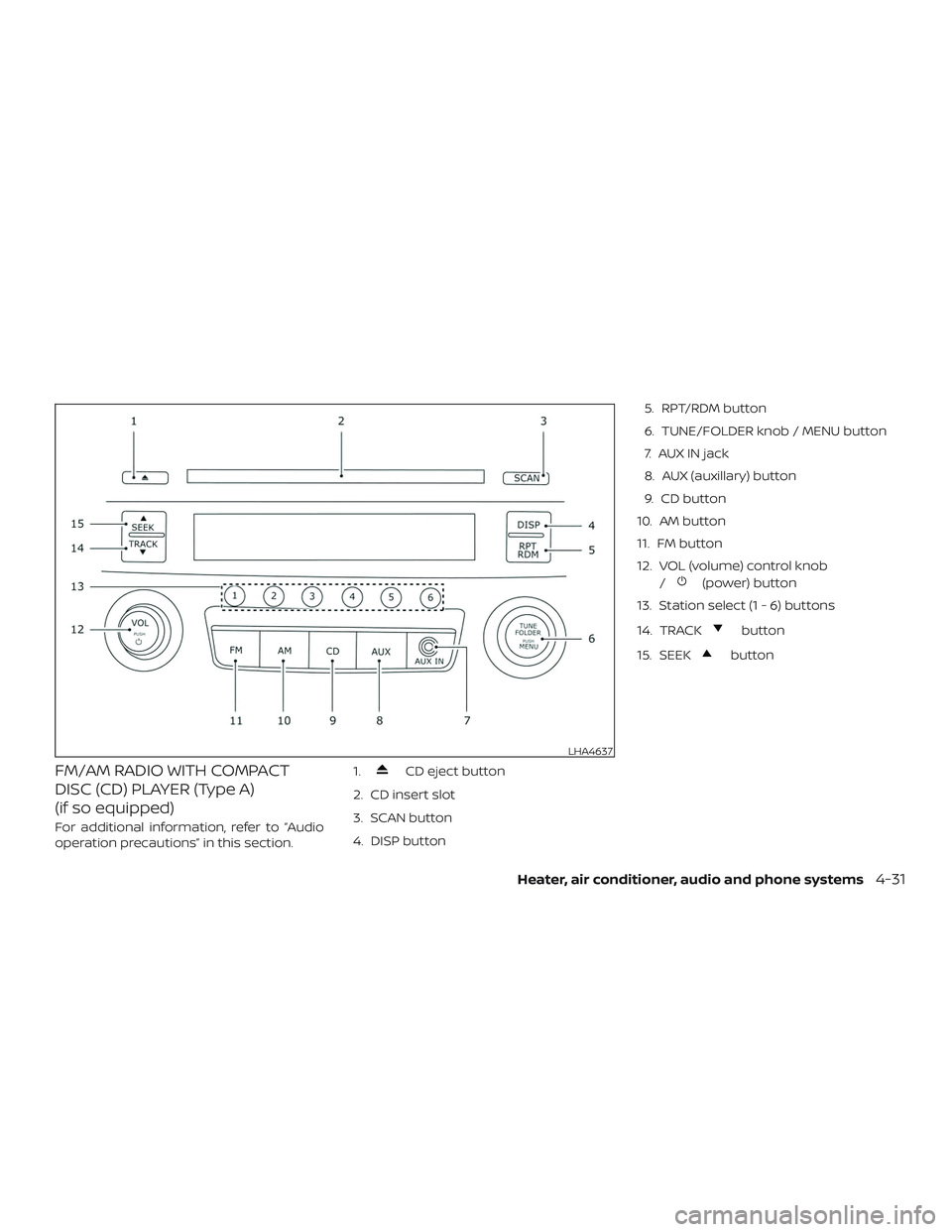
FM/AM RADIO WITH COMPACT
DISC (CD) PLAYER (Type A)
(if so equipped)
For additional information, refer to “Audio
operation precautions” in this section.1.
CD eject button
2. CD insert slot
3. SCAN button
4. DISP button 5. RPT/RDM button
6. TUNE/FOLDER knob / MENU button
7. AUX IN jack
8. AUX (auxillary) button
9. CD button
10. AM button
11. FM button
12. VOL (volume) control knob /
(power) button
13. Station select (1 - 6) buttons
14. TRACK
button
15. SEEK
button
LHA4637
Heater, air conditioner, audio and phone systems4-31
Page 161 of 330
Audio main operation
VOL (volume) control knob
/(power) button
Place the ignition switch in the ACC or ON
position, then press the
button. If you listen to the radio with the engine not
running, place the ignition in the ACC posi-
tion. The mode (radio or CD) that was play-
ing immediately before the system was
turned off resumes playing.
When a CD is loaded, the radio comes on.
Pressing thebutton again turns the
system off. Turn the VOL (volume) control knob to the
right to increase volume or to the lef t to
decrease volume.
MENU button
Audio Bass Adjusts the bass to the desired level.
Treble Adjusts the treble to the desired level.
Balance Adjusts the balance to the desired level. Balance adjusts the sound level between the lef t and right speakers.
Fade Adjusts the fade to the desired level. Fade adjusts the sound level between the front and rear speakers.
Spd Sen Vol. Adjusts the speed sensitive volume function, which increases the volume of the audio system as the speed of the vehicle
increases. Set to “OFF” to disable the feature. The higher the setting, the more the volume increases in relation to vehicle
speed.
AUX IN Volume Choose a setting from 0 to +3 to control the boost of incoming auxiliary device volume. A setting of 0 provides no additional
boost in volume. A setting of +3 provides the greatest boost in volume.
Clock Select “ON” or “OFF” to control whether the clock is shown on the display screen.
Adjust Clock Select “YES” to adjust the hours and/or minutes on the clock.
Bass, treble, balance and fade can also be
adjusted by pressing the MENU button until
the desired mode appears in the display. Press theSEEK orTRACK but-
ton to adjust the setting to the desired level
(-5 to +5). Once you have adjusted the
sound quality to the desired level, press the
MENU button repeatedly until the radio or CD display reappears, otherwise the radio
or CD display will automatically reappear
af ter about 10 seconds.
4-32Heater, air conditioner, audio and phone systems
Page 164 of 330
RPT (repeat)/RDM (random) button
Press the RPT/RDM button while a com-
pact disc is playing to change the play pat-
tern as follows:
CD:
TRACK REPEAT→DISC RANDOM →DISC
REPEAT
MP3/WMA CD:
FOLDER REPEAT →TRACK REPEAT →DISC
RANDOM →FOLDER RANDOM →DISC RE-
PEAT
TRACK REPEAT: The track that is currently
playing will be repeated.
DISC RANDOM: The order of the tracks on
the disc will be mixed during play.
DISC REPEAT: The disc currently playing will
be repeated.
FOLDER REPEAT: The tracks in the current
folder will be repeated.
FOLDER RANDOM: The order of the tracks in
the folder will be mixed during play. SCAN (CDs) button
Press the SCAN button for less than 1.5 sec-
onds to scan all tracks of the current disc
for 10 seconds per track. The SCAN icon is
flashed during scan mode.
The scan mode is canceled once it scans
through all tracks on the disc, or if the SCAN
button is pressed during scan mode.
CD EJECT
When the
button is pressed with a
compact disc loaded, the compact disc will
be ejected.
When the
button is pressed while the
compact disc is playing, the compact disc
will eject and the system will turn off.
AUX (auxiliary) button
The AUX IN jack is located on the CD player.
The AUX IN audio input jack accepts any
standard analog audio input such as from
a portable cassette tape/CD player, MP3
player or laptop computers.
Press the AUX button to play a compatible
device when it is plugged into the AUX IN
jack. Press the MENU button repeatedly until
“AUX IN Volume” appears on the screen to
control the incoming volume level of the
auxiliary input device. Turn the
TUNE/FOLDER knob to adjust the level be-
tween 0 and +3.
Heater, air conditioner, audio and phone systems4-35
Page 165 of 330
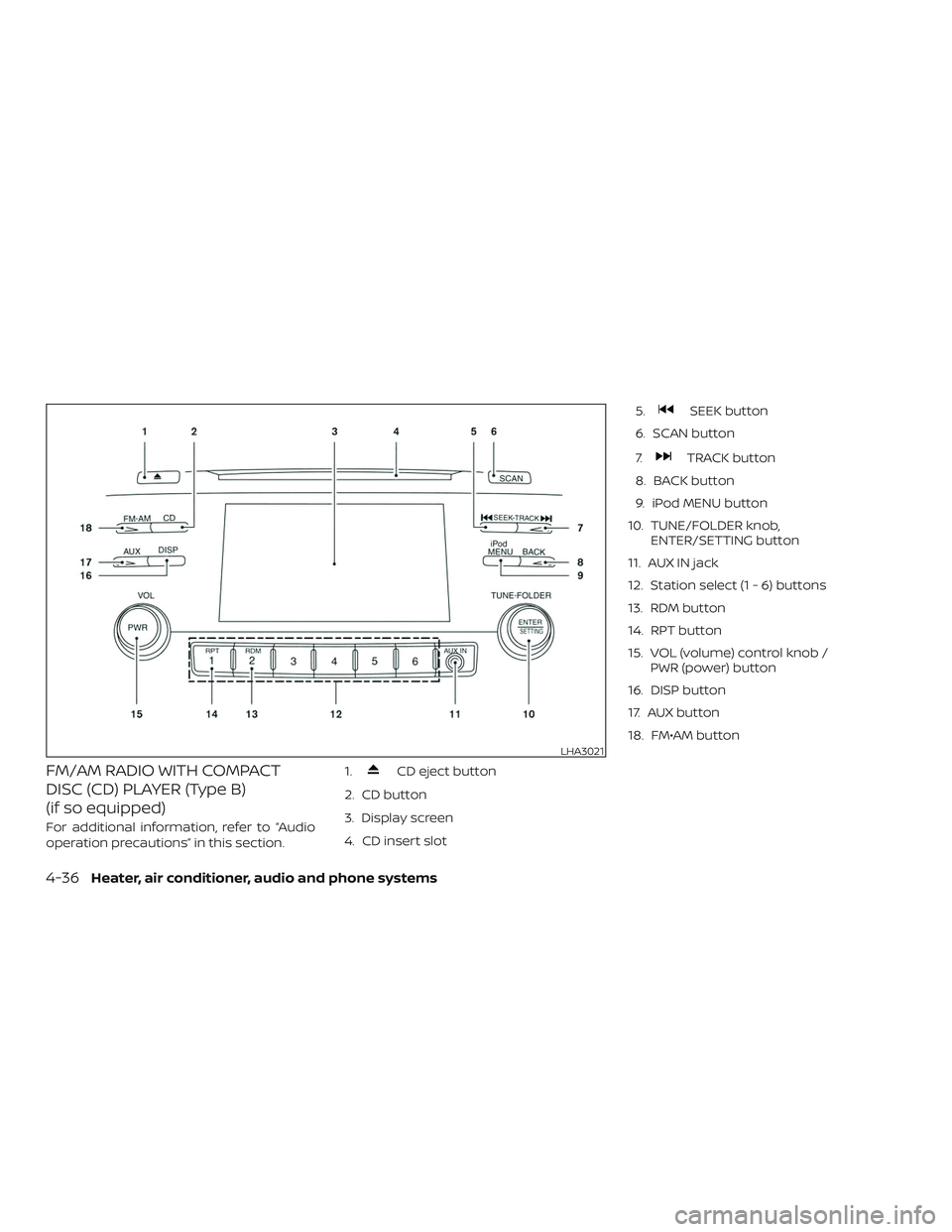
FM/AM RADIO WITH COMPACT
DISC (CD) PLAYER (Type B)
(if so equipped)
For additional information, refer to “Audio
operation precautions” in this section.1.
CD eject button
2. CD button
3. Display screen
4. CD insert slot 5.
SEEK button
6. SCAN button
7.
TRACK button
8. BACK button
9. iPod MENU button
10. TUNE/FOLDER knob, ENTER/SETTING button
11. AUX IN jack
12. Station select (1 - 6) buttons
13. RDM button
14. RPT button
15. VOL (volume) control knob / PWR (power) button
16. DISP button
17. AUX button
18. FM•AM button
LHA3021
4-36Heater, air conditioner, audio and phone systems
Page 166 of 330
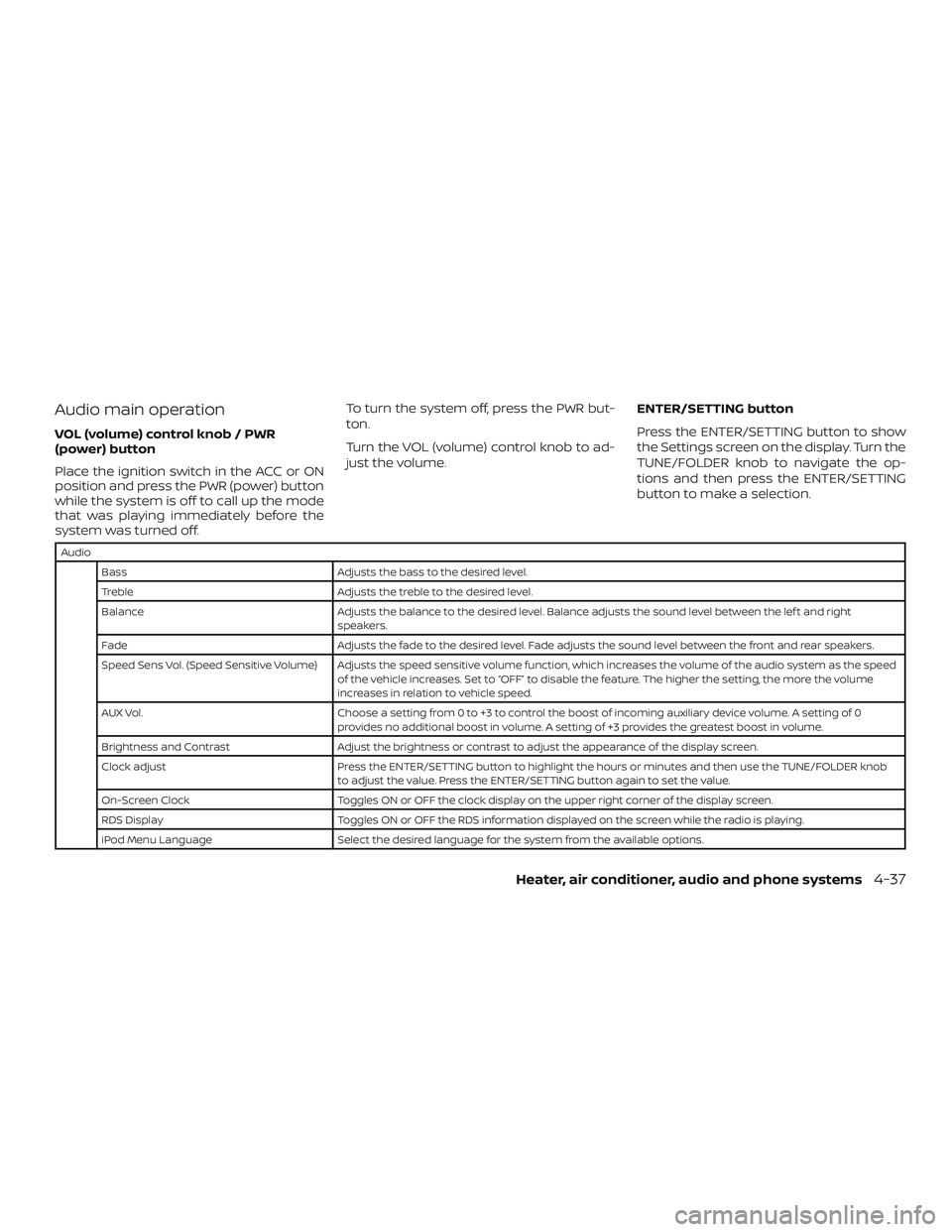
Audio main operation
VOL (volume) control knob / PWR
(power) button
Place the ignition switch in the ACC or ON
position and press the PWR (power) button
while the system is off to call up the mode
that was playing immediately before the
system was turned off.To turn the system off, press the PWR but-
ton.
Turn the VOL (volume) control knob to ad-
just the volume.
ENTER/SETTING button
Press the ENTER/SETTING button to show
the Settings screen on the display. Turn the
TUNE/FOLDER knob to navigate the op-
tions and then press the ENTER/SETTING
button to make a selection.
Audio
Bass Adjusts the bass to the desired level.
Treble Adjusts the treble to the desired level.
Balance Adjusts the balance to the desired level. Balance adjusts the sound level between the lef t and right speakers.
Fade Adjusts the fade to the desired level. Fade adjusts the sound level between the front and rear speakers.
Speed Sens Vol. (Speed Sensitive Volume) Adjusts the speed sensitive volume function, which increases the volume of the audio system as the speed of the vehicle increases. Set to “OFF” to disable the feature. The higher the setting, the more the volume
increases in relation to vehicle speed.
AUX Vol. Choose a setting from 0 to +3 to control the boost of incoming auxiliary device volume. A setting of 0 provides no additional boost in volume. A setting of +3 provides the greatest boost in volume.
Brightness and Contrast Adjust the brightness or contrast to adjust the appearance of the display screen.
Clock adjust Press the ENTER/SETTING button to highlight the hours or minutes and then use the TUNE/FOLDER knob to adjust the value. Press the ENTER/SETTING button again to set the value.
On-Screen Clock Toggles ON or OFF the clock display on the upper right corner of the display screen.
RDS Display Toggles ON or OFF the RDS information displayed on the screen while the radio is playing.
iPod Menu Language Select the desired language for the system from the available options.
Heater, air conditioner, audio and phone systems4-37
Page 169 of 330
The current play pattern of the CD is dis-
played on the screen unless no pattern is
applied.
RDM (random) button
When the RDM button is pressed while a
compact disc is playing, the play pattern
can be changed as follows:
CD:
1 Disc Random←→OFF
CD with MP3 or WMA:
1 Disc Random →1 Folder Random →OFF
1 Disc Random: all tracks on the disc will be
played randomly.
1 Folder Random: all tracks in the current
folder will be played randomly.
OFF: No random play pattern is applied. The
indicator on the display will turn off.
The current play pattern of the CD is dis-
played on the screen unless no pattern is
applied.
AUX button
The AUX IN jack is located on the CD player.
The AUX IN audio input jack accepts any
standard analog audio input such as from a portable cassette tape/CD player, MP3
player or a laptop computer.
Press the AUX button to play a compatible
device plugged into the AUX IN jack. The
AUX button is also used to switch the audio
system to a source plugged into the USB
connection port in the center console.
When a device is plugged into the AUX IN
jack while another device is plugged into
the USB connection port, the AUX button is
used to toggle between the two functions.
For additional information about the USB
connection port, refer to “USB (Universal
Serial Bus) connection port” in this section.
EJECT button
When the
button is pressed with a
compact disc loaded, the compact disc will
eject and the last source will be played.
Additional features
For additional information about the iPod®
player available with this system, refer to
“iPod® player operation” in this section.
For additional information about the USB
(Universal Serial Bus) connection port avail-
able with this system, refer to “USB (Univer-
sal Serial Bus) connection port” in this sec-
tion.
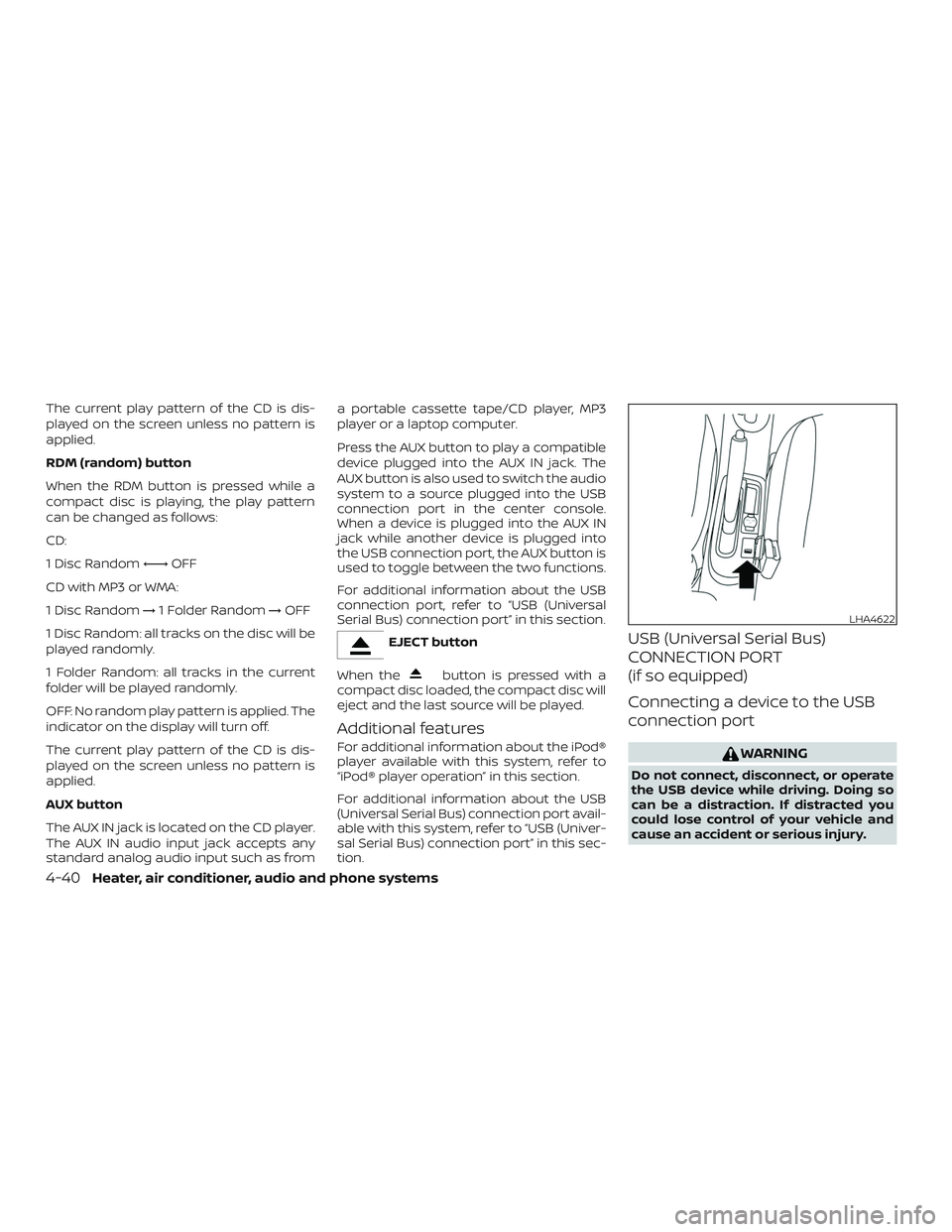
USB (Universal Serial Bus)
CONNECTION PORT
(if so equipped)
Connecting a device to the USB
connection port
WARNING
Do not connect, disconnect, or operate
the USB device while driving. Doing so
can be a distraction. If distracted you
could lose control of your vehicle and
cause an accident or serious injury.
LHA4622
4-40Heater, air conditioner, audio and phone systems
Page 170 of 330
CAUTION
∙ To avoid damage and loss of functionwhen using a USB device, note the fol-
lowing precautions.
∙ Do not force the USB device into the USB port. Inserting the USB device
tilted or up-side-down into the port
may damage the port. Make sure that
the USB device is connected correctly
into the USB port.
∙ Do not grab the USB port cover (if so equipped) when pulling the USB de-
vice out of the port. This could dam-
age the port and the cover.
∙ Do not leave the USB cable in a place where it can be pulled unintentionally.
Pulling the cable may damage the
port.
For additional information, refer to your de-
vice manufacturer’s owner information re-
garding the proper use and care of the
device.
The USB port is located in the center con-
sole. Insert the USB device into the connec-
tion port.
When a compatible storage device is
plugged into the connection port, compat- ible audio files on the storage device can be
played through the vehicle’s audio system.Audio file operation
AUX button
Place the ignition switch in the ON or ACC
position and press the AUX button to
switch to the USB input mode.
Play information
Information about the audio files being
played can be displayed on the display
screen of the vehicle’s audio system. De-
pending on how the audio files are en-
coded, information such as Folder, Song
and Artist will be displayed.
The track number and number of total
tracks in the folder are displayed on the
screen as well.
SEEK/TRACK (Reverse or
Fast Forward) buttons
Press and hold the
orSEEK/TRACK buttons for 1.5 sec-
onds while an audio file on the USB device
is playing to reverse or fast forward the
track being played. The track plays at an
increased speed while reversing or fast for-
warding. When the button is released, the
audio file returns to normal play speed.
SEEK/TRACK buttons
Press the
SEEK/TRACK button while
an audio file on the USB device is playing to
return to the beginning of the current track.
Press the
SEEK/TRACK button several
times to skip backward several tracks.
Press the
SEEK/TRACK button while
an audio file on the USB device is playing to
advance one track. Press
the
SEEK/TRACK button several times
to skip forward several tracks. If the last
track in a folder on the USB device is
skipped, the first track of the next folder is
played.
RDM (random) button
When the RDM button is pressed while an
audio file on the USB device is playing, the
play pattern can be changed as follows:
All Random →1 Folder Random →OFF
All Random: all tracks on the USB device will
be played randomly.
1 Folder Random: all tracks in the current
folder will be played randomly.
OFF: No random play pattern is applied. The
indicator on the display will turn off.
Heater, air conditioner, audio and phone systems4-41
Page 174 of 330
∙ A new disc may be rough on the innerand outer edges. Remove the rough
edges by rubbing the inner and outer
edges with the side of a pen or pencil as
illustrated.
STEERING WHEEL SWITCH FOR
AUDIO CONTROL (if so equipped)
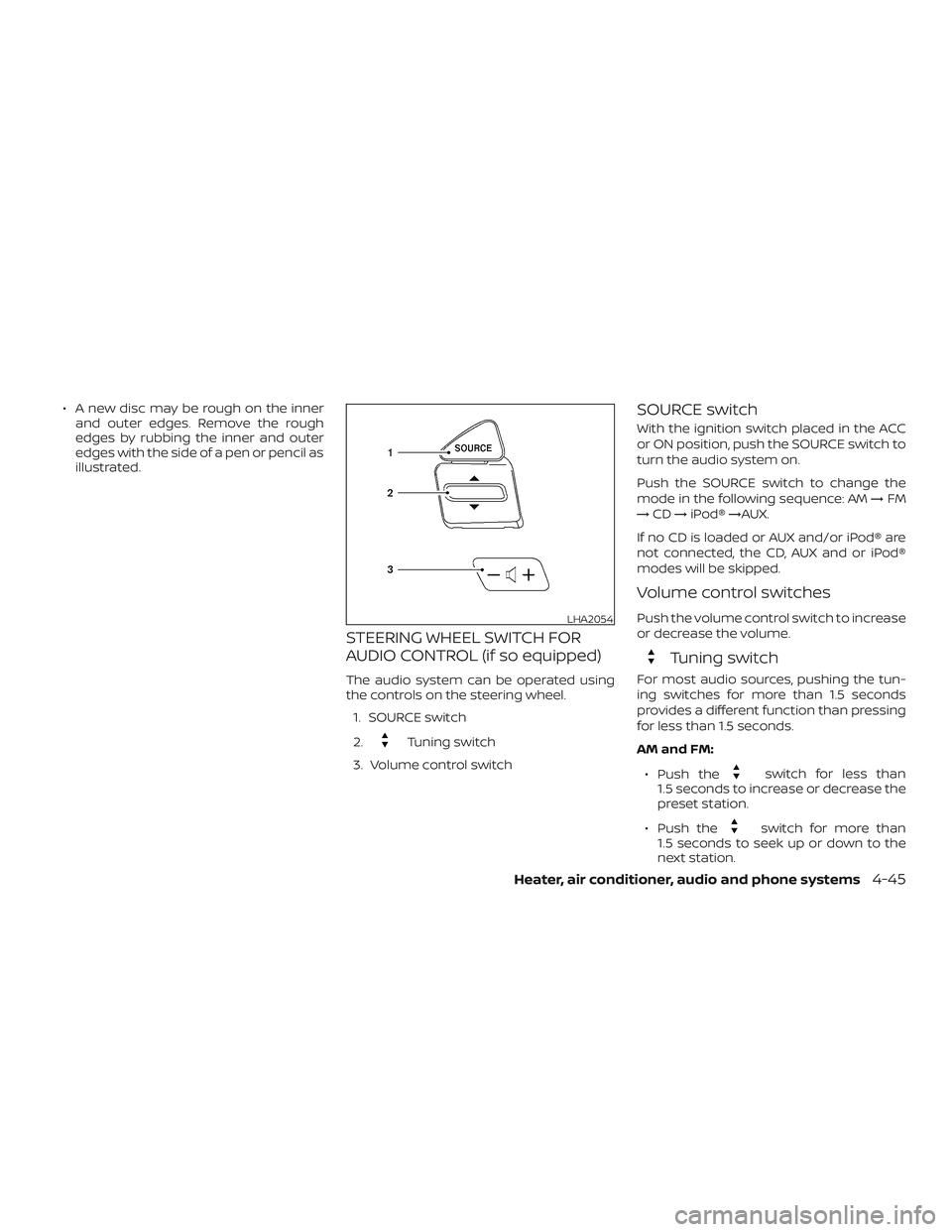
The audio system can be operated using
the controls on the steering wheel.
1. SOURCE switch
2.
Tuning switch
3. Volume control switch
SOURCE switch
With the ignition switch placed in the ACC
or ON position, push the SOURCE switch to
turn the audio system on.
Push the SOURCE switch to change the
mode in the following sequence: AM →FM
→ CD →iPod® →AUX.
If no CD is loaded or AUX and/or iPod® are
not connected, the CD, AUX and or iPod®
modes will be skipped.
Volume control switches
Push the volume control switch to increase
or decrease the volume.
Tuning switch
For most audio sources, pushing the tun-
ing switches for more than 1.5 seconds
provides a different function than pressing
for less than 1.5 seconds.
AM and FM:
∙ Push the
switch for less than
1.5 seconds to increase or decrease the
preset station.
∙ Push the
switch for more than
1.5 seconds to seek up or down to the
next station.
LHA2054
Heater, air conditioner, audio and phone systems4-45