air con NISSAN MICRA 2019 Owner´s Manual
[x] Cancel search | Manufacturer: NISSAN, Model Year: 2019, Model line: MICRA, Model: NISSAN MICRA 2019Pages: 346, PDF Size: 4.05 MB
Page 196 of 346
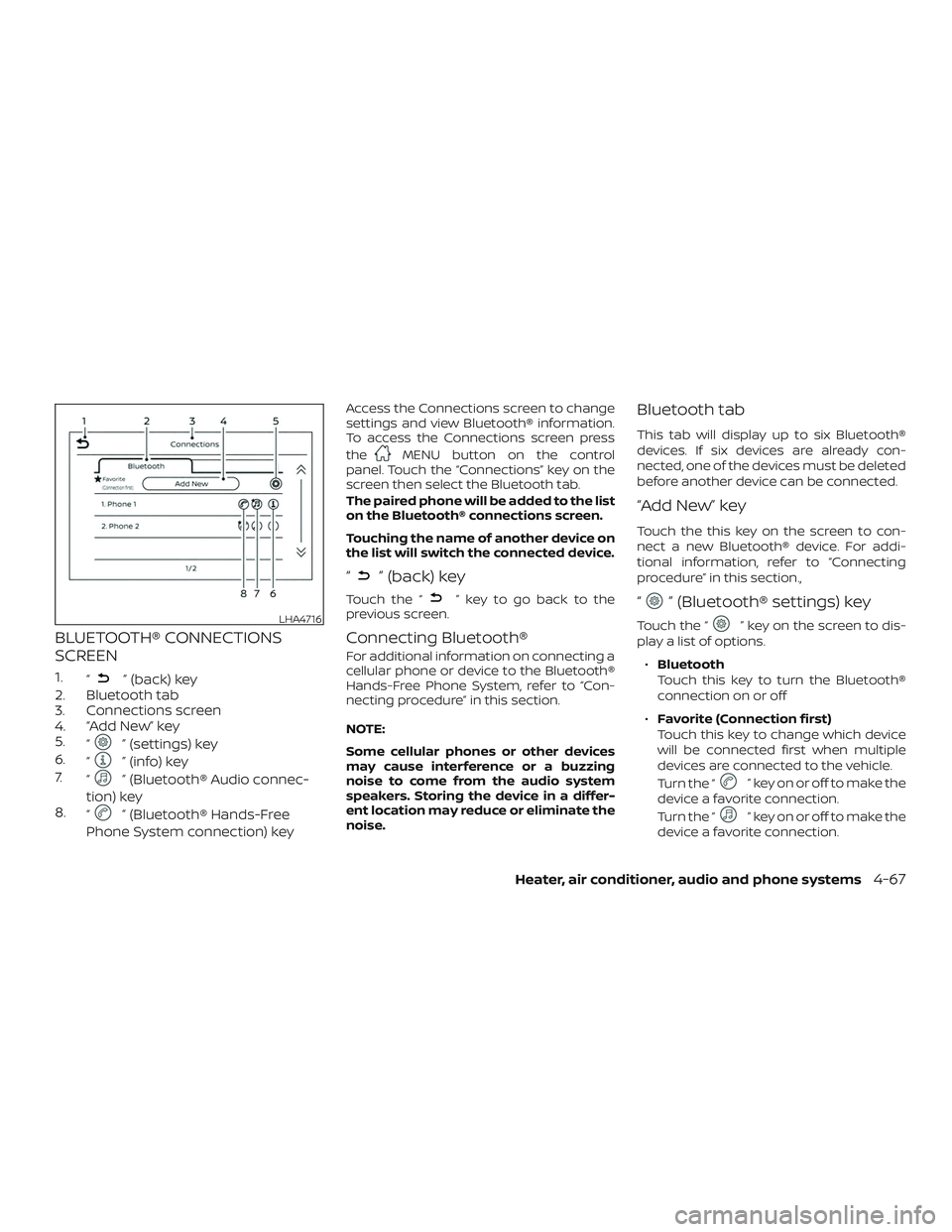
BLUETOOTH® CONNECTIONS
SCREEN
1.“” (back) key
2. Bluetooth tab
3. Connections screen
4. “Add New” key
5. “
” (settings) key
6. “
” (info) key
7. “
” (Bluetooth® Audio connec-
tion) key
8. “
” (Bluetooth® Hands-Free
Phone System connection) key
Access the Connections screen to change
settings and view Bluetooth® information.
To access the Connections screen press
the
MENU button on the control
panel. Touch the “Connections” key on the
screen then select the Bluetooth tab.
The paired phone will be added to the list
on the Bluetooth® connections screen.
Touching the name of another device on
the list will switch the connected device.
“” (back) key
Touch the “” key to go back to the
previous screen.
Connecting Bluetooth®
For additional information on connecting a
cellular phone or device to the Bluetooth®
Hands-Free Phone System, refer to “Con-
necting procedure” in this section.
NOTE:
Some cellular phones or other devices
may cause interference or a buzzing
noise to come from the audio system
speakers. Storing the device in a differ-
ent location may reduce or eliminate the
noise.
Bluetooth tab
This tab will display up to six Bluetooth®
devices. If six devices are already con-
nected, one of the devices must be deleted
before another device can be connected.
“Add New” key
Touch the this key on the screen to con-
nect a new Bluetooth® device. For addi-
tional information, refer to “Connecting
procedure” in this section.,
“” (Bluetooth® settings) key
Touch the “” key on the screen to dis-
play a list of options.
∙ Bluetooth
Touch this key to turn the Bluetooth®
connection on or off
∙ Favorite (Connection first)
Touch this key to change which device
will be connected first when multiple
devices are connected to the vehicle.
Turn the “
” key on or off to make the
device a favorite connection.
Turn the “
” key on or off to make the
device a favorite connection.
LHA4716
Heater, air conditioner, audio and phone systems4-67
Page 197 of 346
∙Pin
Touch this key to customize the PIN
code. Input a four digit number then
touch the “OK” key. The new PIN will be
set.
“” (info) key
Touch the “” key on the screen to dis-
play the information of the cellular phone
or to delete the device.
Touch the “Delete” key to remove a paired
device then select “Yes” when a message
appears.
“” (Bluetooth® Hands-Free
Phone System connection) key
A list of connected devices will be displayed
on the screen. Touch the “
” key next to
the name to connect a device to the
Hands-Free Phone System. If the phone is
listed as a favorite, a star will appear on the
icon. Select the key again to disconnect the
device. The device will not be removed
from the list. For additional information on
removing a device, refer to “
(info) key”
in this section.
“” (Bluetooth® Audio
connection) key
A list of connected devices will be displayed
on the screen. Touch the “
” key next to
the name to connect a device to
Bluetooth® Audio. If the device is listed as a
favorite, a star will appear on the icon. Se-
lect the key again to disconnect the device.
The device will not be removed from the
list. For additional information on removing
a device, refer to “
(info) key” in this
section.
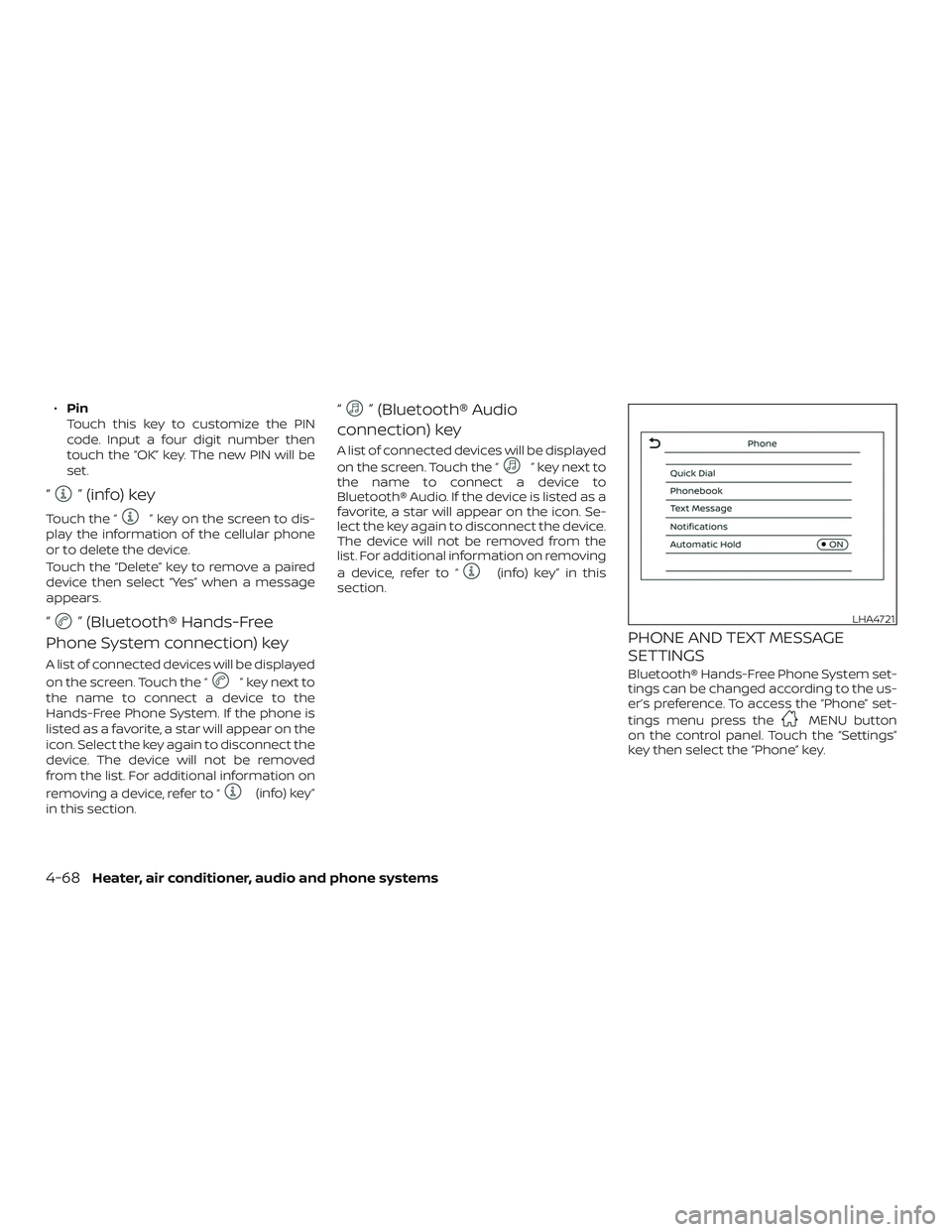
PHONE AND TEXT MESSAGE
SETTINGS
Bluetooth® Hands-Free Phone System set-
tings can be changed according to the us-
er’s preference. To access the “Phone” set-
tings menu press the
MENU button
on the control panel. Touch the “Settings”
key then select the “Phone” key.
LHA4721
4-68Heater, air conditioner, audio and phone systems
Page 198 of 346
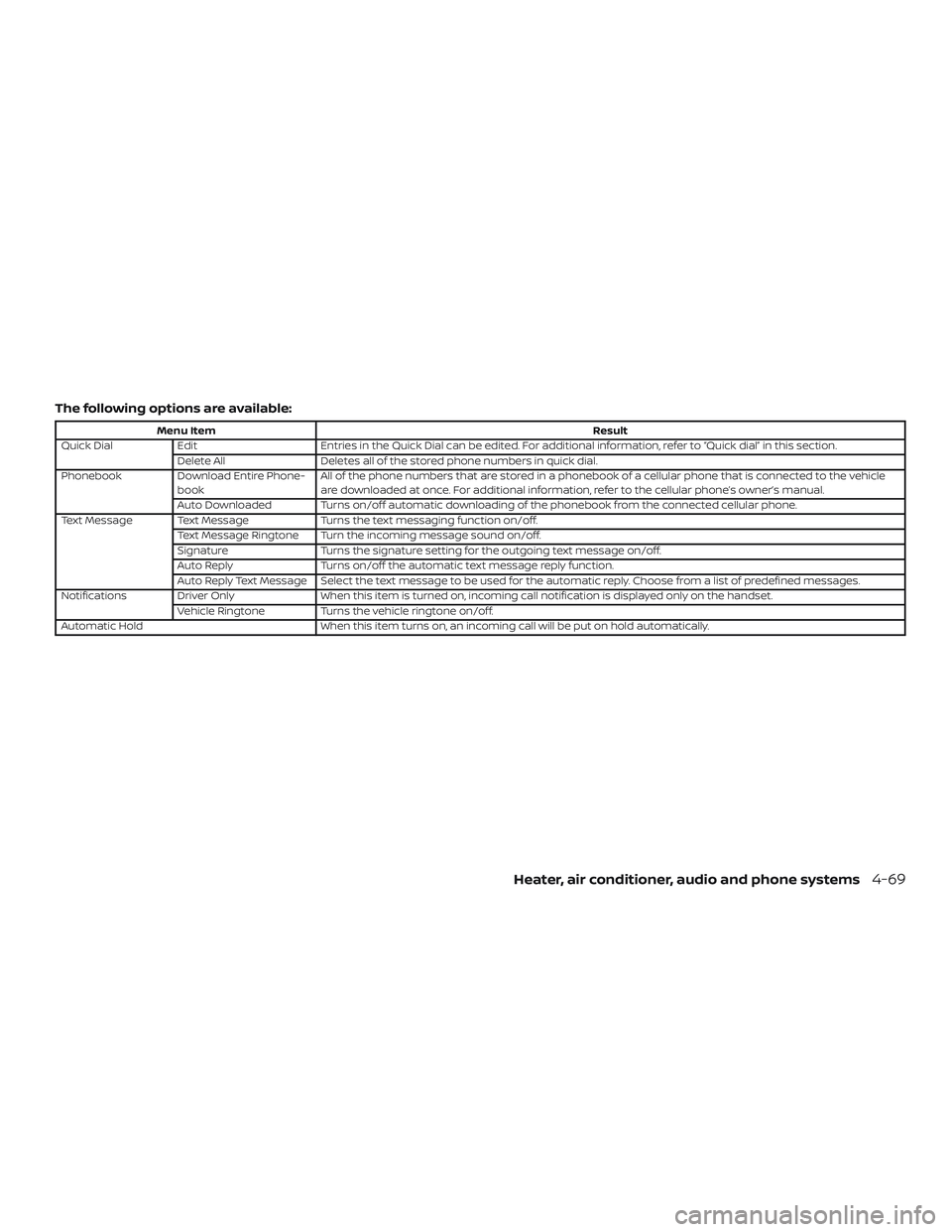
The following options are available:
Menu ItemResult
Quick Dial Edit Entries in the Quick Dial can be edited. For additional information, refer to “Quick dial” in this section.
Delete All Deletes all of the stored phone numbers in quick dial.
Phonebook Download Entire Phone-
book All of the phone numbers that are stored in a phonebook of a cellular phone that is connected to the vehicle
are downloaded at once. For additional information, refer to the cellular phone’s owner’s manual.
Auto Downloaded Turns on/off automatic downloading of the phonebook from the connected cellular phone.
Text Message Text Message Turns the text messaging function on/off.
Text Message Ringtone Turn the incoming message sound on/off.
Signature Turns the signature setting for the outgoing text message on/off.
Auto Reply Turns on/off the automatic text message reply function.
Auto Reply Text Message Select the text message to be used for the automatic reply. Choose from a list of predefined messages.
Notifications Driver Only When this item is turned on, incoming call notification is displayed only on the handset.
Vehicle Ringtone Turns the vehicle ringtone on/off.
Automatic Hold When this item turns on, an incoming call will be put on hold automatically.
Heater, air conditioner, audio and phone systems4-69
Page 199 of 346
Volume & beeps
There are several methods to customize
the volume settings.
Volume & Beeps
The Volume & Beeps screen can be found
by pressing the
MENU button on the
control panel, touching the “Settings” key
on the screen and selecting “Volume &
Beeps”. To adjust the volume of the follow-
ing options, touch the “–” and “+” keys on the
screen.
The available settings are:
∙ Ringtone Adjust the volume level of the ringtone
of incoming calls.
∙ Outgoing Call Adjust the volume level of the outgoing
calls.
∙ Voice Prompt Vol. Adjust the volume level of the system
voice.
∙ Text-to-speech Vol. Adjust the volume of the replay voice for
text messaging.
∙ Button Beeps Turns on/off the button beep sounds
and alarm for prohibited operations. Volume Settings
The Volume settings screen can be found
by pressing the
button on the control
panel then touching the “Volume” key on
the screen. To adjust the volume of the
following options, touch the “–” and “+” keys
on the screen.
The available settings are:
∙ Ringtone Adjust the volume level of the ringtone
of incoming calls.
∙ Outgoing Call Adjust the volume level of the outgoing
calls.
4-70Heater, air conditioner, audio and phone systems
Page 200 of 346
5 Starting and driving
Precautions when starting and driving..........5-2
Exhaust gas (carbon monoxide) ..............5-2
Three-way catalyst ...........................5-2
Avoiding collision and rollover ................5-3
Off-roadrecovery ............................5-3
Rapid air pressure loss .......................5-4
Drinking alcohol/drugs and driving ...........5-5
Ignition switch ...................................5-5
Automatic transmission
(if so equipped) ...............................5-6
Manual transmission (if so equipped) .........5-7
Ignition switch positions ......................5-7
NISSAN Vehicle Immobilizer System ..........5-7
Before starting the engine .......................5-8
Starting the engine ..............................5-8
Driving the vehicle ...............................5-9
Automatic transmission (A/T) (if so
equipped) ....................................5-9
Manual transmission (if so equipped) ........5-14
Parking brake .................................. 5-16
Cruise control (if so equipped) ..................5-17
Precautions on cruise control ................5-17Cruise control operations
....................5-17
Break-in schedule .............................. 5-18
Fuel efficient driving tips ........................5-19
Increasing fuel economy .......................5-20
Parking/parking on hills ........................5-21
Power steering ................................. 5-22
Brake system ................................... 5-23
Brake precautions ........................... 5-23
Anti-lock Braking System (ABS) ..............5-23
Brake assist ................................. 5-24
Vehicle Dynamic Control (VDC) system .........5-25
Brake force distribution ......................5-26
Cold weather driving ........................... 5-27
Freeing a frozen door lock ...................5-27
Antifreeze ................................... 5-27
Battery...................................... 5-27
Draining of coolant water ....................5-27
Tire equipment .............................. 5-28
Special winter equipment ...................5-28
Driving on snow or ice .......................5-28
Engine
block heater (if so equipped) .........5-29
Page 201 of 346
WARNING
∙ Do not leave children or adults whowould normally require the assis-
tance of others alone in your vehicle.
Pets should also not be lef t alone.
They could accidentally injure them-
selves or others through inadvertent
operation of the vehicle. Also, on hot,
sunny days, temperatures in a closed
vehicle could quickly become high
enough to cause severe or possibly
fatal injuries to people or animals.
∙ Properly secure all cargo to help pre- vent it from sliding or shif ting. Do not
place cargo higher than the seat-
backs. In a sudden stop or collision,
unsecured cargo could cause per-
sonal injury.
EXHAUST GAS (carbon monoxide)
WARNING
∙ Do not breathe exhaust gases; theycontain colorless and odorless carbon
monoxide. Carbon monoxide is dan-
gerous. It can cause unconsciousness
or death. ∙ If you suspect that exhaust fumes are
entering the vehicle, drive with all
windows fully open, and have the ve-
hicle inspected immediately.
∙ Do not run the engine in closed spaces such as a garage.
∙ Do not park the vehicle with the en- gine running for any extended length
of time.
∙ Keep the rear vent windows, lif tgates, doors and trunk lids (if so equipped)
closed while driving, otherwise ex-
haust gases could be drawn into the
passenger compartment. If you must
drive with one of these open, follow
these precautions:
1. Open all the windows.
2. Turn the air recirculation mode off and set the fan speed control to
the highest level to circulate the
air.
∙ The exhaust system and body should be inspected by a qualified mechanic
whenever:
a. The vehicle is raised for service. b. You suspect that exhaust fumes
are entering into the passenger
compartment.
c. You notice a change in the sound of the exhaust system.
d. You have had an accident involving damage to the exhaust system,
underbody, or rear of the vehicle.
THREE-WAY CATALYST
The three-way catalyst is an emission con-
trol device installed in the exhaust system.
Exhaust gases in the three-way catalyst
are burned at high temperatures to help
reduce pollutants.
WARNING
∙ The exhaust gas and the exhaust sys-tem are very hot. Keep people, ani-
mals or flammable materials away
from the exhaust system
components.
∙ Do not stop or park the vehicle over flammable materials such as dry
grass, waste paper or rags. They may
ignite and cause a fire.
PRECAUTIONS WHEN STARTING AND
DRIVING
5-2Starting and driving
Page 203 of 346
5. If there is nothing in the way, steer thevehicle to follow the road while vehicle
speed is reduced. Do not attempt to
drive the vehicle back onto the road
surface until vehicle speed is reduced.
6. When it is safe to do so, gradually turn the steering wheel until both tires re-
turn to the road surface. When all tires
are on the road surface, steer the ve-
hicle to stay in the appropriate driving
lane.
∙ If you decide that it is not safe to re- turn the vehicle to the road surface
based on vehicle, road or traffic con-
ditions, gradually slow the vehicle to a
stop in a safe place off the road.
RAPID AIR PRESSURE LOSS
Rapid air pressure loss or a “blow-out” can
occur if the tire is punctured or is damaged
due to hitting a curb or pothole. Rapid air
pressure loss can also be caused by driving
on under-inflated tires.
Rapid air pressure loss can affect the han-
dling and stability of the vehicle, especially
at highway speeds. Help prevent rapid air pressure loss by
maintaining the correct air pressure and
visually inspecting the tires for wear and
damage. For additional information, refer
to “Wheels and tires” in the “Do-it-yourself ”
section of this manual. If a tire rapidly loses
air pressure or “blows-out” while driving,
maintain control of the vehicle by following
the procedure below. Please note that this
procedure is only a general guide. The ve-
hicle must be driven as appropriate based
on the conditions of the vehicle, road and
traffic.
WARNING
The following actions can increase the
chance of losing control of the vehicle if
there is a sudden loss of tire air pres-
sure. Losing control of the vehicle may
cause a collision and result in personal
injury.
∙ The vehicle generally moves or pulls
in the direction of the flat tire.
∙ Do not rapidly apply the brakes.
∙ Do not rapidly release the accelerator pedal.
∙ Do not rapidly turn the steering wheel. 1. Remain calm and do not overreact.
2. Maintain a firm grip on the steering
wheel with both hands and try to hold a
straight course.
3. When appropriate, slowly release the accelerator pedal to gradually slow the
vehicle.
4. Gradually steer the vehicle to a safe location off the road and away from
traffic if possible.
5. Lightly apply the brake pedal to gradu- ally stop the vehicle.
6. Turn on the hazard warning flashers and contact a roadside emergency
service to change the tire. For addi-
tional information, refer to “Changing a
flat tire” in the “In case of emergency”
section of this manual.
5-4Starting and driving
Page 204 of 346
DRINKING ALCOHOL/DRUGS AND
DRIVING
WARNING
Never drive under the influence of alco-
hol or drugs. Alcohol in the bloodstream
reduces coordination, delays reaction
time and impairs judgement. Driving
af ter drinking alcohol increases the
likelihood of being involved in an acci-
dent injuring yourself and others. Addi-
tionally, if you are injured in an accident,
alcohol can increase the severity of the
injury.
NISSAN is committed to safe driving. How-
ever, you must choose not to drive under the
influence of alcohol. Every year thousands of
people are injured or killed in alcohol-related
collisions. Although the local laws vary on
what is considered to be legally intoxicated,
the fact is that alcohol affects all people dif-
ferently and most people underestimate the
effects of alcohol.
Remember, drinking and driving don’t mix!
That is true for drugs (over-the-counter,
prescription) and illegal drugs, too. Don’t
drive if your ability to operate your vehicle is
impaired by alcohol, drugs, or some other
physical condition.WARNING
∙ Never remove the ignition key or placethe ignition switch in the LOCK posi-
tion while driving. The steering wheel
will lock. This may cause the driver to
lose control of the vehicle and could
result in serious vehicle damage or
personal injury.
IGNITION SWITCH
Starting and driving5-5
Page 212 of 346
Fail-safe
When the fail-safe operation occurs, the
Automatic Transmission will be locked in
any of the forward gears depending on
conditions.
If the vehicle is driven under extreme
conditions, such as excessive wheel
spinning and subsequent hard braking,
the fail-safe system may be activated.
This will occur even if all electrical cir-
cuits are functioning properly. In this
case:∙ Place the shif t lever in the P (Park)
position.
∙ Place the ignition switch in the OFF
position and wait for 3 seconds.
∙ Then place the ignition switch back in
the ON position.
The vehicle should return to its normal
operating condition. If it does not return
to its normal operating condition, have
the transmission checked and repaired,
if necessary. It is recommended that you
visit a NISSAN dealer for this service.
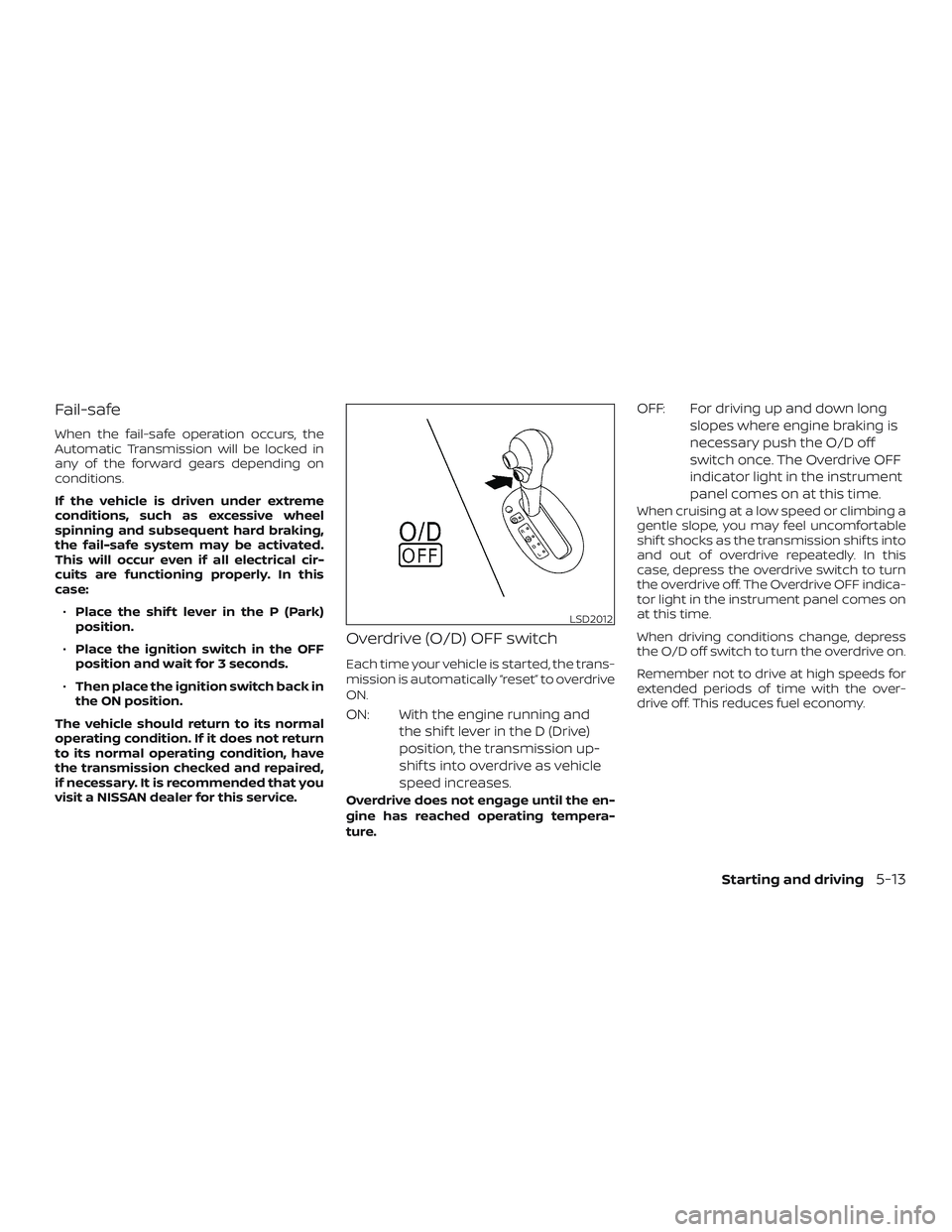
Overdrive (O/D) OFF switch
Each time your vehicle is started, the trans-
mission is automatically “reset” to overdrive
ON.
ON: With the engine running and the shif t lever in the D (Drive)
position, the transmission up-
shif ts into overdrive as vehicle
speed increases.
Overdrive does not engage until the en-
gine has reached operating tempera-
ture.
OFF: For driving up and down longslopes where engine braking is
necessary push the O/D off
switch once. The Overdrive OFF
indicator light in the instrument
panel comes on at this time.
When cruising at a low speed or climbing a
gentle slope, you may feel uncomfortable
shif t shocks as the transmission shif ts into
and out of overdrive repeatedly. In this
case, depress the overdrive switch to turn
the overdrive off. The Overdrive OFF indica-
tor light in the instrument panel comes on
at this time.
When driving conditions change, depress
the O/D off switch to turn the overdrive on.
Remember not to drive at high speeds for
extended periods of time with the over-
drive off. This reduces fuel economy.
LSD2012
Starting and driving5-13
Page 218 of 346
Follow these easy-to-use Fuel Efficient
Driving Tips to help you achieve the most
fuel economy from your vehicle.1. Use Smooth Accelerator and Brake
Pedal Application
∙ Avoid rapid starts and stops.
∙ Use smooth, gentle accelerator and brake application whenever possible.
∙ Maintain constant speed while com- muting and coast whenever pos-
sible.
2. Maintain Constant Speed
∙ Look ahead to try and anticipate and minimize stops.
∙ Synchronizing your speed with traffic lights allows you to reduce your num-
ber of stops.
∙ Maintaining a steady speed can mini- mize red light stops and improve fuel
efficiency.
3. Use Air Conditioning (A/C) at Higher
Vehicle Speeds
∙ Below 64 km/h (40 mph), it is more efficient to open windows to cool the
vehicle due to reduced engine load. ∙ Above 64 km/h (40 mph), it is more
efficient to use A/C to cool the vehicle
due to increased aerodynamic drag.
∙ Recirculating the cool air in the cabin when the A/C is on reduces cooling
load.
4. Drive at Economical Speeds and Dis-
tances
∙ Observing the speed limit and not exceeding 97 km/h (60 mph) (where
legally allowed) can improve fuel effi-
ciency due to reduced aerodynamic
drag.
∙ Maintaining a safe following distance behind other vehicles reduces un-
necessary braking.
∙ Safely monitoring traffic to anticipate changes in speed permits reduced
braking and smooth acceleration
changes.
∙ Select a gear range suitable to road conditions.
5. Use Cruise Control
∙ Using cruise control during highway driving helps maintain a steady
speed. ∙ Cruise control is particularly effective
in providing fuel savings when driving
on flat terrains.
6. Plan for the Shortest Route
∙ Utilize a map or navigation system to determine the best route to save
time.
7. Avoid Idling
∙ Shutting off your engine when safe for stops exceeding 30–60 seconds
saves fuel and reduces emissions.
8.
Buy an Automated Pass for Toll Roads
∙ Automated passes permit drivers to use special lanes to maintain cruis-
ing speed through the toll and avoid
stopping and starting.
9. Winter Warm Up
∙ Limit idling time to minimize impact to fuel economy.
∙ Vehicles typically need no more than 30 seconds of idling at start-up to
effectively circulate the engine oil be-
fore driving.
∙ Your vehicle will reach its ideal oper- ating temperature more quickly
while driving versus idling.
FUEL EFFICIENT DRIVING TIPS
Starting and driving5-19