navigation system NISSAN MURANO 2005 1.G Owners Manual
[x] Cancel search | Manufacturer: NISSAN, Model Year: 2005, Model line: MURANO, Model: NISSAN MURANO 2005 1.GPages: 192, PDF Size: 4.45 MB
Page 92 of 192
![NISSAN MURANO 2005 1.G Owners Manual The [CONFIRMATION] screen is displayed with
the following three keys.
cAll Destinations
cWaypoint 1 or Waypoint
cDo not Cancel
WHEN THEAll Destinations KEY IS
SELECTED
The route guidance is turned off](/img/5/686/w960_686-91.png "NISSAN MURANO 2005 1.G Owners Manual The [CONFIRMATION] screen is displayed with
the following three keys.
cAll Destinations
cWaypoint 1 or Waypoint
cDo not Cancel
WHEN THEAll Destinations KEY IS
SELECTED
The route guidance is turned off")
The [CONFIRMATION] screen is displayed with
the following three keys.
cAll Destinations
cWaypoint 1 or Waypoint
cDo not Cancel
WHEN THEAll Destinations KEY IS
SELECTED
The route guidance is turned off temporarily.1. Select the
All Destinations key.
2. When the
Yes key is selected, the route
guidance is turned off.
INFO:
cWhen the
No key is selected, the map will
be displayed. When the PREV button is
pressed, the previous screen will be displayed.
cTo restart the route guidance, press the
GUIDE VOICE button.
WHEN THEWaypoint 1 KEY IS SE-
LECTED
INFO:
This key can be selected only when a waypoint is
set.
Route guidance to the next waypoint is deleted.
INV1890INV1891
5-46How do I program a destination?
ZREVIEW COPYÐ2005(nav)
Navigation System OMÐUSA_English(nna)
07/10/04Ðdebbie
X
Page 93 of 192

1. Select theWaypoint 1 key.
2. When the
Yes key is selected, the
waypoint is deleted and route calculation will
start.
INFO:
When the
No key is selected, the map will be
displayed. When the PREV button is pressed,
the previous screen will be displayed.
WHEN THEDo not Cancel KEY IS
SELECTED
The [CONFIRMATION] screen will return to the
map screen.
INV1892
How do I program a destination?5-47
ZREVIEW COPYÐ2005(nav)
Navigation System OMÐUSA_English(nna)
07/10/04Ðdebbie
X
Page 95 of 192

6 How do I use the Point of Interest (POI)
feature?
Setting with thekey..........6-2
Setting with the
List key
......................6-2
Setting with the
Category key
.................6-5
Setting with the
State key
.....................6-7Setting with the
City key
......................6-9
Setting with the
Nearby key
..................6-11
POI categories...................................6-13
Setting the nearby display icons....................6-14
ZREVIEW COPYÐ2005(nav)
Navigation System OMÐUSA_English(nna)
07/10/04Ðdebbie
X
Page 96 of 192
![NISSAN MURANO 2005 1.G Owners Manual The keys in Point of Interest (POI) are:
cList
cCategory
cState/Province
cCity
cNearby
1. First press the DEST button.
2. Select the
key on
the [DEST. SETTING] screen.
SETTING WITH THEList KEY
TheList](/img/5/686/w960_686-95.png "NISSAN MURANO 2005 1.G Owners Manual The keys in Point of Interest (POI) are:
cList
cCategory
cState/Province
cCity
cNearby
1. First press the DEST button.
2. Select the
key on
the [DEST. SETTING] screen.
SETTING WITH THEList KEY
TheList")
The keys in Point of Interest (POI) are:
cList
cCategory
cState/Province
cCity
cNearby
1. First press the DEST button.
2. Select the
key on
the [DEST. SETTING] screen.
SETTING WITH THEList KEY
TheList key is used when you know the exact
names of the destinations and waypoints.
1. Input the facility name for your destination.
NOTE:
For a quicker search, input the
state/province, city and category before
searching for your desired destination.
INFO:
If the system detects that the number of corre-
sponding facilities or cities is five or less, the dis-
play shows the list screen automatically.
INV2337INV1893
SETTING WITH THE
KEY
6-2How do I use the Point of Interest (POI) feature?
ZREVIEW COPYÐ2005(nav)
Navigation System OMÐUSA_English(nna)
07/10/04Ðdebbie
X
Page 97 of 192

2. The display shows the screen to select a fa-
cility or
Info key.When the
Next Search key is selected, it is
possible to narrow down categories,
states/provinces and cities.
To use this function, refer to “Setting with the
Category key”, “Setting with theState key”
and “Setting with the
City key” on pages 6-5,
6-7 and 6-9.3. When a facility name is selected, the display
shows the [DEST. SETTING (POI)] screen
to set the destination.
To set priorities, select the
OK key. Then,
the route calculation will be started. When
you alter the destination or set waypoints,
select the
Waypoint key.
Please refer to “Making the system guide
the route with detailed options” on page
5-31.
INV1894INV1895INV1896
How do I use the Point of Interest (POI) feature?6-3
ZREVIEW COPYÐ2005(nav)
Navigation System OMÐUSA_English(nna)
07/10/04Ðdebbie
X
Page 98 of 192
![NISSAN MURANO 2005 1.G Owners Manual cWhen theInfo key next to the facility name of
your choice is selected in step 2, the display
shows the detailed [Address] and [Telephone
number] of the selected facility, and the
Map andEnter keys.4.](/img/5/686/w960_686-97.png "NISSAN MURANO 2005 1.G Owners Manual cWhen theInfo key next to the facility name of
your choice is selected in step 2, the display
shows the detailed [Address] and [Telephone
number] of the selected facility, and the
Map andEnter keys.4.")
cWhen theInfo key next to the facility name of
your choice is selected in step 2, the display
shows the detailed [Address] and [Telephone
number] of the selected facility, and the
Map andEnter keys.4. When setting the facility as the destination,
select the
OK key. The display shows the
[DEST. SETTING (POI)] screen to set the
destination.
Set priorities and select the
Route Calc. key. Then, the route calcula-
tion will be started.
When you alter the destination or set
waypoints, select the
Waypoint key.
Please refer to “Making the system guide the
route with detailed options” on page 5-31.cWhen the
Map key is selected, the display
shows the map. When the ENTER button is
pressed, the display shows the
Destination key.
INV1897INV1896INV2006
6-4How do I use the Point of Interest (POI) feature?
ZREVIEW COPYÐ2005(nav)
Navigation System OMÐUSA_English(nna)
07/10/04Ðdebbie
X
Page 99 of 192
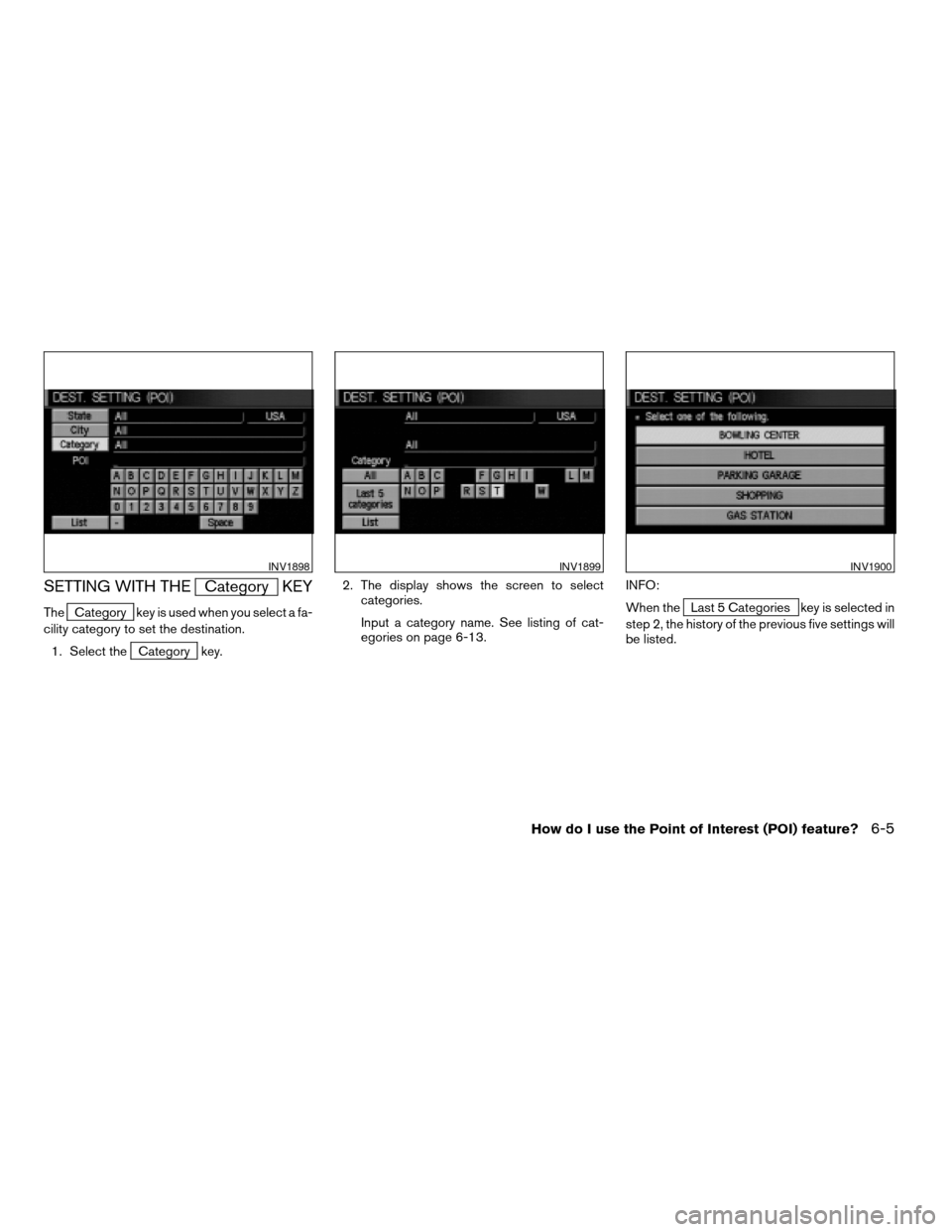
SETTING WITH THECategory KEY
TheCategory key is used when you select a fa-
cility category to set the destination.
1. Select the
Category key.2. The display shows the screen to select
categories.
Input a category name. See listing of cat-
egories on page 6-13.INFO:
When the
Last 5 Categories key is selected in
step 2, the history of the previous five settings will
be listed.
INV1898INV1899INV1900
How do I use the Point of Interest (POI) feature?6-5
ZREVIEW COPYÐ2005(nav)
Navigation System OMÐUSA_English(nna)
07/10/04Ðdebbie
X
Page 100 of 192

3. The display shows the category list. Select
a category name.
INFO:
When the
RESTAURANT key is selected, the
screen to input the cuisine type will be displayed.4. The screen returns to the [DEST. SETTING
(POI)] screen.
When the category is set, the display shows
the selected category beside theCategory key.
Input the facility name.
INFO:
cIf you do not know the facility name you want
to go to, select the
List key so that the facility
names in the category will be listed in alpha-
betical order.
cIt may take some time to show the list, de-
pending on categories.5. When a facility name is input, the system re-
trieves the facility name according to the se-
lected category and the input letters. Then,
the display shows the screen to select a fa-
cility and
Info key.
Please refer to “Setting with the
List key” on page 6-2.
INV1901INV1902INV1903
6-6How do I use the Point of Interest (POI) feature?
ZREVIEW COPYÐ2005(nav)
Navigation System OMÐUSA_English(nna)
07/10/04Ðdebbie
X
Page 101 of 192

When theNext Search key is selected, it is
possible to narrow down states/provinces and
cities within the selected category.
To use this function, refer to “Setting with the
State key” and “Setting with theCity key” on
pages 6-7 and 6-9.
SETTING WITH THEState KEY
TheState key is used when you select a
state/province to set the destination.
1. Select the
State key.2. The display shows the screen to select
states.
Input a state/province name.
INV1904INV1905INV1906
How do I use the Point of Interest (POI) feature?6-7
ZREVIEW COPYÐ2005(nav)
Navigation System OMÐUSA_English(nna)
07/10/04Ðdebbie
X
Page 102 of 192

INFO:
When the
Last 5 States key is selected, the
history of the previous five settings will be listed.3. The display shows the state list.
Select a state/province name.4. The screen returns to the [DEST. SETTING
(POI)] screen.
When the state/province is set, the display
shows the selected state/province next to
the
State key.
Input the state/province name.
INFO:
If you do not know the facility name you want to
go to, select the
List key so that the facility
names will be listed in alphabetical order.
INV1907INV1908INV1909
6-8How do I use the Point of Interest (POI) feature?
ZREVIEW COPYÐ2005(nav)
Navigation System OMÐUSA_English(nna)
07/10/04Ðdebbie
X