bluetooth NISSAN MURANO 2008 Owners Manual
[x] Cancel search | Manufacturer: NISSAN, Model Year: 2008, Model line: MURANO, Model: NISSAN MURANO 2008Pages: 444, PDF Size: 6.09 MB
Page 3 of 444
Black plate (4,1)
Model "Z51-D" EDITED: 2007/ 10/ 2
BLUETOOTH
®is a trademark
owned by Bluetooth SIG, Inc.,
U.S.A.
Gracenote
®is a registered tra-
demark of Gracenote, Inc. The
Gracenote logo and logo type,
and the “Powered by Gracenote”
logo are trademarks of Grace-
note.
*C2007 NISSAN MOTOR CO., LTD.
All rights reserved. No part of this Owner’s
Manual may be reproduced or stored in a
retrieval system, or transmitted in any form, or
by any means, electronic, mechanical, photo-
copying, recording or otherwise, without the
prior written permission of Nissan Motor Co.,
Ltd.
Page 11 of 444
Black plate (8,1)
Model "Z51-D" EDITED: 2008/ 6/ 26
SSI0376
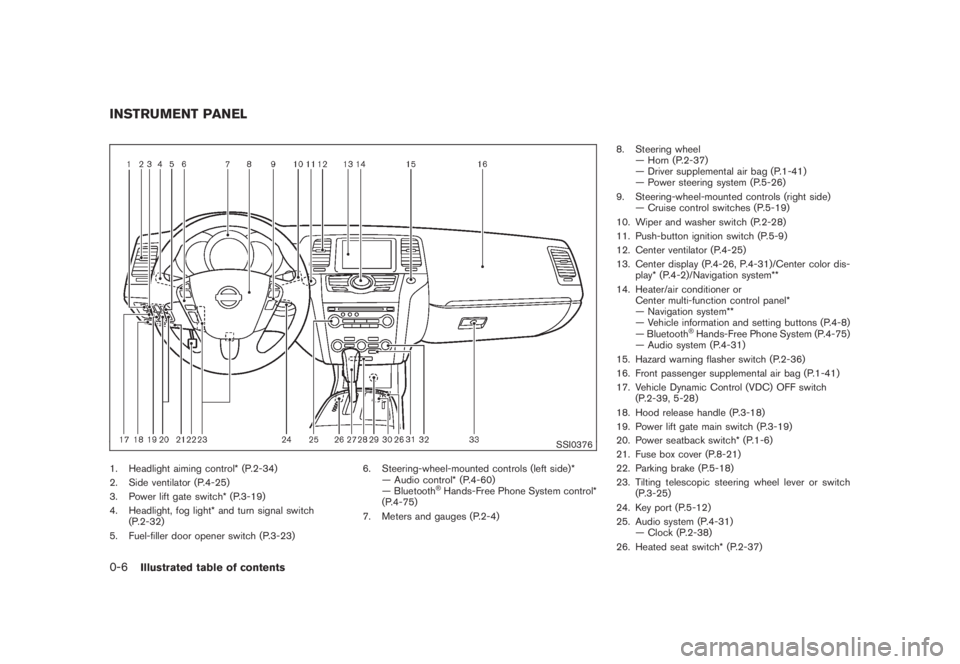
1. Headlight aiming control* (P.2-34)
2. Side ventilator (P.4-25)
3. Power lift gate switch* (P.3-19)
4. Headlight, fog light* and turn signal switch
(P.2-32)
5. Fuel-filler door opener switch (P.3-23)6. Steering-wheel-mounted controls (left side)*
— Audio control* (P.4-60)
— Bluetooth
®Hands-Free Phone System control*
(P.4-75)
7. Meters and gauges (P.2-4)8. Steering wheel
— Horn (P.2-37)
— Driver supplemental air bag (P.1-41)
— Power steering system (P.5-26)
9. Steering-wheel-mounted controls (right side)
— Cruise control switches (P.5-19)
10. Wiper and washer switch (P.2-28)
11. Push-button ignition switch (P.5-9)
12. Center ventilator (P.4-25)
13. Center display (P.4-26, P.4-31)/Center color dis-
play* (P.4-2)/Navigation system**
14. Heater/air conditioner or
Center multi-function control panel*
— Navigation system**
— Vehicle information and setting buttons (P.4-8)
— Bluetooth
®Hands-Free Phone System (P.4-75)
— Audio system (P.4-31)
15. Hazard warning flasher switch (P.2-36)
16. Front passenger supplemental air bag (P.1-41)
17. Vehicle Dynamic Control (VDC) OFF switch
(P.2-39, 5-28)
18. Hood release handle (P.3-18)
19. Power lift gate main switch (P.3-19)
20. Power seatback switch* (P.1-6)
21. Fuse box cover (P.8-21)
22. Parking brake (P.5-18)
23. Tilting telescopic steering wheel lever or switch
(P.3-25)
24. Key port (P.5-12)
25. Audio system (P.4-31)
— Clock (P.2-38)
26. Heated seat switch* (P.2-37)
INSTRUMENT PANEL0-6
Illustrated table of contents
Page 74 of 444
Black plate (70,1)
Model "Z51-D" EDITED: 2008/ 6/ 26
SSI0376
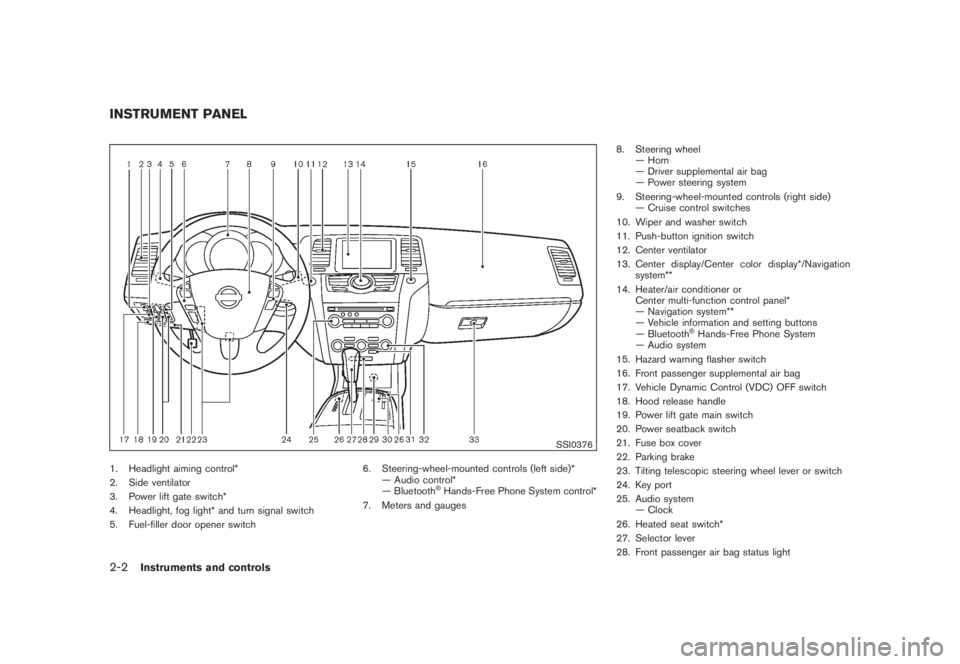
1. Headlight aiming control*
2. Side ventilator
3. Power lift gate switch*
4. Headlight, fog light* and turn signal switch
5. Fuel-filler door opener switch6. Steering-wheel-mounted controls (left side)*
— Audio control*
— Bluetooth
®Hands-Free Phone System control*
7. Meters and gauges8. Steering wheel
— Horn
— Driver supplemental air bag
— Power steering system
9. Steering-wheel-mounted controls (right side)
— Cruise control switches
10. Wiper and washer switch
11. Push-button ignition switch
12. Center ventilator
13. Center display/Center color display*/Navigation
system**
14. Heater/air conditioner or
Center multi-function control panel*
— Navigation system**
— Vehicle information and setting buttons
— Bluetooth
®Hands-Free Phone System
— Audio system
15. Hazard warning flasher switch
16. Front passenger supplemental air bag
17. Vehicle Dynamic Control (VDC) OFF switch
18. Hood release handle
19. Power lift gate main switch
20. Power seatback switch
21. Fuse box cover
22. Parking brake
23. Tilting telescopic steering wheel lever or switch
24. Key port
25. Audio system
— Clock
26. Heated seat switch*
27. Selector lever
28. Front passenger air bag status light
INSTRUMENT PANEL2-2
Instruments and controls
Page 166 of 444
Black plate (14,1)
Model "Z51-D" EDITED: 2008/ 6/ 23
Playing a Digital Versatile Disc (DVD)............... 4-69
Care and maintenance.................................. 4-73
Car phone or CB radio...................................... 4-74
Bluetooth
®Hands-Free Phone System with
navigation system (for U.S.)................................ 4-75
Regulatory information................................... 4-76
Voice commands.......................................... 4-76
Control buttons........................................... 4-77
Pairing procedure......................................... 4-77
Phonebook registration.................................. 4-78
Making a call............................................... 4-80
Receiving a call........................................... 4-80
During a call............................................... 4-81
Phone setting.............................................. 4-82
Troubleshooting guide................................... 4-84
Bluetooth®Hands-Free Phone System with
navigation system (for Canada)............................ 4-85
Regulatory information................................... 4-86
Voice commands.......................................... 4-86
Control buttons........................................... 4-87
Pairing procedure......................................... 4-87
Phonebook registration.................................. 4-88
Making a call............................................... 4-90
Receiving a call........................................... 4-91
During a call............................................... 4-91
Phone setting.............................................. 4-92Troubleshooting guide................................... 4-94
Bluetooth
®Hands-Free Phone System without
navigation system (if so equipped)....................... 4-95
Regulatory information................................... 4-96
Initialization................................................. 4-96
Operating tips............................................. 4-96
Giving voice commands................................. 4-96
Control buttons........................................... 4-98
Getting started............................................ 4-98
Choosing a language.................................... 4-98
Pairing procedure......................................... 4-98
Making a call by entering a phone number......... 4-99
Receiving a call........................................... 4-99
List of voice commands............................... 4-100
Call......................................................... 4-100
Phone book.............................................. 4-102
Memo pad................................................ 4-104
Setup...................................................... 4-104
Speaker Adaptation (SA) mode..................... 4-106
Troubleshooting guide................................. 4-108
NISSAN voice recognition system
(models with navigation system) (for U.S.)............ 4-109
NISSAN voice recognition standard mode........ 4-109
Using the system....................................... 4-111
Before starting........................................... 4-112
Giving voice commands............................... 4-112
Page 168 of 444
Black plate (164,1)
Model "Z51-D" EDITED: 2008/ 6/ 26
WARNING
.Do not disassemble or modify this
system. If you do, it may result in
accidents, fire, or electric shock.
.Do not use this system if you notice
any abnormality, such as a frozen
screen or lack of sound. Continued
use of the system may result in
accident, fire or electric shock.
.In case you notice any foreign
object in the system hardware, spill
liquid on it, or notice smoke or smell
coming from it, stop using the
system immediately and contact
your nearest NISSAN dealer. Ignor-
ing such conditions may lead to
accidents, fire, or electric shock.
.Park the vehicle in a safe location
and apply the parking brake to view
the images on the front center dis-
play screen using devices connected
to the auxiliary input jacks.
Do not attempt to operate the system in
extreme temperature conditions [below
48F(208C) and above 1588F(708C)].
Operating this system under these condi-
tions may result in system malfunctions.
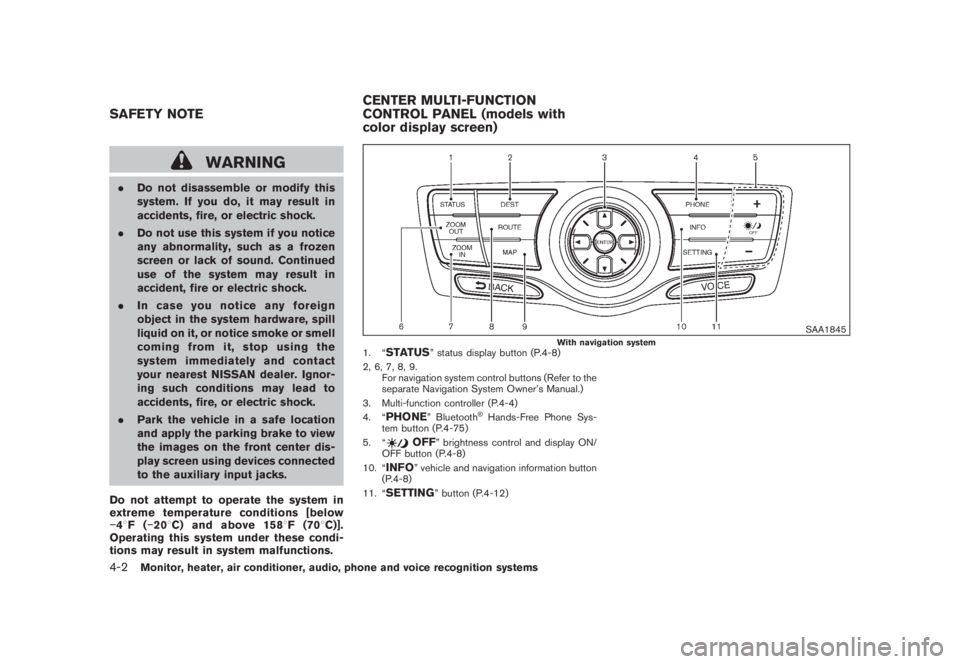
SAA1845
With navigation system
1. “
STATUS
” status display button (P.4-8)
2, 6, 7, 8, 9.
For navigation system control buttons (Refer to the
separate Navigation System Owner’s Manual.)
3. Multi-function controller (P.4-4)
4. “
PHONE
” Bluetooth
®Hands-Free Phone Sys-
tem button (P.4-75)
5. “
OFF
” brightness control and display ON/
OFF button (P.4-8)
10. “
INFO
” vehicle and navigation information button
(P.4-8)
11. “
SETTING
” button (P.4-12)
SAFETY NOTECENTER MULTI-FUNCTION
CONTROL PANEL (models with
color display screen)4-2
Monitor, heater, air conditioner, audio, phone and voice recognition systems
Page 241 of 444
Black plate (237,1)
Model "Z51-D" EDITED: 2008/ 6/ 26
WARNING
.Use a phone after stopping your
vehicle in a safe location. If you
have to use a phone while driving,
exercise extreme caution at all
times so full attention may be given
to vehicle operation.
.If you find yourself unable to devote
full attention to vehicle operation
while talking on the phone, pull off
the road to a safe location and stop
your vehicle before doing so.
CAUTION
To avoid draining the vehicle battery,
use a phone after starting the engine.
Your NISSAN is equipped with Bluetooth
®
Hands-Free Phone System. If you are an owner
of a compatible Bluetooth
®enabled cellular
phone, you can set up the wireless connection
between your cellular phone and the in-vehicle
phone module. With Bluetooth®wireless tech-
nology, you can make or receive a telephone call
with your cellular phone in your pocket.
Once your cellular phone is paired to the in-
vehicle phone module, no phone connectingprocedure is required anymore. Your phone is
automatically connected with the in-vehicle
phonemodulewhentheignitionswitchis
pushed to the ON position with the registered
cellular phone turned on and carried in the
vehicle.
You can register up to 5 different Bluetooth
®
cellular phones in the in-vehicle phone module.
However, you can talk on only one cellular phone
at a time.
The NISSAN Voice Recognition system sup-
ports the phone commands, so dialing a phone
number using your voice is possible. For more
details, see “NISSAN VOICE RECOGNITION
SYSTEM (models with navigation system)” later
in this section; page 4-109.
Before using the Bluetooth
®Hands-Free Phone
System, refer to the following notes.
.Set up the wireless connection between a
cellular phone and the in-vehicle phone
module before using the Bluetooth
®
Hands-Free Phone System.
.Some Bluetooth
®enabled cellular phones
may not be recognized by the in-vehicle
phone module. Please visit
www.nissanusa.com/bluetooth for a recom-
mended phone list.
.You will not be able to use a hands-free
phone under the following conditions:— Your vehicle is outside of the telephone
service area.
— Your vehicle is in an area where it is
difficult to receive radio waves; such as in
a tunnel, in an underground parking
garage, behind a tall building or in a
mountainous area.
— Your cellular phone is locked in order not
to be dialed.
.When the radio wave condition is not ideal
or ambient sound is too loud, it may be
difficult to hear the other person’s voice
during a call.
.Immediately after the ignition switch is
pushed to the ON position, it may be
impossible to receive a call for a short
period of time.
.Do not place the cellular phone in an area
surrounded by metal or far away from the in-
vehicle phone module to prevent tone quality
degradation and wireless connection dis-
ruption.
.While a cellular phone is connected through
the Bluetooth
®wireless connection, the
battery power of the cellular phone may
discharge quicker than usual.
.If the Bluetooth®Hands-Free Phone System
seems to be malfunctioning, please visit
BLUETOOTH
®HANDS-FREE PHONE
SYSTEM WITH NAVIGATION
SYSTEM (for U.S.)
Monitor, heater, air conditioner, audio, phone and voice recognition systems
4-75
Page 242 of 444
Black plate (238,1)
Model "Z51-D" EDITED: 2008/ 6/ 26
www.nissanusa.com/bluetooth for trouble-
shooting help.
.Some cellular phones or other devices may
cause interference or a buzzing noise to
come from the audio system speakers.
Storing the device in a different location
may reduce or eliminate the noise.
.Refer to the cellular phone Owner’s Manual
regarding the telephone pairing procedure
specific to your phone, battery charging,
cellular phone antenna, etc.
.The antenna display on the monitor will not
coincide with the antenna display of some
cellular phones.
.Keep the interior of the vehicle as quiet as
possible to hear the caller’s voice clearly as
well as to minimize its echoes.
.If reception between callers is unclear,
adjusting the incoming or outgoing call
volume may improve the clarity.
REGULATORY INFORMATION
FCC Regulatory information— CAUTION: To maintain compliance with
FCC’s RF exposure guidelines, use only
the supplied antenna. Unauthorized antenna,
modification, or attachments could damage
the transmitter and may violate FCC regula-
tions.
— Operation is subject to the following two
conditions:
1) this device may not cause interference and
2) this device must accept any interference,
including interference that may cause un-
desired operation of the deviceIC Regulatory information— Operation is subject to the following two
conditions: (1) this device may not cause
interference, and (2) this device must accept
any interference, including interference that
may cause undesired operation of the
device.
— This Class B digital apparatus meets all
requirements of the Canadian Interference-
Causing Equipment Regulations.Bluetooth trademark:
BLUETOOTH
®is a trademark
owned by Bluetooth SIG, Inc.,
U.S.A.
VOICE COMMANDSYou can use voice commands to operate various
Bluetooth
®Hands-Free Phone System features
using the NISSAN Voice Recognition system.
For more details, see “NISSAN VOICE RE-
COGNITION SYSTEM (models with navigation
system)” later in this section; page 4-109.
4-76
Monitor, heater, air conditioner, audio, phone and voice recognition systems
Page 244 of 444
Black plate (240,1)
Model "Z51-D" EDITED: 2008/ 6/ 26
SAA1925
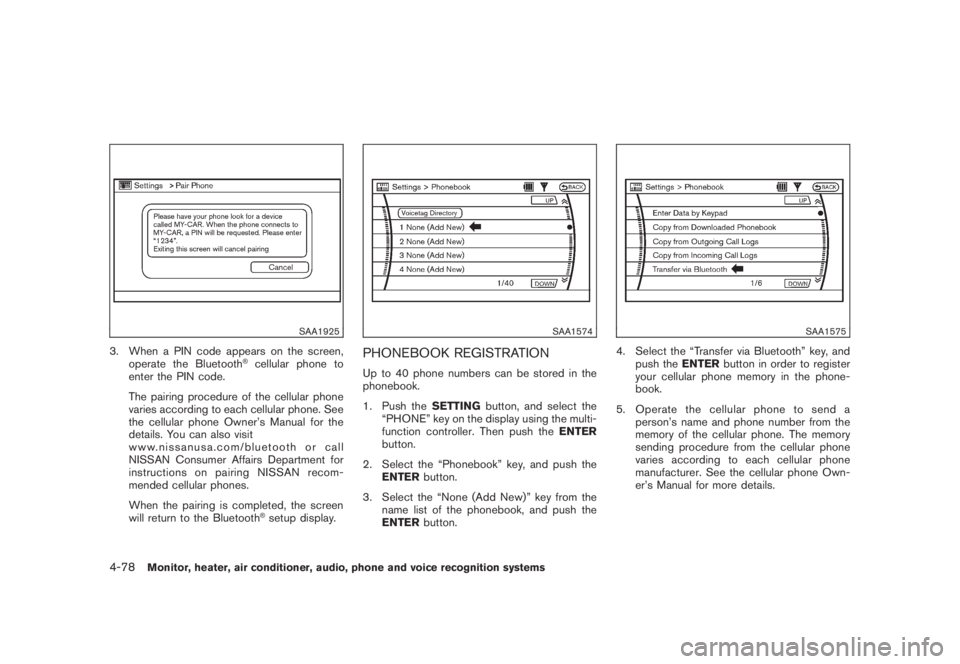
3. When a PIN code appears on the screen,
operate the Bluetooth
®cellular phone to
enter the PIN code.
The pairing procedure of the cellular phone
varies according to each cellular phone. See
the cellular phone Owner’s Manual for the
details. You can also visit
www.nissanusa.com/bluetooth or call
NISSAN Consumer Affairs Department for
instructions on pairing NISSAN recom-
mended cellular phones.
When the pairing is completed, the screen
will return to the Bluetooth®setup display.
SAA1574
PHONEBOOK REGISTRATIONUp to 40 phone numbers can be stored in the
phonebook.
1. Push theSETTINGbutton, and select the
“PHONE” key on the display using the multi-
function controller. Then push theENTER
button.
2. Select the “Phonebook” key, and push the
ENTERbutton.
3. Select the “None (Add New)” key from the
name list of the phonebook, and push the
ENTERbutton.
SAA1575
4. Select the “Transfer via Bluetooth” key, and
push theENTERbutton in order to register
your cellular phone memory in the phone-
book.
5. Operate the cellular phone to send a
person’s name and phone number from the
memory of the cellular phone. The memory
sending procedure from the cellular phone
varies according to each cellular phone
manufacturer. See the cellular phone Own-
er’s Manual for more details.
4-78
Monitor, heater, air conditioner, audio, phone and voice recognition systems
Page 245 of 444
Black plate (241,1)
Model "Z51-D" EDITED: 2008/ 6/ 26
SAA1576
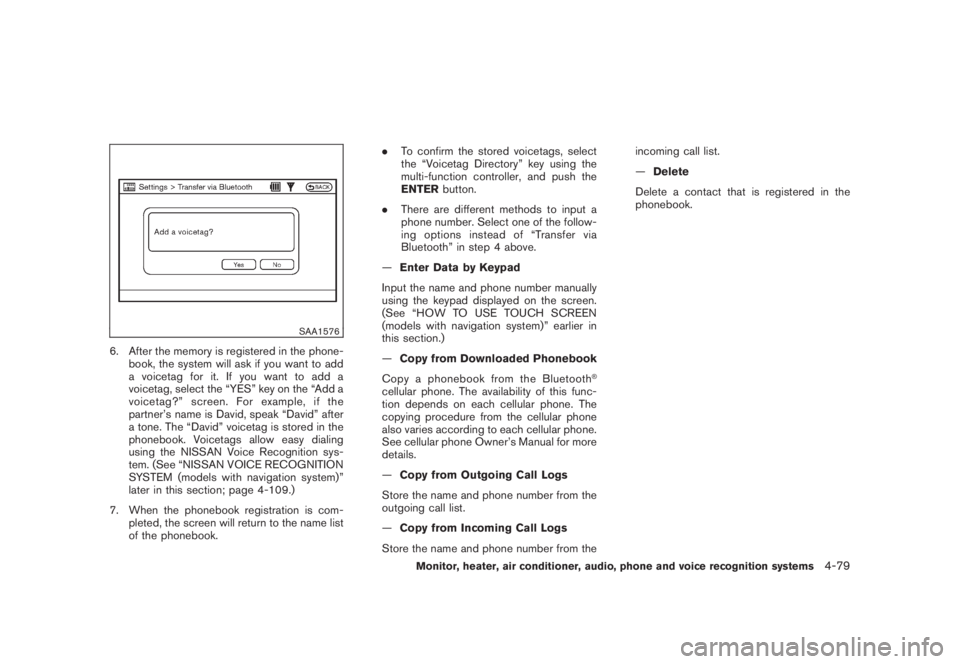
6. After the memory is registered in the phone-
book, the system will ask if you want to add
a voicetag for it. If you want to add a
voicetag, select the “YES” key on the “Add a
voicetag?” screen. For example, if the
partner’s name is David, speak “David” after
a tone. The “David” voicetag is stored in the
phonebook. Voicetags allow easy dialing
using the NISSAN Voice Recognition sys-
tem. (See “NISSAN VOICE RECOGNITION
SYSTEM (models with navigation system)”
later in this section; page 4-109.)
7. When the phonebook registration is com-
pleted, the screen will return to the name list
of the phonebook..To confirm the stored voicetags, select
the “Voicetag Directory” key using the
multi-function controller, and push the
ENTERbutton.
.There are different methods to input a
phone number. Select one of the follow-
ing options instead of “Transfer via
Bluetooth” in step 4 above.
—Enter Data by Keypad
Input the name and phone number manually
using the keypad displayed on the screen.
(See “HOW TO USE TOUCH SCREEN
(models with navigation system)” earlier in
this section.)
—Copy from Downloaded Phonebook
Copy a phonebook from the Bluetooth
®
cellular phone. The availability of this func-
tion depends on each cellular phone. The
copying procedure from the cellular phone
also varies according to each cellular phone.
See cellular phone Owner’s Manual for more
details.
—Copy from Outgoing Call Logs
Store the name and phone number from the
outgoing call list.
—Copy from Incoming Call Logs
Store the name and phone number from theincoming call list.
—Delete
Delete a contact that is registered in the
phonebook.
Monitor, heater, air conditioner, audio, phone and voice recognition systems
4-79
Page 248 of 444
Black plate (244,1)
Model "Z51-D" EDITED: 2008/ 6/ 26
SAA1580
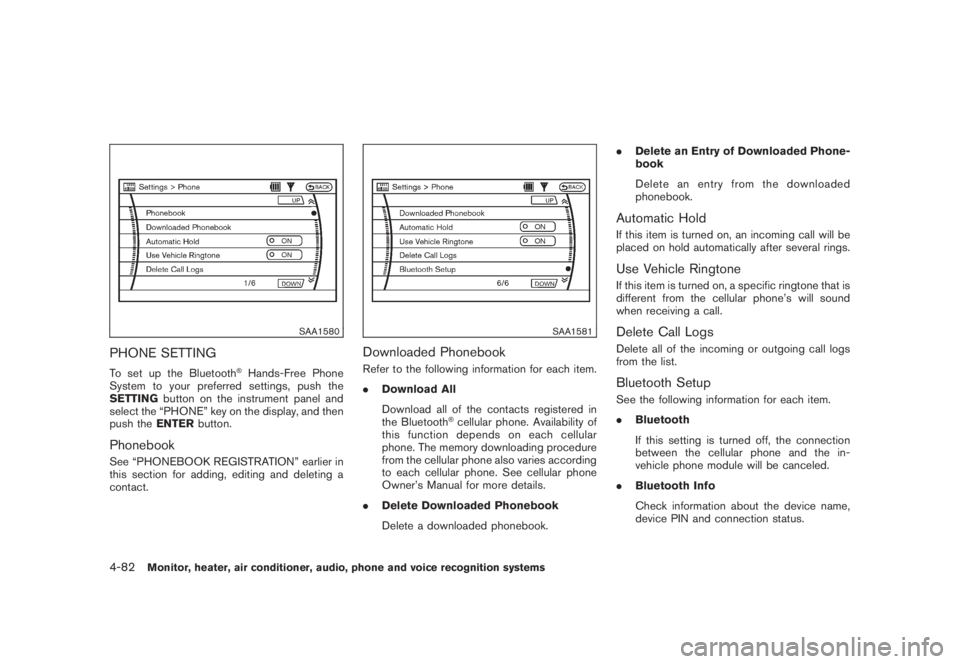
PHONE SETTINGTo set up the Bluetooth
®Hands-Free Phone
System to your preferred settings, push the
SETTINGbutton on the instrument panel and
select the “PHONE” key on the display, and then
push theENTERbutton.
PhonebookSee “PHONEBOOK REGISTRATION” earlier in
this section for adding, editing and deleting a
contact.
SAA1581
Downloaded PhonebookRefer to the following information for each item.
.Download All
Download all of the contacts registered in
the Bluetooth
®cellular phone. Availability of
this function depends on each cellular
phone. The memory downloading procedure
from the cellular phone also varies according
to each cellular phone. See cellular phone
Owner’s Manual for more details.
.Delete Downloaded Phonebook
Delete a downloaded phonebook..Delete an Entry of Downloaded Phone-
book
Delete an entry from the downloaded
phonebook.
Automatic HoldIf this item is turned on, an incoming call will be
placed on hold automatically after several rings.Use Vehicle RingtoneIf this item is turned on, a specific ringtone that is
different from the cellular phone’s will sound
when receiving a call.Delete Call LogsDelete all of the incoming or outgoing call logs
from the list.Bluetooth SetupSee the following information for each item.
.Bluetooth
If this setting is turned off, the connection
between the cellular phone and the in-
vehicle phone module will be canceled.
.Bluetooth Info
Check information about the device name,
device PIN and connection status.
4-82
Monitor, heater, air conditioner, audio, phone and voice recognition systems