fuel cap NISSAN MURANO 2008 Owners Manual
[x] Cancel search | Manufacturer: NISSAN, Model Year: 2008, Model line: MURANO, Model: NISSAN MURANO 2008Pages: 444, PDF Size: 6.09 MB
Page 87 of 444
Black plate (83,1)
Model "Z51-D" EDITED: 2008/ 6/ 26
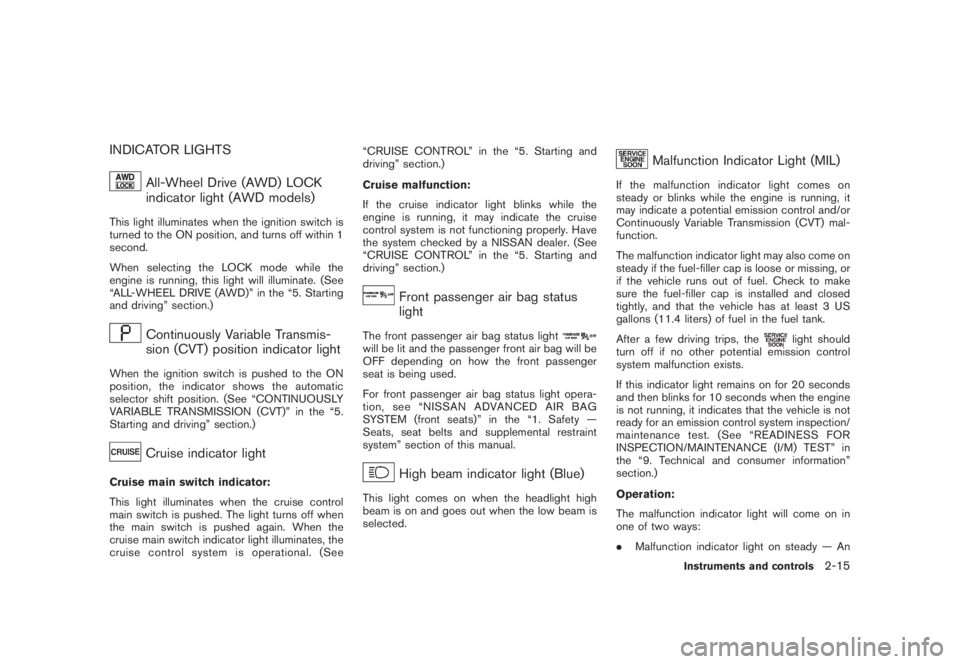
INDICATOR LIGHTS
All-Wheel Drive (AWD) LOCK
indicator light (AWD models)
This light illuminates when the ignition switch is
turned to the ON position, and turns off within 1
second.
When selecting the LOCK mode while the
engine is running, this light will illuminate. (See
“ALL-WHEEL DRIVE (AWD)” in the “5. Starting
and driving” section.)
Continuously Variable Transmis-
sion (CVT) position indicator light
When the ignition switch is pushed to the ON
position, the indicator shows the automatic
selector shift position. (See “CONTINUOUSLY
VARIABLE TRANSMISSION (CVT)” in the “5.
Starting and driving” section.)
Cruise indicator light
Cruise main switch indicator:
This light illuminates when the cruise control
main switch is pushed. The light turns off when
the main switch is pushed again. When the
cruise main switch indicator light illuminates, the
cruise control system is operational. (See“CRUISE CONTROL” in the “5. Starting and
driving” section.)
Cruise malfunction:
If the cruise indicator light blinks while the
engine is running, it may indicate the cruise
control system is not functioning properly. Have
the system checked by a NISSAN dealer. (See
“CRUISE CONTROL” in the “5. Starting and
driving” section.)
Front passenger air bag status
light
The front passenger air bag status lightwill be lit and the passenger front air bag will be
OFF depending on how the front passenger
seat is being used.
For front passenger air bag status light opera-
tion,see“NISSANADVANCEDAIRBAG
SYSTEM (front seats)” in the “1. Safety —
Seats, seat belts and supplemental restraint
system” section of this manual.
High beam indicator light (Blue)
This light comes on when the headlight high
beam is on and goes out when the low beam is
selected.
Malfunction Indicator Light (MIL)
If the malfunction indicator light comes on
steady or blinks while the engine is running, it
may indicate a potential emission control and/or
Continuously Variable Transmission (CVT) mal-
function.
The malfunction indicator light may also come on
steady if the fuel-filler cap is loose or missing, or
if the vehicle runs out of fuel. Check to make
sure the fuel-filler cap is installed and closed
tightly, and that the vehicle has at least 3 US
gallons (11.4 liters) of fuel in the fuel tank.
After a few driving trips, the
light should
turn off if no other potential emission control
system malfunction exists.
If this indicator light remains on for 20 seconds
and then blinks for 10 seconds when the engine
is not running, it indicates that the vehicle is not
ready for an emission control system inspection/
maintenance test. (See “READINESS FOR
INSPECTION/MAINTENANCE (I/M) TEST” in
the “9. Technical and consumer information”
section.)
Operation:
The malfunction indicator light will come on in
one of two ways:
.Malfunction indicator light on steady — An
Instruments and controls
2-15
Page 88 of 444
Black plate (84,1)
Model "Z51-D" EDITED: 2008/ 6/ 26
emission control system and/or CVT mal-
function has been detected. Check the fuel-
filler cap. If the fuel-filler cap is loose or
missing, tighten or install the cap and
continue to drive the vehicle. The
light
should turn off after a few driving trips. If the
light does not turn off after a few
driving trips, have the vehicle inspected by a
NISSAN dealer. You do not need to have
your vehicle towed to the dealer.
.Malfunction indicator light blinking — An
engine misfire has been detected which may
damage the emission control system.
To reduce or avoid emission control system
damage:
a) Do not drive at speeds above 45 MPH
(72 km/h) .
b) Avoid hard acceleration or deceleration.
c) Avoid steep uphill grades.
d) If possible, reduce the amount of cargo
being hauled or towed.
The malfunction indicator light may stop
blinking and remain on.
Have the vehicle inspected by a NISSAN
dealer. You do not need to have your vehicle
towed to the dealer.
CAUTION
Continued vehicle operation without
having the emission control system
and/or CVT system checked and re-
paired as necessary could lead to poor
driveability, reduced fuel economy, and
possible damage to the emission con-
trol system.
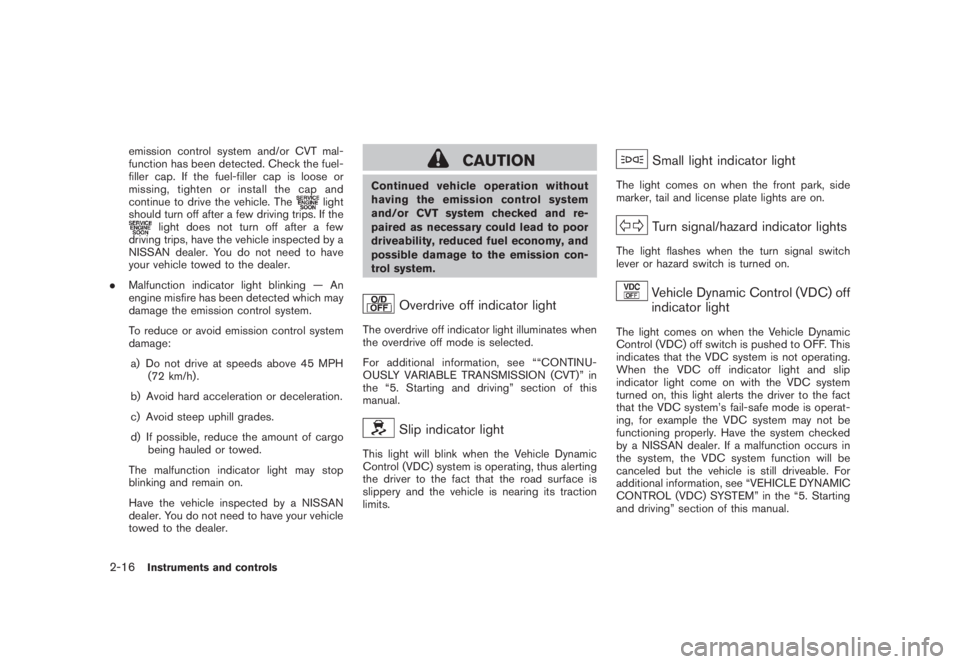
Overdrive off indicator light
The overdrive off indicator light illuminates when
the overdrive off mode is selected.
For additional information, see ““CONTINU-
OUSLY VARIABLE TRANSMISSION (CVT)” in
the “5. Starting and driving” section of this
manual.
Slip indicator light
This light will blink when the Vehicle Dynamic
Control (VDC) system is operating, thus alerting
the driver to the fact that the road surface is
slippery and the vehicle is nearing its traction
limits.
Small light indicator light
The light comes on when the front park, side
marker, tail and license plate lights are on.
Turn signal/hazard indicator lights
The light flashes when the turn signal switch
lever or hazard switch is turned on.
Vehicle Dynamic Control (VDC) off
indicator light
The light comes on when the Vehicle Dynamic
Control (VDC) off switch is pushed to OFF. This
indicates that the VDC system is not operating.
When the VDC off indicator light and slip
indicator light come on with the VDC system
turned on, this light alerts the driver to the fact
that the VDC system’s fail-safe mode is operat-
ing, for example the VDC system may not be
functioning properly. Have the system checked
by a NISSAN dealer. If a malfunction occurs in
the system, the VDC system function will be
canceled but the vehicle is still driveable. For
additional information, see “VEHICLE DYNAMIC
CONTROL (VDC) SYSTEM” in the “5. Starting
and driving” section of this manual.
2-16
Instruments and controls
Page 133 of 444
Black plate (10,1)
3 Pre-driving checks and adjustments
Model "Z51-D" EDITED: 2008/ 6/ 23
Keys ............................................................... 3-2
NISSAN Vehicle Immobilizer System keys............ 3-2
Intelligent Key system (if so equipped)................ 3-3
Mechanical key.............................................. 3-4
Valet hand-off................................................ 3-4
Doors.............................................................. 3-4
Locking with mechanical key............................. 3-5
Opening and closing windows with the
mechanical key.............................................. 3-5
Locking with inside lock knob........................... 3-5
Locking with power door lock switch.................. 3-6
Automatic door locks...................................... 3-6
Child safety rear door lock............................... 3-7
Intelligent Key system (if so equipped).................... 3-7
Intelligent Key operating range.......................... 3-9
Door locks/unlocks precaution.......................... 3-9
Intelligent Key operation................................. 3-10
Battery saver system..................................... 3-13
Warning signals........................................... 3-13
Troubleshooting guide................................... 3-14
Remote keyless entry system.............................. 3-15
How to use remote keyless entry system........... 3-16Hood............................................................ 3-18
Lift gate......................................................... 3-19
Operating manual lift gate.............................. 3-19
Operating power lift gate (if so equipped).......... 3-19
Auto closure............................................... 3-22
Lift gate release........................................... 3-23
Fuel-filler door................................................. 3-23
Opening fuel-filler door.................................. 3-23
Fuel-filler cap.............................................. 3-24
Tilting telescopic steering column........................ 3-25
Manual operation......................................... 3-25
Electric operation......................................... 3-26
Sun visors...................................................... 3-26
Mirrors........................................................... 3-27
Inside mirror................................................ 3-27
Outside mirrors............................................ 3-29
Vanity mirror................................................ 3-30
Automatic drive positioner (if so equipped)............. 3-30
Entry/exit function......................................... 3-30
Memory storage........................................... 3-31
System operation......................................... 3-32
Page 156 of 444
Black plate (154,1)
Model "Z51-D" EDITED: 2008/ 6/ 26
FUEL-FILLER CAP
WARNING
.Gasoline is extremely flammable
and highly explosive under certain
conditions. You could be burned or
seriously injured if it is misused or
mishandled. Always stop engine
and do not smoke or allow open
flames or sparks near the vehicle
when refueling.
.Do not attempt to top off the fuel
tank after the fuel pump nozzle
shuts off automatically. Continued
refueling may cause fuel overflow,
resulting in fuel spray and possibly
a fire.
.Use only an original equipment type
fuel-filler cap as a replacement. It
has a built-in safety valve needed
for proper operation of the fuel
system and emission control sys-
tem. An incorrect cap can result in a
serious malfunction and possible
injury. It could also cause the mal-
function indicator light to come on.
.Never pour fuel into the throttle
body to attempt to start your vehi-cle.
.Do not fill a portable fuel container
in the vehicle or trailer. Static elec-
tricity can cause an explosion of
flammable liquid, vapor or gas in
any vehicle or trailer. To reduce the
risk of serious injury or death when
filling portable fuel containers:
— Always place the container on
the ground when filling.
— Do not use electronic devices
when filling.
— Keep the pump nozzle in contact
with the container while you are
filling it.
— Use only approved portable fuel
containers for flammable liquid.
CAUTION
.If fuel is spilled on the vehicle body,
flush it away with water to avoid
paint damage.
.Tighten until the fuel-filler cap
clicks. Failure to tighten the fuel-
filler cap properly may cause the
malfunction indicator light
(MIL) to illuminate. If the
lightilluminates because the fuel-filler
cap is loose or missing, tighten or
install the cap and continue to drive
the vehicle. The
light should
turn off after a few driving trips. If
the
light does not turn off after
a few driving trips, have the vehicle
inspected by a NISSAN dealer.
3-24
Pre-driving checks and adjustments
Page 157 of 444
Black plate (155,1)
Model "Z51-D" EDITED: 2008/ 6/ 26
SPA2442
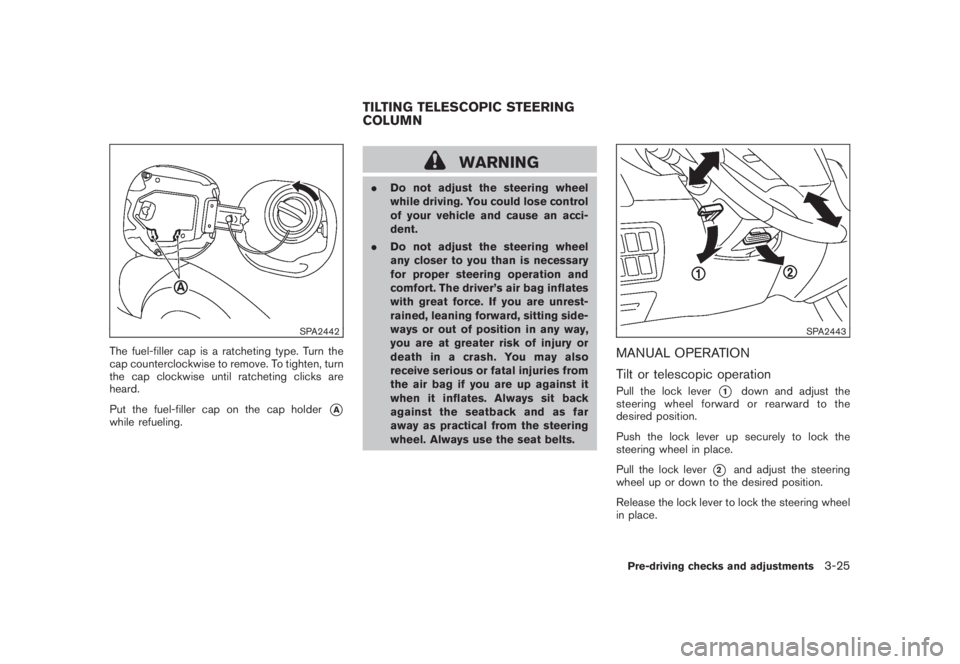
The fuel-filler cap is a ratcheting type. Turn the
cap counterclockwise to remove. To tighten, turn
the cap clockwise until ratcheting clicks are
heard.
Put the fuel-filler cap on the cap holder
*A
while refueling.
WARNING
.Do not adjust the steering wheel
while driving. You could lose control
of your vehicle and cause an acci-
dent.
.Do not adjust the steering wheel
any closer to you than is necessary
for proper steering operation and
comfort. The driver’s air bag inflates
with great force. If you are unrest-
rained, leaning forward, sitting side-
ways or out of position in any way,
you are at greater risk of injury or
death in a crash. You may also
receive serious or fatal injuries from
the air bag if you are up against it
when it inflates. Always sit back
against the seatback and as far
away as practical from the steering
wheel. Always use the seat belts.
SPA2443
MANUAL OPERATION
Tilt or telescopic operationPull the lock lever
*1
down and adjust the
steering wheel forward or rearward to the
desired position.
Push the lock lever up securely to lock the
steering wheel in place.
Pull the lock lever
*2
and adjust the steering
wheel up or down to the desired position.
Release the lock lever to lock the steering wheel
in place.
TILTING TELESCOPIC STEERING
COLUMN
Pre-driving checks and adjustments
3-25
Page 196 of 444
Black plate (192,1)
Model "Z51-D" EDITED: 2008/ 6/ 26
TO TURN THE SYSTEM OFFPush the OFF button.
SAA1989
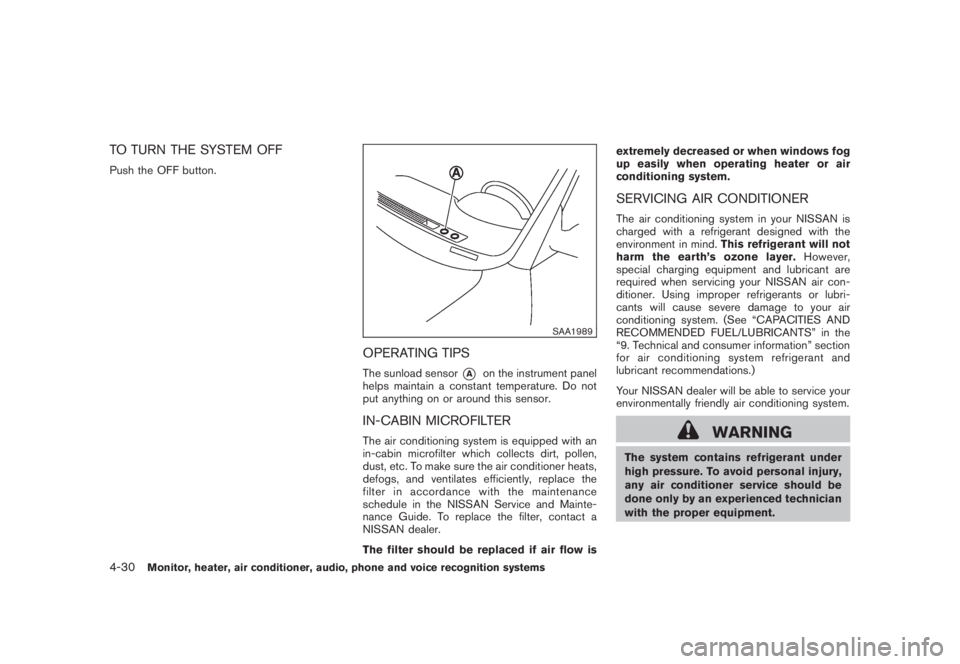
OPERATING TIPSThe sunload sensor
*A
on the instrument panel
helps maintain a constant temperature. Do not
put anything on or around this sensor.
IN-CABIN MICROFILTERThe air conditioning system is equipped with an
in-cabin microfilter which collects dirt, pollen,
dust, etc. To make sure the air conditioner heats,
defogs, and ventilates efficiently, replace the
filter in accordance with the maintenance
schedule in the NISSAN Service and Mainte-
nance Guide. To replace the filter, contact a
NISSAN dealer.
The filter should be replaced if air flow isextremely decreased or when windows fog
up easily when operating heater or air
conditioning system.
SERVICING AIR CONDITIONERThe air conditioning system in your NISSAN is
charged with a refrigerant designed with the
environment in mind.This refrigerant will not
harm the earth’s ozone layer.However,
special charging equipment and lubricant are
required when servicing your NISSAN air con-
ditioner. Using improper refrigerants or lubri-
cants will cause severe damage to your air
conditioning system. (See “CAPACITIES AND
RECOMMENDED FUEL/LUBRICANTS” in the
“9. Technical and consumer information” section
for air conditioning system refrigerant and
lubricant recommendations.)
Your NISSAN dealer will be able to service your
environmentally friendly air conditioning system.
WARNING
The system contains refrigerant under
high pressure. To avoid personal injury,
any air conditioner service should be
done only by an experienced technician
with the proper equipment.
4-30
Monitor, heater, air conditioner, audio, phone and voice recognition systems
Page 373 of 444
Black plate (371,1)
Model "Z51-D" EDITED: 2008/ 6/ 26
When performing any inspection or mainte-
nance work on your vehicle, always take care
to prevent serious accidental injury to yourself or
damage to the vehicle. The following are general
precautions which should be closely observed.
WARNING
.Park the vehicle on a level surface,
apply the parking brake securely
and block the wheels to prevent
the vehicle from moving. Move the
selector lever to P (Park) .
.Be sure the ignition switch is in the
OFF or LOCK position when per-
forming any parts replacement or
repairs.
.If you must work with the engine
running, keep your hands, clothing,
hair and tools away from moving
fans, belts and any other moving
parts.
.It is advisable to secure or remove
any loose clothing and remove any
jewelry, such as rings, watches, etc.
before working on your vehicle.
.Always wear eye protection when-
ever you work on your vehicle.
.If you must run the engine in anenclosed space such as a garage, be
sure there is proper ventilation for
exhaust gases to escape.
.Never get under the vehicle while it
is supported only by a jack. If it is
necessary to work under the vehicle,
support it with safety stands.
.Keep smoking materials, flame and
sparks away from fuel tank and the
battery.
.The fuel filter or fuel lines should be
serviced by a NISSAN dealer be-
cause the fuel lines are under high
pressure even when the engine is
off.
CAUTION
.Do not work under the hood while
the engine is hot. Turn the engine
off and wait until it cools down.
.Avoid direct contact with used en-
gine oil and coolant. Improperly
disposed engine oil, and engine
coolant and/or other vehicle fluids
can damage the environment. Al-
ways conform to local regulations
for disposal of vehicle fluid..Never leave the engine or the CVT
related component harnesses dis-
connected while the ignition switch
is in the ON position.
.Never connect or disconnect the
battery or any transistorized com-
ponent while the ignition switch is
in the ON position.
.Your vehicle is equipped with an
automatic engine cooling fan. It may
come on at any time without warn-
ing, even if the ignition key is in the
OFF position and the engine is not
running. To avoid injury, always
disconnect the negative battery
cable before working near the fan.
This “8. Maintenance and do-it-yourself” section
gives instructions regarding only those items
which are relatively easy for an owner to perform.
A genuine NISSAN Service Manual is also
available. (See “OWNER’S MANUAL/SERVICE
MANUAL ORDER INFORMATION” in the “9.
Technical and consumer information” section.)
Youshouldbeawarethatincompleteor
improper servicing may result in operating
difficulties or excessive emissions, and could
affect warranty coverage.If in doubt about
any servicing, we recommend that it be
MAINTENANCE PRECAUTIONS
Maintenance and do-it-yourself
8-5
Page 378 of 444
Black plate (376,1)
Model "Z51-D" EDITED: 2008/ 6/ 26
CAUTION
Be careful not to burn yourself, as the
engine oil is hot.
.Waste oil must be disposed of
properly.
.Check your local regulations.
Perform steps 4 to 9 when the engine oil
filter change is needed.
4. Remove the plastic cover over the oil filter
location by removing the small plastic clips
as illustrated.
5. Loosen the oil filter
*C
with an oil filter
wrench. Remove the oil filter by turning it by
hand.
6. Wipe the engine oil filter mounting surface
with a clean rag.
CAUTION
Be sure to remove any old gasket
material remaining on the mounting
surface of the engine. Failure to do so
could lead to engine damage.
7. Coat the gasket on the new filter with clean
engine oil.8. Screw in the oil filter clockwise until a slight
resistance is felt, then tighten additionally
more than 2/3 turn.
Oil filter tightening torque:
11 to 15 ft-lb (14.7 to 20.5 N·m)
9. Install the plastic cover.
10. Clean and re-install the drain plug with a
new washer. Securely tighten the drain plug
with a wrench.
Drain plug tightening torque:
22 to 29 ft-lb (29 to 39 N·m)
Do not use excessive force.
11. Refill engine with recommended oil through
the oil filler opening, and install the oil filler
cap securely.
See “CAPACITIES AND RECOMMENDED
FUEL/LUBRICANTS” in the “9. Technical
and consumer information” section for drain
and refill capacity. The drain and refill
capacity depends on the oil temperature
and drain time. Use these specifications for
reference only. Always use the dipstick to
determine the proper amount of oil in the
engine.
12. Start the engine and check for leakage
around the drain plug and the oil filter.
Correct as required.
13. Turn the engine off and wait more than 10minutes. Check the oil level with the dipstick.
Add engine oil if necessary.
After the operation1. Lower the vehicle carefully to the ground.
2. Dispose of waste oil and filter properly.
WARNING
.Prolonged and repeated contact
with used engine oil may cause skin
cancer.
.Try to avoid direct skin contact with
used oil. If skin contact is made,
wash thoroughly with soap or hand
cleaner as soon as possible.
.Keep used engine oil out of reach of
children.
8-10
Maintenance and do-it-yourself
Page 380 of 444
Black plate (378,1)
Model "Z51-D" EDITED: 2008/ 6/ 26
For additional brake fluid information, see
“CAPACITIES AND RECOMMENDED FUEL/
LUBRICANTS” in the “9. Technical and con-
sumer information” section of this manual.
WARNING
.Use only new fluid from a sealed
container. Old, inferior or contami-
nated fluid may damage the brake
system. The use of improper fluids
can damage the brake system and
affect the vehicle’s stopping ability.
.Clean the filler cap before removing.
.Brake fluid is poisonous and should
be stored carefully in marked con-
tainers out of the reach of children.
CAUTION
Do not spill the fluid on any painted
surfaces. This will damage the paint. If
fluid is spilled, immediately wash the
surface with water.
SDI2178
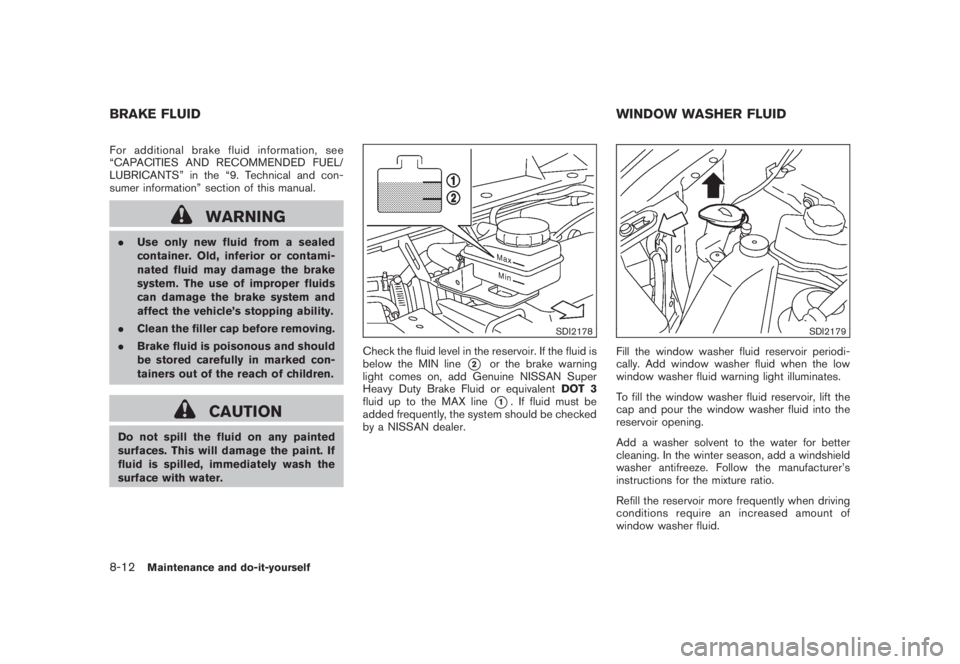
Check the fluid level in the reservoir. If the fluid is
below the MIN line
*2
or the brake warning
light comes on, add Genuine NISSAN Super
Heavy Duty Brake Fluid or equivalentDOT 3
fluid up to the MAX line*1. If fluid must be
added frequently, the system should be checked
by a NISSAN dealer.
SDI2179
Fill the window washer fluid reservoir periodi-
cally. Add window washer fluid when the low
window washer fluid warning light illuminates.
To fill the window washer fluid reservoir, lift the
cap and pour the window washer fluid into the
reservoir opening.
Add a washer solvent to the water for better
cleaning. In the winter season, add a windshield
washer antifreeze. Follow the manufacturer’s
instructions for the mixture ratio.
Refill the reservoir more frequently when driving
conditions require an increased amount of
window washer fluid.
BRAKE FLUID WINDOW WASHER FLUID8-12
Maintenance and do-it-yourself
Page 409 of 444
Black plate (28,1)
9 Technical and consumer information
Model "Z51-D" EDITED: 2008/ 6/ 23
Capacities and recommended fuel/lubricants............ 9-2
Fuel recommendation...................................... 9-3
Engine oil and oil filter recommendation............... 9-5
Air conditioning system refrigerant and lubricant
recommendations........................................... 9-6
Specifications.................................................... 9-7
Engine......................................................... 9-7
Wheels and tires............................................ 9-7
Dimensions and weights.................................. 9-8
When traveling or registering your vehicle in
another country.................................................. 9-8
Vehicle identification........................................... 9-8
Vehicle identification number (VIN) plate.............. 9-8
Vehicle identification number (chassis number)...... 9-9
Engine serial number...................................... 9-9
F.M.V.S.S./C.M.V.S.S. certification label............... 9-9
Emission control information label.................... 9-10
Tire and loading information label..................... 9-10
Air conditioner specification label..................... 9-10
Installing front license plate................................ 9-11
Vehicle loading information................................. 9-12
Terms........................................................ 9-12Vehicle load capacity.................................... 9-12
Securing the load......................................... 9-14
Loading tips................................................ 9-15
Measurement of weights................................ 9-15
Towing a trailer................................................ 9-15
Maximum load limits...................................... 9-16
Maximum Gross Vehicle Weight (GVW)/
maximum Gross Axle Weight (GAW)................ 9-17
Towing load/specification............................... 9-19
Towing safety.............................................. 9-19
Flat towing................................................. 9-23
Uniform tire quality grading................................. 9-24
Treadwear.................................................. 9-24
Traction AA, A, B and C................................ 9-24
Temperature A, B and C................................ 9-24
Emission control system warranty......................... 9-25
Reporting safety defects (US only)....................... 9-25
Readiness for Inspection/Maintenance (I/M) test . ..... 9-25
Event data recorders (EDR)................................ 9-26
Owner’s Manual/Service Manual order information . . . 9-27
In the event of a collision............................... 9-27