reset NISSAN MURANO 2008 Owners Manual
[x] Cancel search | Manufacturer: NISSAN, Model Year: 2008, Model line: MURANO, Model: NISSAN MURANO 2008Pages: 444, PDF Size: 6.09 MB
Page 13 of 444
Black plate (10,1)
Model "Z51-D" EDITED: 2008/ 6/ 26
SSI0377
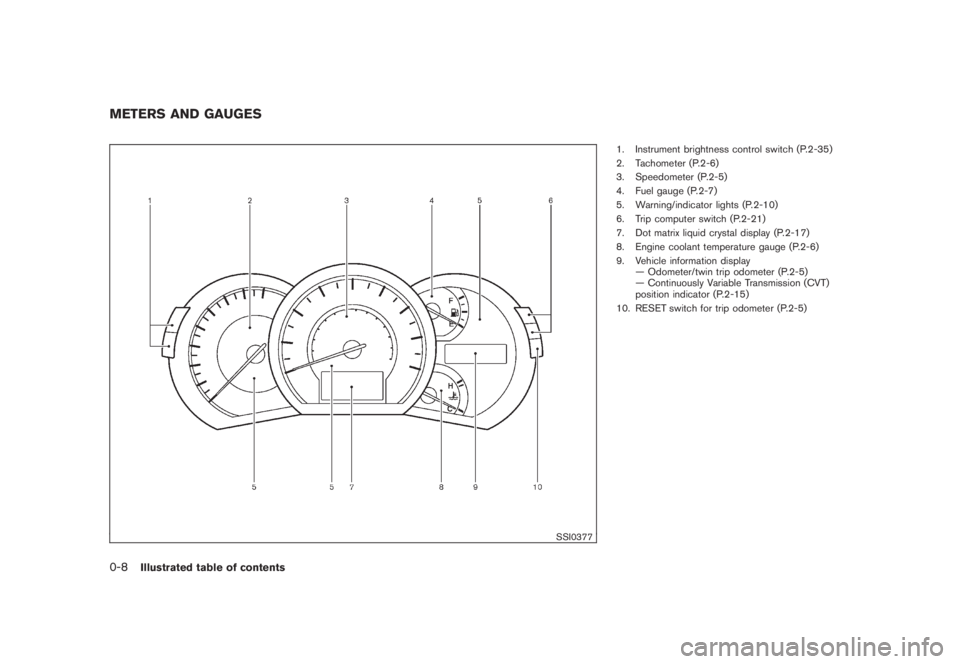
1. Instrument brightness control switch (P.2-35)
2. Tachometer (P.2-6)
3. Speedometer (P.2-5)
4. Fuel gauge (P.2-7)
5. Warning/indicator lights (P.2-10)
6. Trip computer switch (P.2-21)
7. Dot matrix liquid crystal display (P.2-17)
8. Engine coolant temperature gauge (P.2-6)
9. Vehicle information display
— Odometer/twin trip odometer (P.2-5)
— Continuously Variable Transmission (CVT)
position indicator (P.2-15)
10. RESET switch for trip odometer (P.2-5)
METERS AND GAUGES0-8
Illustrated table of contents
Page 19 of 444
Black plate (16,1)
Model "Z51-D" EDITED: 2008/ 6/ 26
SSS0793
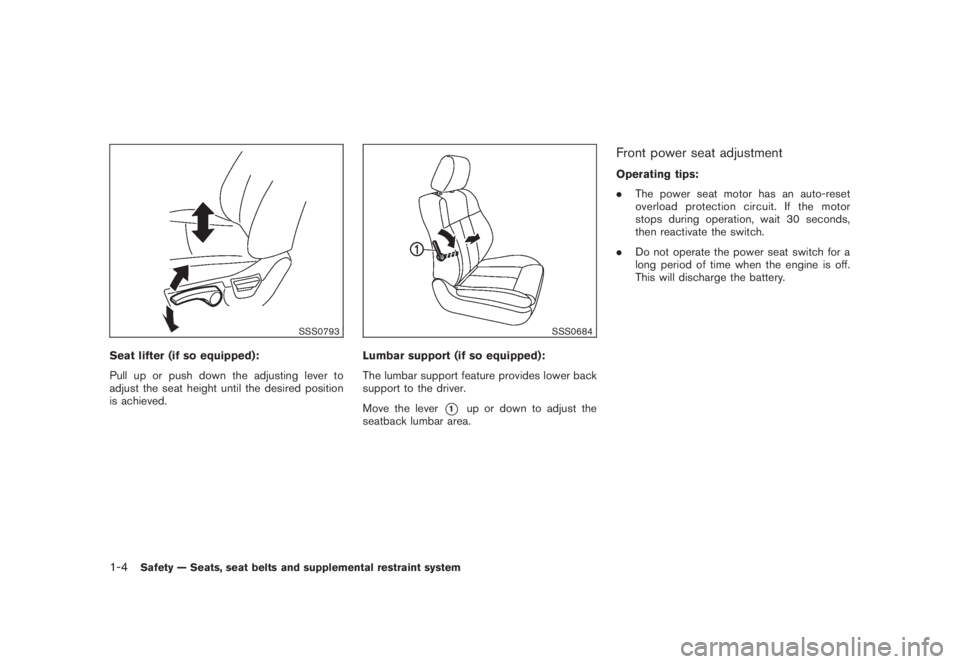
Seat lifter (if so equipped):
Pull up or push down the adjusting lever to
adjust the seat height until the desired position
is achieved.
SSS0684
Lumbar support (if so equipped):
The lumbar support feature provides lower back
support to the driver.
Move the lever
*1
up or down to adjust the
seatback lumbar area.
Front power seat adjustmentOperating tips:
.The power seat motor has an auto-reset
overload protection circuit. If the motor
stops during operation, wait 30 seconds,
then reactivate the switch.
.Do not operate the power seat switch for a
long period of time when the engine is off.
This will discharge the battery.
1-4
Safety — Seats, seat belts and supplemental restraint system
Page 76 of 444

Black plate (72,1)
Model "Z51-D" EDITED: 2008/ 6/ 26
SSI0377
1. Instrument brightness control switch
2. Tachometer
3. Speedometer
4. Fuel gauge
5. Warning/indicator lights
6. Trip computer switch
7. Dot matrix liquid crystal display
8. Engine coolant temperature gauge
9. Vehicle information display
— Odometer/twin trip odometer
— Continuously Variable Transmission (CVT)
position indicator
10. RESET switch for trip odometerThe needle indicators may move slightly
after the ignition switch is pushed to the
LOCK position. This is not a malfunction.
METERS AND GAUGES2-4
Instruments and controls
Page 77 of 444
Black plate (73,1)
Model "Z51-D" EDITED: 2008/ 6/ 26
SIC3571
Speedometer
SPEEDOMETER AND ODOMETER
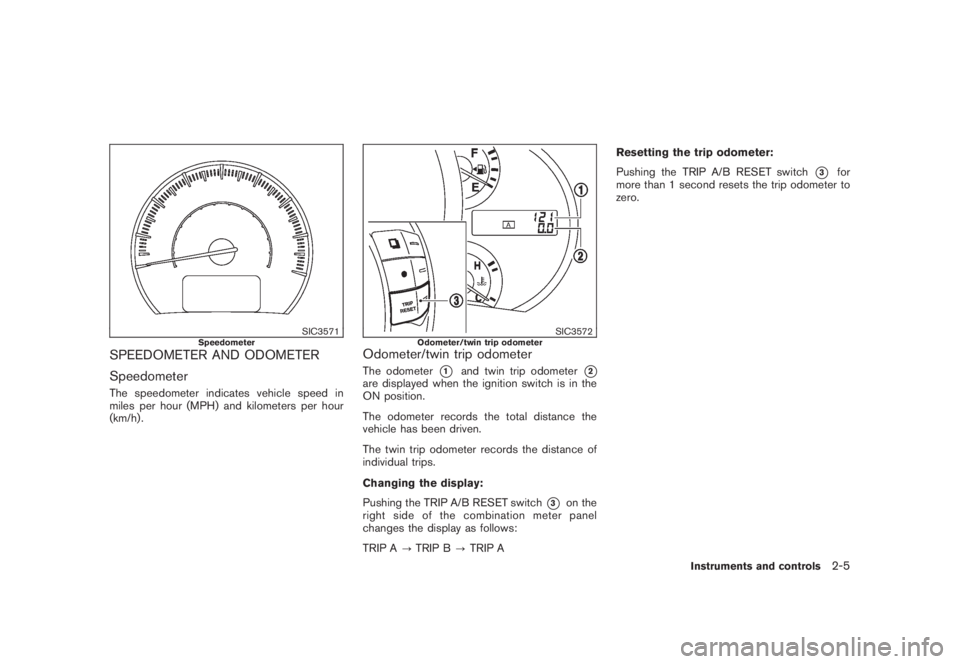
SpeedometerThe speedometer indicates vehicle speed in
miles per hour (MPH) and kilometers per hour
(km/h) .
SIC3572
Odometer/twin trip odometer
Odometer/twin trip odometerThe odometer
*1
and twin trip odometer
*2
are displayed when the ignition switch is in the
ON position.
The odometer records the total distance the
vehicle has been driven.
The twin trip odometer records the distance of
individual trips.
Changing the display:
Pushing the TRIP A/B RESET switch
*3
on the
right side of the combination meter panel
changes the display as follows:
TRIP A?TRIP B?TRIP AResetting the trip odometer:
Pushing the TRIP A/B RESET switch
*3
for
more than 1 second resets the trip odometer to
zero.
Instruments and controls
2-5
Page 85 of 444
Black plate (81,1)
Model "Z51-D" EDITED: 2008/ 6/ 26
Low tire pressure warning light
Your vehicle is equipped with a Tire Pressure
Monitoring System (TPMS) that monitors the tire
pressure of all tires except the spare.
The low tire pressure warning light warns of low
tire pressure or indicates that the TPMS is not
functioning properly.
After the ignition switch is pushed ON, this light
illuminates for about 1 second and turns off.
Low tire pressure warning:
If the vehicle is being driven with low tire
pressure, the warning light will illuminate.
When the low tire pressure warning light
illuminates, you should stop and adjust the tire
pressure to the recommended COLD tire
pressure shown on the Tire and Loading
Information label. The low tire pressure warning
light does not automatically turn off when the tire
pressure is adjusted. After the tire is inflated to
the recommended pressure, the vehicle must be
driven at speeds above 16 MPH (25 km/h) to
activate the TPMS and turn off the low tire
pressure warning light. Use a tire pressure
gauge to check the tire pressure.
For additional information, see “TIRE PRES-
SURE MONITORING SYSTEM (TPMS)” in the
“5. Starting and driving” section and “TIREPRESSURE MONITORING SYSTEM (TPMS)”
in the “6. In case of emergency” section.
TPMS malfunction:
If the TPMS is not functioning properly, the low
tire pressure warning light will flash for approxi-
mately 1 minute when the ignition switch is
pushed ON. The light will remain on after the 1
minute. Have the system checked by a NISSAN
dealer.
For additional information, see “TIRE PRES-
SURE MONITORING SYSTEM (TPMS)” in the
“5. Starting and driving” section.
WARNING
.If the light does not illuminate with
the ignition switch pushed ON, have
the vehicle checked by a NISSAN
dealer as soon as possible.
.If the light illuminates while driving,
avoid sudden steering maneuvers or
abrupt braking, reduce vehicle
speed, pull off the road to a safe
location and stop the vehicle as
soon as possible. Driving with un-
der-inflated tires may permanently
damage the tires and increase the
likelihood of tire failure. Serious
vehicle damage could occur andmay lead to an accident and could
result in serious personal injury.
Check the tire pressure for all four
tires. Adjust the tire pressure to the
recommended COLD tire pressure
shownontheTireandLoading
Information label to turn the low
tire pressure warning light OFF. If
the light stays on after adjusting the
tire pressure and driving over 16
MPH (25 km/h) , have the system
checked by a NISSAN dealer. If you
have a flat tire, replace it with a
spare tire as soon as possible.
.When a spare tire is mounted or a
wheel is replaced, the TPMS will not
function and the low tire pressure
warning light will flash for approxi-
mately 1 minute. The light will
remain on after 1 minute. Contact
your NISSAN dealer as soon as
possible for tire replacement and/
or system resetting.
.Replacing tires with those not ori-
ginally specified by NISSAN could
affect the proper operation of the
TPMS.
Instruments and controls
2-13
Page 92 of 444
Black plate (88,1)
Model "Z51-D" EDITED: 2008/ 6/ 26
11. Low washer fluid warningThis warning appears when the washer tank fluid
is at a low level. Add washer fluid as necessary.
(See “WINDOW WASHER FLUID” in the “8.
Maintenance and do-it-yourself” section.)12. Door/lift gate open warning (ignition
switch is in the ON position)This warning appears if any of the doors and/or
the lift gate are open or not closed securely. The
vehicle icon indicates which door is open on the
display.13. “Time to rest” indicatorThis indicator appears when the set “time to
rest” indicator activates. You can set the time for
up to 6 hours. (See “TRIP COMPUTER” later in
this section.)14. Low outside temperature warningThis warning appears if the outside temperature
is below 378F(38C) . The warning can be set not
to be displayed. (See “TRIP COMPUTER” later
in this section.)
SIC3578
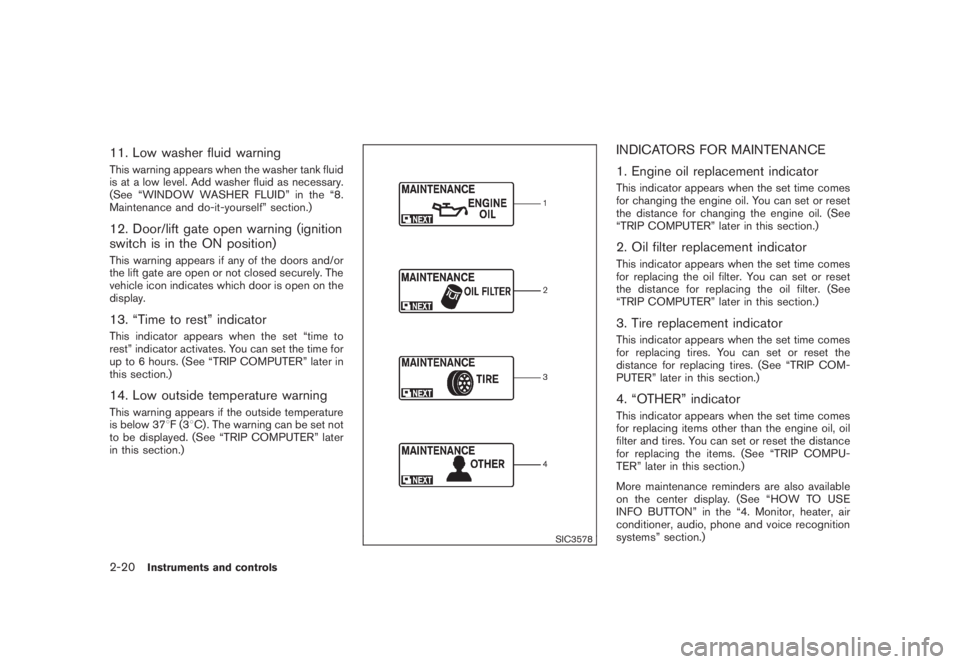
INDICATORS FOR MAINTENANCE
1. Engine oil replacement indicatorThis indicator appears when the set time comes
for changing the engine oil. You can set or reset
the distance for changing the engine oil. (See
“TRIP COMPUTER” later in this section.)2. Oil filter replacement indicatorThis indicator appears when the set time comes
for replacing the oil filter. You can set or reset
the distance for replacing the oil filter. (See
“TRIP COMPUTER” later in this section.)3. Tire replacement indicatorThis indicator appears when the set time comes
for replacing tires. You can set or reset the
distance for replacing tires. (See “TRIP COM-
PUTER” later in this section.)4. “OTHER” indicatorThis indicator appears when the set time comes
for replacing items other than the engine oil, oil
filter and tires. You can set or reset the distance
for replacing the items. (See “TRIP COMPU-
TER” later in this section.)
More maintenance reminders are also available
on the center display. (See “HOW TO USE
INFO BUTTON” in the “4. Monitor, heater, air
conditioner, audio, phone and voice recognition
systems” section.)
2-20
Instruments and controls
Page 94 of 444
Black plate (90,1)
Model "Z51-D" EDITED: 2008/ 6/ 26
SIC3674
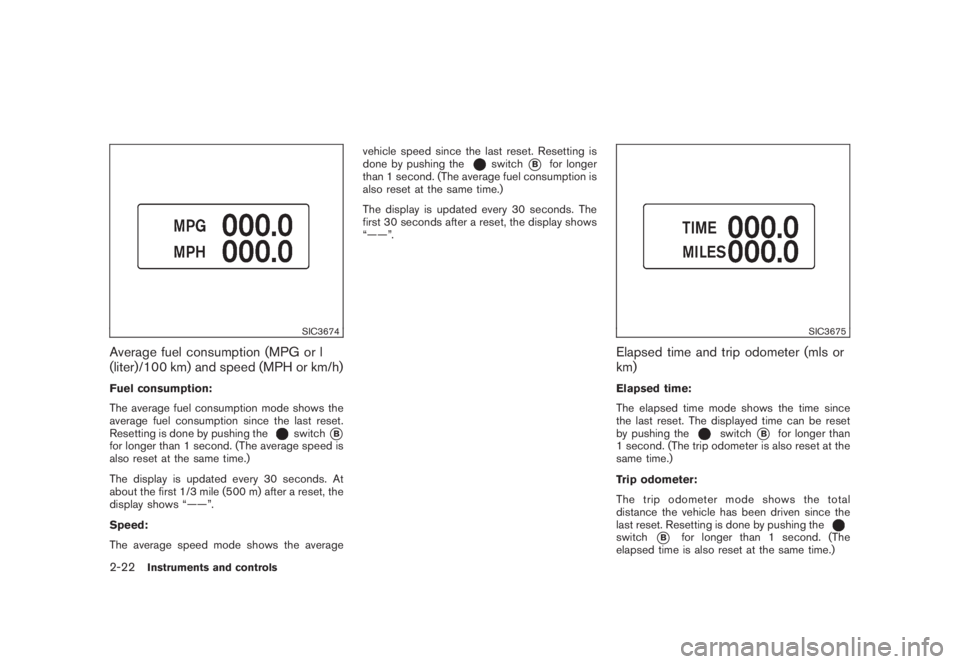
Average fuel consumption (MPG or l
(liter)/100 km) and speed (MPH or km/h)Fuel consumption:
The average fuel consumption mode shows the
average fuel consumption since the last reset.
Resetting is done by pushing the
switch
*B
for longer than 1 second. (The average speed is
also reset at the same time.)
The display is updated every 30 seconds. At
about the first 1/3 mile (500 m) after a reset, the
display shows “——”.
Speed:
The average speed mode shows the averagevehicle speed since the last reset. Resetting is
done by pushing the
switch
*B
for longer
than 1 second. (The average fuel consumption is
also reset at the same time.)
The display is updated every 30 seconds. The
first 30 seconds after a reset, the display shows
“——”.
SIC3675
Elapsed time and trip odometer (mls or
km)Elapsed time:
The elapsed time mode shows the time since
the last reset. The displayed time can be reset
by pushing the
switch
*B
for longer than
1 second. (The trip odometer is also reset at the
same time.)
Trip odometer:
The trip odometer mode shows the total
distance the vehicle has been driven since the
last reset. Resetting is done by pushing the
switch
*B
for longer than 1 second. (The
elapsed time is also reset at the same time.)
2-22
Instruments and controls
Page 96 of 444
Black plate (92,1)
Model "Z51-D" EDITED: 2008/ 6/ 26
SIC3678
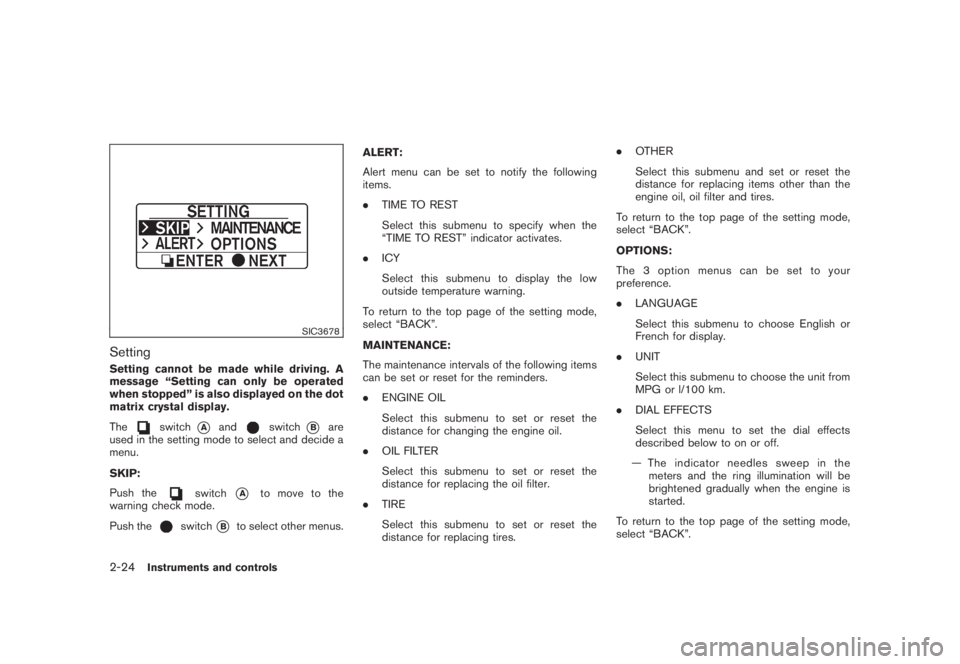
SettingSetting cannot be made while driving. A
message “Setting can only be operated
when stopped” is also displayed on the dot
matrix crystal display.
The
switch
*A
and
switch
*B
are
used in the setting mode to select and decide a
menu.
SKIP:
Push the
switch
*A
to move to the
warning check mode.
Push the
switch
*B
to select other menus.ALERT:
Alert menu can be set to notify the following
items.
.TIME TO REST
Select this submenu to specify when the
“TIME TO REST” indicator activates.
.ICY
Select this submenu to display the low
outside temperature warning.
To return to the top page of the setting mode,
select “BACK”.
MAINTENANCE:
The maintenance intervals of the following items
can be set or reset for the reminders.
.ENGINE OIL
Select this submenu to set or reset the
distance for changing the engine oil.
.OIL FILTER
Select this submenu to set or reset the
distance for replacing the oil filter.
.TIRE
Select this submenu to set or reset the
distance for replacing tires..OTHER
Select this submenu and set or reset the
distance for replacing items other than the
engine oil, oil filter and tires.
To return to the top page of the setting mode,
select “BACK”.
OPTIONS:
The 3 option menus can be set to your
preference.
.LANGUAGE
Select this submenu to choose English or
French for display.
.UNIT
Select this submenu to choose the unit from
MPG or l/100 km.
.DIAL EFFECTS
Select this menu to set the dial effects
described below to on or off.
— The indicator needles sweep in the
meters and the ring illumination will be
brightened gradually when the engine is
started.
To return to the top page of the setting mode,
select “BACK”.
2-24
Instruments and controls
Page 163 of 444
Black plate (161,1)
Model "Z51-D" EDITED: 2008/ 6/ 26
SPA2445
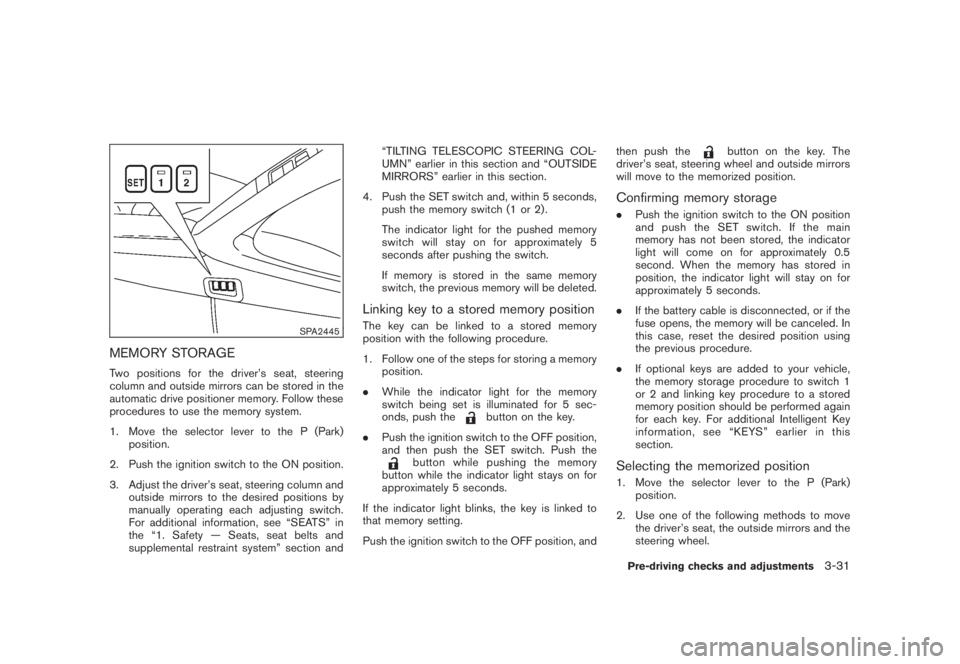
MEMORY STORAGETwo positions for the driver’s seat, steering
column and outside mirrors can be stored in the
automatic drive positioner memory. Follow these
procedures to use the memory system.
1. Move the selector lever to the P (Park)
position.
2. Push the ignition switch to the ON position.
3. Adjust the driver’s seat, steering column and
outside mirrors to the desired positions by
manually operating each adjusting switch.
For additional information, see “SEATS” in
the “1. Safety — Seats, seat belts and
supplemental restraint system” section and“TILTING TELESCOPIC STEERING COL-
UMN” earlier in this section and “OUTSIDE
MIRRORS” earlier in this section.
4. Push the SET switch and, within 5 seconds,
push the memory switch (1 or 2) .
The indicator light for the pushed memory
switch will stay on for approximately 5
seconds after pushing the switch.
If memory is stored in the same memory
switch, the previous memory will be deleted.
Linking key to a stored memory positionThe key can be linked to a stored memory
position with the following procedure.
1. Follow one of the steps for storing a memory
position.
.While the indicator light for the memory
switch being set is illuminated for 5 sec-
onds, push the
button on the key.
.Push the ignition switch to the OFF position,
and then push the SET switch. Push the
button while pushing the memory
button while the indicator light stays on for
approximately 5 seconds.
If the indicator light blinks, the key is linked to
that memory setting.
Push the ignition switch to the OFF position, andthen push the
button on the key. The
driver’s seat, steering wheel and outside mirrors
will move to the memorized position.
Confirming memory storage.Push the ignition switch to the ON position
and push the SET switch. If the main
memory has not been stored, the indicator
light will come on for approximately 0.5
second. When the memory has stored in
position, the indicator light will stay on for
approximately 5 seconds.
.If the battery cable is disconnected, or if the
fuse opens, the memory will be canceled. In
this case, reset the desired position using
the previous procedure.
.If optional keys are added to your vehicle,
the memory storage procedure to switch 1
or 2 and linking key procedure to a stored
memory position should be performed again
for each key. For additional Intelligent Key
information, see “KEYS” earlier in this
section.Selecting the memorized position1. Move the selector lever to the P (Park)
position.
2. Use one of the following methods to move
the driver’s seat, the outside mirrors and the
steering wheel.Pre-driving checks and adjustments
3-31
Page 175 of 444
Black plate (171,1)
Model "Z51-D" EDITED: 2008/ 6/ 26
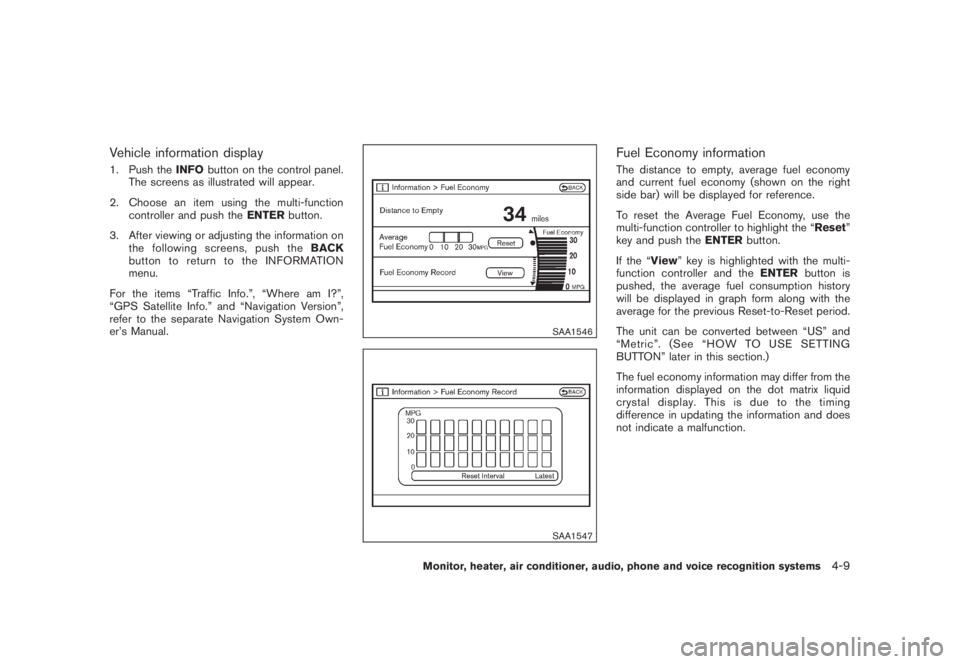
Vehicle information display1. Push theINFObutton on the control panel.
The screens as illustrated will appear.
2. Choose an item using the multi-function
controller and push theENTERbutton.
3. After viewing or adjusting the information on
the following screens, push theBACK
button to return to the INFORMATION
menu.
For the items “Traffic Info.”, “Where am I?”,
“GPS Satellite Info.” and “Navigation Version”,
refer to the separate Navigation System Own-
er’s Manual.
SAA1546SAA1547
Fuel Economy informationThe distance to empty, average fuel economy
and current fuel economy (shown on the right
side bar) will be displayed for reference.
To reset the Average Fuel Economy, use the
multi-function controller to highlight the “Reset”
key and push theENTERbutton.
If the “View” key is highlighted with the multi-
function controller and theENTERbutton is
pushed, the average fuel consumption history
will be displayed in graph form along with the
average for the previous Reset-to-Reset period.
The unit can be converted between “US” and
“Metric”. (See “HOW TO USE SETTING
BUTTON” later in this section.)
The fuel economy information may differ from the
information displayed on the dot matrix liquid
crystal display. This is due to the timing
difference in updating the information and does
not indicate a malfunction.
Monitor, heater, air conditioner, audio, phone and voice recognition systems
4-9