navigation system NISSAN MURANO 2009 Owner´s Manual
[x] Cancel search | Manufacturer: NISSAN, Model Year: 2009, Model line: MURANO, Model: NISSAN MURANO 2009Pages: 443, PDF Size: 3.95 MB
Page 11 of 443
Black plate (8,1)
Model "Z51-D" EDITED: 2007/ 10/ 2
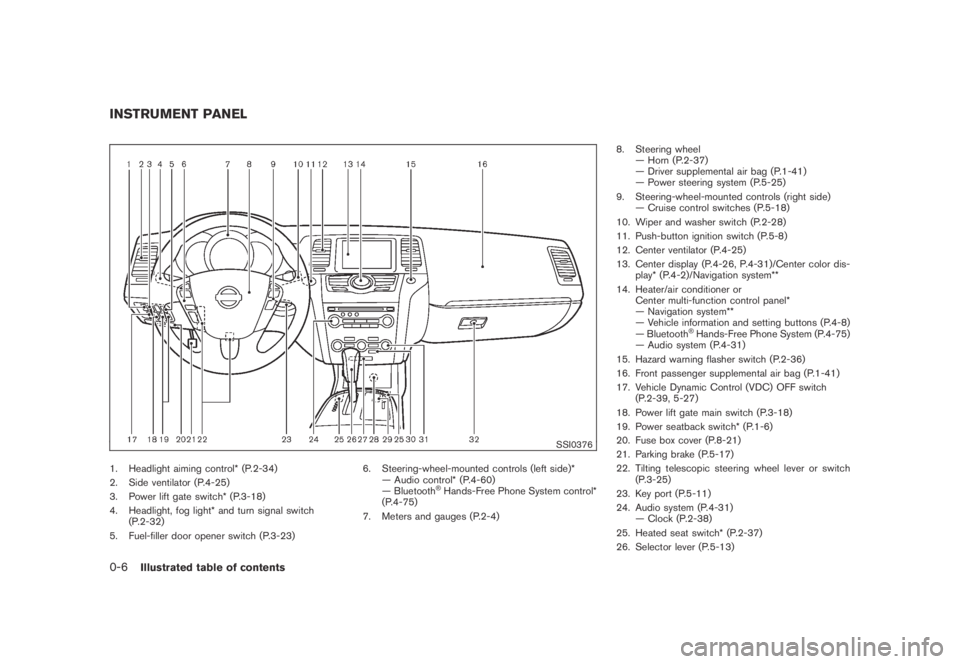
SSI0376
1. Headlight aiming control* (P.2-34)
2. Side ventilator (P.4-25)
3. Power lift gate switch* (P.3-18)
4. Headlight, fog light* and turn signal switch
(P.2-32)
5. Fuel-filler door opener switch (P.3-23)6. Steering-wheel-mounted controls (left side)*
— Audio control* (P.4-60)
— Bluetooth
®Hands-Free Phone System control*
(P.4-75)
7. Meters and gauges (P.2-4)8. Steering wheel
— Horn (P.2-37)
— Driver supplemental air bag (P.1-41)
— Power steering system (P.5-25)
9. Steering-wheel-mounted controls (right side)
— Cruise control switches (P.5-18)
10. Wiper and washer switch (P.2-28)
11. Push-button ignition switch (P.5-8)
12. Center ventilator (P.4-25)
13. Center display (P.4-26, P.4-31)/Center color dis-
play* (P.4-2)/Navigation system**
14. Heater/air conditioner or
Center multi-function control panel*
— Navigation system**
— Vehicle information and setting buttons (P.4-8)
— Bluetooth
®Hands-Free Phone System (P.4-75)
— Audio system (P.4-31)
15. Hazard warning flasher switch (P.2-36)
16. Front passenger supplemental air bag (P.1-41)
17. Vehicle Dynamic Control (VDC) OFF switch
(P.2-39, 5-27)
18. Power lift gate main switch (P.3-18)
19. Power seatback switch* (P.1-6)
20. Fuse box cover (P.8-21)
21. Parking brake (P.5-17)
22. Tilting telescopic steering wheel lever or switch
(P.3-25)
23. Key port (P.5-11)
24. Audio system (P.4-31)
— Clock (P.2-38)
25. Heated seat switch* (P.2-37)
26. Selector lever (P.5-13)
INSTRUMENT PANEL
0-6Illustrated table of contents
Page 12 of 443
Black plate (9,1)
Model "Z51-D" EDITED: 2007/ 10/ 2
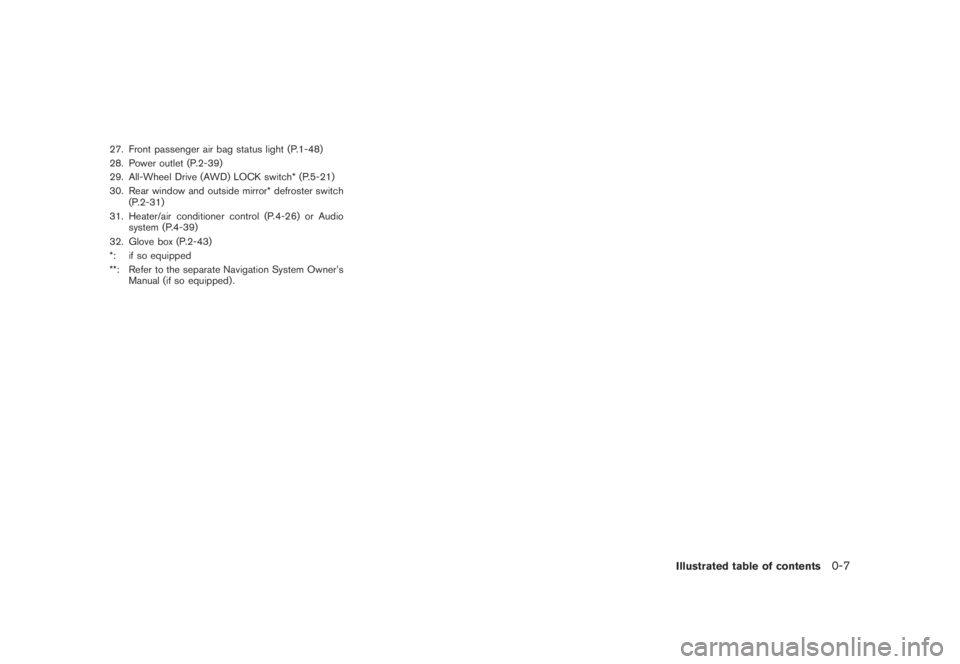
27. Front passenger air bag status light (P.1-48)
28. Power outlet (P.2-39)
29. All-Wheel Drive (AWD) LOCK switch* (P.5-21)
30. Rear window and outside mirror* defroster switch
(P.2-31)
31. Heater/air conditioner control (P.4-26) or Audio
system (P.4-39)
32. Glove box (P.2-43)
*: if so equipped
**: Refer to the separate Navigation System Owner’s
Manual (if so equipped) .
Illustrated table of contents0-7
Page 72 of 443
Black plate (70,1)
Model "Z51-D" EDITED: 2007/ 10/ 2
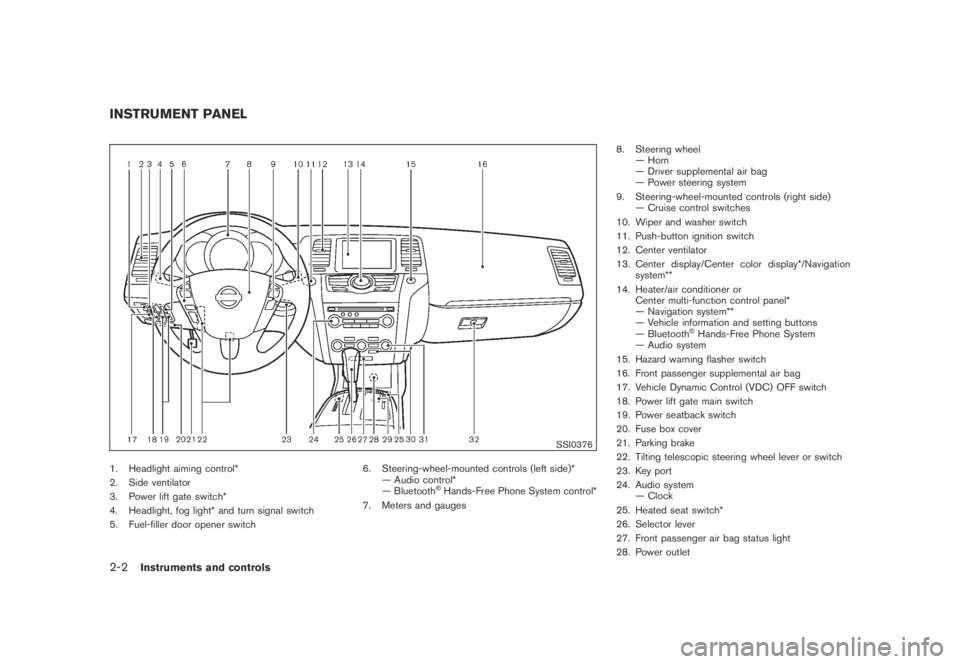
SSI0376
1. Headlight aiming control*
2. Side ventilator
3. Power lift gate switch*
4. Headlight, fog light* and turn signal switch
5. Fuel-filler door opener switch6. Steering-wheel-mounted controls (left side)*
— Audio control*
— Bluetooth
®Hands-Free Phone System control*
7. Meters and gauges8. Steering wheel
— Horn
— Driver supplemental air bag
— Power steering system
9. Steering-wheel-mounted controls (right side)
— Cruise control switches
10. Wiper and washer switch
11. Push-button ignition switch
12. Center ventilator
13. Center display/Center color display*/Navigation
system**
14. Heater/air conditioner or
Center multi-function control panel*
— Navigation system**
— Vehicle information and setting buttons
— Bluetooth
®Hands-Free Phone System
— Audio system
15. Hazard warning flasher switch
16. Front passenger supplemental air bag
17. Vehicle Dynamic Control (VDC) OFF switch
18. Power lift gate main switch
19. Power seatback switch
20. Fuse box cover
21. Parking brake
22. Tilting telescopic steering wheel lever or switch
23. Key port
24. Audio system
— Clock
25. Heated seat switch*
26. Selector lever
27. Front passenger air bag status light
28. Power outlet
INSTRUMENT PANEL
2-2Instruments and controls
Page 73 of 443
Black plate (71,1)
Model "Z51-D" EDITED: 2007/ 10/ 2
29. All-Wheel Drive (AWD) LOCK switch*
30. Rear window and outside mirror* defroster switch
31. Heater/air conditioner control or Audio system
32. Glove box
*: if so equipped
**: Refer to the separate Navigation System Owner’s
Manual (if so equipped) .
Instruments and controls2-3
Page 163 of 443
Black plate (13,1)
4 Monitor, heater, air conditioner, audio,
phone and voice recognition systems
Model "Z51-D" EDITED: 2007/ 10/ 2
Safety note....................................................... 4-2
Center multi-function control panel
(models with color display screen)......................... 4-2
How to use multi-function controller................... 4-4
How to use touch screen
(models with navigation system)........................ 4-4
Start-up screen (models with navigation system) . . . 4-6
Start menu................................................... 4-6
How to select menus on the screen................... 4-7
Vehicle information and settings............................. 4-8
How to use STATUS button.............................. 4-8
How to use brightness control and display ON/
OFF button................................................... 4-8
How to use INFO button.................................. 4-8
How to use SETTING button..........................4-12
Rearview monitor (if so equipped)........................4-19
How to read the displayed lines.......................4-20
How to park with predicted course lines............4-20
Difference between predicted and actual
distances...................................................4-22
How to adjust the screen...............................4-24
Operating tips.............................................4-24
Ventilators......................................................4-25
Heater and air conditioner..................................4-26
Automatic operation......................................4-28
Manual operation.........................................4-29
To turn the system off...................................4-30Operating tips.............................................4-30
In-cabin microfilter........................................4-30
Servicing air conditioner................................4-30
Audio system..................................................4-31
Audio operation precautions...........................4-31
FM-AM radio with Compact Disc (CD)
changer.....................................................4-39
FM-AM-SAT radio with Compact Disc (CD)
changer.....................................................4-44
CompactFlash (CF) player operation
(models with navigation system)......................4-49
iPod
®player operation (if so equipped)..............4-51
Music box hard drive
(models with navigation system)......................4-52
CD/CF (CompactFlash) care and cleaning.........4-59
Steering-wheel-mounted controls for audio
(if so equipped)...........................................4-60
Antenna.....................................................4-61
NISSAN Mobile Entertainment System (MES)
(if so equipped)...............................................4-62
DVD player operation precautions....................4-63
Digital Versatile Disc (DVD) system
components...............................................4-64
Remote controller and headphones battery
replacement................................................4-67
Before operating the DVD entertainment
system.......................................................4-68
Page 164 of 443
Black plate (14,1)
Model "Z51-D" EDITED: 2007/ 10/ 2
Playing a Digital Versatile Disc (DVD)...............4-69
Care and maintenance..................................4-73
Car phone or CB radio......................................4-74
Bluetooth
®Hands-Free Phone System with
navigation system (for U.S.)................................4-75
Regulatory information...................................4-76
Voice commands..........................................4-76
Control buttons...........................................4-77
Pairing procedure.........................................4-77
Phonebook registration..................................4-78
Making a call...............................................4-80
Receiving a call...........................................4-80
During a call...............................................4-81
Phone setting..............................................4-82
Troubleshooting guide...................................4-84
Bluetooth
®Hands-Free Phone System with
navigation system (for Canada)............................4-85
Regulatory information...................................4-86
Voice commands..........................................4-86
Control buttons...........................................4-87
Pairing procedure.........................................4-87
Phonebook registration..................................4-88
Making a call...............................................4-90
Receiving a call...........................................4-91
During a call...............................................4-91
Phone setting..............................................4-92Troubleshooting guide...................................4-94
Bluetooth
®Hands-Free Phone System without
navigation system (if so equipped).......................4-95
Regulatory information...................................4-96
Initialization.................................................4-96
Operating tips.............................................4-96
Giving voice commands.................................4-96
Control buttons...........................................4-98
Getting started............................................4-98
Choosing a language....................................4-98
Pairing procedure.........................................4-98
Making a call by entering a phone number.........4-99
Receiving a call...........................................4-99
List of voice commands............................... 4-100
Call......................................................... 4-100
Phone book.............................................. 4-102
Memo pad................................................ 4-104
Setup...................................................... 4-104
Speaker Adaptation (SA) mode..................... 4-106
Troubleshooting guide................................. 4-108
NISSAN voice recognition system
(models with navigation system) (for U.S.)............ 4-109
NISSAN voice recognition standard mode........ 4-109
Using the system....................................... 4-111
Before starting........................................... 4-112
Giving voice commands............................... 4-112
Page 165 of 443
Black plate (15,1)
Model "Z51-D" EDITED: 2007/ 10/ 2
NISSAN voice recognition alternate command
mode...................................................... 4-119
Using the system....................................... 4-126
Speaker adaptation function......................... 4-128
Minimize voice feedback.............................. 4-130
Troubleshooting guide................................. 4-131NISSAN voice recognition system
(models with navigation system) (for Canada)....... 4-132
Command list............................................ 4-132
Using the system....................................... 4-141
Voice command learning function................... 4-144
Troubleshooting guide................................. 4-148
Page 166 of 443
Black plate (164,1)
Model "Z51-D" EDITED: 2007/ 10/ 2
WARNING
.Do not disassemble or modify this
system. If you do, it may result in
accidents, fire, or electric shock.
.Do not use this system if you notice
any abnormality, such as a frozen
screen or lack of sound. Continued
use of the system may result in
accident, fire or electric shock.
.In case you notice any foreign
object in the system hardware, spill
liquid on it, or notice smoke or smell
coming from it, stop using the
system immediately and contact
your nearest NISSAN dealer. Ignor-
ing such conditions may lead to
accidents, fire, or electric shock.
.Park the vehicle in a safe location
and apply the parking brake to view
the images on the front center dis-
play screen using devices connected
to the auxiliary input jacks.
Do not attempt to operate the system in
extreme temperature conditions [below
−48F(−208C) and above 1588F(708C)].
Operating this system under these condi-
tions may result in system malfunctions.
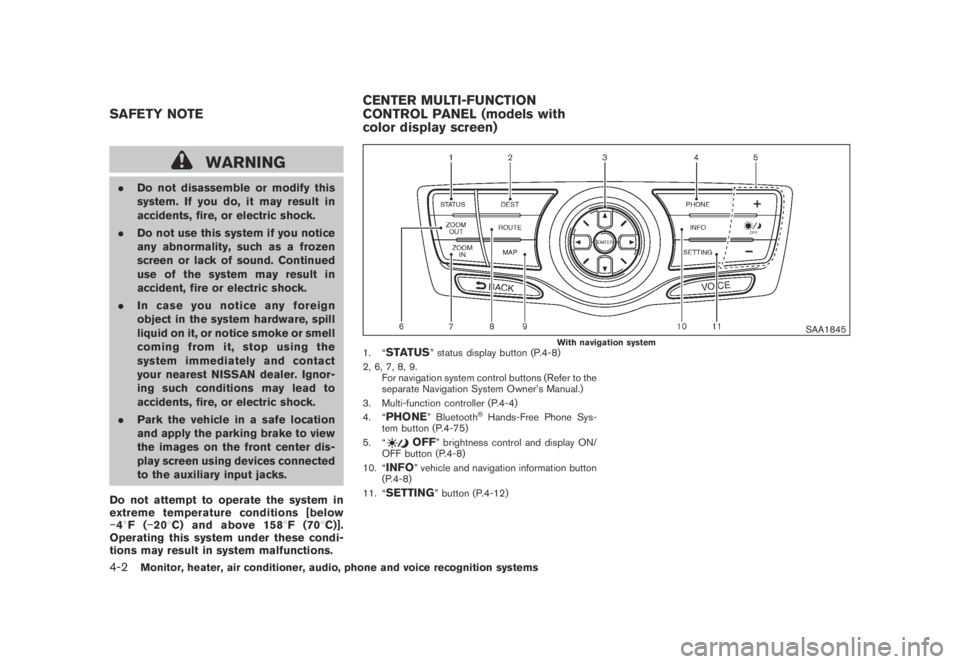
SAA1845With navigation system1. “STATUS” status display button (P.4-8)
2, 6, 7, 8, 9.
For navigation system control buttons (Refer to the
separate Navigation System Owner’s Manual.)
3. Multi-function controller (P.4-4)
4. “
PHONE” Bluetooth®Hands-Free Phone Sys-
tem button (P.4-75)
5. “
OFF” brightness control and display ON/
OFF button (P.4-8)
10. “
INFO” vehicle and navigation information button
(P.4-8)
11. “
SETTING” button (P.4-12)
SAFETY NOTECENTER MULTI-FUNCTION
CONTROL PANEL (models with
color display screen)
4-2Monitor, heater, air conditioner, audio, phone and voice recognition systems
Page 167 of 443
Black plate (165,1)
Model "Z51-D" EDITED: 2007/ 10/ 2
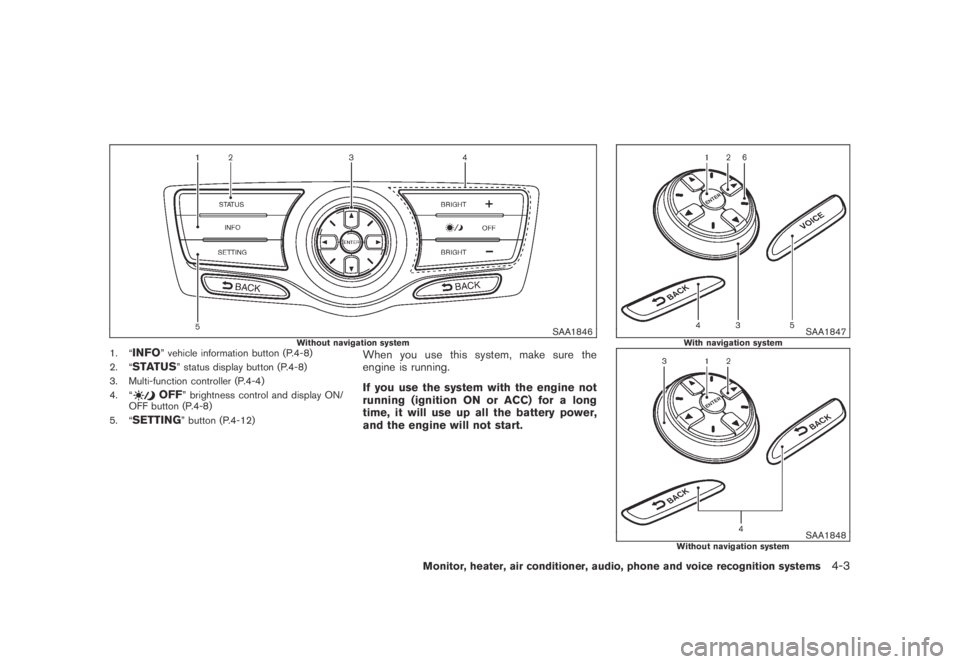
SAA1846Without navigation system1. “INFO” vehicle information button (P.4-8)
2. “
STATUS” status display button (P.4-8)
3. Multi-function controller (P.4-4)
4. “
OFF” brightness control and display ON/
OFF button (P.4-8)
5. “
SETTING” button (P.4-12)
When you use this system, make sure the
engine is running.
If you use the system with the engine not
running (ignition ON or ACC) for a long
time, it will use up all the battery power,
and the engine will not start.
SAA1847With navigation system
SAA1848Without navigation system
Monitor, heater, air conditioner, audio, phone and voice recognition systems4-3
Page 168 of 443
Black plate (166,1)
Model "Z51-D" EDITED: 2007/ 10/ 2
HOW TO USE MULTI-FUNCTION
CONTROLLER
Choose an item on the display using the main
directional buttons
*2(or additional directional
buttons
*6with navigation system) or center
dial
*3, and push theENTERbutton*1for
operation.
If you push theBACKbutton
*4before the
setup is completed, the setup will be canceled
and/or the display will return to the previous
screen. This button can also be used to delete
characters that have been input.
After the setup is completed, push theBACK
button
*4and return to the previous screen.
For theVOICEbutton
*5functions, refer to the
separate Navigation System Owner’s Manual.
HOW TO USE TOUCH SCREEN
(models with navigation system)
CAUTION
.The glass screen on the liquid
crystal display may break if it is hit
with a hard or sharp object. If the
glass breaks, do not touch the liquid
crystalline material, which contains
a small amount of mercury. In case
of contact with skin, wash immedi-ately with soap and water.
.To clean the display, use a soft, dry
cloth. If additional cleaning is ne-
cessary, use a small amount of
neutral detergent with a soft cloth.
Never use a rough cloth, alcohol,
benzine, thinner or any kind of
solvent or paper towel with a che-
mical cleaning agent. They will
scratch or deteriorate the panel.
.Do not splash any liquid such as
water or car fragrance on the dis-
play. Contact with liquid will cause
the system to malfunction.
To ensure safe driving, some functions cannot
be operated while driving.
The on-screen functions that are not available
while driving will be “grayed out” or muted.
Park the vehicle in a safe location and then
operate the navigation system.
SAA1542
Touch screen operation
With this system, the same operations as those
for the multi-function controller are possible
using the touch screen operation.
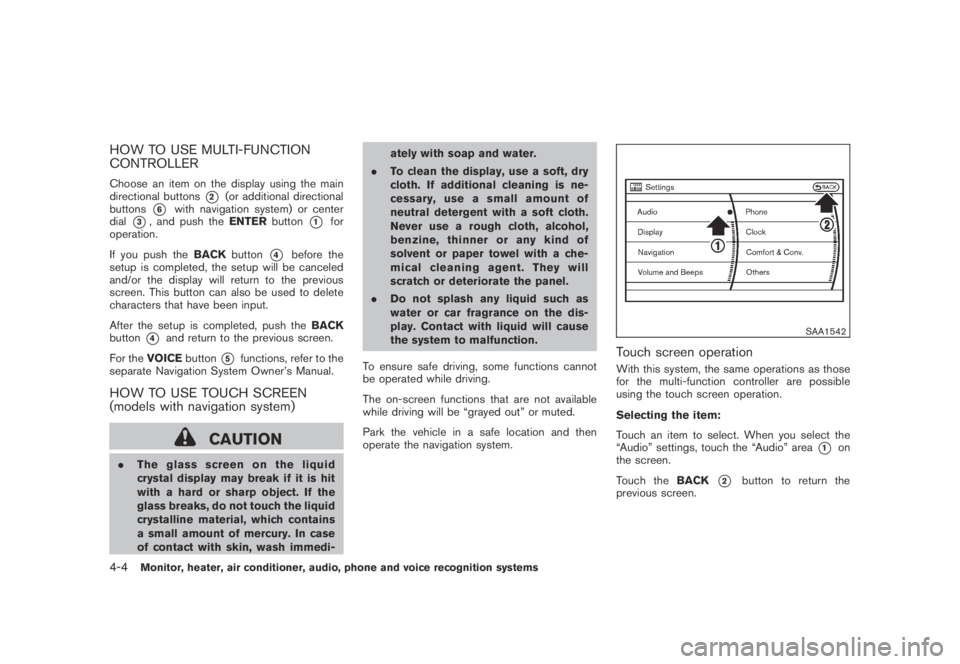
Selecting the item:
Touch an item to select. When you select the
“Audio” settings, touch the “Audio” area
*1on
the screen.
Touch theBACK
*2button to return the
previous screen.
4-4Monitor, heater, air conditioner, audio, phone and voice recognition systems