instrument panel NISSAN MURANO 2009 Owner´s Manual
[x] Cancel search | Manufacturer: NISSAN, Model Year: 2009, Model line: MURANO, Model: NISSAN MURANO 2009Pages: 443, PDF Size: 3.95 MB
Page 65 of 443
Black plate (63,1)
Model "Z51-D" EDITED: 2007/ 10/ 2
placing material over the steering
wheel pad and above the instrument
panel or by installing additional trim
material around the air bag system.
.Modifying or tampering with the
front passenger seat may result in
serious personal injury. For exam-
ple, do not change the front seats by
placing material on the seat cushion
or by installing additional trim ma-
terial, such as seat covers, on the
seat that is not specifically designed
to assure proper air bag operation.
Additionally, do not stow any ob-
jects under the front passenger seat
or the seat cushion and seatback.
Such objects may interfere with the
proper operation of the occupant
classification sensor.
.No unauthorized changes should be
made to any components or wiring
of the seat belt system. This may
affect the front air bag system.
Tampering with the seat belt system
may result in serious personal in-
jury.
.Work on and around the front air
bag system should be done by a
NISSAN dealer. Installation of elec-trical equipment should also be
done by a NISSAN dealer. The
Supplemental Restraint System
(SRS) wiring should not be modified
or disconnected. Unauthorized elec-
trical test equipment and probing
devices should not be used on the
air bag system.
.A cracked windshield should be
replaced immediately by a qualified
repair facility. A cracked windshield
could affect the function of the
supplemental air bag system.
.The SRS wiring harness connectors
are yellow and orange for easy
identification.
When selling your vehicle, we request that you
inform the buyer about the front air bag system
and guide the buyer to the appropriate sections
in this Owner’s Manual.
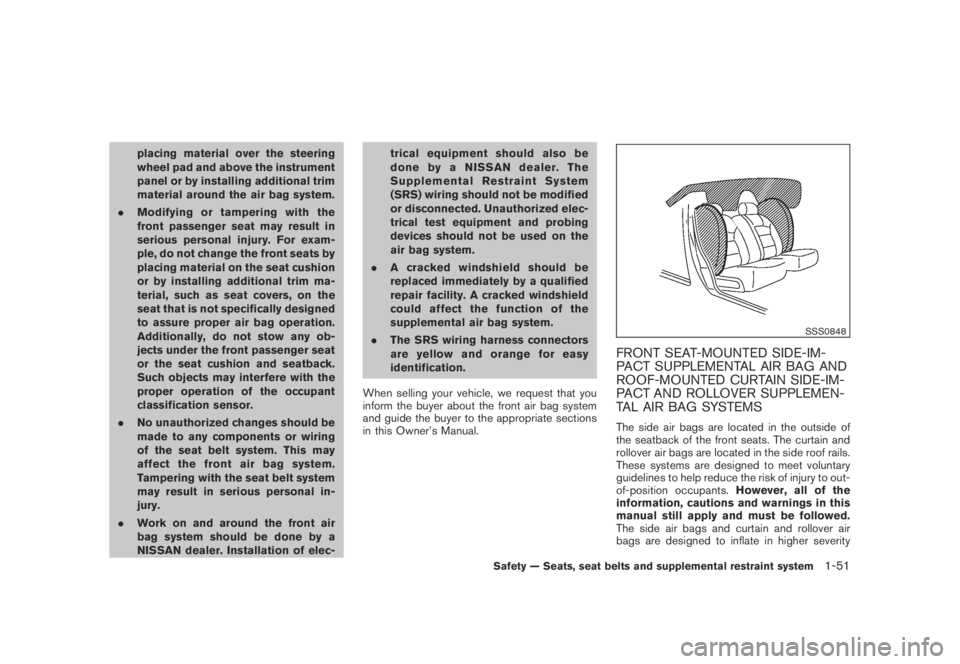
SSS0848
FRONT SEAT-MOUNTED SIDE-IM-
PACT SUPPLEMENTAL AIR BAG AND
ROOF-MOUNTED CURTAIN SIDE-IM-
PACT AND ROLLOVER SUPPLEMEN-
TAL AIR BAG SYSTEMS
The side air bags are located in the outside of
the seatback of the front seats. The curtain and
rollover air bags are located in the side roof rails.
These systems are designed to meet voluntary
guidelines to help reduce the risk of injury to out-
of-position occupants.However, all of the
information, cautions and warnings in this
manual still apply and must be followed.
The side air bags and curtain and rollover air
bags are designed to inflate in higher severity
Safety — Seats, seat belts and supplemental restraint system1-51
Page 68 of 443
Black plate (66,1)
Model "Z51-D" EDITED: 2007/ 10/ 2
After pretensioner activation, load limiters allow
the seat belt to release webbing (if necessary) to
reduce forces against the chest.
If any abnormality occurs in the pretensioner
system, the supplemental air bag warning light
will not come on, will flash intermittently or
will turn on for 7 seconds and remain on after
the ignition switch has been pushed to the ON
position. In this case, the pretensioner may not
function properly. They must be checked and
repaired. Take your vehicle to the nearest
NISSAN dealer.
When selling your vehicle, we request that you
inform the buyer about the pretensioner system
and guide the buyer to the appropriate sections
in this Owner’s Manual.
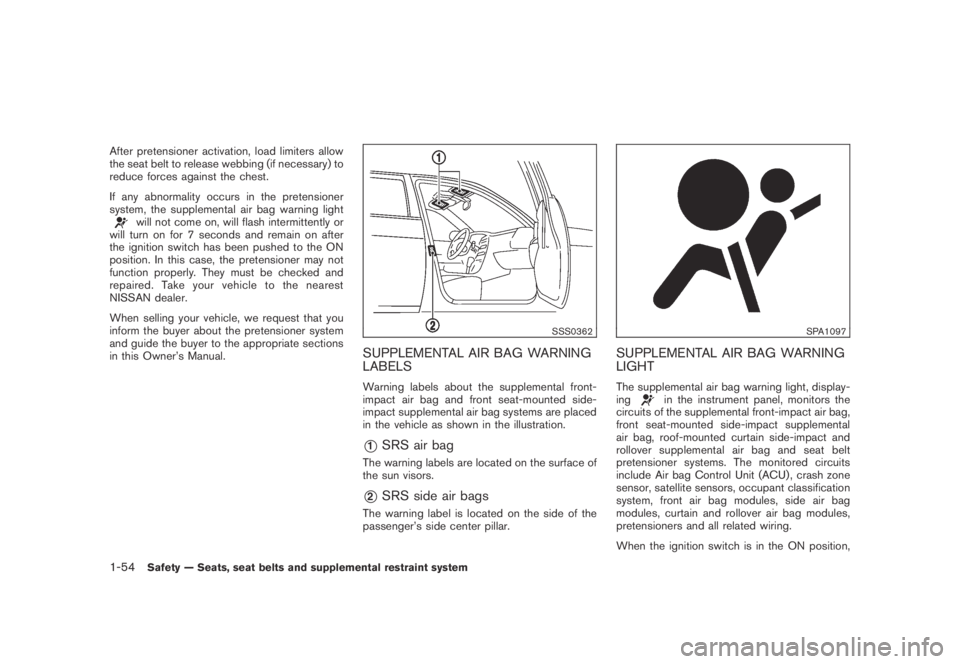
SSS0362
SUPPLEMENTAL AIR BAG WARNING
LABELS
Warning labels about the supplemental front-
impact air bag and front seat-mounted side-
impact supplemental air bag systems are placed
in the vehicle as shown in the illustration.
*1SRS air bag
The warning labels are located on the surface of
the sun visors.
*2SRS side air bags
The warning label is located on the side of the
passenger’s side center pillar.
SPA1097
SUPPLEMENTAL AIR BAG WARNING
LIGHT
The supplemental air bag warning light, display-
ingin the instrument panel, monitors the
circuits of the supplemental front-impact air bag,
front seat-mounted side-impact supplemental
air bag, roof-mounted curtain side-impact and
rollover supplemental air bag and seat belt
pretensioner systems. The monitored circuits
include Air bag Control Unit (ACU) , crash zone
sensor, satellite sensors, occupant classification
system, front air bag modules, side air bag
modules, curtain and rollover air bag modules,
pretensioners and all related wiring.
When the ignition switch is in the ON position,
1-54Safety — Seats, seat belts and supplemental restraint system
Page 70 of 443
Black plate (7,1)
2 Instruments and controls
Model "Z51-D" EDITED: 2007/ 10/ 2
Instrument panel................................................ 2-2
Meters and gauges............................................. 2-4
Speedometer and odometer............................. 2-5
Tachometer................................................... 2-6
Engine coolant temperature gauge..................... 2-6
Fuel gauge................................................... 2-7
Compass (if so equipped).................................... 2-7
Zone variation change procedure....................... 2-9
Warning/indicator lights and audible reminders.......2-10
Checking bulbs...........................................2-10
Warning lights.............................................2-10
Indicator lights.............................................2-15
Audible reminders........................................2-17
Dot matrix liquid crystal display............................2-17
Indicators for operation..................................2-18
Indicators for maintenance..............................2-20
Trip computer..............................................2-21
Security systems..............................................2-25
Vehicle security system (if so equipped)............2-25
NISSAN Vehicle Immobilizer System.................2-27
Windshield wiper and washer switch....................2-28
Rain-sensing auto wiper system
(if so equipped)..........................................2-29
Rear window wiper and washer switch..................2-30
Rear window and outside mirror defroster switch.....2-31Headlight and turn signal switch..........................2-32
Xenon headlights (if so equipped)....................2-32
Headlight switch..........................................2-32
Turn signal switch........................................2-36
Fog light switch (if so equipped)......................2-36
Hazard warning flasher switch.............................2-36
Horn.............................................................2-37
Heated seats (if so equipped).............................2-37
Clock............................................................2-38
Models without color display...........................2-38
Models with color display...............................2-39
Vehicle Dynamic Control (VDC) OFF switch...........2-39
Power outlet...................................................2-39
Cigarette lighter and ashtray (if so equipped)..........2-41
Storage.........................................................2-41
Cup holders................................................2-41
Sunglasses holder........................................2-42
Glove box..................................................2-43
Console box...............................................2-44
Storage box (if so equipped)..........................2-45
Cargo floor box...........................................2-45
Luggage side box.........................................2-46
Cargo cover (if so equipped)..........................2-46
Luggage hooks (if so equipped)......................2-47
Roof rack (if so equipped)..............................2-48
Page 72 of 443
Black plate (70,1)
Model "Z51-D" EDITED: 2007/ 10/ 2
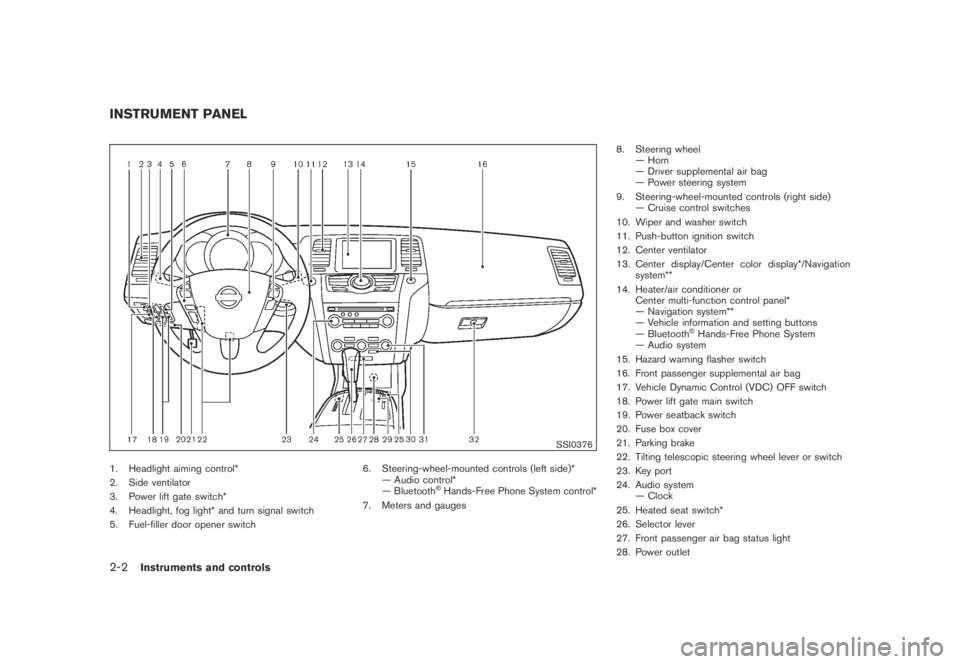
SSI0376
1. Headlight aiming control*
2. Side ventilator
3. Power lift gate switch*
4. Headlight, fog light* and turn signal switch
5. Fuel-filler door opener switch6. Steering-wheel-mounted controls (left side)*
— Audio control*
— Bluetooth
®Hands-Free Phone System control*
7. Meters and gauges8. Steering wheel
— Horn
— Driver supplemental air bag
— Power steering system
9. Steering-wheel-mounted controls (right side)
— Cruise control switches
10. Wiper and washer switch
11. Push-button ignition switch
12. Center ventilator
13. Center display/Center color display*/Navigation
system**
14. Heater/air conditioner or
Center multi-function control panel*
— Navigation system**
— Vehicle information and setting buttons
— Bluetooth
®Hands-Free Phone System
— Audio system
15. Hazard warning flasher switch
16. Front passenger supplemental air bag
17. Vehicle Dynamic Control (VDC) OFF switch
18. Power lift gate main switch
19. Power seatback switch
20. Fuse box cover
21. Parking brake
22. Tilting telescopic steering wheel lever or switch
23. Key port
24. Audio system
— Clock
25. Heated seat switch*
26. Selector lever
27. Front passenger air bag status light
28. Power outlet
INSTRUMENT PANEL
2-2Instruments and controls
Page 75 of 443
Black plate (73,1)
Model "Z51-D" EDITED: 2007/ 10/ 2
SIC3571Speedometer
SPEEDOMETER AND ODOMETER
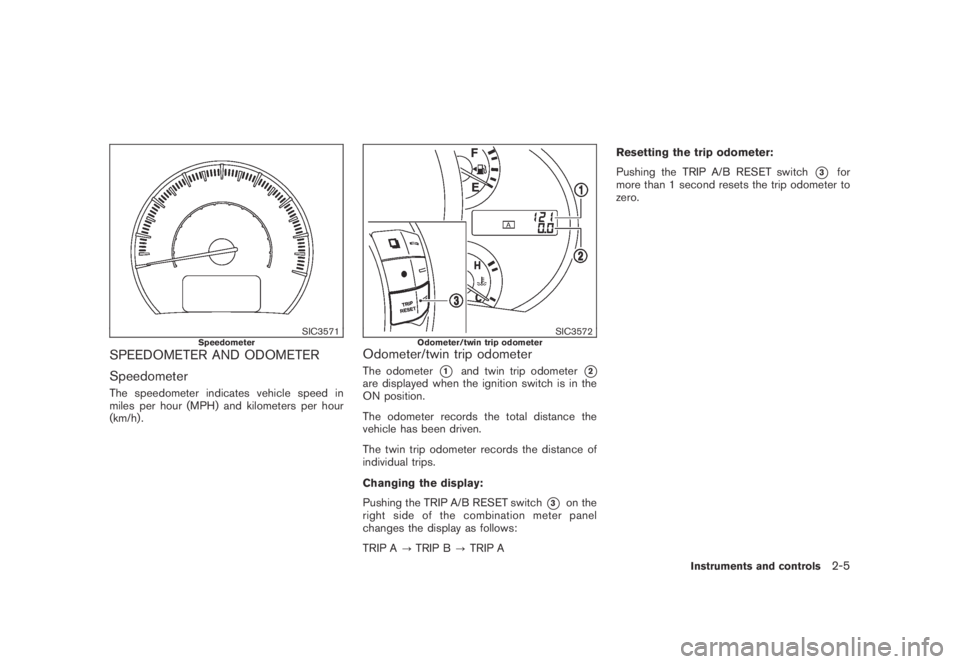
Speedometer
The speedometer indicates vehicle speed in
miles per hour (MPH) and kilometers per hour
(km/h) .
SIC3572Odometer/twin trip odometerOdometer/twin trip odometer
The odometer*1and twin trip odometer*2are displayed when the ignition switch is in the
ON position.
The odometer records the total distance the
vehicle has been driven.
The twin trip odometer records the distance of
individual trips.
Changing the display:
Pushing the TRIP A/B RESET switch
*3on the
right side of the combination meter panel
changes the display as follows:
TRIP A?TRIP B?TRIP AResetting the trip odometer:
Pushing the TRIP A/B RESET switch
*3for
more than 1 second resets the trip odometer to
zero.
Instruments and controls2-5
Page 91 of 443
Black plate (89,1)
Model "Z51-D" EDITED: 2007/ 10/ 2
SIC3580
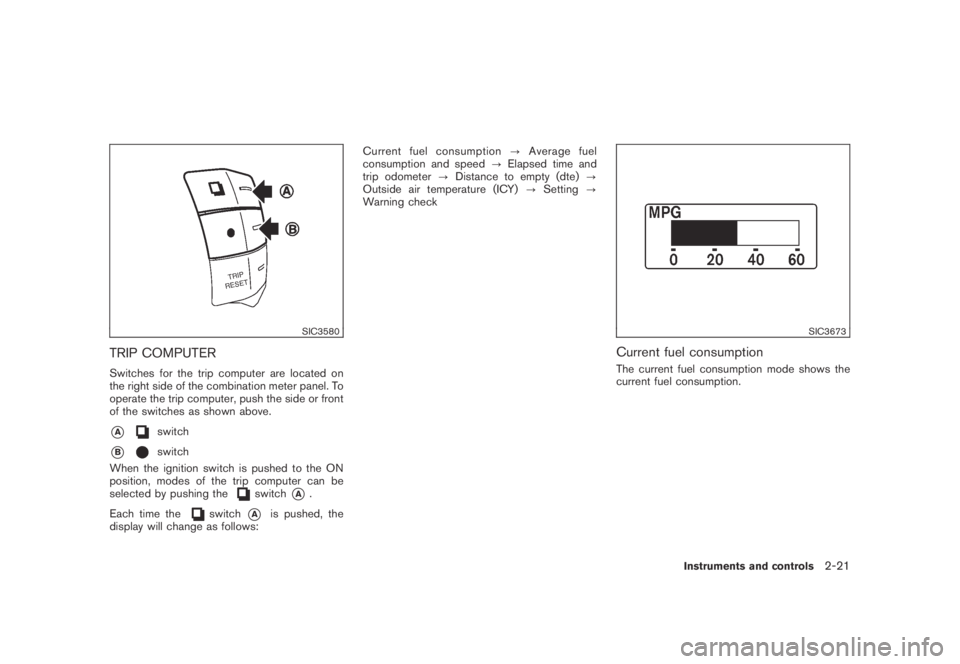
TRIP COMPUTER
Switches for the trip computer are located on
the right side of the combination meter panel. To
operate the trip computer, push the side or front
of the switches as shown above.
*Aswitch
*Bswitch
When the ignition switch is pushed to the ON
position, modes of the trip computer can be
selected by pushing the
switch*A.
Each time the
switch*Ais pushed, the
display will change as follows:Current fuel consumption?Average fuel
consumption and speed?Elapsed time and
trip odometer?Distance to empty (dte)?
Outside air temperature (ICY)?Setting?
Warning check
SIC3673
Current fuel consumption
The current fuel consumption mode shows the
current fuel consumption.
Instruments and controls2-21
Page 103 of 443
Black plate (101,1)
Model "Z51-D" EDITED: 2007/ 10/ 2
SIC3669
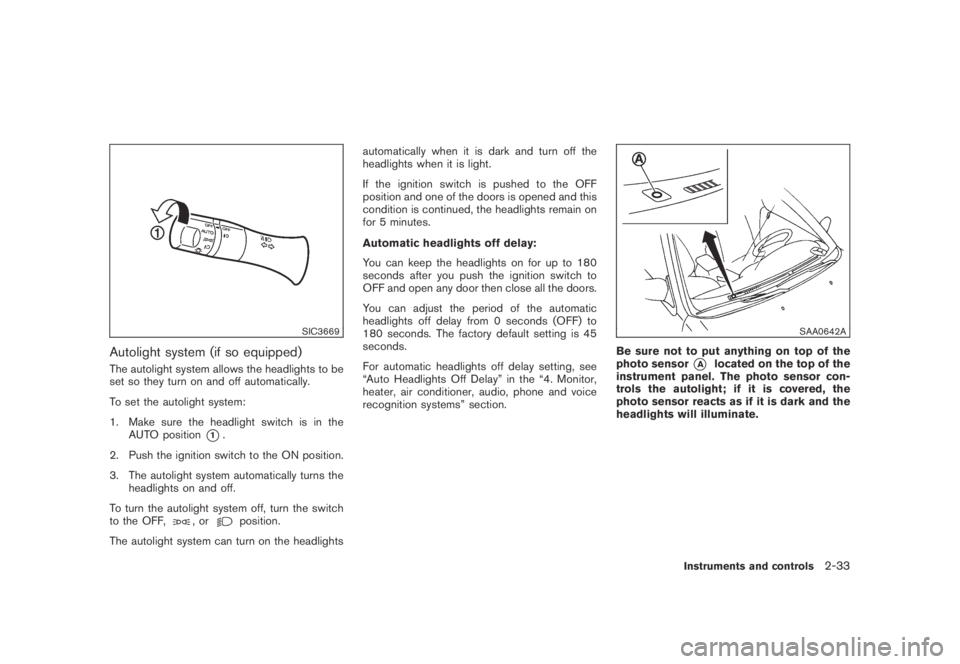
Autolight system (if so equipped)
The autolight system allows the headlights to be
set so they turn on and off automatically.
To set the autolight system:
1. Make sure the headlight switch is in the
AUTO position
*1.
2. Push the ignition switch to the ON position.
3. The autolight system automatically turns the
headlights on and off.
To turn the autolight system off, turn the switch
to the OFF,
,orposition.
The autolight system can turn on the headlightsautomatically when it is dark and turn off the
headlights when it is light.
If the ignition switch is pushed to the OFF
position and one of the doors is opened and this
condition is continued, the headlights remain on
for 5 minutes.
Automatic headlights off delay:
You can keep the headlights on for up to 180
seconds after you push the ignition switch to
OFF and open any door then close all the doors.
You can adjust the period of the automatic
headlights off delay from 0 seconds (OFF) to
180 seconds. The factory default setting is 45
seconds.
For automatic headlights off delay setting, see
“Auto Headlights Off Delay” in the “4. Monitor,
heater, air conditioner, audio, phone and voice
recognition systems” section.
SAA0642A
Be sure not to put anything on top of the
photo sensor
*Alocated on the top of the
instrument panel. The photo sensor con-
trols the autolight; if it is covered, the
photo sensor reacts as if it is dark and the
headlights will illuminate.
Instruments and controls2-33
Page 105 of 443
Black plate (103,1)
Model "Z51-D" EDITED: 2007/ 10/ 2
WARNING
Xenon headlights are extremely bright
compared to conventional headlights. If
the xenon headlights hit the rearview
mirror of the vehicle ahead or the
windshield of oncoming vehicle, the
driver of these vehicles may have
difficulty driving because of the bright-
ness. Use the headlight aiming control
switch to lower the light axis. See
“XENON HEADLIGHTS” earlier in this
section for additional information.
Daytime running light system (Canada
only)
The daytime running lights automatically illumi-
nate when the engine is started with the parking
brake released. The daytime running lights
operate with the headlight switch in the OFF
position or in the
position. Turn the
headlight switch to theposition for full
illumination when driving at night.
If the parking brake is applied before the engine
is started, the daytime running lights do not
illuminate. The daytime running lights illuminate
once the parking brake is released. The daytime
running lights will remain on until the ignition
switch is pushed to the OFF position.
WARNING
When the daytime running light system
is active, tail lights on your vehicle are
not on. It is necessary at dusk to turn on
your headlights. Failure to do so could
cause an accident injuring yourself and
others.
SIC3585
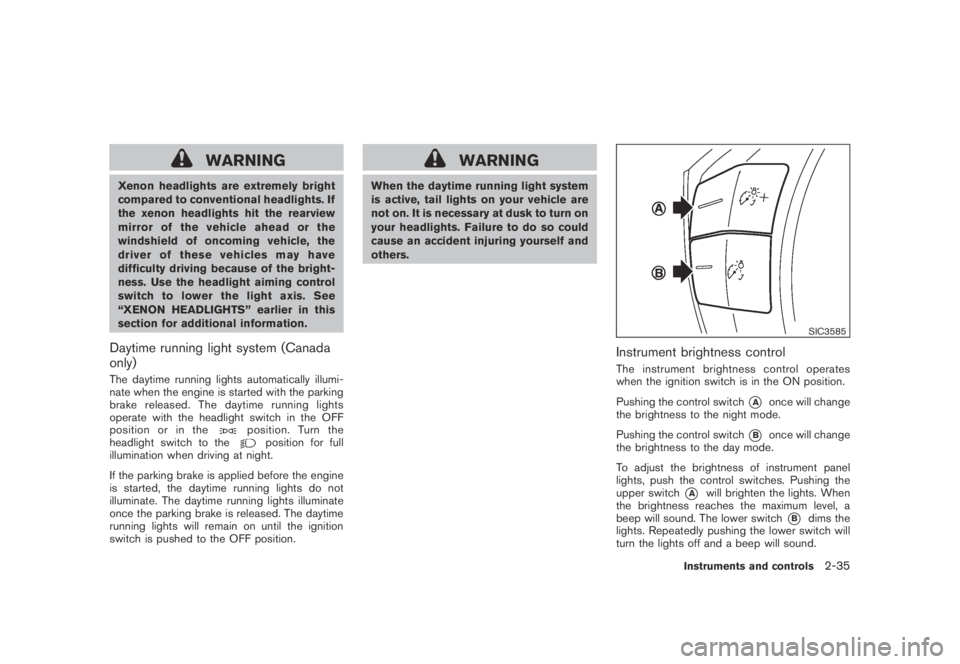
Instrument brightness control
The instrument brightness control operates
when the ignition switch is in the ON position.
Pushing the control switch
*Aonce will change
the brightness to the night mode.
Pushing the control switch
*Bonce will change
the brightness to the day mode.
To adjust the brightness of instrument panel
lights, push the control switches. Pushing the
upper switch
*Awill brighten the lights. When
the brightness reaches the maximum level, a
beep will sound. The lower switch
*Bdims the
lights. Repeatedly pushing the lower switch will
turn the lights off and a beep will sound.
Instruments and controls2-35
Page 126 of 443
Black plate (124,1)
Model "Z51-D" EDITED: 2007/ 10/ 2
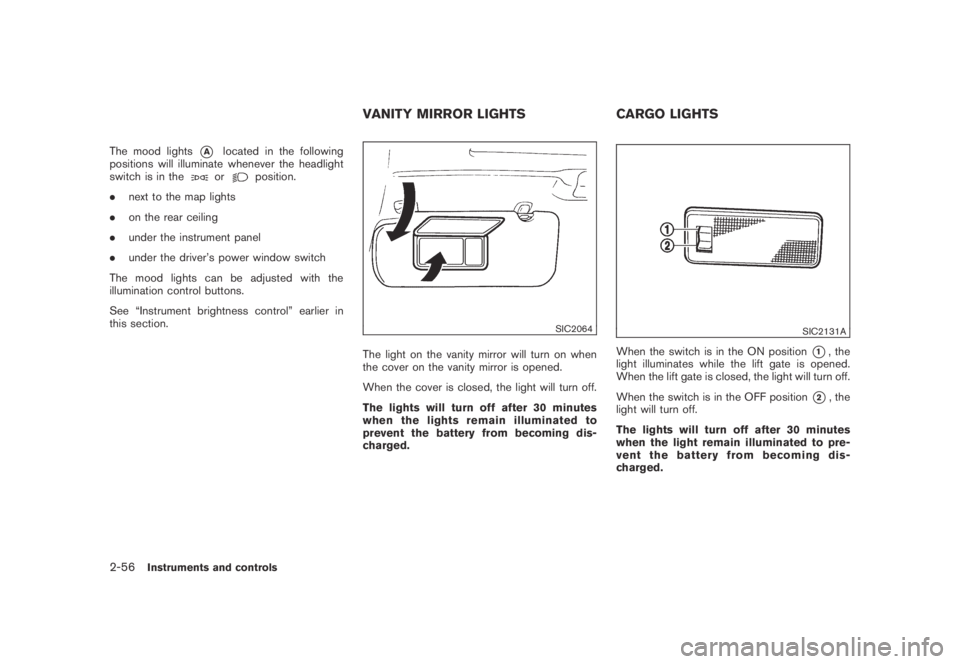
The mood lights*Alocated in the following
positions will illuminate whenever the headlight
switch is in the
orposition.
.next to the map lights
.on the rear ceiling
.under the instrument panel
.under the driver’s power window switch
The mood lights can be adjusted with the
illumination control buttons.
See “Instrument brightness control” earlier in
this section.
SIC2064
The light on the vanity mirror will turn on when
the cover on the vanity mirror is opened.
When the cover is closed, the light will turn off.
The lights will turn off after 30 minutes
when the lights remain illuminated to
prevent the battery from becoming dis-
charged.
SIC2131A
When the switch is in the ON position*1, the
light illuminates while the lift gate is opened.
When the lift gate is closed, the light will turn off.
When the switch is in the OFF position
*2, the
light will turn off.
The lights will turn off after 30 minutes
when the light remain illuminated to pre-
vent the battery from becoming dis-
charged.
VANITY MIRROR LIGHTS CARGO LIGHTS
2-56Instruments and controls
Page 141 of 443
Black plate (141,1)
Model "Z51-D" EDITED: 2007/ 10/ 2
*3: Doors will not lock by pushing the door
handle request switch with the Intelligent
Key inside the vehicle.
However, when an Intelligent Key is inside
the vehicle, doors can be locked with
another registered Intelligent Key.
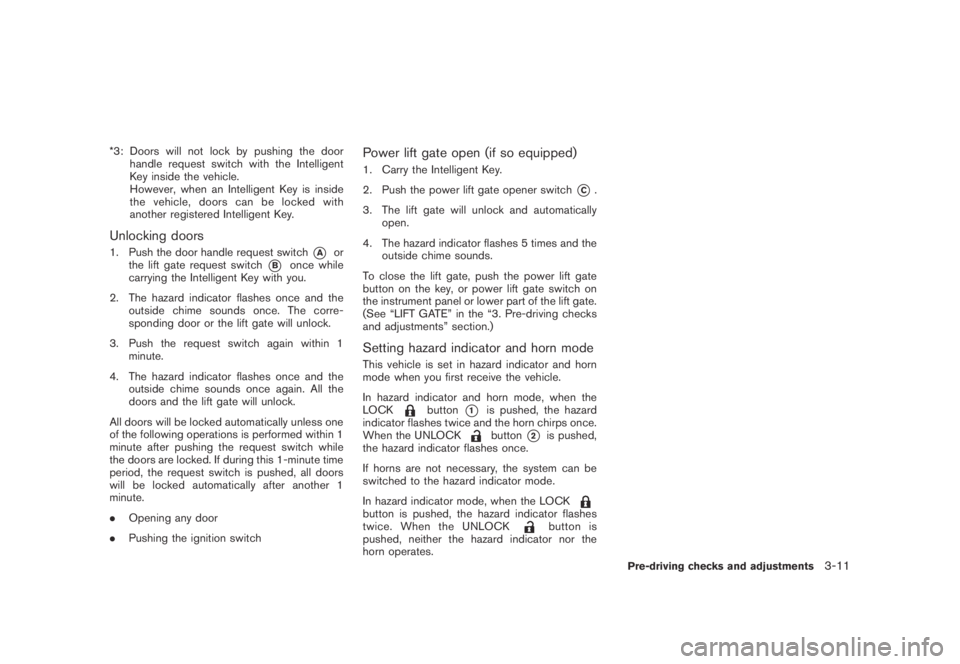
Unlocking doors
1. Push the door handle request switch*Aor
the lift gate request switch
*Bonce while
carrying the Intelligent Key with you.
2. The hazard indicator flashes once and the
outside chime sounds once. The corre-
sponding door or the lift gate will unlock.
3. Push the request switch again within 1
minute.
4. The hazard indicator flashes once and the
outside chime sounds once again. All the
doors and the lift gate will unlock.
All doors will be locked automatically unless one
of the following operations is performed within 1
minute after pushing the request switch while
the doors are locked. If during this 1-minute time
period, the request switch is pushed, all doors
will be locked automatically after another 1
minute.
.Opening any door
.Pushing the ignition switch
Power lift gate open (if so equipped)
1. Carry the Intelligent Key.
2. Push the power lift gate opener switch
*C.
3. The lift gate will unlock and automatically
open.
4. The hazard indicator flashes 5 times and the
outside chime sounds.
To close the lift gate, push the power lift gate
button on the key, or power lift gate switch on
the instrument panel or lower part of the lift gate.
(See “LIFT GATE” in the “3. Pre-driving checks
and adjustments” section.)
Setting hazard indicator and horn mode
This vehicle is set in hazard indicator and horn
mode when you first receive the vehicle.
In hazard indicator and horn mode, when the
LOCK
button*1is pushed, the hazard
indicator flashes twice and the horn chirps once.
When the UNLOCK
button*2is pushed,
the hazard indicator flashes once.
If horns are not necessary, the system can be
switched to the hazard indicator mode.
In hazard indicator mode, when the LOCK
button is pushed, the hazard indicator flashes
twice. When the UNLOCKbutton is
pushed, neither the hazard indicator nor the
horn operates.
Pre-driving checks and adjustments3-11