lock NISSAN MURANO 2009 Owner´s Manual
[x] Cancel search | Manufacturer: NISSAN, Model Year: 2009, Model line: MURANO, Model: NISSAN MURANO 2009Pages: 443, PDF Size: 3.95 MB
Page 96 of 443
Black plate (94,1)
Model "Z51-D" EDITED: 2007/ 10/ 2
vibration occurs.
The system helps deter vehicle theft but cannot
prevent it, nor can it prevent the theft of interior
or exterior vehicle components in all situations.
Always secure your vehicle even if parking for a
brief period. Never leave your keys in the vehicle,
and always lock it when unattended. Be aware
of your surroundings, and park in secure, well-lit
areas whenever possible.
Many devices offering additional protection,
such as component locks, identification markers,
and tracking systems, are available at auto
supply stores and specialty shops. Your
NISSAN dealer may also offer such equipment.
Check with your insurance company to see if
you may be eligible for discounts for various
theft protection features.
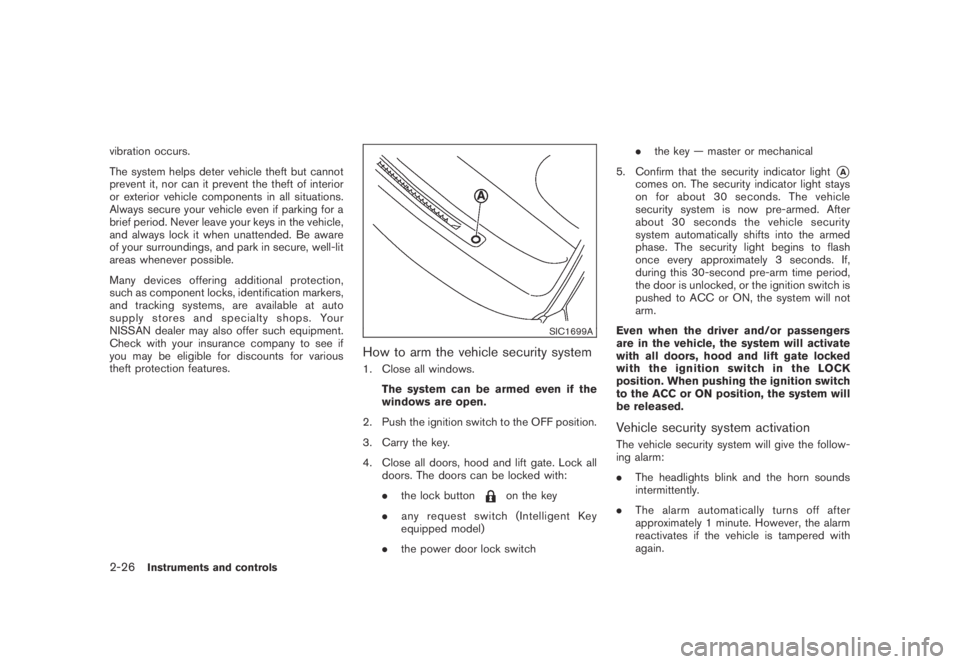
SIC1699A
How to arm the vehicle security system
1. Close all windows.
The system can be armed even if the
windows are open.
2. Push the ignition switch to the OFF position.
3. Carry the key.
4. Close all doors, hood and lift gate. Lock all
doors. The doors can be locked with:
.the lock button
on the key
.any request switch (Intelligent Key
equipped model)
.the power door lock switch.the key — master or mechanical
5. Confirm that the security indicator light
*Acomes on. The security indicator light stays
on for about 30 seconds. The vehicle
security system is now pre-armed. After
about 30 seconds the vehicle security
system automatically shifts into the armed
phase. The security light begins to flash
once every approximately 3 seconds. If,
during this 30-second pre-arm time period,
the door is unlocked, or the ignition switch is
pushed to ACC or ON, the system will not
arm.
Even when the driver and/or passengers
are in the vehicle, the system will activate
with all doors, hood and lift gate locked
withtheignitionswitchintheLOCK
position. When pushing the ignition switch
to the ACC or ON position, the system will
be released.
Vehicle security system activation
The vehicle security system will give the follow-
ing alarm:
.The headlights blink and the horn sounds
intermittently.
.The alarm automatically turns off after
approximately 1 minute. However, the alarm
reactivates if the vehicle is tampered with
again.
2-26Instruments and controls
Page 97 of 443
Black plate (95,1)
Model "Z51-D" EDITED: 2007/ 10/ 2
The alarm is activated by:
.Unlocking the door without using the button
on the key, the request switch (if so
equipped) or the key. (Even if the door is
opened by releasing the door inside lock
knob, the alarm will activate.)
.Opening the hood.
How to stop an activated alarm
The alarm will stop by unlocking a door by
pushing the unlock buttonon the key,
pushing the request switch or using the key.
If the system does not operate as de-
scribed above, have it checked by a
NISSAN dealer.
NISSAN VEHICLE IMMOBILIZER SYS-
TEM
The NISSAN Vehicle Immobilizer System will not
allow the engine to start without the use of the
registered key.Never leave these keys in the
vehicle.
Statement related to section 15 of FCC
rules for NISSAN Vehicle Immobilizer
System (CONT ASSY - CARD SLOT)
This device complies with part 15 of the
FCC Rules and RSS-210 of Industry Cana-
da. Operation is subject to the following
two conditions;(1) This device may not cause harmful
interference, and (2) this device must
accept any interference received, including
interference that may cause undesired
operation of the device.
CHANGES OR MODIFICATIONS NOT EX-
PRESSLY APPROVED BY THE PARTY
RESPONSIBLE FOR COMPLIANCE COULD
VOID THE USER’S AUTHORITY TO OPER-
ATE THE EQUIPMENT.
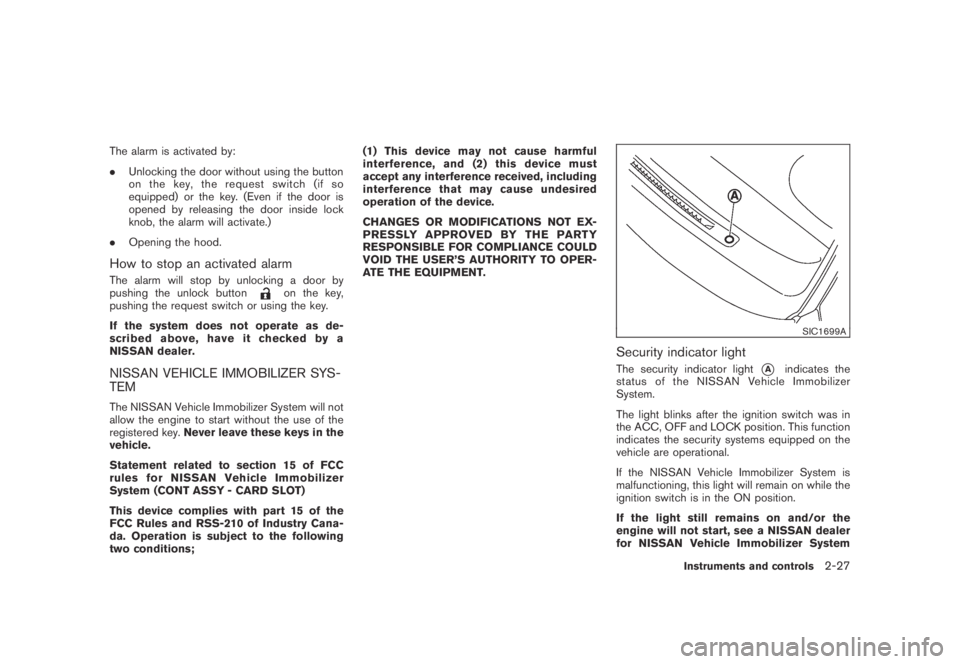
SIC1699A
Security indicator light
The security indicator light*Aindicates the
status of the NISSAN Vehicle Immobilizer
System.
The light blinks after the ignition switch was in
the ACC, OFF and LOCK position. This function
indicates the security systems equipped on the
vehicle are operational.
If the NISSAN Vehicle Immobilizer System is
malfunctioning, this light will remain on while the
ignition switch is in the ON position.
If the light still remains on and/or the
engine will not start, see a NISSAN dealer
for NISSAN Vehicle Immobilizer System
Instruments and controls2-27
Page 101 of 443
Black plate (99,1)
Model "Z51-D" EDITED: 2007/ 10/ 2
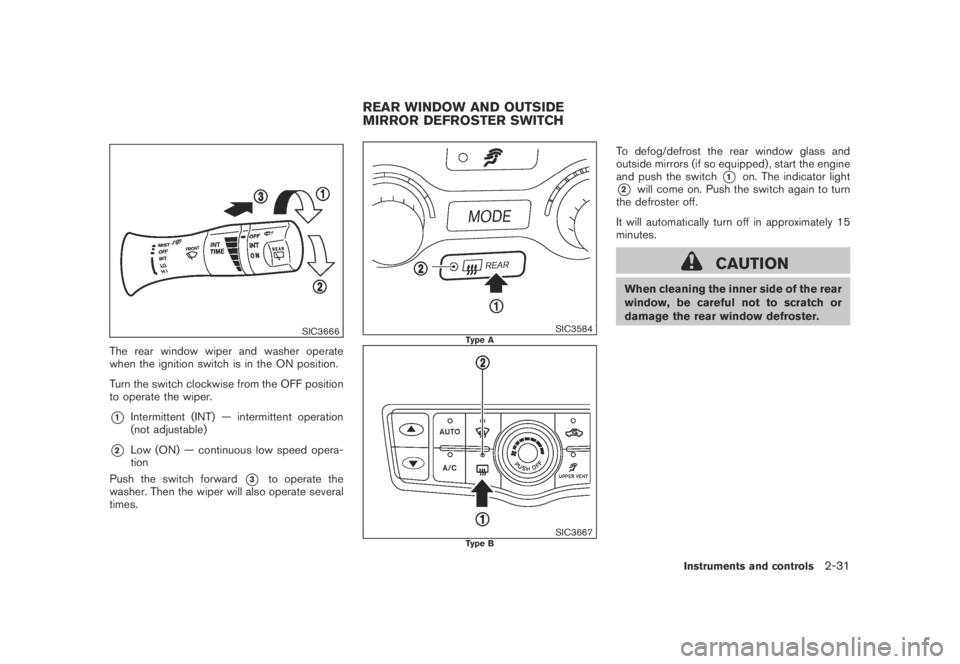
SIC3666
The rear window wiper and washer operate
when the ignition switch is in the ON position.
Turn the switch clockwise from the OFF position
to operate the wiper.
*1Intermittent (INT) — intermittent operation
(not adjustable)
*2Low (ON) — continuous low speed opera-
tion
Push the switch forward
*3to operate the
washer. Then the wiper will also operate several
times.
SIC3584Type A
SIC3667Type B
To defog/defrost the rear window glass and
outside mirrors (if so equipped) , start the engine
and push the switch
*1on. The indicator light
*2will come on. Push the switch again to turn
the defroster off.
It will automatically turn off in approximately 15
minutes.
CAUTION
When cleaning the inner side of the rear
window, be careful not to scratch or
damage the rear window defroster.
REAR WINDOW AND OUTSIDE
MIRROR DEFROSTER SWITCH
Instruments and controls2-31
Page 104 of 443
Black plate (102,1)
Model "Z51-D" EDITED: 2007/ 10/ 2
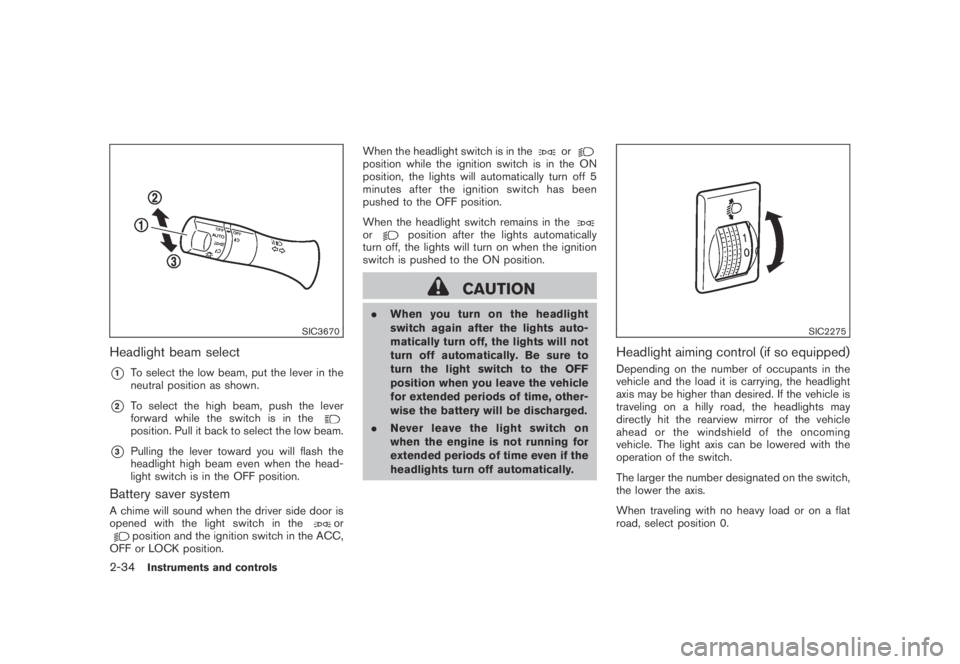
SIC3670
Headlight beam select
*1To select the low beam, put the lever in the
neutral position as shown.
*2To select the high beam, push the lever
forward while the switch is in the
position. Pull it back to select the low beam.
*3Pulling the lever toward you will flash the
headlight high beam even when the head-
light switch is in the OFF position.
Battery saver system
A chime will sound when the driver side door is
opened with the light switch in theorposition and the ignition switch in the ACC,
OFF or LOCK position.When the headlight switch is in the
orposition while the ignition switch is in the ON
position, the lights will automatically turn off 5
minutesaftertheignitionswitchhasbeen
pushed to the OFF position.
When the headlight switch remains in the
orposition after the lights automatically
turn off, the lights will turn on when the ignition
switch is pushed to the ON position.
CAUTION
.When you turn on the headlight
switch again after the lights auto-
matically turn off, the lights will not
turn off automatically. Be sure to
turn the light switch to the OFF
position when you leave the vehicle
for extended periods of time, other-
wise the battery will be discharged.
.Never leave the light switch on
when the engine is not running for
extended periods of time even if the
headlights turn off automatically.
SIC2275
Headlight aiming control (if so equipped)
Depending on the number of occupants in the
vehicle and the load it is carrying, the headlight
axis may be higher than desired. If the vehicle is
traveling on a hilly road, the headlights may
directly hit the rearview mirror of the vehicle
ahead or the windshield of the oncoming
vehicle. The light axis can be lowered with the
operation of the switch.
The larger the number designated on the switch,
the lower the axis.
When traveling with no heavy load or on a flat
road, select position 0.
2-34Instruments and controls
Page 108 of 443
Black plate (106,1)
Model "Z51-D" EDITED: 2007/ 10/ 2
SIC3650
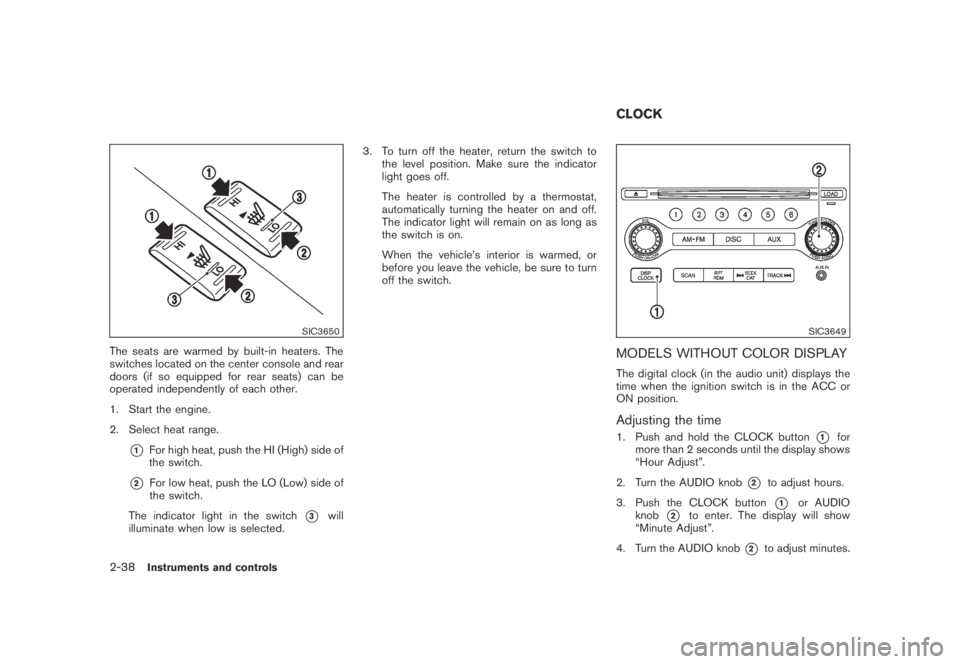
The seats are warmed by built-in heaters. The
switches located on the center console and rear
doors (if so equipped for rear seats) can be
operated independently of each other.
1. Start the engine.
2. Select heat range.
*1For high heat, push the HI (High) side of
the switch.
*2For low heat, push the LO (Low) side of
the switch.
The indicator light in the switch
*3will
illuminate when low is selected.3. To turn off the heater, return the switch to
the level position. Make sure the indicator
light goes off.
The heater is controlled by a thermostat,
automatically turning the heater on and off.
The indicator light will remain on as long as
the switch is on.
When the vehicle’s interior is warmed, or
before you leave the vehicle, be sure to turn
off the switch.
SIC3649
MODELS WITHOUT COLOR DISPLAY
The digital clock (in the audio unit) displays the
time when the ignition switch is in the ACC or
ON position.
Adjusting the time
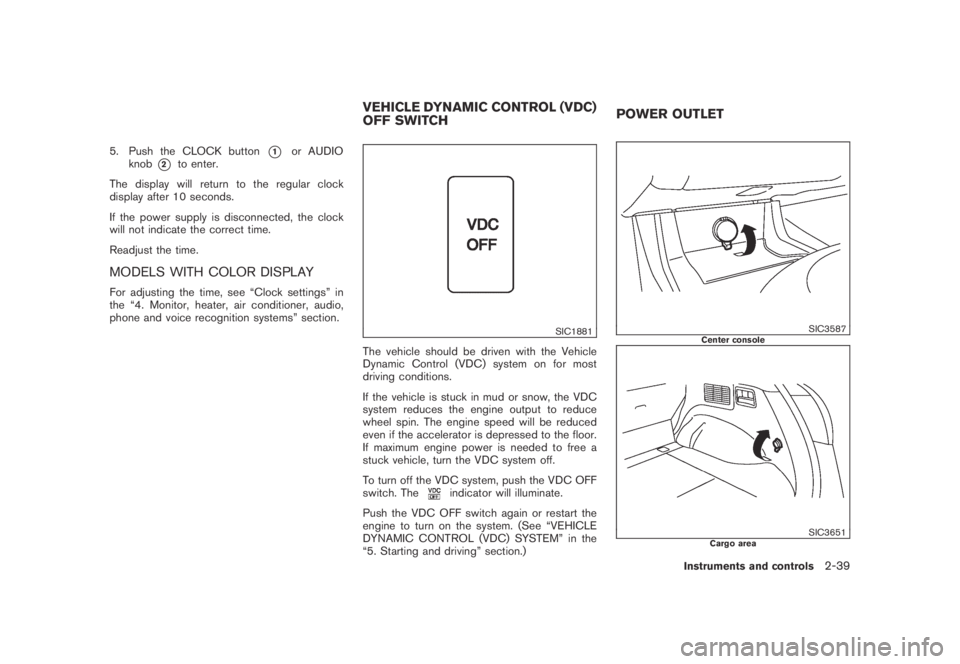
1. Push and hold the CLOCK button*1for
more than 2 seconds until the display shows
“Hour Adjust”.
2. Turn the AUDIO knob
*2to adjust hours.
3. Push the CLOCK button
*1or AUDIO
knob
*2to enter. The display will show
“Minute Adjust”.
4. Turn the AUDIO knob
*2to adjust minutes.
CLOCK
2-38Instruments and controls
Page 109 of 443
Black plate (107,1)
Model "Z51-D" EDITED: 2007/ 10/ 2
5. Push the CLOCK button*1or AUDIO
knob
*2to enter.
The display will return to the regular clock
display after 10 seconds.
If the power supply is disconnected, the clock
will not indicate the correct time.
Readjust the time.
MODELS WITH COLOR DISPLAY
For adjusting the time, see “Clock settings” in
the “4. Monitor, heater, air conditioner, audio,
phone and voice recognition systems” section.
SIC1881
The vehicle should be driven with the Vehicle
Dynamic Control (VDC) system on for most
driving conditions.
If the vehicle is stuck in mud or snow, the VDC
system reduces the engine output to reduce
wheel spin. The engine speed will be reduced
even if the accelerator is depressed to the floor.
If maximum engine power is needed to free a
stuck vehicle, turn the VDC system off.
To turn off the VDC system, push the VDC OFF
switch. The
indicator will illuminate.
Push the VDC OFF switch again or restart the
engine to turn on the system. (See “VEHICLE
DYNAMIC CONTROL (VDC) SYSTEM” in the
“5. Starting and driving” section.)
SIC3587Center console
SIC3651Cargo area
VEHICLE DYNAMIC CONTROL (VDC)
OFF SWITCHPOWER OUTLET
Instruments and controls2-39
Page 113 of 443
Black plate (111,1)
Model "Z51-D" EDITED: 2007/ 10/ 2
direct sunlight. The heat may da-
mage the glasses.
SIC3590
GLOVE BOX
WARNING
Keep glove box lid closed while driving
to help prevent injury in an accident or a
sudden stop.
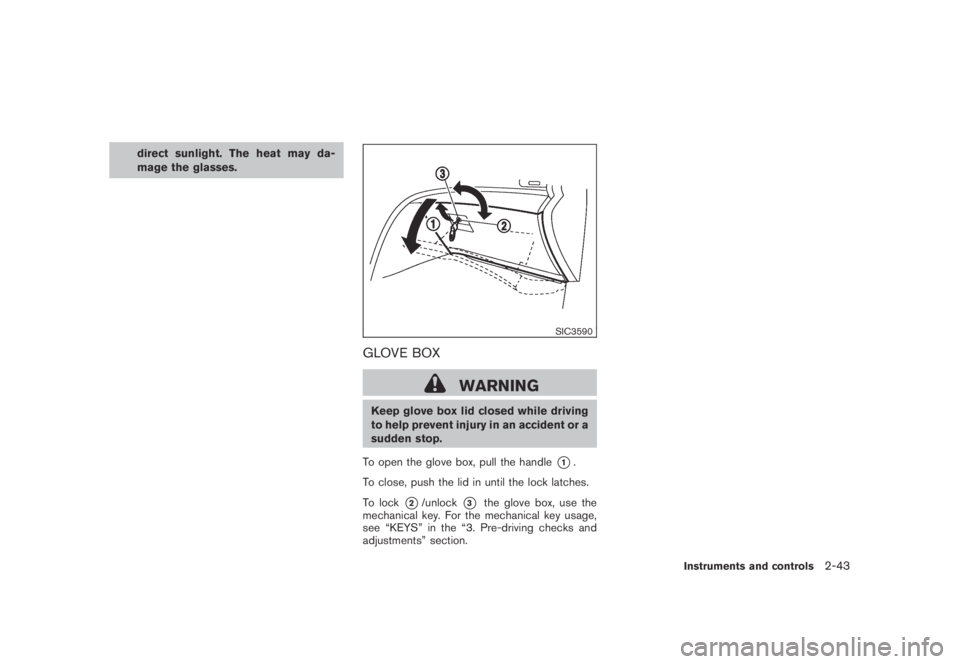
To open the glove box, pull the handle
*1.
To close, push the lid in until the lock latches.
To lock
*2/unlock*3the glove box, use the
mechanical key. For the mechanical key usage,
see “KEYS” in the “3. Pre-driving checks and
adjustments” section.
Instruments and controls2-43
Page 115 of 443
Black plate (113,1)
Model "Z51-D" EDITED: 2007/ 10/ 2
SIC3593
STORAGE BOX (if so equipped)
To open, push the storage box lid*1as
illustrated.
The inner tray can be removed
*2as illustrated.
Do not place valuable items in the storage
box.
Do not use the storage box as an ashtray.
SIC3655Type A
SIC3656Type B
CARGO FLOOR BOX
Type A
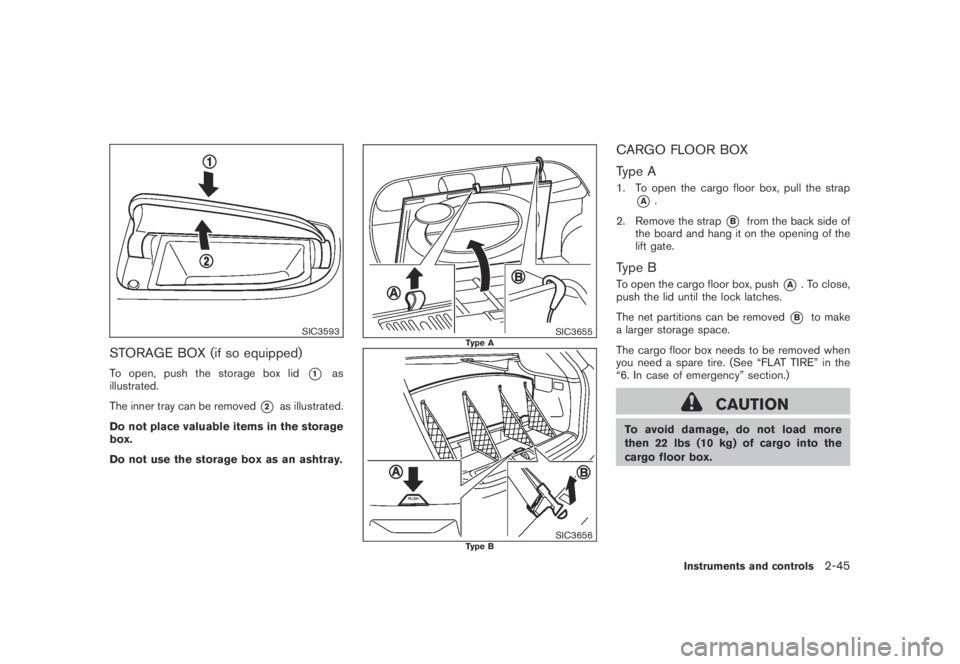
1. To open the cargo floor box, pull the strap
*A.
2. Remove the strap
*Bfrom the back side of
the board and hang it on the opening of the
lift gate.
Type B
To open the cargo floor box, push*A. To close,
push the lid until the lock latches.
The net partitions can be removed
*Bto make
a larger storage space.
The cargo floor box needs to be removed when
you need a spare tire. (See “FLAT TIRE” in the
“6. In case of emergency” section.)
CAUTION
To avoid damage, do not load more
then 22 lbs (10 kg) of cargo into the
cargo floor box.
Instruments and controls2-45
Page 119 of 443
Black plate (117,1)
Model "Z51-D" EDITED: 2007/ 10/ 2
SIC3505
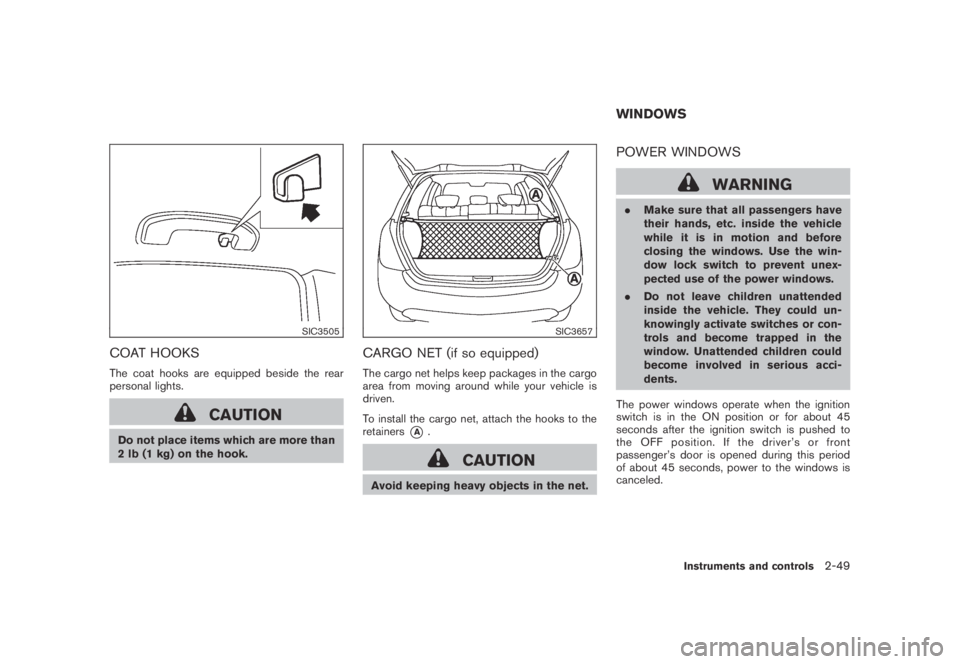
COAT HOOKS
The coat hooks are equipped beside the rear
personal lights.
CAUTION
Do not place items which are more than
2 lb (1 kg) on the hook.
SIC3657
CARGO NET (if so equipped)
The cargo net helps keep packages in the cargo
area from moving around while your vehicle is
driven.
To install the cargo net, attach the hooks to the
retainers
*A.
CAUTION
Avoid keeping heavy objects in the net.
POWER WINDOWS
WARNING
.Make sure that all passengers have
their hands, etc. inside the vehicle
while it is in motion and before
closing the windows. Use the win-
dow lock switch to prevent unex-
pected use of the power windows.
.Do not leave children unattended
inside the vehicle. They could un-
knowingly activate switches or con-
trols and become trapped in the
window. Unattended children could
become involved in serious acci-
dents.
The power windows operate when the ignition
switch is in the ON position or for about 45
seconds after the ignition switch is pushed to
the OFF position. If the driver’s or front
passenger’s door is opened during this period
of about 45 seconds, power to the windows is
canceled.
WINDOWS
Instruments and controls2-49
Page 120 of 443
Black plate (118,1)
Model "Z51-D" EDITED: 2007/ 10/ 2
SIC3283A
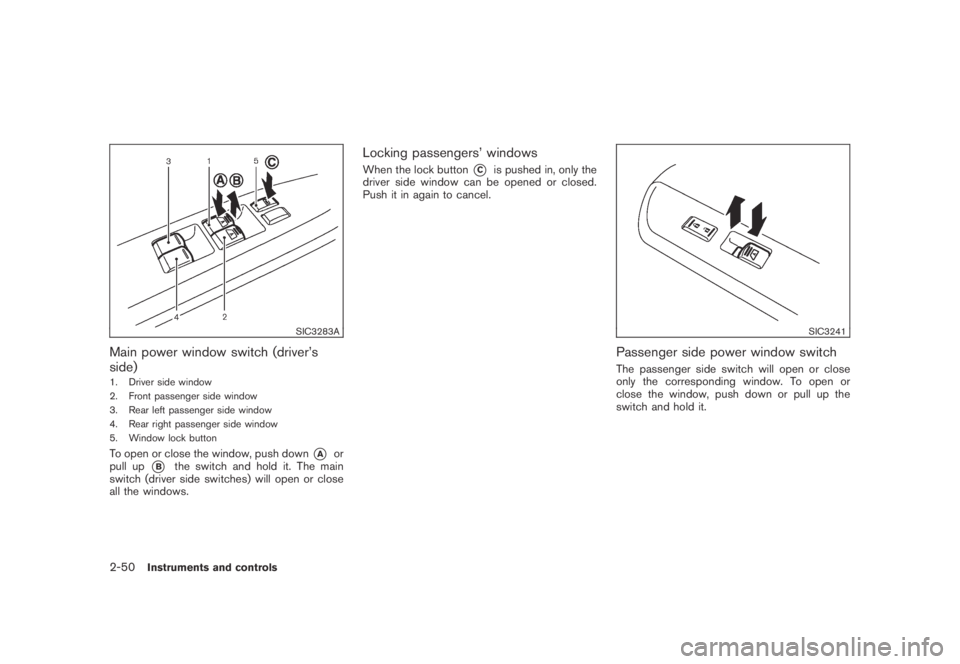
Main power window switch (driver’s
side)
1. Driver side window
2. Front passenger side window
3. Rear left passenger side window
4. Rear right passenger side window
5. Window lock button
To open or close the window, push down*Aor
pull up
*Bthe switch and hold it. The main
switch (driver side switches) will open or close
all the windows.
Locking passengers’ windows
When the lock button*Cis pushed in, only the
driver side window can be opened or closed.
Push it in again to cancel.
SIC3241
Passenger side power window switch
The passenger side switch will open or close
only the corresponding window. To open or
close the window, push down or pull up the
switch and hold it.
2-50Instruments and controls