clock NISSAN MURANO 2009 Owner´s Manual
[x] Cancel search | Manufacturer: NISSAN, Model Year: 2009, Model line: MURANO, Model: NISSAN MURANO 2009Pages: 443, PDF Size: 3.95 MB
Page 11 of 443
Black plate (8,1)
Model "Z51-D" EDITED: 2007/ 10/ 2
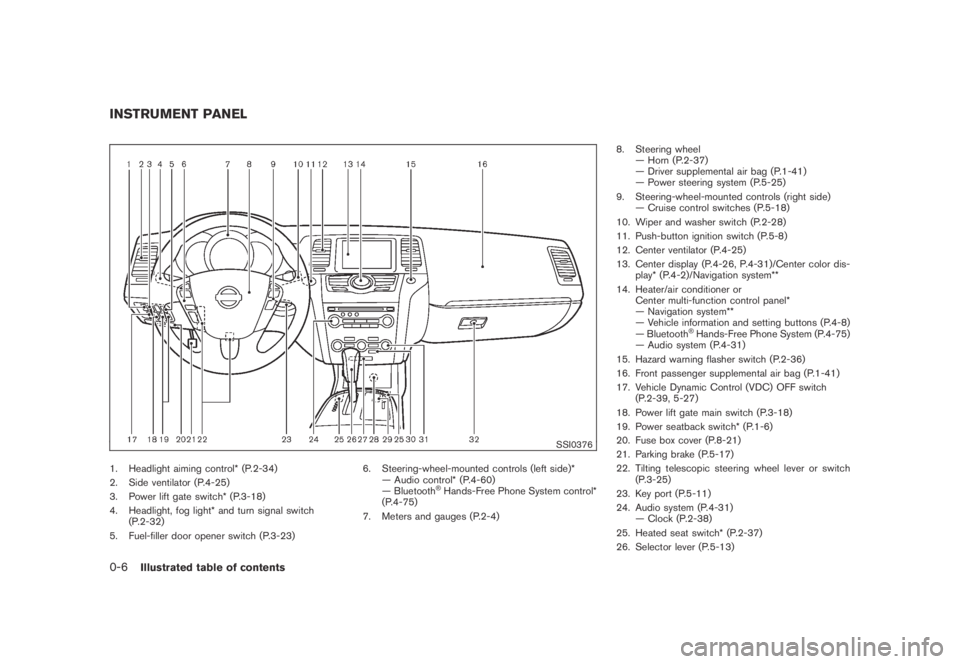
SSI0376
1. Headlight aiming control* (P.2-34)
2. Side ventilator (P.4-25)
3. Power lift gate switch* (P.3-18)
4. Headlight, fog light* and turn signal switch
(P.2-32)
5. Fuel-filler door opener switch (P.3-23)6. Steering-wheel-mounted controls (left side)*
— Audio control* (P.4-60)
— Bluetooth
®Hands-Free Phone System control*
(P.4-75)
7. Meters and gauges (P.2-4)8. Steering wheel
— Horn (P.2-37)
— Driver supplemental air bag (P.1-41)
— Power steering system (P.5-25)
9. Steering-wheel-mounted controls (right side)
— Cruise control switches (P.5-18)
10. Wiper and washer switch (P.2-28)
11. Push-button ignition switch (P.5-8)
12. Center ventilator (P.4-25)
13. Center display (P.4-26, P.4-31)/Center color dis-
play* (P.4-2)/Navigation system**
14. Heater/air conditioner or
Center multi-function control panel*
— Navigation system**
— Vehicle information and setting buttons (P.4-8)
— Bluetooth
®Hands-Free Phone System (P.4-75)
— Audio system (P.4-31)
15. Hazard warning flasher switch (P.2-36)
16. Front passenger supplemental air bag (P.1-41)
17. Vehicle Dynamic Control (VDC) OFF switch
(P.2-39, 5-27)
18. Power lift gate main switch (P.3-18)
19. Power seatback switch* (P.1-6)
20. Fuse box cover (P.8-21)
21. Parking brake (P.5-17)
22. Tilting telescopic steering wheel lever or switch
(P.3-25)
23. Key port (P.5-11)
24. Audio system (P.4-31)
— Clock (P.2-38)
25. Heated seat switch* (P.2-37)
26. Selector lever (P.5-13)
INSTRUMENT PANEL
0-6Illustrated table of contents
Page 70 of 443
Black plate (7,1)
2 Instruments and controls
Model "Z51-D" EDITED: 2007/ 10/ 2
Instrument panel................................................ 2-2
Meters and gauges............................................. 2-4
Speedometer and odometer............................. 2-5
Tachometer................................................... 2-6
Engine coolant temperature gauge..................... 2-6
Fuel gauge................................................... 2-7
Compass (if so equipped).................................... 2-7
Zone variation change procedure....................... 2-9
Warning/indicator lights and audible reminders.......2-10
Checking bulbs...........................................2-10
Warning lights.............................................2-10
Indicator lights.............................................2-15
Audible reminders........................................2-17
Dot matrix liquid crystal display............................2-17
Indicators for operation..................................2-18
Indicators for maintenance..............................2-20
Trip computer..............................................2-21
Security systems..............................................2-25
Vehicle security system (if so equipped)............2-25
NISSAN Vehicle Immobilizer System.................2-27
Windshield wiper and washer switch....................2-28
Rain-sensing auto wiper system
(if so equipped)..........................................2-29
Rear window wiper and washer switch..................2-30
Rear window and outside mirror defroster switch.....2-31Headlight and turn signal switch..........................2-32
Xenon headlights (if so equipped)....................2-32
Headlight switch..........................................2-32
Turn signal switch........................................2-36
Fog light switch (if so equipped)......................2-36
Hazard warning flasher switch.............................2-36
Horn.............................................................2-37
Heated seats (if so equipped).............................2-37
Clock............................................................2-38
Models without color display...........................2-38
Models with color display...............................2-39
Vehicle Dynamic Control (VDC) OFF switch...........2-39
Power outlet...................................................2-39
Cigarette lighter and ashtray (if so equipped)..........2-41
Storage.........................................................2-41
Cup holders................................................2-41
Sunglasses holder........................................2-42
Glove box..................................................2-43
Console box...............................................2-44
Storage box (if so equipped)..........................2-45
Cargo floor box...........................................2-45
Luggage side box.........................................2-46
Cargo cover (if so equipped)..........................2-46
Luggage hooks (if so equipped)......................2-47
Roof rack (if so equipped)..............................2-48
Page 72 of 443
Black plate (70,1)
Model "Z51-D" EDITED: 2007/ 10/ 2
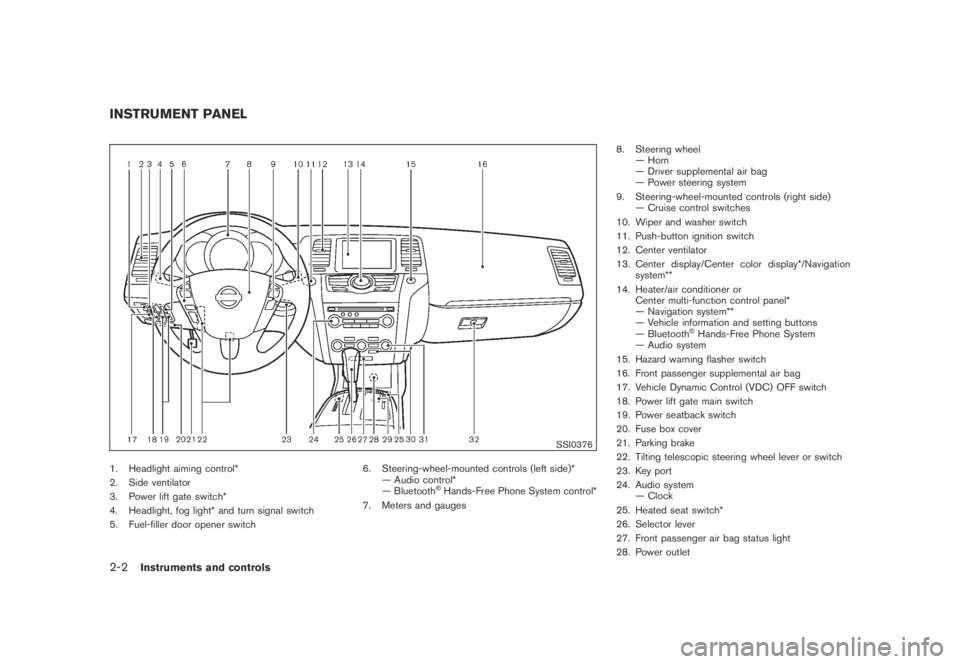
SSI0376
1. Headlight aiming control*
2. Side ventilator
3. Power lift gate switch*
4. Headlight, fog light* and turn signal switch
5. Fuel-filler door opener switch6. Steering-wheel-mounted controls (left side)*
— Audio control*
— Bluetooth
®Hands-Free Phone System control*
7. Meters and gauges8. Steering wheel
— Horn
— Driver supplemental air bag
— Power steering system
9. Steering-wheel-mounted controls (right side)
— Cruise control switches
10. Wiper and washer switch
11. Push-button ignition switch
12. Center ventilator
13. Center display/Center color display*/Navigation
system**
14. Heater/air conditioner or
Center multi-function control panel*
— Navigation system**
— Vehicle information and setting buttons
— Bluetooth
®Hands-Free Phone System
— Audio system
15. Hazard warning flasher switch
16. Front passenger supplemental air bag
17. Vehicle Dynamic Control (VDC) OFF switch
18. Power lift gate main switch
19. Power seatback switch
20. Fuse box cover
21. Parking brake
22. Tilting telescopic steering wheel lever or switch
23. Key port
24. Audio system
— Clock
25. Heated seat switch*
26. Selector lever
27. Front passenger air bag status light
28. Power outlet
INSTRUMENT PANEL
2-2Instruments and controls
Page 101 of 443
Black plate (99,1)
Model "Z51-D" EDITED: 2007/ 10/ 2
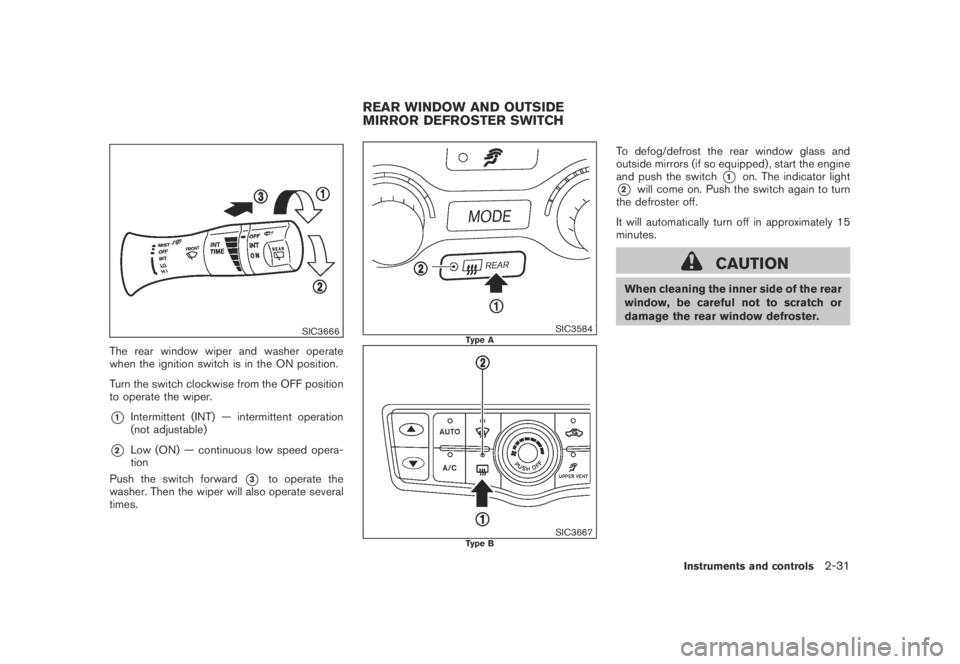
SIC3666
The rear window wiper and washer operate
when the ignition switch is in the ON position.
Turn the switch clockwise from the OFF position
to operate the wiper.
*1Intermittent (INT) — intermittent operation
(not adjustable)
*2Low (ON) — continuous low speed opera-
tion
Push the switch forward
*3to operate the
washer. Then the wiper will also operate several
times.
SIC3584Type A
SIC3667Type B
To defog/defrost the rear window glass and
outside mirrors (if so equipped) , start the engine
and push the switch
*1on. The indicator light
*2will come on. Push the switch again to turn
the defroster off.
It will automatically turn off in approximately 15
minutes.
CAUTION
When cleaning the inner side of the rear
window, be careful not to scratch or
damage the rear window defroster.
REAR WINDOW AND OUTSIDE
MIRROR DEFROSTER SWITCH
Instruments and controls2-31
Page 108 of 443
Black plate (106,1)
Model "Z51-D" EDITED: 2007/ 10/ 2
SIC3650
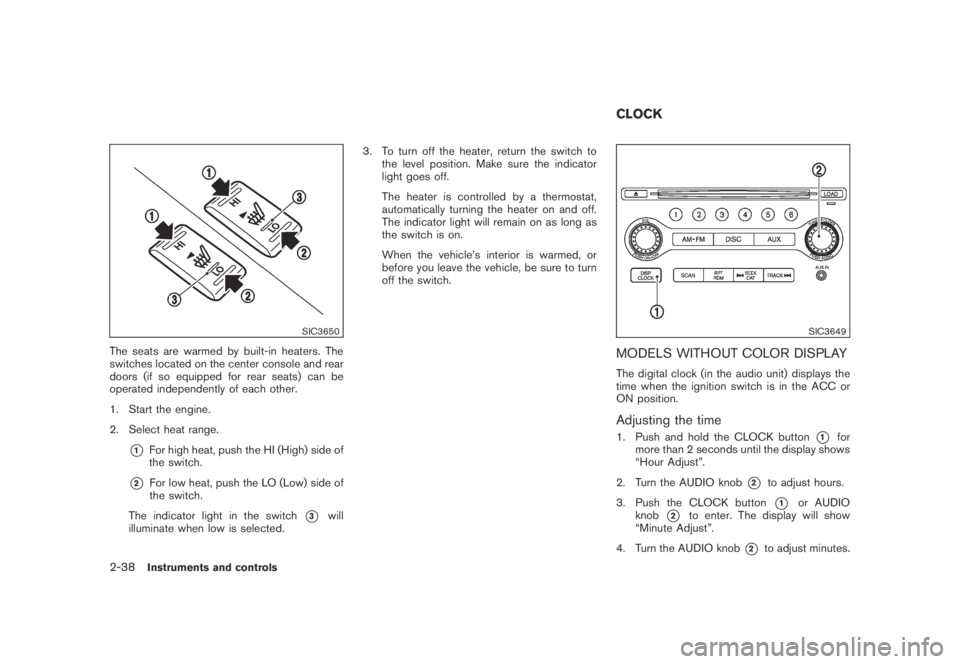
The seats are warmed by built-in heaters. The
switches located on the center console and rear
doors (if so equipped for rear seats) can be
operated independently of each other.
1. Start the engine.
2. Select heat range.
*1For high heat, push the HI (High) side of
the switch.
*2For low heat, push the LO (Low) side of
the switch.
The indicator light in the switch
*3will
illuminate when low is selected.3. To turn off the heater, return the switch to
the level position. Make sure the indicator
light goes off.
The heater is controlled by a thermostat,
automatically turning the heater on and off.
The indicator light will remain on as long as
the switch is on.
When the vehicle’s interior is warmed, or
before you leave the vehicle, be sure to turn
off the switch.
SIC3649
MODELS WITHOUT COLOR DISPLAY
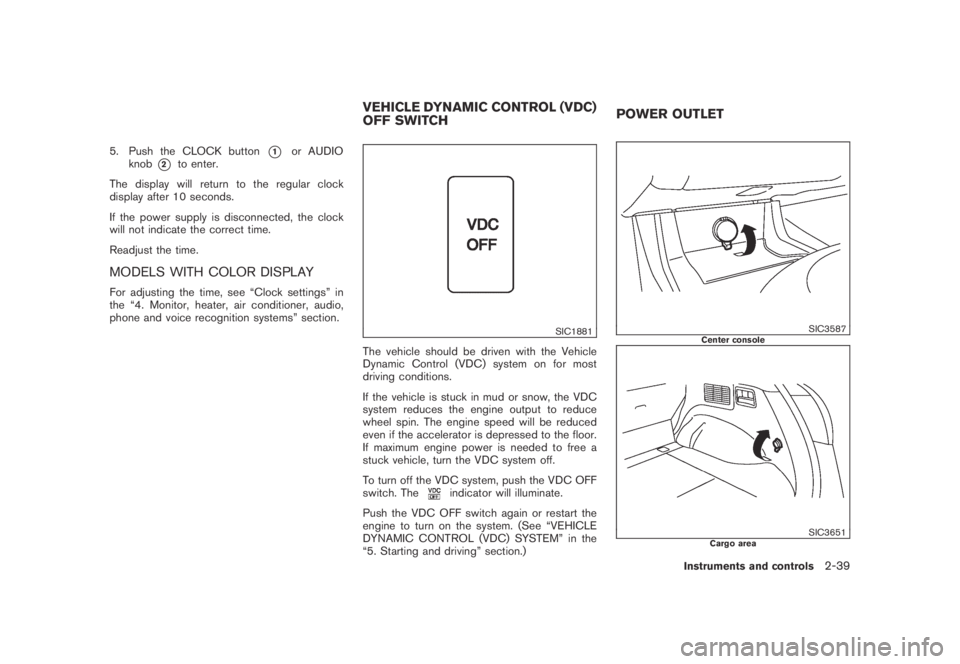
The digital clock (in the audio unit) displays the
time when the ignition switch is in the ACC or
ON position.
Adjusting the time
1. Push and hold the CLOCK button*1for
more than 2 seconds until the display shows
“Hour Adjust”.
2. Turn the AUDIO knob
*2to adjust hours.
3. Push the CLOCK button
*1or AUDIO
knob
*2to enter. The display will show
“Minute Adjust”.
4. Turn the AUDIO knob
*2to adjust minutes.
CLOCK
2-38Instruments and controls
Page 109 of 443
Black plate (107,1)
Model "Z51-D" EDITED: 2007/ 10/ 2
5. Push the CLOCK button*1or AUDIO
knob
*2to enter.
The display will return to the regular clock
display after 10 seconds.
If the power supply is disconnected, the clock
will not indicate the correct time.
Readjust the time.
MODELS WITH COLOR DISPLAY
For adjusting the time, see “Clock settings” in
the “4. Monitor, heater, air conditioner, audio,
phone and voice recognition systems” section.
SIC1881
The vehicle should be driven with the Vehicle
Dynamic Control (VDC) system on for most
driving conditions.
If the vehicle is stuck in mud or snow, the VDC
system reduces the engine output to reduce
wheel spin. The engine speed will be reduced
even if the accelerator is depressed to the floor.
If maximum engine power is needed to free a
stuck vehicle, turn the VDC system off.
To turn off the VDC system, push the VDC OFF
switch. The
indicator will illuminate.
Push the VDC OFF switch again or restart the
engine to turn on the system. (See “VEHICLE
DYNAMIC CONTROL (VDC) SYSTEM” in the
“5. Starting and driving” section.)
SIC3587Center console
SIC3651Cargo area
VEHICLE DYNAMIC CONTROL (VDC)
OFF SWITCHPOWER OUTLET
Instruments and controls2-39
Page 154 of 443
Black plate (154,1)
Model "Z51-D" EDITED: 2007/ 10/ 2
cle.
.Do not fill a portable fuel container
in the vehicle or trailer. Static elec-
tricity can cause an explosion of
flammable liquid, vapor or gas in
any vehicle or trailer. To reduce the
risk of serious injury or death when
filling portable fuel containers:
— Always place the container on
the ground when filling.
— Do not use electronic devices
when filling.
— Keep the pump nozzle in contact
with the container while you are
filling it.
— Use only approved portable fuel
containers for flammable liquid.
CAUTION
.If fuel is spilled on the vehicle body,
flush it away with water to avoid
paint damage.
.Tighten until the fuel-filler cap
clicks. Failure to tighten the fuel-
filler cap properly may cause the
malfunction indicator light
(MIL) to illuminate. If the
lightilluminates because the fuel-filler
cap is loose or missing, tighten or
install the cap and continue to drive
the vehicle. The
light should
turn off after a few driving trips. If
the
light does not turn off after
a few driving trips, have the vehicle
inspected by a NISSAN dealer.
SPA2442
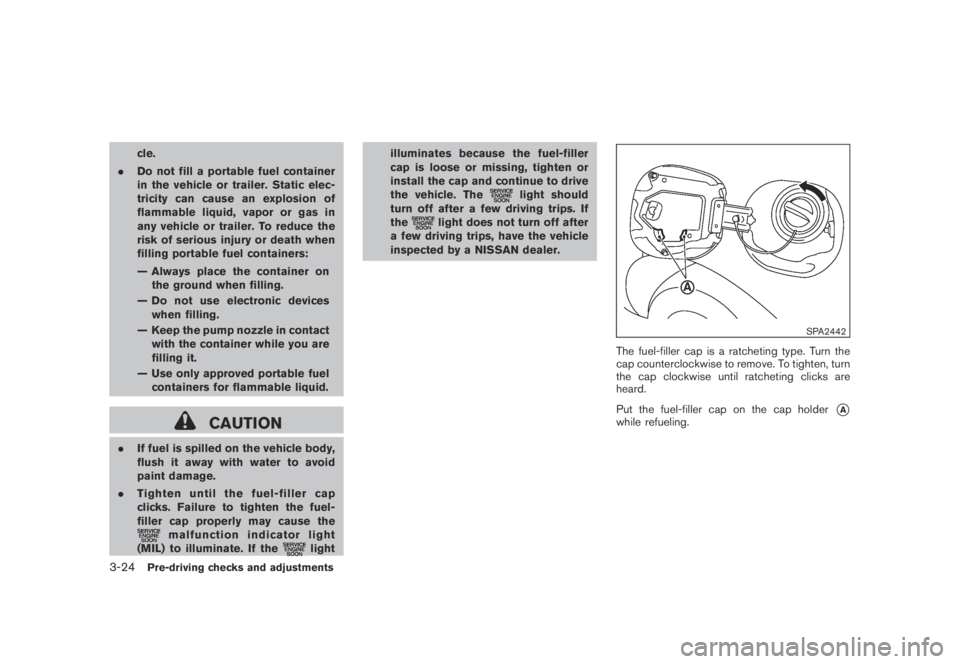
The fuel-filler cap is a ratcheting type. Turn the
cap counterclockwise to remove. To tighten, turn
the cap clockwise until ratcheting clicks are
heard.
Put the fuel-filler cap on the cap holder
*Awhile refueling.
3-24Pre-driving checks and adjustments
Page 180 of 443
Black plate (178,1)
Model "Z51-D" EDITED: 2007/ 10/ 2
SAA2001
Clock settings
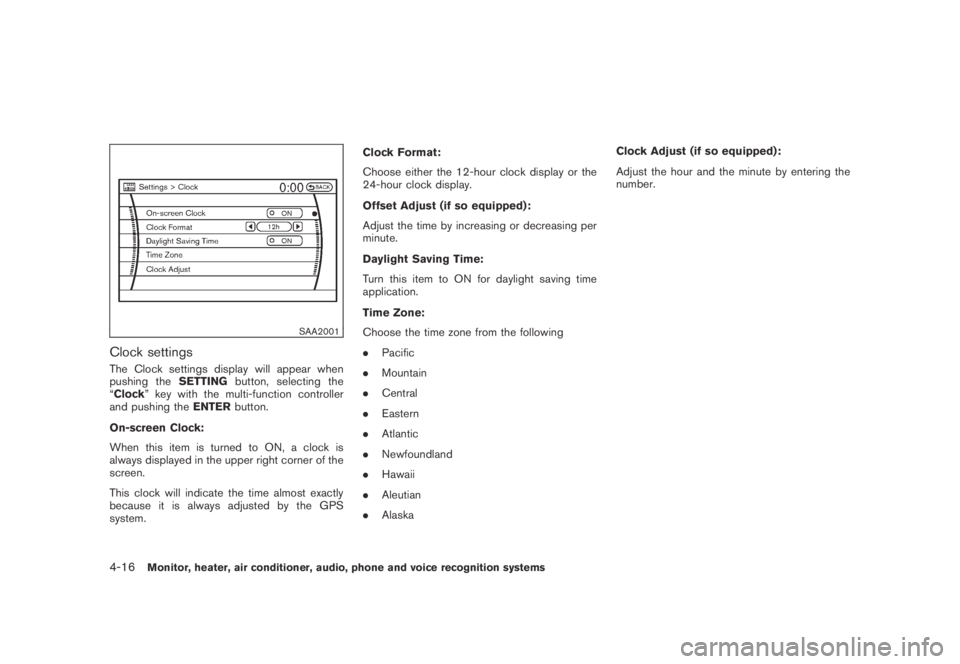
The Clock settings display will appear when
pushing theSETTINGbutton, selecting the
“Clock” key with the multi-function controller
and pushing theENTERbutton.
On-screen Clock:
When this item is turned to ON, a clock is
always displayed in the upper right corner of the
screen.
This clock will indicate the time almost exactly
because it is always adjusted by the GPS
system.Clock Format:
Choose either the 12-hour clock display or the
24-hour clock display.
Offset Adjust (if so equipped):
Adjust the time by increasing or decreasing per
minute.
Daylight Saving Time:
Turn this item to ON for daylight saving time
application.
Time Zone:
Choose the time zone from the following
.Pacific
.Mountain
.Central
.Eastern
.Atlantic
.Newfoundland
.Hawaii
.Aleutian
.AlaskaClock Adjust (if so equipped):
Adjust the hour and the minute by entering the
number.
4-16Monitor, heater, air conditioner, audio, phone and voice recognition systems
Page 203 of 443
Black plate (201,1)
Model "Z51-D" EDITED: 2007/ 10/ 2
SAA2010
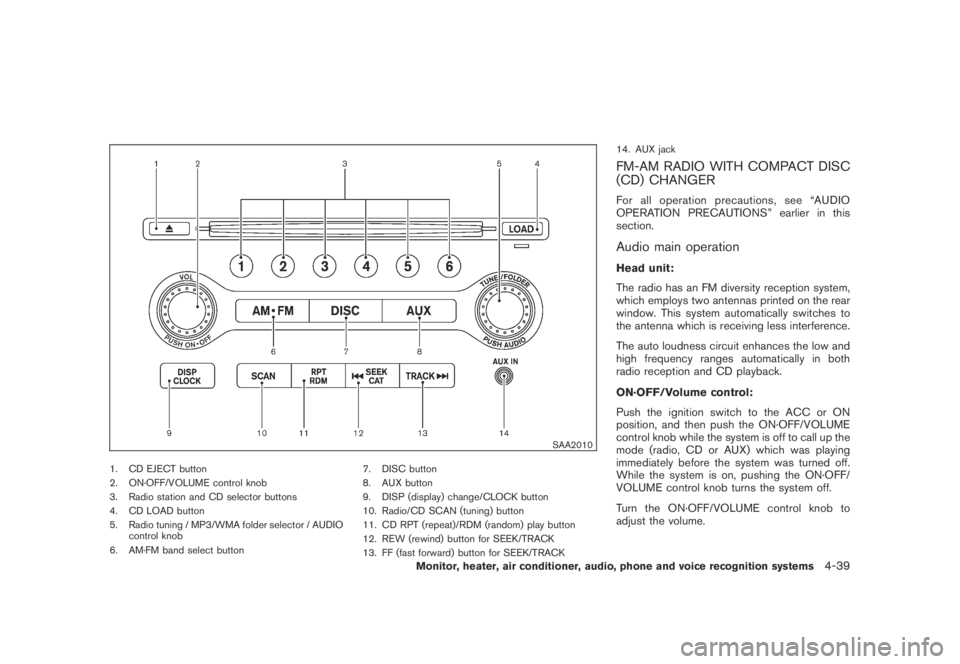
1. CD EJECT button
2. ON·OFF/VOLUME control knob
3. Radio station and CD selector buttons
4. CD LOAD button
5. Radio tuning / MP3/WMA folder selector / AUDIO
control knob
6. AM·FM band select button7. DISC button
8. AUX button
9. DISP (display) change/CLOCK button
10. Radio/CD SCAN (tuning) button
11. CD RPT (repeat)/RDM (random) play button
12. REW (rewind) button for SEEK/TRACK
13. FF (fast forward) button for SEEK/TRACK14. AUX jack
FM-AM RADIO WITH COMPACT DISC
(CD) CHANGER
For all operation precautions, see “AUDIO
OPERATION PRECAUTIONS” earlier in this
section.
Audio main operation
Head unit:
The radio has an FM diversity reception system,
which employs two antennas printed on the rear
window. This system automatically switches to
the antenna which is receiving less interference.
The auto loudness circuit enhances the low and
high frequency ranges automatically in both
radio reception and CD playback.
ON·OFF/Volume control:
Push the ignition switch to the ACC or ON
position, and then push the ON·OFF/VOLUME
control knob while the system is off to call up the
mode (radio, CD or AUX) which was playing
immediately before the system was turned off.
While the system is on, pushing the ON·OFF/
VOLUME control knob turns the system off.
Turn the ON·OFF/VOLUME control knob to
adjust the volume.
Monitor, heater, air conditioner, audio, phone and voice recognition systems4-39
Page 204 of 443
Black plate (202,1)
Model "Z51-D" EDITED: 2007/ 10/ 2
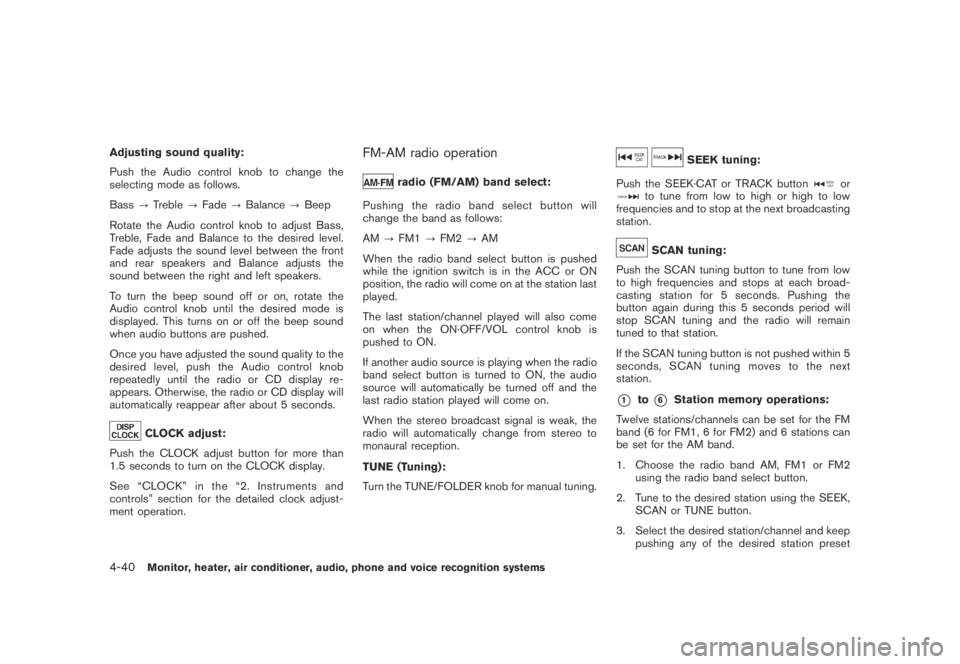
Adjusting sound quality:
Push the Audio control knob to change the
selecting mode as follows.
Bass?Treble?Fade?Balance?Beep
Rotate the Audio control knob to adjust Bass,
Treble, Fade and Balance to the desired level.
Fade adjusts the sound level between the front
and rear speakers and Balance adjusts the
sound between the right and left speakers.
To turn the beep sound off or on, rotate the
Audio control knob until the desired mode is
displayed. This turns on or off the beep sound
when audio buttons are pushed.
Once you have adjusted the sound quality to the
desired level, push the Audio control knob
repeatedly until the radio or CD display re-
appears. Otherwise, the radio or CD display will
automatically reappear after about 5 seconds.
CLOCK adjust:
Push the CLOCK adjust button for more than
1.5 seconds to turn on the CLOCK display.
See “CLOCK” in the “2. Instruments and
controls” section for the detailed clock adjust-
ment operation.
FM-AM radio operation
radio (FM/AM) band select:
Pushing the radio band select button will
change the band as follows:
AM?FM1?FM2?AM
When the radio band select button is pushed
while the ignition switch is in the ACC or ON
position, the radio will come on at the station last
played.
The last station/channel played will also come
on when the ON·OFF/VOL control knob is
pushed to ON.
If another audio source is playing when the radio
band select button is turned to ON, the audio
source will automatically be turned off and the
last radio station played will come on.
When the stereo broadcast signal is weak, the
radio will automatically change from stereo to
monaural reception.
TUNE (Tuning):
Turn the TUNE/FOLDER knob for manual tuning.
SEEK tuning:
Push the SEEK·CAT or TRACK button
orto tune from low to high or high to low
frequencies and to stop at the next broadcasting
station.
SCAN tuning:
Push the SCAN tuning button to tune from low
to high frequencies and stops at each broad-
casting station for 5 seconds. Pushing the
button again during this 5 seconds period will
stop SCAN tuning and the radio will remain
tuned to that station.
If the SCAN tuning button is not pushed within 5
seconds, SCAN tuning moves to the next
station.
*1to*6Station memory operations:
Twelve stations/channels can be set for the FM
band (6 for FM1, 6 for FM2) and 6 stations can
be set for the AM band.
1. Choose the radio band AM, FM1 or FM2
using the radio band select button.
2. Tune to the desired station using the SEEK,
SCAN or TUNE button.
3. Select the desired station/channel and keep
pushing any of the desired station preset
4-40Monitor, heater, air conditioner, audio, phone and voice recognition systems