engine oil NISSAN MURANO 2009 Owner´s Manual
[x] Cancel search | Manufacturer: NISSAN, Model Year: 2009, Model line: MURANO, Model: NISSAN MURANO 2009Pages: 443, PDF Size: 3.95 MB
Page 14 of 443
Black plate (11,1)
Model "Z51-D" EDITED: 2007/ 10/ 2
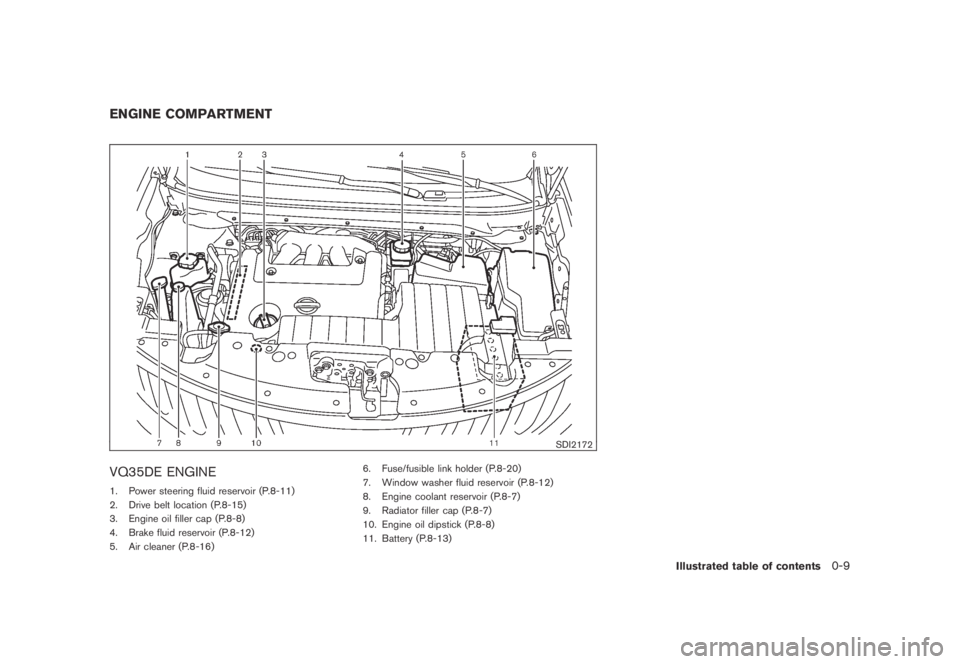
SDI2172
VQ35DE ENGINE
1. Power steering fluid reservoir (P.8-11)
2. Drive belt location (P.8-15)
3. Engine oil filler cap (P.8-8)
4. Brake fluid reservoir (P.8-12)
5. Air cleaner (P.8-16)6. Fuse/fusible link holder (P.8-20)
7. Window washer fluid reservoir (P.8-12)
8. Engine coolant reservoir (P.8-7)
9. Radiator filler cap (P.8-7)
10. Engine oil dipstick (P.8-8)
11. Battery (P.8-13)
ENGINE COMPARTMENT
Illustrated table of contents0-9
Page 80 of 443
Black plate (78,1)
Model "Z51-D" EDITED: 2007/ 10/ 2
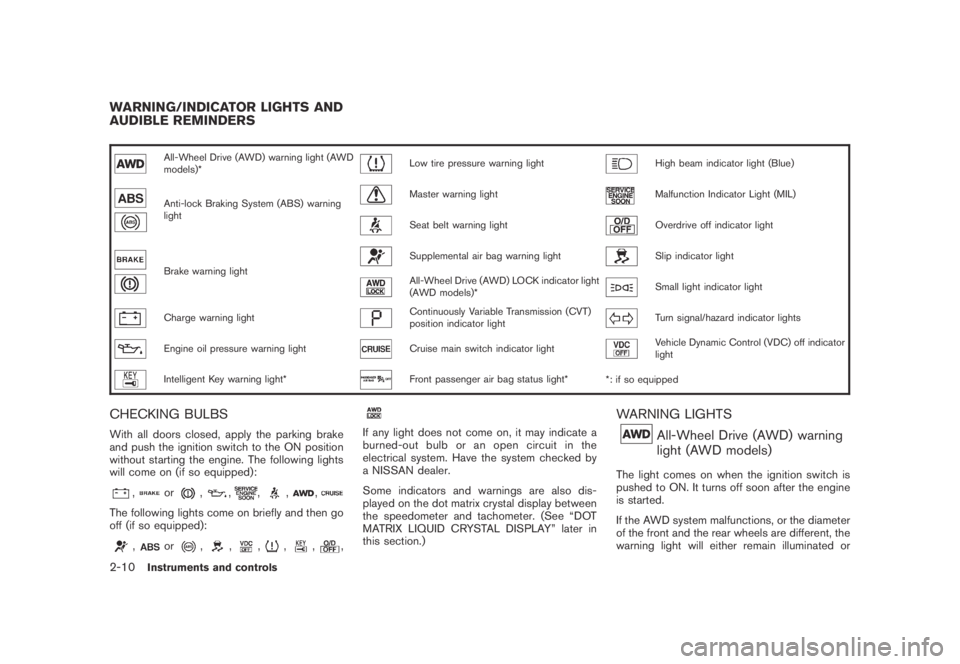
All-Wheel Drive (AWD) warning light (AWD
models)*Low tire pressure warning lightHigh beam indicator light (Blue)
Anti-lock Braking System (ABS) warning
lightMaster warning lightMalfunction Indicator Light (MIL)
Seat belt warning lightOverdrive off indicator light
Brake warning light
Supplemental air bag warning lightSlip indicator light
All-Wheel Drive (AWD) LOCK indicator light
(AWD models)*Small light indicator light
Charge warning lightContinuously Variable Transmission (CVT)
position indicator lightTurn signal/hazard indicator lights
Engine oil pressure warning lightCruise main switch indicator lightVehicle Dynamic Control (VDC) off indicator
light
Intelligent Key warning light*Front passenger air bag status light*
*: if so equipped
CHECKING BULBS
With all doors closed, apply the parking brake
and push the ignition switch to the ON position
without starting the engine. The following lights
will come on (if so equipped):
,or,,,,,
The following lights come on briefly and then go
off (if so equipped):
,or,,,,,,
If any light does not come on, it may indicate a
burned-out bulb or an open circuit in the
electrical system. Have the system checked by
a NISSAN dealer.
Some indicators and warnings are also dis-
played on the dot matrix crystal display between
the speedometer and tachometer. (See “DOT
MATRIX LIQUID CRYSTAL DISPLAY” later in
this section.)
WARNING LIGHTS
All-Wheel Drive (AWD) warning
light (AWD models)
The light comes on when the ignition switch is
pushed to ON. It turns off soon after the engine
is started.
If the AWD system malfunctions, or the diameter
of the front and the rear wheels are different, the
warning light will either remain illuminated or
WARNING/INDICATOR LIGHTS AND
AUDIBLE REMINDERS
2-10Instruments and controls
Page 82 of 443
Black plate (80,1)
Model "Z51-D" EDITED: 2007/ 10/ 2
earlier in this section.)
WARNING
.Your brake system may not be
working properly if the warning light
is on. Driving could be dangerous. If
you judge it to be safe, drive care-
fully to the nearest service station
for repairs. Otherwise, have your
vehicle towed because driving it
could be dangerous.
.Pressing the brake pedal with the
engine stopped and/or low brake
fluid level may increase your stop-
ping distance and braking will re-
quire greater pedal effort as well as
pedal travel.
.If the brake fluid level is below the
minimum or MIN mark on the brake
fluid reservoir, do not drive until the
brake system has been checked at a
NISSAN dealer.
Charge warning light
If the light comes on while the engine is running,
it may indicate the charging system is not
functioning properly. Turn the engine off and
check the alternator belt. If the belt is loose,
broken, missing or if the light remains on, see a
NISSAN dealer immediately.
CAUTION
Do not continue driving if the alternator
belt is loose, broken or missing.
Engine oil pressure warning light
This light warns of low engine oil pressure. If the
light flickers or comes on during normal driving,
pull off the road in a safe area, stop the engine
immediatelyand call a NISSAN dealer or other
authorized repair shop.
The engine oil pressure warning light is
not designed to indicate a low oil level.
Use the dipstick to check the oil level.(See
“ENGINE OIL” in the “8. Maintenance and do-it-
yourself” section.)
CAUTION
Running the engine with the engine oil
pressure warning light on could cause
serious damage to the engine almost
immediately. Such damage is not cov-
ered by warranty. Turn off the engine as
soon as it is safe to do so.
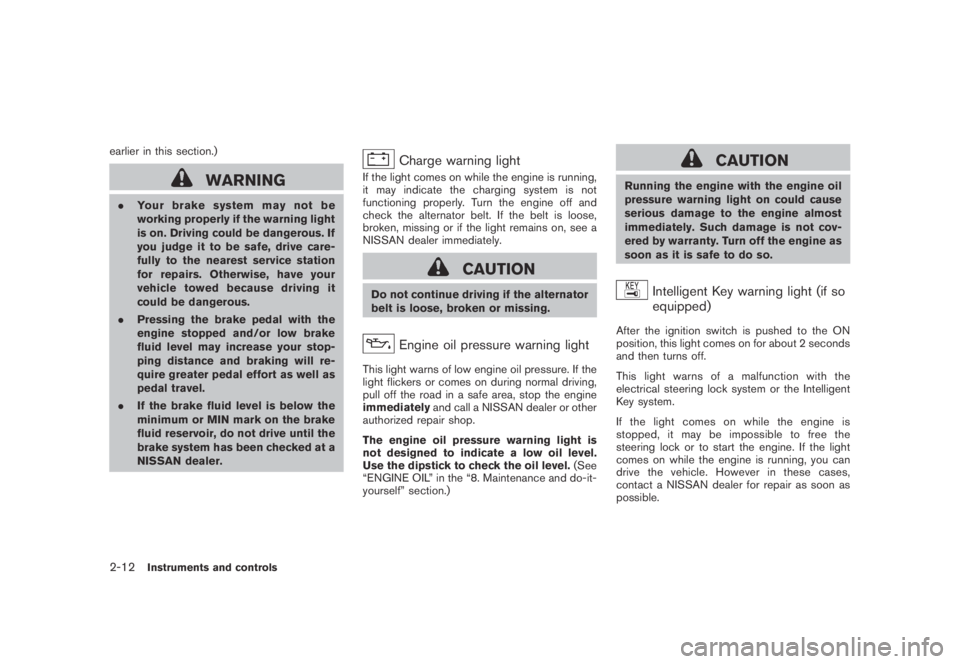
Intelligent Key warning light (if so
equipped)
After the ignition switch is pushed to the ON
position, this light comes on for about 2 seconds
and then turns off.
This light warns of a malfunction with the
electrical steering lock system or the Intelligent
Key system.
If the light comes on while the engine is
stopped, it may be impossible to free the
steering lock or to start the engine. If the light
comes on while the engine is running, you can
drive the vehicle. However in these cases,
contact a NISSAN dealer for repair as soon as
possible.
2-12Instruments and controls
Page 90 of 443
Black plate (88,1)
Model "Z51-D" EDITED: 2007/ 10/ 2
11. Low washer fluid warning
This warning appears when the washer tank fluid
is at a low level. Add washer fluid as necessary.
(See “WINDOW WASHER FLUID” in the “8.
Maintenance and do-it-yourself” section.)
12. Door/lift gate open warning (ignition
switch is in the ON position)
This warning appears if any of the doors and/or
the lift gate are open or not closed securely. The
vehicle icon indicates which door is open on the
display.
13. “Time to rest” indicator
This indicator appears when the set “time to
rest” indicator activates. You can set the time for
up to 6 hours. (See “TRIP COMPUTER” later in
this section.)
14. Low outside temperature warning
This warning appears if the outside temperature
is below 378F(38C) . The warning can be set not
to be displayed. (See “TRIP COMPUTER” later
in this section.)
SIC3578
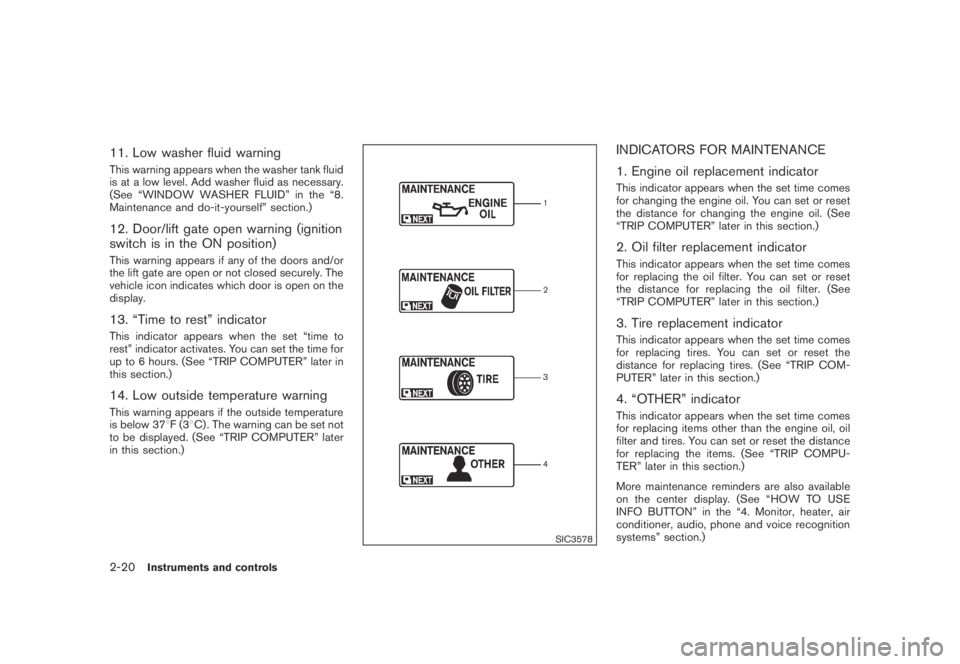
INDICATORS FOR MAINTENANCE
1. Engine oil replacement indicator
This indicator appears when the set time comes
for changing the engine oil. You can set or reset
the distance for changing the engine oil. (See
“TRIP COMPUTER” later in this section.)
2. Oil filter replacement indicator
This indicator appears when the set time comes
for replacing the oil filter. You can set or reset
the distance for replacing the oil filter. (See
“TRIP COMPUTER” later in this section.)
3. Tire replacement indicator
This indicator appears when the set time comes
for replacing tires. You can set or reset the
distance for replacing tires. (See “TRIP COM-
PUTER” later in this section.)
4. “OTHER” indicator
This indicator appears when the set time comes
for replacing items other than the engine oil, oil
filter and tires. You can set or reset the distance
for replacing the items. (See “TRIP COMPU-
TER” later in this section.)
More maintenance reminders are also available
on the center display. (See “HOW TO USE
INFO BUTTON” in the “4. Monitor, heater, air
conditioner, audio, phone and voice recognition
systems” section.)
2-20Instruments and controls
Page 94 of 443
Black plate (92,1)
Model "Z51-D" EDITED: 2007/ 10/ 2
SIC3678
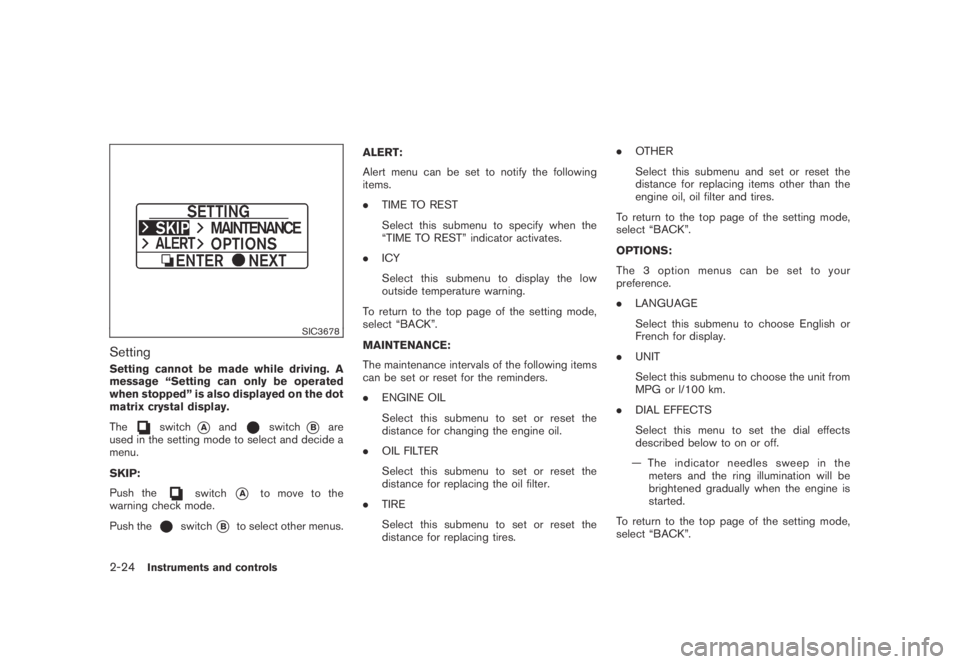
Setting
Setting cannot be made while driving. A
message “Setting can only be operated
when stopped” is also displayed on the dot
matrix crystal display.
The
switch*Aandswitch*Bare
used in the setting mode to select and decide a
menu.
SKIP:
Push the
switch*Ato move to the
warning check mode.
Push the
switch*Bto select other menus.ALERT:
Alert menu can be set to notify the following
items.
.TIME TO REST
Select this submenu to specify when the
“TIME TO REST” indicator activates.
.ICY
Select this submenu to display the low
outside temperature warning.
To return to the top page of the setting mode,
select “BACK”.
MAINTENANCE:
The maintenance intervals of the following items
can be set or reset for the reminders.
.ENGINE OIL
Select this submenu to set or reset the
distance for changing the engine oil.
.OIL FILTER
Select this submenu to set or reset the
distance for replacing the oil filter.
.TIRE
Select this submenu to set or reset the
distance for replacing tires..OTHER
Select this submenu and set or reset the
distance for replacing items other than the
engine oil, oil filter and tires.
To return to the top page of the setting mode,
select “BACK”.
OPTIONS:
The 3 option menus can be set to your
preference.
.LANGUAGE
Select this submenu to choose English or
French for display.
.UNIT
Select this submenu to choose the unit from
MPG or l/100 km.
.DIAL EFFECTS
Select this menu to set the dial effects
described below to on or off.
— The indicator needles sweep in the
meters and the ring illumination will be
brightened gradually when the engine is
started.
To return to the top page of the setting mode,
select “BACK”.
2-24Instruments and controls
Page 232 of 443
Black plate (230,1)
Model "Z51-D" EDITED: 2007/ 10/ 2
firm local regulations for battery
disposal.
.When changing batteries, do not let
dust or oil get on the remote control
and headphones.
FCC Notice:
Changes or modifications not expressly
approved by the manufacturer compliance
could void the user’s authority to operate
the equipment. This device complies with
Part 15 of the FCC Rules and RSS-210 of
Industry Canada. Operation is subject to
the following two conditions: (1) This
device may not cause harmful interference,
and (2) this device must accept any inter-
ference received, including interference
that may cause undesired operation of
the device.
BEFORE OPERATING THE DVD EN-
TERTAINMENT SYSTEM
Precautions
Start the engine when using the DVD entertain-
ment system.
WARNING
The driver must not attempt to operate
the DVD system or wear the head-phones while the vehicle is in motion so
that full attention may be given to
vehicle operation.
CAUTION
.Only operate the DVD while the
vehicle engine is running. Operating
the DVD for extended periods of
time with the engine OFF can dis-
charge the vehicle battery.
.Do not allow the system to get wet.
Excessive moisture such as spilled
liquids may cause the system to
malfunction.
.While playing VIDEO-CD media, this
DVD player does not guarantee
complete functionality of all VI-
DEO-CD formats.
Copyright and trademark
.The technology protected by the U.S. patent
and other intellectual property rights owned
by Macrovision Corporation and other right
holders is adopted for this system.
.This copyright protected technology cannot
be used without a permit from Macrovision
Corporation. It is limited to be personal use,etc., as long as the permit from Macrovision
Corporation is not issued.
.Modifying or disassembling is prohibited.
.Dolby digital is manufactured under license
from Dolby Laboratories, Inc.
.Dolby and the double D mark “
” are
trademarks of Dolby Laboratories, Inc.
.DTS and DTS Digital Surround “
” are
registered trademarks of DTS, Inc.
Parental level (parental control)
DVDs with the parental control setting can be
played with this system. Please use your own
judgement to set the parental control with the
system.
Disc selection
You can play the following disc formats with the
DVD drive:
.DVD-VIDEO
.VIDEO-CD
.CD-DA (Conventional Compact Disc) (CD
with MP3/WMA cannot be played.)
Use DVDs with a region code “1”, “ALL” or “1
included” for your DVD entertainment system.
(The region code is displayed as a small symbol
printed on the top of the DVD.) This vehicle-
4-68Monitor, heater, air conditioner, audio, phone and voice recognition systems
Page 324 of 443
Black plate (324,1)
Model "Z51-D" EDITED: 2007/ 10/ 2
NOTE:
The key port does not charge the key
battery. If you see the low battery indicator
in the dot matrix liquid crystal display,
replace the battery as soon as possible.
(See “BATTERY REPLACEMENT” in the “8.
Maintenance and do-it-yourself” section.)
CAUTION
.Never place anything except the key
in the key port. Doing so may cause
damage to the equipment.
.Make sure the key is in the correct
direction when inserting it to the
key port. The engine may not start if
it is in the incorrect direction.
.Remove the key from the key port
after the ignition switch is pushed to
the OFF position..Make sure the area around the vehicle is
clear.
.Check fluid levels such as engine oil, cool-
ant, brake fluid and window washer fluid as
frequently as possible, or at least whenever
you refuel.
.Check that all windows and lights are clean.
.Visually inspect tires for their appearance
and condition. Also check tires for proper
inflation.
.Lock all doors.
.Position seat and adjust head restraints.
.Adjust inside and outside mirrors.
.Fasten seat belts and ask all passengers to
do likewise.
.Check the operation of warning lights when
the ignition switch is pushed to the ON
position. (See “WARNING/INDICATOR
LIGHTS AND AUDIBLE REMINDERS” in
the “2. Instruments and controls” section.)1. Apply the parking brake.
2. Move the selector lever to the P (Park) or N
(Neutral) position. (P is recommended.)
The starter is designed not to operate unless
the selector lever is in either of the above
positions.
3. Insert the key into the key port. (Without the
Intelligent Key System)
Push the ignition switch to the ON position.
Depress the brake pedal and push the
ignition switch to start the engine.
To start the engine immediately, push and
release the ignition switch while depressing
the brake pedal with the ignition switch in
any position.
.If the engine is very hard to start in
extremely cold weather or when restart-
ing, depress the accelerator pedal a little
(approximately 1/3 to the floor) and
while holding, crank the engine. Release
the accelerator pedal when the engine
starts.
.If the engine is very hard to start
because it is flooded, depress the
accelerator pedal all the way to the floor
and hold it. Push the ignition switch to
the ON position to start cranking the
engine. After 5 or 6 seconds, stop
BEFORE STARTING THE ENGINE STARTING THE ENGINE
5-12Starting and driving
Page 332 of 443
Black plate (332,1)
Model "Z51-D" EDITED: 2007/ 10/ 2
CAUTION
During the first 1,200 miles (2,000 km) ,
follow these recommendations to ob-
tain maximum engine performance and
ensure the future reliability and econo-
my of your new vehicle. Failure to
follow these recommendations may
result in shortened engine life and
reduced engine performance.
.Avoid driving for long periods at constant
speed, either fast or slow. Do not run the
engine over 4,000 rpm.
.Do not accelerate at full throttle in any gear.
.Avoid quick starts.
.Avoid hard braking as much as possible.
.Do not tow a trailer for the first 500 miles
(800 km) . Your engine, axle or other parts
could be damaged..Accelerate slowly and smoothly. Maintain
cruising speeds with a constant accelerator
position.
.Drive at moderate speeds on the highway.
Driving at high speed lowers fuel economy.
.Avoid unnecessary stopping and braking.
Keep a safe distance behind other vehicles.
.Select a gear range suitable to road condi-
tions.
.Avoid unnecessary engine idling.
.Keep your engine tuned up.
.Follow the recommended periodic mainte-
nance schedule.
.Keep the tires inflated to the correct
pressure. Low tire pressure increases tire
wear and lowers fuel economy.
.Keep the wheels in correct alignment.
Improper alignment increases tire wear and
lowers fuel economy.
.Air conditioner operation lowers fuel econ-
omy. Use the air conditioner only when
necessary.
.When cruising at highway speeds, it is more
economical to use the air conditioner and
leave the windows closed to reduce drag..Use the recommended viscosity engine oil.
(See “ENGINE OIL AND OIL FILTER
RECOMMENDATION” in the “9. Technical
and consumer information” section.)
BREAK-IN SCHEDULE INCREASING FUEL ECONOMY
5-20Starting and driving
Page 334 of 443
Black plate (334,1)
Model "Z51-D" EDITED: 2007/ 10/ 2
*2: LOCK mode will change to AUTO mode
automatically when the vehicle has been
driven at a high speed. The AWD LOCK
indicator light turns off.
*3: LOCK mode will automatically be cancelled
when the ignition switch is turned to the OFF
position.
.If the AWD LOCK switch is operated while
accelerating or decelerating, or if the ignition
switch is turned off, you may feel a jolt. This
is normal.
.The oil temperature of power train parts will
increase if the vehicle is continuously
operated under conditions where the differ-
ence in rotation between the front and rear
wheels is large (wheel slip) , such as when
driving the vehicle on rough roads through
sand, mud or freeing a stuck vehicle. In
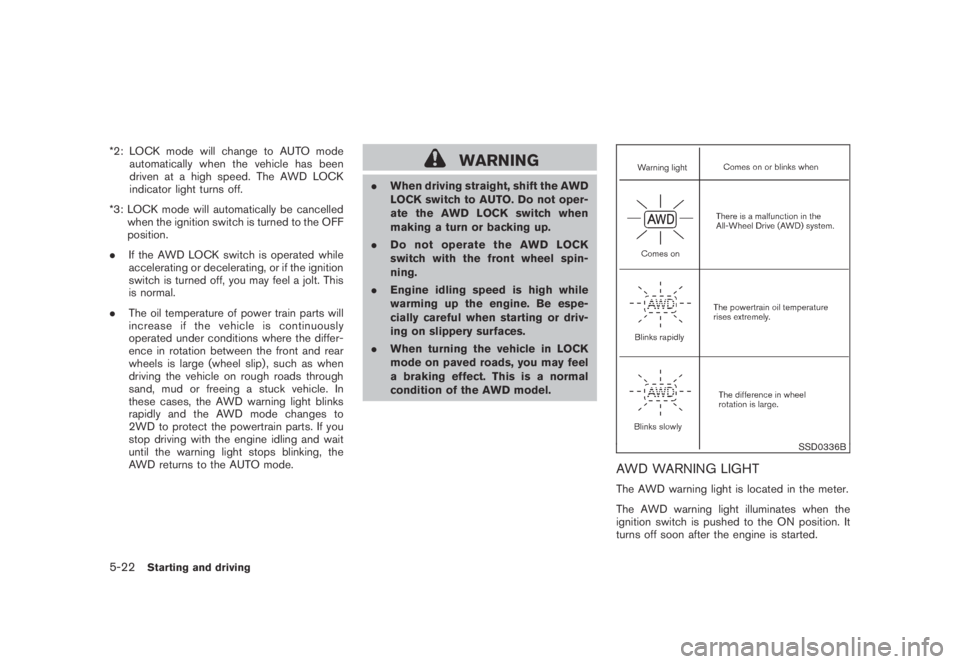
these cases, the AWD warning light blinks
rapidly and the AWD mode changes to
2WD to protect the powertrain parts. If you
stop driving with the engine idling and wait
until the warning light stops blinking, the
AWD returns to the AUTO mode.WARNING
.When driving straight, shift the AWD
LOCK switch to AUTO. Do not oper-
ate the AWD LOCK switch when
making a turn or backing up.
.Do not operate the AWD LOCK
switch with the front wheel spin-
ning.
.Engine idling speed is high while
warming up the engine. Be espe-
cially careful when starting or driv-
ing on slippery surfaces.
.When turning the vehicle in LOCK
mode on paved roads, you may feel
a braking effect. This is a normal
condition of the AWD model.
SSD0336B
AWD WARNING LIGHT
The AWD warning light is located in the meter.
The AWD warning light illuminates when the
ignition switch is pushed to the ON position. It
turns off soon after the engine is started.
5-22Starting and driving
Page 335 of 443
Black plate (335,1)
Model "Z51-D" EDITED: 2007/ 10/ 2
If any malfunction occurs in the AWD system
while the engine is running, the warning light will
come on.
The warning light may blink rapidly (about twice
per second) while trying to free a stuck vehicle
due to high powertrain oil temperature. The
driving mode may change to 2WD. AUTO mode
may change to LOCK mode before the warning
light blinks. If the warning light blinks rapidly
during operation, stop the vehicle with the
engine idling in a safe place immediately. Then
if the light turns off after a while, you can
continue driving.
A large difference between the diameters of
front and rear wheels will make the warning light
blink slowly (about once per two seconds) . Pull
off the road in a safe area, and idle the engine.
Check that all tire sizes are the same, tire
pressure is correct and tires are not worn.
CAUTION
.If the warning light remains on after
the above operation, have your
vehicle checked by a NISSAN dealer
as soon as possible.
.If the warning light comes on while
driving there may be a malfunction
in the AWD system. Reduce the
vehicle speed and have your vehiclechecked by a NISSAN dealer as
soon as possible.
.The powertrain may be damaged if
you continue driving with the warn-
ing light blinking rapidly.
.Never drive on dry hard surface
roads in the LOCK mode, as this
will overload the powertrain and
may cause a serious malfunction.
Starting and driving5-23