seat memory NISSAN MURANO 2009 Owner´s Manual
[x] Cancel search | Manufacturer: NISSAN, Model Year: 2009, Model line: MURANO, Model: NISSAN MURANO 2009Pages: 443, PDF Size: 3.95 MB
Page 160 of 443
Black plate (160,1)
Model "Z51-D" EDITED: 2007/ 10/ 2
The automatic drive positioner system has two
features:
.Entry/exit function
.Memory storage
ENTRY/EXIT FUNCTION
This system is designed so that the driver’s seat
and steering column will automatically move
when the selector lever is in the P (Park)
position. This allows the driver to get into and
out of the driver’s seat more easily.
The driver’s seat will slide backward and the
steering wheel will move up when the driver’s
door is opened with the ignition switch in the
LOCK position and the key not inserted in the
key port.
The driver’s seat and steering wheel will return
to the previous positions when the ignition
switch is pushed to the ACC position.
The driver’s seat will not return to the previous
positions if the seat or steering adjusting switch
is operated when the seat is at the exit position.
Cancel or activate entry/exit function
The selector lever must be in the P (Park)
position with the ignition switch in the OFF
position after the driver’s door is opened.
The entry/exit function can be activated orcanceled by pressing and holding the SET
switch for more than 10 seconds.
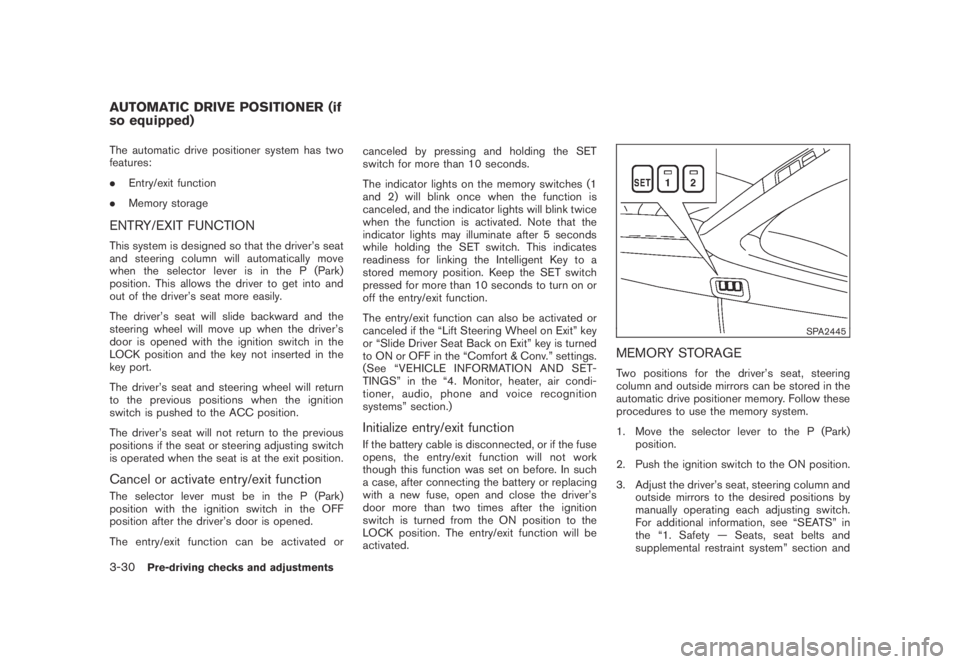
The indicator lights on the memory switches (1
and 2) will blink once when the function is
canceled, and the indicator lights will blink twice
when the function is activated. Note that the
indicator lights may illuminate after 5 seconds
while holding the SET switch. This indicates
readiness for linking the Intelligent Key to a
stored memory position. Keep the SET switch
pressed for more than 10 seconds to turn on or
off the entry/exit function.
The entry/exit function can also be activated or
canceled if the “Lift Steering Wheel on Exit” key
or “Slide Driver Seat Back on Exit” key is turned
to ON or OFF in the “Comfort & Conv.” settings.
(See “VEHICLE INFORMATION AND SET-
TINGS” in the “4. Monitor, heater, air condi-
tioner, audio, phone and voice recognition
systems” section.)
Initialize entry/exit function
If the battery cable is disconnected, or if the fuse
opens, the entry/exit function will not work
though this function was set on before. In such
a case, after connecting the battery or replacing
with a new fuse, open and close the driver’s
door more than two times after the ignition
switch is turned from the ON position to the
LOCK position. The entry/exit function will be
activated.
SPA2445
MEMORY STORAGE
Two positions for the driver’s seat, steering
column and outside mirrors can be stored in the
automatic drive positioner memory. Follow these
procedures to use the memory system.
1. Move the selector lever to the P (Park)
position.
2. Push the ignition switch to the ON position.
3. Adjust the driver’s seat, steering column and
outside mirrors to the desired positions by
manually operating each adjusting switch.
For additional information, see “SEATS” in
the “1. Safety — Seats, seat belts and
supplemental restraint system” section and
AUTOMATIC DRIVE POSITIONER (if
so equipped)
3-30Pre-driving checks and adjustments
Page 161 of 443
Black plate (161,1)
Model "Z51-D" EDITED: 2007/ 10/ 2
“TILTING TELESCOPIC STEERING COL-
UMN” earlier in this section and “OUTSIDE
MIRRORS” earlier in this section.
4. Push the SET switch and, within 5 seconds,
push the memory switch (1 or 2) .
The indicator light for the pushed memory
switch will stay on for approximately 5
seconds after pushing the switch.
If memory is stored in the same memory
switch, the previous memory will be deleted.
Linking key to a stored memory position
The key can be linked to a stored memory
position with the following procedure.
1. Follow one of the steps for storing a memory
position.
.While the indicator light for the memory
switch being set is illuminated for 5 sec-
onds, push the
button on the key.
.Push the ignition switch to the OFF position,
and then push the SET switch. Push the
button while pushing the memory
button while the indicator light stays on for
approximately 5 seconds.
If the indicator light blinks, the key is linked to
that memory setting.
Push the ignition switch to the OFF position, andthen push the
button on the key. The
driver’s seat, steering wheel and outside mirrors
will move to the memorized position.
Confirming memory storage
.Push the ignition switch to the ON position
and push the SET switch. If the main
memory has not been stored, the indicator
light will come on for approximately 0.5
second. When the memory has stored in
position, the indicator light will stay on for
approximately 5 seconds.
.If the battery cable is disconnected, or if the
fuse opens, the memory will be canceled. In
this case, reset the desired position using
the previous procedure.
.If optional keys are added to your vehicle,
the memory storage procedure to switch 1
or 2 and linking key procedure to a stored
memory position should be performed again
for each key. For additional Intelligent Key
information, see “KEYS” earlier in this
section.
Selecting the memorized position
1. Move the selector lever to the P (Park)
position.
2. Use one of the following methods to move
the driver’s seat, the outside mirrors and the
steering wheel..Push the ignition switch to the ON
position and push the memory switch
(1 or 2) .
.Within 45 seconds of opening the
driver’s door, push the memory switch
(1 or 2) .
The driver’s seat, steering column and
outside mirrors will move to the memorized
position with the indicator light flashing, and
then the light will stay on for approximately 5
seconds.
SYSTEM OPERATION
The automatic drive positioner system will not
work or will stop operating under the following
conditions:
.When the vehicle speed is above 4 MPH (7
km/h) (entry/exit function) .
.When the vehicle is driven (memory sto-
rage) .
.When the adjusting switch for the driver’s
seat and steering column is turned on while
the automatic drive positioner is operating.
.When the seat, steering column and outside
mirrors have already been moved to the
memorized position.
.When no position is stored in the memory
switch.
Pre-driving checks and adjustments3-31
Page 270 of 443
Black plate (268,1)
Model "Z51-D" EDITED: 2007/ 10/ 2
SPEAKER ADAPTATION (SA) MODE
Speaker Adaptation allows up to two out-of
dialect users to train the system to improve
recognition accuracy. By repeating a number of
commands, the users can create a voice model
of their own voice that is stored in the system.
The system is capable of storing a different
speaker adaptation model for memory A and
memory B.
If memory A is available, the system will use
memory A to store the model. If memory A is in
use and memory B is available, the system will
use memory B to store the model. If both of the
memory locations are in use, the system will ask
the user to select which memory location should
be overwritten.
Training procedure
The procedure for training a voice is as follows.
1. Position the vehicle in a reasonably quiet
outdoor location.
2. Sit in the driver’s seat with the engine
running, the parking brake on, and the
transmission in the P (Park) position.
3. Press and hold the
button for more
than 5 seconds.
4. The system announces: “Press the PHONE/
SEND (
) button for the hands-free
phone system to enter the speaker adapta-tion mode.
5. Press the
button.
6. Voice memory A or memory B is selected
automatically. If both memory locations are
already in use, the system will prompt you to
overwrite one. Follow the instructions pro-
vided by the system.
7. When preparation is complete and you are
ready to begin, the press the
button.
8. The SA mode will be explained. Follow the
instructions provided by the system.
9. When training is finished, the system will tell
you an adequate number of phrases have
been recorded.
10. The system will ask you to say your name.
Follow the instructions to register your
name.
11. The system will announce that speaker
adaptation has been completed and the
system is ready.
The SA mode will stop if:
.The
button is pressed for more than 5
seconds in SA mode.
.The vehicle is driven during SA mode.
.The ignition switch is pushed to the OFF or
LOCK position.
Training phrases
During the SA mode, the system instructs you to
say the following phrases.
(The system will prompt you for each phrase.)
.phone book new entry
.dial three oh four two nine
.delete call back number
.setup pair phone
.memo pad play
.eight pause nine three two pause seven
.delete all entries
.call seven two four zero nine
.phone book delete entry
.memo pad record
.dial star two one seven oh
.Ye s
.No
.select ringtone
.dial eight five six nine two
.Bluetooth on
.setup change priority
4-106Monitor, heater, air conditioner, audio, phone and voice recognition systems
Page 437 of 443
Black plate (4,1)
10-4
Vehicle identification number (VIN)............. 9-8
LATCH system..................................... 1-23
License plate, Installing front license plate....... 9-11
Lift gate............................................. 3-18
Light
Air bag warning light.......................... 1-54
Bulb replacement.............................. 8-24
Cargo lights .................................... 2-56
Fog light switch................................ 2-36
Headlight switch............................... 2-32
Headlights bulb replacement ................. 8-25
Indicator lights ................................. 2-15
Interior light control switch.................... 2-54
Interior lights ................................... 2-54
Map lights ...................................... 2-54
Mood lights..................................... 2-55
Personal lights ................................. 2-54
Replacement ................................... 8-24
Vanity mirror lights............................. 2-56
Warning/indicator lights and audible
reminders....................................... 2-10
Xenon headlights .............................. 2-32
Lights, Exterior and interior light replacement . . . 8-27
Loading information
(See vehicle loading information)................. 9-12
Lock
Automatic door unlock mechanism............. 3-6
Door locks........................................ 3-4
Glove box lock ................................. 2-43
Lift gate lock ................................... 3-18
Power door lock................................. 3-4
Vehicle speed sensing door lock
mechanism....................................... 3-6
Low tire pressure warning light................... 2-13Low tire pressure warning system (See tire
pressure monitoring system (TPMS)).............. 5-3
Luggage hooks..................................... 2-47
Luggage side box.................................. 2-46
M
Maintenance
Battery.......................................... 8-13
General maintenance............................ 8-2
Indicators for maintenance (dot matrix)...... 2-20
Inside the vehicle................................ 8-3
Maintenance information (display)............ 4-10
Maintenance precautions........................ 8-5
Maintenance requirements...................... 8-2
Outside the vehicle.............................. 8-2
Seat belt maintenance......................... 1-21
Malfunction indicator light (MIL).................. 2-15
Manual front seat adjustment....................... 1-3
Map lights .......................................... 2-54
Master warning light............................... 2-14
Mechanical key (Intelligent Key system)............ 3-4
Memory storage, Automatic drive positioner..... 3-30
Meter, Trip computer.............................. 2-21
Meters and gauges.................................. 2-4
Meters and gauges, Instrument brightness
control.............................................. 2-35
Mirror
Inside mirror.................................... 3-27
Outside mirrors................................ 3-28
Vanity mirror.................................... 3-29
Monitor, Rearview monitor........................ 4-19
Mood lights......................................... 2-55
Moonroof........................................... 2-52
Music box hard drive.............................. 4-52N
Net, Cargo net ..................................... 2-49
New vehicle break-in .............................. 5-20
NISSAN Mobile entertainment system (MES) . . . 4-62
NISSAN Vehicle Immobilizer System............. 2-27
NISSAN Voice recognition system (models
with navigation system) (for Canada) ........... 4-132
NISSAN Voice recognition system
(models with navigation system) (for U.S.)...... 4-109
No key warning .................................... 2-19
O
Odometer............................................. 2-5
Oil
Capacities and recommended
fuel/lubricants.................................... 9-2
Changing engine oil and filter................... 8-8
Checking engine oil level........................ 8-8
Engine oil......................................... 8-8
Engine oil viscosity .............................. 9-5
Oil filter replacement indicator................ 2-20
Operation, Indicators for operation
(dot matrix)......................................... 2-18
Outside air temperature display.................. 2-23
Outside mirrors.................................... 3-28
Overdrive OFF switch............................. 5-15
Overheat, If your vehicle overheats............... 6-11
Owner’s Manual/Service Manual order
information.......................................... 9-27
P
Panic alarm......................................... 3-16
Model "Z51-D" EDITED: 2007/ 10/ 2
Page 438 of 443
Black plate (5,1)
Parking
Brake break-in.................................. 5-25
Parking brake operation....................... 5-17
Parking on hills................................. 5-24
Personal lights ..................................... 2-54
Phone
Bluetooth
®Hands-Free Phone System
(with navigation system for Canada)......... 4-85
Bluetooth
®Hands-Free Phone System
(with navigation system for U.S.)............. 4-75
Car phone or CB radio........................ 4-74
Power
Front seat adjustment........................... 1-4
Power door lock................................. 3-4
Power outlet.................................... 2-39
Power steering fluid........................... 8-11
Power steering system........................ 5-25
Power windows................................ 2-49
Precautions
Audio operation................................ 4-31
Braking precautions........................... 5-25
Child restraints................................. 1-22
Cruise control.................................. 5-18
Driving safety..................................... 5-6
Maintenance...................................... 8-5
On-pavement and off-road driving............. 5-5
Seat belt usage ................................ 1-10
Supplemental restraint system................ 1-41
When starting and driving....................... 5-2
Push starting....................................... 6-10
Push-button ignition switch......................... 5-8R
Radio ........................................ 4-31, 4-60
Car phone or CB radio........................ 4-74
FM-AM radio with Compact Disc (CD)
changer.................................. 4-39, 4-44
Rain-sensing auto wiper system.................. 2-29
Readiness for inspection/maintenance (I/M)
test.................................................. 9-25
Rear center seat belt.............................. 1-18
Rear door lock, Child safety rear door lock........ 3-7
Rear power point.................................. 2-39
Rear seats............................................ 1-6
Rear window and outside mirror defroster
switch............................................... 2-31
Rear window wiper and washer switch.......... 2-30
Rearview monitor.................................. 4-19
Recorders, Event data............................. 9-26
Registering your vehicle in another country........ 9-8
Remote controller (DVD).......................... 4-72
Remote keyless entry system..................... 3-15
Reporting safety defects (US only)............... 9-25
Rollover............................................... 5-5
Roof, Roof rack.................................... 2-48
S
Safety
Child seat belts................................ 1-13
Reporting safety defects (US only)........... 9-25
Towing safety.................................. 9-19
Satellite radio operation........................... 4-45
Seat adjustment
Front manual seat adjustment................... 1-3
Front power seat adjustment................... 1-4Front seats ....................................... 1-3
Seat belt(s)
Child safety..................................... 1-13
Infants........................................... 1-13
Injured persons................................. 1-14
Larger children ................................. 1-13
Precautions on seat belt usage............... 1-10
Pregnant women............................... 1-14
Rear center seat belt.......................... 1-18
Seat belt cleaning............................... 7-5
Seat belt extenders............................ 1-21
Seat belt hooks................................ 1-17
Seat belt maintenance......................... 1-21
Seat belt warning light........................ 2-14
Seat belts...................................... 1-10
Seat belts with pretensioners................. 1-53
Shoulder belt height adjustment.............. 1-17
Small children.................................. 1-13
Three-point type ............................... 1-14
Seat(s)
Driver-side memory............................ 3-30
Heated seats................................... 2-37
Seats.............................................. 1-2
Security system
(NISSAN Vehicle Immobilizer System) ,
Engine start ........................................ 2-27
Security system, Vehicle security system........ 2-25
Selector lever, Shift lock release................. 5-16
Servicing air conditioner........................... 4-30
SETTING button................................... 4-12
Shift lock release, Transmission.................. 5-16
Shifting, CVT
(Continuously Variable Transmission)............. 5-13
Shoulder belt height adjustment.................. 1-17
Spare tire...................................... 8-39, 9-7
10-5
Model "Z51-D" EDITED: 2007/ 10/ 2