transmission NISSAN MURANO 2009 Owner´s Manual
[x] Cancel search | Manufacturer: NISSAN, Model Year: 2009, Model line: MURANO, Model: NISSAN MURANO 2009Pages: 443, PDF Size: 3.95 MB
Page 13 of 443
Black plate (10,1)
Model "Z51-D" EDITED: 2007/ 10/ 2
SSI0377
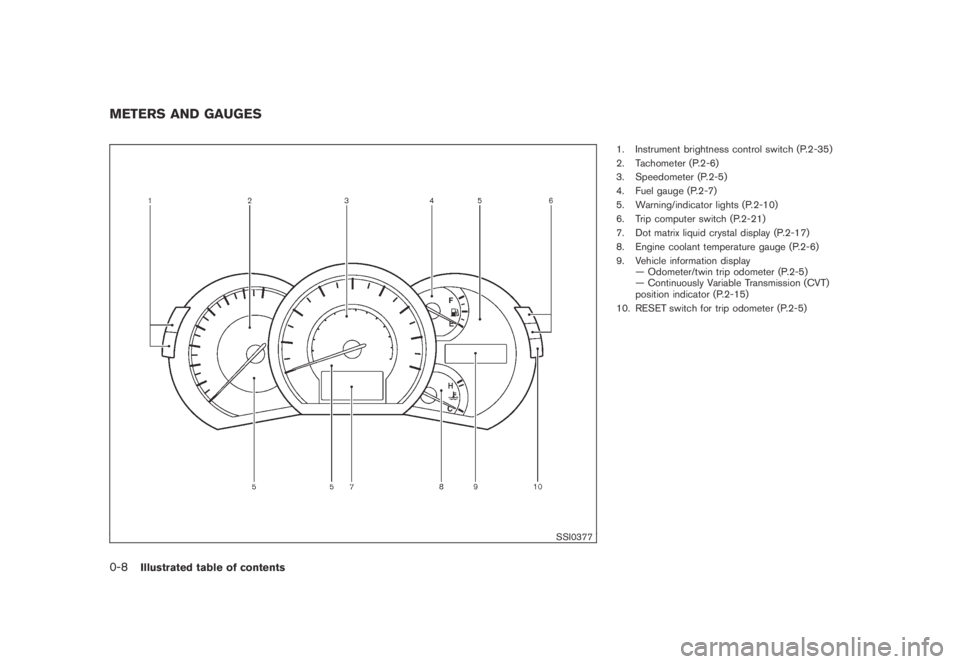
1. Instrument brightness control switch (P.2-35)
2. Tachometer (P.2-6)
3. Speedometer (P.2-5)
4. Fuel gauge (P.2-7)
5. Warning/indicator lights (P.2-10)
6. Trip computer switch (P.2-21)
7. Dot matrix liquid crystal display (P.2-17)
8. Engine coolant temperature gauge (P.2-6)
9. Vehicle information display
— Odometer/twin trip odometer (P.2-5)
— Continuously Variable Transmission (CVT)
position indicator (P.2-15)
10. RESET switch for trip odometer (P.2-5)
METERS AND GAUGES
0-8Illustrated table of contents
Page 17 of 443
Black plate (15,1)
Model "Z51-D" EDITED: 2007/ 10/ 2
SSS0792
FRONT SEATS
Front manual seat adjustment
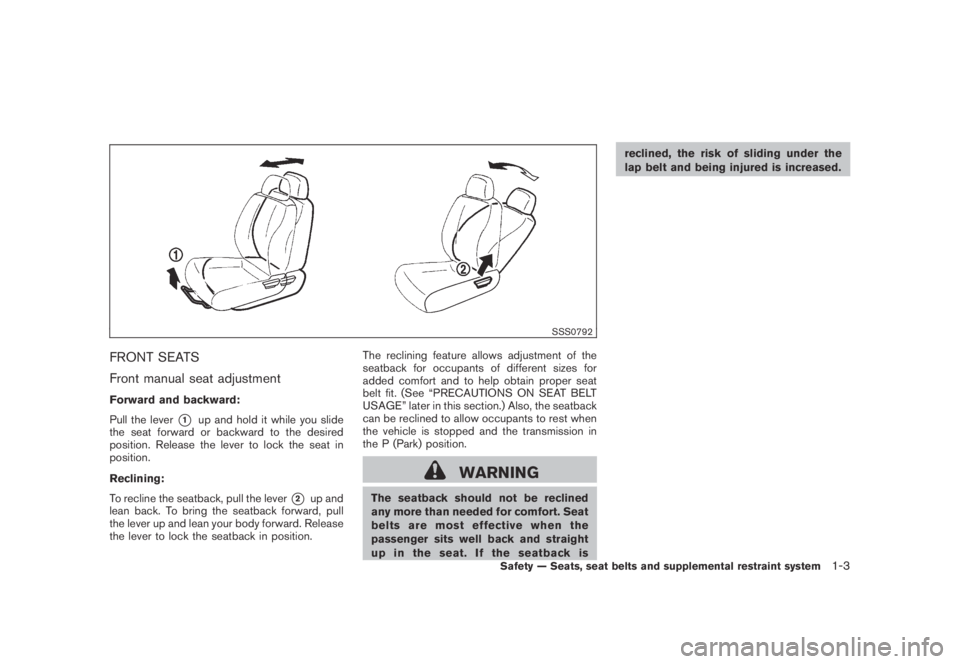
Forward and backward:
Pull the lever
*1up and hold it while you slide
the seat forward or backward to the desired
position. Release the lever to lock the seat in
position.
Reclining:
To recline the seatback, pull the lever
*2up and
lean back. To bring the seatback forward, pull
the lever up and lean your body forward. Release
the lever to lock the seatback in position.The reclining feature allows adjustment of the
seatback for occupants of different sizes for
added comfort and to help obtain proper seat
belt fit. (See “PRECAUTIONS ON SEAT BELT
USAGE” later in this section.) Also, the seatback
can be reclined to allow occupants to rest when
the vehicle is stopped and the transmission in
the P (Park) position.
WARNING
The seatback should not be reclined
any more than needed for comfort. Seat
belts are most effective when the
passenger sits well back and straight
up in the seat. If the seatback isreclined, the risk of sliding under the
lap belt and being injured is increased.
Safety — Seats, seat belts and supplemental restraint system1-3
Page 19 of 443
Black plate (17,1)
Model "Z51-D" EDITED: 2007/ 10/ 2
SSS0819
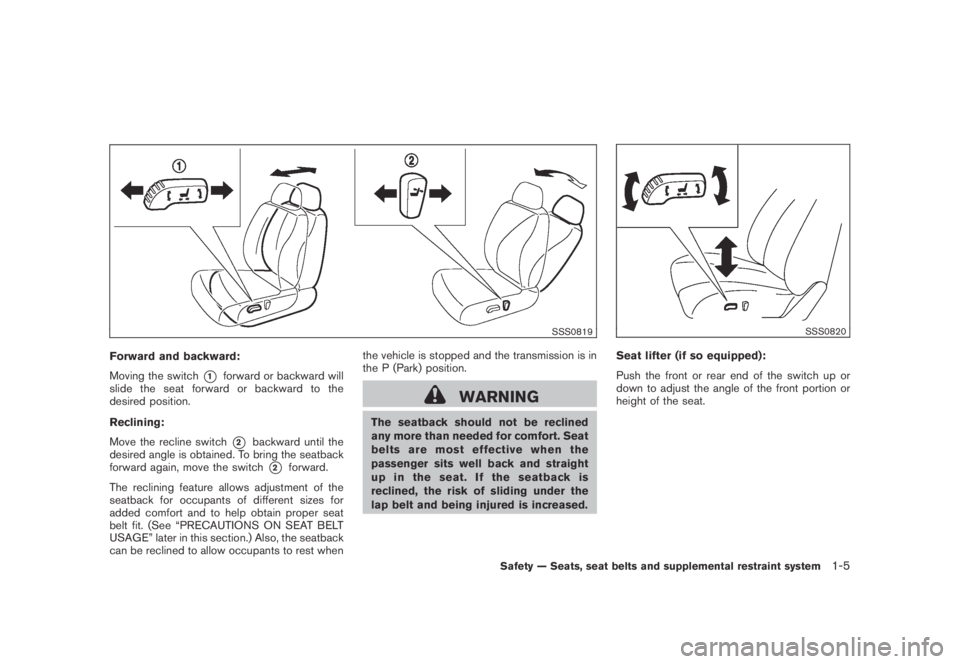
Forward and backward:
Moving the switch
*1forward or backward will
slide the seat forward or backward to the
desired position.
Reclining:
Move the recline switch
*2backward until the
desired angle is obtained. To bring the seatback
forward again, move the switch
*2forward.
The reclining feature allows adjustment of the
seatback for occupants of different sizes for
added comfort and to help obtain proper seat
belt fit. (See “PRECAUTIONS ON SEAT BELT
USAGE” later in this section.) Also, the seatback
can be reclined to allow occupants to rest whenthe vehicle is stopped and the transmission is in
the P (Park) position.
WARNING
The seatback should not be reclined
any more than needed for comfort. Seat
belts are most effective when the
passenger sits well back and straight
up in the seat. If the seatback is
reclined, the risk of sliding under the
lap belt and being injured is increased.
SSS0820
Seat lifter (if so equipped):
Push the front or rear end of the switch up or
down to adjust the angle of the front portion or
height of the seat.
Safety — Seats, seat belts and supplemental restraint system1-5
Page 74 of 443
Black plate (72,1)
Model "Z51-D" EDITED: 2007/ 10/ 2
SSI0377
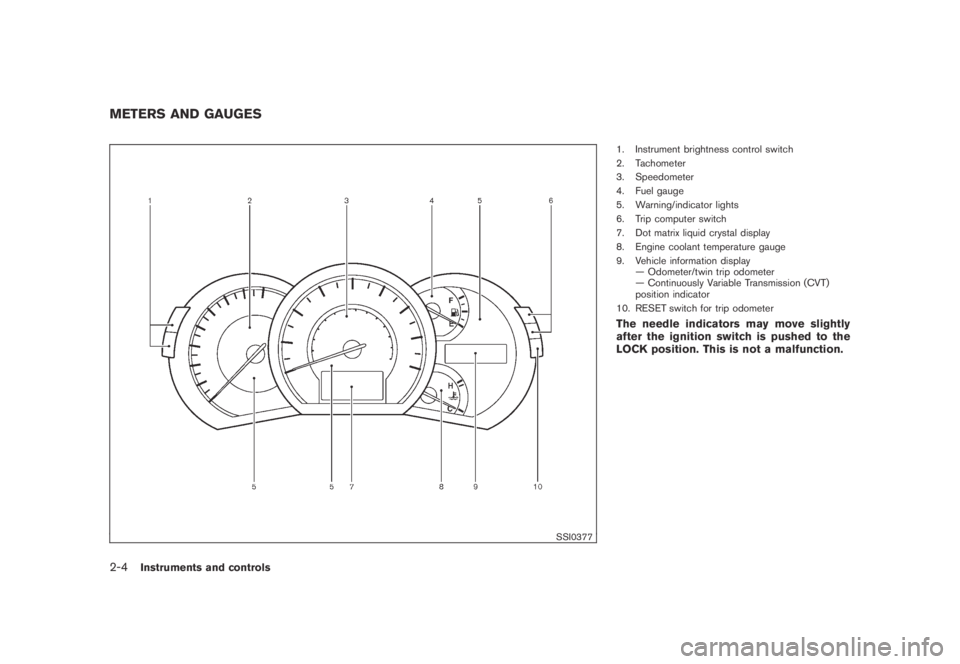
1. Instrument brightness control switch
2. Tachometer
3. Speedometer
4. Fuel gauge
5. Warning/indicator lights
6. Trip computer switch
7. Dot matrix liquid crystal display
8. Engine coolant temperature gauge
9. Vehicle information display
— Odometer/twin trip odometer
— Continuously Variable Transmission (CVT)
position indicator
10. RESET switch for trip odometer
The needle indicators may move slightly
after the ignition switch is pushed to the
LOCK position. This is not a malfunction.
METERS AND GAUGES
2-4Instruments and controls
Page 80 of 443
Black plate (78,1)
Model "Z51-D" EDITED: 2007/ 10/ 2
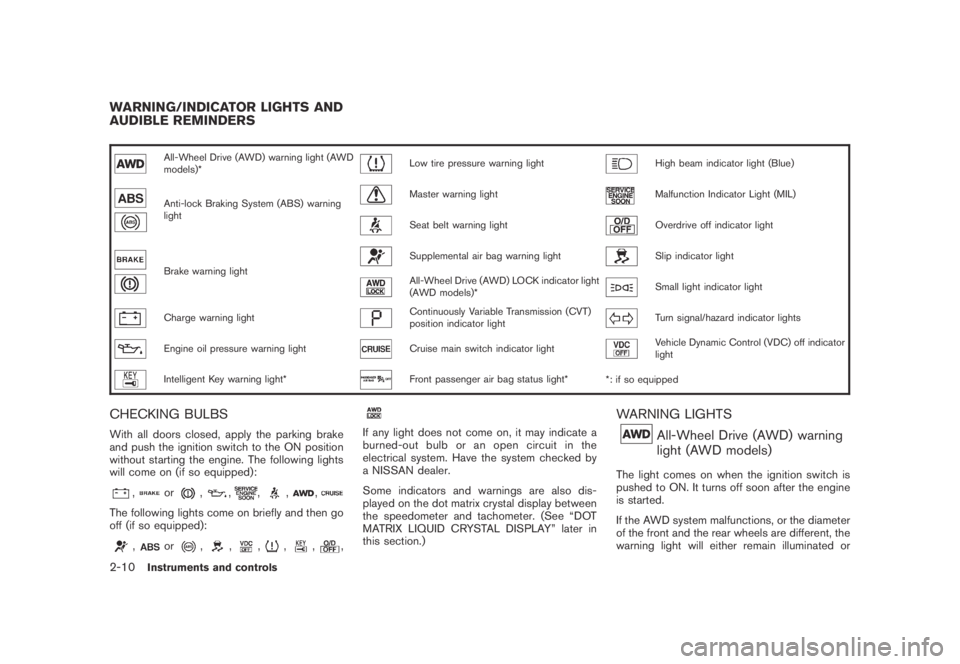
All-Wheel Drive (AWD) warning light (AWD
models)*Low tire pressure warning lightHigh beam indicator light (Blue)
Anti-lock Braking System (ABS) warning
lightMaster warning lightMalfunction Indicator Light (MIL)
Seat belt warning lightOverdrive off indicator light
Brake warning light
Supplemental air bag warning lightSlip indicator light
All-Wheel Drive (AWD) LOCK indicator light
(AWD models)*Small light indicator light
Charge warning lightContinuously Variable Transmission (CVT)
position indicator lightTurn signal/hazard indicator lights
Engine oil pressure warning lightCruise main switch indicator lightVehicle Dynamic Control (VDC) off indicator
light
Intelligent Key warning light*Front passenger air bag status light*
*: if so equipped
CHECKING BULBS
With all doors closed, apply the parking brake
and push the ignition switch to the ON position
without starting the engine. The following lights
will come on (if so equipped):
,or,,,,,
The following lights come on briefly and then go
off (if so equipped):
,or,,,,,,
If any light does not come on, it may indicate a
burned-out bulb or an open circuit in the
electrical system. Have the system checked by
a NISSAN dealer.
Some indicators and warnings are also dis-
played on the dot matrix crystal display between
the speedometer and tachometer. (See “DOT
MATRIX LIQUID CRYSTAL DISPLAY” later in
this section.)
WARNING LIGHTS
All-Wheel Drive (AWD) warning
light (AWD models)
The light comes on when the ignition switch is
pushed to ON. It turns off soon after the engine
is started.
If the AWD system malfunctions, or the diameter
of the front and the rear wheels are different, the
warning light will either remain illuminated or
WARNING/INDICATOR LIGHTS AND
AUDIBLE REMINDERS
2-10Instruments and controls
Page 85 of 443
Black plate (83,1)
Model "Z51-D" EDITED: 2007/ 10/ 2
INDICATOR LIGHTS
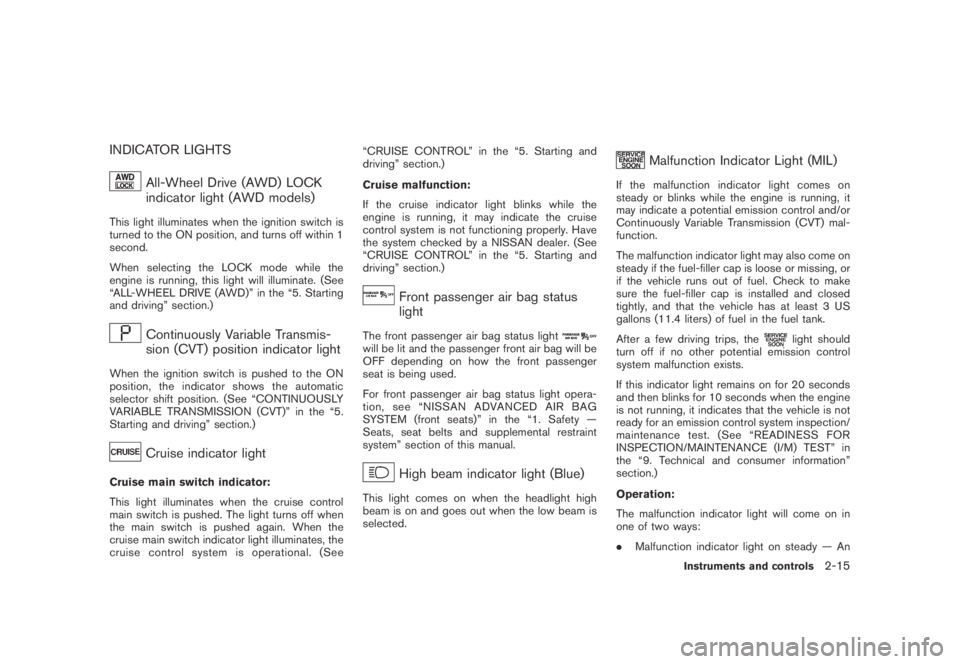
All-Wheel Drive (AWD) LOCK
indicator light (AWD models)
This light illuminates when the ignition switch is
turned to the ON position, and turns off within 1
second.
When selecting the LOCK mode while the
engine is running, this light will illuminate. (See
“ALL-WHEEL DRIVE (AWD)” in the “5. Starting
and driving” section.)
Continuously Variable Transmis-
sion (CVT) position indicator light
When the ignition switch is pushed to the ON
position, the indicator shows the automatic
selector shift position. (See “CONTINUOUSLY
VARIABLE TRANSMISSION (CVT)” in the “5.
Starting and driving” section.)
Cruise indicator light
Cruise main switch indicator:
This light illuminates when the cruise control
main switch is pushed. The light turns off when
the main switch is pushed again. When the
cruise main switch indicator light illuminates, the
cruise control system is operational. (See“CRUISE CONTROL” in the “5. Starting and
driving” section.)
Cruise malfunction:
If the cruise indicator light blinks while the
engine is running, it may indicate the cruise
control system is not functioning properly. Have
the system checked by a NISSAN dealer. (See
“CRUISE CONTROL” in the “5. Starting and
driving” section.)
Front passenger air bag status
light
The front passenger air bag status lightwill be lit and the passenger front air bag will be
OFF depending on how the front passenger
seat is being used.
For front passenger air bag status light opera-
tion,see“NISSANADVANCEDAIRBAG
SYSTEM (front seats)” in the “1. Safety —
Seats, seat belts and supplemental restraint
system” section of this manual.
High beam indicator light (Blue)
This light comes on when the headlight high
beam is on and goes out when the low beam is
selected.
Malfunction Indicator Light (MIL)
If the malfunction indicator light comes on
steady or blinks while the engine is running, it
may indicate a potential emission control and/or
Continuously Variable Transmission (CVT) mal-
function.
The malfunction indicator light may also come on
steady if the fuel-filler cap is loose or missing, or
if the vehicle runs out of fuel. Check to make
sure the fuel-filler cap is installed and closed
tightly, and that the vehicle has at least 3 US
gallons (11.4 liters) of fuel in the fuel tank.
After a few driving trips, the
light should
turn off if no other potential emission control
system malfunction exists.
If this indicator light remains on for 20 seconds
and then blinks for 10 seconds when the engine
is not running, it indicates that the vehicle is not
ready for an emission control system inspection/
maintenance test. (See “READINESS FOR
INSPECTION/MAINTENANCE (I/M) TEST” in
the “9. Technical and consumer information”
section.)
Operation:
The malfunction indicator light will come on in
one of two ways:
.Malfunction indicator light on steady — An
Instruments and controls2-15
Page 86 of 443
Black plate (84,1)
Model "Z51-D" EDITED: 2007/ 10/ 2
emission control system and/or CVT mal-
function has been detected. Check the fuel-
filler cap. If the fuel-filler cap is loose or
missing, tighten or install the cap and
continue to drive the vehicle. The
light
should turn off after a few driving trips. If the
light does not turn off after a few
driving trips, have the vehicle inspected by a
NISSAN dealer. You do not need to have
your vehicle towed to the dealer.
.Malfunction indicator light blinking — An
engine misfire has been detected which may
damage the emission control system.
To reduce or avoid emission control system
damage:
a) Do not drive at speeds above 45 MPH
(72 km/h) .
b) Avoid hard acceleration or deceleration.
c) Avoid steep uphill grades.
d) If possible, reduce the amount of cargo
being hauled or towed.
The malfunction indicator light may stop
blinking and remain on.
Have the vehicle inspected by a NISSAN
dealer. You do not need to have your vehicle
towed to the dealer.
CAUTION
Continued vehicle operation without
having the emission control system
and/or CVT system checked and re-
paired as necessary could lead to poor
driveability, reduced fuel economy, and
possible damage to the emission con-
trol system.
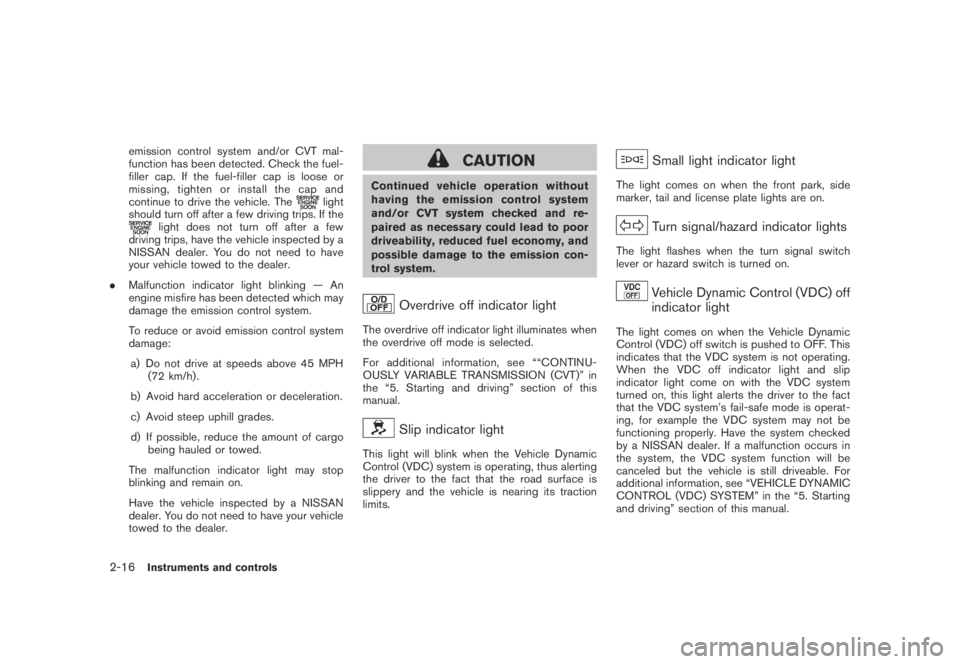
Overdrive off indicator light
The overdrive off indicator light illuminates when
the overdrive off mode is selected.
For additional information, see ““CONTINU-
OUSLY VARIABLE TRANSMISSION (CVT)” in
the “5. Starting and driving” section of this
manual.
Slip indicator light
This light will blink when the Vehicle Dynamic
Control (VDC) system is operating, thus alerting
the driver to the fact that the road surface is
slippery and the vehicle is nearing its traction
limits.
Small light indicator light
The light comes on when the front park, side
marker, tail and license plate lights are on.
Turn signal/hazard indicator lights
The light flashes when the turn signal switch
lever or hazard switch is turned on.
Vehicle Dynamic Control (VDC) off
indicator light
The light comes on when the Vehicle Dynamic
Control (VDC) off switch is pushed to OFF. This
indicates that the VDC system is not operating.
When the VDC off indicator light and slip
indicator light come on with the VDC system
turned on, this light alerts the driver to the fact
that the VDC system’s fail-safe mode is operat-
ing, for example the VDC system may not be
functioning properly. Have the system checked
by a NISSAN dealer. If a malfunction occurs in
the system, the VDC system function will be
canceled but the vehicle is still driveable. For
additional information, see “VEHICLE DYNAMIC
CONTROL (VDC) SYSTEM” in the “5. Starting
and driving” section of this manual.
2-16Instruments and controls
Page 270 of 443
Black plate (268,1)
Model "Z51-D" EDITED: 2007/ 10/ 2
SPEAKER ADAPTATION (SA) MODE
Speaker Adaptation allows up to two out-of
dialect users to train the system to improve
recognition accuracy. By repeating a number of
commands, the users can create a voice model
of their own voice that is stored in the system.
The system is capable of storing a different
speaker adaptation model for memory A and
memory B.
If memory A is available, the system will use
memory A to store the model. If memory A is in
use and memory B is available, the system will
use memory B to store the model. If both of the
memory locations are in use, the system will ask
the user to select which memory location should
be overwritten.
Training procedure
The procedure for training a voice is as follows.
1. Position the vehicle in a reasonably quiet
outdoor location.
2. Sit in the driver’s seat with the engine
running, the parking brake on, and the
transmission in the P (Park) position.
3. Press and hold the
button for more
than 5 seconds.
4. The system announces: “Press the PHONE/
SEND (
) button for the hands-free
phone system to enter the speaker adapta-tion mode.
5. Press the
button.
6. Voice memory A or memory B is selected
automatically. If both memory locations are
already in use, the system will prompt you to
overwrite one. Follow the instructions pro-
vided by the system.
7. When preparation is complete and you are
ready to begin, the press the
button.
8. The SA mode will be explained. Follow the
instructions provided by the system.
9. When training is finished, the system will tell
you an adequate number of phrases have
been recorded.
10. The system will ask you to say your name.
Follow the instructions to register your
name.
11. The system will announce that speaker
adaptation has been completed and the
system is ready.
The SA mode will stop if:
.The
button is pressed for more than 5
seconds in SA mode.
.The vehicle is driven during SA mode.
.The ignition switch is pushed to the OFF or
LOCK position.
Training phrases
During the SA mode, the system instructs you to
say the following phrases.
(The system will prompt you for each phrase.)
.phone book new entry
.dial three oh four two nine
.delete call back number
.setup pair phone
.memo pad play
.eight pause nine three two pause seven
.delete all entries
.call seven two four zero nine
.phone book delete entry
.memo pad record
.dial star two one seven oh
.Ye s
.No
.select ringtone
.dial eight five six nine two
.Bluetooth on
.setup change priority
4-106Monitor, heater, air conditioner, audio, phone and voice recognition systems
Page 313 of 443
Black plate (16,1)
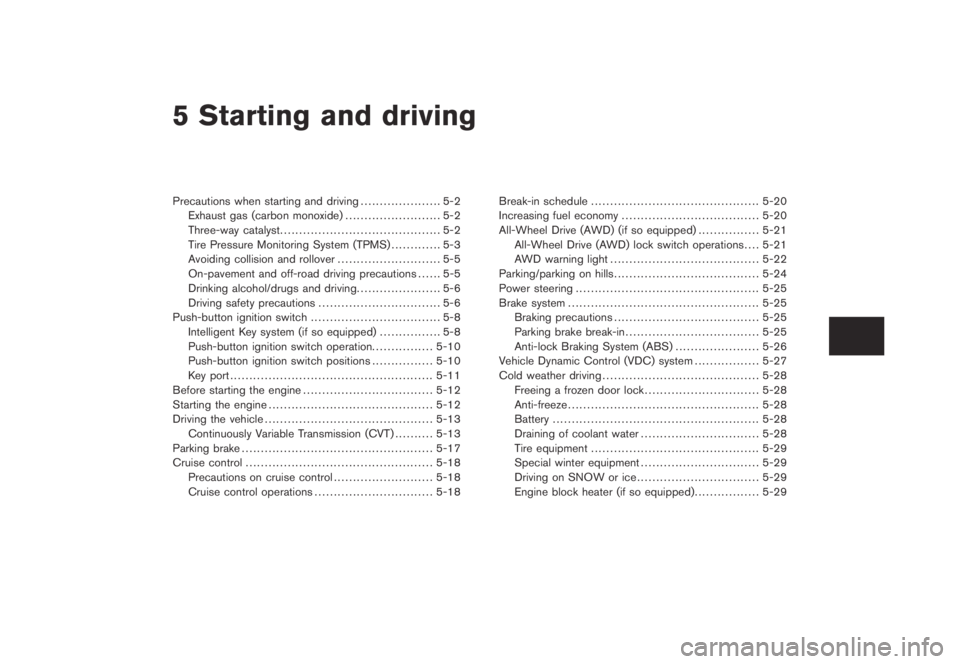
5 Starting and driving
Model "Z51-D" EDITED: 2007/ 10/ 2
Precautions when starting and driving..................... 5-2
Exhaust gas (carbon monoxide)......................... 5-2
Three-way catalyst.......................................... 5-2
Tire Pressure Monitoring System (TPMS)............. 5-3
Avoiding collision and rollover........................... 5-5
On-pavement and off-road driving precautions...... 5-5
Drinking alcohol/drugs and driving...................... 5-6
Driving safety precautions................................ 5-6
Push-button ignition switch.................................. 5-8
Intelligent Key system (if so equipped)................ 5-8
Push-button ignition switch operation................5-10
Push-button ignition switch positions................5-10
Key port.....................................................5-11
Before starting the engine..................................5-12
Starting the engine...........................................5-12
Driving the vehicle............................................5-13
Continuously Variable Transmission (CVT)..........5-13
Parking brake..................................................5-17
Cruise control.................................................5-18
Precautions on cruise control..........................5-18
Cruise control operations...............................5-18Break-in schedule............................................5-20
Increasing fuel economy....................................5-20
All-Wheel Drive (AWD) (if so equipped)................5-21
All-Wheel Drive (AWD) lock switch operations....5-21
AWD warning light.......................................5-22
Parking/parking on hills......................................5-24
Power steering................................................5-25
Brake system..................................................5-25
Braking precautions......................................5-25
Parking brake break-in...................................5-25
Anti-lock Braking System (ABS)......................5-26
Vehicle Dynamic Control (VDC) system.................5-27
Cold weather driving.........................................5-28
Freeing a frozen door lock..............................5-28
Anti-freeze..................................................5-28
Battery......................................................5-28
Draining of coolant water...............................5-28
Tire equipment............................................5-29
Special winter equipment...............................5-29
Driving on SNOW or ice................................5-29
Engine block heater (if so equipped).................5-29
Page 319 of 443
Black plate (319,1)
Model "Z51-D" EDITED: 2007/ 10/ 2
terrain. Properly secure all cargo so
it will not be thrown forward and
cause injury to you or your passen-
gers.
.To avoid raising the center of gravity
excessively, do not exceed the rated
capacityoftheroofrack(ifso
equipped) and evenly distribute the
load. Secure heavy loads in the
cargo area as far forward and as
low as possible. Do not equip the
vehicle with tires larger than speci-
fied in this manual. This could cause
your vehicle to roll over.
.Do not grip the inside or spokes of
the steering wheel when driving off-
road. The steering wheel could
move suddenly and injure your
hands. Instead drive with your fin-
gers and thumbs on the outside of
the rim.
.Before operating the vehicle, ensure
that the driver and all passengers
have their seat belts fastened.
.Always drive with the floor mats in
place as the floor may became hot.
.Lower your speed when encounter-
ing strong crosswinds. With a highercenter of gravity, your NISSAN is
more affected by strong side winds.
Slower speeds ensure better vehicle
control.
.Do not drive beyond the perfor-
mance capability of the tires, even
with AWD engaged.
.For AWD equipped vehicles, do not
attempt to raise two wheels off the
ground and shift the transmission to
any drive or reverse position with
the engine running. Doing so may
result in drivetrain damage or un-
expected vehicle movement which
could result in serious vehicle da-
mage or personal injury.
.Do not attempt to test an AWD
equipped vehicle on a 2-wheel dy-
namometer (such as the dynam-
ometers used by some states for
emissions testing) , or similar equip-
ment even if the other two wheels
are raised off the ground. Make sure
you inform test facility personnel
that your vehicle is equipped with
AWDbeforeitisplacedona
dynamometer. Using the wrong test
equipment may result in drivetrain
damage or unexpected vehiclemovement which could result in
serious vehicle damage or personal
injury. (AWD models)
.When a wheel is off the ground due
to an unlevel surface, do not spin
the wheel excessively.
.Accelerating quickly, sharp steering
maneuvers or sudden braking may
cause loss of control.
.If at all possible, avoid sharp turning
maneuvers, particularly at high
speeds. Your vehicle has a higher
center of gravity than a conventional
passenger car. The vehicle is not
designed for cornering at the same
speeds as conventional passenger
cars. Failure to operate this vehicle
correctly could result in loss of
control and/or a rollover accident.
.Always use tires of the same type,
size, brand, construction (bias, bias-
belted or radial) , and tread pattern
on all four wheels. Install tire chains
on the front wheels when driving on
slippery roads and drive carefully.
.Be sure to check the brakes imme-
diately after driving in mud or water.
See “BRAKE SYSTEM” later in this
Starting and driving5-7